Modern offices still rely on fax for legal, medical, and government paperwork, even as everything else goes digital. The catch is that printers alone rarely handle every workflow, so a true all-in-one has to balance scanning, copying, faxing, and everyday printing without turning into a maintenance headache. This list covers eight strong options, from compact home-office units to paperless fax servers that quietly route documents in the background.
A Fast Comparison Of The Options

Brother Genuine TN450 High Yield Toner Cartridge

Canon imageCLASS MF465dw Monochrome Laser All-in-One

Brother MFC-L8930CDW Business Color Laser All-in-One

CimFAX A5 Paperless Fax Machine

HP Color LaserJet Pro M479fdw Multifunction Printer
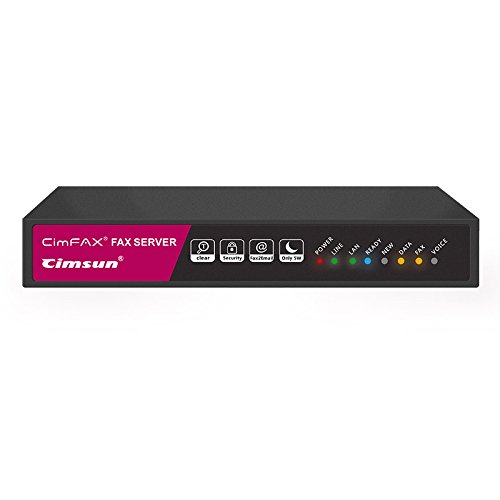
CimFAX C5 Fax2Email Server (20 Users)
CimFAX B5 Paperless Fax Server (10 Users)

Epson EcoTank Pro ET-5800 Supertank All-in-One
A Breakdown Of The Leading Choices
Anyone who already owns a compatible Brother laser printer needs reliable toner to keep the fax line moving. The Brother Genuine TN450 is a high-yield black cartridge built to swap in without fuss, designed to integrate with a range of Brother all-in-one and standalone laser units. It suits a small office that treats the printer as mission-critical and cannot afford a week of downtime waiting on a restock.
Running costs tend to be the deciding factor for offices that print contracts and forms in volume. A high-yield cartridge helps stretch replacement intervals, which is why this option matters even if it looks like a humble accessory. The honest read is that toner alone is not a fax solution, but it is a required piece of the puzzle for several picks later in this list.
Real Benefits
- High-yield capacity reduces how often you swap cartridges.
- Engineered as a Brother genuine consumable, helping preserve print quality.
- Broad compatibility across multiple Brother laser models.
- Cost-per-page stays reasonable compared with standard-yield options.
Honest Caveats
- Only useful if your existing machine already accepts the TN450.
- Single black cartridge, so color jobs still need separate supplies.
Feature Snapshot
Who Will Love This
Offices already running a compatible Brother laser printer and looking to control running costs.
Where Another Pick Suits Better
You need an actual printer, not a refill, so the Canon imageCLASS MF465dw is the smarter starting point for a fresh setup.
Small and mid-size teams that push out stacks of contracts and forms need a machine that will not slow them down. The Canon imageCLASS MF465dw handles monochrome print, scan, copy, and fax in one chassis, designed for offices where speed matters more than color. Unlike the Brother MFC-L8930CDW, this unit sticks to black-and-white output, which keeps toner use simple for paperwork-heavy workflows.
Wireless connectivity and a mobile-ready design let you send a fax from a laptop in the conference room without walking back to the device. For most office setups, that translates into fewer interruptions during the day.
Everyday Wins
- Fast monochrome output for document-heavy offices.
- Built-in fax, scan, and copy remove the need for separate devices.
- Wireless and mobile support for flexible placement.
- Auto document feeder speeds up multi-page faxing and scanning.
- Compact enough for a private office or shared workroom.
Points To Keep In Mind
- No color output, which limits marketing and design use.
- Laser toner replacements add to long-term running costs.
At A Glance
Built With In Mind
Small business workgroups that print mostly in black and white and want a sturdy daily driver.
A Better Fit Elsewhere
Color brochures and presentations matter to you, so the HP Color LaserJet Pro M479fdw is worth a look instead.
Teams that need crisp color for client-facing documents alongside reliable faxing should look closely at the Brother MFC-L8930CDW. It bundles duplex printing, scanning, copying, and fax into a single business-grade machine, built for high-demand environments where downtime is not an option. Compared with the Canon imageCLASS MF465dw, this unit adds color output and stronger security features without doubling the footprint.
Security gets real attention here, which matters for legal and healthcare offices that handle sensitive paperwork daily. For most growing teams, the upgrade pays off through smarter access controls and lower long-term running costs.
Why It Works Well
- Color laser output supports presentations and client collateral.
- Advanced security features protect sensitive office traffic.
- Duplex print and scan saves time on multi-page jobs.
- Designed for sustained high-volume use.
- Low-cost printing approach helps control operating expenses.
Trade Offs
- Larger footprint may not suit cramped desks.
- Color toner adds to supply management compared with monochrome units.
Made For
Mid-size business teams that want color capability plus enterprise-style security in one machine.
Skip It When
Your team works mostly in black and white, in which case the Canon imageCLASS MF465dw is a leaner fit.
Not every office needs a chunky multifunction printer to handle fax. The CimFAX A5 takes the paperless route, plugging into your network so PCs and phones can send and receive faxes around the clock. Rather than printing pages just to scan them again, this device keeps everything as digital PDFs, which is a quiet win for shops trying to cut clutter.
Setup revolves around your existing phone line, and the device works from Windows, Mac, Android, and iOS devices. For most home-office and small-shop setups, the small footprint is the biggest draw.
A Few Highlights
- Paperless operation removes toner and paper waste.
- Cross-platform support for PCs and mobile devices.
- Automatic PDF storage keeps records tidy and searchable.
- Always-on reception for after-hours faxes.
Practical Considerations
- Requires a stable phone line connection to function.
- No built-in scanner for paper originals that need to be digitized first.
Best Suited To
Home offices and solo operators who want quiet, always-on fax without maintaining a printer.
Look Elsewhere When
You regularly scan paper contracts, in which case the Epson EcoTank Pro ET-5800 handles that workload far better.
Busy offices that print, scan, copy, and fax in roughly equal measure find a steady workhorse in the HP Color LaserJet Pro M479fdw. This color laser multifunction is designed to keep workflows moving, with wireless connectivity and a build aimed at sustained use. Where the Brother MFC-L8930CDW leans toward security, this model leans toward throughput and reliability.
The included next-business-day onsite coverage for the first year is a practical comfort for shops that cannot absorb printer downtime. For most office managers, that kind of service plan is what justifies the premium.
Reasons It Performs
- Color laser output handles marketing and forms alike.
- Fast print, scan, copy, and fax keeps office queues short.
- Wireless setup simplifies shared-office placement.
- Onsite warranty coverage reduces maintenance stress.
Less Ideal Details
- Higher upfront cost than entry-level all-in-ones.
- Larger size demands a dedicated spot in the office.
Quick Facts
Right Fit For
Mid-size offices that need a dependable color multifunction with reliable support options.
Reach For A Different Pick When
You want lower ongoing supply costs, which makes the Epson EcoTank Pro ET-5800 worth considering.
When a whole team needs to send and receive faxes without standing over a single machine, a network fax server changes the equation. The CimFAX C5 supports up to 20 users and routes incoming documents straight to email inboxes as PDFs. Compared with the CimFAX A5, this model adds multi-user licensing and team-friendly features for shared office networks.
It still skips paper output, which is the point. For most multi-person offices, that means quieter operation and far fewer toner changes.
What Stands Out
- Multi-user licensing fits shared office environments.
- Email delivery of incoming faxes speeds up response times.
- Cross-platform desktop and mobile clients included.
- Automatic PDF archiving keeps records organized.
Points To Note
- Requires a dedicated phone line and network setup.
- Initial configuration may need IT involvement for larger offices.
Whose Shelf It Belongs On
Small office networks where multiple staff members send and receive faxes daily.
Swap It Out When
Your team is smaller and only needs one or two users, in which case the CimFAX B5 saves some cost.
Growing teams that have outgrown a single-user fax tool but do not need enterprise licensing find a middle ground in the CimFAX B5. It supports up to 10 users on the same paperless fax platform, designed to slot into a small office without major IT overhead. Unlike the CimFAX C5, this model targets tighter teams, keeping the feature set focused.
Incoming faxes still land in inboxes as PDFs, and outgoing faxes go through the same desktop or mobile client. For most small teams stepping up from a personal solution, the path is straightforward.
Useful Strengths
- Right-sized for 10-user offices.
- Email-based fax delivery fits modern workflows.
- Cross-platform clients for Windows, Mac, and mobile.
- Reduces paper and toner waste compared with traditional fax machines.
Where It May Fall Short
- Limited to 10 users, which restricts larger teams.
- Still depends on a stable analog phone line.
Key Product Details
Perfect Match For
Small offices transitioning from a personal fax setup to a team-friendly system.
Not Your Match When
Your team exceeds 10 users, which makes the CimFAX C5 a safer pick for headroom.
High-volume offices that dread cartridge swaps will appreciate the Epson EcoTank Pro ET-5800. Instead of small cartridges, it uses refillable supersized ink tanks, designed for shops that print thousands of pages between refills. Compared with the HP Color LaserJet Pro M479fdw, this unit trades laser toner for ink, which changes the long-term math considerably.
Wireless and Ethernet connectivity make placement flexible, while built-in fax keeps older workflows intact. For most color-heavy offices, the refillable tanks are the standout feature.
Useful Touches
- Supertank design lowers per-page printing cost.
- Color output with sharp text and graphics.
- Wireless and Ethernet options for flexible setup.
- All-in-one scan, copy, and fax in a single chassis.
Some Limits To Know
- Higher upfront cost than cartridge-based inkjet printers.
- Inkjet output may not match laser sharpness for very fine text.
The Right Fit
Small offices with heavy color printing needs that want lower long-term supply costs.
Where A Sibling Pick Shines
Sharp monochrome text matters most to you, and the Canon imageCLASS MF465dw delivers that laser-crisp look.
What Matters Most Before Choosing Alls In One Fax Machine
Print Volume And Duty Cycle
The first honest question is how many pages move through your office each month. Entry-level inkjet all-in-ones handle light daily use, while laser models like the Brother MFC-L8930CDW and HP Color LaserJet Pro M479fdw are designed for sustained workloads. For most small teams, matching the duty cycle to actual use prevents the early wear that frustrates owners.
Fax Role In Your Workflow
Modern offices still need fax for legal, medical, and government paperwork, even as email takes over daily communication. If fax is just one of four jobs, a multifunction printer is the obvious fit. If fax dominates, a paperless server like the CimFAX C5 or B5 routes documents digitally and saves real space.
Color Versus Monochrome
Color laser units cost more up front but handle client collateral and presentations without compromise. Monochrome models like the Canon imageCLASS MF465dw keep running costs low for paperwork-only environments. The right call depends on whether your team prints marketing material or mostly forms.
Connectivity And Placement
Wireless support changes where you can put the machine, which matters in tight offices. Ethernet options on units like the Epson EcoTank Pro ET-5800 help in shared-network environments. Mobile apps also let you send a fax from your phone, which is more useful than it sounds on busy days.
Key Considerations Across These Picks
Where Shoppers Go Wrong
Plenty of shoppers pick a multifunction printer based only on price and overlook the fax feature set entirely. Auto document feeders, duplex faxing, and secure reception vary widely between models, so confirm those details match how your office actually works. Compatibility with your existing phone line matters too, especially for paperless fax servers.
When Paying More Pays Off
Higher-tier picks like the HP Color LaserJet Pro M479fdw and Brother MFC-L8930CDW earn their place through faster output, stronger security, and longer support windows. For most growing offices, the extra cost translates into less downtime and better long-term reliability. The upgrade makes sense when daily volume justifies the spend.
Frequently Asked Questions
Do all-in-one machines handle fax reliably in 2026?
Yes, modern multifunction printers from Canon, Brother, HP, and Epson still include built-in fax that integrates with standard phone lines. The reliability depends on the model and your line quality.
Is a paperless fax server better than a multifunction printer?
A paperless server like the CimFAX C5 or B5 suits teams that want digital records and email delivery. A multifunction printer is the better fit when you also need to scan, copy, and print paper documents.
Can I send a fax from my phone?
Yes, several picks in this list support mobile apps, including the Brother MFC-L8930CDW and the CimFAX paperless servers. The experience is smoothest on devices designed with mobile workflows in mind.
What is a supertank printer?
A supertank printer uses refillable ink tanks instead of small cartridges, lowering per-page cost. The Epson EcoTank Pro ET-5800 is a strong example for offices that print in color volume.
How important is duplex faxing?
Duplex faxing saves time when sending or receiving multi-page documents. For most offices, automatic duplex support on the machine itself is a worthwhile feature.
The Takeaway
The right all-in-one fax machine depends less on brand loyalty and more on your weekly workflow. Paper-heavy offices benefit from laser multifunctions like the HP Color LaserJet Pro M479fdw, while document routing teams thrive with the CimFAX C5 or B5. Match the machine to your real workload, and the rest falls into place.