Counting cash by hand eats hours every week, and a single miscount can throw off a register, a church offering, or a weekend market tally. The right tabletop bill counter turns that chore into something you finish before your coffee gets cold, with fewer errors and steadier counts across long shifts. Small-business owners, church treasurers, and serious cash handlers each face slightly different daily loads, so this list covers compact portable units, mixed-denomination workhorses, and a bank-grade sorter for the heaviest needs.
The Leading Options At A Glance

XUNHON Portable Money Counter with UV/MG/IR Detection

Aneken Value Counting Money Counter with TFT Display
Carnation Mixed Denomination Counter with UV/MG/MT/IR/2CIS

PONNOR Value Bill Counter with UV/MG/IR Detection

PONNOR Money Counter with UV/MG/IR/MT/DD Detection
Aneken Top-Loading Counter for USD/EUR/CAD

Aneken Ultra 2-Pocket Sorter with Built-in Printer

Aneken Mixed Denomination Counter with Touch Screen

CARNATION Mixed Denomination Counter, 1200 N/M

CARNATION Mixed Denomination Counter, 1500 N/M
Inside Each Recommended Option
If your cash count fits in a tote bag and your desk is already crowded, the XUNHON earns its space. A small footprint and a hidden carry handle make it the lightest grab-and-go unit in this lineup, and it still covers nine operating modes for everyday workflows. Compared with the Aneken unit further down, you trade a color screen for a quieter footprint that tucks behind a register without crowding the workspace.
Church groups, pop-up vendors, and mobile contractors tend to appreciate how the handle folds flat when not needed, leaving a clean rectangular block on the counter. UV, MG, and IR detection flag obvious counterfeits, which is reassuring when accepting bills across a busy market stall.
Real Benefits
- Hidden carry handle keeps the body slim during transport between markets, churches, or job sites.
- 3LCD display shows running counts clearly under fluorescent shop lighting where smaller screens wash out.
- Nine operating modes cover batch runs, additions, and counterfeit screening without menu diving.
- Compact shell fits on narrow register shelves where larger units would overhang the edge.
Things To Consider
- The screen is functional but lacks the color cues found on the Aneken TFT models, so reading values across a noisy room takes a second glance.
- Smaller feed tray means more frequent reloads on busy back-office days.
Who It Suits Best
Solo operators and small treasurers who need a portable counter with reliable counterfeit screening and easy transport.
Consider Something Else When
The Aneken Value Counting Money Counter suits better if you want a color display and faster batch runs on a tight budget.
Café owners and weekend market sellers who tally the same few denominations every day often ask for a simple value counter without paying for a sorter. This Aneken fills that slot with a 3.5-inch TFT screen that shows running totals in color, plus three speed settings topping out at 1,500 notes per minute. The trade-off from the XUNHON reviewed earlier is a slightly larger shell in exchange for a more readable interface.
Top-loading means you square off a stack and drop it in, which speeds up batch counts during a closing shift. The unit focuses on USD, EUR, and CAD, which covers most North American small-business setups without forcing a currency selection menu.
Strengths Worth Knowing
- Color TFT display makes denominations and totals visible from several feet away, helpful across a wide counter.
- Three-speed control lets you slow down for worn bills and speed up for crisp stacks, extending the life of the rollers.
- Batch and Add functions cover the most common till-close workflows without extra setup.
Trade Offs
- Value counting requires manual denomination selection, since mixed stacks aren’t read automatically.
- Cleaning the feed path takes a steady hand because the rollers sit close to the sensor window.
Made For
Small-shop owners who count limited denominations daily and want a colorful, mid-volume workhorse.
Look Elsewhere When
The CARNATION Mixed Denomination Counter, 1200 N/M is the stronger match if you regularly handle mixed stacks without pre-sorting.
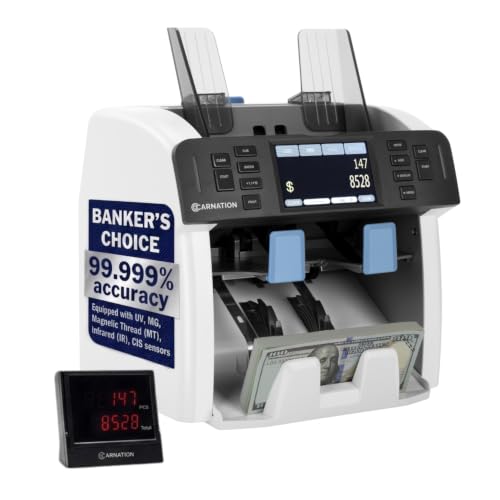
Retail counters that take mixed bills straight from a register drawer appreciate machines that recognize denominations on the fly, and this Carnation reads USD, EUR, GBP, CAD, BRL, and MXN without pre-sorting. Two CIS sensors (contact image sensors, which photograph both sides of each note) scan both faces simultaneously, reducing the misreads that single-sensor units occasionally produce on worn currency. Steady 1,100 notes per minute keeps the unit calm on a busy Saturday shift.
Compared with the XUNHON’s portable focus, this machine trades the handle for a heavier chassis that stays put under continuous use. UV, MG, MT, and IR sensors layer additional counterfeit protection, useful in shops that take in large stacks from event nights.
The Upside
- Automatic denomination recognition cuts manual sorting before each run, saving several minutes per till.
- Multi-currency support fits border shops and tourist-heavy districts without swapping equipment.
- Layered counterfeit sensors add a second opinion on suspicious bills flagged at the register.
- Single-speed steady operation reduces the chance of operator error during long shifts.
Points To Keep In Mind
- No speed adjustment, so worn bills occasionally need a slower hand-feed on a second pass.
- Larger footprint than portable picks, which matters in tight booths.
Key Specs
Best Suited To
Multi-currency retail counters and busy shops that need steady mixed-denomination throughput every shift.
Not Your Match When
The Aneken Ultra 2-Pocket Sorter suits better if you want a built-in printer and pocket-based sorting for very high-volume days.
Counters that face customers benefit from a visible read-out, and PONNOR’s external customer-facing display turns a private tally into a moment of trust. The main 3.7-inch LCD shows the operator’s data while the external screen mirrors totals for the person waiting at the counter. UV, MG, IR, DD, DBL, HLF, and CHN detection covers the standard counterfeit screening set, with the screen flashing red and an alarm sounding if a note trips a sensor.
The Value Bill Count mode lets you pick a denomination, feed a stack, and get a subtotal without pre-sorting notes by type. Against the earlier Aneken, you get the customer display, though the interface stays monochrome.
The Value In It
- External display gives customers a transparent view of the count, easing disputes at market stalls and service desks.
- Seven-layer detection flags torn, double, and chained notes that often slip through cheaper machines.
- Large main LCD reduces misreads that come from squinting at small numbers during a rush.
Honest Caveats
- No touchscreen, so switching modes still relies on physical buttons that wear with heavy use.
- External display requires a clear line of sight, which tightens placement behind a tall register.
Perfect Match For
Front-counter shops and event vendors who want customers to see the count in real time and build trust at checkout.
Skip It When
The Aneken Mixed Denomination Counter with Touch Screen fits better if you want touchscreen control and automatic denomination recognition.
Shops that switch between USD and EUR counts need a counter that doesn’t force a deep menu dive between currencies. This PONNOR handles Count, Add, Batch, and Auto modes through an external LCD display, and the Value Counting mode lets you select denominations manually before tallying. UV, MG, IR, MT, and DD detection catches the counterfeit patterns most banks flag on daily deposits.
Compared with the PONNOR reviewed just before, this sibling drops the external customer display in favor of an external operator-facing screen. The trade-off matters for shops where the operator stands across the room from the machine.
What Earns Its Place
- Five-sensor detection layers beat the typical three-sensor minimum that cheaper units offer.
- Auto mode trims operator input during simple counts, useful when training new staff on closing procedures.
- External LCD lets the operator monitor counts from a customer-service position away from the counter.
- Alarms with red error codes make counterfeit flags unmistakable, even in a busy back office.
Soft Spots
- Value counting still requires manual denomination selection rather than automatic recognition.
- Rollers tend to collect dust from heavy use, so a quick weekly wipe extends service life.
Right Fit For
Mid-volume shops that switch currencies often and need reliable counterfeit screening with flexible modes.
Reach For A Different Pick When
The Carnation Mixed Denomination Counter suits better if automatic denomination recognition saves more time than the extra sensors.
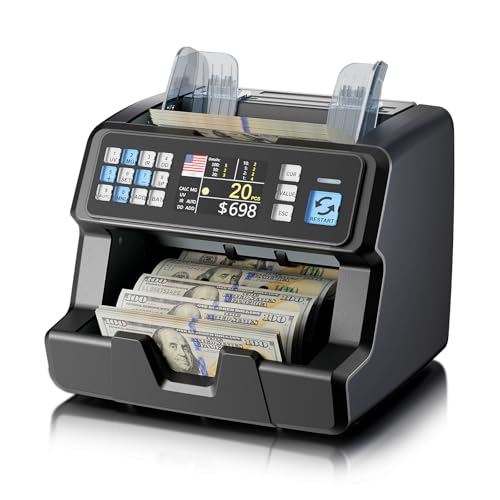
First-time owners often want a counter that doesn’t require a manual thicker than the device itself, and this Aneken keeps the controls pared down. The top-loading tray accepts a squared stack without a flip-and-feed ritual, and the Value Count mode runs once you pick a denomination. UV, MG, IR, MT, and DD detection covers the standard counterfeit package without piling on extra sensors.
Against the earlier Aneken model with the TFT screen, this unit trades the color readout for simpler operation. For someone counting the same denominations week after week, that trade makes sense.
Points In Its Favor
- Straightforward top-loading path reduces the learning curve for new treasurers and seasonal volunteers.
- Five counterfeit sensors cover common counterfeits without forcing a deep spec comparison.
- USD, EUR, and CAD support fits the currency mix in most North American shops.
Less-Strong Areas
- No mixed-denomination recognition, so counting a till with multiple bill types still takes manual setup.
- Display is functional rather than flashy, which may feel plain next to TFT screens.
Who Should Grab It
New owners and small treasurers who want a simple top-loading counter with reliable counterfeit screening.
A Better Fit Elsewhere
The Aneken Value Counting Money Counter suits better if a color TFT screen and three-speed control fit your daily workflow.
Back offices that handle bank deposits daily often need more than a counter, and the Aneken Ultra adds sorting and a built-in printer on top of mixed-denomination reading. Two pockets let you separate denominations during the run rather than splitting counts manually afterward, and dual CIS sensors scan both sides of each note to reduce blind spots. Continuous-feed technology means you can top up the hopper while the machine runs, trimming downtime on long sessions.
Compared with the Carnation mixed-denomination model reviewed earlier, this unit steps up to a touch screen and adds the printer. The trade-off is the heavier footprint that demands a dedicated back-office corner.
Bright Spots
- Two-pocket sorting keeps denominations separate during the run, saving time at the bank-prep stage.
- Built-in printer produces a paper receipt that auditors and accountants appreciate at month-end.
- Continuous-feed hopper lets you reload without pausing, trimming minutes off large counts.
- Touch screen simplifies mode changes for staff who prefer tapping over button combinations.
Factors To Consider
- Larger chassis needs a dedicated spot, which may not fit small-shop back rooms.
- Printer paper refills add an ongoing maintenance step compared with screen-only counters.
- Higher upfront cost than single-pocket models in this roundup.
Key Specs
Built With In Mind
High-volume back offices, casino cages, and cash-heavy retail operations that need sorting and printed records.
Swap It Out When
The Aneken Mixed Denomination Counter with Touch Screen is the more compact alternative if you want automatic recognition without the printer.
Multi-country operations sometimes need a counter that grows with new currencies, and this Aneken supports software upgrades through customer support to recognize up to 120 currencies. The touch screen and dual CIS sensors handle mixed-denomination stacks on the fly, and serial-number recognition supports audit-grade reconciliation. UV, MG, IR, DD, DBL, HLF, and CHN detection round out the counterfeit screening package.
Compared with the Aneken Ultra, this unit skips the second pocket and printer but keeps the touch interface. For shops that don’t need physical sorting, the smaller footprint still leaves room on a multi-purpose desk.
Where It Excels
- Upgrade path to 120 currencies future-proofs the machine as your business expands into new markets.
- Touch screen shortens the learning curve for staff who rarely run the counter.
- Serial-number recognition supports compliance checks for regulated industries.
Possible Compromises
- Currency upgrades depend on customer support availability, which can slow new-market rollouts.
- Single pocket means no physical sorting during the run, so bank prep still takes a follow-up step.
Whose Shelf It Belongs On
Multi-country small businesses and import-export desks that need flexible currency recognition and serial tracking.
Where Another Pick Suits Better
The Aneken Ultra 2-Pocket Sorter fits better if physical denomination sorting during the count is a daily need.
Tills that receive a mix of $1 to $100 bills straight from the drawer benefit from a counter that totals mixed stacks without pre-sorting. This CARNATION reads USD, CAD, BRL, MXN, ARS, and PEN and totals mixed denominations on the fly. Three speed settings keep daily cash handling flexible, with up to 1,200 notes per minute in simple count mode and gentler rates in mixed-value runs.
Compared with the CARNATION reviewed just below, this sibling trades hopper capacity for a smaller footprint. The trade-off matters for shops that don’t run marathon closing sessions.
Features That Help
- Three speed options let you slow down for worn bills and speed up for crisp stacks, extending the life of the rollers.
- Mixed-denomination recognition across six currencies handles Latin American and North American stacks without manual sorting.
- UV, MG, MT, IR, and CIS sensors cover the standard counterfeit detection set.
Where It Is Less Suited
- Smaller hopper than the higher-capacity CARNATION model, so large back-office runs need more frequent reloads.
- Single-pocket design means no built-in denomination sorting during the run.
Key Specs
Built With In Mind
Mixed-stack tills and small back offices that count Latin American and North American bills together without sorting first.
Consider Something Else When
The CARNATION Mixed Denomination Counter, 1500 N/M is a stronger fit if you want a larger hopper and faster continuous counts.
Continuous POS shifts and back-office days that run from open to close need a counter that doesn’t force frequent refills. This CARNATION holds a 500-note hopper and a 200-note stacker, which keeps the count flowing without constant reload breaks. Up to 1,500 notes per minute in count mode and 800 to 1,000 in mixed or sort modes handle the longest sessions with steady pacing.
Against the CARNATION reviewed just before, this unit stretches hopper and stacker capacity for marathon days. The chassis is heavier, so plan a permanent spot rather than daily transport.
A Few Strong Suits
- 500-note hopper and 200-note stacker trim reload stops during continuous POS shifts.
- Three-mode flexibility keeps the pace appropriate for mixed bills and straightforward counts.
- UV, MG, MT, IR, and CIS detection flags torn, half, and counterfeit notes before they enter your totals.
- Higher top speed of 1,500 notes per minute clears end-of-day deposits faster than slower sibling models.
Things To Weigh Up
- Larger footprint demands a permanent counter spot rather than shared desk use.
- Higher capacity adds weight, which makes transport between events less convenient.
Key Specs
The Right Fit
Back offices with continuous POS shifts and high-volume retail operations that need marathon-count capacity.
Reach For A Different Pick When
The Aneken Ultra 2-Pocket Sorter suits better if two-pocket physical sorting and a receipt printer matter more than raw hopper capacity.
Picking The Right Bill Counter For Your Daily Cash Load
Counting Speed And Hopper Capacity
Speed ratings tell you how fast a machine chews through a stack, but hopper and stacker sizes tell you how often you’ll reload during a closing session. A 1,500-notes-per-minute unit feels great until you’re pausing every two minutes to refill a 200-note hopper, which matters more on heavy back-office days than on a quick register tally. Match the hopper to your typical session length, not your peak rush, so daily use stays steady rather than stop-and-start.
Counterfeit Detection And Sensor Layers
UV (ultraviolet), MG (magnetic), IR (infrared), MT (magnetic thread), DD (diameter detection), CIS (contact image sensors), DBL (double-note detection), HLF (half-note detection), and CHN (chained-note detection) each catch a different counterfeit pattern. UV alone catches fluorescent security threads, while CIS reads the printed face of each bill. Multi-sensor units cost more, but they reduce the chance of letting a fake note slip into a deposit. For shops in tourist corridors or large-event venues, layered detection earns its keep; for a quiet suburban bookshop, three sensors often suffice.
Mixed-Denomination Recognition
Mixed recognition means the machine reads each bill and totals the stack automatically, while value counting requires you to tell the machine which denomination you’re feeding. Mixed recognition saves real time when tills come in unsorted, but it usually costs more and pulls in additional sensors. If your till always sees the same denominations in the same order, a value counter handles the job for less money.
Footprint, Display, And Daily Use
Counter space often decides the choice before any spec gets considered. Portable picks like the XUNHON tuck behind a register, while bank-grade sorters like the Aneken Ultra claim a permanent corner. Displays range from monochrome LCDs to color touch screens, and an external customer display can change the customer experience at a market stall. Match the footprint and screen to your counter and your audience, since the most capable machine that doesn’t fit your space simply won’t get used.
Common Mistakes Worth Dodging On The Way To Checkout
Pitfalls Shoppers Hit When Choosing Counters
A common slip-up is buying the fastest machine on the spec sheet without checking hopper size, since speed without capacity means constant reloads. Another trap is ignoring currency support, especially for shops near borders or tourist zones that need more than USD. Some shoppers overpay for mixed-denomination recognition they won’t use because their staff already pre-sorts stacks by hand. Picking by sensor count alone is also risky, since a unit with seven sensors but a fragile roller assembly costs more downtime than it saves in counterfeit catches.
Where The Extra Money Actually Goes
Stepping up to a premium model typically buys you dual CIS sensors, a second sorting pocket, a built-in printer, and a heavier chassis built for marathon shifts. You also gain continuous-feed hoppers and faster top-end speeds that keep long sessions flowing. The upgrade pays off when your daily cash load justifies the spend, since labor saved per shift multiplies across a year. For a small operation counting a few hundred notes a week, the value often stays in the mid-range tier where counterfeit detection and steady speeds cover the real workload.