Push-to-talk headsets earn their keep when your day is split between calls and whatever is in front of you, from a warehouse aisle to a long-haul cab. A dedicated button cuts out the fumble of unlocking a phone or calling up a voice assistant, which matters when you wear gloves, drive at highway speed, or sit in a noisy open office. The eight single-ear Bluetooth headsets below were chosen for practical call clarity, comfortable all-day fit, and the kind of button layout that makes hands-free work feel natural rather than finicky.
The Leading Options At A Glance

Atheewon Bluetooth Headset V5.4 Wireless Earpiece Dual Mic

Yealink BH70 Teams Bluetooth Headset 35h Talk Battery

Bluetooth Headset Wireless Dual-Mics Noise Cancelling Mute V5.3

Micool Bluetooth Headset Work Driving Office 40H Talk
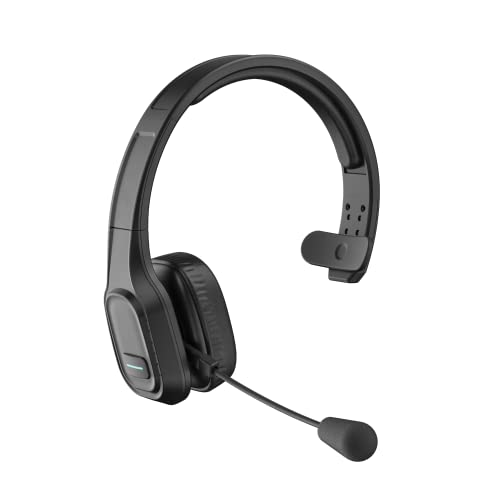
COMEXION Trucker Bluetooth Headset V5.0 Noise Canceling Mute

Yealink BH70 Wireless Teams Headset AI Mic Flip-to-Mute

Yealink BH70 Mono Bluetooth Teams Headset AI Mic

Sarevile Trucker Bluetooth Headset V5.2 AI Noise Canceling
The Strengths Of Each Pick
Long-haul drivers and shift workers tend to push a single headset harder than anyone, and the Atheewon V5.4 is built for exactly that kind of abuse. The earhook style keeps the earpiece anchored across potholed roads and the supplied USB dongle (a small plug-in adapter that adds Bluetooth to laptops or PCs that lack it) means a cab computer or office laptop can pair without fuss. For truckers running dispatch calls from a phone and a tablet simultaneously, that dual source flexibility matters more than flashy codecs.
It runs Bluetooth 5.4, the latest widely deployed standard at the time of writing, which holds a stable wireless link across a truck cab and reduces the dropouts that plague older radios. The dual-mic ENC array (Environmental Noise Cancellation, a system that uses two microphones to subtract ambient sound from your voice) targets road rumble directly, helping your voice cut through diesel noise on a hands-free call.
What Stands Out
- Listed talk time runs well past a full work week between charges, easing range anxiety on multi-day routes.
- Simultaneous pairing to a phone and a laptop means dispatch and personal calls can stay live without manual reconnection.
- Voice assistant activation from the earpiece keeps your hands on the wheel when you need directions or a quick dial.
- USB dongle support opens the headset to older Windows or Mac laptops that lack built-in Bluetooth.
Things To Consider
- The physical size of the earpiece is on the larger side, which can bother wearers who prefer an invisible in-ear profile.
- Owners commonly report that the included charging cable feels short, so a longer spare is a worthwhile add-on.
Who Will Love This
Long-haul truckers, courier drivers, and warehouse leads who toggle between a phone and a work computer for most of the shift.
Look Elsewhere When
The COMEXION Trucker Headset (Pick 5) is a lighter, more pared-back option for drivers who do not need multi-device pairing.
Microsoft Teams users tend to notice when a headset plays nicely with the platform and when it does not. The Yealink BH70 Teams edition is built around that handshake, joining meetings with a single tap and syncing mute state across the headset and the app so you do not end up talking to a muted line. For remote workers juggling back-to-back calls, that single-button reliability is a real workflow upgrade over a generic Bluetooth headset.
Compared with the Atheewon, this is a more office-tuned design with a slimmer headband profile and a longer per-charge talk window aimed at desk-heavy schedules. The mono earcup leaves one ear open to coworkers and door knocks.
Where It Helps
- Native Teams certification means the dedicated Teams button triggers the correct app actions without a separate dongle.
- Talk time in the mid-30-hour range covers a full work week of meetings between charges.
- Mute status syncs between the headset and the Teams app, removing the classic “am I muted?” moment.
Worth Noting
- It is tuned first for Teams, so the button layout is less intuitive on Zoom or Google Meet calls.
- At this tier, replacement ear cushions are a separate purchase for anyone planning multi-year daily use.
Made For
Remote employees and contact-center staff who live in Teams meetings and want a headset that mirrors the app’s controls.
A Better Fit Elsewhere
The Yealink BH70 with Stand (Pick 6) is the better call for desk-based workers who also want a charging dock on the workstation.
Travel-heavy users tend to lose or forget charging accessories more than anyone, which is why the bundled case on this Swiitech model is a quiet star. The carry case has its own battery that tops up the earpiece between hotel rooms, so the headset stays usable across a long flight day without hunting for a wall outlet. It feels closer to carrying a pair of true wireless earbuds than a traditional trucker headset.
The fit system is unusually flexible for a budget-tier pick, with three ear tip sizes and multi-axis rotation on the ear hook and mic arm, which matters for glasses wearers who need a non-pressure fit. Calls in busy shops or coffee shops hold up well thanks to the dual-mic array.
Where It Excels
- The pocketable charging case is a genuine travel advantage, sparing you the wall-outlet hunt at airports.
- The fit kit includes three tip sizes and rotating joints, which helps glasses wearers avoid the pressure-point hot spots common on rigid earhooks.
- The LED battery readout on the case removes the guesswork that usually comes with carry-case charging.
Points To Note
- The case adds bulk compared with the COMEXION (Pick 5), so pocket-carry purists may prefer a slimmer setup.
- Ear tip replacements are consumables; stash a spare set if you plan to wear the headset daily.
Whose Shelf It Belongs On
Sales reps, traveling consultants, and anyone who treats calls as a between-meeting activity across hotels and airports.
Swap It Out When
The Micool (Pick 4) suits a quieter, mostly stationary routine where a charging case is overkill.
The Micool BT-XLINE leans hard into the newest Bluetooth radio available at the time of writing. Bluetooth 6.0, which improves connection stability and lowers latency compared with older V5.x versions, on a single-ear workhorse, which is a sensible priority for anyone whose day breaks when a headset drops mid-call. Multipoint pairing lets the headset stay connected to a phone and a work laptop at the same time, removing the tedious dance of repairing every time you switch devices.
Compared with the Sarevile later in this list, the Micool prioritizes office calm over road noise, with dual MEMS microphones (tiny surface-mounted mics that pick up voice cleanly) that target the kind of background chatter you get in an open-plan office or a home workspace with a dog.
The Practical Payoff
- Bluetooth 6.0 delivers a steadier link in crowded wireless environments, useful in offices stacked with Wi-Fi access points.
- 40-hour talk rating easily covers a full week of typical meeting load.
- The mono earcup leaves one ear free for office conversations and door knocks.
Trade Offs
- Without a charging case, a missed charge night means a quiet morning until you find a USB cable.
- The headband profile is more office than road, so it does not anchor as securely as a hook-style earpiece on rougher drives.
Right Fit For
Hybrid workers carrying a personal phone and a work laptop, plus office staff who take calls all day.
Consider Something Else When
The Yealink BH70 Mono (Pick 7) is a stronger match for anyone running Teams as their primary meeting platform.
The COMEXION M100 is one of the more recognizable entry-level trucker headsets, and for good reason. It skips the dongle and the dual-device gymnastics in favor of a single, reliable phone or PC connection. A physical mute button on the earcup is the kind of small detail drivers ask for, since muting a phone screen at highway speed is the worst possible moment to take your eyes off the road.
Note that the mute function only works on a phone out of the box; PC users running Skype or Zoom will need the dongle-equipped variant for mute to register in software. That is the kind of detail worth checking before checkout.
A Strong Showing
- On-ear pad and lightweight build suit long driving days without the earhook pressure some wearers dislike.
- One-press mute on the earcup avoids the screen-tap scramble on active calls.
- Bluetooth 5.0 is enough for phone calls, music, and navigation prompts in most cabs.
Honest Caveats
- On a PC, the mute button does not register without the dongle version, which limits its out-of-the-box usefulness for software-based calls.
- Without multipoint, switching from a phone to a laptop requires a manual reconnection.
Best Suited To
Long-haul truckers and delivery drivers who want a comfortable on-ear headset for phone-first calls.
Not Your Match When
The Atheewon (Pick 1) is the smarter choice for anyone who needs phone and laptop to stay paired simultaneously.
The BH70 with Stand adds a charging cradle to the regular BH70 experience, which changes the daily feel more than it sounds. Dropping the headset onto the stand at the end of a meeting means it is topped up by the next call, removing the end-of-week scramble where every device needs charging at once. For office workers with a fixed workstation, that habit-forming routine is a quiet productivity win.
Where this differs from the standard BH70 (Pick 2) is the flip-to-mute boom: rotate the microphone up to mute, rotate it down to unmute. It is the kind of physical control that pairs well with Teams’ mute state sync.
Advantages To Know
- The desk stand keeps the headset charged between meetings, ideal for back-to-back call days.
- Flip-to-mute is a tactile, headset-side control that maps directly to Teams’ mute sync.
- Native Teams certification means the dedicated Teams button works without extra receivers or USB ports.
A Few Limitations
- The stand takes up dedicated desk real estate, which is awkward in hot-desking setups.
- Like other Yealink BH70 variants, button mapping for non-Teams apps is less polished.
Perfect Match For
Office-based professionals with a permanent desk and a daily Teams meeting load.
Reach For A Different Pick When
The Sarevile (Pick 8) suits a hybrid routine where the headset splits time between home, the office, and a phone.
This third Yealink BH70 variant keeps the mono single-ear form factor and Teams certification, tuned specifically for work-from-home use. The AI mic array is the headline feature here: it actively cleans up background sound like a barking dog or a blender in the next room. For anyone whose home has become an office, that extra audio polish shows up in every meeting without requiring any user settings.
Compared with the standard BH70 (Pick 2), this version is positioned for a quieter environment where the focus is on call clarity rather than long battery marathon sessions. It pairs straight to a PC over Bluetooth, no dongle required, which keeps your USB ports free for everything else.
Strengths Worth Knowing
- AI-driven mic processing lifts voice clarity in home environments with unpredictable background noise.
- Native Teams pairing keeps workflow simple with no dongle or extra receiver taking up a USB port.
- The mono earcup leaves one ear free for family life during working from home.
Practical Considerations
- The price tier sits above general-purpose headsets, so it only makes sense if Teams is your primary meeting app.
- Wearing comfort over eight-hour stretches depends on head shape; trying it on before settling in is worth the effort.
Who Should Grab It
Remote workers whose meeting platform is Microsoft Teams and whose home has plenty of background distractions.
Where Another Pick Suits Better
The Micool (Pick 4) makes more sense for hybrid users who need to switch easily between a phone and a PC.
The Sarevile rounds out the list as the most device-agnostic of the eight. Bluetooth 5.2 supports simultaneous pairing across phones, tablets, computers, and even office desk phones, which is why it has a foothold in call centers and small business setups. The directional microphone is angled to face the mouth directly, lifting voice pickup before any noise-canceling software gets involved.
Compared with the COMEXION (Pick 5), this Sarevile adds AI-assisted noise canceling and broader device compatibility, at the cost of a slightly heavier on-ear feel. For long shifts, that balance is worth weighing.
The Case For It
- Universal pairing covers phones, tablets, computers, and even landline-style desk phones without extra adapters.
- AI-assisted noise reduction on top of a directional mic gives your voice a cleaner ride to the other end.
- Bluetooth 5.2 holds a steady link even when several office devices share the same wireless space.
Things To Weigh
- The on-ear cushion warms up over long shifts, so a breathable replacement pad is a worthwhile upgrade.
- The on-ear fit secures less aggressively than the Atheewon earhook (Pick 1), so very active drivers may want a hook-style alternative.
Built With In Mind
Call center agents, dispatch operators, and small business owners who switch between desk phones, PCs, and mobile devices.
Skip It When
The Yealink BH70 Mono (Pick 7) is the cleaner pick for Teams-only remote workers.
What Matters Most Before Choosing Bluetooth Headsets With Push To Talk Button
Pick The Microphone For Your Environment
Noise-canceling microphones fall into two camps: dual-mic ENC arrays, which use two microphones to subtract ambient sound from your voice, and AI-driven arrays that profile background noise in real time. Dual-mic systems handle steady rumble, like road noise or HVAC hum, while AI arrays adapt better to sudden sounds such as barking dogs or kitchen clatter. For highway driving, dual-mic ENC remains the more focused tool. For home offices with unpredictable interruptions, the AI-tuned Yealink BH70 Mono (Pick 7) is a noticeable step up.
Sensitivity is worth a glance too. Mics rated around negative 42 dBV/Pa (decibels of output per Pascal of sound pressure, where higher absolute values mean quieter voice capture needed) pick up a natural speaking voice without forcing you to raise it.
Match Battery Life To Your Shift
Talk time tells you how long the headset runs on a single charge during continuous calls. Long-haul drivers benefit most from marathon ratings like the Atheewon (Pick 1). Office workers running back-to-back Teams meetings are well served by mid-30-hour models such as the Yealink BH70 Teams (Pick 2). Travel-heavy users gain more from a charging case like the one bundled with the Swiitech (Pick 3) than from raw battery hours.
Decide If Multipoint Pairing Is Worth It
Multipoint, the ability to stay connected to two devices at once, matters whenever your day splits between a phone and a laptop. If you only ever take calls from a single device, you can save money by skipping the feature. Truckers running dispatch apps on a tablet and calls on a phone should treat multipoint as essential rather than optional.
Fit And Wearing Style Change Everything
Earhook designs like the Atheewon (Pick 1) lock in place during motion, while on-ear models like the COMEXION (Pick 5) and Sarevile (Pick 8) feel lighter for stationary office work. Glasses wearers should look for flexible joints or multiple ear tip sizes, since rigid earhooks can press frame arms into the side of the head over a long shift.
Key Considerations Across These Picks
Where Shoppers Go Wrong
One common slip is treating the mute button as guaranteed across apps. On the COMEXION (Pick 5), the mute only registers on a phone out of the box, and PC users will need a dongle-equipped variant. Skipping that detail leads to the embarrassing moment of muting your mic mid-call only to discover the other side still hears everything.
Another trap is assuming every headset handles multipoint. Several picks in this list pair to two devices, while older V5.0 designs tend to be single-source only. Confirm the multipoint claim before committing if your workflow depends on phone and laptop staying live at the same time.
When Paying More Pays Off
The premium tier earns its place through software polish rather than raw hardware. Native Teams certification on the Yealink BH70 line means a single button press triggers the correct app behavior, including mute sync. AI mic arrays clean up background noise in ways that basic noise canceling cannot match. For anyone whose headset is the difference between a clear meeting and a frustrating one, that extra spend buys daily consistency, not spec sheet bragging rights.
Frequently Asked Questions
What Is A Push To Talk Button On A Bluetooth Headset?
A push-to-talk button is a physical control that activates instant communication, often used with walkie-talkie apps, dispatch software, or voice assistants. It removes the need to unlock your phone or open an app first, which is useful when your hands are busy or you are on the move.
Do These Headsets Work With Zoom And Google Meet?
Most models pair with any standard conferencing app over Bluetooth, but Teams-certified headsets map extra buttons to Teams-specific actions. For Zoom and Google Meet, the basic call controls work, while platform-specific shortcuts may behave differently.
How Long Does The Battery Actually Last During Calls?
Talk time ratings are based on continuous calls at moderate volume. Heavy use of noise canceling and higher volumes reduces real-world runtime, while lighter standby use stretches it well past the rated figure.
Can I Use These Headsets While Wearing Glasses?
Earhook designs with flexible joints or models that include multiple ear tip sizes generally accommodate glasses without pressure points. On-ear cushions avoid the temple area entirely, which suits wearers who find earhooks uncomfortable over long shifts.
Do I Need A USB Dongle For My Computer?
Modern laptops with built-in Bluetooth typically pair directly to these headsets without a dongle. Older desktops or PCs without Bluetooth rely on the included USB dongle, as seen on the Atheewon (Pick 1), for both audio and the mute button functionality on certain apps.
Final Verdict
Long-haul drivers tend to gravitate toward the Atheewon V5.4 for its marathon battery and dual-device pairing, while office-heavy Teams users get more from the Yealink BH70 variants. Travel-heavy callers who lose charging cables benefit from the Swiitech case, and call center agents who switch between phone, PC, and desk phone will appreciate the Sarevile’s flexibility. The honest read is that the right pick depends less on spec sheets and more on which device lives in your hand during the longest part of your day.