A color laser MFP earns its place in a home office the moment your printer starts doing real work, not just spitting out the occasional boarding pass. Running a small business, juggling school assignments, and printing client decks on a deadline all put different pressure on the same machine. The ten options below cover the printers themselves and the cartridges that keep them fed, so the right model and the right consumables both make your shortlist.
A Side-By-Side Look

206A Black Toner 2 Pack Replacement for HP W2110A

206X Toner 4 Pack for HP Color Laser Pro MFP M283 Series
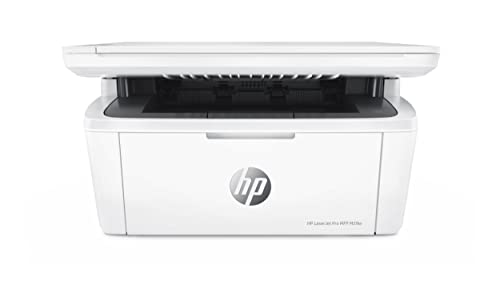
HP LaserJet Pro MFP M29w Wireless Monochrome (Y5S53A)

201X High Yield Toner 4 Pack for HP M277 M252 Series

206A Toner 4 Pack for HP W2110A W2111A Series
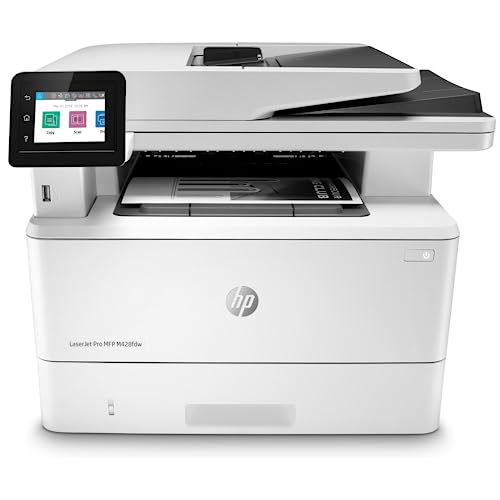
HP LaserJet Pro MFP M428fdw Wireless Monochrome (W1A30A)

Xerox C240 Wireless Color Laser Printer

201A Standard Yield Toner 4 Pack for HP M277 M252

TN436 Super High Yield Toner 4 Pack for Brother MFC-L8900CDW

HP LaserJet Pro MFP 3101sdw Wireless Monochrome (9D2X4F)
Meet The Standout Selections
A two-pack of black toner is the unglamorous backbone of any color laser setup, and this Myceke set covers the W2110A slot used across the HP Color Laser Pro MFP M283 family plus the M255 series. For most home offices that lean mostly monochrome with the occasional color page, stocking the black cartridge in duplicate means fewer last-minute orders mid-project.
The 206A spec delivers about 1,350 pages per cartridge at standard 5% coverage, which roughly translates to a couple of weeks of steady printing for a solo professional. Compared to the full color sets later on this list, this option keeps the cost-of-ownership conversation focused on the cartridge that actually runs out first.
Useful Highlights
- Two black cartridges extend the time between replacement orders
- Compatible with the HP M255, M282, and M283 printer families
- 1,350-page yield per cartridge suits moderate daily printing
- Smart chip integration is generally reliable across the supported models
Things To Consider
- Does not include any cyan, magenta, or yellow cartridges
- Third-party cartridges can occasionally trigger low-toner warnings that need a manual override
Made For
HP M255 and M283 owners who print mostly black-and-white documents and want a backup cartridge on the shelf.
Where Another Pick Suits Better
The 206X toner 4 pack later in this list is the better fit when your workflow runs through all four colors at any real volume.
Stepping up to the 206X line means roughly double the page count of the standard 206A cartridges, and this four-pack covers black, cyan, magenta, and yellow in one box. For a small studio that produces client-facing pitch decks and brochures, this kind of bundle removes the chance of running out of cyan in the middle of a deadline.
You see roughly 3,150 pages from the black cartridge and about 2,450 from each color at 5% coverage. The 206X chips are designed for the same HP Color Laser Pro MFP M283 family as the previous pick, so the swap is essentially a capacity upgrade rather than a compatibility gamble.
A Strong Showing
- Full CMYK cartridge set eliminates separate reorder cycles
- High yield black cartridge suits daily print volumes
- Direct replacement for original HP 206X cartridges across the M283 line
Points To Note
- Higher upfront cost than buying the standard 206A set
- Bulk packaging may be more toner than light users can rotate through before shelf life concerns
Key Specs
Right Fit For
Small studios and remote teams printing a steady mix of color and monochrome on HP M283 hardware.
Consider Something Else When
The 206A 4 pack earlier in this list is the better match for very light users who will not consume the high-yield capacity in time.
The M29w exists for the corner-of-the-desk reality many home offices actually live in. It is HP’s smallest LaserJet Pro all-in-one, packing print, scan, and copy into a footprint that slides next to a monitor without dominating the room. Solo professionals handling less than a thousand pages a month get wireless connectivity without paying for a machine built for shared workgroups.
Mobile printing support and a straightforward wireless setup make it forgiving for households where the printer needs to talk to laptops, phones, and tablets. The honest read is that this machine trades color output for size, so it lands in a different lane than the MFPs further down the list.
What It Does Well
- Compact body fits tight home office corners
- Wireless printing from laptops and mobile devices
- Print, scan, and copy functions in one unit
- Targets low monthly page volumes without wasted capacity
Worth Noting
- Monochrome only, no color laser output
- Paper tray capacity is modest for busier households
Best Suited To
Solo professionals printing under a thousand monochrome pages a month from a small desk setup.
Skip It When
The Xerox C240 later in this list is the better fit when full-color output matters as much as the footprint.
Owners of the HP Color LaserJet Pro MFP M277 and M252 printers live in a slightly older but still capable corner of the HP family, and the 201X high yield pack serves that hardware well. You get all four colors in one box, with the black cartridge rated at roughly 2,800 pages at standard coverage. For an established home office that already owns the printer, this is the cartridge refresh that keeps the workflow humming.
The advanced smart chip inside each cartridge is the kind of detail that matters more than it sounds: it talks to the printer’s onboard monitoring so you do not get phantom low-toner errors after a fresh install. Compared to the standard 201A set covered later in this list, the 201X delivers nearly double the page count per cartridge.
Everyday Perks
- Higher yield option for the HP M277 and M252 series
- Smart chip support reduces compatibility warnings
- Full CMYK set means a single reorder covers all colors
Trade Offs
- Higher upfront cost than standard yield alternatives
- Limited to the specific HP printer families listed
Who It Suits Best
Established home offices already running HP Color LaserJet Pro M277 or M252 printers who print in steady volume.
A Better Fit Elsewhere
The 201A standard yield 4 pack later in this list makes more sense when monthly print volume is genuinely light.
The standard yield version of the 206A family delivers about 1,350 pages from black and 1,250 from each color, and this bundle ships all four in a single box. For an HP Color Laser Pro MFP M283 owner who prints a few hundred pages a month, the standard yield is honestly enough without paying the premium for the 206X high yield.
The cartridge chips are tuned for the same M283, M282, and M255 series that the rest of the HP 206 ecosystem supports. Same story with the other Myceke entries on this list: the swap is designed to feel close to an OEM replacement once installed.
What Stands Out
- Full color set at standard yield suits lighter volumes
- Direct fit for HP M283, M282, and M255 series
- Lower entry cost than the 206X high yield bundle
Honest Caveats
- Color cartridges run out faster in heavy use than the 206X line
- Third-party cartridges may trigger firmware warnings on some firmware versions
Perfect Match For
HP Color Laser Pro M283 owners printing a few hundred color pages a month who want a balanced cost-to-yield ratio.
Not Your Match When
The 206X 4 pack earlier in this list is the stronger pick when monthly color volume climbs into the thousands.
The M428fdw is built for the home office that has quietly turned into a small team operation. Print, scan, copy, and fax sit alongside built-in Ethernet and automatic two-sided printing, so it covers both the everyday document churn and the occasional duplex report without breaking flow. HP Wolf Pro Security sits at the firmware level, adding a layer of protection that matters more the moment client data starts passing through the machine.
The customizable control panel saves multi-step workflows to a single button press, which sounds modest until you watch a complicated scan-to-email sequence collapse into one tap. Compared to the M29w earlier in this list, this is a step up in both throughput and built-in security hardening.
The Case For It
- Automatic two-sided printing saves paper on long reports
- Ethernet and wireless connectivity for flexible placement
- Hardware-level security through HP Wolf Pro
- Multi-function print, scan, copy, and fax capability
A Few Limitations
- Monochrome only, no color laser output
- Larger footprint than entry-level home office printers
Feature Snapshot
Whose Shelf It Belongs On
Busy small teams and security-conscious home offices that need fax, duplex, and robust firmware-level protection.
Reach For A Different Pick When
The HP LaserJet Pro MFP 3101sdw later in this list is a comparable monochrome option worth comparing for newer firmware cycles.
The Xerox C240 is one of the few color laser printers in this list aimed squarely at small offices that actually want color output at speed. Twenty-six pages per minute means a multi-page client deck rolls out fast enough that you stop watching the printer and start reviewing the pages. Dual-band Wi-Fi plus Apple AirPrint and Mopria support make it friendly to mixed-device households.
The compact body is a genuine selling point for any color laser, since most machines with this kind of throughput run large. Note that this is a print-only device, so the C240 sidesteps scan and copy duty entirely.
What Pays Off
- 26 pages per minute output for color and monochrome
- Dual-band Wi-Fi plus AirPrint and Mopria mobile support
- Compact body for a color laser in its speed class
Less Ideal Details
- Print-only design, no scan or copy functions
- Color toner cost should be weighed against expected monthly volume
Built With In Mind
Freelancers and small studios who print color presentations and reports regularly but do not need scanning built in.
Swap It Out When
The HP LaserJet Pro MFP M29w earlier in this list is the better fit when scan and copy functions are part of the daily routine.
The standard yield 201A four-pack is the friendlier entry point for HP Color LaserJet Pro M277 and M252 owners who print occasionally rather than constantly. Each black cartridge here is rated for roughly 1,500 pages, which lines up nicely with households that go through a printer more by the week than by the hour.
Like its high yield sibling earlier in the list, this bundle uses updated smart chips for cleaner compatibility. The smart chip is the small piece of circuitry that lets the printer read the cartridge’s remaining toner level, so an accurate chip keeps the low-toner warning honest.
Why It Works Well
- Lower entry cost for occasional color printing
- Smart chip design for accurate toner reporting
- Covers full CMYK set in one box
Some Limits To Know
- Lower page yield than the 201X high yield alternative
- Replacements needed more often under heavier workloads
Who Should Grab It
HP M277 and M252 owners with light monthly print volumes who prefer smaller, more frequent cartridge swaps.
Another Choice May Suit
The 201X high yield pack earlier in this list is the stronger pick when you would rather change cartridges less often.
Brother’s MFC-L8900CDW and HL-L8360CDW printers live in a different weight class than the HP machines elsewhere on this list, and the TN436 super high yield cartridges match that scale. Each color cartridge is rated for roughly 6,500 pages at standard coverage, which is the kind of number that lets you forget about reorders for a real stretch.
For home offices that have grown into a small workgroup setup with a Brother color laser at the center, this four-pack keeps every color lane stocked at once. The trade-off shows up if your Brother hardware is an older TN433-based model, since compatibility runs through both cartridge generations but the yield numbers are very different.
Bright Spots
- Approximately 6,500 pages per cartridge at standard coverage
- Full CMYK set covers all four color lanes
- Smart chip support for clean integration with Brother printers
Where It May Fall Short
- Premium capacity comes at a higher upfront cost
- Best value only for Brother machines designed for the TN436/TN433 lineup
Quick Facts
The Right Fit
Brother workgroup printer owners who want maximum cartridge life and fewer reorder cycles per quarter.
Look Elsewhere When
The HP 206X toner 4 pack earlier in this list is the better match for home offices running HP Color Laser Pro hardware.
The 3101sdw closes the list as the newer-generation sibling to the M428fdw covered earlier, and it leans hard into high-speed monochrome productivity. Automatic duplex printing, fast print and scan times, and wireless connectivity target the small team that treats the printer as shared infrastructure rather than a personal device.
HP’s printer management dashboard lets a single admin configure multiple machines across locations, which is helpful even in a hybrid home office with two sites. It is a print, scan, and copy machine without fax, so the omission is worth noting if your workflow still depends on incoming fax documents.
Standout Benefits
- High-speed print and scan performance
- Wireless setup with remote fleet management
- Automatic duplex printing for two-sided documents
Details To Watch
- No fax function compared to the M428fdw earlier in this list
- Monochrome output only, no color laser support
Core Details
Who Will Love This
Small team workflows that need fast monochrome duplex printing without a fax requirement.
Where A Sibling Pick Shines
The HP LaserJet Pro MFP M428fdw earlier in this list is the better fit when built-in fax is part of the daily routine.
What Matters Most Before Choosing Color Laser Mfps For Home Office
Matching The Printer To Your Real Print Mix
Color laser MFPs are not interchangeable, and the wrong match usually shows up within a month of ownership. Printers like the Xerox C240 give you true color output for client-facing materials, while monochrome workhorses like the HP M428fdw or 3101sdw cut ongoing toner costs for text-heavy workflows. Decide honestly whether color pages are daily, weekly, or rare before choosing between the two paths.
Connectivity And Placement Flexibility
A home office rarely offers dedicated printer space, so wireless connectivity is not a luxury. Dual-band Wi-Fi, AirPrint, and Mopria support keep printing frictionless across laptops, tablets, and phones. Ethernet becomes relevant if the printer sits near a router and serves multiple users.
Toner Cost And Cartridge Availability
The printer itself is only the first expense. Toner cartridge availability and yield per cartridge shape the long-term cost of ownership far more than the initial outlay. Look at the cartridge ecosystem your printer uses and confirm third-party options exist if OEM pricing feels steep.
Security And Workflow Features
Small offices handling client data benefit from firmware-level security features like HP Wolf Pro on the M428fdw. Customizable control panels that save multi-step workflows to a single button are worth real time savings on recurring tasks. Skip these features only if your printing is genuinely light.
Key Considerations Across These Picks
Pitfalls Shoppers Hit
The most common mistake is buying a printer based on initial price without checking the cartridge ecosystem. Some color laser MFPs run reliably on third-party toner; others trigger warnings or refuse to print with non-OEM cartridges. Always verify cartridge compatibility before committing.
Where The Extra Money Goes
Premium models earn their higher cost through faster print speeds, automatic duplexing, stronger security, and larger duty cycles. The upgrade pays off when your home office prints more than a few hundred pages a week or handles sensitive client documents.
Frequently Asked Questions
What Is The Main Difference Between Color And Monochrome Laser MFPs?
Color laser MFPs print in full CMYK using four separate toner cartridges, while monochrome MFPs use only black toner. Color machines suit presentations and marketing materials; monochrome workhorses handle text-heavy documents at lower ongoing cost.
How Often Will I Need To Replace Toner Cartridges?
Replacement frequency depends on monthly print volume and the cartridge yield. Standard yield cartridges typically last through a few hundred pages, while high yield and super high yield options can stretch to several thousand pages per cartridge.
Are Third-Party Toner Cartridges Safe To Use?
Third-party cartridges from reputable manufacturers generally work well with supported printer models, though firmware updates occasionally trigger compatibility warnings. Check the seller’s return policy and confirm the cartridge explicitly lists your printer model before ordering.
Do I Need Fax Capability In A Home Office MFP?
Fax matters mainly if your workflow still depends on it for legal, medical, or government documents. Most home offices have moved to scanned-and-emailed alternatives, but some industries still require a physical fax line.
Can Wireless Laser Printers Handle Multiple Users?
Yes, most modern wireless laser MFPs support multiple connected devices through Wi-Fi and mobile printing standards. For multi-user households, look for models with Ethernet support and remote management dashboards for easier shared administration.
Wrap Up
The right color laser MFP for your home office is the one that matches your actual print mix, fits the space you have, and runs on a cartridge ecosystem you can maintain without drama. Match the printer to your real workload first, then stock the matching toner so the machine keeps working through the next quarter without you thinking about it.