You spend hours at that desk, and your lower back has opinions about it. The right chair turns a long workday from a posture fight into something close to comfortable, especially when lumbar support is built in rather than improvised with a pillow. This list sorts through nine options across mesh, leather, and reclining builds, so the match for your back and your space gets easier to spot.
The Main Contenders

Mesh Office Chair with Headrest & Lumbar
Hbada E3 Air Ergonomic Office Chair (Black)
Hbada E3 Air Ergonomic Office Chair (Grey)
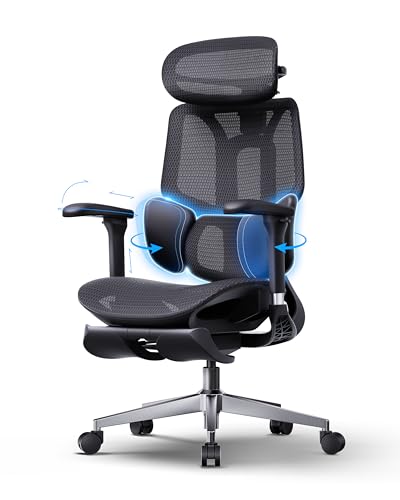
Hbada E3 Air Ergonomic Chair with Footrest

TRALT Ergonomic Desk Chair Mesh (Black)
TRALT Ergonomic Desk Chair (Cloud White)

TRALT Ergonomic Desk Chair Mesh (White)

Solviva Leather Desk Chair Flip-Up Arms

Humergo Reclining Mesh Chair with Footrest
Inside Each Recommended Option
Solviva opens the list with a high-back mesh chair that treats airflow as a feature rather than a footnote. The breathable back panel keeps heat from settling across your shoulders during long calls, and the wide seat gives larger frames a little extra breathing room without looking oversized in a smaller room. Built-in lumbar shaping takes the guesswork out of where your lower back should land.
For anyone clocking six to ten hours a day at a screen, the combination of an adjustable headrest and 3D armrests (arms that pivot, slide, and shift in multiple directions) means fewer micro-adjustments mid-meeting. Setup runs through standard home-office assembly, and the mesh fabric wipes clean with a damp cloth rather than demanding special care.
Real Benefits
- Mesh back panel lets heat escape, which matters during summer months or warm rooms without strong airflow.
- Wide seat footprint suits taller sitters who find narrower chairs compressing the hips.
- Headrest adjustment supports video-call posture without forcing you to crane forward.
- Lumbar curve is built into the back frame, so the support stays in place as you shift positions.
Things To Consider
- 3D armrests take some fiddling to dial in for the right typing angle.
- Mesh seats feel firmer than padded alternatives for sitters who prefer a cushier landing.
Key Specs
Best Suited To
Remote workers and hybrid staff who log full days at a desk and want breathable support without premium-chair pricing.
Skip It When
The Solviva Leather Desk Chair Flip-Up Arms is a better fit for studio dwellers who need the chair to slide fully under a low desk.
The Hbada E3 Air treats the lower back like it deserves a custom fit. Its three-zone lumbar system divides support across the upper lumbar, mid lumbar, and sacral regions, so the chair fills the hollow most office chairs leave empty. Where the Solviva leans on a single curved back, this one adapts across multiple pressure points.
Programmers and writers tend to sit still for long stretches, and the auto-recline feature lets the chair follow your lean without manual locking. The 4D headrest and armrests (adjustable in height, depth, width, and angle) let you line up monitors and keyboards without contorting. The tilt range tops out around 140°, which lands somewhere between upright desk work and a short rest break.
Good Reasons To Consider
- Three-zone lumbar shaping addresses the lower-back gap that flat cushions miss.
- Auto-recline follows your movement, cutting down on fiddling with tilt locks.
- 4D armrests accommodate keyboards at varying heights and shoulder widths.
- 4D headrest tracks neck position whether you sit upright or lean back.
Worth Noting
- The adjustment learning curve runs longer than a basic chair’s, since each zone responds to a different dial.
- The recline range stops short of a full lay-flat, so it is not a nap chair.
Made For
Knowledge workers with persistent lower-back tension who want granular tuning instead of one-size-fits-all lumbar curves.
Consider Something Else When
The Hbada E3 Air with Footrest is a smarter call for anyone who wants a built-in leg rest without buying a separate ottoman.
Functionally, this is the same chair as the black Hbada E3 Air above, but the grey finish softens its visual weight inside a home office. For rooms that lean minimalist, Scandinavian, or industrial-light, the lighter tone blends where a deep black frame would feel heavy. The three-zone lumbar system and auto-recline perform identically across both finishes.
A neutral palette also hides dust less aggressively than pure white, which is a quiet plus for households without daily cleaning routines. Owners commonly find the lighter fabric frames better in photos for video calls when the chair sits in the background.
Practical Advantages
- Same three-zone lumbar support as the black version, with no functional sacrifice for the color change.
- Grey fabric forgives smudges better than bright white alternatives.
- Lighter visual footprint suits small rooms where black furniture reads as too dominant.
Minor Gripes
- Grey mesh can show lint more visibly than darker weaves if you have pets that shed.
- Color availability may run more limited than black or white over time.
Right Fit For
Design-conscious remote workers who want serious lumbar support without a heavy visual presence in the room.
Look Elsewhere When
The TRALT Ergonomic Desk Chair in Cloud White makes more sense for shoppers prioritizing a brighter, whiter aesthetic over multi-zone lumbar tuning.
This Hbada variant keeps the three-zone lumbar system from the standard E3 Air and tucks a retractable footrest under the seat. For anyone whose legs swell after a long sit, or who takes standing-style micro-breaks without leaving the chair, the footrest changes the recovery equation. Recline plus leg support takes pressure off the lower spine in a way upright sitting cannot.
The trade-off is footprint: the footrest adds length when extended, so plan on having a bit more clearance behind the chair. Compared with the standard E3 Air above, this is the same engineering with a comfort feature folded in.
Notable Upsides
- Retractable footrest lets legs recover without a separate ottoman crowding the room.
- Same three-zone lumbar system as the standard E3 Air.
- Auto-recline pairs naturally with the footrest for short break sessions.
- Headrest and armrests retain their 4D adjustment range.
Honest Caveats
- Extended footrest adds depth, so tight rooms with chairs close to walls may struggle for clearance.
- The footrest mechanism adds weight and assembly time compared with the standard model.
Who Should Grab It
Remote workers with long shifts who already use a footstool and want that comfort built into the chair instead of parked beside it.
Another Choice May Suit
The Humergo Reclining Mesh Chair with Footrest offers a similar feature set with an adjustable lumbar depth slider if Hbada’s three-zone system feels over-engineered.
TRALT’s black mesh chair targets the spot where most people actually buy: a mid-budget ergonomic chair without a stripped-down feel. The adjustable lumbar support moves up and down to land in the right spot for your spine, and the seat uses high-resilience molded foam (a denser foam that bounces back instead of flattening within months). That foam choice matters more than it sounds, since cheaper cushions sag into a hammock shape inside the first year.
For students, first-job remote workers, and anyone furnishing a home office without overspending, this chair covers the essentials: breathable back, tunable lumbar, and an executive silhouette that does not look out of place on camera. The build is lighter than the Hbada chairs above, which is the natural trade-off for the price.
Notable Gains
- High-resilience foam seat resists the flattening and sagging that hits budget chairs early.
- Adjustable lumbar height lets shorter and taller sitters both find a useful position.
- Mesh back keeps airflow steady through warm seasons.
- Executive styling works for video calls without screaming “gaming chair.”
Things To Weigh
- Adjustable lumbar moves up and down but does not offer depth tuning like premium picks.
- Armrests adjust less than 4D, so keyboard alignment takes more compromise.
Key Specs
Best Suited To
First-time home-office shoppers who want real ergonomic support without stepping into premium pricing territory.
Not Your Match When
The Hbada E3 Air Ergonomic Chair in Grey makes more sense for sitters who want multi-zone lumbar tuning rather than single-point adjustment.
The Cloud White finish on this TRALT reads as airy rather than clinical, which works well in rooms with lots of natural light. Functionally identical to the black TRALT above, it shares the same high-resilience foam seat, adjustable lumbar, and mesh back panel. The shift is purely visual, and that visual shift can matter when the chair anchors the room’s palette.
For shared workspaces, guest-room offices, or any space where two or more people use the same chair, the lighter tone tends to look intentional rather than institutional. The mesh still breathes the same way, and the foam still resists the early-sag pattern.
Standout Benefits
- Cloud White finish brightens dim rooms without crossing into high-gloss territory.
- Same high-resilience foam and adjustable lumbar as the black TRALT.
- Light frame visually opens up small home offices.
Small Caveats
- White mesh shows spills and stains faster than darker mesh, so accidental coffee requires quick cleanup.
- Color matching across batches can vary slightly, which matters if you buy multiple chairs for a team.
Feature Snapshot
Whose Shelf It Belongs On
Shared workspaces, guest offices, and any room where the chair needs to coordinate with a lighter color palette.
Reach For A Different Pick When
The Solviva Leather Desk Chair is worth a look for shoppers who prefer an upholstered seat over mesh and need flip-up arms.
The white TRALT sits between the Cloud White and the black version on the visual spectrum, leaning slightly cooler and brighter than the Cloud shade. For decor schemes that already run white or off-white, this chair blends in instead of competing. It carries the same adjustable lumbar and molded foam seat as its siblings, so the comfort profile does not change with the finish.
Buyers tend to pick between the white and Cloud White options based on the warm versus cool cast of their walls. The honest read is that both read as light, and the difference is subtle enough that it matters most in rooms with strong natural light.
Positive Points
- Cleaner, cooler white tone for modern-leaning decor.
- Same molded foam and adjustable lumbar as the rest of the TRALT line.
- Mesh back keeps the chair cool in warm rooms.
Room For Improvement
- White surfaces require more frequent wiping than darker mesh.
- Cool-toned white can feel stark in rooms with warm wood or terracotta accents.
Built With In Mind
Style-focused shoppers furnishing a bright, neutral-toned home office and willing to wipe down the chair more often.
Where Another Pick Suits Better
The Hbada E3 Air Ergonomic Chair in Grey fits better in mixed-palette rooms where multi-zone lumbar support matters more than color purity.
Solviva’s leather chair goes against the mesh grain on this list, and that choice has real consequences. Leather looks more polished in a corner office or a formal living-room-turned-desk, but it does not breathe the way mesh does, so summer afternoons can get warm against the back and seat. Where this chair wins is its flip-up armrests: arms that pivot 90 degrees upward so the chair slides fully under a standard desk.
For tight apartments, multipurpose rooms, and any layout where the desk doubles as a dining or craft table, the chair tucks away instead of dominating the room. Built-in lumbar shaping follows the natural curve of the spine, and a rocking function lets you shift weight without leaving your seat.
Where It Delivers
- Flip-up arms let the chair slide under low desks, freeing floor space when not in use.
- Leather upholstery reads more executive than mesh in formal room settings.
- Built-in lumbar curve supports the lower back without a separate pillow.
- Rocking function offers movement without unlocking the tilt mechanism.
Some Limits To Know
- Leather surfaces run warmer than mesh, which can feel sticky in summer or unconditioned rooms.
- Flip-up armrests tend to flex slightly under heavy leaning, since they pivot rather than lock rigid.
Who It Suits Best
Apartment dwellers and remote workers in multipurpose rooms who need the chair to disappear when the workday ends.
A Better Fit Elsewhere
The Solviva Mesh Office Chair with Headrest is a smarter pick for hot rooms or sitters who prioritize airflow over executive styling.
Humergo’s reclining mesh chair closes the list with the most granular lumbar adjustment in the roundup. A movable crossbar system lets the lumbar panel shift forward and backward by roughly 2 cm, so the support sits exactly where your spine needs it. Combined with a 45-degree rotating headrest, the chair covers neck and lower-back tension in a single setup.
The recline range stretches from 90 degrees (upright work) to 145 degrees (a near-recline that doubles as a break position), and a retractable footrest extends for short recovery sessions. You may find the chair’s adjustment count higher than most home setups need, but for sitters who have spent years fighting generic lumbar curves, the extra dials tend to pay off.
Where It Excels
- Lumbar depth slider lets you match the support curve to your exact spine shape.
- Rotating headrest (45°) supports angled reading or tablet work beyond standard up-and-down motion.
- Wide recline range covers both desk work and short rest breaks.
- Retractable footrest folds back when you return to upright posture.
Trade-Offs To Consider
- Multiple adjustment points add setup time during initial assembly and tuning.
- Footrest extension increases the chair’s footprint when fully reclined.
Perfect Match For
Sitters with specific lumbar needs who want both depth and height tuning plus the option to recline with leg support during the day.
Swap It Out When
The Hbada E3 Air Ergonomic Chair with Footrest is worth considering for shoppers who prefer a multi-zone system over a depth slider.
What Matters Most Before Choosing Desk Chairs For Lumbar Support
Lumbar support is the headline, but the support style decides whether the chair actually helps your back. Built-in curves offer gentle, fixed contact, while adjustable lumbar systems let you raise, lower, or push the support forward into the natural hollow of your lower back. Sitters with recurring lower-back tension usually benefit more from the adjustable kind, since spine curves vary person to person.
Seat depth and width matter just as much as the backrest. A seat that is too shallow leaves your thighs hanging, while one that is too deep presses into the back of your knees. Mesh backs breathe better than padded leather or fabric, which becomes noticeable during summer or in rooms without strong airflow. Armrest adjustment range (2D, 3D, or 4D) shapes how well the chair aligns with your keyboard and monitor height.
Recline range matters more than people expect. A 110-degree tilt is enough for casual leaning, while a 140-degree range lets the chair double as a break spot. Footrests, whether built-in or separate, change how the legs recover during long sits, especially for anyone who stands frequently during the day and wants the chair to support transition moments.
Key Considerations Across These Picks
Where Shoppers Go Wrong
Picking a chair based on look alone is the most common slip-up, since lumbar support is invisible from across the room. A second pitfall is assuming all “ergonomic” chairs fit the same body, when in reality seat depth, lumbar position, and armrest height vary enough to make one chair perfect for a 5’4″ sitter and miserable for someone 6’2″. Test the listed dimensions against your own measurements before committing.
Where The Extra Money Goes
Higher-tier picks on this list typically add multi-zone lumbar systems, deeper adjustment ranges, and footrest integration. The Hbada chairs, for example, layer three support zones where budget models offer one. Whether that upgrade makes sense depends on how many hours a day you sit and whether your back has already told you what generic support cannot fix.