Running a meeting from a home office, a hotel room, or a busy co-working space can fall apart fast when voices sound thin, distant, or echoey on the other end. The right conference mic setup turns laptop audio from a compromise into something that actually sounds professional. This roundup looks at ten speakerphones built for clear voice pickup, practical connectivity, and the kind of day-to-day durability that matters when calls stack up back to back.
The Picks In Brief

Jabra Speak 410 Corded Speakerphone for Softphones

EMEET M1A USB Speakerphone with 360° Pickup

EMEET M3 Bluetooth Conference Speakerphone (Zoom Certified)

EMEET M220 Bluetooth Speaker with Daisy Chain

EMEET M0 Plus Conference Speakerphone with 4 Mics

EMEET Luna Conference Speaker and Microphone (8 Users)
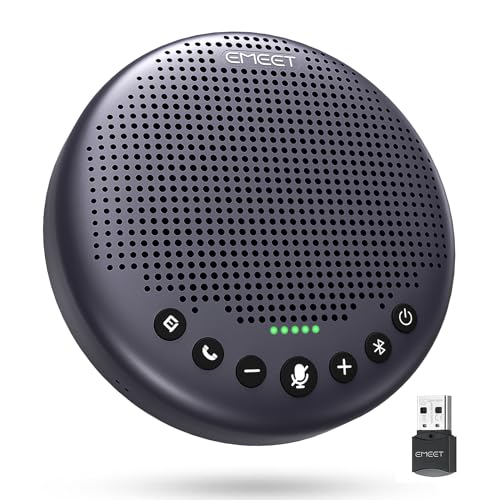
EMEET Luna Plus Conference Speakerphone (8 Mics)

Bluetooth Conference Speakerphone (360° 4-Mic, USB & Wireless)

EMEET Luna Plus Kit Conference Speakerphone (8+1 Mics)

EMEET M2 Max Professional Conference Speaker (4 Directional Mics)
The Picks, Examined More Closely
The Jabra Speak 410 is the kind of speakerphone you plug in once and forget about. It runs over a wired USB connection, so it draws power from your laptop and never asks to be charged before a call. The disc-shaped body sits flat on the desk or conference table, and a single integrated cable wraps neatly underneath when you need to pack it away.
For one or two people taking calls at a shared desk, the Speak 410 covers the basics without fuss. You will not find Bluetooth pairing or wireless freedom here, which is exactly the point. Jabra built this for softphone setups where reliability matters more than flexibility, and the simple USB approach keeps meeting starts quick and predictable.
The Helpful Details
- USB wired connection means no batteries, no pairing, and no dropouts in the middle of a call.
- Compact, low-profile design slips into a laptop bag without adding bulk.
- Omnidirectional 360-degree pickup captures voices from any seat around the table.
- Plug-and-play setup skips driver installs on most major softphone platforms.
Points To Keep In Mind
- Wired only, so your reach is limited by the USB cable length.
- Built for small groups; expect voices to thin out beyond roughly four people.
Made For
Solo professionals and small huddle spaces where a clean, no-fuss USB speakerphone beats wireless convenience.
Look Elsewhere When
The EMEET M3 fits better when wireless freedom and longer battery life matter more than a wired connection.
The EMEET M1A lands in that sweet spot where a small office does not want to overthink audio. It connects over USB-C with a bundled USB-C to USB-A adapter, which means older laptops and newer ones both work without a dongle hunt. Out of the box, it shows up as a plug-and-play audio device on most conferencing platforms.
Built-in omnidirectional microphones aim to grab voices from anywhere around the disc, while echo cancellation and noise reduction try to clean up background hum from HVAC systems or keyboard clatter. For a small huddle room or a shared desk where five to eight people lean in, it covers everyday call needs without taking up much space.
Strong Points
- USB-C with included USB-A adapter covers newer and legacy laptops out of the box.
- 360-degree mic array picks up voices from any side of the table.
- Fast-mute button on top keeps call control within reach.
- Noise reduction and echo cancellation aimed at typical home and small-office noise.
Trade Offs
- Wired only, so the unit stays tethered to the host laptop.
- Built for small groups; larger rooms will stretch the pickup past its comfortable range.
- Common user feedback notes occasional driver quirks on less common conferencing platforms.
Best Suited To
Small teams running quick daily standups from a shared desk who want a budget-friendly USB-C speakerphone.
Reach For A Different Pick When
The EMEET M0 Plus makes more sense if you want four dedicated mics in a similar wired form factor.
The M3 is built for people who do not stay in one room. It pairs over Bluetooth to a phone or laptop and runs on an internal battery, so you can pull it out of a bag, drop it on a hotel desk, and start a call without hunting for cables. The compact puck form factor takes up about as much space as a drink coaster.
A four-hour full charge is meant to deliver roughly eighteen hours of call time, which for most road warriors means several days of meetings between charges. Zoom certification signals that EMEET has validated the audio path with that platform, and the M3 also plays well with Teams, Skype, and most web meeting tools you are likely to encounter.
Notable Gains
- Bluetooth pairing frees the speakerphone from the laptop entirely.
- Long battery life covers a full day of back-to-back calls on a single charge.
- Compact body fits easily in a laptop sleeve or carry-on pocket.
- Zoom certification points to tested compatibility with the most common video platform.
Small Caveats
- Wireless use means you have to remember to charge it before travel days.
- Microphone reach favors smaller groups around a single table.
Perfect Match For
Frequent travelers and hot-deskers who need conference-quality audio without cables on the road.
Skip It When
The EMEET Luna Plus Kit fits better if you run larger conference room calls and need a satellite mic for broader pickup.
Where the M220 earns its place is in the daisy-chain feature, which lets two units link together to cover a wider room. A single M220 works fine for small meetings, but pairing a second one expands the effective meeting space without buying a full room system. That flexibility appeals to growing teams that do not want to replace their gear every time the headcount climbs.
On its own, the M220 is rated to handle groups of up to sixteen attendees in a single room, which already stretches past most home office and small conference room needs. Bluetooth connectivity keeps things wireless, and the included dongle makes pairing straightforward across laptops that do not always behave nicely with Bluetooth audio.
Key Advantages
- Daisy chain two units to cover a long or L-shaped meeting room.
- Single-unit capacity stretches up to sixteen attendees in one space.
- Included dongle helps laptops that struggle with native Bluetooth audio.
- Wireless design removes cable clutter from the conference table.
Honest Caveats
- You pay for daisy-chain capability you may not need for a single small room.
- Two-unit setup adds a step to meeting prep, since both speakers need pairing.
Whose Shelf It Belongs On
Growing teams whose meeting spaces may expand, or anyone running meetings in unusually shaped rooms.
A Better Fit Elsewhere
The EMEET Luna Plus Kit handles very large rooms better when a dedicated satellite mic is more practical than linking two units.
The M0 Plus is essentially a small puck that hides a four-microphone array inside. That matters because more mics, arranged in a ring, generally mean better voice pickup from any seat around the device. Combined with EMEET’s VoiceIA algorithm, the unit tries to separate voices from background noise rather than just boosting everything at once.
A 3-watt speaker pushes audio back out at a level that works for a small table or a quiet home office. You probably would not want to fill a boardroom with it, but for one or two people sharing a workspace, the size-to-performance ratio is the appeal. Compared to the M1A earlier in the list, the M0 Plus leans harder on its mic count than on extras like fast mute buttons.
Points In Its Favor
- Four-mic array improves pickup coverage compared to single or dual-mic designs.
- VoiceIA noise reduction aims to filter HVAC and keyboard noise from calls.
- Compact puck body fits small desks without crowding the workspace.
- Updated 2023 algorithm version targets clearer voice separation.
Less Ideal Details
- Speaker volume favors small rooms over larger spaces.
- Lacks the daisy-chain or satellite expansion some larger meetings may need.
Quick Facts
Who Will Love This
Small-space professionals who want more mic coverage in a compact footprint than a basic single-mic puck offers.
Consider Something Else When
The EMEET M1A covers similar ground with a USB-C focus if you prefer a more mainstream wired setup.
The Luna sits in that useful middle ground between a personal puck and a true boardroom unit. It targets meetings with up to eight people in the room, which matches a lot of small-team and family-office setups. EMEET’s VoiceIA noise reduction is doing real work here, since home environments tend to throw unpredictable sounds at a microphone: kitchen timers, dogs, neighbors, air purifiers.
The Luna is the kind of device you park in the middle of a small conference table and leave there. It does not shout about its specs, but it tends to make remote participants stop asking “what was that?” mid-call. If your home office has noise issues, that alone is worth paying attention to.
Well-Handled Touches
- VoiceIA noise reduction targets the specific background noise patterns found in home offices.
- Eight-user capacity fits small teams and family-style workspaces.
- Stable tabletop form factor stays put through long meetings.
- Echo cancellation helps keep double-talk from confusing the far end.
A Few Limitations
- Not designed for rooms larger than a small conference space.
- Fewer onboard mics than the step-up Luna Plus model.
Built With In Mind
Home-based professionals and small teams who need clean audio over noise reduction more than sheer volume.
Where A Sibling Pick Shines
The EMEET Luna Plus gives you twice the onboard mic count when your room or team grows.
The Luna Plus is the Luna with the microphone array turned up. Eight omnidirectional mics sit inside the unit, which gives it a much wider pickup zone than the standard Luna. EMEET rates it for up to ten attendees in a conference room, putting it squarely in the mid-size meeting space category.
That extra mic density does two things in real meetings. First, it raises the chance that quieter voices at the edges of the table still come through clearly. Second, it gives the noise reduction algorithm more signal to work with, which tends to improve how well it separates speech from background sounds.
Where It Delivers
- Eight-mic array covers ten-person meeting rooms more comfortably than the base Luna.
- Better voice pickup at table edges helps quieter participants get heard.
- Strong choice for growing teams that have outgrown a small huddle setup.
- Same tabletop form factor as the Luna, so it does not demand a bigger table.
Practical Considerations
- Pricier than the base Luna for what is mainly a mic-count upgrade.
- Overkill for solo or two-person setups where four mics already do the job.
- Common user reports mention an initial Bluetooth pairing step before first use.
The Right Fit
Mid-size teams that run meetings of six to ten people in a single dedicated conference space.
Swap It Out When
The EMEET Luna Plus Kit makes more sense for very large rooms where a satellite mic expands pickup further.
The AV Access speakerphone makes the wired-versus-wireless question easy: you do not have to choose. It supports Bluetooth 5.0 for wireless pairing and a USB-C cable for plug-and-play audio, which is the kind of flexibility that pays off in mixed-device offices where some people bring MacBooks and others bring older Windows laptops.
Inside, four omnidirectional microphones pick up voices from a range of about three meters, or roughly ten feet, which suits meetings of four to eight people. Echo cancellation, background noise reduction, and speech enhancement work together to keep voices intelligible in everyday rooms. Compared to the EMEET M0 Plus reviewed earlier, this model leans harder into dual connectivity.
Where It Helps
- Bluetooth 5.0 plus USB-C covers both wireless and wired workflows in one device.
- Four-mic pickup covers groups of four to eight people around a typical table.
- Speech enhancement aims to make quieter voices easier to hear on the far end.
- Compact build suits both permanent desks and occasional travel use.
Factors To Consider
- Microphone range tops out around three meters, so very large rooms remain a stretch.
- Some conferencing apps may need a manual device selection on first connect.
Who Should Grab It
Offices that run a mix of laptop types and operating systems and want one speakerphone that works for everyone.
Not Your Match When
The EMEET M2 Max is a better fit for very high-volume calls where directional mics add extra clarity.
The Luna Plus Kit adds a dedicated satellite microphone to the standard Luna Plus. That single addition changes the device’s room coverage from “good for a mid-size space” to “ready for a real boardroom.” The satellite mic can sit on a far end of the table to pick up voices that the main unit cannot comfortably hear.
EMEET positions the kit for groups of up to fourteen people in a single room, which puts it firmly in larger meeting territory. The main unit still carries its eight-mic array for core coverage, and the satellite extends that reach without forcing everyone to crowd around one spot on the table.
What Works In Its Favor
- Satellite mic extends pickup across long tables or L-shaped rooms.
- Combined 8+1 mic count covers up to fourteen attendees in one space.
- Useful for boardrooms where seating cannot easily move closer to the speaker.
- Builds on the proven Luna Plus platform rather than introducing a new design.
Some Limits To Know
- Bigger investment than a single-unit speakerphone, which may be excessive for small rooms.
- Extra component to manage, store, and remember to set out before meetings.
Feature Card
Right Fit For
Larger organizations running meetings of ten or more people in a single dedicated conference room.
Another Choice May Suit
The EMEET M220’s daisy chain works well when you want two linked units instead of a dedicated satellite mic.
The M2 Max is the unit you reach for when call volume matters. Four directional microphones, each ten millimeters across, sample at a rate of 48 kHz, which is closer to what you see in DVD and professional audio gear than in a typical office speakerphone. That higher sampling rate tends to capture more of the texture in a voice, especially when people speak softly or overlap.
Rated for groups of up to fifteen attendees, the M2 Max sits at the top of the EMEET lineup and competes with other professional-grade setups. The included daisy-chain dongle and high-volume output make it suitable for larger rooms where a small puck simply would not cut it.
Useful Highlights
- 48 kHz sampling captures voice detail that lower-rate mics tend to flatten.
- Four large directional mics support meetings of up to fifteen attendees.
- High-volume output fills larger rooms more confidently than smaller pucks.
- Daisy-chain dongle supports expanded room coverage when needed.
Worth Bearing In Mind
- Larger footprint than compact pucks like the M0 Plus reviewed earlier.
- Directional design favors well-seated groups over scattered desk arrangements.
- Common user feedback notes the dongle takes a moment to seat before first use.
Best Suited To
Larger teams and boardroom setups that need higher-fidelity voice capture than everyday conference pucks provide.
Not Your Match When
The EMEET M0 Plus is the better compact call for solo and small-group users who do not need the extra volume.
What To Weigh Before Choosing A Conference Call Mic
Match The Speakerphone To The Room, Not The Spec Sheet
The single biggest factor is the size of the room and how many people actually sit around the table. A four-mic puck sounds great in a home office and disappears in a twelve-person conference room. Manufacturers rate each unit for a maximum attendee count, and that rating is a more useful starting point than raw microphone numbers. Think about the typical meeting, not the worst-case one.
Decide Between Wired And Wireless Early
A USB-only speakerphone draws power from your laptop and skips the battery question, which suits permanent desk setups. A Bluetooth or dual-connect model gives you cable-free placement and easier device switching, which suits travelers and shared rooms. Picking the wrong one usually means living with a daily annoyance, not a deal-breaker.
Look At Noise Reduction, Not Just Pickup Range
Omnidirectional pickup (mics that capture sound equally from every direction) is table stakes now, but noise reduction algorithms vary widely. VoiceIA-style processing, echo cancellation, and speech clarity tools determine how the speakerphone handles HVAC hum, keyboard clicks, and overlapping talkers. For noisy home offices, that processing often matters more than one extra microphone.
Key Considerations Across These Picks
Pitfalls Shoppers Hit
The most common mistake is buying for a meeting room you do not actually have. Many shoppers grab a high-end boardroom unit for a home setup and end up paying for capacity they never use. The reverse happens too: picking the smallest puck for a room of ten people and spending every meeting asking people to repeat themselves. Match the device to your real room size first.
Why Top Tier Costs More
Higher-tier speakerphones add cost through more microphones, better noise reduction algorithms, and higher sampling rates like the 48 kHz setup on the M2 Max. That extra hardware and processing translates into cleaner voice capture at greater distances and in noisier rooms. The upgrade is worth it when your calls happen in larger spaces or with audio quality that genuinely affects outcomes.
Frequently Asked Questions
How Many Microphones Do I Really Need In A Conference Speakerphone?
For one or two people, two to four microphones handle everyday calls without strain. Groups of six to ten benefit from eight-mic arrays for cleaner pickup at table edges, and rooms of twelve or more usually want a satellite or daisy-chain setup to cover the full space.
Are Bluetooth Conference Speakerphones Reliable Enough For Daily Use?
Modern Bluetooth 5.0 models hold a stable connection across typical office distances and battery life has improved sharply in recent years. The trade-off is that you have to remember to charge them, and some laptops handle Bluetooth audio less gracefully than a wired USB connection.
What Is Daisy-Chaining And When Does It Matter?
Daisy-chaining links two speakerphones together so they act as one extended audio system across a longer table or a larger room. It matters most for L-shaped rooms or growing teams that are not ready to invest in a full installed conference system.
Do I Need Zoom Or Teams Certification To Use A Speakerphone?
Certification signals that the manufacturer has validated the audio path with a specific platform, which can reduce setup quirks. Most modern speakerphones work fine across Zoom, Teams, Webex, and Google Meet without certification, but certified models tend to “just work” with fewer manual device selections.
Can A Conference Speakerphone Replace A Headset?
For solo calls in a quiet room, a headset still tends to deliver better voice clarity and fewer distractions. Speakerphones earn their place when multiple people need to talk, when hands-free matters, or when a room fills with participants that no single headset can cover.
The Takeaway
The right conference speakerphone depends less on chasing the longest spec list and more on the room you actually use every day. Match the unit to your group size, weigh wired against wireless honestly, and pay attention to noise reduction if your environment is busy. With those three filters in place, any of the picks above should make your meetings sound noticeably more professional.