Modern meetings keep moving online, and the gap between a productive video call and a frustrating one usually traces back to audio. The right conference microphone pulls voices forward, softens keyboard taps, and stops the far end from saying “sorry, you cut out.” Whether you host from a converted bedroom office or run a small huddle room, your mic choice shapes every conversation.
This roundup focuses on speakerphones and dedicated meeting microphones built for shared spaces. Each option below fits a different room size, team size, and connection style, so you can pick the one that matches how you actually meet.
The Main Contenders

Jabra Speak 410 Corded Speakerphone for Softphones

Audio-Technica AT2020USB+ Cardioid Condenser USB Microphone

EMEET M0 Plus Conference Speaker and Microphone

EMEET Luna Conference Speaker and Microphone

EMEET Luna Plus Kit Conference Speaker and Microphone

Bluetooth Conference Speakerphone 360° 4-Mic Pickup

Yealink Sp92 Conference Speaker and Microphone Teams Certified
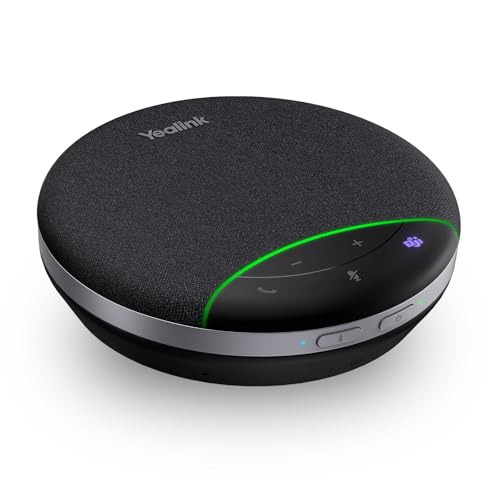
Yealink SP92 USB Speakerphone Bluetooth Conference Speakers and Microphone
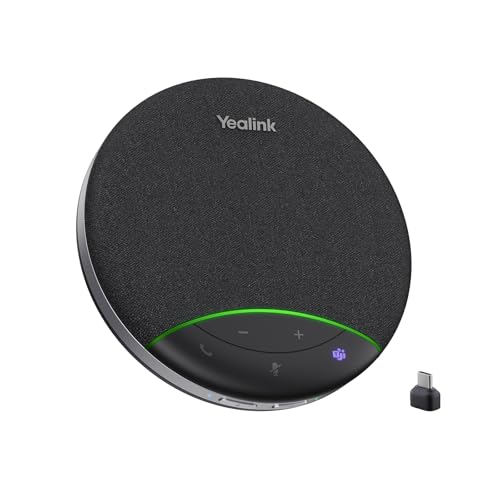
Yealink Sp92 Conference Speaker and Microphone with Bluetooth Dongle

Yealink SP92 Bluetooth Speaker and Microphone with Dongle
For a one-person office or a quick call from the kitchen table, the Jabra Speak 410 is the definition of plug-and-play. The 360-degree omni mic captures voices from any angle around the disc, so you can lean back or pace without worrying about where you sit.
Its USB cable means there’s no battery to charge and no Bluetooth pairing to wrestle with. Setup is genuinely instant on modern softphones. If you host short, focused calls and want zero friction, this is the most dependable baseline.
Noteworthy Benefits
- Truly plug-and-play with no drivers required on most platforms
- 360-degree pickup makes seat position irrelevant
- Compact disc footprint slips into a laptop bag
- No battery anxiety, ever, since it draws power over USB
Things To Consider
- Corded design limits where you can place it on a large table
- Not built for groups larger than a handful of people around one desk
- Audio lacks the richer bass of larger speakerphones
Quick Facts
Right Fit For
Solo professionals who host frequent one-on-one calls and value simplicity over bells and whistles.
Consider Something Else When
You run meetings with multiple people around a table, where the Audio-Technica AT2020USB+ offers a stronger single-voice capture for a presenter-style setup.
The Audio-Technica AT2020USB+ isn’t a 360-degree conference mic. It’s a studio condenser, which means it zeroes in on one voice with startling clarity. If your “meeting room” is a single presenter broadcasting to a large remote audience, that focused pickup is a feature, not a flaw.
The cardioid pattern (heart-shaped pickup that favors sound in front while rejecting noise from the back and sides) keeps keyboard clicks and HVAC hum off your stream. The built-in headphone jack with volume control lets you monitor your own voice in real time, which most office workers underestimate until they try it.
Where It Helps
- Studio-grade articulation that flatters the spoken voice
- Zero-latency monitoring through the headphone jack
- Cardioid rejection quiets ambient room noise dramatically
Worth Noting
- Single-direction pickup is wrong for group calls around a table
- Requires a stand or boom arm, which is sold separately
Feature Snapshot
Best Suited To
Presenters, podcasters, and trainers who run one-person broadcasts and want broadcast-style vocal clarity.
Look Elsewhere When
You host group discussions, since the EMEET M0 Plus with its four-mic array is built for shared-table conversations.
The M0 Plus packs four directional microphones into a palm-sized puck, which is plenty for a small huddle room with four to six participants. EMEET’s updated VoiceIA algorithm shapes audio on the fly, pulling voices forward and trimming echo. Compared to the Jabra Speak 410’s single omni element, this is a real step up for group calls.
It links through USB or Bluetooth, so it adapts to a laptop in the office or a phone on the road. Owners commonly report that the noise suppression holds up well against air conditioning hum and the click of mechanical keyboards.
A Few Strong Suits
- Four-mic array picks up voices evenly from any seat
- Dual USB and Bluetooth connection covers laptop and phone workflows
- 3W speaker output fills a small room without distortion
Small Caveats
- Best suited to small rooms rather than larger conference spaces
- Charging port and cable placement can be awkward on some desks
Who Will Love This
Small teams that need an affordable upgrade from a laptop mic without investing in a full boardroom setup.
Another Choice May Suit
Mid-size conference rooms with eight or more attendees, where the EMEET Luna offers broader pickup coverage.
The Luna is the workhorse of EMEET’s speakerphone line. Its eight-element mic array captures up to eight participants seated around a conference table, while the VoiceIA noise reduction targets the usual suspects: keyboard clicks, HVAC drones, and the rustle of a paper notebook. For most growing teams, it’s the right size.
Plug it in over USB and it shows up as an audio device instantly. The onboard daisy-chain port lets you link two Lunas together, which extends pickup if your meeting room expands. Owners note that the touch controls feel responsive and the unit stays cool during long calls.
Useful Strengths
- Eight-mic array supports full-table conversations
- VoiceIA filtering handles common office background noise
- Daisy-chain option scales with room size
- Touch controls are quick and responsive
Points To Note
- Wired USB connection keeps it tethered to a single workstation
- Daisy-chain cable is an extra accessory for scaling up
Perfect Match For
Teams of six to eight people running daily standups in a dedicated conference room.
Swap It Out When
You need wireless flexibility for a hybrid setup, where the AV Access Bluetooth speakerphone brings USB-C and Bluetooth in one unit.
The Luna Plus Kit is the Luna’s bigger sibling, paired with a dedicated satellite mic that stretches coverage out to fourteen participants. Where the standard Luna stays centered on one table, the satellite lets you extend pickup to a second cluster of seats. It’s the closest thing in this list to a full boardroom setup without going pro AV.
The main unit still houses eight omnidirectional mics, so it carries the same VoiceIA noise filtering that handles air conditioning and chatter well. For companies that host mixed in-person and remote meetings all day, the extra reach is worth the kit.
Positive Takeaways
- Satellite mic extends pickup to fourteen people across the room
- Same reliable VoiceIA filtering as the standard Luna
- Modular approach scales with your real room layout
Honest Caveats
- Two units mean more cables to manage during setup
- Overkill for small huddle rooms
Whose Shelf It Belongs On
Growing teams moving into a larger conference room who want one kit instead of piecing together separate pieces.
Not Your Match When
You’re running a small team of four or five, where the EMEET M0 Plus is the leaner, simpler choice.
The AV Access speakerphone is built around one promise: connection flexibility. With USB-C and Bluetooth 5.0 on board, it pivots from a wired laptop call to a wireless phone call in seconds. The four-mic array covers a roughly ten-foot radius, so a meeting of four to eight around a small table feels natural.
Echo cancellation and speech enhancement work together to keep voices centered while trimming the room. For people who bounce between their laptop and a mobile device throughout the day, this is one of the most adaptable options on the list.
What Helps Most
- Bluetooth 5.0 reduces dropouts during wireless calls
- USB-C connection future-proofs modern laptops
- Echo cancellation tightens up hollow-sounding rooms
Trade Offs
- Four-mic pickup range is shorter than the eight-mic Luna
- Battery life varies with how aggressively noise suppression is used
Made For
Hybrid professionals who switch between a laptop for video calls and a phone for quick standups throughout the day.
A Better Fit Elsewhere
Larger dedicated conference rooms with consistent AC noise, where the EMEET Luna’s stronger noise filtering is a real advantage.
The Yealink SP92 is the first entry in this roundup designed with Microsoft Teams in mind. Its AI noise cancellation targets a thousand-plus background noise profiles in real time, which means the typing of a quiet colleague no longer pulls focus from the speaker. With Teams certification, the experience on that platform is smoother than uncertified alternatives.
Inside is a 50mm speaker driver paired with an omnidirectional mic covering a thirteen-foot radius, sized for four to eight people. The twenty-hour call time also makes it a strong fit for roaming professionals who don’t want to babysit a battery between meetings.
What Stands Out
- Teams certification streamlines controls on that platform
- AI filtering tackles a wide library of common distractions
- 20-hour call time covers multiple workdays per charge
- 50mm driver delivers fuller audio than smaller puck speakers
Some Limits To Know
- Pricier than basic USB-only speakerphones
- Best suited to small meeting rooms rather than auditoriums
Who Should Grab It
Mobile professionals living in Teams calls all day who want a long-lasting battery and refined AI filtering in one package.
Reach For A Different Pick When
You mainly host occasional calls from a desk and don’t need extended battery life, where the Yealink SP92 wired version keeps things simpler.
This SP92 variant keeps the audio engine of its sibling but leans into a wired USB connection for simplicity. You skip the battery management entirely, which suits a fixed desk or a shared hot-desk arrangement where someone else might forget to charge the wireless version.
The 50mm speaker and AI noise reduction stay intact, so the call quality holds up against the more expensive Teams-certified unit. For everyday office use without the roaming demands, this is the most practical Yealink option in the line.
The Practical Payoff
- No battery to manage, ever
- Same 50mm driver and AI filtering as the wireless SP92
- Lower cost than the Teams-certified variant
Points To Keep In Mind
- USB cable limits speaker placement around a large room
- Lacks the official Teams badge for one-tap call controls
The Right Fit
Office workers who run daily calls from the same desk and want Yealink audio quality without the wireless markup.
Skip It When
You move between meeting rooms all day, where the Yealink SP92 with Bluetooth Dongle offers reliable wireless without giving up audio fidelity.
This version ships with a dedicated Bluetooth dongle, which is more than a free accessory. A dongle bypasses the slightly flaky Bluetooth stack inside some laptops and gives you a stable wireless link with consistent audio quality. For shared workspaces where reliability matters more than elegance, this is a quietly important difference.
It covers a thirteen-foot pickup radius, runs about twenty hours per charge, and carries Teams certification. Compared to the basic Bluetooth AV Access unit earlier in this list, this one trades flexibility for a tighter, more predictable wireless experience.
Everyday Perks
- Included dongle offers a more stable wireless link than built-in laptop Bluetooth
- Teams certification delivers native integration on Microsoft platforms
- 20-hour battery supports back-to-back meetings
Where It Is Less Suited
- Dongle occupies a USB port you might need elsewhere
- Setup is slightly more involved than the wired SP92
Built With In Mind
Shared offices and hybrid teams that want a stable, dongle-based wireless connection without sacrificing audio quality.
Where A Sibling Pick Shines
Roaming solo presenters who need a single unit that travels cleanly, where the Yealink SP92 with Dongle variant bundles more features for on-the-go use.
The top-tier SP92 layers full-duplex audio on top of the same AI filtering, meaning both sides of a call can speak and be heard at the same time without the walkie-talkie chop. Full duplex is a real upgrade for natural conversations, especially in brainstorming sessions where people interrupt and overlap constantly.
Virtual bass tuning from the 50mm driver also makes the unit pull double duty as a casual desk speaker between calls. With Teams certification, a Bluetooth dongle, and USB-C and USB-A support, it covers every connection you might realistically need in a busy 2026 office.
Strengths Worth Knowing
- Full-duplex audio removes choppy interruptions during lively discussions
- Virtual bass adds warmth for music playback between calls
- USB-C and USB-A support covers older and newer laptops
- 13-foot pickup radius suits mid-size meeting rooms
Practical Considerations
- Highest price in the Yealink SP92 lineup
- Full-duplex works best when paired with a stable network connection
Who It Suits Best
Teams that host dynamic, overlapping conversations and want a premium speakerphone that doubles as a desk audio source.
Consider Something Else When
Budget matters more than feature depth, where the wired Yealink SP92 delivers similar audio quality at a lower tier.
What Matters Most Before Choosing Mics For Meeting Room
Match The Mic Array To Your Room Size
A 360-degree omnidirectional mic is the heart of any meeting room speakerphone. Single-element designs like the Jabra Speak 410 work for solo callers, but the moment you add a second voice across the table, you want at least four pickup elements. Larger rooms benefit from eight or more. The number of mics matters more than any single spec sheet claim because it determines whether someone seated at the far end of the table gets heard at normal speaking volume.
Look For Real Noise Reduction, Not Just Marketing
Background noise filtering varies wildly between models. Basic echo cancellation trims the worst reverb, but AI-driven filtering like EMEET’s VoiceIA or Yealink’s AI noise cancellation actively identifies and removes specific noise patterns. If your office has air conditioning, mechanical keyboards, or a busy street outside the window, the quality of that filter shapes every minute of every call. In our view, this single feature separates a usable speakerphone from a frustrating one.
Prioritize Connection Flexibility
USB remains the most reliable wired option, but Bluetooth 5.0 (the latest Bluetooth standard, offering longer range and more stable connections than older versions) and included dongles unlock real flexibility for hybrid workers. Teams-certified models add one-tap controls on Microsoft platforms, which saves a few seconds per meeting but adds up over weeks.
Balance Battery Versus Wired Use
Twenty-hour battery life sounds appealing, but if you always work at the same desk, a wired unit removes the hassle of charging. Mobile workers benefit from long battery life, while desk-bound teams can save money and complexity with a plug-in model.
Practical Notes Across These Picks
Common Shopping Slip Ups
The most common error is buying a single-direction mic like the Audio-Technica AT2020USB+ for group calls. It sounds incredible for one voice, but it fails the moment a second person joins from across the table. Another frequent mistake is ignoring room acoustics, since a great mic in a hard, echoey room still sounds distant. Soft furnishings and wall coverings do more than any spec sheet can promise.
Why Top Tier Costs More
Higher-tier models like the Yealink SP92 with Dongle add full-duplex audio, larger speaker drivers, and richer AI noise libraries. You pay for the ability to handle overlapping speech naturally and to filter a wider range of distractions. For most small teams, the value tier covers daily needs, but if your meetings involve rapid back-and-forth or happen in noisy environments, the upgrade earns its place through calmer calls and fewer “sorry, go ahead” moments.
Frequently Asked Questions
How many mics do I need for a small meeting room?
For four to six people around a single table, four-mic arrays like the EMEET M0 Plus handle the pickup well. Larger rooms of eight or more benefit from eight-mic designs such as the EMEET Luna or Yealink SP92 line.
Is Teams certification worth the extra cost?
If you spend most of your day inside Microsoft Teams, certification delivers smoother one-tap controls and predictable behavior. If you split time across Zoom, Google Meet, and other platforms, uncertified models often perform just as well for audio quality.
Can I use these speakerphones for music between calls?
The 50mm drivers in the Yealink SP92 models handle casual music playback surprisingly well. Smaller puck-style speakers focus on voice clarity, so they sound thinner on bass-heavy tracks.
Do Bluetooth speakerphones have audio delay?
Modern Bluetooth 5.0 speakerphones add minimal delay, but some lag can still show up during video calls. For the most consistent experience, a wired USB connection or a dedicated dongle remains the safer pick.
How long do these mics typically last?
Conference speakerphones are built for daily office use, and owners commonly get several years of service from major brands. Battery-equipped units may see battery capacity drop after two to three years of heavy daily charging.
Wrap Up
Your meeting room microphone shapes how your team sounds on every call, and the right pick depends on your room size, team habits, and platform of choice. Solo callers will find plenty to love in simpler wired options, while growing teams benefit from multi-mic arrays and AI filtering. Take a moment to match the pickup range and connection style to your real workflow, and your next meeting will sound noticeably sharper.