Setting up a printer at home used to mean a bulky laser box tethered to a desktop. Today’s options span compact inkjets with photo-quality output, refillable supertank systems that slash ink costs, and dedicated photo printers that turn phone snapshots into keepsakes. The right pick depends on whether you mostly print schoolwork and tax forms, or you want vibrant color prints without a trip to the shop.
This roundup covers eight solid options across inkjet, laser, and photo categories. Each one is sized for a real home, not a corporate copy room. Read on to find the machine that matches how you actually print.
An Overview Of The Picks
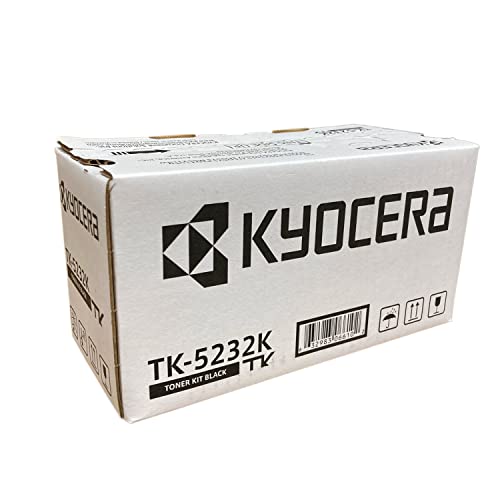
KYOCERA TK-5232K Black Toner Cartridge

Canon PIXMA TR4720 All-in-One Wireless Printer

Brother HL-L6200DWT Monochrome Laser Printer

Canon SELPHY CP1300 Wireless Photo Printer

Liene Amber M110 Bluetooth Photo Printer

KYOCERA ECOSYS P5021cdw Color Laser Printer

Epson EcoTank ET-2980 Supertank Printer
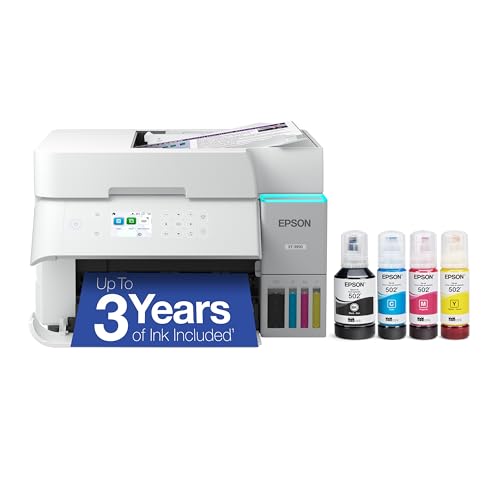
Epson EcoTank ET-3950 Supertank Printer
The Strengths Of Each Pick
If you already own a Kyocera ECOSYS P5021cdw or M5521cdw, this black toner cartridge is the factory-made replacement that keeps the machine running as designed. It slots into the same bay and the printer recognizes it without firmware tricks. In a busy home office that relies on the Kyocera for daily documents, this is the cartridge you reach for when the “toner low” warning finally appears.
Unlike the printers later in this list, the TK-5232K isn’t a standalone device; it’s a consumable. The genuine OEM build (original equipment manufacturer, meaning made by Kyocera rather than a third party) matters because Kyocera printers track toner via embedded chips, and off-brand cartridges sometimes trigger compatibility alerts. For owners of the matching hardware, the choice between this and a third-party refill is essentially a choice between predictable performance and a slightly lower upfront cost.
Useful Touches
- Factory-engineered for the P5021cdw and M5521cdw, so firmware detection works without workarounds.
- Clean black output rated for office-quality text on standard copy paper.
- Single-cartridge swap keeps maintenance simple, no separate drum to handle.
- Authentic Kyocera formulation tends to protect the long-life drum components inside the printer.
Points To Note
- Only useful if you already own one of the two compatible Kyocera models.
- Genuine OEM cartridges typically cost more per page than third-party alternatives.
- Yield is modest for a home office that’s churning through long reports, so you may swap it more often than you’d like.
Right Fit For
Owners of a Kyocera ECOSYS P5021cdw or M5521cdw who want a no-fuss, factory-matched replacement toner.
Where Another Pick Suits Better
Shoppers who don’t already own a compatible Kyocera printer should look at the Canon PIXMA TR4720 for a complete home unit.
Where the Kyocera toner is a single-purpose refill, the Canon PIXMA TR4720 is a full four-function machine that handles print, copy, scan, and fax in a footprint suited to a kitchen counter or a small desk shelf. Setup runs through the Canon PRINT Inkjet/SELPHY app, which walks you through Wi-Fi connection in a few taps. For a household that needs one device to do almost everything, the TR4720 covers a lot of ground without dominating the room.
The auto document feeder (ADF) sits on top and feeds multi-page sheets through the scanner, which is the kind of feature that matters when you’re scanning a stack of school permission slips or copying a few pages of a lease. Mobile printing support means you can send a doc from a phone on the couch. Compared with the Kyocera toner cartridge above, the TR4720 is the whole package, not just a replacement part.
A Few Highlights
- Genuine four-in-one design with print, copy, scan, and fax in a single compact body.
- Auto document feeder handles multi-page scan and copy jobs without babysitting.
- Wireless and mobile printing through the Canon app, useful when the laptop is closed.
- Cartridge replacement is straightforward, and the design clearly indicates where the tanks sit.
Trade Offs
- Standard inkjet cartridges cost more per page than the EcoTank models later in this list.
- Print speed lands in the casual range, fine for homework, slow for long documents.
Feature Snapshot
Who It Suits Best
Families and home office workers who want a single compact machine for printing, scanning, copying, and the occasional fax.
Look Elsewhere When
High-volume color printing at low per-page cost points toward the Epson EcoTank ET-3950 instead.
The Brother HL-L6200DWT is a different kind of animal than the Canon TR4720 above. It’s a workgroup-class monochrome laser (a printer that uses toner and a heated fuser, printing only in black) built for sheer throughput on plain paper. Dual paper trays, automatic duplex, and wireless networking make it suited to a household that prints dozens of pages a day, contracts, manuscripts, lesson plans, or a side-business invoicing stack.
The trade-off is that “monochrome” is the operative word. There’s no color output here, and there’s no scanner. If your printing life is mostly black text and you refill paper less often than you refill a coffee mug, the L6200DWT rewards that pattern. For photo printing or the odd school project with color illustrations, you’ll still want a separate inkjet or photo printer.
Good Reasons To Consider
- Automatic two-sided (duplex) printing saves paper and reduces reloading.
- Dual paper trays hold substantial stock, so you don’t babysit refills.
- High-yield replacement toner options keep the per-page cost low for heavy workloads.
- Wireless networking lets the whole household send jobs from any device.
Honest Caveats
- Monochrome only; no color pages, no scanning, no copying.
- The chassis is larger and heavier than typical home inkjets, so plan shelf space.
Made For
Text-heavy home offices, freelance writers, tutors, and small home businesses that print hundreds of black-and-white pages a month.
Skip It When
You need color or scanning built in; the Canon PIXMA TR4720 handles those without a second machine.
Stepping away from document printers, the Canon SELPHY CP1300 is built to do one thing well. It uses dye-sublimation technology, which means heat turns a solid dye into a gas that bonds to the paper, producing continuous-tone prints (no visible dots) rather than inkjet dots. The result is a small, glossy photo that feels closer to a lab print than to something out of an office machine.
For a household that mostly archives digital photos on a phone or cloud and only occasionally wants something physical, the CP1300 is sized to live on a bookshelf and pull out when needed. It accepts several paper sizes, from 2.1 by 2.1-inch square labels up to 4 by 6-inch postcards, which makes it handy for scrapbookers and gift-givers. Compared with the Liene photo printer later in this list, the SELPHY leans toward a more polished, slightly slower print experience.
Positive Points
- Dye-sublimation output yields smooth, lab-like photos rather than visible ink dots.
- Supports multiple print sizes, including 4×6 postcards and smaller sticker formats.
- Built-in editing options such as red-eye correction and skin smoothing, useful before printing.
- Compact body fits on a shelf or in a drawer between uses.
Things To Consider
- Dedicated photo paper and ink cartridges are required, so running costs are higher than a standard inkjet.
- Print speed is measured in seconds per photo, fine for occasional use, slow for batches of dozens.
Quick Facts
Perfect Match For
Memory keepers, scrapbookers, and families who print photos occasionally and want lab-style quality at home.
Not Your Match When
You print mostly documents and want a do-it-all machine; the Canon PIXMA TR4720 is a better fit there.
The Liene Amber M110 is a Bluetooth photo printer designed for the way most people actually take photos today: on a phone. It bundles a generous starter pack of 60 sheets of 4×6 paper, 20 sheets of 3-inch square sticker paper, and two cartridges right in the box, so you can start printing the same day you unbox it. For a teen’s bedroom or a living room side table, that’s a meaningful head start.
Like the Canon SELPHY, this is a thermal dye-sublimation printer, so output looks like continuous-tone photos rather than dotty inkjet prints. The dual paper tray inside the body handles both the standard 4×6 sheets and the smaller 3-inch sticker paper without swapping trays. Compared with the SELPHY above, the M110 leans younger, more app-driven, and more oriented to social-media-style prints.
The Helpful Details
- Starter pack includes 60 sheets of 4×6 photo paper, 20 sheets of 3-inch stickers, and 2 cartridges.
- Bluetooth connection keeps the workflow phone-first, no Wi-Fi network needed.
- Dual paper tray handles standard and sticker paper without manual tray swaps.
- Compact frame fits on a desk or shelf without dominating the space.
Softer Spots
- Bluetooth-only connectivity may be limiting if your household prefers Wi-Fi printing from laptops.
- Proprietary cartridges and paper mean ongoing supply costs add up with frequent use.
Whose Shelf It Belongs On
Teens, crafters, and journalers who want to print phone photos and stickers without a computer in the loop.
Another Choice May Suit
Anyone wanting a wider range of print sizes and built-in editing should consider the Canon SELPHY CP1300.
The Kyocera ECOSYS P5021cdw is the printer that the toner cartridge at the top of this list belongs to. It’s a compact color laser (meaning it uses toner and a heated fuser to print in full color) designed for the home or small office that needs sharp, professional-looking output on plain paper. Print speed reaches up to 22 pages per minute in both black and color, which is comfortably faster than the inkjet options earlier in this list.
Built-in Wi-Fi, gigabit Ethernet, and Apple AirPrint support make the P5021cdw flexible about how it receives jobs. The Kyocera ECOSYS approach emphasizes long-life consumables and low waste, which matters if you’re sensitive to the running cost of color toner. Compared with the Brother HL-L6200DWT above, this machine trades raw monochrome speed for the ability to print in color when needed.
Where It Helps
- Color laser output handles marketing materials, charts, and color documents cleanly.
- Up to 22 pages per minute in both black and color keeps jobs moving.
- Wireless plus gigabit Ethernet covers home network and small-office setups.
- Apple AirPrint support sends jobs from iPhone and iPad without extra software.
Points To Keep In Mind
- Color toner replacement costs run higher than the EcoTank refill bottles on the Epson models below.
- No scanner or copier built in, so document handling still needs a separate device.
Feature Rundown
Best Suited To
Home-based businesses and prosumers who print crisp color documents and value fast, duplex output.
Where A Sibling Pick Shines
Households prioritizing low-cost color ink over laser speed are better served by the Epson EcoTank ET-3950.
The Epson EcoTank ET-2980 is where this roundup shifts from cartridge-based machines to refillable ink tank systems, sometimes called supertank printers. Instead of swapping small plastic cartridges, you top up built-in reservoirs from ink bottles, which dramatically lowers the per-page cost over the life of the printer. For a family that’s tired of “ink low” warnings derailing homework, that difference alone is worth the switch.
The ET-2980 covers print, scan, and copy in one body, and its wireless setup lets the whole household send jobs from phones, tablets, and laptops. Compared with the Kyocera color laser above, the ET-2980 trades toner-crisp speed for ink-tank economy. It’s the kind of machine that rewards steady use; the more you print, the more the refillable system pays for itself.
The Practical Payoff
- Refillable ink tanks replace cartridges and significantly reduce long-term ink cost.
- All-in-one design handles print, scan, and copy without extra devices.
- Wireless connectivity supports phones, tablets, and laptops from anywhere in the home.
- EcoTank models are widely reported to run for long stretches between refills.
Possible Compromises
- Upfront price is higher than cartridge-based inkjets, even if running costs are lower.
- Print speed is modest compared to the laser options earlier in this list.
Who Should Grab It
Everyday family printers who want low-cost color output and the convenience of an all-in-one without subscription ink.
Swap It Out When
You want higher-volume supertank performance and faster output; the EcoTank ET-3950 steps up from here.
The Epson EcoTank ET-3950 is the higher-trim sibling to the ET-2980 above, aimed squarely at busy families and home offices that print across the week. It carries the same refillable ink tank approach, so per-page ink cost stays low, but it layers on faster output, larger paper handling, and stronger wireless features. For a household where the printer is in near-daily use, the upgrade over the ET-2980 tends to show up in the small things: less waiting, fewer refills, more flexibility.
Like the other EcoTank in this list, the ET-3950 includes print, scan, and copy in one body. Where it differs from the cartridge-based Canon PIXMA TR4720 is the long-term ink math. Bottles of ink cost more up front than cartridges but last dramatically longer, which changes the ownership story over a couple of years. For a household printing a few hundred pages a month, the refillable system pulls ahead.
Strong Points
- Refillable ink tanks deliver very low per-page color cost, ideal for high-volume homes.
- Stepped-up print speed and paper capacity handle busy weekly workloads comfortably.
- All-in-one design covers print, scan, and copy in a single countertop unit.
- Wireless setup supports phones, tablets, and laptops across the home network.
Potential Drawbacks
- Upfront price is the highest among the home inkjet options in this roundup.
- Refilling tanks requires a steady hand and a small amount of counter space during the refill.
Who Will Love This
Busy families and home office workers who print frequently and want low running costs without sacrificing speed.
Reach For A Different Pick When
Print volume is light and a smaller machine will do; the EcoTank ET-2980 keeps the same ink system at a friendlier price.
What Matters Most Before Choosing Copy Machines For Home Use
Match The Printer To The Job
The biggest decision is what you’ll actually print most often. Pure text documents lean toward a monochrome laser like the Brother HL-L6200DWT. Mixed schoolwork, color charts, and the occasional photo point to an inkjet. Frequent photos only? A dedicated dye-sublimation printer like the Canon SELPHY CP1300 or Liene Amber M110 keeps the rest of your ink budget untouched. Choosing by use case saves both desk space and running cost.
Ink Or Toner, And The Refill Math
Cartridge-based inkjets (where you swap small plastic tanks of liquid ink) feel cheap at purchase but sting over time. Toner-based lasers (which use dry powder fused to the page with heat) cost more up front but print many more pages per cartridge. Supertank printers split the difference, with a higher initial price and dramatically lower per-page ink cost, which is why the Epson EcoTank models sit where they do in this roundup.
Size, Noise, And Connectivity
Measure the spot you have in mind before ordering. A laser like the Brother HL-L6200DWT or Kyocera P5021cdw is larger than a typical inkjet. Wireless setup matters more than it used to: most households now print from phones, so AirPrint, Wi-Fi, and app-based setup (the kind Canon and Epson lean on) save daily friction. You may find the noise level more noticeable in a quiet home office than in a busy kitchen, so placement matters as much as spec.
Where Shoppers Go Wrong
Buying On Sticker Price Alone
The cheapest printer in the aisle often carries the priciest ink. Comparing total cost of ownership (the printer’s purchase price plus what you’ll spend on ink or toner over its life) over a year or two reveals which machines really save money. Supertank printers like the EcoTank ET-2980 and ET-3950 look expensive at first glance but typically pay that back through cheaper ink.
Ignoring Paper Handling
A single-sheet feeder is fine for one-off prints, painful for a stack of invoices. Auto document feeders, duplex (two-sided) printing, and dual paper trays (like those on the Brother L6200DWT and Kyocera P5021cdw) save real time when the workload climbs. Match the hardware to the workload, not the other way around.
What The Higher Tier Buys
Speed, Capacity, And Lower Running Cost
Stepping up from an entry inkjet to a mid-range supertank or color laser typically gets you faster pages, larger paper capacity, and noticeably lower cost per page. For a household printing a few hundred pages a month, the upgrade often pays back through ink savings within a year. The EcoTank ET-3950 over the ET-2980, or the Kyocera P5021cdw over a basic inkjet, are both upgrades where the math works out for frequent users.
Build Quality And Longevity
Higher-tier models also tend to use longer-life internal components and sturdier paper paths, which matters when the printer sits on a counter in daily use. For a family planning to keep the same machine for several years, the upfront premium is a hedge against midlife breakdowns. For a light user, the entry tier is usually the smarter spend.
Frequently Asked Questions
Do Home Printers Need Wi-Fi To Be Useful?
Most modern home printers work best with Wi-Fi because so much of what you print now starts on a phone or tablet. Models like the Canon PIXMA TR4720 and Epson EcoTank ET-2980 are built around wireless workflows. A few specialty photo printers, like the Liene Amber M110, lean on Bluetooth instead, which works fine for phone-to-printer jobs.
Are Supertank Printers Worth The Higher Upfront Cost?
Supertank printers (which store ink in large refillable reservoirs rather than small cartridges) usually pay for themselves through cheaper ink if you print regularly, roughly a few dozen pages a week or more. Light users who print a handful of pages a month may not see the savings fast enough to justify the higher purchase price.
Can One Printer Handle Documents And Photos Well?
An all-in-one inkjet can do both, but photo quality from a general-purpose inkjet is rarely as polished as a dedicated dye-sublimation printer. Many households keep an inkjet for everyday work and a small photo printer for keepsakes. If you only print photos occasionally, a single all-in-one is usually enough.
How Often Do Home Printers Need Maintenance?
Most home printers are happy with occasional use and a light dusting now and then. Inkjet heads can clog if the printer sits unused for weeks; running a test page once a month helps. Laser printers are more forgiving but benefit from keeping the paper path clean and using decent paper to reduce dust buildup.
Is Monochrome Laser Still Relevant For Home Use?
For households that print mostly text, monochrome laser still wins on speed and cost per page. The Brother HL-L6200DWT is a strong example. The catch is no color output, so a separate inkjet or photo printer handles the rest.
Wrap Up
The best home printer is the one that matches what you actually print, not the one with the longest feature list. Match the technology (inkjet, laser, or dye-sub) to your dominant job, weigh the ink math over a year or two, and make sure the footprint fits your space. With those boxes checked, any of the picks above will serve a household well.