Speed matters when you run a custom apparel shop, crank through lab reports, or print invoices from a hotel room. The inkjet category has stretched far beyond basic home printers, and a handful of wide-format DTF (direct-to-film) machines now claim print speeds that rival older laser hardware. The picks below cover DIY apparel businesses, mobile professionals, and home offices looking for real throughput, not marketing claims. Each one is sized to a specific use case so you can match the machine to the workload, not the other way around.
A Snapshot Of The Selections

MZK A3 Pro F1080 DTF Printer (XP600 Gen2)

MZK 14” A3 Plus F1080 DTF Printer + Shaker + Purifier

MZK A3+ XP600 Gen2 F1080 DTF Printer

MZK A3 Plus I1600 Dual Head DTF Printer
Industrial-grade A3 i3200 DTF Printer + Shaker + Laptop + Purifier
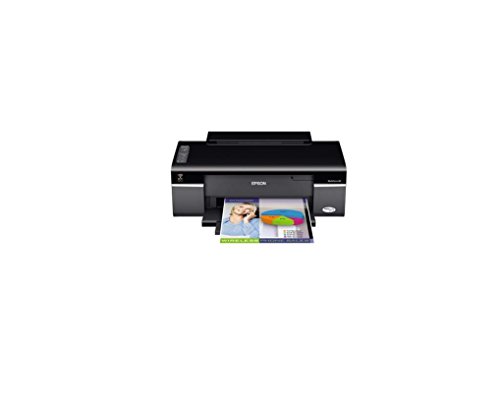
Epson WorkForce 30 Color Inkjet Printer (C11CA19201)

Enlite Premium DTF Ink 1000ML Value Pack (6-Pack)

MZK A3 Pro F1080 DTF Printer + Shaker + Purifier

HP OfficeJet 200 Wireless Mobile Printer (CZ993A)
Inside Each Recommended Option
A wide-format workhorse aimed at startup apparel shops, this A3 Pro F1080 sits at the entry edge of the MZK DTF lineup. The XP600 Gen2 printhead pushes roughly double the throughput of legacy L1800-class machines, which matters when you are timing out a Saturday production run.
The 13-inch+ film path handles most adult tee designs without tiling, and a 5-inch LED touch screen keeps job control on the front of the unit rather than buried in software menus.
Strengths Worth Knowing
- Timed anti-clog cleaning cycles ink through the head on a schedule, which owners commonly report keeps the printer ready between weekend jobs.
- The dual ink level alert shows both color and white reservoirs at a glance, useful when white ink tends to deplete faster on dark garments.
- The built-in film cutter trims prints inline, saving a separate trimming step before transfer.
- 2X speed versus older L1800 designs means a small batch of tees finishes before lunch, not by close of day.
Things To Consider
- The included two-year ink program covers US shipping costs, which adds a small ongoing logistics step you may find mildly tedious.
- DTF printers in this class need daily head-purge attention during humid summers, otherwise white ink settles in the lines.
Right Fit For
Side-hustle apparel makers running their first DTF unit out of a garage or spare room benefit from the all-in-one approach and the anti-clog design.
Where Another Pick Suits Better
Shops pushing past hobby volume should reach for the MZK A3 Plus I1600 Dual Head instead, since dual printheads compound the throughput gap.
Step up to the 14-inch A3 Plus size and the same F1080 platform starts to look like a complete print-and-press station rather than a standalone printer. This bundle bundles the printer with a powder shaker and air purifier, which is the realistic minimum for any DTF workflow.
Compare that to the A3 Pro from pick 1, and you get roughly two extra inches of film width plus a one-click printhead moisturizing function that primes the nozzles without manual syringe work.
The Upside
- The wider film path accommodates full adult-tee artwork without splitting the image into panels.
- The powder shaker spreads adhesive powder evenly across freshly printed film, so you skip the hand-tap step that slows beginners down.
- White ink circulation keeps pigment moving through the lines, addressing the chronic settling issue that plagues DTF systems on long weekends.
- One-click head moisturizing cuts the daily startup ritual from minutes to a single tap on the smart panel.
Trade Offs
- The purifier and shaker together demand roughly 6×6 feet of clear bench space, which tightens up apartment work setups.
- You may find the smart panel menu a touch dense at first, and learning the cleaning rhythm takes a week of ownership.
Quick Facts
Made For
First-time DTF buyers who would otherwise piece together a printer, shaker, and ventilation separately benefit from this matched bundle.
Reach For A Different Pick When
Operators with established ventilation and a shaker already on the bench may prefer the standalone MZK A3 Pro F1080 from pick 1 to avoid duplicate gear.
The A3+ variant of the F1080 line trades bundle accessories for a rotatable touch screen, which sounds minor until you realize how often you crouch over these machines. A panel that tilts toward you changes the daily ownership experience more than spec sheets suggest.
Performance lands in the same neighborhood as pick 2, but the cleaner single-unit form factor appeals to operators who already own a shaker and just want a reliable printer core.
What Makes Sense
- The 5-inch rotatable touchscreen lets you angle the controls toward seated or standing positions, reducing neck strain during long runs.
- The built-in anti-clog ink filter adds a layer of protection between the reservoirs and the printhead, which owners commonly report extending service intervals.
- Dual ink level alerts cover CMYK plus white channels so you replace the right bottle before a job fails mid-print.
- Inline film cutter trims prints to size without breaking the workflow rhythm.
Small Caveats
- Without a bundled shaker or purifier, you need to budget for those separately if you are starting from zero equipment.
- The two-year ink program requires US shipping arrangements, which adds a recurring task to your calendar.
Whose Shelf It Belongs On
Workshop owners with existing powder-handling gear who want a refined, screen-forward printer benefit most from this A3+ configuration.
Consider Something Else When
Brand-new apparel startups without any supporting equipment should look at the MZK 14” A3 Plus bundle from pick 2 instead, since it ships ready to run.
Dual I1600 printheads push this A3 Plus well past the single-head F1080 models earlier in the list. The result is roughly 3X the throughput of an L1800-class baseline, which puts mid-volume apparel shops within reach of same-day fulfillment on moderate orders.
The 7-inch LED multi-function display is a meaningful upgrade over the 5-inch panels elsewhere in the MZK range, and the steel-frame construction targets shops that leave the printer powered on for days at a time.
Where It Delivers
- Dual printheads lay down color and white simultaneously rather than in passes, roughly halving the time per design.
- The 7-inch multi-function display exposes more controls at a glance, so you stop digging through menus mid-job.
- Anti-clog ink routing cycles white pigment on a schedule, addressing the most common DTF failure mode during humid months.
- Steel-frame chassis dampens vibration during high-speed passes, which owners commonly report translates into cleaner edges on fine detail.
Honest Caveats
- The dual-head design consumes white ink faster than single-head models, so your ink budget should account for the higher burn rate.
- Setup takes longer than a single-head unit because both heads need color alignment before the first production run.
- For most home studios, depending on ceiling clearance, the footprint may not fit a standard desk.
Feature Snapshot
Best Suited To
Mid-volume apparel shops running 50 to 150 prints per day benefit from the dual-head throughput without jumping to industrial-grade pricing.
Skip It When
Hobbyists printing a few tees per week should look at the MZK A3 Pro F1080 from pick 1 instead, since the dual-head speed gains go unused at low volume.
The Epson i3200 printhead jumps this A3 model into industrial territory, claiming roughly 3X the speed of an L1800 baseline with a 720×3660 DPI ceiling. The bundled laptop removes the RIP software setup hurdle that trips up many first-time buyers.
Where the dual-head I1600 from pick 4 uses two mid-grade printheads, this model leans on a single industrial head engineered for continuous duty cycles. The trade-off is precision over parallelism.
What Helps Most
- The i3200 industrial printhead targets continuous production runs rather than intermittent home use, so daily output stays consistent.
- Including the laptop with preconfigured RIP (raster image processor) software cuts a major setup step that otherwise takes a weekend.
- Auto-cleaning paired with the anti-clog filter extends the time between manual head-service sessions, valuable when the printer runs all day.
- The 5-inch smart screen keeps operation self-contained even if the laptop is in use for design work elsewhere.
A Few Limitations
- The full bundle demands dedicated bench space and stable power, which small studios may find impractical to arrange.
- Industrial printheads cost more to replace if damaged, so the ownership math shifts toward gentler handling routines.
Technical Highlights
Perfect Match For
Production-scale apparel shops committing to daily output above 200 prints benefit most from the industrial printhead and bundled infrastructure.
A Better Fit Elsewhere
Side-hustle operators with sporadic weekend runs should consider the MZK A3 Plus I1600 Dual Head from pick 4, which costs less to acquire and maintain.
Step away from the DTF world and you land in a different era of inkjet hardware. The Epson WorkForce 30 uses MicroPiezo technology, which fires ink droplets mechanically rather than thermally, and it earns its place in this roundup by handling standard documents quickly for a small home office.
Compare that to the wide-format MZK machines earlier, and the WorkForce 30 is a reminder that the fastest inkjet for one shopper is a completely different machine than for another.
What Pays Off
- MicroPiezo drop-on-demand technology fires precise droplets without heat, which owners commonly report extends printhead life compared to thermal designs.
- 5760 × 1440 optimized DPI handles photo prints and detailed graphics on plain paper without obvious banding.
- 4-color CMYK (cyan, magenta, yellow, black) ink system keeps consumable stocking simple for a one-user office.
- The compact WorkForce chassis fits on a corner of a desk where a wide-format DTF unit would never sit.
Points To Note
- This is a legacy model without the smart features of newer office printers, so mobile printing requires a wired or networked setup.
- Standard home ink cartridges deplete faster than tank-based systems when you print daily, depending on coverage.
Feature Card
Who It Suits Best
One-person home offices printing reports, schoolwork, and occasional photos benefit from the WorkForce 30’s compact footprint and reliable mechanics.
Not Your Match When
Anyone planning to print custom apparel or wide-format designs should step up to the MZK A3 Pro F1080 from pick 1 instead, since this model tops out at letter-size paper.
Ink makes the list because every DTF printer in the roundup runs through consumables faster than the printer itself costs to buy. The Enlite six-pack covers 2 white, 1 black, 1 cyan, 1 magenta, and 1 yellow at 1000 ml each, sized for shops that refill reservoirs rather than swap cartridges.
Compatibility spans the printhead models in picks 1 through 5, which means a single bulk order can supply an existing MZK or Epson-based DTF setup without juggling multiple SKUs.
The Value In It
- The 2W-1BK-1C-1M-1Y mix matches the white-heavy demand profile most DTF shops run into when printing on dark garments.
- Water-based digital inkjet formulation targets vibrant color output on direct-to-film transfers.
- Compatibility covers L1800, L805, R1390, 4720, I3200, XP600, DX7, DX5, and 5113 printheads, so the same pack serves most printers on this list.
Points To Keep In Mind
- Bulk ink requires clean handling and proper storage, since white pigment settles if a bottle sits unused for months.
- You may find that refilling reservoirs takes practice, and spilling ink on the printer frame is harder to clean than swapping a cartridge.
Who Should Grab It
Active DTF shops already running an MZK or Epson-based printer benefit from this bulk refill format once their included starter ink runs low.
Swap It Out When
Owners of the HP OfficeJet 200 from pick 9 should skip this entirely, since that mobile printer uses standard ink cartridges, not bulk DTF bottles.
Take the A3 Pro F1080 from pick 1, add the shaker and purifier accessories, and you get a printer tuned for shops that leave the unit powered on through the workweek. The 24/7 auto-maintenance cycle is the headline feature here, designed for environments where the printer sits idle overnight between rush orders.
Compare that to the standalone A3 Pro from earlier, and this bundle costs a bit more up front but spares you the separate shaker and purifier purchase.
The Helpful Details
- Continuous 24/7 auto-maintenance cycles white ink and runs head-cleaning flashes around the clock, which owners commonly report matters during hot summer weeks.
- White circulation paired with the anti-clog design keeps the pigment in suspension through long idle stretches.
- The bundled shaker and purifier remove the matching-accessory shopping step, so the bench is ready to operate on day one.
- The 2X speed claim versus L1800 baseline holds up in mid-size batches where setup time dominates small runs.
Worth Bearing In Mind
- 24/7 maintenance draws a small amount of power continuously, which adds up over months of always-on operation.
- The purifier filter needs replacement on a schedule, adding a recurring consumable to the shop budget.
Built With In Mind
Apparel shops running daily T-shirt and tote-bag production benefit from the always-on maintenance that prevents the most common DTF downtime cause.
Look Elsewhere When
Weekend-only hobbyists should reach for the standalone MZK A3 Pro F1080 from pick 1, since they will not get full use from the always-on features.
The HP OfficeJet 200 solves a different problem than every DTF machine in the roundup. It runs on a rechargeable battery, fits in a hotel-room desk drawer, and prints borderless documents without needing a network connection.
For mobile professionals printing contracts from a rental car or invoices from a client site, speed means something different than for an apparel shop: it means printing without hunting for an outlet.
Well-Handled Touches
- The integrated battery removes the need for AC power, which means you can print from a car, café, or hotel desk.
- Wireless connectivity supports printing from laptops and phones without a wired network, useful when traveling between client sites.
- The 2-inch control panel keeps operation minimal and intentional, suited to one-off prints in unfamiliar spaces.
- Borderless output capability helps when you need a clean full-page print without trim margins.
Practical Considerations
- Battery life limits heavy print sessions, so mobile users printing 30+ pages per day should plan a recharge cycle.
- Portable inkjet ink costs more per page than tank-based home printers, which matters for users who print frequently on the road.
Core Details
Who Will Love This
Field-based professionals printing contracts, quotes, and invoices from client locations benefit from the battery-powered portability.
Not Your Match When
Anyone printing custom apparel or wide-format artwork should look at the MZK A3 Pro F1080 from pick 1 instead, since this model tops out at letter-size paper.
What To Weigh Before Choosing A Speed-Focused Inkjet
Speed specs vary wildly across the inkjet category, and the right metric depends on what you print. ISO ppm (pages per minute, measured under a standardized lab test) tells one story for office documents, while printheads-per-pass and film-width matter more for DTF apparel workflows. The honest read is that “fastest” means “fastest for your specific job,” not fastest in a vacuum.
Printhead Architecture And Throughput
The XP600 Gen2 heads in the A3 Pro F1080 family handle roughly double the L1800 baseline, which suits small-batch apparel makers. The dual I1600 design layers a second head for roughly triple the baseline, while the industrial i3200 trades parallelism for continuous-duty precision. Mobile and home-office users care less about printhead architecture and more about pages per minute on plain paper, which is why the WorkForce 30 and OfficeJet 200 stay relevant for different reasons.
Film Width And Material Sizing
A3 film at roughly 13 inches covers most adult tee artwork, while A3 Plus at 14 inches removes the need to split oversized designs across panels. For non-apparel printing, paper size tops out at letter or legal for most home inkjets, so the wide-format category applies only when you actually need that breadth.
Maintenance Demands By Use Pattern
DTF printers demand regular head cleaning, white ink circulation, and dust-controlled environments, especially during humid months. Standard inkjets are quieter in this respect: a weekly printhead test page and occasional cartridge swaps are usually enough. Mobile printers sit between the two, with battery care as the unique ownership task.
Total Cost Of Consumables
The printer price is rarely the full story. The Enlite bulk ink from pick 7 illustrates how DTF operations spend more on consumables over a year than on the printer itself, so the included two-year ink programs on the MZK models materially change ownership math. For home-office inkjets, look at cartridge yield and per-page cost rather than the printer sticker.
Picking Through The Trade-Offs
Where Shoppers Go Wrong
The most common slip in this category is buying on peak speed claims without matching throughput to actual workload. A dual-head industrial DTF machine in a garage that prints twice a month wastes the very features you paid for. The opposite mistake is choosing a basic home inkjet when your business depends on dark-garment transfers, since standard inkjets simply cannot print to film. Match the machine to the print volume and the substrate (the surface you are printing on), not to the highest spec on the listing.
When Paying More Pays Off
Stepping up from a single-head F1080 to a dual-head I1600 or an industrial i3200 costs more up front but reduces per-print time and labor costs once you cross roughly 50 prints per day. The extra money also buys better maintenance systems, larger displays, and sturdier frames that survive daily duty cycles. For low-volume operators, the upgrade math rarely works, so the extra spend should track the volume, not the ambition.