A cluttered shelf of mystery cables, a row of unmarked pantry jars, a stack of file folders that all blur together: these are the small daily frictions a label maker quietly solves. Office label makers have moved well beyond clunky plug-in units, and the current class covers everything from pocket-sized thermal printers that run off your phone to keyboard-equipped workhorses built for asset tagging. If your goal is a calmer desk, a tidier shop, or a more professional-looking small business, the right pick depends on how much you print, where you print, and how much format control you actually need. This shortlist covers a useful spread, so you can match a machine to your real workflow.
How The Shortlist Stacks Up

GWCASE Hard Case for Brady M210 / BMP21-PLUS

SUPVAN E10 Bluetooth Label Maker with 3 Tapes

FINTIE Hard Case for Mini Label Printers
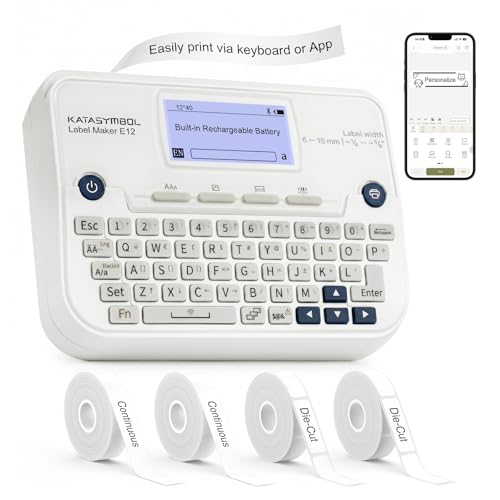
SUPVAN E12 Keyboard & Bluetooth Label Maker with 4 Tapes

SUPVAN G15M Mini Portable Label Maker with Heat Shrink Tube

Brother P-Touch PT-D610BT Connected Label Maker

Comecase Storage Case for Mini Label Makers (Blue)
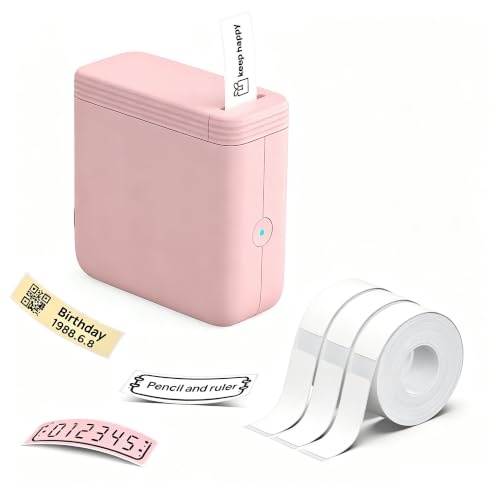
FLEXYVA P24 Mini Label Maker with 3 Tapes (Pink)

SUPVAN T50M Pro Bluetooth Label Maker (Black)

SUPVAN E11 Keyboard & Bluetooth Label Maker with 4 Tapes
The Details Behind The Selections
The GWCASE travel shell is built for a specific job: keeping a Brady M210 or BMP21-PLUS handheld printer safe between job sites. Compared to the printer-first picks later in the list, this one is purely protective, so it earns its spot as the first accessory you should consider if you already own, or plan to own, one of those Brady units.
The interior is laid out for the printer body, spare label cartridges, a charging cable, and any paperwork you want kept together. A tradesperson walking onto a client site with a bag full of gear will appreciate having everything in one zipped case rather than loose in a toolbox.
Positive Points
- Hard shell resists drops and crushing in a crowded truck or van
- Dedicated cutouts keep the printer from rattling against accessories
- Hand strap makes it easier to carry to remote work locations
- Works as a tidy gift-style storage box for someone new to label printing
Trade Offs To Consider
- Only fits a narrow list of Brady handhelds, not mini thermal printers
- No room for full-size label rolls beyond a couple of cartridges
Made For
Electricians, AV installers, and facility technicians who carry a Brady handheld to job sites and need it protected.
A Better Fit Elsewhere
Home organizers who want a softer pouch should look at the FINTIE Hard Case reviewed further down, which fits a broader mix of mini printers.
The SUPVAN E10 is one of the gentlest ways to step into label making. It uses thermal printing, a method that produces text without ink cartridges, and pairs with a phone app over Bluetooth. The green shell sets it apart visually, and it ships with three starter tapes so you can print the moment the battery is charged.
For a first-timer organizing a spice rack, baby supplies, or a tangle of cables behind the TV, the E10 removes most of the usual friction. You won’t wrestle with drivers or toner, and the app walks you through font and icon choices.
Practical Advantages
- No ink or toner to replace, so ongoing costs stay low
- Battery holds up well between charges for light daily use
- App setup is free with no registration required
- Three tape rolls included so you can label right out of the box
Things To Weigh
- Print width is narrow compared to desktop label printers
- App-only design means no quick keyboard entry for fast repeats
- Thermal labels can fade under direct sunlight over long periods
Quick Facts
Right Fit For
Home organizers and small-office users who want a low-maintenance first label maker they can control from a phone.
Consider Something Else When
Anyone who wants fast keyboard entry should skip ahead to the SUPVAN E11 Keyboard and Bluetooth Label Maker, which handles repetitive label runs more comfortably.
The FINTIE case is the Swiss Army knife of mini printer storage. Rather than locking you into one brand, it accepts the Phomemo D30 and D35, the SUPVAN E10, the NELKO P21, and several other popular pocket printers. For a household where label duties rotate among devices, that flexibility is the whole point.
The hard EVA shell shrugs off the bumps of a backpack or rolling suitcase, and the soft interior keeps the printer face from getting scratched. Owners commonly report that the all-around zipper holds up well under daily handling.
Useful Touches
- Cross-brand compatibility removes the guesswork when switching printers
- Compact footprint stores easily in a desk drawer or carry-on
- Sturdy shell protects against the kind of drops that ruin pocket printers
Where It May Fall Short
- Printer not included, so it only suits shoppers who already own a compatible model
- Interior room is limited if you want to bring more than two tape rolls
Whose Shelf It Belongs On
Multi-device households and label enthusiasts who already own a supported pocket printer and want a single tidy home for it.
Reach For A Different Pick When
Someone carrying a Brady handheld should choose the GWCASE Hard Case from the first review, since its interior is shaped specifically for that printer family.
The SUPVAN E12 splits the difference between phone-only models and a full desktop label printer. A built-in QWERTY keyboard handles fast, on-device edits, and Bluetooth opens the door to richer layouts through the app. Four label tapes arrive in the box, which is more than most bundles include.
The backlit display reads cleanly in dim storerooms or under workshop fluorescents. For someone labeling archive boxes or kitchen canisters, that little screen makes a real difference during long sessions.
Positive Takeaways
- Dual input modes suit both quick jobs and detailed design work
- Backlit screen helps in low-light workspaces
- Four tape rolls included covers most color and width needs upfront
- Rechargeable battery keeps you away from disposable cells
Soft Spots
- Keyboard layout takes a few sessions to feel natural
- Still limited to thermal labels, so it cannot print barcodes at industrial resolution
Who It Suits Best
Office administrators and serious home organizers who print in batches and want both keyboard speed and app flexibility.
Skip It When
Small businesses needing wide laminated labels for shipping should consider the SUPVAN T50M Pro, which prints up to 2-inch wide stock.
The SUPVAN G15M is the most niche pick on this list, and that’s a strength. It supports heat shrink tubing, the same material used for marking electrical wires, alongside regular label stock. A hobbyist rewiring a guitar, or a mechanic tagging hoses in an engine bay, gets a tool that matches how the work actually happens.
At 0.88 pounds and roughly 6.7 inches long, the G15M slips into a jacket pocket. The 1200 mAh battery is rated for up to three months of light use on a single charge, so it stays ready for the occasional Saturday project.
What Works In Its Favor
- Supports multiple label formats including heat shrink and cable wraps
- Long battery life reduces charging anxiety between projects
- Compact size travels easily to remote worksites
Honest Caveats
- Heat shrink tubes sold separately add to the real cost
- Print width is narrower than desktop label machines
Feature Snapshot
Best Suited To
Makers, hobbyists, and homeowners tackling electrical or mechanical projects that need tidy wire identification.
Where Another Pick Suits Better
Pure home organizers who never touch heat shrink will find the SUPVAN E10 simpler and a friendlier entry point.
The Brother P-Touch PT-D610BT is the most grown-up machine on this shortlist. It accepts TZe laminated tapes up to 24 mm wide, which is roughly an inch, and connects over Bluetooth so you can design labels from a computer or phone. A full-color LCD display sits on top for on-device edits.
Asset tags, date-tracked equipment, and laminated file labels are where this machine earns its keep. The included starter tape, AC adapter, and micro-USB cable cover everything you need to begin, although a desktop workflow may eventually call for a dedicated computer connection.
Where It Helps
- Laminated TZe tapes resist smudges, water, and abrasion
- Color screen simplifies on-device formatting
- Bluetooth connection speeds up batch design from a PC
- 24 mm print width fits asset tags and barcodes comfortably
Less Ideal Details
- Brother TZe tapes cost more than generic thermal stock
- Heavier and less portable than the mini units above
Who Should Grab It
Small offices, IT managers, and serious home businesses that need durable, wide labels for equipment and inventory.
Not Your Match When
Casual home organizers will probably find the FLEXYVA P24 pocket model a friendlier everyday choice at a much lower entry point.
The Comecase is another accessory, and it earns its place for labelers who treat their pocket printer as part of a mobile kit. An interior elastic strap holds the printer steady, and a mesh pocket tucks away tape rolls and the charging cord. The blue shell is easy to spot in a crowded tote.
Small-business vendors selling at markets will appreciate that everything lives in one zippered unit. The case fits several common mini printers including the NELKO P21, the Phomemo D30 and D35, and the JADENS D11.
Reasons It Performs
- Elastic strap keeps the printer from shifting in transit
- Mesh pocket organizes tape rolls and cables together
- Multi-brand compatibility supports common pocket printers
Some Limits To Know
- Interior room for extras is modest at roughly 6 x 4.13 x 2.16 inches
- Soft shell handles minor bumps but not heavy crushing force
Perfect Match For
Market sellers, crafters, and home businesses who haul their label printer to events and want it organized in transit.
Swap It Out When
Anyone needing a hardier shell for daily job-site travel should consider the GWCASE Hard Case, which offers a tougher outer build.
The FLEXYVA P24 is the smallest, lightest entry in the lineup, and it carries the playful pink finish that appeals to students and casual labelers. Weighing in at around 113 grams, it slips into a pocket or backpack sleeve without a second thought.
Three starter tapes measuring roughly 14 by 40 mm ship in the box. Thermal printing means no ink, which keeps ongoing costs modest. For a dorm room or first apartment, that’s a refreshingly low-friction setup.
Real Benefits
- Pocketable size makes spontaneous labeling easy
- No ink or toner required for everyday use
- Tape rolls included so you can print immediately
Practical Considerations
- Tape width is narrower than mid-range label makers
- Plastic shell can scratch if tossed in a bag without protection
Who Will Love This
Students, renters, and casual home organizers who want a fuss-free label maker at a friendly entry price.
Look Elsewhere When
Anyone printing asset tags or wide shipping labels should look at the Brother P-Touch PT-D610BT, which produces much wider laminated output.
The SUPVAN T50M Pro steps up to wide-format thermal printing, supporting label widths from roughly 3/4 inch up to 2 inches. That covers product packaging, address labels, and barcodes with breathing room. For a small business printing shipping labels or branded stickers, that range is the whole ball game.
Bluetooth pairing with the companion app lets you import logos and barcodes, then customize fonts before sending each design over. Owners commonly report that the wider print area justifies the higher price for any shop producing real shipping volume.
What Earns Its Place
- Wide label support up to 2 inches fits shipping and packaging needs
- App-based design handles logos and barcodes
- Sturdy black shell reads as a desktop workhorse
Details To Watch
- Wider label stock costs more than the slim tapes used by mini printers
- Footprint is larger and best suited to a fixed desk spot
Built With In Mind
Home-based sellers and small shop owners printing shipping labels, QR codes, or branded product stickers daily.
Wrong Turns To Avoid
For a casual organizer, the Brother P-Touch PT-D610BT reviewed above is a more measured step up, especially when laminated durability matters most.
The SUPVAN E11 closes the list as a versatile all-rounder. The integrated keyboard handles quick standalone labels, while Bluetooth lets you reach for the app when you want icons or custom fonts. Four tapes in the box cover most household labeling needs from the first day.
A 1200 mAh battery is rated for roughly a month between charges under typical use. For a busy household tackling pantry, garage, and office organization in short sessions, that battery life removes a common daily frustration.
Everyday Perks
- Keyboard plus app covers both quick and detailed work
- Four included tapes mean no immediate accessory shopping
- Rechargeable battery lasts about a month between charges
Factors To Consider
- Print width is mid-range, not wide enough for shipping labels
- Plastic shell handles desk life but appreciates a case in transit
Feature Rundown
Who It Suits Best
Families and home-office users who want one machine that handles pantry jars, file folders, and tool drawers without switching devices.
A Better Fit Elsewhere
Anyone running a small shipping operation will get more mileage from the SUPVAN T50M Pro and its wider label support.
What To Weigh Before Choosing Your Office Label Maker
Printing Technology: Thermal vs. Laminated
Most modern home units use thermal printing, which means the print head heats special paper to create text and graphics. That design eliminates ink cartridges but also means labels can fade in strong sunlight or harsh conditions over long periods. Laminated models, like the Brother P-Touch PT-D610BT, layer a protective film over the print and stand up better to smudges and abrasion. For files, tools, or anything handled often, laminated output is worth the higher tape cost.
Form Factor and Where You Print
Pocket-sized printers like the FLEXYVA P24 travel easily to markets or shared desks, while keyboard-equipped models such as the SUPVAN E11 and E12 feel more at home on a fixed surface. Wide-format units like the SUPVAN T50M Pro demand real estate but reward you with shipping-ready labels. Match the footprint to where the printer will actually live, not where you wish it would.
Connectivity and App Ecosystem
App-driven printers free you from cables and let you design on a phone, which most shoppers find plenty for casual use. Keyboard models add independence when your phone is busy or charging. For office environments that already rely on PCs, Bluetooth pairing with desktop software, as offered by the Brother PT-D610BT, can save real time during batch runs.
Tape Width, Color, and Cost Over Time
Entry tapes run narrow and limit what fits on a label. Wider tape rolls cost more per cartridge but let you include barcodes, logos, or longer addresses. The ongoing cost of replacement tape often exceeds the printer’s purchase price over several years, so factor that in before chasing the lowest sticker price.
Key Considerations Across These Picks
Common Shopping Slip Ups
The most frequent regret in this category is buying on initial price alone, then discovering that the tape ecosystem is expensive or limited. Thermal tapes vary in width, adhesive strength, and color options, and not every printer supports the full range. Another pitfall is choosing a phone-only model when you actually need to print dozens of repetitive labels quickly. Test your real workload in your head, not just the unboxing moment, before committing.
What The Higher Tier Buys
Spending more in this category typically buys you wider laminated output, faster print speeds, and keyboards that speed up batch work. The Brother P-Touch PT-D610BT and the SUPVAN T50M Pro both demonstrate how the upgrade changes what you can produce, from durable asset tags to branded shipping labels. For occasional pantry duty, the premium tier is overkill, but for daily office or small-business use, the time savings add up quickly.
Frequently Asked Questions
Do office label makers need ink?
Most modern thermal models, including the SUPVAN E10 and the FLEXYVA P24, use heat-sensitive paper and require no ink cartridges. Laminated units like the Brother P-Touch PT-D610BT also avoid ink but rely on special TZe tapes that include the protective layer.
Can I use any brand of label tape with these printers?
No, tape compatibility is brand-specific, and even within a brand, different printers accept different widths and formulations. Always confirm that a tape is listed for your exact model before buying replacements.
Are Bluetooth label makers reliable for office use?
For typical home and small-office loads, Bluetooth models tend to perform reliably when paired within the recommended range. Heavy batch printing on a PC is often smoother over a wired connection, which is where desktop units like the Brother PT-D610BT earn their keep.
How wide a label do I really need?
A 12 to 14 mm tape covers most pantry and cable jobs, while 24 mm fits file folders and equipment tags comfortably. Anything wider than that is usually reserved for shipping or product labels on a small business workflow.
Is a label maker worth it for a small home office?
For anyone juggling cables, files, and storage bins, a compact thermal model pays for itself in saved time within a few months. The SUPVAN E11 with its keyboard strikes a particularly good balance for mixed home and office labeling.
Bottom Line
The right office label maker is the one that matches your real workload, not the one with the most features on paper. Pocket thermal models handle light home organization with almost no fuss, keyboard units bridge quick standalone jobs and app-driven design, and wide-format workhorses serve small businesses that print labels daily. Start by deciding where you’ll print, then match the printer to that space, and the rest of the choice tends to fall into place.