A second screen changes how a desk feels, but only when the arm holding it disappears into the workflow. The picks below cover everything from clamp-friendly single arms to ultrawide-ready dual mounts, plus a reinforcement plate for anyone whose desk surface can’t handle a standard C-clamp. Each entry has been narrowed down to the real-world details that matter: weight range, VESA compatibility (the standardized bolt-hole pattern on the back of your monitor), and the desk thickness the clamp actually fits. Skip the spec-dump listings and the overengineered picks that cost more than the monitors themselves; what follows is built around what most home offices, gaming rooms, and shared workspaces genuinely need.
The Picks In Brief

ZANOLY Steel Monitor Mount Reinforcement Plate

HUANUO FlowLift Pro Dual Monitor Mount 13–27″

HUANUO FlowLift Pro Monitor Arm 13–32″
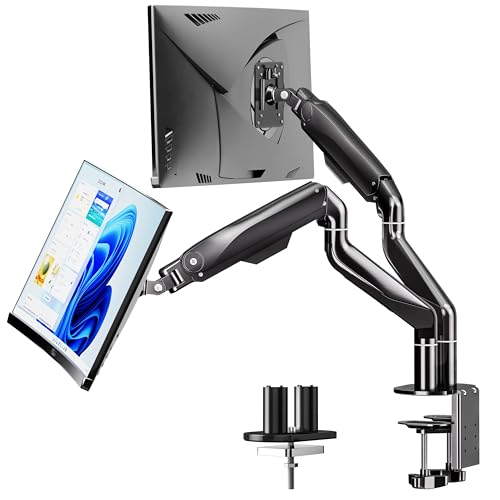
BIZUM Dual Monitor Stand 17–42″ Ultrawide

Ergotron LX Pro Single Monitor Arm (White)

VIVO Adjustable Single Monitor Arm PT-SD-AM01A

PUTORSEN Laptop Desk Mount 18″ + 32″

HUANUO FlowLift Dual Monitor Stand 13–32″

Ergotron LX Pro Single Monitor Arm (Matte Black)

Ergotron LX Pro Dual Monitor Arm (Dark Grey)
Meet The Standout Selections
Before any of the dual-arm picks make sense, the desk itself has to survive the clamp. The ZANOLY reinforcement plate is a steel bracket that spreads the load of a standard C-clamp across a wider footprint, so thin tops, glass desks, or particleboard surfaces don’t crack under pressure. It’s not a monitor arm on its own; it’s the accessory you bolt under one of the arms later in this list when your tabletop isn’t built for clamping.
Anyone who’s already drilled through a glass desk or watched a C-clamp slowly crush an IKEA tabletop will appreciate the logic. The plate pairs with most standard clamp-style monitor mounts, which keeps the rest of your setup flexible. If your desk is solid wood at proper thickness, this is overkill, but for shared spaces and rented apartments it’s a quiet insurance policy.
Real Benefits
- Distributes clamp pressure across a wider steel surface, reducing the risk of cracks in fragile tops
- Compatible with most C-clamp monitor stands, so it works alongside the rest of this list rather than locking you into one brand
- Useful for glass desks where direct clamping would be unsafe or impossible
- Modest size keeps it hidden under the clamp once installed
Things To Consider
- Requires a proper C-clamp monitor arm, sold without the arm itself
- Adds a small step to the installation process before mounting the actual arm
Built With In Mind
Renters with glass desks, owners of thin IKEA-style tabletops, and anyone whose workspace surface can’t take a standard C-clamp directly.
Where Another Pick Suits Better
The HUANUO FlowLift Pro Dual Monitor Mount is a better starting point if your desk is solid wood and you don’t need the extra reinforcement layer.
HUANUO’s FlowLift Pro dual mount arrives with a clear purpose: hold two average-sized office monitors without the wobble that plagues cheaper spring arms. The MechaSpring tension system is the headline detail, replacing the gas-strut feel with a mechanical counterbalance that stays put once you’ve dialled in the weight. The 13″–27″ screen range covers most productivity and gaming monitors on the market right now.
The mounting side is genuinely tool-free, which sounds like a small thing until you’ve spent twenty minutes hunting for an Allen key. Compared with the budget single-arm VIVO covered later, this is a meaningful step up in dual-screen stability. The trade-off is desk-thickness range: the clamp is built for wood, so if you’re working with glass or a hollow frame, you’d want to pair it with the ZANOLY plate from pick 1.
Standout Benefits
- MechaSpring counterbalance keeps both arms stable without the slow sag common in gas-strut designs
- Tool-free VESA mounting saves setup time on day one and any time you swap monitors later
- 15.4 lb per arm capacity covers most 24″–27″ productivity monitors comfortably
- Independent tilt, swivel, and rotation let each screen face a different angle
- VESA 75×75 and 100×100 compatibility covers the vast majority of office displays
Worth Noting
- Listed for wood desks only, so glass or hollow tops need an additional plate
- At the upper weight range, tuning the spring tension takes patience
- Single-monitor shoppers may be paying for capacity they won’t use
Feature Snapshot
Right Fit For
Remote workers and home-office setups running two 24″ or 27″ productivity monitors on a solid wood desk.
Skip It When
Heavy ultrawide owners should look at the BIZUM dual monitor stand instead, which is rated for far more weight per arm.
Sometimes one screen is plenty, but that screen happens to be a 32″ productivity panel or a chunky 4K display. The single-arm version of the FlowLift Pro stretches the same MechaSpring tension concept across a wider weight range, landing at 19.8 lb for flat screens and 15.4 lb for curved. That’s a meaningful bump over the dual-arm version covered above.
The mount keeps the tool-free VESA plate and adds both C-clamp and grommet base options, which is a quiet win for desks with existing cable holes. If you’ve been eyeing a single 32″ monitor for serious spreadsheet work or a wider creative canvas, this is the more sensible pick than doubling up smaller screens. The honest trade-off is that anyone running dual displays is better served by pick 2 or pick 4.
Where It Helps
- Higher 19.8 lb flat-screen capacity covers larger 27″–32″ panels without sag
- MechaSpring tension keeps the arm steady after dialing in the weight
- Dual base options (C-clamp or grommet) suit more desk configurations
- Tool-free VESA plate streamlines installation
Trade Offs
- Curved screens drop to a lower load rating than flat panels
- Dual-screen shoppers will want a wider solution
- Single-arm footprint leaves the right side of the desk free, which can feel uneven on wider desks
Who Should Grab It
Single-monitor power users upgrading to a 27″–32″ 4K display on a solid wood or grommet-friendly desk.
Not Your Match When
Multi-monitor creative professionals should pivot to the Ergotron LX Pro Dual Monitor Arm for a more polished two-screen result.
The BIZUM dual stand leans into aviation-grade aluminum arms and a dual C-clamp base designed for monitors that would buckle lesser mounts. At 33.1 lb per arm and a 17″–42″ screen range, this is built for ultrawide owners who want both screens floating cleanly. The wider base footprint is the giveaway that BIZUM is taking weight seriously.
Compare that with the HUANUO FlowLift Pro dual from pick 2, which caps out around 15.4 lb per arm. The BIZUM is the option when your displays are larger, heavier, and you don’t want any of the slow sag that comes from running spring arms at their limit. The dual clamp design does require more desk-edge real estate, which is worth measuring before you commit.
Strengths Worth Knowing
- 33.1 lb per arm supports heavy ultrawide and curved displays without sagging
- Aviation aluminum arms add rigidity and resist flex during daily adjustments
- Both C-clamp and grommet bases included for different desk setups
- 17″–42″ range covers ultrawide 34″ and even some 40″ panels
- Full-motion tilt, swivel, and rotation suit both productivity and gaming layouts
Points To Keep In Mind
- Dual C-clamp design takes more desk-edge space than single-clamp mounts
- Aviation aluminum adds noticeable weight during assembly
- Overkill for anyone running two 24″ office monitors
Spec Overview
Whose Shelf It Belongs On
Ultrawide owners running two 32″ or larger displays, or anyone with heavy curved monitors that have overwhelmed lighter spring arms.
Look Elsewhere When
The HUANUO FlowLift Dual Monitor Stand is a better match for gamers running two 27″ panels who don’t need aviation aluminum at this scale.
Ergotron’s LX Pro is the kind of arm where the first adjustment already tells you it costs more for a reason. The constant-force spring technology (a patented tension mechanism that holds any weight in its range without manual re-tuning) handles ultrawide curved displays up to 34″ and 22 lb without the manual tension fiddling that cheaper mounts demand. The white finish is the small detail that suits bright Scandinavian-style or minimalist workspaces.
For curved ultrawide owners running a single screen, this is the upgrade path beyond what HUANUO and BIZUM offer on the spring-tension side. The VESA 75 and 100 compatibility covers the standard bolt patterns, and the included two-piece desk clamp fits a wide range of wood desk thicknesses. It’s premium-priced for a reason, and that shows up in the daily feel.
Strong Points
- Constant-force spring holds screens steady without manual re-tensioning
- Supports curved ultrawide panels up to 34″ without wobble
- White finish suits bright, minimalist workstations
- Wide clamp compatibility fits desks from 0.4″ to 2.4″ thick
Honest Caveats
- Costs more than spring-tension alternatives for similar weight ratings
- Single-arm only; dual-screen users need the LX Pro Dual model covered later
- Grommet mount sold separately
Feature Card
Made For
Single ultrawide owners who want premium-feel adjustments and a clean white finish on a quality home-office desk.
Reach For A Different Pick When
Multi-screen minimalist setups should pivot to the Ergotron LX Pro Dual Monitor Arm for a matched pair in the same premium tier.
Sometimes a single-arm clamp and a solid steel build are all that’s needed, and that’s exactly what VIVO delivers with the PT-SD-AM01A. The 27″ screen ceiling covers mainstream office and home monitors without paying for capacity most setups won’t touch. The black finish blends into most workstations without drawing attention to the mount itself.
This is the budget entry in the roundup, and the honest read is that it does the basics competently. Where it falls short is in the spring-tension refinement you get from HUANUO’s MechaSpring or Ergotron’s constant-force system. Heavier monitors above the rated range will start to drift. For a single 24″ office screen on a smaller desk, though, it’s a perfectly reasonable pick that leaves budget for other accessories.
Practical Advantages
- Solid steel construction keeps the price accessible without going plastic
- 27″ screen range covers the most common single-monitor setups
- Black finish blends into most workstations unobtrusively
- Adjustable tilt, swivel, and rotation handle typical ergonomic adjustments
Some Limits To Know
- Spring tension is less refined than MechaSpring or constant-force alternatives
- Heavier monitors near the weight ceiling may drift over time
- Single-arm only; dual-screen shoppers need a different solution
Perfect Match For
Single-monitor users building a first home-office setup on a tighter budget, especially students and remote workers.
A Better Fit Elsewhere
The HUANUO FlowLift Pro Monitor Arm suits shoppers willing to spend slightly more for noticeably better tension control on heavier panels.
The PUTORSEN mount solves a specific problem most dual-arm picks don’t: a desk where a laptop and a separate monitor share the same workspace, but only one is on the mount at a time. The 2-in-1 design holds either an 18″ laptop tray or a 17″–32″ monitor, with a quick-release tray that swaps between the two configurations. For hybrid work setups that move between docked and undocked modes, this is genuinely useful.
The three-section spring arm extends up to 831mm, which is longer than most single mounts on this list, and that extra reach pays off when you want to push the screen back for video calls or pull it close for detailed work. Compared with the HUANUO FlowLift single from pick 3, the PUTORSEN trades a slightly lower weight ceiling for the laptop tray flexibility. It’s a niche pick, but a smart one for the right setup.
Practical Pluses
- Swappable tray handles both laptops and monitors without separate mounts
- 831mm reach is longer than typical single-arm mounts
- 17″–32″ monitor range covers most office and creative displays
- Useful for hybrid work setups that dock and undock throughout the week
- VESA 75 and 100 compatibility covers standard monitor bolt patterns
Where It Is Less Suited
- Laptop tray weight limit of 11 lb rules out heavier mobile workstations
- Single-mount design means true dual-screen setups need a different pick
- Swapping the tray adds a step when switching between configurations
Quick Facts
Best Suited To
Hybrid workers who dock a laptop at one station during the week and switch to a larger monitor for deep-focus sessions.
Swap It Out When
Dual-monitor creative professionals should pivot to the BIZUM dual monitor stand for proper two-screen support with higher weight ratings.
For gaming battlestations running two 27″ or 32″ panels, the HUANUO FlowLift dual stand is the most gaming-aware pick in this roundup. Full motion tilt, swivel, and rotation let you angle one screen for racing sims and the other for chat or streaming overlays. The 4.4–19.8 lb per arm load range covers mainstream gaming monitors comfortably.
It’s the dual-arm counterpart to the single-arm HUANUO covered in pick 3, and the same VESA 75 and 100 compatibility applies across both. The C-clamp and grommet base options cover most gaming desks, including standing desks with cable routing holes. For gamers who don’t need the 33 lb aviation-aluminum build of the BIZUM from pick 4, this lands in a more accessible middle ground.
A Favorable Mix
- Full motion adjustments suit varied gaming and streaming layouts
- 19.8 lb per arm handles mainstream 27″ and 32″ gaming monitors
- C-clamp and grommet bases fit most gaming and standing desks
- VESA 75 and 100 compatibility covers mainstream display bolt patterns
- 13″–32″ screen range works for both compact and large gaming setups
Potential Compromises
- Not built for ultrawide 34″–42″ panels at heavier weights
- Two arms share a single clamp base, which concentrates force on the desk edge
- Color options are limited compared with single-arm picks
Who It Suits Best
Two-monitor gaming setups running mainstream 27″–32″ displays where a full-motion setup matters more than ultrawide support.
Where Another Pick Suits Better
The BIZUM dual monitor stand is the upgrade path for serious ultrawide gaming rigs that exceed this HUANUO’s weight ceiling.
The matte black version of the Ergotron LX Pro single arm is the same mechanical platform as the white version covered in pick 5, finished for darker workstations and minimalist desks. The constant-force spring, 34″ ultrawide support, and 4–22 lb weight range all carry over. The finish is the differentiator: matte black fades into the background rather than drawing the eye.
For single-ultrawide owners running dark-themed creative setups or gaming battlestations where black-on-black matters, this is the more visually coherent pick. The honest trade-off is identical to the white version: it’s a premium spend for one screen, and dual-monitor shoppers should look at the matching LX Pro Dual covered next.
What It Does Well
- Constant-force spring holds the screen at any height without drift
- Matte black finish suits dark-themed or minimalist desks
- 34″ ultrawide compatibility covers flat and curved panels
- Same desk-clamp range as the white version, 0.4″–2.4″ thickness
Details To Watch
- Premium pricing reflects the constant-force mechanism, not the finish
- Single-arm only; pair with the LX Pro Dual for multi-screen setups
- Grommet base sold separately
The Right Fit
Single-ultrawide owners who want a darker aesthetic and the smoothest possible adjustment feel on a quality desk.
Consider Something Else When
The Ergotron LX Pro Dual Monitor Arm is the better starting point for matched dual-screen setups in the same premium tier.
The dual-arm version of the LX Pro finishes the roundup where it logically belongs: premium dual-screen support for professionals who want both monitors floating cleanly without the wobble or sag of mid-tier alternatives. Each arm holds 4–20 lb and supports screens up to 27″, which covers most productivity monitors without stepping into ultrawide territory.
Compared with the HUANUO FlowLift Pro dual from pick 2, the LX Pro trades a lower weight ceiling for noticeably smoother adjustment and a more refined finish. The dark grey color sits between the matte black single arm and the white version, suiting workstations that want a neutral premium look. For tidy two-screen setups that will see daily use for years, the constant-force spring earns its place.
Where It Delivers
- Constant-force springs on both arms keep screens locked at any height
- Dark grey finish suits neutral, professional workstations
- 20 lb per arm handles mainstream 24″–27″ productivity displays
- Independent arm adjustments allow varied screen positioning
- VESA 75 and 100 compatibility matches mainstream monitor bolt patterns
A Few Limitations
- 27″ screen ceiling rules out ultrawide dual setups; choose BIZUM for that
- Costs more per arm than HUANUO’s FlowLift Pro dual alternative
- Grommet base sold separately if you prefer it over the included clamp
Who Will Love This
Professionals running two 24″–27″ productivity monitors on a clean, minimalist desk where adjustment feel matters as much as weight capacity.
Where A Sibling Pick Shines
Heavy ultrawide owners should pivot to the BIZUM dual monitor stand for the higher 33 lb per arm ceiling.
What To Weigh Before Choosing 2 Monitor Arms
VESA Compatibility Is Non-Negotiable
VESA is the bolt pattern on the back of your monitor, either 75x75mm or 100x100mm for almost every display on the market. Check yours before anything else, because every mount in this roundup works with both patterns. The mistake shoppers commonly make is assuming their monitor has VESA mounting holes at all. Older or curved-back displays sometimes lack the standard pattern, which means an adapter or a different mounting approach entirely.
Desk Thickness And Material Dictate The Clamp
Most C-clamps in this list target wood desks between roughly 0.4″ and 3.54″ thick. Glass desks, hollow-core tops, and very thin tabletops need the ZANOLY reinforcement plate from pick 1 to spread clamp pressure safely. Grommet bases (a mounting bolt that passes through a hole drilled in the desk top) work when your desk has a pre-existing cable hole, but most home desks don’t. Measure your desk edge before you commit to a clamp-based mount, and you avoid the disappointment of a clamp that won’t close.
Weight Range Matters More Than Screen Size
The most common buying trap is choosing a mount based on monitor size alone. Screen size gives you the physical fit, but weight range determines whether the arm sags over time. For 27″ productivity monitors around 10–15 lb, most mounts in this roundup work. For 32″ panels or heavier curved ultrawides, the BIZUM dual or Ergotron LX Pro single arms earn their premium pricing.
Single Vs Dual Arms Depends On Workflow
If your second screen is a reference monitor you only glance at, a single arm plus a desk stand is plenty. If both screens are in constant use for parallel workflows, dual arms are the right call. The honest read is that dual setups eat more desk-edge space and concentrate clamp force, so the desk itself needs to handle the combined weight comfortably.
Where Shoppers Go Wrong
Trusting “Fits Up To 32 Inches” Without Checking Weight
Screen size tells you the arm will physically clear the monitor, not that it will hold it steadily. Mounts rated for 32″ screens often assume a lighter weight than the actual monitor on your desk. Always cross-check the weight range against your specific display model.
Skipping The Desk Thickness Check
A mount that lists 0.59″–3.54″ desk thickness sounds flexible, but IKEA tabletops at 0.75″ sit at the lower end where clamps feel less secure. Glass desks need the reinforcement plate from pick 1, not just a friendlier clamp. Measure before ordering, and you avoid returns that eat an afternoon.
Paying For Capacity You Won’t Use
The BIZUM at 33 lb per arm is overkill for two 24″ office monitors. The VIVO budget single arm is too modest for a 32″ 4K display. Match the mount to your actual screens, and you’ll likely spend less while ending up with a steadier setup.
What Separates Premium From Basic
Constant-Force Vs Mechanical Vs Gas Spring
Cheaper mounts use gas springs that lose tension over months and require re-tuning. Mid-tier picks like HUANUO’s MechaSpring use mechanical counterbalances that stay stable longer. Premium mounts like the Ergotron LX Pro use patented constant-force springs that hold any weight in their range without manual adjustment. The upgrade pays off most on heavier displays where cheaper mounts visibly drift.
Materials And Finish
Aviation aluminum arms like the BIZUM resist flex during daily adjustments. Standard steel arms like the VIVO handle lighter loads fine. Powder-coated finishes hold up better than painted ones over years of clamp-on, clamp-off cycles. None of this matters much on a single 24″ monitor; all of it starts to matter on heavier ultrawides.
Frequently Asked Questions
Do I Need A Dual Arm Setup Or Just A Single Arm?
Dual arms make sense when both screens are in active use throughout the day, like coding on one and referencing docs on the other. A single arm plus a desk stand works fine when the second screen is occasional reference material.
Will These Mounts Work On A Glass Desk?
Standard C-clamps can crack glass under pressure, so most manufacturers recommend wood desks only. Pairing any mount in this list with the ZANOLY reinforcement plate from pick 1 solves that problem safely.
How Do I Know If My Monitor Has VESA Mounting Holes?
Look at the back of the monitor for four threaded holes arranged in a square pattern. Most monitors from 17″ upward include either 75x75mm or 100x100mm VESA patterns. The product page or manual will confirm which.
What Desk Thickness Do These Clamps Fit?
Most mounts in this list target wood desks between roughly 0.4″ and 3.54″ thick. Measure your desk edge before ordering, especially if you have a thinner tabletop or an unusual edge profile. Grommet mounting is the alternative when clamping isn’t an option.
Can I Mount Two Different-Sized Monitors On One Dual Arm?
Most dual arms support different-sized monitors as long as each one falls within the rated weight and screen-size range. Check the per-arm specifications carefully, especially when pairing a 27″ main display with a 24″ secondary screen.
Closing Remarks
The right 2 monitor arms depend on what your desk can hold, how heavy your displays actually are, and whether premium adjustment feel is worth the spend. Most productivity setups will land somewhere in the HUANUO FlowLift range, while heavy ultrawide and minimalist premium desks justify the BIZUM or Ergotron picks. Match the mount to your screens, measure your desk, and the upgrade pays for itself the first time both screens actually float where you want them.