The home office has become a daily workplace, not a corner desk you use once in a while. Long hours at a kitchen-table setup leave shoulders tight, lower backs achy, and wrists sore by Wednesday. A supportive chair that fits your body and your budget solves more of that pain than any gadget on the desk. These seven picks cover a spread of needs: compact spaces, taller frames, plus-size support, and a feature-loaded option for anyone chasing the next level of adjustability. You will find mesh breathability, lumbar tracking, flip-up arms, and wide seats in the mix, with honest trade-offs called out in each review.
A Closer Look At The Lineup
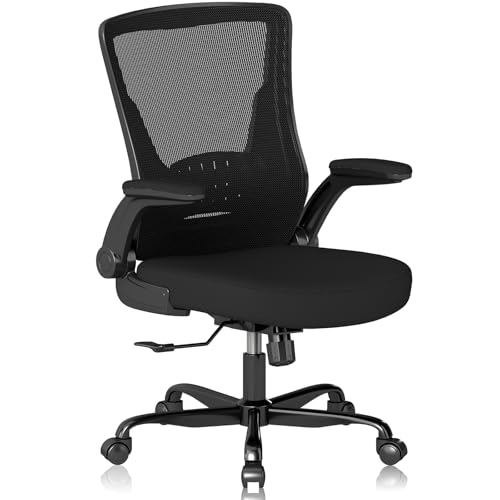
Vomena Ergonomic Office Chair with Flip-up Armrests

Solviva Mesh Office Chair with Headrest and Wide Seat

Ergalithic Mesh Desk Chair with Headrest and Lumbar Support

Ergalithic 330LBS Mesh Ergonomic Desk Chair

Hbada X7 Smart Ergonomic Chair (Grey)

Ergalithic Black Mesh Desk Chair with Headrest and Lumbar

Hbada X7 Smart Ergonomic Chair (Black)
More On The Choices That Made The List
The Vomena chair is a friendly starting point for anyone setting up a workstation for the first time. The breathable mesh back keeps air moving during warmer stretches of work, and a dense foam cushion gives the seat enough give for steady typing sessions. Flip-up armrests let you slide the chair under a standard 28-inch desk, a small but meaningful win for compact bedrooms or shared dining-table setups.
You will notice the ergonomic shape focuses on five contact points: shoulders, back, hips, and hands. Compared to the Solviva pick below, the Vomena skimps on a separate headrest, so users who lean back for video calls may feel some neck fatigue over long stretches. The build is suited to lighter daily workloads rather than marathon shifts, which fits students, casual remote workers, and anyone easing into a more structured seating setup.
Where It Excels
- Mesh backrest keeps air flowing, useful in warm bedrooms without climate cooling.
- Flip-up arms tuck the chair under shallow desks to save floor space.
- Dense foam cushion holds shape through typical eight-hour workdays.
- Five-point ergonomic focus covers the shoulders, lumbar, hips, and arms.
Things To Consider
- No headrest, so users leaning back during long calls may want an aftermarket neck pillow.
- Mesh tension can feel firm on the lower back during the first week as the material settles.
Who It Suits Best
First-time home-office shoppers and students who need an adjustable seat without a footprint that dominates the room.
Look Elsewhere When
Anyone needing a taller backrest and dedicated head support will get more from the Solviva Mesh Office Chair with Headrest and Wide Seat.
The Solviva chair leans into a fuller-seat, taller-back silhouette that fits users who want more surface area for their hips and shoulders. The mesh backrest allows heat to escape rather than trapping it against the spine, which matters in upstairs offices where summer afternoons run warm. An adjustable headrest gives your neck a place to rest between calls, and 3D armrests pivot to support forearms while typing or holding a phone.
The wide seat is the headline detail. For anyone shifting between cross-legged focus time and standard typing posture, the extra width keeps posture options open. Compare that to the Vomena chair above, which trades that width for a smaller footprint, and you can see where the Solviva pulls ahead for taller sitters and broad-shouldered frames. The trade-off is a larger footprint, so small bedrooms may feel crowded once it is in place.
Real Benefits
- Adjustable headrest supports the neck during long reading or call-heavy stretches.
- 3D armrests pivot, slide, and rotate to match varied typing and reading positions.
- Wide seat accommodates cross-legged sitters and broader frames comfortably.
- Mesh back promotes airflow, helping during back-to-back video meetings.
Worth Noting
- Wider base demands more floor space than the Vomena pick, so tight bedrooms may feel cramped.
- Lumbar curve may need a small pillow for users who sit perfectly upright rather than leaning back.
Made For
Taller users and broad-shouldered remote workers who spend long stretches at the desk and want a headrest built into the frame.
Where Another Pick Suits Better
Shoppers who want automated lumbar tracking rather than manual adjustment should look at the Hbada X7 Smart Ergonomic Chair (Grey) further down the list.
The first Ergalithic entry on the list covers the full ergonomic checklist at a friendly entry point: adjustable headrest, dedicated lumbar support, flip-up arms, and tunable seat height. The manufacturer lists a fit range of roughly 5’5″ to 6’2″, which catches the broad average of adult sitters without forcing a custom build. You can fine-tune the backrest tilt and headrest position to match your monitor height, a small daily win that protects the neck over months of use.
This is the chair for someone who wants an all-rounder rather than a specialist. Where the Vomena sacrifices a headrest and the Solviva focuses on width, the Ergalithic tries to give you both a headrest and adjustability in a standard-size frame. The honest read is that the adjustments cover the basics without going beyond them, so power users chasing 4D armrests or automated lumbar may outgrow it.
Useful Strengths
- Full adjustability across seat height, headrest, backrest, and armrests covers most body types.
- Mesh construction keeps air moving through long remote-work shifts.
- Lumbar support is shaped into the backrest, providing steady lower-back pressure.
- Flip-up arms let you push the chair under shallow desks when work wraps up.
Points To Note
- Arm adjustments cover basic flip-up use, though users wanting multi-axis arm control may want a wider model.
- Lumbar cushion firmness tends to vary slightly between production runs, so test the fit within the return window.
Best Suited To
Mid-range remote workers between 5’5″ and 6’2″ who want a tunable seat without chasing premium adjustability.
A Better Fit Elsewhere
Users who sit for ten-plus-hour shifts and want automated lumbar response should step up to the Hbada X7 Smart Ergonomic Chair (Grey).
The second Ergalithic chair on this list focuses on a sturdier frame with a listed weight capacity of 330 pounds, paired with a 3D lumbar system and a smooth swivel base. Taller and broader sitters often find standard frames dipping or wobbling over time, so a reinforced build addresses that gap head-on. The 3D lumbar shifts up, down, and inward, so you can target the pressure point where your back actually meets the chair rather than the average spot.
You will notice the chair shares a design language with the previous Ergalithic pick, but skips the headrest to put the budget into the frame. Compare that to the Vomena chair at the top of the list, and you trade the headrest-less Vomena profile for a noticeably beefier base. For shared workstations where multiple body types use the same seat through the week, that versatility matters.
The Case For It
- Reinforced frame supports a higher listed capacity, suitable for taller or broader users.
- 3D lumbar adjusts up, down, and inward to target the lower-back pressure point.
- Swivel base glides across standard office rugs and hard floors without sticking.
- Mesh backrest breathes well, which helps during long shared-workstation sessions.
Honest Caveats
- No headrest, so users leaning back between tasks may need to add a separate neck pillow.
- Heavier frame makes moving the chair between rooms less convenient than lighter picks.
Right Fit For
Taller or broader sitters and shared workstations where sturdiness outweighs the need for a built-in headrest.
Swap It Out When
Anyone who wants both a higher listed capacity and a headrest should look at the Solviva Mesh Office Chair with Headrest and Wide Seat instead.
The Hbada X7 is the feature-loaded option in this roundup. Dual pressure sensors read how you sit, and a control system drives the lumbar support to follow your posture, whether you lean forward to type or recline to read. The 4D headrest moves across four directions, and the armrests pivot through a 720-degree range (more than a full rotation), so you can angle them to support elbows during phone calls or tuck them out of the way when you pull the chair close to the desk.
A ventilated seat cushion adds another layer of cooling on top of the mesh back, which helps on hot afternoons. Compared to the manual lumbar systems elsewhere on this list, the X7 removes the daily dial-twisting and lets the chair adapt in real time. The trade-off shows up in the price tier and the power requirement for the tracking motors, which is worth weighing before you commit.
A Favorable Mix
- Automated lumbar tracking shifts support as you lean forward or recline.
- 4D headrest and 720-degree armrests cover typing, calling, and reclining positions.
- Ventilated seat cushion supports airflow beyond the mesh backrest.
- Sensors remove the need to re-dial lumbar pressure between tasks.
Where It May Fall Short
- Higher tier than the other picks, so budget-focused shoppers may prefer the Ergalithic models.
- Powered lumbar tracking requires access to power, which limits placement near outlets.
- More moving parts mean long-term service depends on the manufacturer’s support response.
Who Should Grab It
Power users and feature-heavy remote workers who switch between typing, calling, and reading positions throughout the day.
Reach For A Different Pick When
Shoppers who want a simpler manual experience and a smaller footprint should look at the Vomena Ergonomic Office Chair with Flip-up Armrests.
This third Ergalithic chair covers a broader height range than the other entries, fitting users from roughly 4’9″ to 6’2″. The adjustable lumbar pillow moves about 1.8 inches up and down plus 1 inch in and out, letting you target the lower-back curve where pressure tends to build up. A black mesh finish keeps the look understated for shared living spaces where a bright gaming-style chair would clash with the décor.
Where the Hbada X7 leans on sensors and motors, this chair keeps the adjustment manual but precise. You may find the lumbar pillow takes a few sessions to dial in, especially compared to the automated system on the X7. For users who prefer tactile, hands-on controls over powered systems, that is the point rather than a drawback.
Positive Takeaways
- Height range fits petite to tall sitters without forcing a custom build.
- Lumbar pillow adjusts up, down, and inward to match individual spine curves.
- Black mesh finish blends into bedrooms, studies, and shared workspaces.
- Manual controls keep the chair usable during power outages or outlet-limited rooms.
Some Limits To Know
- Manual lumbar tuning requires a few sessions to find the right position.
- No 4D armrest movement, so users wanting multi-axis arm control should look elsewhere.
Perfect Match For
Households with multiple body types sharing one chair, where the wide height range and quiet black finish matter most.
Consider Something Else When
Anyone chasing multi-axis armrests and automated lumbar response should look at the Hbada X7 Smart Ergonomic Chair (Grey) instead.
The black version of the Hbada X7 shares the same automated lumbar tracking, 4D headrest, and 720-degree armrests as the grey model. The difference comes down to finish: a black mesh suit that reads more understated in a home office with multiple screens or a darker wall palette. For shoppers who liked the X7 feature set but wanted a quieter look, this is the natural pick.
The same caveats from the grey model apply: the powered lumbar needs access to an outlet, and the higher tier may stretch thin for budget-focused shoppers. Where it pulls ahead of the grey model is purely aesthetic, so you can match the chair to a darker setup without sacrificing the adaptive tracking that defines the X7 line. For shift workers logging ten-hour days, the system removes the need to re-dial lumbar pressure each time you shift tasks.
Good Reasons To Consider
- Automated lumbar tracking responds to posture changes in real time.
- Black mesh finish fits darker offices without visual clutter.
- 4D headrest and 720-degree armrests cover typing, calling, and reclining positions.
- Ventilated seat cushion supports airflow beyond the mesh backrest.
Factors To Consider
- Same higher tier as the grey model, so the budget-focused picks may suit tighter wallets better.
- Powered lumbar tracking needs outlet access, limiting placement near windows or open layouts.
Whose Shelf It Belongs On
Long-hour users who want automated lumbar response in a darker finish that blends into a multi-monitor or studio setup.
Not Your Match When
Shoppers wanting a budget-focused manual chair should look at the Ergalithic Mesh Desk Chair with Headrest and Lumbar Support further up the list.
What To Weigh Before Choosing An Affordable Ergonomic Office Chair
Match The Chair To Your Body, Not The Hype
Start with your height and hip width, not the marketing copy. Lumbar support is the curved cushion area at the lower back of the chair that fills the gap between your spine and the backrest, and getting that pressure right matters more than brand names. A chair that fits your torso and your seated hip width will outwork a more expensive model that fights your frame. The Solviva and Hbada picks lean toward taller and broader users, while the Vomena fits tighter bedrooms and shorter sitters.
Adjustability Beats Aesthetics Over Time
Look past the photos and check the adjustment list: seat height, lumbar depth, armrest pivot range, and headrest travel. A chair with mesh fabric (a woven synthetic that lets air pass through) plus adjustable lumbar will keep you cooler than a leather-look seat with fixed bolsters. The Hbada X7 pushes further into automation, while the Ergalithic line keeps adjustment manual but covers the essentials.
Plan For The Floor, Not Just The Seat
Swivel bases glide well on hard floors and short office rugs, but tall pile carpet can swallow smaller casters. Measure the gap under your desk before ordering, since flip-up arms and compact bases make a real difference in tight setups. Power access also matters for the Hbada X7 models, since the lumbar motors need an outlet nearby.
Think About How Long You Sit Each Day
A casual two-hour workday needs far less from a chair than a ten-hour shift with back-to-back video calls. If your day stretches past eight hours, prioritize lumbar depth, breathable mesh, and armrest pivot range. Short daily users can stay focused on compact footprint and a basic adjustable headrest.
Key Considerations Across These Picks
Pitfalls Shoppers Hit
The most common slip-up is buying on frame style alone. A chair can look sharp in photos and still pinch the wrong part of your back once you sit down for an hour. Measure your seated hip width and compare it against the seat dimensions before committing, and check that the lumbar curve lands where your spine actually bends. Skipping this step tends to leave you with a chair that looks right but pulls in the wrong place by Wednesday afternoon.
What The Higher Tier Buys
The Hbada X7 models sit at a higher tier because the lumbar system reads your posture and adjusts on its own, while manual chairs require you to dial in pressure by hand. The 4D headrest and 720-degree armrests cover more positions, and the ventilated seat cushion adds another cooling layer beyond the mesh back. The upgrade pays off for power users logging long, varied shifts, but casual users may not feel the difference enough to justify the jump.
Frequently Asked Questions
How Long Should An Affordable Ergonomic Office Chair Last?
Most mesh ergonomic chairs in this price range hold up well for three to five years of regular daily use. The frame and gas cylinder (the piston-style post that adjusts seat height) tend to outlast the foam and mesh, so check replacement cushion options before you commit.
Are Mesh Backs Better Than Cushioned Backs?
Mesh backs breathe more than padded backs, which helps during long sessions in warm rooms. Cushioned backs feel softer at first but can trap heat and flatten over time, so the choice comes down to climate and how long you sit each day.
Do I Need A Headrest On An Office Chair?
A headrest helps if you recline to read or take video calls from a leaned-back position. Upright typists who rarely lean back can usually skip the headrest and free up budget for better lumbar adjustment instead.
What Does A 3D Armrest Actually Do?
A 3D armrest pivots across three axes: height, slide, and rotation, letting you angle forearm support to match your typing or calling position. Standard 1D armrests only adjust height, so 3D adds flexibility for users who switch between mouse work and phone calls.
Is A Higher Weight Capacity Rating Worth Considering Even If I Weigh Less?
A higher capacity rating often signals a sturdier frame, stronger gas cylinder, and a wider base, all of which add stability for any user. If you want a chair that feels planted and lasts longer, looking at higher-rated frames can pay off even when you do not need the full capacity.
The Takeaway
The right chair depends on how long you sit, how much space you have, and how much adjustability you actually use. Compact bedrooms do well with the Vomena, taller sitters get more from the Solviva, and power users logging long shifts will appreciate the Hbada X7’s automated lumbar tracking. Match the chair to your body first, then let the feature list follow, and you will sit more comfortably for years to come.