A serious home office needs more than a laptop on a kitchen table. Between client emails, scanning tax documents, and printing shipping labels, the right setup quietly carries half your week. This guide pairs hardworking desks with the multifunction printers that anchor them, so your workspace handles real workloads without taking over the room.
An Overview Of The Picks

Tribesigns 55″ Industrial Executive Desk (Walnut)

Brother HL-L2395DW Monochrome Laser Printer
Brother MFC-L2710DW Monochrome Laser Printer

Tribesigns 78″ L-Shaped Executive Desk (Brown)

Tribesigns 78″ L-Shaped Desk with Cabinet (Gray & Black)

Epson EcoTank ET-2980 Supertank All-in-One

Brother DCP-L2550DW Monochrome Multifunction
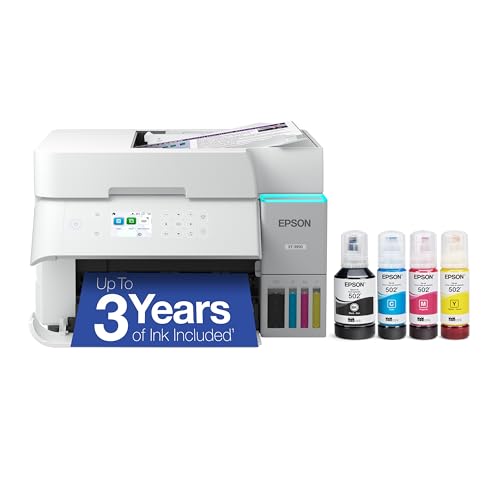
Epson EcoTank ET-3950 Supertank All-in-One

Tribesigns 63″ Executive Desk (Rustic Brown)
Taking A Closer Look At The Options
The Tribesigns 55-inch desk lands in the sweet spot for people who want a real workstation without commandeering a guest room. Its walnut-toned farmhouse surface pairs with industrial steel legs, giving it the kind of grounded look that holds up under dual monitors and a printer base.
For a one-person home office where square footage matters, the 55-inch length fits a laptop, a side lamp, and a compact multifunction unit like the Brother HL-L2395DW without crowding. Owners commonly describe the metal frame as reassuringly heavy for the price range, and the surface wipes clean with a damp cloth.
What It Does Well
- 55-inch surface fits a monitor plus printer without cramping your elbows.
- Steel-leg frame resists wobble during heavy typing sessions.
- Walnut woodgrain finish pairs well with most office chairs and decor.
- Open-leg clearance works with most standard rolling stools.
Things To Consider
- No built-in drawers, so stackable trays or a side cabinet become necessary.
- Assembly usually takes two people; the top pieces are heavier than they look.
Made For
Solo remote workers setting up a dedicated corner in a bedroom or den who want a sturdy surface without a sprawling footprint.
Consider Something Else When
You need built-in file storage, in which case the Tribesigns 78″ L-Shaped Executive Desk is a more practical layout.
Where the first pick gives you a place to sit, this Brother gives you something to print on. The HL-L2395DW is a compact monochrome laser (meaning it prints only in black and white using a toner-based system) built for shared home offices that burn through contracts, invoices, and lecture notes.
The flatbed scanner on top lets you digitize signed documents without a separate machine, and NFC “tap to print” removes the friction of typing passwords from a phone. For most households, that combination replaces a stack of older devices.
Useful Highlights
- Monochrome laser output keeps per-page costs low for text-heavy workloads.
- Wireless and NFC connectivity cut setup time for laptops and phones.
- Flatbed scanner handles odd-sized documents a sheet feeder can’t grip.
Trade Offs
- No automatic document feeder, so multi-page scanning takes patience.
- Monochrome only, so color charts or school projects need a separate printer.
- Toner replacement cost runs higher than ink tanks for low-volume users.
Feature Snapshot
Right Fit For
Freelancers, paralegals, and small-business owners who print dozens of pages a day and care more about speed than color.
Look Elsewhere When
Your household regularly prints color photos or kid projects, where the Epson EcoTank ET-2980 will save more in the long run.
Step up from the HL-L2395DW and you land at the Brother MFC-L2710DW, which adds the automatic document feeder (a top-mounted tray that pulls pages through the scanner one at a time) that the previous model lacks. For a household where multiple people scan or copy weekly, that single feature changes the workflow.
Wireless networking is dependable across laptops, Chromebooks, and phones, and the duplexing (automatic two-sided printing) helps when you’re batching school permission slips or quarterly reports. It pairs naturally with the Tribesigns 63-inch desk, where its compact footprint leaves plenty of room for paperwork.
Features That Help
- Automatic document feeder speeds up multi-page scanning and copying.
- Wireless networking supports AirPrint and Google Cloud Print workflows.
- Compact chassis fits under a hutch or beside a monitor arm.
- Toner yields are high enough for most home offices between replacements.
Points To Note
- Display is a basic LCD rather than the touchscreen found on the HL-L2395DW.
- No color output, so marketing materials still need an inkjet backup.
Best Suited To
Busy households where one person prints invoices while another scans homework, and a shared wireless setup keeps everyone off cables.
A Better Fit Elsewhere
Anyone needing a touchscreen interface should revisit the Brother HL-L2395DW instead.
If the 55-inch model felt snug, the 78-inch L-shaped desk opens up a different way of working. Two perpendicular surfaces let you keep a printer on one wing and active projects on the other, without losing elbow room for writing or video calls.
The brown finish and integrated drawers cover most file-folder needs, and the lateral file cabinet handles letter or legal hanging folders. It suits anyone whose office has a real corner to give up rather than a wall to flank.
A Few Strong Suits
- L-shape layout separates active work from printer and reference materials.
- Built-in drawers keep supplies off the desktop.
- Lateral file cabinet handles standard hanging folders without aftermarket inserts.
- Woodgrain brown finish feels warmer than pure black for home settings.
Honest Caveats
- Requires a corner with at least 79 inches of clearance on each side.
- Assembly is a longer project, and shipping arrives in multiple boxes.
Key Specs
Whose Shelf It Belongs On
Remote managers and contractors who want a dedicated printer wing plus an active working wing in one corner.
Swap It Out When
Your room only has a single open wall, in which case the Tribesigns 55″ Industrial Executive Desk keeps things linear.
The gray and black sibling of the previous L-shaped desk trades warmth for a cooler, more modern aesthetic and adds a full storage cabinet. Compared to the brown model, this one feels more like an IT workstation and less like a study.
For anyone whose home office doubles as a small-business hub, the cabinet swallows reams of paper, binders, and even a desktop tower. The 78-inch span keeps the printer on one wing while leaving the main wing uncluttered.
Standout Benefits
- Enclosed cabinet hides supplies and computer hardware behind closed doors.
- Gray-and-black palette pairs with most modern office chairs and lamps.
- Storage shelves double as printer risers for easier paper-tray access.
- Wide surface accepts ultrawide monitors without crowding.
Practical Considerations
- Cooler finish may feel stark in a wood-furnished room.
- Cabinet adds weight, so most owners assemble it in place rather than moving it after.
Who Will Love This
Operations-minded remote workers who want a printer, a tower PC, and active projects in one corner without extra furniture.
Reach For A Different Pick When
You want a softer, residential feel, in which case the brown Tribesigns 78″ L-Shaped Executive Desk reads more like living-room furniture.
After four desks and three laser printers, the Epson EcoTank ET-2980 brings color back into the conversation. Unlike traditional cartridge printers, EcoTank models use refillable ink reservoirs you top up from bottles, which dramatically lowers the per-page cost.
For households that print color homework, flyers, or the occasional photo, the savings stack up fast. PrecisionCore Heat-Free technology (a printhead design that warms up only when needed) also helps the printer sip less power during lighter weeks, and wireless setup is straightforward from a phone.
Notable Gains
- Refillable ink tanks cut color-printing costs dramatically over cartridge models.
- Wireless connectivity supports phones, laptops, and tablets.
- Heat-free printhead technology reduces warm-up time and power draw.
- Compact footprint fits beside a desk without taking over the room.
Some Limits To Know
- Ink refills require careful bottle handling to avoid spills near electronics.
- Color speed lags behind the Brother HL-L2395DW for large print runs.
Quick Facts
Who Should Grab It
Families and homeschoolers who print a mix of worksheets, projects, and photos and want predictable ink costs.
Not Your Match When
You mainly print contracts and invoices, where the Brother MFC-L2710DW delivers text at lower per-page cost.
The DCP-L2550DW takes the MFC-L2710DW’s core strengths and squeezes them into a tighter chassis for smaller rooms. Compared to its sibling, it skips fax capability but keeps the automatic document feeder and 36-page-per-minute engine.
It pairs especially well with the Tribesigns 55-inch Industrial Desk in a studio apartment, where every shelf and surface matters. For most households running modest monthly volumes, the per-page toner cost is a real advantage over color inkjets.
Practical Advantages
- 50-sheet automatic document feeder simplifies multi-page copy jobs.
- Up to 36 ppm output keeps pace with busy weekdays.
- Compact body fits under a hutch or on a printer stand.
Less Ideal Details
- Monochrome only, so color jobs require a backup printer or scanner.
- No touchscreen, which slows navigation for first-time users.
- Toner is a recurring cost worth budgeting for high-volume households.
Feature Card
Built With In Mind
Small-office dwellers who want genuine laser-class speed without giving up an entire corner to the printer.
Where A Sibling Pick Shines
Households needing fax capability should look at the Brother MFC-L2710DW instead.
The EcoTank ET-3950 sits above the ET-2980 with more paper capacity and stronger throughput for bigger households. Where the smaller EcoTank targets casual family use, this one handles weekly color printouts for a household of four or five without flinching.
It also leans into better photo quality, which is rare for office-class all-in-ones. For a homework-and-homeschool household, the per-page savings on color ink become substantial over a school year.
Reasons It Performs
- Larger ink reservoirs mean fewer refills across heavy months.
- Higher-volume paper tray supports long print sessions without babysitting.
- Wireless setup streamlines access from multiple family devices.
A Few Limitations
- Bigger footprint than the ET-2980, so it needs dedicated shelf space.
- Color speed still trails monochrome lasers like the Brother HL-L2395DW.
- Replacement ink bottles, while affordable, still require a steady hand.
Perfect Match For
Larger families that print schoolwork, permission slips, and the occasional photo from the same machine.
Skip It When
You mainly print monochrome text, where a laser model like the Brother DCP-L2550DW will be cheaper to run.
The 63-inch desk is the spread-everything-out option in this roundup. Its double-pedestal base gives the surface a boardroom feel, and the rustic brown finish softens it enough for a converted guest room.
Compared to the 55-inch model, it adds meaningful room for a printer plus paperwork plus a laptop, all without L-shaped corner demands. For anyone whose home office is also a small conference space, that flexibility earns its place.
A Few Highlights
- 63-inch span fits a printer, monitors, and active paperwork at once.
- Double-pedestal base adds visual weight and stability.
- Rustic brown finish reads warmer than the gray-and-black L-shaped option.
Worth Bearing In Mind
- No built-in drawers, so storage requires a separate cabinet.
- Heavier build means a two-person assembly is wise.
Who Should Grab It
Remote executives, consultants, or anyone hosting weekly video calls who wants a single surface that handles meeting prep and printer duty together.
Look Elsewhere When
You need file storage integrated into the desk, where the Tribesigns 78″ L-Shaped Executive Desk has the edge.
Factors To Consider When Choosing Home Office Multifunction Laser Printers
Match The Printer To Your Weekly Workload
Before falling for specs, think about the documents you actually print. Monochrome laser models handle text faster and cheaper per page, while ink tank printers win on color and photo output. Knowing the rough weekly volume keeps you from overpaying for capacity you won’t use.
Desk Footprint Shapes Your Choices
The desks in this roundup range from a compact 55-inch surface to sprawling 78-inch L-shapes. A 78-inch corner layout absorbs a printer plus active projects, while a single-wall desk keeps the printer on its own stand. Measure your room, then work backward from there.
Connectivity And Mobile Printing Matter
Look for wireless support, NFC tap-to-print, and mobile app compatibility if your phone is part of the workflow. Features like automatic duplexing (two-sided printing) and document feeders quietly save hours every month without extra effort on your part.
Plan For Long-Term Running Costs
A printer’s sticker price is the smallest line on the ledger. Toner replacements and ink refills drive the real cost over a device’s lifetime, so weigh cartridge yields, refill bottle pricing, and duty cycle ratings before committing.
What Smart Shoppers Often Miss
Pitfalls Shoppers Hit
Many first-time shoppers focus on initial cost and ignore the per-page expense, which can swing two printers of similar price by hundreds over a few years. Others underestimate desk space, then cram a sprawling printer into a corner meant for a monitor arm. Measure twice and check the duty cycle.
When Paying More Pays Off
Stepping up from a basic monochrome printer to a multifunction laser or a supertank color model usually buys you faster print speeds, automatic document feeders, and duplex printing. Those features earn their upgrade price in any home office that handles more than a few pages a day.
Frequently Asked Questions
What Is A Multifunction Laser Printer?
A multifunction laser printer combines printing, scanning, and copying in one toner-based machine, replacing several single-purpose devices at a desk.
Are Laser Printers Better Than Inkjet For Home Offices?
For text-heavy workloads, laser printers usually deliver faster speeds and lower per-page costs, while inkjets (especially refillable supertanks) win on color and photo output.
How Much Desk Space Do I Need For A Multifunction Printer?
Plan for a surface at least 18 inches deep and 16 inches wide, plus clearance for paper trays and scanner lids to lift fully.
Can I Print From My Phone To These Printers?
Yes, all the picks here support wireless printing from phones via AirPrint, mobile apps, or NFC tap-to-print on supported models.
Do These Printers Support Automatic Two-Sided Printing?
Most of the laser models in this roundup include automatic duplex printing, while the EcoTank inkjets rely on manual flips for two-sided output.
The Takeaway
Your ideal setup depends on the honest answer to one question: what do you actually print, and how often? Pair the right desk footprint with the right printer engine, and your home office stops feeling like a workaround and starts feeling like a place you want to work. Take your time comparing the options above, and the right combination usually shows itself.