Whether you run a custom merchandise shop, a growing team, or a busy home office, the right commercial printer saves hours every week. Ink costs add up fast, throughput makes or breaks a deadline, and connectivity quirks can quietly eat a morning. The eight machines below cover the main lanes you are likely shopping: dye-sublimation for product printing, monochrome lasers for document-heavy teams, color lasers for marketing material, and ink-tank all-in-ones for mixed home-and-business use.
An Overview Of The Picks

Epson SureColor F170 Dye-Sublimation Printer with Starter Kit

Epson SureColor F170 Dye-Sublimation Printer OEM Edition

HP LaserJet Pro 4001n Black & White Printer

Brother HL-L6210DWT Monochrome Laser Printer

HP LaserJet Pro MFP 3101sdw All-in-One

Brother MFC-L8930CDW Color Laser All-in-One

Epson EcoTank ET-2980 Supertank All-in-One
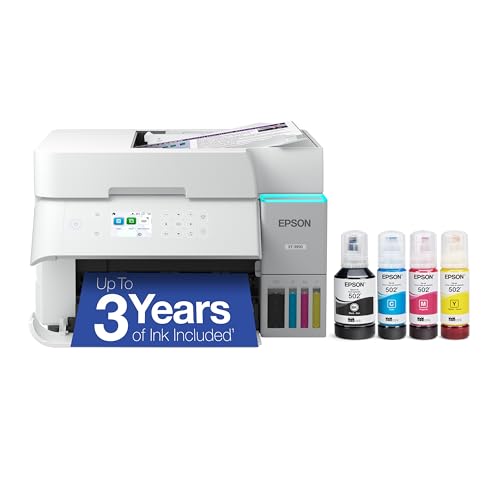
Epson EcoTank ET-3950 Supertank All-in-One
The Details Behind The Selections
This SureColor F170 bundle arrives ready for first-day sublimation work, which matters when a new shop has orders waiting. Dye-sublimation uses heat to bond dye into coated surfaces, so it is the standard path for mugs, shirts, mousepads, and similar blanks. The included 8.5″ by 11″ and 8.5″ by 14″ paper sizes cover most small-format jobs without extra purchases.
Where this differs from the OEM SureColor F170 covered next is the extras: thermal tape, a starter kit, and the bundled full ink set lower the up-front shopping list. New creators get a working setup from the box rather than tracking down consumables separately.
The Value In It
- Bundled ink and paper lower setup friction for first orders
- 8.5″ by 14″ legal-size feed handles wider designs without tiling
- Compact desktop footprint fits a corner of a craft room
- Dye-sub output works on apparel, mugs, and coated blanks
Things To Consider
- Sublimation ink is sensitive to humidity, so storage in a dry area tends to extend cartridge life
- Output is limited to polyester-coated or polymer-treated blanks, which rules out cotton tees
Key Attributes
Built With In Mind
A new sublimation shop owner or hobby seller producing mugs, shirts, and small accessories who wants one bundle that includes the consumables.
A Better Fit Elsewhere
If factory-sealed packaging with documented OEM warranty matters more than the kit extras, the Epson SureColor F170 OEM Edition is the better fit.
The OEM SureColor F170 ships as Epson packaged it, which is the priority for shops that document warranty coverage for their records. Factory sealing is the kind of detail that only matters when something goes wrong, but on the day a printhead needs service, it matters a lot. Genuine Epson sublimation ink carries the brand’s textile-safety certification for wearable blanks.
Unlike the starter SureColor F170 reviewed above, this edition skips thermal tape and paper. Creators who already stock sublimation supplies and just need the printer itself save on the extra bundle items they would not use.
Strong Points
- Factory-sealed OEM packaging supports clean warranty registration
- Genuine Epson inks carry textile-safety documentation for apparel
- Compact 8.5″ by 11″ body fits a tight desk or back-room station
Worth Noting
- No bundled paper or thermal tape, so you need to source supplies separately
- Standard home circuit is fine, but the unit should sit somewhere with steady airflow to keep the printhead cool
- Document output speed is modest versus the laser models later in this list
Whose Shelf It Belongs On
Creators who already keep sublimation paper and tape on hand and want the cleanest warranty path from an authorized Epson channel.
Swap It Out When
If you are just starting out and want paper, tape, and ink in one box, the Epson SureColor F170 starter bundle avoids that separate shopping trip.
Laser printing is the workhorse technology behind most office document stacks: toner is fused to paper with heat, which keeps cost-per-page low on long runs. The LaserJet Pro 4001n is a wired single-function unit, so it skips Wi-Fi and scanning in exchange for a sharp focus on print reliability. For a small team that prints contracts, reports, and shipping labels all day, that focus tends to matter more than extras.
Compare that to the wireless HP MFP 3101sdw reviewed later, which adds scan and copy but costs more in size and upfront spend. The 4001n stays in its lane and does it well, with Ethernet and USB for offices that prefer a hardwired network connection over wireless.
Benefits That Matter
- Wired Ethernet and USB keep print jobs off congested Wi-Fi
- Monochrome laser toner keeps cost-per-page steady on long runs
- Single-function design means fewer moving parts to service
- Compact enough to sit on a credenza beside the file cabinet
Room For Improvement
- No scanner or copier, so color workflows need a second device
- Wired-only setup can frustrate offices that already run mobile printing apps
Quick Facts
Right Fit For
Small offices or workgroups that print mostly black-and-white paperwork and prefer a wired, single-purpose machine.
Reach For A Different Pick When
If your team needs scan and copy in the same box, the HP LaserJet Pro MFP 3101sdw covers all three without a second device.
The HL-L6210DWT targets the higher end of the office-document scale: dual paper trays, fast print speeds, and a duty cycle built for workgroups that never quite stop printing. Where the HP 4001n handles small-team volume, this Brother is sized for the next step up, the kind of office where one person always seems to be refilling paper.
Wireless networking comes standard, so placement is more flexible than the wired 4001n covered above. Two 520-sheet trays let you load letterhead in one and plain paper in the other, which removes a daily swap for offices that still send formal correspondence.
A Favorable Mix
- Dual 520-sheet trays remove frequent paper reloads
- Wireless networking fits open office layouts
- High-speed monochrome output handles multi-page reports quickly
- Standard automatic duplex cuts paper use on two-sided jobs
- Tall body still fits beside a file cabinet without dominating the room
Trade-Offs To Consider
- Single-function design, so scan and copy need a separate machine
- Larger footprint than the smaller HP 4001n, so plan the desk space
Who It Suits Best
Workgroups and busy offices that print dozens of pages an hour and want two paper sources loaded at once.
Consider Something Else When
If your office needs full color plus scan and copy in one machine, the Brother MFC-L8930CDW covers the same volume tier with a full color document hub.
This MFP (multifunction printer) folds scan, copy, and print into one wireless unit, which is the practical answer for small teams that no longer want a separate flatbed scanner taking up desk space. Wireless setup, duplex printing, and mobile-friendly controls make it a flexible drop-in for an office that has mixed laptop and phone workflows.
Versus the HP 4001n earlier in this list, the trade is simple: you add scan and copy, accept a slightly larger body, and gain wireless. For a three-to-five-person team, that combination usually replaces two machines.
Well-Handled Touches
- Single-device scan, copy, and print trims equipment clutter
- Wireless networking suits laptop-heavy offices
- Automatic duplex keeps two-sided documents efficient
- Mobile printing support helps hybrid workers on phones
Some Limits To Know
- Monochrome only, so color workflows require another solution
- Toner replacement and occasional roller cleaning are common over multi-year use
Feature Card
Made For
Small hybrid teams that want one machine for everyday print, scan, and copy without paying for color capability they will not use.
Where A Sibling Pick Shines
If color marketing documents are part of the regular workload, the Brother MFC-L8930CDW covers the same multifunction lane with full color output.
The MFC-L8930CDW is the color step up from the monochrome Brother covered earlier: print, scan, and copy all in one body, but with full color laser output for presentations, flyers, and client-facing documents. Where inkjets bleed on cheap paper, color laser toner sits cleanly on standard office stock, which is the everyday reality for marketing and admin teams.
Compared to the HP MFP 3101sdw reviewed above, the trade is weight and upfront cost for color capability. For offices that produce branded handouts, that upgrade pays off quickly.
What Works In Its Favor
- Full color laser output works on plain office paper without smearing
- All-in-one design removes the need for a separate scanner or copier
- Automatic duplex covers color two-sided reports
- Built-in security features appeal to offices with compliance requirements
Soft Spots
- Color toner cost-per-page runs higher than monochrome laser
- Body is larger than the single-function printers in this list
- Color calibration may need occasional tweaking for brand-accurate output
Best Suited To
Marketing, sales, and admin teams that produce color documents regularly and need scan and copy without buying extra equipment.
Look Elsewhere When
If the workload is strictly black-and-white paperwork, the Brother HL-L6210DWT delivers higher monochrome throughput at a lower ongoing toner cost.
The EcoTank line replaces cartridges with refillable ink tanks, which is the appeal here: bottled ink costs less per page than traditional cartridges once you are past the initial ink that comes in the box. For a household that prints school forms, recipes, and the occasional photo, that math works out cleanly over a year of mixed use.
Where this differs from the laser models reviewed earlier is print technology. Inkjet printers (which spray liquid ink onto paper) handle photos and color graphics more naturally than lasers, at the cost of slower page-for-page throughput on long documents.
The Helpful Details
- Refillable ink tanks cut long-term cost-per-page for light mixed use
- Wireless setup suits a laptop-and-phone household
- Compact body fits on a small desk or kitchen counter
- All-in-one scan and copy covers school and home-office tasks
Worth Bearing In Mind
- Photo and color graphics print slower than office laser printers on long runs
- Ink tanks should be topped up before they run dry to avoid printhead drying
Feature Snapshot
Who Will Love This
Families and home users who print a mix of school forms, recipes, and color graphics and want to dodge cartridge replacement costs.
Not Your Match When
If your workload leans heavily toward office documents at volume, the Brother HL-L6210DWT delivers faster page throughput for that profile.
The ET-3950 sits one step up from the ET-2980 covered above, with higher-volume ink tanks and stronger specs for a home office that splits time between work documents and personal printing. Epson’s EcoTank supertank approach keeps bottled ink in play instead of cartridges, which matters for hybrid users running a small business from a spare room.
For most hybrid home offices, this lands in a comfortable middle: lower per-page cost than cartridge inkjets, more capacity than entry-level supertanks, and full color plus scan and copy in one box.
Useful Touches
- Larger ink tanks reduce refill frequency on heavier weekly use
- Wireless all-in-one covers print, scan, and copy in one footprint
- Color output handles client documents and family photo projects
- Higher page yield suits a hybrid home-office workload
Points To Note
- Body is slightly larger than the ET-2980, so plan the desk space
- Photo print speed is moderate compared to dedicated photo printers
Perfect Match For
Hybrid home offices that mix work documents with personal printing and want lower ink costs without stepping up to a full laser machine.
Skip It When
If your printing is overwhelmingly business documents in volume, the HP LaserJet Pro MFP 3101sdw handles monochrome office work faster for the same office footprint.
Choosing The Right Commercial Printer For Your Workload
The first decision is print technology. Dye-sublimation printers, like the two SureColor F170 models above, transfer dye into coated blanks and are the standard for mugs, shirts, and similar merchandise. Laser printers fuse powdered toner to paper with heat, which is faster and cheaper per page on long text runs. Inkjet printers, including the EcoTank supertanks, spray liquid ink and handle photos and mixed color graphics more naturally.
The second decision is workload size. Small teams printing dozens of pages a day fit comfortably into single-function monochrome lasers. Workgroups pushing hundreds of pages need dual-tray capacity. Color-capable offices should weigh whether marketing collateral is a daily task or a quarterly one, because color toner costs more per page.
Connectivity rounds out the picture. Wired Ethernet is reliable for fixed offices; wireless models like the MFP 3101sdw and the EcoTank supertanks give placement flexibility and mobile printing support. Match the connection type to how your team actually prints, not the spec sheet.
Finally, factor in consumable costs over a year. Cartridge inkjets run higher per page than supertank models. Color lasers run higher than monochrome lasers. A quick estimate of monthly page volume multiplied by cost-per-page is the most honest comparison.
Smart Guidance Before You Commit
Pitfalls Shoppers Hit
Buying a single-function printer when the team needs scan and copy is a frequent mismatch, since the second device always seems to arrive a month later. Another common miss is choosing a color laser for an office that only prints monochrome paperwork, paying higher toner costs for unused capability.
Where The Extra Money Goes
Higher-tier models like the Brother HL-L6210DWT and the MFC-L8930CDW cost more because they ship with larger paper capacity, faster print engines, and built-in security features. For a small home office, that spend is overkill. For a busy workgroup with daily deadlines, the upgrade typically pays back in time saved on paper reloads and faster job completion.
Frequently Asked Questions
What Is The Difference Between Inkjet And Laser Printing?
Inkjet printers spray liquid ink onto paper, which handles photos and color graphics well. Laser printers fuse powdered toner to paper using heat, which is faster and more cost-efficient on long text runs.
How Does Dye-Sublimation Printing Work?
Dye-sublimation uses heat to convert solid dye into a gas that bonds with polyester-coated or polymer-treated surfaces. It is the standard method for mugs, shirts, and similar merchandise blanks.
Do Supertank Printers Really Save Money On Ink?
Supertank printers use refillable ink tanks filled from bottles instead of replacement cartridges. For most households and home offices with regular printing, bottled ink costs less per page than cartridges over time.
What Does Duplex Printing Mean?
Duplex printing means the printer can automatically print on both sides of a sheet. It saves paper on two-sided documents and is standard on most current office printers.
Is Wireless Printing Reliable For Office Use?
Wireless printing is reliable for most modern offices with a stable Wi-Fi network. Wired Ethernet remains the most dependable connection for high-volume shared printers in busy offices.
Closing Remarks
The right commercial printer depends on what you actually print day to day, not just the spec sheet. Match the print technology to your materials, size the paper capacity to your volume, and pick the connectivity that fits how your team works. Any of the eight options above will serve the right user well; the trick is knowing which user that is before you check out.