A printer with a scanner changes how a home office actually runs. Tax forms, signed contracts, kids’ permission slips, and shipping labels all turn into one tap instead of a separate app or a trip to the office. The eight picks below cover everyday families, photo-heavy creators, and small businesses that push through serious paper volume. Each one earns its place by handling print, copy, and scan duties without eating your whole desk.
A Quick View Of The Lineup

Canon SELPHY CP1300 Wireless Photo Printer
Epson EcoTank ET-2720 Supertank All-in-One (White)
Fujitsu FI-6130Z Duplex Document Scanner (Renewed)
Epson EcoTank ET-2720 Supertank All-in-One (Black)

Epson EcoTank ET-2980 Supertank All-in-One (Black)

Canon Pixma TS6320 Wireless All-in-One (Black)
Epson EcoTank ET-3950 Supertank All-in-One

Fujitsu FI-7160 Duplex Document Scanner (Renewed)
The Picks, Examined More Closely
The Canon SELPHY CP1300 sits in a category of its own on this list: a dedicated photo printer that prints on the spot rather than scanning documents. Think of it as a scrapbooker’s tool that happens to live near the home office, not a paper-pushing workhorse like the EcoTank models that follow.
It’s small enough to stow in a closet between projects, and dye-sublimation (a printing method that uses heat to fuse dye onto paper for smudge-resistant, lab-style photos) gives prints that feel closer to a photo kiosk than an inkjet. Photo editors and party hosts tend to get the most out of it, while someone needing 30 pages of black text per day should look at the EcoTank ET-2720 instead.
What Helps Most
- Compact footprint makes it easy to set up on a craft table or kitchen counter, then tuck away when finished.
- Prints in multiple formats from 2.1 x 2.1-inch labels to 4 x 6-inch postcards, covering most scrapbook and journaling needs.
- Built-in editing tools like portrait optimization, red-eye reduction, and skin smoothing save a trip to photo software.
- Wireless connectivity lets a phone send snapshots over without cables cluttering the desk.
Things To Consider
- It prints photos, not general office documents, so pairing it with another device is common for mixed workloads.
- Specialty paper and ink cartridges are the only consumables that fit, so you may want to keep spare sets on hand for big projects.
Right Fit For
Crafters, scrapbookers, and memory keepers who mostly print photos rather than office paperwork.
Reach For A Different Pick When
Daily document printing is the priority, in which case the Epson EcoTank ET-2720 Supertank All-in-One (White) handles text, scanning, and copying in one box.
The ET-2720 leans into Epson’s supertank system, where ink bottles refill visible reservoirs instead of slipping into small cartridges. For a home office that prints a few dozen pages a week, that swap alone reshapes the cost equation.
Wireless setup keeps it tidy on a shared desk, and the flatbed scanner covers tax documents and signed forms without dragging out a separate device. It pairs best with shoppers who print a steady, moderate volume and want one machine that does the basics well, rather than chasing the higher throughput of the ET-2980 reviewed later.
Good Reasons To Consider
- Refillable ink tanks replace cartridges, trimming long-term running costs for steady printers.
- Wireless connectivity cuts cable clutter, which matters when the printer shares space with a laptop and a lamp.
- Built-in scanner and copier turn a one-trick printer into a full home office hub.
Honest Caveats
- Print speeds lean modest compared to the ET-2980, so large report dumps can feel slow.
- Photo quality is decent but not on the level of the Canon Pixma TS6320, which uses a five-ink setup.
- No automatic document feeder (ADF), meaning multi-page scans are placed by hand one sheet at a time.
Key Product Details
Made For
Light-to-moderate home offices that print weekly and want to skip cartridge replacements for a long stretch.
A Better Fit Elsewhere
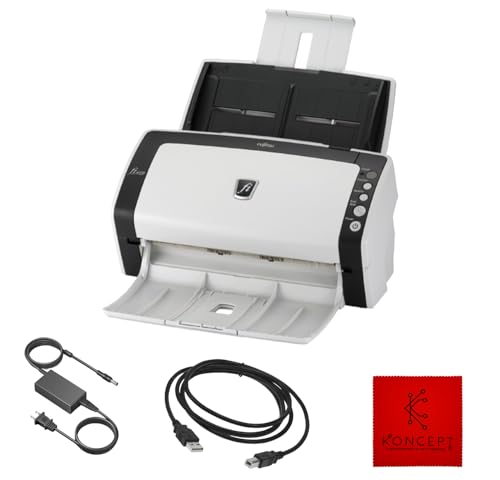
Heavy scanning loads should consider the Fujitsu FI-6130Z Duplex Document Scanner (Renewed), which chews through document stacks much faster.
Unlike the all-in-one inkjets on this list, the FI-6130Z is a specialist. It’s a sheet-fed document scanner that pulls pages through an automatic feeder, captures both sides in a single pass (duplex scanning), and ships them straight to a folder on your computer. For an accountant, paralegal, or anyone tackling a backlog of receipts, that focus is the whole point.
This Renewed unit carries the same basic hardware profile as its newer siblings, though operating system compatibility is the catch: it supports Windows XP through Windows 10, so Windows 11 shoppers will need to verify drivers before buying. It pairs with a home office that already has a printer, or with one of the EcoTank models, and treats scanning as a daily task rather than an afterthought.
What Earns Its Place
- Duplex scanning grabs both sides of a page in one pass, cutting time on receipts and contracts.
- Sheet-fed design means stacks of paper go in unattended instead of one page at a time.
- Document scanner build typically handles varied paper sizes better than flatbed alternatives.
Worth Noting
- This Renewed unit is not compatible with Windows 11, which is a deal-breaker for shoppers on the latest OS.
- It’s a scanner only, so a separate printer is required for any paper output.
- Needs a USB connection plus the included 24V power supply, taking up two outlets near the desk.
Best Suited To
Paper-heavy home businesses on Windows 10 or earlier who need fast, unattended document capture.
Swap It Out When
You need printing and scanning in one box, in which case the Epson EcoTank ET-2720 Supertank All-in-One (Black) covers both without a second device.
The black ET-2720 is essentially the same machine as the white version reviewed earlier, with a darker finish that blends into a typical desk setup. For a home office that already has a black monitor, laptop, and bookshelf nearby, the color match is more than cosmetic: it keeps the workspace from looking like a printer showroom.
Everything about the ink tank system, the wireless setup, and the flatbed scanner carries over identically. Where it differs is purely visual, and that matters more in a visible corner of a living room than in a closed-off study.
What Stands Out
- Black housing disappears into most desk setups, so it draws less attention in open-plan living areas.
- Same refillable ink tank system as the white ET-2720, meaning identical long-term running costs.
- Wireless connectivity keeps cables off the desk and lets a phone print directly.
Points To Note
- Functionally identical to the white ET-2720, so the color choice is the only real differentiator.
- Print speeds stay modest, so report-heavy days take patience.
- No ADF means multi-page scanning still happens by hand.
Whose Shelf It Belongs On
Shoppers who want the EcoTank value but prefer a darker finish that matches other electronics on the desk.
Look Elsewhere When
Faster print times are needed, since the Epson EcoTank ET-2980 Supertank All-in-One (Black) handles pages more quickly for the same money.
The ET-2980 takes the EcoTank foundation and turns the dial toward speed. Epson describes it as printing 50% faster than its predecessor, the ET-2720, and that bump matters when a household is sharing one machine for school projects, work reports, and the occasional boarding pass.
It keeps the refillable ink system, wireless connectivity, and flatbed scanner that make the smaller EcoTank models appealing, then layers faster throughput on top. For families juggling homework deadlines alongside a remote workday, that balance is the real story. Compared to the Canon Pixma TS6320 covered next, it leans more toward ink economy than photo fidelity.
Where It Helps
- Improved print speed over the ET-2720, cutting wait times during deadline crunches.
- Refillable ink tanks keep replacement costs predictable across a school year.
- Wireless setup supports laptops, phones, and tablets without rewiring the desk.
- Modern design fits alongside current laptops and monitors without looking dated.
Some Limits To Know
- Photo quality still trails dedicated photo printers like the Canon Pixma TS6320.
- Flatbed-only scanning means no automatic document feeder for multi-page jobs.
- Body size grows compared to the ET-2720, so a slightly larger desk footprint is needed.
Technical Highlights
Perfect Match For
Families that print often and want one machine to handle school, work, and household documents without slowing down.
Not Your Match When
Photo prints take priority over speed, since the Canon Pixma TS6320 Wireless All-in-One (Black) is built around richer color output.
The TS6320 swings toward creators who care about color as much as they care about copies. It uses a five-ink system, meaning it has separate cartridges for black, cyan, magenta, yellow, and a photo-specific black, which delivers richer photo prints than a standard four-ink setup. For someone printing portfolio samples or family photo albums alongside office work, that extra ink slot pulls real weight.
A small OLED screen and LED status bar sit on the front, so checking ink levels or job status doesn’t require booting up a computer. Compared to the EcoTank ET-2980 reviewed earlier, the Pixma trades the refillable tank system for sharper photo output, which is the right call for photo-leaning shoppers and the wrong call for high-volume text printers.
Practical Pluses
- Five individual ink tanks replace only the color that runs out, instead of a combined tri-color cartridge.
- OLED display and LED status bar make the printer readable from across the room.
- Wireless mobile printing supports phones and tablets without app fuss for most users.
- Auto-expandable output tray means less manual setup before a print job starts.
Small Caveats
- Cartridge-based ink costs add up faster than the EcoTank models over many pages.
- No automatic document feeder, so multi-page scans are loaded by hand.
- Photo focus means it’s slightly less economical for plain text-heavy weeks.
Feature Snapshot
Built With In Mind
Home offices where color quality matters as much as document printing, from photographers to teachers preparing visual materials.
Skip It When
Print volume runs high each month, since the Epson EcoTank ET-3950 Supertank All-in-One cuts long-term ink costs far more effectively.
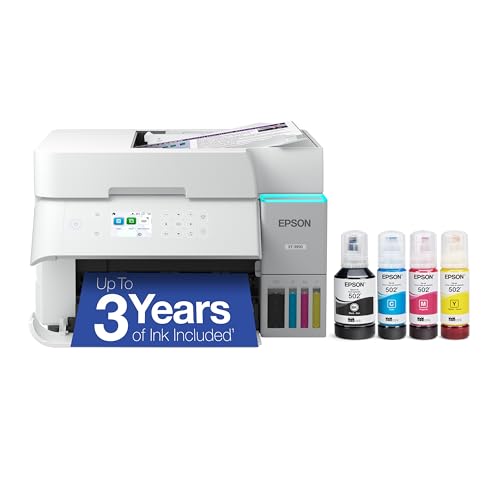
The ET-3950 is the grown-up sibling in the EcoTank lineup covered so far. It keeps the refillable ink tank design that defines the family, then stretches toward higher monthly volumes and a sturdier build that feels more office than living room.
For a small business running from a spare bedroom, or a household where the printer rarely gets a quiet day, that scaling makes sense. Wireless setup and a flatbed scanner still cover the basics, but the draw is capacity, not novelty. Compared to the ET-2720 and ET-2980 reviewed earlier, this one earns its keep when pages pile up fast.
Real-World Strengths
- Larger ink reservoirs support heavier monthly print volumes without constant refilling.
- Refillable tank design keeps per-page costs low for both text and color documents.
- All-in-one design folds scanning and copying into a single device, saving desk space.
- Wireless connectivity supports multiple users across phones, laptops, and tablets.
- Sturdier build suits a busy home office where the machine runs daily.
Trade-Offs
- Larger footprint than the ET-2720 and ET-2980, so a dedicated spot on the desk is needed.
- Price tag sits higher than entry-level EcoTank models, which may not suit lighter users.
- Photo output still trails dedicated photo printers like the Canon Pixma TS6320.
- No automatic document feeder listed, so multi-page scans remain manual.
Feature Rundown
Who Should Grab It
Small businesses and high-traffic households that print and copy weekly and want low per-page costs over time.
Consider Something Else When
Document capture is the main task, since the Fujitsu FI-7160 Duplex Document Scanner (Renewed) scans much faster than any flatbed all-in-one.
The FI-7160 sits at the performance end of this roundup. It’s a dedicated workgroup scanner that pulls pages through an automatic feeder at high speed, captures both sides simultaneously, and handles document types that would frustrate a flatbed scanner.
Pair it with any printer on this list, and the result feels closer to a small office than a kitchen counter. For shoppers whose biggest headache is a stack of mail, contracts, or receipts that never ends, the FI-7160 makes short work of the backlog. Compared to the FI-6130Z reviewed earlier, it brings faster throughput and a deeper duty cycle for users who scan all day.
Where It Excels
- High-speed scanning handles large document piles in a fraction of the time flatbeds need.
- Duplex scanning captures both sides of a page in one pass, doubling efficiency on two-sided documents.
- Automatic document feeder loads stacks of paper without babysitting each sheet.
- Built for daily heavy use, suiting home businesses that scan through paperwork regularly.
- Connects via USB 3.0 (a fast wired connection standard) for reliable data transfer to a computer.
Things To Weigh
- This is a scanner only, so a separate printer is required for any paper output.
- Larger footprint than a flatbed scanner, needing a dedicated corner of the desk.
- Renewed unit condition varies, so inspecting it on arrival is worth the time.
Who Will Love This
Home businesses and serious paper handlers who scan through hundreds of pages a week and want it done quickly.
Another Choice May Suit
Casual scanning with the occasional document is enough, since the Epson EcoTank ET-2720 Supertank All-in-One (White) bundles basic scanning into a printer for less complexity.
What To Weigh Before Choosing Home Office Printers With Scanner
Match The Machine To Your Volume
The biggest divide in this category is between cartridge-based printers and refillable supertank models. Cartridge printers like the Canon Pixma TS6320 shine on photo quality and small monthly loads, while supertank models like the Epson EcoTank ET-2980 and ET-3950 save money when pages stack up weekly. Honest monthly volume is the deciding factor, since a low-use household overpays for refillable tanks, and a high-use household burns through cartridges fast.
Scanning Style Matters More Than It Seems
Flatbed scanners on all-in-one printers work fine for tax forms and the occasional receipt, but anything multi-page gets old fast. A dedicated document scanner like the Fujitsu FI-6130Z or FI-7160 handles stacks through an automatic feeder, which is the real time-saver. For shoppers scanning fewer than 10 pages a week, a flatbed is plenty.
Wireless Setup And Operating System Fit
Most modern home office printers connect wirelessly, but operating system support still trips people up. The Renewed Fujitsu scanners on this list specifically note Windows 10 compatibility limits, so verifying driver support before buying prevents a return headache. Printers from major brands typically support current systems out of the box, but it’s worth a glance at the listing before clicking through.
Photo Versus Document Leanings
Photo-leaning shoppers get richer color from a five-ink system like the Pixma TS6320, while document-heavy households benefit more from supertank ink economy. The Canon SELPHY CP1300 covers a third path: dedicated photo prints in scrapbook-friendly sizes. Picking the lean that matches your most common job keeps the right strengths in play.
Key Considerations Across These Picks
Pitfalls Shoppers Hit
The most common mistake is buying a printer that looks right but doesn’t match the household’s real print volume. A photo printer in a paperwork-heavy home collects dust, and a workhorse printer in a scrapbooker’s room disappoints on color. The honest read is that your weekly page count matters more than the spec sheet.
Another trap is overlooking operating system compatibility, especially with Renewed scanners. Driver support varies, and buying a unit that doesn’t recognize your computer wastes setup time. Check the listing’s OS notes before adding anything to the cart.
Why Top Tier Costs More
The price gap between the entry-level ET-2720 and the higher-tier ET-3950 comes down to ink reservoir size, build quality, and monthly duty cycle. Premium models handle bigger print jobs without straining, and their refillable tanks hold more ink per fill, which matters for small businesses running daily jobs. For lighter users, the lower tier is plenty and saves money upfront.
For scanning-focused shoppers, the step from FI-6130Z to FI-7160 brings faster throughput and a deeper duty cycle. The upgrade pays off when document capture is the bottleneck, but casual users don’t need that extra headroom.
Frequently Asked Questions
Do all-in-one printers scan as well as dedicated scanners?
For occasional scans like tax forms or signed contracts, a flatbed scanner on an all-in-one works well. For stacks of receipts or contracts, a dedicated sheet-fed scanner like the Fujitsu FI-7160 is far faster.
What does supertank mean?
Supertank printers use refillable ink reservoirs instead of small cartridges, which lowers the cost per page and reduces how often you need to replace ink. Models like the Epson EcoTank ET-2720, ET-2980, and ET-3950 use this approach.
Are Renewed document scanners worth considering?
Renewed units can offer strong value for shoppers who want pro-grade hardware at lower cost. Inspect the unit on arrival and verify OS support, since some Fujitsu Renewed scanners specify Windows 10 rather than newer systems.
Can a home office printer handle photo prints well?
Printers with five-ink systems, like the Canon Pixma TS6320, produce sharper photos than typical four-ink models. For dedicated photo projects, the Canon SELPHY CP1300 is purpose-built for that work.
How much desk space do these printers need?
Compact models like the SELPHY CP1300 and ET-2720 fit on small shelves, while the ET-3950 and dedicated Fujitsu scanners need more room. Measure your spot before buying to avoid a cramped workspace.
Closing Thoughts
The right pick depends on what your home office actually does day to day. For mixed document and light photo work, the EcoTank models balance cost and capability well. For serious scanning loads, the Fujitsu units handle the work without wearing out your patience. Match the machine to your real workload, and the rest falls into place.