Counting cash by hand eats up time at retail counters, church offices, and small businesses where every minute matters. A solid bill counter machine turns a tedious stack into a tidy number, flags suspicious notes, and keeps daily reconciliation honest. After sorting through ten popular models, these are the ones that earn their place on the desk in 2026.
A Side-By-Side Look

XUNHON Bill Counter with UV/MG/IR Detection, Hidden Handle

MUNBYN IMC20 Money Counter with Value Count

Aneken Money Counter 1300 Bills/Min

Aneken N60 Mixed Denomination Bill Counter

Aneken Money Counter with Value Count

PONNOR Money Counter with Value Bill Count

PONNOR Money Counter with UV/MG/IR/MT/DD

LOLARAN Mixed Denomination Counter with CIS

LOLARAN AL-923 Touch-Screen Mixed Bill Counter
LOLARAN N71 Mixed Denomination Bill Counter
What Each Pick Brings To The Table
The XUNHON starts this roundup on purpose, because it tackles the awkward problem of hauling a bill counter between the back office and a pop-up event. A hidden handle tucks into the body, so the unit slides into a tote or low shelf without snagging on anything nearby. That portability is genuinely useful for small-team operations that rotate cash drawers between locations, and the lightweight frame means a single person can move it without help.
Three LCD readouts keep totals and per-stack counts visible from several angles, which helps when you hand the device off mid‑shift and want to glance at progress without leaning over. UV, MG, and IR sensors (ultraviolet, magnetic, and infrared checks, respectively) run alongside eight additional modes, so this compact unit covers more counterfeit screening than its size suggests. Setup is straightforward, and owners commonly report the auto-start kicking in reliably as bills feed through.
Practical Advantages
- The hidden handle turns a stationary-feeling tool into one you can grab and go, a real benefit for mobile operators and event-based sellers.
- UV/MG/IR plus eight other counting modes give you a deeper screening net than basic counters, which matters in regions where fakes circulate more often.
- The triple-display layout means the operator and a customer-facing helper can both read totals without leaning over the unit.
Things To Consider
- The compact hopper means more frequent reloads during long batches, so high-volume cash rooms may feel the slowdown.
- Without CIS (contact image sensor) scanning, this unit relies on sensor arrays rather than full bill-image recognition, which leaves a small gap in counterfeit coverage.
Feature Snapshot
Built With In Mind
Mobile sellers, church treasurers, and small offices that need a stowable counter more than a stationary workhorse.
Consider Something Else When
The MUNBYN IMC20 is the better fit for high-volume retail floors that run stacks of a thousand notes without pause.
Where the XUNHON trades size for portability, the MUNBYN IMC20 leans fully into throughput. This counter chews through up to 1,000 notes per minute, with a 200-note hopper on top and a 150-note stacker catching the output. Peak hours at a checkout lane or end-of-day deposit prep become a one-person job again, since the larger hoppers keep reloads infrequent.
Value, Add, and Batch modes cover the everyday counting scenarios small businesses hit most, and an external LED display sits next to the unit so a customer-facing colleague can verify totals at the same time. Detection covers UV, MG, IR, and MT (magnetic thread), screening bills on multiple characteristics during each pass. You may find the included warranty length a quieter detail worth checking before checkout.
Real Benefits
- 1,000 bills per minute with deep hoppers means long batches run with fewer pauses, which is exactly what busy shifts need.
- Value, Add, and Batch modes cover preset bundles, running totals, and per-denomination tracking without extra steps.
- The external LED display lets a second viewer follow counts in real time, useful for transparent customer transactions.
Points To Note
- The larger hopper and stacker mean a bigger desktop footprint than the XUNHON, so tight counter spaces may feel cramped.
- Without CIS imaging, this counter cannot read bill faces, which limits value-count automation on mixed denominations.
Who It Suits Best
Retail managers and cash-room operators who prioritize raw speed and need fewer reloads during back-to-back batches.
Where Another Pick Suits Better
The Aneken N60 is the stronger match when mixed-denomination sorting matters more than sheer bills-per-minute speed.
The Aneken DC002 prioritizes the one metric most people notice first: speed. At up to 1,300 bills per minute, it outpaces the MUNBYN IMC20 by a noticeable margin, which is meaningful when a manager has a stack of bank-bag-style piles waiting at the end of a long shift. USD and EUR support covers the most common counting scenarios for North American retailers and European importers alike.
Value count requires manual denomination input rather than automatic face recognition, which keeps the machine simpler and the price typically lower than CIS-equipped models. In ADD mode, multiple stacks of notes can be tallied into a running total. For most back-office counts, the throughput alone makes this pick feel like a serious time-saver.
Positive Takeaways
- 1,300 bills per minute places this among the quickest counters in the roundup, shaving real minutes off large batches.
- Manual value-count mode gives accurate running totals without the cost of a CIS imaging sensor.
- ADD mode lets you stack multiple piles into a single grand total, useful for end-of-shift reconciliation.
Honest Caveats
- Without automatic denomination recognition, sorting mixed piles requires manual denomination selection, which slows things down.
- The display surface is less elaborate than the TFT panels found on the LOLARAN models, so visual clarity in dim back rooms can suffer.
The Right Fit
Cash-heavy businesses that batch-count by denomination and want the fastest pass-through speed available.
A Better Fit Elsewhere
The LOLARAN AL-923 is worth a look when you need automatic mixed-value recognition and a touch-screen interface.
This is where the roundup shifts from raw speed into intelligence. The Aneken N60 reads the face of every bill, recognizes the denomination automatically, and tallies both quantity and dollar total on a 3.5-inch TFT display during a single pass. USD, CAD, MXN, EUR, and GBP support means a single device can serve border towns, tourist-heavy districts, and bilingual cash rooms without swapping hardware.
Compared to the simpler Aneken and MUNBYN models reviewed above, the N60 adds mixed-denomination counting (MDC), single-denomination counting (SDC), count, batch, and accumulation modes. UV, MG, IR, and DD (dimension detection, which checks bill size) screen for counterfeits on every pass, and the printer-enabled design means records can flow straight into a paper trail. For most small businesses, the time saved on manual denomination sorting alone justifies the upgrade.
Everyday Perks
- Automatic denomination recognition across five major currencies turns mixed-stack counting into a one-step process.
- The 3.5-inch TFT screen displays quantity and total simultaneously, cutting the mental math that simpler counters leave to the operator.
- DD detection adds a physical-size check that catches many of the most common counterfeit techniques.
Small Caveats
- Printer-enabled design typically requires a separately purchased printer unit, so factor that into the total cost.
- Owners commonly report the learning curve for MDC mode runs a session or two before confidence builds.
Made For
Tourist-area retailers, currency-exchange counters, and bilingual cash rooms handling mixed bills in five currencies.
Skip It When
The LOLARAN AL-923 makes more sense for businesses needing 120-currency support and touch-screen controls.
The earlier Aneken counters reviewed here focused on speed or screen size; this model focuses on the breadth of counterfeit detection. Seven separate checks run on every bill: UV, MG, IR, DD, DBL (double-bill detection), HLF (half-bill detection), and CHN (chain-note detection). Each catches a different trick, and running them in parallel produces one of the deepest screening nets on this list.
Add and Batch modes cover everyday counting patterns, while Value Count tallies totals when you set the denomination in advance. The LCD readout shifts to red and triggers an audible alert the moment the system spots a flagged bill, which is the kind of immediate feedback busy operators appreciate. You may find the alert volume a touch loud in a quiet office, depending on placement.
What Works In Its Favor
- Seven-layer counterfeit screening catches double bills, half bills, and chained notes that simpler counters miss.
- Red-on-LCD alerts with audible alarms mean flagged bills get attention immediately, which speeds up the operator’s response.
- Value Count, Add, and Batch modes cover most everyday reconciliation patterns without forcing mode-switching mid-shift.
Less Ideal Details
- Heavier detection processing can slow per-bill throughput compared to the Aneken 1300 bills/min reviewed earlier.
- Without CIS imaging, mixed-denomination totals still require manual denomination selection, which adds a step.
Key Product Details
Best Suited To
Cash handlers in markets where counterfeit bills circulate frequently and layered screening matters more than pure speed.
Reach For A Different Pick When
The LOLARAN N71 is a stronger match for businesses needing automatic mixed-denomination recognition alongside solid detection.
The PONNOR with Value Bill Count centers on a 3.7-inch LCD, which is larger than most displays on this list. For shared counters where two people need to read totals at once, that extra screen real estate makes a difference. The display is the same one used in the Aneken models reviewed earlier, but the larger size cuts down on misreads during fast counts.
UV, MG, IR, DD, DBL, HLF, and CHN detection stacks seven screening layers into a single pass, matching the depth of the Aneken 7-layer model. Add, Batch, and Value modes cover the most common counting workflows, and an external display port supports a secondary screen for customer-side viewing. Owners commonly report the housing feels sturdy enough for daily commercial use.
Useful Touches
- The 3.7-inch display is among the largest on the list, reducing eye strain during long counting sessions.
- Seven-layer detection runs in parallel, catching double, half, and chained notes alongside standard counterfeit screens.
- External display support lets a second viewer confirm totals, which helps in customer-facing settings.
Trade-Offs To Consider
- Without CIS imaging, mixed-denomination totals still require manual denomination input per batch.
- The larger display adds slightly to the overall footprint, which can matter on narrow retail counters.
Whose Shelf It Belongs On
Shared counters, bank-teller-style desks, and any workspace where two people need to read the count at once.
Where A Sibling Pick Shines
The PONNOR Money Counter with UV/MG/IR/MT/DD (Item 7) is a better fit when you want auto mode for faster unattended batches.
The other PONNOR model in this roundup pairs a slimmer body with five detection methods and an Auto mode. Where Item 6 focuses on screen size, this model leans into workflow simplicity: Auto mode handles the run-and-restart cycle without manual intervention, which is the kind of detail that matters when one person is running an entire cash wrap.
UV, MG, IR, MT, and DD detection catches magnetic thread anomalies alongside the standard counterfeit screens. Count, Add, Batch, and the newer Value Counting mode cover the most common reconciliation workflows. An external LCD display supports a customer-facing viewer. You may find this unit fits a narrower shelf better than its sibling with the bigger screen.
A Few Highlights
- Auto mode restarts the count without operator input, saving time on batch-heavy routines.
- Magnetic thread detection adds a screening layer the more common UV-only counters skip.
- External LCD display support enables transparent customer-side viewing on shared counters.
Points To Keep In Mind
- The smaller LCD on the unit itself is harder to read at a distance than the larger PONNOR model reviewed just before this.
- Auto mode can continue past a flagged bill faster than some operators prefer, so manual review of alerts matters.
Perfect Match For
Solo operators running end-of-day deposits who want Auto mode to reduce button-pushing between stacks.
Another Choice May Suit
The Aneken N60 is worth a look when automatic mixed-denomination recognition matters more than Auto mode shortcuts.
The LOLARAN N71 with CIS is the roundup’s first entry into true image-based screening. CIS (contact image sensor) reads the printed face of every bill, comparing patterns against stored templates rather than relying solely on magnetic or ultraviolet characteristics. That extra layer matters in markets where sophisticated counterfeits pass simple sensor checks.
USD, EUR, MXN, GBP, and CAD support covers the most common retail currencies across North America and Europe. A 3.5-inch TFT main screen pairs with a dedicated secondary side display, so the operator and a customer-facing colleague can both verify totals. Five-layer detection covers CIS, IR, UV, MG, and DD in a single pass.
A Favorable Mix
- CIS imaging reads bill faces directly, catching counterfeits that bypass basic UV and magnetic sensors.
- Dual displays let the operator and a customer-facing colleague see totals simultaneously, useful for transparent transactions.
- Five-layer detection stacks image, infrared, ultraviolet, magnetic, and dimension checks for thorough screening.
Factors To Consider
- CIS-equipped units typically cost more than simpler UV/MG models, so this is a deliberate upgrade choice.
- Image-based recognition can be sensitive to heavily worn or damaged bills, occasionally requiring manual verification.
Quick Facts
Who Should Grab It
Retailers in counterfeit-prone markets who want image-level screening on top of standard sensor checks.
Not Your Match When
The LOLARAN AL-923 is the stronger choice when you also need a touch screen and broader 120-currency support.
The AL-923 sits at the top of the LOLARAN range and earns the position through breadth rather than raw speed. Support for up to 120 global currency programs means an exporter or travel-focused business can run a single machine across multiple markets, with USD, EUR, CAD, MXN, DOP, COP, ARS, and JMD preloaded out of the box. Three on-screen languages (English, Spanish, and French) reduce the onboarding friction for bilingual teams.
A touch-screen interface replaces the button-heavy layouts of the MUNBYN and basic Aneken models reviewed earlier, which makes mode-switching faster once operators learn the layout. CIS, UV, MG, IR, DD, DBL, HLF, and CHN detection covers image recognition plus seven secondary checks in a single pass. Software upgrades flow through customer support as new currencies are added.
Positive Points
- 120-currency support with eight preloaded currencies makes this a fit for exporters and travel-focused retailers.
- Touch-screen interface simplifies mode switching and reduces the training curve for new operators.
- Eight-layer detection stacks CIS imaging with seven secondary screens for the deepest screening on the list.
Where It May Fall Short
- The premium feature set puts this unit in a higher price tier than most of the other models reviewed here.
- Software upgrades routed through customer support mean adding new currencies is not an instant process.
Product Snapshot
Who Will Love This
Currency-exchange counters, travel agencies, and exporters handling multiple currencies with a single team.
Look Elsewhere When
The LOLARAN N71 is a better fit for retailers who want strong detection but do not need 120-currency flexibility.
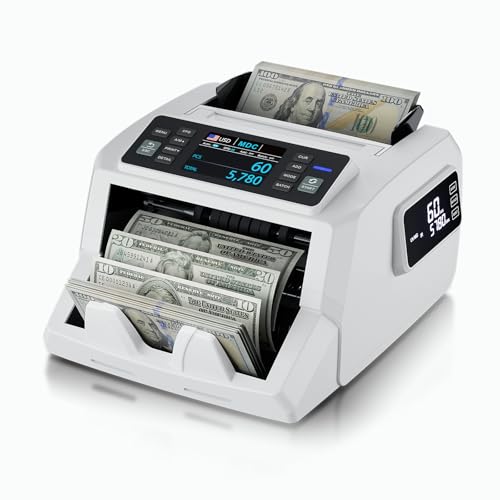
Closing out the roundup is the LOLARAN N71, which threads a useful needle between the other LOLARAN models reviewed above. It carries the same CIS, IR, UV, MG, and DD detection as the high-security pick earlier in the list, but trades the 120-currency breadth of the AL-923 for a tighter multi-currency focus aimed at retail and business use.
Dual displays support operator and customer viewing simultaneously, which is a meaningful upgrade for transparent point-of-sale transactions. Mixed-denomination counting reads bill faces, displays quantity and total at the same time, and runs through mixed stacks in one pass. The included three-year protection plan adds a layer of reassurance beyond what most competitors in this list offer.
Notable Gains
- Mixed-denomination recognition with dual displays handles retail transactions and end-of-day reconciliation in one device.
- Five-layer CIS-based detection provides image-level screening comparable to the higher-tier LOLARAN model reviewed earlier.
- The three-year protection plan runs longer than the warranty on most of the other models in this roundup.
A Few Limitations
- Fewer supported currencies than the LOLARAN AL-923, so multi-region businesses may need additional equipment.
- The dual-display setup adds a touch of bulk compared to single-screen units like the XUNHON reviewed at the top.
Core Features
The Right Fit
Retail counters and business cash rooms that want CIS-level screening plus a longer protection window.
Swap It Out When
The XUNHON Bill Counter is a better match for mobile operations where portability outweighs dual-screen transparency.