Keeping tabs on tools, IT gear, and machinery gets messy fast once a team grows past a handful of assets. The right tag holds up to solvents, grease, scanner lights, and the occasional drop, so your inventory records actually match what’s sitting on the bench. This list rounds up ten custom-label options that handle everyday wear, scan cleanly, and stay readable after months of service.
A Quick View Of The Lineup
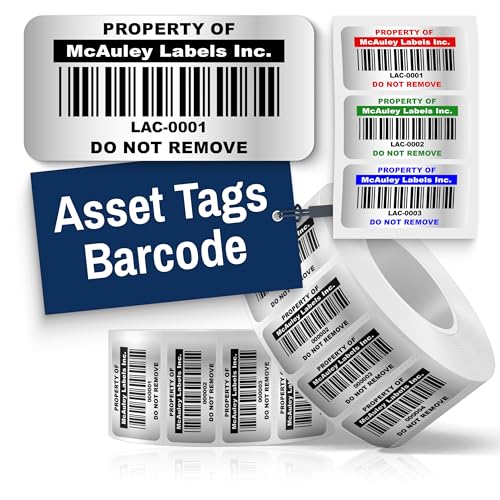
McAuley Labels Custom Silver Asset Tags (2×1 in)
McAuley Labels Heavy Duty Silver Asset Tags (2×1 in)

McAuley Labels Custom White Asset Tags (2×1 in)

McAuley Labels Custom Silver ID Tags (2×1 in)
McAuley Labels Custom Silver ID Tags (1.5×0.75 in)
McAuley Labels Heavy Duty Silver Tags (1.5×0.75 in)
McAuley Labels Heavy Duty Silver ID Tags (2×1 in)
McAuley Labels Custom Silver Barcode Tags (1.5×0.75 in)

Bunny Badges Custom Logo Asset Labels
McAuley Labels Heavy Duty Silver ID Tags (1.5×0.75 in)
A Breakdown Of The Leading Choices
Starting off with a versatile silver barcode label sized at 2 by 1 inches, this McAuley Labels option fits the widest range of equipment tagging jobs without overcommitting to industrial-grade specifications. The metalized silver finish (a reflective polyester layer designed to read clearly under typical scanner lighting) gives barcodes enough contrast to register quickly during routine audits.
For an office manager running a laptop and projector inventory, or a facilities lead tracking shared tools, this entry provides a baseline that handles daily wear. The size gives room for both human-readable numbers and a barcode without crowding either one, and the silver tone looks cleaner on metal surfaces than white alternatives.
Advantages To Know
- 2×1 inch surface accommodates readable serial numbers and a scannable barcode side by side.
- High-contrast printing helps the barcode register in varied lighting, reducing rescans during audits.
- Reflective silver finish reads cleanly against dark equipment housings and metallic toolboxes.
- Customization options let you match numbering schemes to existing inventory software.
Things To Consider
- Standard adhesive may struggle on powder-coated or rough surfaces common in heavier shops.
- Smaller assets like cables and hand tools may find this size hard to apply without overhang.
Who It Suits Best
Office and facilities teams managing mixed laptops, projectors, and shared tools in indoor environments.
Where Another Pick Suits Better
For handheld gear that takes regular knocks, the McAuley Labels Heavy Duty Silver Asset Tags (2×1 in) brings a more aggressive adhesive that holds longer.
Stepping up from the entry silver tag, this heavy-duty variant uses a 3M adhesive backing rated for tougher surfaces, paired with the same 2 by 1 inch silver barcode layout. The adhesive chemistry (a high-tack acrylic designed for low-surface-energy plastics and powder-coated metals) makes a real difference on tool cabinets, machinery, and gear that gets handled frequently.
Shops where tags routinely see solvent splashes or constant abrasion benefit most. Compare that to the standard silver option above, and the upgrade shows up in longevity rather than scan performance, since the print and barcode finish stay consistent.
Features That Help
- Heavy-duty 3M adhesive resists curling at the edges after months of service.
- Same silver barcode surface as the standard tag, so scan training stays consistent across fleets.
- 2×1 inch format gives space for asset IDs and barcodes on the same label face.
- Water, scratch, and fade resistance keep printed data legible in shop conditions.
- Reflective silver base helps handheld scanners register on first pass.
- Custom numbering integrates with barcode-prefix workflows already in use.
Worth Noting
- Once applied, removal often leaves adhesive residue, so consider placement permanent.
- Heavier construction adds slight thickness that may not suit thin laptop lids.
- The aggressive grip makes repositioning during application nearly impossible after contact.
Quick Facts
Made For
Maintenance crews, manufacturing leads, and shop managers tracking equipment that gets handled, wiped, and moved daily.
Not Your Match When
For asset counts under fifty in a clean office, the standard McAuley Labels Custom Silver Asset Tags (2×1 in) gives similar scan performance without the adhesive commitment.
The white sibling to the silver barcode tags offers a semi-gloss polyester face that photographs well for asset photos and reads cleanly on dark equipment surfaces. White stays the familiar default for most inventory systems, and these 2 by 1 inch labels keep that convention intact.
Where indoor aesthetics matter, like client-facing offices or shared conference equipment, the lighter tone blends in better than reflective silver. The trade-off shows up in low-light scanning, where white prints slightly less reflective under angled scanner beams compared to metalized silver.
Where It Excels
- Semi-gloss white face looks unobtrusive on light-colored electronics and appliances.
- Sharp high-contrast printing keeps barcodes legible on first scan attempts.
- Custom color and sizing options let you match branding or department coding.
- Polyester build resists typical office cleaning chemicals and routine wiping.
Trade Offs
- White finish blends into light surfaces, which may slow visual asset checks.
- Less reflective than silver under angled handheld scanners in dim rooms.
Best Suited To
Office administrators and school IT staff tagging laptops, tablets, and AV carts in indoor environments with controlled lighting.
Skip It When
For frequent outdoor or warehouse scans, the Bunny Badges Custom Logo Asset Labels add sequenced barcodes that handle bulk auditing more smoothly.
Unlike the barcode-first tags earlier, this ID Label variant prioritizes human-readable serial numbers on a metalized silver face, sized at 2 by 1 inches. The silver background gives printed text a slight reflective pop without the busy look of overlapping barcodes.
IT teams who walk around checking serial numbers by eye during spot audits find this format faster than aiming a scanner at every device. The same silver-based durability carries over, so the labels handle routine office cleaning and the occasional fingerprint smudge.
The Helpful Details
- Large numeric format aids quick visual checks without a scanner in hand.
- Silver reflective background keeps text legible under overhead fluorescents.
- Custom serial sequencing drops directly into existing IT inventory databases.
- Same 2×1 inch footprint as the barcode tags for consistent placement across devices.
- Scratch and fade resistance preserves readability through multi-year device lifecycles.
Points To Keep In Mind
- No built-in barcode means manual entry for any system that requires scans.
- Silver tone may clash with consumer electronics that have lighter finishes.
Feature Snapshot
Perfect Match For
IT support staff and asset auditors who rely on quick visual identification during walkthroughs.
Look Elsewhere When
For barcode-driven checkouts at scale, the McAuley Labels Custom White Asset Tags (2×1 in) gives scannable labels with a similar size profile.
Same silver ID format as the larger version above, but trimmed to 1.5 by 0.75 inches for tighter real estate. Cables, dongles, small electronics, and any item where a full 2 by 1 inch label would overwhelm the surface benefit from this scaled-down profile.
The smaller size does force shorter serial strings or condensed barcodes. For most teams, four to six digit IDs fit comfortably, while longer enterprise asset numbers may need abbreviation schemes.
What It Does Well
- Compact footprint fits adapters, hand tools, and cable ends without crowding.
- Silver reflective finish keeps small-scale prints legible.
- Custom numbering preserves database continuity with full-size silver tags.
- Durable surface resists the rubbing that cable labels typically see.
Some Limits To Know
- Tight print area limits readable serial length without abbreviation.
- Small size can be tricky to align cleanly during high-volume application.
- Less visible from across a room, so visual audits take longer.
Whose Shelf It Belongs On
Lab managers and AV crews tagging cables, dongles, and handheld electronics with limited surface area.
Reach For A Different Pick When
For longer enterprise asset numbers, the McAuley Labels Custom Silver ID Tags (2×1 in) gives the print area to display full IDs.
Pairing the heavy-duty 3M adhesive from the 2-inch version with the compact 1.5 by 0.75 inch footprint, this tag targets the small-format assets that also see shop abuse. Power tools, diagnostic equipment, and handheld devices tend to land in this exact overlap.
The smaller print area still carries a scannable barcode and short serial number, though anything beyond six digits will feel cramped. For teams running lean asset schemes, that’s usually plenty.
Good Reasons To Consider
- Heavy-duty adhesive keeps tags on tools exposed to grease and solvents.
- Compact 1.5×0.75 inch format fits drill housings and meter faces.
- Silver barcode surface scans reliably in mixed shop lighting.
- Custom prefix sequencing works with established barcode-prefix systems.
A Few Limitations
- Limited print real estate constrains longer enterprise IDs.
- Permanent adhesive complicates relabeling during tool reassignments.
At A Glance
Built With In Mind
Tradespeople, automotive technicians, and maintenance crews labeling tools that live in tough conditions.
Swap It Out When
For larger equipment and machines where print area matters more than adhesive strength, the McAuley Labels Heavy Duty Silver ID Tags (2×1 in) offers a wider canvas.
Taking the heavy-duty adhesive formula and pairing it with the larger 2 by 1 inch ID format, this option targets long-term equipment fleets where both print area and durability matter. Industrial machinery, manufacturing cells, and shared rental equipment typically need exactly this combination.
Same story with the silver reflectivity, though here it serves human-readable numbers more than barcode contrast, since this variant focuses on ID labeling. The result feels closer to a permanent nameplate than a quick sticker.
A Favorable Mix
- Heavy-duty 3M adhesive holds through years of shop and outdoor exposure.
- 2×1 inch surface accommodates long serial numbers plus a secondary reference field.
- Silver background keeps large-print IDs visible from a distance.
- Custom sequencing drops straight into long-term asset registers.
- Water, scratch, and fade resistance protect print quality over multi-year cycles.
Honest Caveats
- Permanent bond makes removal difficult when assets are reassigned or retired.
- Higher material cost adds up across large fleets versus standard adhesive tags.
Right Fit For
Operations managers and plant supervisors maintaining multi-year equipment records in industrial settings.
Consider Something Else When
For shorter asset lifecycles or frequent reassignments, the standard McAuley Labels Custom Silver ID Tags (2×1 in) keeps things less permanent.
This compact silver barcode tag mirrors the standard adhesive option above but in the 1.5 by 0.75 inch small-format size, giving teams a consistent silver barcode look across both large and small assets. For mixed inventories where laptops and adapters live side by side, that consistency simplifies training and auditing.
The smaller print area means barcodes shrink to match, and depending on scanner resolution you may find the smallest codes slightly slower to register. In practice, modern handheld imagers handle these sizes without complaint.
What Earns Its Place
- Compact 1.5×0.75 inch format fits adapters, hand tools, and small electronics.
- Silver barcode face maintains visual consistency with larger silver tags.
- Sharp high-contrast printing aids quick scanner pickup.
- Custom color and sizing options accommodate team-specific numbering schemes.
Smaller Caveats
- Smaller barcode may scan slower on older laser-style scanners.
- Limited surface area leaves little room for human-readable backup numbers.
Who Should Grab It
Fleet coordinators handling mixed inventories of large gear and small peripherals who want one tag family across everything.
Another Choice May Suit
For tool-heavy environments with rougher handling, the McAuley Labels Heavy Duty Silver Tags (1.5×0.75 in) upgrade the adhesive to match the abuse.
Stepping outside the McAuley family, Bunny Badges lets you upload a company logo and personalize each label with a chosen prefix and starting number. Sequential CODE-128 barcodes (a high-density linear barcode format common in shipping and inventory) get printed automatically, which removes the spreadsheet work that custom tag jobs usually demand.
Order quantities range from 50 to 5,000 labels, sized at 2 by 0.7 inches. The narrow profile suits labeling along equipment edges, server bezels, and rack rails where wider labels would intrude on ventilation or adjacent ports.
Real-World Strengths
- Upload-your-logo workflow builds branded identification into the standard tagging process.
- Automatic CODE-128 sequencing saves spreadsheet prep on large orders.
- Flexible 50 to 5,000 label range fits both small pilots and enterprise rollouts.
- Slim 2×0.7 inch profile fits along rack rails, server bezels, and equipment edges.
Things To Weigh
- Standard adhesive may struggle on rough industrial surfaces compared to heavy-duty options.
- Sequenced barcodes cannot be customized mid-run, so prefix changes require a new order.
Feature Snapshot
Best Suited To
Branded operations and IT teams that want company identification baked into every asset tag from the start.
Skip It When
For shop environments with heavy abrasion, the McAuley Labels Heavy Duty Silver ID Tags (2×1 in) provide tougher adhesive at a similar print area.
Closing out the list with the compact heavy-duty ID variant, this tag pairs a 1.5 by 0.75 inch silver face with the same 3M adhesive backing found on the larger heavy-duty labels. Small serialized items that see real wear, like handheld scanners, calibration tools, and portable meters, sit squarely in its sweet spot.
The shorter print area still fits abbreviated IDs comfortably, though full enterprise numbers will need a shortened scheme. For tight tool inventories where consistency matters, that trade-off usually pays off.
Key Advantages
- Compact form factor fits handheld gear with limited label real estate.
- Heavy-duty 3M adhesive handles the abuse that small portable tools typically see.
- Silver face keeps short IDs readable from arm’s length during inspections.
- Custom sequencing supports department-specific numbering schemes.
Minor Gripes
- Limited print area forces shorter or abbreviated serial numbers.
- Permanent adhesive makes relabeling during reassignment difficult.
Right Fit For
Field service technicians and lab teams labeling portable instruments that need rugged but compact identification.
Look Elsewhere When
For full enterprise asset numbers on similar portable gear, the Bunny Badges Custom Logo Asset Labels support longer CODE-128 sequences at a slim profile.
Picking The Right Tags For Your Setup
Asset tags live or die by a few core decisions, and getting them straight before ordering saves the headache of relabeling an entire fleet later. Material choice, adhesive strength, and barcode format each pull the labels in a different direction, and matching those to your environment matters more than chasing every spec at once.
The reflective silver metalized finish works best when scanners operate at angles under mixed lighting, while semi-gloss white reads cleanly on lighter equipment and stays unobtrusive in client-facing spaces. Adhesive grade is the other fork in the road, since standard backing handles smooth indoor surfaces well, and the heavy-duty 3M adhesive option earns its keep on powder-coated metal, plastic tool bodies, and rough industrial cabinets.
Surface prep is the detail that decides whether tags stay put for years or peel within months. Wiping down application areas with isopropyl alcohol and letting them dry fully before peeling the backing gives the adhesive a clean surface to bond with. Skipping that step is the most common reason tags curl up at the edges long before the print fades.
For barcode-driven environments, CODE-128 sequencing remains the workhorse format, supported by virtually every modern handheld scanner. Pair that with consistent prefix schemes and starting numbers, and audits stop requiring manual cross-referencing between paper lists and physical equipment.
Key Considerations Across These Picks
Mistakes First-Timers Often Make
Underestimating the surface where the tag goes ranks as the top mistake. Smooth, clean, indoor plastics accept any standard adhesive, but powder-coated metal, painted steel, and textured rubber grips need the heavy-duty option or the tag lifts within weeks.
Overlooking lighting at the scanner station causes secondary headaches. A label that scans perfectly on a desk may frustrate users in a dim warehouse aisle. Testing scan reliability under actual operating conditions before ordering hundreds of labels prevents batch reprints.
Where The Extra Money Goes
The premium between standard and heavy-duty adhesive reflects real material costs and bonding chemistry. For assets that rarely move and live in climate-controlled spaces, standard adhesive handles years of service without complaint.
The premium tier earns its keep on equipment that travels, gets handled daily, or lives in unconditioned environments. Industrial machinery, rental fleets, and shared shop tools justify the upgrade because replacement labor and reprint costs add up quickly when tags fail mid-cycle. Custom logo upload, meanwhile, adds branding value rather than durability, and makes sense when the visible identification doubles as company presence on every piece of gear.
Frequently Asked Questions
What size asset tag fits most equipment?
The 2 by 1 inch format covers the majority of laptops, projectors, and mid-size tools without crowding the surface. Smaller gear like cables and adapters benefits more from 1.5 by 0.75 inch labels that avoid overhang.
How do metalized silver tags differ from white polyester tags?
Silver metalized labels reflect more light, which helps handheld scanners register barcodes in mixed or dim lighting. White polyester labels photograph better for asset records and blend more cleanly with light-colored electronics in office environments.
When does heavy-duty adhesive actually matter?
Standard adhesive works on smooth indoor plastics and metals, but powder-coated surfaces, textured rubber grips, and rough shop cabinets typically need the heavy-duty 3M backing. Tags applied with the wrong adhesive often curl at the edges within a few months.
Can barcodes be sequenced automatically across an order?
Some custom tag providers, including Bunny Badges, print sequential CODE-128 barcodes based on a chosen prefix and starting number. That removes the spreadsheet prep work usually required for large custom runs.
Do asset tags survive outdoor or warehouse conditions?
Water, scratch, and fade resistance ratings apply to most metalized and heavy-duty polyester labels, which handle outdoor and warehouse exposure for years. Standard white polyester labels perform best indoors under controlled conditions.
The Takeaway
Matching the tag to your actual environment, rather than chasing the toughest spec on the page, gives the best long-term value. Offices and clean indoor fleets run well on standard adhesive white or silver tags, while shops, field crews, and industrial settings get the most from heavy-duty silver formats sized for the gear they tag. Once those two choices line up with your scanning workflow, the rest of the rollout tends to fall into place.