Modern offices run on visual cues. From lobby directories to shared conference rooms, the right digital signage cuts down on confusion, helps visitors find their way, and turns a plain wall into a flexible communication tool. This roundup covers floor-standing kiosks, ADA-compliant wayfinding, privacy sliders, and a portable outdoor unit, so you can match the format to the room rather than forcing the room to fit the hardware.
A Snapshot Of The Selections

SIOXCFZ 55-inch Digital Signage 4K Touchscreen Kiosk

SIOXCFZ 65-inch Digital Signage 4K Touchscreen Kiosk

EliteSign In a Meeting Magnetic Privacy Slider

Kubik Letters Premium Conference Room Sign

SIOXCFZ 43-inch Outdoor Mobile Signage Kiosk

Alpha Dog Conference Room ADA Braille Sign

SIOXCFZ 43-inch 2K Touchscreen Kiosk Display
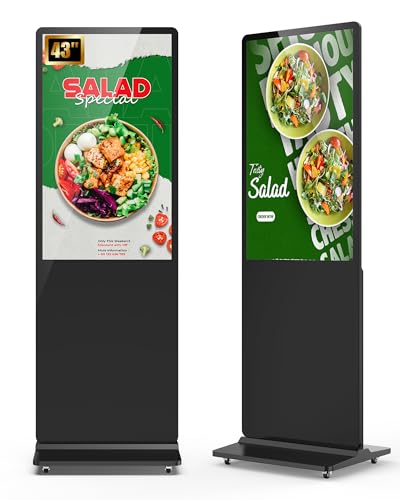
SIOXCFZ 43-inch 2K Auto Media Kiosk
The Strengths Of Each Pick
Step into a 12-person conference room and the first thing anyone notices is the screen. The SIOXCFZ 55-inch floor unit delivers 4K resolution on a vertical kiosk form factor, which works well for room directories, wayfinding, and interactive welcome screens. Unlike the compact EliteSign slider covered later, this is a full multimedia display, so it doubles as a presentation surface in rooms that don’t already have a wall-mounted TV.
For offices that want a single piece of hardware to handle schedules, branding, and interactive wayfinding, this size is the practical middle ground between the 43-inch options further down and the larger 65-inch unit reviewed next. Most teams find 55 inches readable from across a medium-sized room without overwhelming a standard doorway.
The Helpful Details
- 4K panel keeps text crisp for directories and menus at typical viewing distance.
- 178-degree viewing angle suits wide rooms where people sit off to the side.
- Built-in 8-ohm stereo speakers handle basic audio without a separate sound system.
- Floor-standing form means no wall mounting or contractor needed in most offices.
- Touchscreen layer turns the display into an interactive check-in or wayfinding kiosk.
Points To Note
- Floor placement requires a clear footprint near a power outlet, so it may not suit narrow corridors.
- Brightness is tuned for indoor use, so direct lobby sunlight can wash the panel out.
Who It Suits Best
Mid-size offices running a mix of room schedules, branding slides, and visitor check-in on a single screen.
Where Another Pick Suits Better
The EliteSign In a Meeting Magnetic Privacy Slider is a smarter grab for solo practitioners who only need door-side status communication.
Big rooms ask for big screens, and a 65-inch floor kiosk earns its keep in atriums, open-plan lobbies, and training spaces. Same 4K panel and stereo speaker setup as the 55-inch SIOXCFZ above, just stretched across a larger surface, so text and graphics stay sharp from across a busy open workspace. Where the 55-inch reads as a meeting room fixture, this one behaves more like a feature wall.
Touch interaction works on this size, though at typical standing reach the upper corners are a stretch for shorter users. In our view, the 65-inch form factor shines most when content is viewed, not tapped. Building directories, rotating brand reels, and live event calendars all benefit from the bigger canvas.
The Value In It
- 65-inch 4K canvas handles atriums and open lobbies where smaller displays disappear.
- Same touchscreen layer and audio hardware as the 55-inch, so the upgrade is purely size.
- Wide viewing angle keeps the picture consistent across a crowd.
Honest Caveats
- Large footprint blocks sightlines, so placement in narrow corridors is awkward.
- Weight and size mean two people are usually needed to position it during install.
- Overkill for a single 6-person meeting room where the 55-inch already does the job.
Right Fit For
Reception areas, training halls, and event spaces that need a visible centerpiece screen.
Look Elsewhere When
The Kubik Letters Premium Conference Room Sign is a calmer, lower-tech choice for designers who want a tactile door sign rather than a screen.
Sometimes a screen is overkill. The EliteSign slider is a small, magnet-backed door sign that flips between “In a Meeting” and “Please Knock” without any cables, mounting brackets, or software. For solo attorneys, therapists, remote workers, and small consult rooms, it solves the same interruption problem a digital kiosk would, only without the power outlet hunt. The package includes adhesive stickers for non-metal doors, which most competitors leave out.
Where the SIOXCFZ kiosks in this list are full media displays, this one is purely a status indicator. That’s a feature, not a limitation, for anyone who wants something that just works without Wi-Fi or a content management plan.
Everyday Advantages
- Magnetic backing installs on metal doors in seconds, with no tools.
- Adhesive stickers included for wood, glass, or hollow-core doors.
- Slider mechanism is intuitive enough for visitors to read at a glance.
- Compact size fits standard office doors without crowding the frame.
Some Limits To Know
- Single-language text, so multi-lingual offices may need to pair it with a printed sign.
- Plastic construction can show scuffs in high-traffic hallways over time.
Made For
Therapists, consultants, and small teams who want simple do-not-disturb signaling without running a screen.
Skip It When
The SIOXCFZ 43-inch 2K Touchscreen Kiosk Display is the better match for offices that need live room schedules, not just a door flag.
Kubik Letters leans into the visual language of modern co-working spaces. The sliding panel toggles between “In Session” and “Vacant,” and the minimal, geometric styling reads more like decor than office equipment. Studios, design firms, and architect offices that care about how a door sign photographs on a client tour will appreciate the look. The build feels solid, and the slider action has a satisfying weight that cheaper plastic signs lack.
Compared to the EliteSign slider earlier, this is more about finish and feel than raw function. The Kubik Letters sign costs a touch more, and you’re paying for the aesthetic upgrade.
Positive Points
- Sliding mechanism shows room status without electricity or batteries.
- Premium build quality stands up to daily flipping in busy offices.
- Minimalist design complements modern office interiors.
- Works on most standard interior doors without special hardware.
Trade Offs
- No ADA tactile features, so it may not satisfy accessibility audits on its own.
- Higher cost than basic plastic sliders, which is a real consideration for outfitting a whole floor.
Who Will Love This
Design studios, boutique agencies, and any office where the door sign is part of the brand presentation.
Another Choice May Suit
The Alpha Dog Conference Room ADA Braille Sign is the smarter pick for buildings that need to satisfy accessibility code requirements.
Most meeting room displays assume a climate-controlled interior, but events, pop-up clinics, and curbside check-in desks don’t. The SIOXCFZ 43-inch outdoor kiosk handles that gap with a weather-sealed enclosure and a built-in rechargeable battery, so it can run where there’s no nearby outlet. The included road case makes transport between venues practical for teams that move between locations.
Brightness on outdoor-rated panels is typically cranked well past indoor units, and this one follows that pattern with auto-adjustment that helps with shifting daylight. Most indoor picks in this list, like the SIOXCFZ 55-inch unit, would wash out the moment you wheel them onto a sunny sidewalk.
Practical Advantages
- Rechargeable battery removes the hunt for an outdoor power outlet.
- IP65 weather sealing handles rain and dust exposure at outdoor events.
- Road case protects the panel during transport between sites.
- Auto-brightness adjustment keeps the image visible as light changes.
What To Weigh
- Heavier and bulkier than indoor-only units, so it’s a poor fit for fixed indoor use.
- Battery life caps continuous runtime, so all-day events need a charging plan.
Best Suited To
Event teams, mobile clinics, and curbside retail operations that need a screen that can take weather and movement.
Reach For A Different Pick When
The SIOXCFZ 43-inch 2K Auto Media Kiosk is the better choice for permanent indoor lobby installations where battery power is irrelevant.
ADA compliance (the Americans with Disabilities Act standards for accessible design) isn’t optional in most commercial buildings, and signage often gets overlooked until an inspection flags it. The Alpha Dog sign delivers tactile lettering and Grade 2 Braille on a 4-by-8-inch plate, sized to meet common legibility requirements. For property managers outfitting a multi-room floor, this is the kind of sign that quietly passes inspection without drama.
It doesn’t slide, it doesn’t light up, and it doesn’t run a schedule. It labels a room clearly for someone who can’t rely on sight alone, and it does that job with consistent build quality. Pair it with a digital room schedule if your space needs both accessibility and live booking data.
What Stands Out
- Tactile lettering and Grade 2 Braille cover core ADA wayfinding needs.
- High-contrast finish improves readability in varied lighting conditions.
- Compact 4×8-inch footprint fits standard door frames without crowding.
Possible Compromises
- Single fixed message, so it doesn’t replace dynamic room-status displays.
- Black colorway may look stark in lighter interior schemes.
Who Should Grab It
Facility managers and office leads who need reliable accessibility signage that satisfies code on the first inspection.
Swap It Out When
The Kubik Letters Premium Conference Room Sign is the better match for offices that want a stylish, status-changing door sign instead of fixed ADA text.
The 43-inch class is the sweet spot for most meeting rooms, and this SIOXCFZ unit covers the basics without a 4K premium. 2K resolution is plenty for room directories, brand slides, and interactive wayfinding at typical indoor viewing distance. The touchscreen layer makes it useful for self-service check-in or quick polls, and the floor-standing form avoids any wall-mounting in leased spaces where drilling isn’t an option.
Compared to the SIOXCFZ 55-inch 4K model at the top of the list, you give up screen real estate and resolution density. For a 6-to-10-person room where the display sits five or six feet from the closest viewer, that’s a fair trade for a friendlier price tier.
A Few Highlights
- 2K resolution is sharp enough for typical meeting room viewing distances.
- Touchscreen layer supports interactive content without a separate tablet.
- Floor-standing housing suits leased offices where wall mounting isn’t allowed.
- 178-degree viewing angle keeps the picture clear from awkward seats.
Trade-Offs To Consider
- Lower pixel density than 4K siblings, so very fine graphics lose some detail.
- 350-nit brightness is fine for indoor use, but glare-prone lobbies may need shading.
Built With In Mind
Standard conference rooms that need a capable, mid-size touchscreen display without stepping into 4K territory.
Where A Sibling Pick Shines
The SIOXCFZ 43-inch 2K Auto Media Kiosk makes more sense for lobbies running scheduled content loops, since it leans into set-and-forget media rotation.
For lobbies, waiting rooms, and break areas, the goal is usually a screen that just plays the right content without anyone touching it. The SIOXCFZ 43-inch 2K Auto Media Kiosk leans into that use case with auto-playback for scheduled media, so a USB stick or connected media library can keep rotating slides and video without daily management. It uses the same 2K panel and 178-degree viewing angle as the touchscreen kiosk earlier, just oriented toward passive viewing.
In our view, this is the pick to deploy when you have a fixed playlist and no plan to run interactive content. Drop in the media, set the schedule, and the screen runs itself. The SIOXCFZ 55-inch 4K model still beats it for high-end presentation rooms, but the 2K panel here is honestly plenty for standard informational signage.
Real-World Strengths
- Auto-playback media rotation suits unattended lobby installations.
- 2K resolution reads cleanly at typical lobby viewing distances.
- Wide viewing angle keeps content legible from lobby seating and walkways.
- Compact 43-inch footprint fits narrower wall pockets and entry alcoves.
Where It May Fall Short
- No interactive touchscreen layer, so it doesn’t suit check-in or wayfinding taps.
- Requires scheduled content updates to stay useful over time.
Perfect Match For
Reception areas and break rooms that need a steady rotation of branding, announcements, or ambient content.
A Better Fit Elsewhere
The SIOXCFZ 43-inch 2K Touchscreen Kiosk Display is the stronger choice for spaces that need visitor interaction alongside video playback.
What To Think Through Before Choosing Meeting Room Digital Signages
Screen size and panel type drive the bulk of the experience. 43-inch models fit standard meeting rooms without dominating the wall, while 55- and 65-inch units suit open lobbies, atriums, and training spaces where viewers stand further back. Resolution matters more as screens get bigger: 2K holds up well at 43 inches, but 4K earns its place at 55 inches and above, where pixel density becomes visible at close range.
Brightness (measured in nits, where higher numbers mean a brighter image) and viewing angle separate indoor units from outdoor or atrium use. A 350-nit panel looks fine in a windowless conference room but washes out near a sunny entryway. The SIOXCFZ outdoor unit reviewed above compensates with auto-brightness, but most indoor picks assume controlled lighting.
Touchscreen versus static playback is the other fork. Interactive screens let visitors check in, find a room, or browse a directory. Static or auto-playback models are cheaper and simpler, and they fit spaces where no one is expected to tap the screen. Door signs like the EliteSign slider and the Kubik Letters sign take a third path, solving room-status communication without any display at all.
Key Considerations Across These Picks
Wrong Turns To Avoid
The most common mistake is buying the largest screen available, then squeezing it into a room that can’t handle the footprint. A 65-inch kiosk in a 10-by-10 meeting room overwhelms the space and crowds the door. Match the screen to the room, not the other way around.
The other trap is ignoring accessibility. Even if your team doesn’t need ADA signage today, commercial buildings usually do, and retrofitting later costs more than planning for it upfront. Pairing a digital kiosk with a tactile sign like the Alpha Dog ADA Braille option is often the cleanest path.
Where The Extra Money Goes
Stepping up from 2K to 4K costs more, but you pay for sharper text, cleaner graphics, and a panel that won’t feel dated as content standards improve. Larger screens and weather-sealed enclosures add real money too, mostly because the components and structural materials get more expensive at scale.
For most offices outfitting a handful of rooms, the 43-inch 2K class hits the right balance. Spend more when the room calls for it, not because bigger numbers feel safer.
Frequently Asked Questions
What size screen works for a standard conference room? A 43-inch display is the practical starting point for rooms seating up to 10 people. Larger spaces benefit from 55- or 65-inch panels, where viewers sit further back and need the extra real estate to read clearly.
Do meeting room digital signages need internet access? Not always. Many of the picks in this roundup support USB media playback or local scheduling, which works without network access. Cloud-managed content does need a stable connection.
How does a digital signage kiosk differ from a regular TV? A commercial kiosk is built for long runtimes, public interaction, and often includes a touchscreen layer, wider viewing angles, and integrated media playback. Consumer TVs are designed for shorter viewing sessions and lack the durability profile of commercial units.
Are ADA signs required in every meeting room? Most commercial buildings in the U.S. are subject to ADA wayfinding requirements, though specifics vary by jurisdiction and occupancy type. The Alpha Dog sign covered above is a common solution for meeting rooms.
Can outdoor digital signage work indoors too? Technically yes, but you’ll pay for weatherproofing and battery hardware you don’t need. Indoor units run lighter, generate less heat, and tend to look cleaner in interior spaces.
Final Verdict
The right pick depends on what your room actually needs. For interactive meeting rooms, the SIOXCFZ 55-inch 4K Touchscreen Kiosk is a strong starting point. Small offices get a lot of mileage from a simple slider sign like the EliteSign or the Kubik Letters option, and buildings that need code-compliant wayfinding should pair any digital display with a tactile sign like the Alpha Dog ADA Braille plate. Match the format to the room, and the hardware tends to disappear into the workflow.