A 34-inch ultrawide changes the texture of a workday. Spreadsheets stop eating each other, video calls sit comfortably beside your inbox, and long stretches of writing feel less cramped. The catch is that “ultrawide” covers a wide spread of panels, curvatures, and refresh rates, and the wrong one for your setup creates eye fatigue or wasted desk space. This list sorts through nine current options, mixing office-first picks with hybrid work-and-play models, so the screen you land on fits the way you actually work.
The Shortlist At A Glance

Dell S34 Series 34″ 2K Curved Monitor (White)

LG 34″ Curved UltraWide QHD IPS Monitor

LG 34″ UltraWide WFHD Monitor

INNOCN 34C1R 34″ WQHD 180Hz Ultrawide

INNOCN 49″ Curved DQHD 240Hz Ultrawide
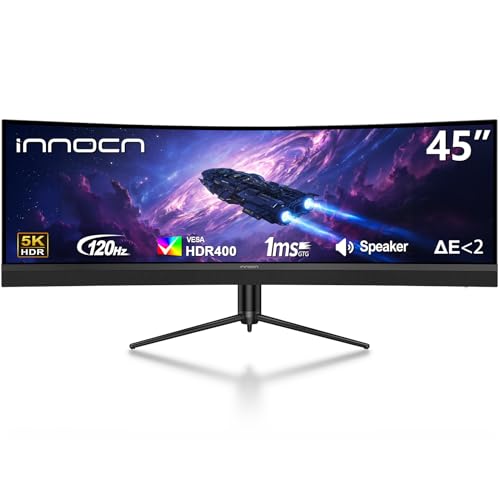
INNOCN 45″ 5K2K 120Hz Ultrawide Curved

INNOCN 49C1G 49″ Curved 144Hz Ultrawide

INNOCN 45C1R 45″ 5K2K Ultrawide Curved

INNOCN 40C1R 40″ WQHD 144Hz Ultrawide
A Closer Look At Each Pick
The Dell S34 lands first because it handles the unglamorous side of office work: long sessions, mixed lighting, and the kind of multi-window juggling that exposes a weak panel. The 3440 x 1440 VA screen pushes a 3000:1 contrast ratio, which gives text and slide decks more depth than a typical IPS at this size. A 120Hz refresh rate means cursor movement and scrolling feel smoother than the 60Hz standard on most productivity monitors, and the curve keeps the far edges from drifting out of your sightline.
For teams that bounce between calls, documents, and browser tabs, the 99% sRGB coverage and integrated dual 5W speakers reduce the gear you need on the desk. AMD FreeSync Premium steps in when the workload shifts to a quick break, smoothing motion without the typical screen tearing. The white finish reads modern in a clean setup, though darker desks may prefer a different option for visual balance.
The Practical Payoff
- 3000:1 contrast ratio gives documents and dashboards noticeable depth in a normal-lit office.
- 120Hz refresh rate keeps cursor and scroll motion easy on the eyes during long stretches.
- Integrated 2x5W speakers handle video calls without crowding the desk with extra hardware.
- AMD FreeSync Premium smooths casual gaming or video playback during off hours.
Things To Consider
- VA panels can show slight ghosting in fast-moving visuals, something to expect if you edit motion content.
- The white finish shows dust on the bezel and stand more than darker alternatives.
Key Product Details
Right Fit For
Knowledge workers in mixed-lighting offices who split time between documents, calls, and light creative work will find this Dell covers the daily basics with minimal setup fuss.
Look Elsewhere When
Color-critical creators should look at the LG 34″ Curved UltraWide QHD IPS, where IPS viewing angles and HDR 10 support make image work easier on the eyes.
LG’s 34-inch curved IPS panel is the screen you reach for when color accuracy and wide viewing angles matter as much as screen real estate. IPS (In-Plane Switching) panels keep colors consistent even when you lean sideways, which matters in a hot-desking office or a shared workspace where the screen is not always dead-center. The 3440 x 1440 resolution hits the same sweet spot as the Dell above, but the panel tech leans toward creative tasks.
HDR 10 support gives supported video content more visible highlight detail, and OnScreen Control plus Dual Controller let you manage two connected computers from one keyboard and mouse. Height, tilt, and pivot adjustments make it easier to find a posture-friendly position across a long workday, particularly for hybrid work-and-content workflows.
Useful Strengths
- IPS panel keeps colors stable at the edges, helping shared or off-angle viewing during reviews.
- Height, tilt, and pivot adjustments support ergonomic positioning across long stretches.
- OnScreen Control and Dual Controller simplify switching between two connected computers.
Trade Offs
- IPS contrast is lower than the Dell S34’s VA panel, so dark scenes in videos appear flatter.
- Without higher refresh rate listed in the spec sheet, fast-action content feels more limited than the 180Hz INNOCN options further down.
Made For
Home office multitaskers who bounce between writing, light photo or video work, and shared screen reviews benefit most from the IPS clarity and ergonomic range.
Consider Something Else When
Dark-room video editors or anyone prioritizing contrast should weigh the Dell S34 Series 34″ 2K Curved Monitor instead for its deeper blacks.
The second LG on this list steps down to WFHD (2560 x 1080), which keeps the ultrawide 21:9 shape but reduces the pixel count compared to QHD models. The honest read is that text looks softer up close, though for general office work, browser-heavy research, and email triage, the drop is often an acceptable trade. It also means your computer does not need to drive as many pixels, which helps older laptops keep up.
Where this screen earns its place is in the feature set for the price. DisplayHDR 400 brings a small lift in highlight brightness for compatible content, AMD FreeSync smooths motion, and 99% sRGB coverage suits everyday color work. The virtually borderless design and VESA mount compatibility make it easy to clean and reconfigure on crowded desks.
Practical Advantages
- WFHD resolution puts less demand on integrated graphics, helping older office laptops run smoothly.
- 99% sRGB and DisplayHDR 400 cover general color needs and add modest HDR punch.
- VESA mount compatibility supports monitor arms and tight desk arrangements.
Points To Note
- Lower pixel density means text is softer than QHD alternatives, something you may notice in long coding or writing sessions.
- Reader Mode and Black Stabilizer help, but the tilt-only stand offers less ergonomic flexibility than the height-adjustable picks.
Who It Suits Best
Cost-conscious teams or first-time ultrawide shoppers running modest office hardware will find this LG covers the basics without overloading the GPU.
Swap It Out When
Coders or anyone reading dense text all day should move up to the INNOCN 34C1R 34″ WQHD 180Hz Ultrawide for sharper text and a faster refresh rate.
The INNOCN 34C1R is the hybrid option for shoppers who refuse to keep two monitors on the desk. An IPS panel with 3440 x 1440 resolution, 180Hz refresh rate, and Adaptive-Sync compatibility sits in an unusual spot: faster than typical office screens, sharper than the WFHD LG above. The result is a panel that handles spreadsheets, code, and a quick game of your favorite title after hours without a settings overhaul.
PIP and PBP modes (Picture-in-Picture and Picture-by-Picture) let you run two input sources side by side or stacked, which is helpful when a work laptop and a personal desktop share the same monitor. Dual HDMI 2.0 ports and a DisplayPort 1.4 input cover most modern computers, and the 130mm height adjustment with tilt range supports a more comfortable viewing position across the day.
A Few Highlights
- 180Hz refresh rate gives smoother cursor and scroll motion than standard 60Hz office screens.
- PIP/PBP modes support two-device workflows without swapping cables constantly.
- IPS panel plus WQHD resolution balances sharp text with wide viewing angles for shared desks.
Minor Gripes
- The built-in speakers are present but tend toward functional rather than rich, so call-heavy users may still want dedicated speakers or a headset.
Feature Snapshot
Best Suited To
Hybrid work-and-play users who want one screen for productivity, video calls, and casual gaming will appreciate the speed without losing sharpness.
Skip It When
Pure office setups that never touch games or fast-moving content may find the Dell S34 Series 34″ 2K Curved Monitor a more cost-effective match.
The first of the super-ultrawides on this list, the INNOCN 49″ delivers dual-QHD resolution (5120 x 1440) across a 32:9 panel, effectively two 27-inch QHD screens side by side without a bezel between them. The 1800R curve wraps the edges into your field of view, which helps when you stack timelines, dashboards, or trading windows across the full width.
For power users, the 240Hz refresh rate and DQHD detail make it just as comfortable for serious gaming as it is for sprawling work layouts. The trade is desk space: this panel needs a deep surface and a stable arm or stand. USB Type-C, DisplayPort, and HDMI inputs give flexibility across desktops and laptops, and tilt, swivel, and height adjustments support a posture-friendly setup despite the size.
What It Does Well
- DQHD resolution replaces a dual-monitor setup with a single seamless canvas.
- 240Hz refresh rate handles high-frame gaming during off hours.
- 1800R curve keeps the far corners within your natural sightline.
Practical Considerations
- Desk depth becomes a real constraint; shallow surfaces leave you sitting too close to the edges.
- Higher resolution demands a capable GPU for gaming and smoother scrolling.
Whose Shelf It Belongs On
Multi-window power users such as traders, video editors, and engineers benefit from the seamless dual-screen footprint.
Not Your Match When
Compact desk shoppers should drop down to the INNOCN 40C1R 40″ WQHD 144Hz Ultrawide for similar ultrawide benefits in a smaller frame.
The 45-inch 5K2K (5120 x 1440) INNOCN feels purpose-built for creators and analysts who need horizontal pixels more than vertical ones. The 32:9 panel and 1500R curve wrap a wide workspace into one screen, while USB Type-C with 65W power delivery lets a compatible laptop connect and charge through a single cable, cutting dock clutter on smaller desks.
At 120Hz, motion is smooth for everyday use, and HDR400 support gives compatible content a modest lift. The trade-off against the 49-inch INNOCN is a slightly smaller footprint with the same 5K2K horizontal resolution, which can feel less overwhelming in tighter rooms. Built-in speakers, height adjustment, and PIP/PBP round out a creator-friendly feature set.
The Value In It
- USB-C 65W power delivery simplifies laptop connections by handling video, data, and charging in one cable.
- 5K2K resolution packs creator-grade sharpness into a wide 32:9 canvas.
- 1500R curve supports comfortable viewing across the full width.
Where It May Fall Short
- 32:9 aspect ratio is not ideal for every workflow, and some apps handle the wider canvas inconsistently.
Quick Facts
Perfect Match For
Content creators and analysts running wide timelines, large spreadsheets, or multi-window workflows benefit from the 5K2K canvas and single-cable laptop hookup.
Another Choice May Suit
Shoppers needing 90W charging for higher-power laptops should consider the INNOCN 45C1R 45″ 5K2K Ultrawide Curved instead, which pushes USB-C power delivery further.
The INNOCN 49C1G keeps the 32:9 footprint but steps the resolution down to WDFHD (3840 x 1080) and the refresh rate to 144Hz. That combination trades pixel density for a smoother, less GPU-intensive experience, which works well for shoppers with mid-range graphics hardware or those who want a wide canvas without the rendering overhead of a 5K2K panel.
The 1800R curve, 99% sRGB coverage, and HDR400 support give it solid office credentials, while the 144Hz ceiling keeps fast content smooth. USB Type-C, DisplayPort, and HDMI inputs make it friendly to mixed laptop and desktop setups, and the height-and-tilt stand supports ergonomic tweaks for long sessions.
A Strong Showing
- WDFHD resolution is easier on mid-range GPUs while still offering wide horizontal space.
- 144Hz refresh rate keeps motion smooth for everyday work and casual play.
- 99% sRGB coverage and HDR400 add a touch of creator capability.
Honest Caveats
- WDFHD pixel density means text is softer than on QHD or 5K2K alternatives.
- 49-inch width demands a deep desk, similar to the larger 5K2K models.
Who Should Grab It
Traders, timeline editors, and multi-window users with mid-tier hardware will find the wide canvas and lighter resolution an easy daily fit.
Reach For A Different Pick When
Text-heavy workflows like coding or long-form writing should pick the INNOCN 40C1R 40″ WQHD 144Hz Ultrawide for sharper pixel density.
The 45C1R sits in a sweet spot for laptop-led workflows. The 5K2K (5120 x 1440) panel delivers creator-grade horizontal resolution in a 45-inch frame, and the 1500R curve keeps the edges comfortable. Where it pulls ahead of the similar 45-inch INNOCN above is the USB Type-C port with 90W power delivery, enough to charge most mid-to-high-end work laptops while carrying the display signal and data through one cable.
PIP and PBP modes let a connected work laptop and a personal desktop share the screen without swapping inputs, and the height-adjustable stand helps maintain ergonomic positioning across long stretches. HDR400 support is a small lift rather than a transformation, but it adds a touch of depth to supported content.
What Makes Sense
- 90W USB-C power delivery handles most work laptops on a single cable.
- 5K2K resolution keeps timelines and spreadsheets sharp across the 32:9 canvas.
- PIP/PBP modes support two-device workflows without input swaps.
Some Limits To Know
- 32:9 aspect ratio requires app support, and some software windows still feel stretched.
- Without a higher refresh rate listed, it leans office-first rather than gaming-first.
Feature Overview
The Right Fit
Hybrid laptop-and-monitor users who want a wide, sharp canvas and a clean single-cable connection will find the 45C1R hits the brief.
A Better Fit Elsewhere
Gamers chasing high refresh rates should consider the INNOCN 49″ Curved DQHD 240Hz Ultrawide for smoother motion on the same 32:9 footprint.
The 40C1R rounds out the list as the compact option. At 40 inches with a 21:9 aspect ratio, it sits between standard 34-inch ultrawides and the larger 45- and 49-inch super-ultrawides, giving you about 18 percent more horizontal space than a 34-inch without the desk dominance of a 49-inch. The WQHD (3440 x 1440) resolution keeps text crisp at this size.
Color coverage is a quiet strength: 95 percent DCI-P3 with HDR400 support, a step beyond the sRGB-focused entries above. That makes it a friendly option for designers and video editors working in DCI-P3 workflows. AMD FreeSync Premium, 144Hz via DisplayPort (100Hz over HDMI), USB Type-C, and tilt-and-height adjustment complete a versatile compact package.
Strong Points
- 95% DCI-P3 coverage supports design and video work that goes beyond sRGB.
- 40-inch 21:9 footprint fits smaller desks better than 45- or 49-inch super-ultrawides.
- 144Hz refresh rate and FreeSync Premium support both smooth work and casual play.
A Few Limitations
- 40-inch size still needs careful positioning to avoid neck strain on long days.
- ADS (Advanced Super Dimension Switching) panel tech delivers wide angles but contrast trails the VA-based Dell S34.
Who Will Love This
Compact-desk shoppers, design students, and small-studio creators will appreciate the balance of color coverage, size, and refresh rate in one panel.
Where Another Pick Suits Better
Anyone needing 5K2K sharpness across a wider canvas should step up to the INNOCN 45C1R 45″ 5K2K Ultrawide Curved for more horizontal pixels and a roomier 32:9 workspace.
Choosing The Right Ultrawide For Your Desk
The 34-inch class has matured into a practical sweet spot, but the details decide whether it improves your day or just adds screen real estate you do not need. Resolution matters most: 3440 x 1440 (WQHD) is the everyday standard for sharp text and side-by-side windows, while 2560 x 1080 (WFHD) suits lighter laptops but reads softer up close. Going past 34 inches into 40-, 45-, or 49-inch panels usually means a 32:9 aspect ratio, which replaces a dual-monitor setup with one wide canvas.
Panel tech changes the feel. VA panels push deeper contrast, useful for text and dashboards in bright offices. IPS panels keep colors consistent at the edges, which helps shared viewing and creative work. ADS panels (a wide-angle tech similar to IPS) show up in the 40-inch INNOCN and balance both well. Refresh rate above 60Hz smooths scrolling and cursor motion, and higher rates like 144Hz or 180Hz pay off most during long sessions or post-hours gaming.
Connectivity decides how clean the desk stays. USB Type-C with power delivery lets a compatible laptop connect, transfer data, and charge on one cable, which is a meaningful quality-of-life upgrade for hybrid setups. PIP and PBP modes help when a work laptop and a personal desktop share one monitor. Ergonomic adjustments like height, tilt, and pivot matter more than most people expect; a screen you cannot raise to eye level will catch up to you by mid-afternoon.
Curvature, Curve Radius, And Why It Matters
Curvature numbers like 1500R and 1800R describe how aggressively the panel bends. A lower number means a tighter curve, which keeps the far edges within a more natural sightline on wider panels. For a 34-inch screen, curvature is a comfort detail; for 45- and 49-inch panels, it is closer to a necessity.
Desk Space, Depth, And Mounting
A 49-inch super-ultrawide looks smaller in photos than it feels at your desk. Measure your desk depth before committing; shallow surfaces leave you sitting too close to the edges. VESA-compatible mounting gives you a path to a monitor arm, which often helps posture more than any built-in stand adjustment.
Picking Wisely Across The Shortlist
Where Shoppers Go Wrong
The most common slip is chasing the largest panel without measuring the desk. A 49-inch super-ultrawide on a 24-inch-deep surface forces constant head turning and defeats the productivity pitch. The other is ignoring pixel density. Going wide is great, but going wide at low resolution trades sharpness for size, and that trade shows up fastest in long reading or coding sessions.
What The Higher Tier Buys
Stepping up to premium picks like the 5K2K INNOCN models or the 240Hz DQHD panel adds sharper detail, faster motion, and more capable USB-C power delivery. For pure office work, the upgrade is often subtle. For creators, traders, and hybrid work-and-play users, the extra pixels and smoother motion pay back across daily use. The honest read is that the upgrade is worth it when your work depends on the screen; otherwise, a balanced QHD pick like the Dell S34 or INNOCN 34C1R covers most days comfortably.
Frequently Asked Questions
Is a 34-inch ultrawide too big for office work?
For most desks, a 34-inch ultrawide is comfortable at a normal viewing distance and often replaces a dual-monitor setup without a bezel gap. If your desk depth is limited, sit slightly farther back or consider a 40-inch panel with the same 21:9 shape for a similar feel with more usable space.
What resolution should you look for in a 34-inch monitor?
3440 x 1440 (WQHD) is the standard for sharp text and side-by-side windows. 2560 x 1080 (WFHD) is fine for lighter workloads but reads softer at close range. Anything wider usually means moving into 40-, 45-, or 49-inch super-ultrawides with a 32:9 aspect ratio.
Does refresh rate matter for office tasks?
Higher refresh rates (above 60Hz) make scrolling and cursor movement noticeably smoother, which helps during long sessions. Rates of 120Hz or higher also pay off if you game or watch sports after work, without hurting everyday productivity.
Are curved ultrawides better for office work?
Curved panels keep the far edges within a natural sightline, which reduces eye strain on wider screens. On a 34-inch ultrawide, the benefit is modest; on 45- and 49-inch super-ultrawides, the curve makes a real difference in comfort.
Is USB-C power delivery important on an ultrawide?
USB-C with 65W or 90W power delivery lets a compatible laptop connect with one cable for video, data, and charging. It cleans up the desk and removes the need for a separate dock, which is especially useful for hybrid work setups that move between locations.
Wrap Up
The best 34-inch monitor for office work matches the way you actually spend your day. Knowledge workers who live in documents and calls will find the Dell S34 or the LG 34″ Curved UltraWide QHD easy to settle into. Hybrid users who game on the same screen will appreciate the INNOCN 34C1R’s 180Hz panel. Power users with deep desks and serious multi-window workflows earn their investment in the 45- or 49-inch super-ultrawides. Match the panel to the workload, measure the desk, and the rest tends to fall into place.