Sorting through a stack of unmarked CDs, project discs, or backup media gets old fast. Disc label makers fix that problem in two flavors: dedicated disc printers that print directly onto a CD or DVD surface, and label makers that print adhesive stickers you apply to a disc or its case spine. Your best fit depends on how often you label, how polished you want the result, and whether you work in batches or one disc at a time. This roundup covers nine options that handle the core need, from thermal sticker rolls to a true disc-surface printer built for media collections.
The Choices Worth Comparing

Nelko Bluetooth 4×6 Thermal Shipping Label Printer

SUPVAN E10 Bluetooth Label Maker with 3 Tapes

Avery 5697 Printable CD/DVD Labels, Matte White
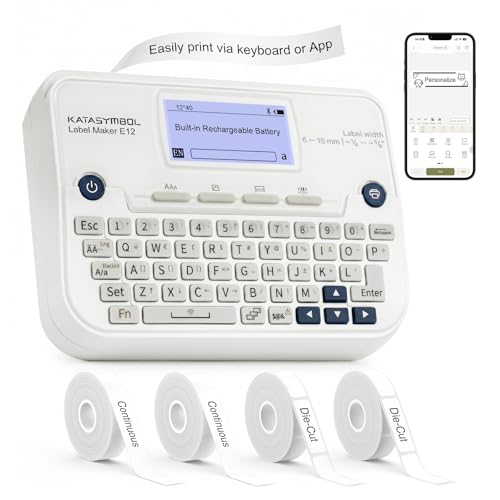
SUPVAN E12 Keyboard & Bluetooth Label Maker, 4 Tapes

SUPVAN G15M Mini Label Maker with Heat Shrink Tube

SUPVAN T50M Pro Bluetooth Label Maker, Black

Casio CW-K85 Disc Title Printer with Keyboard

Nelko P21 Bluetooth Label Maker, Black

SUPVAN E11 Keyboard & Bluetooth Label Maker, 4 Tapes
More Details On Our Top Picks
Disc archiving only makes sense if you can clearly mark each disc or its case. The Nelko 4×6 thermal printer handles that job in a different lane: it prints onto adhesive label rolls using heat rather than ink, so there are no cartridges to swap out. The companion app pairs over Bluetooth, sending your disc titles, case spines, or batch labels straight from a phone in seconds.
It fits neatly beside a packing station or desk drawer, and the 4×6 output makes short work of full-disc-face labels as well as spine strips. Home sellers handling small-batch shipping, and anyone organizing a personal disc collection, get a tidy workflow without learning a desktop design program.
Standout Benefits
- Thermal printing removes the need for ink or toner refills.
- Bluetooth pairing keeps the setup wire-free from phone or tablet.
- 4×6 output covers full disc face and spine labels in one pass.
- Mobile app editing shortens the time between idea and printed label.
Things To Consider
- Thermal output can fade faster than laser prints in direct sunlight.
- Works best with the app, so a charged phone is part of the routine.
Who It Suits Best
Home sellers and casual shippers who want a low-maintenance label printer for mixed disc and package work.
Look Elsewhere When
The Avery 5697 Printable CD Labels are a stronger fit for large media libraries that already own a laser printer.
The SUPVAN E10 arrives as a complete starter package, so you can move from unboxing to printed disc labels in minutes. The green bundle ships with three tapes, covering different widths for disc faces, slim spines, and broader case labels. The companion app needs no registration and asks for no subscription, which keeps the first-time experience painless.
For first-time label users, the E10 cuts the learning curve down to a few taps. Compared to the Nelko 4×6 thermal printer above, this unit produces smaller, more decorative stickers rather than shipping-label-style strips, so it suits tidy shelf organization more than high-volume work.
Points In Its Favor
- Three included tapes cover disc, spine, and case labeling right away.
- App requires no fees, registration, or subscription to use.
- Rechargeable battery lasts long enough for casual weekly projects.
Honest Caveats
- Narrower tape widths limit the size of artwork or text on each label.
- Best suited for low-volume, decoration-focused disc work.
Key Product Details
Right Fit For
First-time label users organizing a small disc collection or labeling media cases for the first time.
Reach For A Different Pick When
Anyone handling many discs at once should consider the Casio CW-K85 Disc Title Printer for direct disc printing.
Not every disc label project calls for a dedicated machine. The Avery 5697 sheets slot into a standard laser printer, turning a desktop you already own into a disc-labeling station. Each pack carries 250 disc-face labels and 500 spine labels, which is enough stock to clear a substantial media shelf in one or two sittings.
The matte white surface keeps glare low on store-bought stacks and gives printed text a clean, easy-to-read finish. For anyone sitting on a wall of unlabeled DVDs, archived project discs, or wedding media, this approach turns batch labeling into a print job rather than a special project.
The Good Stuff
- 250 disc and 500 spine labels cover a large media library in one buy.
- Matte white finish reduces glare on stacked discs.
- Permanent adhesive helps labels survive repeated handling.
- Laser compatibility keeps the workflow tied to existing equipment.
Trade Offs
- Requires a laser printer, which adds equipment you may not already have.
- Spine alignment takes practice on the first few sheets.
Best Suited To
Large disc collections and family archives where batch labeling matters more than one-off convenience.
A Better Fit Elsewhere
For occasional one-disc projects, the SUPVAN G15M Mini Label Maker offers a more compact approach without paper stock to manage.
The SUPVAN E12 blends two input styles into one device, so you are not locked into a phone or a keyboard. The onboard keys handle short disc titles and spine labels in seconds, while the Bluetooth connection unlocks longer design work through the companion app. The backlit screen stays readable in dim shelving rooms, which matters when labeling in a closet or media cabinet.
It ships with four tape rolls, covering more situations out of the box than the smaller E10. Where the Casio CW-K85 prints directly onto discs, this unit keeps the adhesive-label workflow while adding flexibility that pure app-driven labelers cannot match.
The Helpful Details
- Two input modes cover quick labels and detailed design work.
- Backlit screen improves visibility in low-light labeling spots.
- Four included tapes handle disc, spine, and case work immediately.
- Rechargeable design removes disposable battery costs over time.
Points To Note
- Larger than pocket-sized units like the Nelko P21.
- Keyboard layout takes a short learning period for fast typing.
Made For
Hybrid home office users who want both standalone typing and app-driven design in one label maker.
Swap It Out When
Frequent travelers and renters may prefer the lighter Nelko P21 Label Maker for grab-and-go labeling.
The SUPVAN G15M earns its place for anyone juggling more than just discs. Heat-shrink tube support means the same device can label AV cables, network runs, or audio gear alongside a small stack of CDs. The unit weighs about 0.88 pounds and runs on a 1200 mAh rechargeable battery that owners commonly report lasting around three months per charge.
Its compact footprint suits a workshop bench or shelf better than a wide desk. Unlike the SUPVAN T50M Pro, the G15M targets shorter labels and tighter spaces, which is often all disc work demands.
What Stands Out
- Heat-shrink tube compatibility opens up cable and AV rack labeling.
- 1200 mAh battery supports weeks of work between charges.
- Lightweight design slips into a drawer or carry bag easily.
- Minimal margin printing reduces wasted tape between labels.
Small Caveats
- Smaller body means a smaller onboard screen for previews.
- Tape and tube consumables add a small ongoing cost.
Feature Snapshot
Whose Shelf It Belongs On
Workshop owners and AV rack organizers who want one labeler for both discs and cables.
Where A Sibling Pick Shines
For wider media labels and small business branding, the SUPVAN T50M Pro offers broader tape support.
The T50M Pro widens the lane that the E10 and E12 operate in. It accepts tapes from 3/4 inch to 2 inches, so it can print full-coverage disc-face artwork, bold spine labels, and broader case inserts. The companion app adds image imports, QR codes, and barcode support, which makes it useful beyond plain text labeling.
For small business owners producing branded discs or sellers marking inventory, that wider range saves the step of printing onto separate sheets. Compared to the entry-level E10, this unit is the more capable sibling for anyone who wants richer design on each label.
The Value In It
- Up to 2-inch tape width supports larger disc-face designs.
- App editing handles images, QR codes, and barcodes.
- Bluetooth setup avoids cable clutter on a small desk.
Where It Is Less Suited
- Bulkier body than the pocket-friendly Nelko P21.
- Wider tapes cost more per roll than narrow starter tapes.
Who Will Love This
Small business owners and craft sellers who want branded, image-rich labels on their disc products.
Not Your Match When
Casual household users labeling a few discs at a time may find the SUPVAN E10 a simpler, lighter option.
The Casio CW-K85 does something none of the other picks on this list can: it prints directly onto printable-surface CDs and DVDs rather than onto an adhesive label. A built-in keyboard handles standalone typing, and a USB cable links it to a PC for longer design work. The thermal print head lays text directly on the disc surface, so there is no sticker to apply, no centering guess, and no peeling later.
This unit targets media specialists with a stack of blank printable discs. For most household users, an adhesive-label system is simpler. For anyone printing discs in real volume, however, the direct-print workflow beats a paper label every time.
What Works In Its Favor
- Direct disc printing removes the adhesive step entirely.
- Built-in keyboard supports standalone operation without a PC.
- Prints up to eight lines above and below the center hub.
- USB connection opens up detailed PC-based design work.
Practical Considerations
- Requires special printable-surface discs, which cost slightly more.
- Print area is limited to 5/8 x 2 15/16 inches around the disc center.
Perfect Match For
Media-only specialists and small duplicators who burn and label discs in regular batches.
Skip It When
Anyone working mostly with standard (non-printable) discs will get more value from the Avery 5697 laser labels.
The Nelko P21 shrinks the labeling workflow down to something that genuinely fits a coat pocket. The lightweight body pairs over Bluetooth to a phone, where the app handles fonts, icons, and basic templates. For disc work, that means a quick label printed straight from a couch, a media shelf, or a friend’s house.
This is the grab-and-go option on the list, aimed at renters, students, and travelers. It lacks the wider tape support of the SUPVAN T50M Pro, but for short titles and slim case spines, the small size is the point.
Useful Touches
- Compact body slips into a bag or large pocket.
- Bluetooth app input keeps the device free of onboard clutter.
- Rechargeable battery covers short trips without a charger.
Soft Spots
- Small tape widths limit larger disc-face designs.
- Best results typically come from NELKO thermal label paper.
Who Should Grab It
Travelers, students, and renters who want a pocketable labeler for quick disc and case work on the move.
Where Another Pick Suits Better
For dedicated home office labeling, the SUPVAN E12 Keyboard & Bluetooth Label Maker offers more input flexibility.
The SUPVAN E11 rounds out the family with the same dual-mode design as the E12, but tuned for household routines. The onboard keyboard handles everyday labels without reaching for a phone, while Bluetooth unlocks the app for custom designs. Four included tapes cover discs, pantry jars, and storage boxes alike.
It slots in as a steady, rechargeable tool for shared spaces where multiple people might use it. Compared to the SUPVAN E10 starter bundle, the E11 trades a tape for an integrated keyboard, which makes it more useful in a busy household than a strictly app-driven unit.
Positive Points
- Two input modes let different household members work their way.
- Four included tapes cover common disc and case projects.
- Rechargeable battery simplifies shared, repeated use.
Room For Improvement
- Not as pocketable as the Nelko P21 for travel use.
- Keyboard layout rewards a brief familiarization period.
Feature Card
Built With In Mind
Families and shared households that need a label maker anyone can pick up and use.
Not Your Match When
Solo travelers who want a pocketable option should look at the Nelko P21 Label Maker instead.
What Matters Most Before Choosing Disc Label Makers
A disc label maker falls into one of three approaches, and matching your situation to the right approach saves money and frustration. A dedicated disc printer, like the Casio CW-K85, prints straight onto printable-surface discs and is the most polished option for media specialists. A thermal or thermal-transfer label maker, including the Nelko 4×6 and most SUPVAN picks, prints adhesive stickers you apply to a disc, spine, or case. A standard laser printer paired with pre-cut sheets, like the Avery 5697, handles the largest batch jobs using equipment you may already own.
Tape width matters more than people expect. Narrow tapes around 12mm cover simple text on a disc face or case spine, while 25mm to 50mm tapes allow bolder titles, icons, and small artwork. If your discs sit in jewel cases rather than sleeves, the spine label is often the first thing you read, so narrower tape can still be enough.
Connectivity shapes daily use. Pure keyboard units are fast for short labels and need no phone. App-driven units offer richer fonts, icons, and images, at the cost of charging another device. Dual-mode machines like the SUPVAN E11 and E12 give you both, which helps when different members of a household want to use the device their own way.
For most people, the honest read is that an adhesive-label system covers the widest range of disc needs. A direct disc printer wins for volume media work, and a laser sheet setup is the right call when you already own a laser printer and a long to-label queue.
Smart Choices Before You Commit
Pitfalls Shoppers Hit
The most common slip is buying a label maker without checking tape width compatibility. A unit designed for narrow ribbons cannot produce a full-coverage disc-face design, and the cost of upgrading tapes later often matches the savings from the initial purchase. Measure the labels you want to print before ordering, not after.
Another trap is assuming every disc accepts adhesive labels. Some discs have raised hub areas, textured printable surfaces, or tight jewel cases that make a paper label harder to apply cleanly. In those situations, a direct disc printer or a careful pre-cut sheet system tends to deliver a cleaner result.
Where The Extra Money Goes
Higher-tier models in this category usually add wider tape support, dual input methods, or higher resolution thermal print heads. The wider tape and richer app design of the SUPVAN T50M Pro, for example, pays off for small business branding, where a logo and a clean font do real work. For casual home labeling, a narrower, simpler unit handles the job without the extra spend. The honest read is that upgrading makes sense when you will use the extra width or resolution at least a few times a month.
Frequently Asked Questions
What is the difference between a label maker and a disc title printer?
A label maker prints onto adhesive tape or sheets that you apply to a disc. A disc title printer, like the Casio CW-K85, prints directly onto the printable surface of a special disc, removing the sticker step entirely.
Can a regular label maker print on CDs or DVDs?
Yes, most modern label makers can print adhesive stickers sized for disc faces, case spines, or jewel cases. You will need to match the tape width to the disc area you want to cover, and many users prefer matte finishes for readability.
Are thermal labels durable enough for disc archiving?
Thermal prints can fade faster than laser prints when exposed to direct sunlight or high heat. For long-term media archiving, laser-printed labels on pre-cut sheets or direct disc printing tend to hold up better over years of storage.
Do I need a phone app to use these label makers?
Not always. SUPVAN E11, E12, and the Casio CW-K85 all offer onboard keyboards for standalone typing. App-based units like the Nelko P21 require a phone, but they unlock richer design options in return.
How many labels do I need for a typical disc collection?
A 250-disc-face pack, like the Avery 5697, covers roughly the same number of discs plus spare spine labels. For occasional projects, a starter bundle with three or four tape rolls usually lasts several months of casual use.
Closing Remarks
Your best pick comes down to scale, frequency, and how polished you want the result. Direct disc printing wins for media specialists, laser sheets handle the largest queues, and a Bluetooth or keyboard label maker covers everyday household needs with the least setup. Match the tool to the size of the job in front of you, and the right choice tends to fall into place.