A three-monitor setup transforms how you work, trade, or game, but only when each screen sits at the right height and angle. The right stand keeps your neck relaxed during long sessions and reclaims valuable desk real estate underneath. Whether you’re running a productivity battlestation or a content creation rig, the picks below cover everything from simple risers to full triple-arm mounts.
A Fast Comparison Of The Options

ELIVED 2 Pack Monitor Stand Riser – 3 Height Adjustable

Kantek Glass Monitor Riser (MS370) 40 lb Capacity

DOLALIKE 2 Pack Desktop Riser, 3 Height Adjustable

LOTEYIKE Monitor Riser Desktop Stand, 3 Height Adjustable

WALI Computer Monitor Stand for Desk, Adjustable Laptop Riser

Husky Mounts Large Dual Monitor Stand Riser, Adjustable Legs
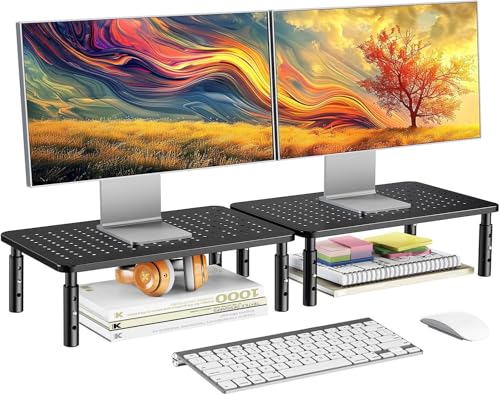
HUANUO Computer Monitor Stand for Desk, 2 Pack

MOUNTUP Triple Monitor Stand Mount for up to 27 inch Screens

MOUNTUP Triple Monitor Mount for 17-32 inch Screens, Full Motion

MOUNTUP Triple Monitor Mount for Max 32 Inch Screens
Meet The Standout Selections
Running a two-screen setup without crowding your desk often starts with a pair of risers rather than one wide platform. ELIVED ships two identical units in a single box, so you can align your primary display and your secondary screen at matching heights without mismatched branding or slightly different lift mechanisms.
Each riser clicks into three preset heights (3.9, 4.7, and 5.5 inches) using a simple button-press adjustment, which is enough granularity for most seated users. The platform tucks a slim keyboard, a notebook, or a hub underneath when the riser is set to its tallest setting, depending on your chair height.
Benefits That Matter
- Two-pack format keeps dual-monitor desks visually consistent.
- Three height stops cover seated, reclined, and tall-chair setups.
- Lift-to-adjust mechanism needs no tools or disassembly.
- Storage shelf underneath doubles as a hub caddy in taller positions.
- Compact footprint suits narrow writing desks where risers matter more than arms.
Things To Consider
- No ventilation mesh, so heat-prone displays sit on a closed surface.
- Height stops are fixed, not continuous, which can feel coarse between presets.
Feature Snapshot
Made For
Home users running two side-by-side monitors who want matching risers at an entry-level price.
Skip It When
The Husky Mounts Large Dual Monitor Stand Riser suits you better if you want a single 39-inch wide span instead of two separate platforms.
Most risers hide behind the monitor, but the Kantek MS370 is the riser you actually want people to notice. A single 5mm tempered glass panel floats on minimal supports, giving a clean, modern look that fits glass-top desks and minimalist studios.
At 22 inches wide and 8.25 inches deep with a 40-pound capacity, the platform accepts most single displays up to about 27 inches comfortably. The fixed 3.25-inch lift suits standard seated viewing, though you may find it short if your chair sits tall.
Well-Handled Touches
- Tempered glass resists scratches and wipes clean in seconds.
- 40-pound capacity covers most productivity displays with margin.
- Clear material visually disappears against busy desk setups.
Worth Noting
- Fixed 3.25-inch height leaves no adjustment room, so verify chair fit first.
- Glass shows fingerprints and dust more than coated steel or mesh risers.
- Single platform means no built-in storage for hubs or notebooks underneath.
Best Suited To
Design-focused professionals who prioritize a clean desk look over storage space or height flexibility.
Look Elsewhere When
The ELIVED 2 Pack Monitor Stand Riser suits you better if you need adjustable heights and storage room under each display.
Heat is the silent killer of monitor electronics, especially with bright panels running all day. The DOLALIKE 2 Pack addresses that with a ventilated steel platform, so warm air moves around the base instead of trapping against a solid surface.
Like the ELIVED pair earlier, this set ships two risers that click into the same 3.9, 4.7, and 5.5-inch presets, which keeps dual-monitor symmetry intact. The steel construction also supports heavier displays than plastic alternatives, depending on the panel weight.
Notable Upsides
- Open platform design reduces heat buildup around the monitor base.
- Steel build adds long-term durability over plastic risers.
- Matching pair keeps dual setups visually consistent.
- Same three height stops as the ELIVED pair, so mixing across desks is easy.
Trade Offs
- Smaller items can slip through the ventilated gaps.
- Steel finish may show scuffs on light-colored desks.
Right Fit For
Power users running hot-running displays in warm home offices where airflow matters.
Not Your Match When
The Kantek Glass Monitor Riser fits better if you want a closed platform that hides cables and small accessories from view.
Not every desk only holds a monitor. Many home offices share space with a printer, a scanner, or a small all-in-one PC. The LOTEYIKE Riser handles that with a 14.6 x 9.3-inch platform that fits a flat panel plus a compact printer underneath without wobble.
The mesh top keeps things cooler than solid glass, and three adjustable height stops (3.9, 4.7, and 5.5 inches) match what you have already seen from ELIVED and DOLALIKE. The 44-pound load rating leaves headroom for heavier productivity displays, which feels reassuring for daily use.
Positive Takeaways
- Generous 44-pound capacity handles monitor-plus-printer combos.
- Mesh top promotes airflow under the display.
- Three height stops match the ELIVED and DOLALIKE risers for cross-desk consistency.
Points To Note
- Mesh surface catches dust and needs periodic cleaning.
- Single-riser format means dual setups require a second purchase.
Who Should Grab It
Home office organizers who want one sturdy riser for a monitor and a printer sharing the same footprint.
A Better Fit Elsewhere
The ELIVED 2 Pack Monitor Stand Riser serves dual-monitor-only setups better, since you get two matching risers out of the box.
Sometimes the best riser is the one that gets out of the way and just works. The WALI Monitor Stand is a familiar choice for single-screen workstations, with a 14.6 x 9.3-inch metal shelf that fits laptops and most flat panels up to its 44-pound rating.
Compared with the LOTEYIKE above, the WALI offers the same footprint and weight class but leans toward rubber-padded feet to protect finished desks. Height stops again hit 3.9, 4.7, and 5.5 inches, depending on how tall your seated position runs.
Standout Benefits
- Rubber feet prevent sliding on glass or polished desks.
- 44-pound capacity covers most productivity panels with margin.
- Metal shelf stays rigid under heavy laptops and docks.
Soft Spots
- Closed metal surface can trap heat under the display base.
- No built-in storage cutout for keyboards at the lowest setting.
Quick Facts
Who Will Love This
Single-monitor professionals who want a no-nonsense riser that protects their desk and supports heavier displays.
Consider Something Else When
The DOLALIKE 2 Pack Desktop Riser suits you better if heat dissipation matters more than rubber-padded feet.
Two separate risers work fine, but a single 39-inch span under both screens looks tighter and removes the gap between displays. The Husky Mounts Dual Stand does exactly that, with a perforated matte black steel top that handles airflow and a wide, stable base.
Adjustable legs raise the platform up to 5.5 inches at full extension, which is taller than most compact risers. Side-by-side 27-inch monitors sit cleanly without crowding the seam, depending on bezel width.
What Helps Most
- 39-inch width spans two side-by-side monitors in one platform.
- Perforated steel balances airflow and load strength.
- Matte finish hides dust and minor scratches.
- Up to 5.5 inches of lift suits taller seated positions.
Honest Caveats
- Wide footprint requires a deep desk, typically 24 inches or more.
- Matte black may not match lighter wood or glass desk aesthetics.
- Leg adjustments may need occasional re-tightening over time.
Feature Rundown
Built With In Mind
Side-by-side dual-monitor owners with deep desks who want a unified platform rather than two separate risers.
Reach For A Different Pick When
The MOUNTUP Triple Monitor Stand Mount fits better if you want articulated arms rather than a fixed riser platform.
Taller users often find standard risers end up too low after adjustment. HUANUO addresses that with slightly higher stops at 4.1, 4.9, and 5.7 inches, which gives a few extra millimeters where neck posture tends to suffer most.
The 14.5 x 9.1-inch metal platform fits most laptops and flat panels, and the 12-inch and 7-inch leg widths give you enough clearance to tuck office supplies or a small dock underneath. It arrives in a two-pack, so dual-monitor symmetry comes standard.
A Strong Showing
- Slightly taller presets help users with high seated chair positions.
- Two-pack keeps dual-monitor desks uniform.
- Metal platform stays rigid under common productivity displays.
A Few Limitations
- Only three height stops, no continuous adjustment range.
- No ventilation cutouts in the platform surface.
Whose Shelf It Belongs On
Petite-to-average users with slightly elevated seating setups where standard risers run too low.
Swap It Out When
The LOTEYIKE Monitor Riser Desktop Stand suits you better if you need a 44-pound load rating for a printer-and-monitor stack.
Risers lift your screens; monitor arms actually free up desk space. The MOUNTUP Triple Monitor Stand holds three displays up to 27 inches on gas-spring articulating arms that float each panel where you want it. That’s a different category from everything above, and where this list shifts from simple stands to true mounting hardware.
Each arm supports 4.4 to 19.8 pounds and fits VESA patterns (the standard four-hole pattern on the back of most monitors) of 75x75mm or 100x100mm. The mount clamps to desks between 0.39 and 3.15 inches thick, so most standard surfaces qualify.
What It Does Well
- Frees up the entire desk footprint beneath three monitors.
- Gas-spring arms let you adjust tilt, swivel, and height independently.
- VESA 75 and 100 compatibility covers most mainstream displays.
- Both C-clamp and grommet mounting options ship in the box.
Possible Compromises
- Requires drilling or clamping into the desk, depending on mount style.
- Cable management needs planning to keep three screens tidy.
Key Product Details
Who It Suits Best
Trading, coding, or flight-sim users who run three 24 to 27 inch monitors and need individual arm articulation.
Where A Sibling Pick Shines
The MOUNTUP Triple Monitor Mount for 17-32 inch Screens fits better if your displays sit at 30 inches or larger.
When your screens push past 27 inches, the original MOUNTUP triple mount starts running out of arm strength. This upgraded version handles 17 to 32 inch displays with the same 4.4 to 19.8-pound per-arm rating, depending on panel weight.
Full-motion articulation lets each screen pivot, swivel, and tilt independently, so the middle display can angle down for editing work while the side monitors face you straight on. Both clamp and grommet mounting come included.
A Few Strong Suits
- Supports 32-inch screens, expanding past the 27-inch cap of the smaller mount.
- Full-motion arms deliver independent adjustment for each panel.
- Compatible with VESA 75 and 100 patterns across most monitor brands.
- Includes both C-clamp and grommet mounting hardware.
Worth Bearing In Mind
- Heavier 32-inch monitors near the 19.8-pound limit may need careful balancing.
- Full arm reach requires more desk depth behind the clamp.
Perfect Match For
Content creators and traders using larger 30 to 32 inch displays who want triple-arm flexibility without buying a freestanding mount.
Another Choice May Suit
The MOUNTUP Triple Monitor Mount (B0CHW4MKRV) fits better if you want a taller 28-inch pole for sit-stand desks.
Sit-stand desks raise a different problem: monitor arms that were tall enough at seated height suddenly sit too low when the desk rises. This MOUNTUP triple mount addresses that with a 28-inch center pole that lifts screens up to 36.3 inches at full extension.
Each arm supports 4.4 to 17.6 pounds across displays up to 32 inches, fitting the same VESA 75 and 100 patterns as the previous MOUNTUP models. The arm reach extends up to 20.5 inches forward, which helps when you want screens angled toward you for reference work.
What Earns Its Place
- 28-inch pole lifts screens high enough for sit-stand desk transitions.
- 20.5-inch arm reach pulls displays forward for angled viewing.
- Supports three monitors up to 32 inches each.
Factors To Consider
- Lower per-arm load limit (17.6 lbs) rules out heavier 32-inch panels.
- Taller pole adds visual weight above the desk surface.
Right Fit For
Sit-stand desk owners who need extra pole height to keep screens at eye level across both seated and standing positions.
Not Your Match When
The MOUNTUP Triple Monitor Mount for 17-32 inch Screens suits you better if your displays are heavier and your desk stays at a fixed height.
Choosing The Right Fit For Your Setup
Picking a 3 display monitor stand comes down to the kind of flexibility you want. Simple risers like the ELIVED, Kantek, DOLALIKE, LOTEYIKE, WALI, and HUANUO options keep screens at fixed positions but raise them to a more ergonomic height, which reduces neck strain during long sessions. Full-motion triple arms from MOUNTUP take that further by letting each screen tilt, swivel, and pivot independently.
The first question to answer is whether you want screens fixed in place or floating on arms. Fixed risers cost less and install in seconds, but they lock your viewing angles. Articulating arms free up desk space and let you share screens with a colleague during reviews, though installation requires clamping or drilling into your desk surface.
Weight rating and VESA pattern matter more than people expect. VESA refers to the standard four-hole mounting pattern on the back of most monitors, measured in millimeters (typically 75×75 or 100×100). Check your monitor’s weight and VESA pattern before buying any arm mount, since exceeding either limit leads to sagging or worse.
What To Watch Before You Commit
Common Shopping Slip Ups
The biggest mistake is matching the stand to your desk instead of your monitors. A riser that looks fine holding a 24-inch panel may struggle with a 32-inch display once you add the weight of a heavier base. Always cross-check your monitor’s actual weight against the stand’s load rating.
Another slip-up is choosing aesthetics over ventilation. Glass risers look clean, but they trap heat under hot-running panels. If your display runs warm or you work in a sunny room, a mesh or perforated platform keeps temperatures down over time.
Why Top Tier Costs More
Triple-arm mounts cost more because they include gas-spring cylinders (pressurized pistons that let arms move smoothly and hold position), multiple articulating joints, and the hardware to clamp or grommet-mount to your desk. A premium mount also tends to handle heavier monitors and larger VESA patterns, which expands compatibility across your current and future displays.
The upgrade pays off when you actually use the range of motion. If you spend your day pivoting screens for client reviews, swapping angles for video calls, or raising monitors between seated and standing work, a higher-tier mount becomes a daily tool. For setups that stay static once configured, a riser delivers most of the ergonomic benefit at a fraction of the cost.
Frequently Asked Questions
What is VESA compatibility and why does it matter?
VESA is the standard mounting pattern on the back of most monitors, measured in millimeters. Most mounts support 75x75mm or 100x100mm patterns, so check your monitor’s spec sheet before buying any arm mount.
Can a monitor riser support three screens at once?
A wide platform like the Husky Mounts Large Dual Stand can hold two side-by-side displays, but three screens usually require a triple-arm mount such as the MOUNTUP options listed above.
Do I need a clamp or grommet mount for my desk?
C-clamps grip the edge of the desk without drilling, while grommet mounts pass a bolt through a hole in the desk surface. Grommet mounts are more secure on thicker desks, while clamps suit thinner tops where you want to avoid permanent holes.
How much weight can a triple monitor arm handle?
Most triple arms support 4.4 to 19.8 pounds per arm, though some models cap at 17.6 pounds. Always verify each monitor’s weight falls within the rated range to prevent sagging or hardware failure.
Will a glass monitor riser scratch my desk?
Tempered glass risers typically include rubber feet or padding underneath to prevent scratching. Avoid sliding the riser across the desk surface, since grit trapped underneath can still cause marks.
Bottom Line
A 3 display monitor stand works best when it matches the size of your screens, the height of your chair, and the depth of your desk. Risers handle everyday two-screen setups cleanly, while triple-arm mounts earn their keep when you actually pivot and angle your monitors throughout the day. Pick the tool that fits how you work, and your neck will thank you by the end of the week.