You spend hours at a keyboard, and the wrong setup punishes your wrists, shoulders, and lower back long before the day ends. Adjustable keyboard trays give you control over height, tilt, and reach, the three levers that actually decide whether a desk feels comfortable. This roundup walks through nine solid options across risers, clamp-on trays, and full sit-stand converters so you can match the tray to the way you actually work.
A Side-By-Side Look

BOSSCASA Acrylic Ergonomic Keyboard Stand Holder (Lightpink)

Rocelco CADRB-46 Corner Standing Desk Converter

Rocelco ADRB-45 Standing Desk Converter with Retractable Tray

Rocelco CADRT-46 Corner Standing Desk Converter (Teak)
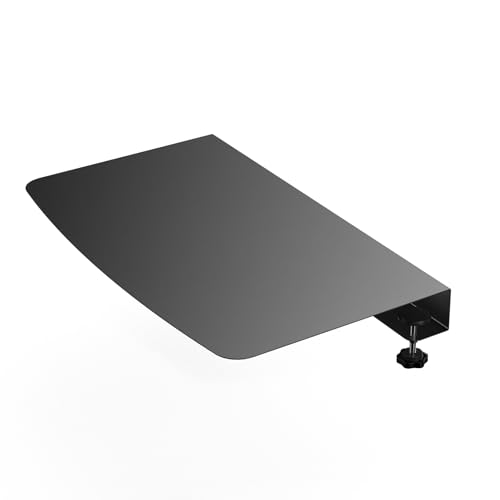
BOUNHOHE 17-inch Clamp-on Corner Desk Connector

KOTEMON Acrylic Tilted Keyboard Stand (Black)

VIVO MOUNT-KB05E Clamp-on Keyboard Tray

VIVO MOUNT-KB05HB Adjustable Keyboard Tray

Rocelco DADRB-46 Standing Desk Converter
The Picks, Examined More Closely
A slim acrylic riser sounds like a small upgrade, but for someone whose flat desk leaves their wrists bent and shoulders creeping up, the angle change matters more than the price tag suggests. The BOSSCASA Acrylic Ergonomic Keyboard Stand Holder tilts the board slightly upward so your forearms rest closer to neutral, and a silicone strip along the base keeps the keyboard from sliding when you type with any real force.
It works best in calm, light-use environments: a homework station, a bedroom desk, or a shared family setup. You won’t get height adjustment or storage underneath, but the trade-off is a clean footprint that doesn’t fight the rest of your gear.
What Makes Sense
- Forward tilt encourages a more neutral wrist position during long sessions
- Silicone anti-slip strip keeps the keyboard planted without adhesive
- Clear acrylic blends into almost any desk style and stays out of the way visually
- Lightweight build makes it easy to move between rooms or pack away
Things To Consider
- No height adjustment, so it won’t compensate for a desk that already sits too high
- Acrylic can show fingerprints and micro-scratches over time, so a quick microfiber wipe each week keeps it presentable
Who It Suits Best
Students, casual typists, and home-office users who want a small ergonomic nudge without converting the whole desk.
Where Another Pick Suits Better
Anyone who needs real height travel should look at the VIVO MOUNT-KB05HB Adjustable Keyboard Tray, which clamps under the desk and moves with you.
Most standing desk converters assume a flat, straight desk edge, which is exactly what an L-shaped workstation doesn’t have. The Rocelco CADRB-46 sits on top of your current desk and reshapes that empty corner into a usable sit-stand station, with a gas-spring assist (a pressurized cylinder that uses compressed gas to lift weight smoothly) that does the heavy lifting when you transition between seated and standing work.
It earns its spot here for the people who already own a corner desk and refuse to give up the surface area just to gain ergonomics. The keyboard tray is large enough for a full-size board plus a mouse, and the dual-monitor tier keeps screens at a comfortable viewing height.
Where It Excels
- Corner-specific shape uses dead space that straight converters can’t fill
- Gas-spring assist makes height changes feel controlled instead of a workout
- Wide keyboard tray fits a tenkeyless board and a mouse side by side
- Sits on the existing desk, so no reassembly or desk replacement is needed
Trade Offs
- Bulk means it really wants a deep corner; shallow edges leave the unit hanging over the front
- Black finish shows dust on the deck, so routine wiping keeps the workspace looking sharp
- Not a fit for a straight desk, since the angled surface would leave your gear misaligned
Feature Card
Right Fit For
Remote workers and small-business owners running L-shaped desks who want a real sit-stand setup without rebuilding the room.
Skip It When
If your desk is straight, the Rocelco ADRB-45 Standing Desk Converter gives you the same lift and a wider work deck without the angled cut.
The Rocelco ADRB-45 takes the sit-stand converter idea and adds a retractable keyboard tray, which means you can push the keys out of the way when you want a clean writing surface or pull them close when you’re back to typing. A dual-piston lift (two synchronized gas cylinders sharing the workload) supports up to 40 pounds of monitors and gear without the slow, drifting feel single-piston units sometimes show.
For triple-monitor users, the 45-inch deck is the headline number. It swallows three screens with breathing room, and the wide surface keeps accessories like a notebook, a webcam, and a coffee cup from competing for elbow space.
Key Advantages
- Retractable keyboard tray clears the desk when you need flat workspace
- Dual-piston lift handles heavier monitor loads without height drift over time
- 45-inch surface fits three monitors with room to spare
- Sturdy steel frame keeps the unit planted through repeated height changes
Worth Noting
- Footprint swallows a chunk of the underlying desk, so shallow tabletops feel cramped
- Assembly takes time and a second pair of hands, since the frame is heavy out of the box
Made For
Power users with multi-monitor setups, programmers, and designers who want sit-stand flexibility without giving up gear space.
Swap It Out When
Anyone running a single monitor and a smaller keyboard can save space and money with the VIVO MOUNT-KB05E Clamp-on Keyboard Tray.
The CADRT-46 takes the same corner-friendly shape as the CADRB-46 and dresses it up. The teak wood-grain finish gives the unit a warmer, more residential look, which matters in home offices where a black metal box can feel out of place next to a wood bookcase or a fabric chair.
It still does the same job: gas-spring assist, a wide keyboard tray, and a dual-monitor tier on top. The honest read is that the underlying mechanism is the Rocelco CADRB-46 platform you just saw, only with a different surface treatment, so you’re paying partly for the aesthetic.
Strengths Worth Knowing
- Wood-grain finish suits home offices better than industrial black frames
- Wide keyboard tray fits a full-size board without crowding the mouse
- Same gas-spring lift as the standard CADRB corner unit
Points To Keep In Mind
- Premium finish costs more than the black version without adding ergonomic features
- Wood-look surface can show smudges, so plan on light cleaning to keep the grain looking fresh
Best Suited To
Home-office users who want sit-stand ergonomics without the visual weight of a black metal workstation.
Not Your Match When
Budget-focused shoppers should look at the Rocelco CADRB-46 Corner Standing Desk Converter, which uses the same mechanism in a plain finish.
The BOUNHOHE Clamp-on Corner Desk Connector is the smallest item in this list, and that’s the point. It bridges the gap where two L-shaped desk sections meet, giving you an extra 17 inches of flat surface for a keyboard, a mouse, or a laptop without buying a whole new desk.
Where the Rocelco corner converters add sit-stand height, this one simply adds usable surface. It’s the right answer when your L-desk has an awkward seam that swallows small items, or when you want a dedicated keyboard landing zone without raising the rest of your gear.
Everyday Wins
- Solid steel plate handles keyboard, mouse, and laptop weight without flex
- Clamp-on design installs without drilling or permanent mods
- Compact footprint fits corners where larger converters won’t go
Some Limits To Know
- No height or tilt adjustment, so it works best when your existing desk height is already comfortable
- Clamp range limits which desk thicknesses it can attach to, so measure your edge before ordering
Quick Facts
Who Should Grab It
Renters, students, and remote workers with L-shaped desks who need more surface without committing to a full converter.
Another Choice May Suit
For actual sit-stand movement, the Rocelco CADRB-46 Corner Standing Desk Converter is the upgrade path from this kind of passive surface extender.
The KOTEMON Acrylic Tilted Keyboard Stand covers the same basic idea as the BOSSCASA stand you saw earlier, with a different angle and a black finish. A 17-inch length, 5.5-inch width, and 1.5-inch height put it in the same “drop-on-desk” category: no tools, no clamps, no assembly.
What it adds is a low front lip at the end, which keeps slimline keyboards from sliding forward when you type. You may find that detail matters if your current keyboard has a slick base or if you rest your palms on the front edge while typing.
Notable Upsides
- Low front lip stops slim keyboards from drifting forward during heavy typing
- Non-slip silicone case keeps the stand itself from sliding on the desk
- Tilted angle helps wrists stay in a more neutral position without changing desk height
Honest Caveats
- No height adjustment, so desk height has to already be a reasonable starting point
- Acrylic can collect dust in the corners, so a quick weekly wipe keeps it looking clean
Spec Overview
Perfect Match For
Minimalist home-desk users who want ergonomic tilt and a slim keyboard-friendly design without any moving parts.
Look Elsewhere When
Anyone needing adjustable height and tilt should step up to the VIVO MOUNT-KB05HB Adjustable Keyboard Tray, which moves with you throughout the day.
Slide-out under-desk trays are a different kind of solution: instead of raising the keyboard, they tuck it below the surface so your desk stays clear. The VIVO MOUNT-KB05E clamps onto the desk edge and extends a 27 x 11 inch platform that holds a full-size keyboard, a mouse, and a few small accessories.
The tray extends roughly 8.5 inches from the desk edge, which gives you a comfortable reach without forcing your elbows into your body. You slide it under when you need the desktop for paperwork or a laptop, then pull it out when you’re back to typing.
Everyday Advantages
- Under-desk mounting frees the entire desktop for writing, drawing, or laptop work
- Slide-out design means the tray is there when you need it and hidden when you don’t
- 27-inch platform fits full-size keyboards with a mouse alongside
Possible Compromises
- No height or tilt adjustment, so it works best at a fixed sitting height
- Clamp design has a maximum desk thickness, so check your desktop’s edge depth before installing
- Periodic tightening of the clamp screws is a common ownership task, since daily use can slowly loosen the grip
Built With In Mind
Home offices and small workspaces where reclaiming desk surface for non-typing tasks matters as much as keyboard ergonomics.
Reach For A Different Pick When
For sit-stand setups, the VIVO MOUNT-KB05HB Adjustable Keyboard Tray is the natural sibling, since it adds height and tilt to the same basic platform.
The MOUNT-KB05HB is the height-adjustable sibling of the MOUNT-KB05E you just read about. Same 27 x 11 inch platform, same under-desk clamp mounting, but the tray tilts and shifts vertically so you can find an angle that actually supports your wrists and shoulders rather than forcing you to accept whatever the desk gives you.
It supports up to 11 pounds, which covers a full-size mechanical keyboard and a mouse with room to spare. You may find the height range is the real selling point for taller users who sit at raised desks or for anyone pairing it with a standing-desk converter.
The Helpful Details
- Height adjustment helps match the tray to standing-desk transitions
- Tilt adjustment supports different typing styles and ergonomic preferences
- 11-pound capacity handles full-size mechanical keyboards comfortably
- Slides under the desk when not in use, keeping the surface clear
Worth Bearing In Mind
- More adjustment points mean more screws to check over time, so periodic tightening belongs in the routine
- Mechanism adds slight bulk beneath the desk, which can interfere with knee clearance on shallow tops
Technical Highlights
Whose Shelf It Belongs On
Tall users, shared workstations, and anyone pairing an under-desk tray with a standing-desk converter who needs real adjustment.
Where A Sibling Pick Shines
For a fixed-height sitting setup, the VIVO MOUNT-KB05E Clamp-on Keyboard Tray is a simpler, more streamlined choice.
The Rocelco DADRB-46 closes the list with a tall, gear-heavy option built for the kind of workstation where you have three monitors, a docking station, a scanner, and a notebook all within reach. The “tall” in the design description matters: the gas-spring assist reaches a higher standing height than standard converters, so taller users stop feeling like they’re hunching over to type.
The retractable keyboard tray reappears here too, which keeps the deck usable for writing, signing paperwork, or laying out a tablet when you step away from the keyboard. Compared to the ADRB-45, this is the version to consider when your monitor stack and accessories push the weight up and your height is above average.
What Stands Out
- Taller gas-spring reach suits users above six feet who feel cramped on standard converters
- Retractable keyboard tray clears the deck for non-typing tasks
- 46-inch surface handles triple-monitor setups with breathing room
Practical Considerations
- Footprint and weight make it a two-person install, so plan a setup afternoon
- Deep deck needs a deep underlying desk, or the front edge will overhang and feel unstable during height changes
- Black steel finish picks up fingerprints, so a microfiber cloth in the desk drawer is a sensible add-on
Who Will Love This
Tall professionals running multi-monitor setups who want a true sit-stand range and don’t mind giving up desk space for the upgrade.
Consider Something Else When
For a smaller, lighter footprint, the Rocelco ADRB-45 Standing Desk Converter covers the same general idea in a more compact form.
What Matters Most Before Choosing Adjustable Keyboard Trays
Match The Tray To Your Desk Shape First
Straight desks, L-shaped corner workstations, and shallow tabletops each push you toward a different product family. Before you look at adjustment ranges, decide whether you need a flat riser, an under-desk clamp tray, or a full sit-stand converter. The Rocelco CADRB-46 and CADRT-46 are corner-specific, the VIVO MOUNT-KB05E and KB05HB are clamp-on under-desk units, and the BOSSCASA and KOTEMON acrylic stands are flat-surface risers. Choosing the wrong family is the most common reason a tray ends up returned.
Height, Tilt, And Reach Are Three Different Levers
Height adjustment changes how high the keyboard sits relative to your elbows. Tilt changes the angle of the board, which affects wrist position. Reach, often called tray extension, changes how far the keyboard sits from your body. A tray that adjusts in all three (like the VIVO MOUNT-KB05HB) gives you the most ergonomic flexibility, but a static-height tray still works if your desk height is already close to correct.
Weight Capacity And Footprint Often Travel Together
Converters with wider decks and heavier-duty lifts also eat more of the desk below them. Measure the usable surface of your existing desk, then subtract the converter’s footprint, before you order. A 45-inch or 46-inch converter needs a deep underlying desk to feel stable through the full height range.
Real-World Use Scenarios Drive The Right Choice
Casual typists and students typically do well with a tilted acrylic stand. Remote workers and gamers usually want at least a clamp-on tray. Engineers, traders, and designers running three monitors usually need a full sit-stand converter with a heavy-duty lift. Choosing by scenario, not by feature list, is the simplest way to land on a tray you keep using past the first week.
Key Considerations Across These Picks
Common Shopping Slip Ups
Measuring your desk after the tray arrives, instead of before, leads to overhang and instability. Skipping a check on clamp range is the other frequent mistake: not every clamp fits every desktop thickness, and a clamp that won’t seat properly is a clamp that will slowly slide down under typing force. Finally, people often buy a converter for a corner desk that is actually a straight L-shape, which is exactly the mismatch that prompted the Rocelco corner-specific models in this list.
Where The Extra Money Goes
The price gap between a flat acrylic riser and a full Rocelco converter is mostly mechanism, footprint, and finish. Higher-tier picks add gas-spring or dual-piston lifts that handle heavier monitor loads without drift, retractable keyboard trays that free up deck space, and materials that hold up under years of daily height changes. The honest read is that paying more makes sense the moment your setup includes multiple monitors, a sit-stand routine, or a corner desk, and makes less sense for a single-screen, fixed-height workstation.
Frequently Asked Questions
What is the difference between a keyboard tray and a keyboard riser?
A keyboard tray is a separate platform that holds your keyboard, often under or on top of the desk, while a keyboard riser is a smaller stand that simply tilts or elevates the keyboard on the desk surface itself.
Are clamp-on keyboard trays safe for glass desks?
Clamp-on trays work on solid edges with enough thickness to grip; glass desks typically need a different mounting approach because clamps can crack or scratch the material.
How much weight can a typical standing desk converter support?
Most mid-range converters in this list support 11 to 40 pounds, which covers dual or triple monitor setups, though you should check the manufacturer’s number for the specific unit you choose.
Do under-desk trays interfere with knee clearance?
Some do, especially deeper trays or units mounted lower on the edge, so it’s worth sitting at your desk with a tape measure before installing to confirm comfortable leg room.
Can a keyboard tray help with wrist pain?
A properly adjusted tray can encourage a more neutral wrist position, which may reduce strain over time, though it’s not a substitute for medical evaluation of persistent pain.
Closing Thoughts
The right adjustable keyboard tray comes down to your desk shape, your monitor count, and how often you actually switch between sitting and standing. Match those three to one of the nine picks above, and you’ll end up with a setup that quietly disappears into your workday, which is exactly what good ergonomic gear is supposed to do.