DTF printing has shifted from a niche trade setup to a realistic weekend hobby, and plenty of small apparel studios now run a single desktop unit instead of outsourcing runs. The catch is that true DTF rigs used to cost serious money, so the recent wave of A3-format kits, dye-sub alternatives, and starter bundles has opened the door for first-time operators. The picks below cover dedicated DTF machines, one dye-sub crossover, and a couple of general photo printers that handle film work in a pinch, plus the consumable powder you’ll inevitably need.
The Essentials At A Glance

PLK A3 DTF Printer with Shaker Dryer & Purifier, XP600

INKSONIC 14″ F1080 DTF Printer with Oven & Laptop

Epson SureColor F170 Dye-Sublimation Printer Starter Bundle

LNKCOS DTF Powder White 1KG Hot Melt Adhesive

Epson SureColor F170 Compact 8.5″ x 11″ Dye-Sublimation Printer
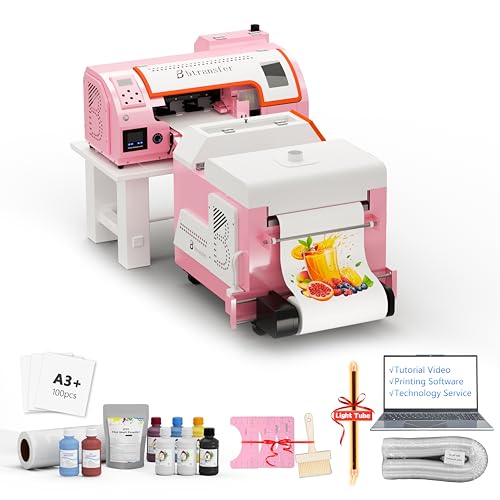
B btransfer M1630 Pro A3 DTF Printer with Dryer Shaker Bundle

Lancelot M1630 Pro DTF Printer Bundle with Auto Maintenance

Canon Pixma TS6320 Wireless All-in-One Photo Printer

HP OfficeJet 3830 All-in-One Wireless Printer
Meet The Standout Selections
The PLK A3 DTF setup arrives as a ready-made production line rather than a printer you have to bolt accessories onto. The XP600 printhead prints straight onto transfer film, while the matching shaker-dryer applies the adhesive powder and cures it in a single pass, which removes the awkward hand-dusting step that trips up first-timers. The integrated air purifier is a thoughtful touch for a small studio, where powder mist tends to settle on every surface.
For a home operator printing runs of T-shirts, totes, and hoodies, this bundle eliminates the part-sourcing headache entirely. You may find the A3 width limiting for larger chest prints, but for standard apparel work, the footprint is genuinely manageable on a sturdy desk or folding table.
Positive Takeaways
- Print, powder, and cure happen in one workflow, cutting production time noticeably
- XP600 printhead handles color plus white underbase for dark garments
- Built-in purifier reduces airborne powder cleanup in tight rooms
- A3 film width suits standard adult apparel sizing without scaling tricks
- Bundle pricing often beats sourcing a printer and dryer separately
Trade Offs Worth Weighing
- Shaker-dryer adds bulk, meaning a deeper desk or dedicated cart helps
- White ink circulation still benefits from daily use to avoid settling
- A learning curve for RIP software settings on the first batches
Feature Snapshot
Best Suited To
Small apparel studios and serious hobbyists who want one bundle rather than three separate purchases.
Skip It When
You print mostly oversized posters or yardage, since the INKSONIC F1080 handles wider formats more comfortably.
Where the PLK covers the basics, the INKSONIC F1080 leans into throughput. The F1080 low-temperature printhead is the headline feature, and INKSONIC pairs it with an included laptop running its upgraded RIP software, so you skip the hunt for compatible drivers on day one. The integrated oven, automatic film cutter, and 24/7 auto-maintenance routine (the H13 system) turn this into a near-set-and-forget package.
Compared to the PLK setup above, this is the pick that earns its keep when you push daily output rather than weekend runs. For a busy home studio, the printhead inspection station and CISS (Continuous Ink Supply System) keep ink costs predictable and reduce the manual refilling chore.
Benefits That Matter
- F1080 head runs cooler, which can extend printhead service life
- Preconfigured laptop removes driver headaches at setup
- Automatic film cutter trims sheets without a separate tool
- CISS ink tanks lower long-term consumable expense
Soft Spots
- More moving parts, so the maintenance routine matters more than simpler kits
- Vacation mode is a nice safety net but still benefits from a weekly wake-up cycle
Made For
Home apparel studios pushing multiple daily runs who value print speed and software convenience.
A Better Fit Elsewhere
Casual hobbyists printing once a week, since the B btransfer M1630 Pro keeps things simpler at lower volume.
The Epson SureColor F170 sits a step away from the true DTF rigs above, because it is technically a dye-sublimation printer. That distinction matters: dye-sublimation (where ink bonds with polyester-coated surfaces under heat) is the right tool for mugs, coasters, and poly-blend fabrics, while DTF handles cotton and dark garments. The starter bundle adds genuine Epson ink, a user guide, an AC cable, thermal tape, and both 8.5″ x 11″ and 8.5″ x 14″ paper.
For a first-time crafter walking into a new medium, the inclusion of every consumable on day one removes the worst guesswork. You may still want a heat press separately for garments, but mugs, ornaments, and small polyester items work with a basic mug press or convection oven.
What Pays Off
- Genuine Epson ink set included, so calibration starts from a known baseline
- Thermal tape and paper ship in the box, cutting the first-week spend
- Compact footprint suits a kitchen counter or shared craft table
- OEM support paperwork is straightforward if anything goes sideways
Practical Considerations
- Dye-sub inks only work on polyester or poly-coated blanks, limiting material range
- White ink is absent, which rules out dark-garment transfers
Right Fit For
First-time operators who want mugs, ornaments, and polyester apparel projects without sourcing accessories separately.
Swap It Out When
You mostly print on cotton or dark tees, since the PLK A3 DTF Printer handles that workflow natively.
This entry is not a printer at all, but no DTF roundup is complete without flagging the consumable that runs out fastest. Hot melt adhesive powder (the fine white powder applied to wet ink before curing) is what makes DTF transfers grip fabric after pressing. LNKCOS ships a 1KG bag, roughly 35.3 oz, sized for hobbyists who already own a compatible printer.
For a brand-new operator, the L1800/XP15000/F2100 compatibility list in the product description covers the common starter printers, so swapping powder brands is rarely an issue. Powder does clump in humid storage, so sealing the bag between sessions keeps it usable.
Standout Benefits
- Bulk 1KG size lowers per-print powder cost compared to small jars
- Broad printer compatibility across L1800, XP15000, and F2100 families
- Works on cotton, polyester, denim, leather, and blends according to the spec sheet
Honest Caveats
- Not a standalone product, since you still need a DTF or modified DTG printer
- Humidity-sensitive, so an airtight container helps in damp basements
Who Should Grab It
Existing DTF owners running regular apparel orders who want a budget-friendly powder refill.
Not Your Match When
You have not yet bought a printer, since the INKSONIC F1080 bundle ships with the full workflow already.
The standalone SureColor F170 in OEM packaging suits shoppers who prefer to bring their own paper and ink sourcing. The 8.5″ x 11″ format keeps the unit small enough for a craft room corner, and the full Epson manufacturer support means any troubleshooting goes through the original documentation chain.
Versus the bundled F170 above, this version skips the starter paper and thermal tape, which is a fair trade if you already own sublimation supplies. The compact format favors small production runs of mugs, ornaments, and polyester-based blanks.
Where It Excels
- Genuine OEM Epson packaging, easing warranty and support interactions
- Tiny desktop footprint compared to the A3 DTF machines earlier in this roundup
- Sublimation ink certified ECO PASSPORT by OEKO-TEX for textile safety
Possible Compromises
- No starter paper or tape, so first projects need extra purchases
- Dye-sub format limits materials to poly-coated surfaces
Whose Shelf It Belongs On
Returning sublimation users with paper and consumables already in their supply closet.
Reach For A Different Pick When
You want a fully stocked first day, since the Epson F170 starter bundle ships with paper and tape already.
B btransfer’s M1630 Pro leans into mobility. The bundle pairs the printer with a portable stand and an A3 shaker-dryer, so you can fold it down between jobs or wheel it to a craft fair. Auto-cutting (both automatic and manual modes) and holiday self-maintenance mode round out a feature list aimed at people who do not run the machine every single day.
Compared to the PLK setup at the top of the list, this is the option for part-time operators and pop-up vendors who need to pack up and reload often. The auto-clean routine is the real peace-of-mind feature for anyone who prints in fits and starts.
Features That Help
- Portable stand keeps the workflow movable for events and pop-ups
- Auto-cut function trims film without a separate tool
- Holiday self-maintenance prevents clogs during idle weeks
- A3 print width handles standard apparel sizing
Factors To Consider
- Portable frame feels less planted than a fixed studio rig
- Auto-cut precision varies with artwork, so some jobs still benefit from manual trimming
Key Product Details
Who Will Love This
Mobile print vendors and weekend-event operators who value portability over maximum output volume.
Where A Sibling Pick Shines
Full-time studio operators, since the INKSONIC F1080 pushes higher daily throughput on a stable bench.
Lancelot’s M1630 Pro shares the same print engine family as the B btransfer above, but it leans harder into the clog-prevention story. The patented holiday mode (a built-in routine that cycles ink and cleans the head during idle periods) and the bundled laptop with preloaded drivers give a smoother first-day experience for operators who have not run a DTF machine before.
For a studio that prints in waves (busy week, slow week, busy week), this is the kit that forgives downtime. You may find the print speed claim only holds up once the RIP profile matches your specific ink batch, but the auto-film-cutting still saves time on every run.
Positive Points
- Patented holiday mode keeps the head wet across idle weeks
- Bundled laptop with preloaded drivers simplifies day-one setup
- Smart auto-cut trims both single sheets and rolls
- Speed claim sits above older L1800-class machines
Room For Improvement
- RIP profile tuning takes patience during the first batches
- Laptop bundle locks you into the included hardware
Perfect Match For
New DTF operators with irregular print schedules who need a forgiving maintenance routine.
Skip It When
You already own a compatible laptop and RIP setup, since the B btransfer M1630 Pro offers the same engine without the bundled computer.
The Canon Pixma TS6320 is a stretch in a DTF roundup, since it is a five-ink home photo printer rather than a transfer rig. Yet plenty of hobbyists start their transfer journey by printing artwork on a high-quality photo printer, then pressing the prints onto shirts with transfer paper. The TS6320’s 1.44″ OLED display, LED status bar, and individual ink tanks (small replaceable reservoirs for each color) all reduce the friction of switching between photo and craft projects.
For someone who prints school photos, scrapbook pages, and the occasional transfer project, this is the hybrid pick. You may find the lack of a true white ink limiting for dark-garment transfers, but for light-color shirts using transfer paper, it does the job.
Useful Touches
- Five individual ink tanks mean you only replace the color that runs out
- OLED display and LED status bar make at-a-glance operation easy
- Wireless and mobile printing support phones and tablets without apps
- Compact all-in-one footprint includes a scanner for digitizing artwork
Less-Strong Areas
- Not a true DTF machine, so dark-garment transfers need separate toner paper workflows
- Ink cost per page runs higher than bulk tank printers for heavy use
Built With In Mind
Hybrid households splitting time between photo printing, document tasks, and light transfer-paper craft work.
Consider Something Else When
You want true DTF transfers on dark shirts, since the PLK A3 DTF Printer is purpose-built for that workflow.
The HP OfficeJet 3830 closes the list as the most generalist option. It is a wireless all-in-one with printing, scanning, copying, and faxing, leaning hard into home-office flexibility rather than craft specialization. For a household that wants one machine for school worksheets, occasional scans, and light transfer-paper projects, this fits the bill.
Versus the Canon TS6320 above, this is the more budget-oriented choice. You give up the five-individual-tank system for a simpler cartridge setup, but gain a smaller footprint and a lower entry price for casual users.
The Case For It
- All-in-one format covers documents, scans, and copies in one unit
- Wireless setup from phones and tablets is straightforward
- Compact footprint fits a shelf or small desk
- Budget-friendly entry compared to dedicated photo printers
Small Limitations
- Photo print quality falls short of true photo-first machines like the Canon TS6320
- Cartridge-based ink system raises per-page cost for heavy users
- Not designed for transfer workflows, so results vary by paper choice
Who It Suits Best
Casual crafters whose main printer need is homework and occasional transfer-paper play.
Look Elsewhere When
You want sharp photo output for transfer paper, since the Canon Pixma TS6320 is tuned for that work.
How To Pick The Right DTF Setup Without Overpaying
Match The Printhead To Your Output Goals
The single biggest cost driver is the printhead. A3-format kits using XP600 or L1800-class heads stay in the budget range and handle weekly apparel runs comfortably. If your goal is daily production, the F1080-class head on the INKSONIC unit runs cooler and clears a full A3 in roughly three minutes according to the manufacturer’s data, which matters once you stack jobs back-to-back. Choosing the right head upfront saves the cost of upgrading later.
Consider The Full Workflow, Not Just The Printer
A bare printer only handles half the job. You still need a shaker-dryer to apply and cure the powder, plus the powder itself. Bundles like the PLK A3 kit or the B btransfer M1630 Pro include the dryer, which removes the part-sourcing chore. If you already own a heat press and film cutter, a printer-only kit paired with bulk powder from LNKCOS can lower total spend.
Plan For Maintenance Before You Buy
White ink settles and clogs when a DTF machine sits idle. That reality makes auto-maintenance features like the Lancelot’s holiday mode or the INKSONIC’s 24/7 routine genuinely valuable for casual operators. Budget a few minutes per week for a manual print cycle even on self-cleaning units, since the routine depends on regular ink movement through the head.
Dye-Sub Versus DTF Is A Real Choice
Dye-sublimation printers like the Epson F170 models print onto polyester or poly-coated blanks, which excludes cotton and dark garments. DTF machines handle cotton, blends, and dark fabrics through a transfer film and adhesive powder. Pick the technology that matches the substrates you already own, since buying both printers at once doubles the learning curve and consumable cost.
Smart Shopping Notes For DTF Shoppers
Traps First Timers Fall Into
The most common slip is buying a printer-only kit and forgetting the shaker-dryer, since hand-dusting adhesive powder rarely produces even results. Another is choosing dye-sublimation ink for cotton garments, where the colors wash out fast because dye-sub ink only bonds with polyester fibers. Verify your substrate and your ink technology before you commit to either path.
Why Top Tier Costs More
Higher-tier DTF kits like the INKSONIC F1080 bundle charge for faster printheads, included laptops with preloaded RIP software (the program that translates your artwork into printer instructions), and integrated auto-maintenance. The premium shows up as saved setup time, lower daily maintenance, and faster turnaround on production runs. For a part-time hobbyist the upgrade rarely pays back, but for a busy studio the throughput difference covers the cost difference within months.
Frequently Asked Questions
What Is DTF Printing And How Does It Differ From Other Methods?
DTF (Direct-to-Film) printing lays ink onto a transfer film, applies hot melt adhesive powder, cures it, then presses the film onto fabric. Unlike dye-sublimation, DTF works on cotton, blends, and dark garments, which is why it has become popular for apparel shops serving mixed fabric orders.
Do I Need A Heat Press To Use A DTF Printer?
Yes. DTF transfers require a heat press set to roughly 320 degrees Fahrenheit for about 15 seconds to bond the film to the fabric. A household iron rarely delivers enough even pressure, so the heat press is treated as part of the essential workflow rather than an optional extra.
How Much Space Does A DTF Setup Require?
Plan for at least the printer footprint, the shaker-dryer beside it, a heat press on a separate surface, and storage for film rolls and powder. A standard 6-foot folding table covers the printer and dryer, while the heat press typically gets its own sturdy bench nearby.
What Is The Typical Maintenance Routine?
Daily users run a print cycle and a short head-clean every day or two. Weekly users lean on holiday or auto-maintenance modes, but still benefit from a manual nozzle check before each session. White ink clogs are the most common failure, so preventive cleaning matters more than reactive cleaning.
Can I Use Generic Inks And Powders With A New Printer?
Most DTF kits accept third-party inks and powders, but color matching and head longevity can shift. OEM inks are the safer bet for your first six months, and bulk powder like the LNKCOS 1KG bag can replace the original powder once you have a baseline result to compare against.
Closing Remarks
A3 DTF kits have made apparel printing realistic for home studios that used to send runs out to a third party. Match the printhead to your output goal, decide whether dye-sub or DTF fits your substrates, and budget for the full workflow including powder and a heat press. Whichever path you pick, the table above should give you a solid starting point without overpaying for features you will never touch.