Working from a cramped desk in a spare bedroom is the reality for a lot of remote professionals and students. Finding an at home laser printer that prints quietly without dominating the room, scans the occasional form, and runs cheaply is the actual puzzle. This roundup sorts through seven monochrome laser options across Brother and HP, matched to different home-office profiles so the right one is easy to spot.
The Main Contenders

Brother Compact Monochrome Laser Printer, HLL2395DW

Brother Monochrome Laser HLl2390DW
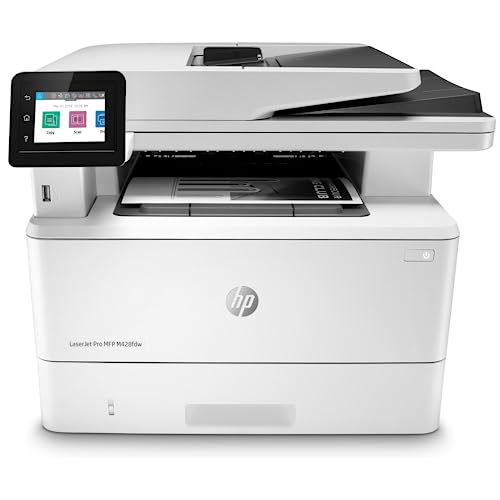
HP LaserJet Pro MFP M428fdw

Brother Monochrome Laser Printer, HL-L6200DWT
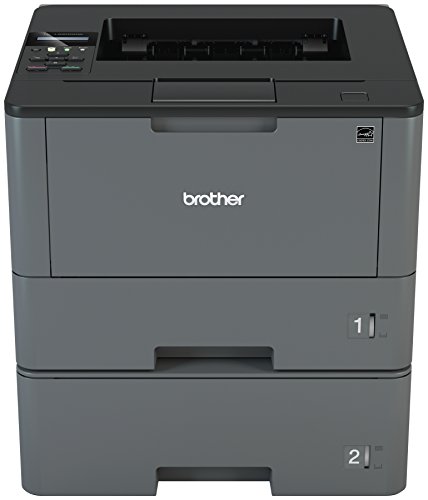
Brother Monochrome Laser Printer, HL-L5200DWT

Brother Compact Multifunction Printer and Copier, DCPL2550DW

Brother MFCL2750DW Monochrome All-in-One Wireless Laser Printer
Meet The Standout Selections
The Brother HLL2395DW fits the way most home offices actually work: a mixed bag of receipts, school worksheets, boarding passes, and the occasional 30-page report. Its flatbed scan glass handles odd-sized paperwork that an automatic document feeder would mangle, and wireless networking keeps laptops and phones printing without a cable trail across the desk.
Compared to the simpler HLL2390DW covered below, this model adds a color touchscreen and NFC tap-to-print, which is genuinely useful when a guest needs a quick page without digging through your Wi-Fi settings. The 250-sheet paper tray means most weekly home print loads finish without a refill.
Key Advantages
- NFC tap-to-connect speeds up one-off mobile prints when family or visitors need a page in a hurry.
- Flatbed scan glass copies book pages, passports, and crumpled receipts more cleanly than sheet-fed alternatives.
- Automatic duplex printing cuts paper use for multi-page documents without manual page flipping.
- 2.7-inch color touchscreen walks through cloud and scan-to workflows without memorizing button combos.
- Wireless networking supports everyday printing from laptops, tablets, and phones without cables.
Worth Noting
- The monochrome engine is text-focused; any photo or color document gets routed elsewhere or stays digital.
- Compact size is a benefit, but the 250-sheet tray may run thin for households printing school packets weekly.
- Like most home laser printers, the unit is best placed where warm air vents freely during long print jobs.
Who It Suits Best
Remote professionals and small households who want one compact machine for printing, copying, scanning, and occasional mobile prints without juggling cables.
Not Your Match When
High-volume home businesses printing hundreds of pages daily should look at the Brother HL-L6200DWT instead for its larger paper capacity and faster engine.
Not everyone needs a touchscreen or NFC, and that’s exactly who the Brother HLL2390DW is for. Stripped of the frills from the HLL2395DW above, it keeps the same flatbed scan glass, wireless networking, and duplex printing in a body aimed at minimalists. The mental model is simple: it prints, scans, copies, and stays out of the way.
Mobile printing from iOS and Android devices is built in, so a quick email attachment or boarding pass arrives without booting up a laptop. For a single user or a couple sharing a printer, the capacity is plenty without paying for features that would just sit unused.
Real-World Strengths
- Same flatbed scanner as the pricier sibling, so copying book pages and irregular documents stays easy.
- Duplex printing is automatic, halving paper use on long homework packets and tax printouts.
- Wireless setup keeps the printer on a shelf rather than tethered to one computer.
- Clean, button-driven interface suits users who prefer tactile controls over touchscreen menus.
Honest Caveats
- No color touchscreen, so cloud and scan-to workflows take a few extra button presses.
- No NFC tap-to-print for quick guest sessions.
- 250-sheet tray matches the HLL2395DW, so very busy households may still want the HL-L5200DWT’s dual trays.
Best Suited To
Solo remote workers and students who want a no-nonsense monochrome printer and scanner for routine homework, invoices, and email attachments.
Swap It Out When
Households that fax or rely on cloud-scan shortcuts should consider the Brother MFC L2750DW further down for its broader feature set.
The HP LaserJet Pro MFP M428fdw is the heaviest hitter on this list and the one that starts looking like a small-office machine pressed into home service. Where the Brother options earlier lean toward personal use, this HP adds built-in Ethernet, automated workflow buttons, and the kind of paper handling that won’t blink at a stack of contracts at 9 PM.
Built-in security at the hardware level is the silent benefit for anyone handling sensitive client files. Pair it with the customizable control panel and one-touch scan workflows, and a home-based law practice or bookkeeping setup starts to feel legitimate without renting office space.
Useful Touches
- Built-in Ethernet alongside wireless networking makes it easy to drop into a hardwired home office network for reliability.
- Automated one-touch workflows on the control panel shave time off recurring scan-and-email or scan-to-folder tasks.
- Hardware-level security features help protect sensitive documents, useful for client-facing home businesses.
- Two-sided printing, scanning, copying, and faxing in one unit consolidate four devices into one footprint.
Trade Offs
- Larger footprint than the compact Brother models; plan for a sturdy shelf or printer cart.
- Higher toner and component costs than entry-level home units, depending on the cartridge plan.
- Feature density can feel like overkill for households printing under 200 pages a week.
Right Fit For
Home-based businesses, freelancers, and consultants who run a real document pipeline and want a printer that scales with growth.
Consider Something Else When
Casual home users should consider the Brother DCP L2550DW for a simpler experience at a friendlier entry point.
The Brother HL-L6200DWT is what happens when a printer designed for office print rooms gets dragged into a serious home workspace. Where the HLL2395DW uses a single 250-sheet tray, this model runs dual trays that hold serious paper volume without weekly refills. The engine itself targets higher-volume households and small businesses.
Duplex printing stays automatic, and wireless networking plus mobile printing support keep the workflow flexible. For a household printing school reports, work contracts, and the occasional homeschool curriculum, the paper capacity alone justifies the upgrade over compact models.
A Strong Showing
- Dual paper trays reduce refill trips, valuable for households printing multiple projects weekly.
- High-yield toner support lowers long-term cost per page for heavy users.
- Automatic duplex printing on a sturdier engine handles two-sided pages reliably over long jobs.
- Wireless and mobile printing keep it friendly for laptops, phones, and tablets.
Things To Consider
- Larger footprint demands more shelf space than a compact home printer.
- Cost per page drops with high-yield toner, but the initial cartridge spend runs higher than basic models.
- Print-only design means no scanner; pair with a phone scanner app or a separate device.
Whose Shelf It Belongs On
Heavy-printing households, homeschool families, and home offices that produce multi-hundred-page jobs each week.
Look Elsewhere When
Anyone who also needs to scan and copy in the same box should consider the Brother MFC L2750DW for an integrated all-in-one solution.
The Brother HL-L5200DWT sits right in the middle of this list by design: faster than the compact HLL2390DW but easier to live with than the heavy-duty HL-L6200DWT above. Two paper trays, totaling around 770 sheets, support a busy week of print jobs without constant refills.
Mobile printing compatibility runs wide, including AirPrint, Google Cloud Print 2.0, Brother iPrint and Scan, Mopria, Cortado Workplace, and Wi-Fi Direct. That breadth is useful when the household mixes iPhones, Androids, and Chromebooks.
Everyday Wins
- Dual paper trays (250-sheet and 520-sheet) reduce interruptions for busy home print schedules.
- Wireless and Ethernet networking make placement flexible across the home office.
- Wide mobile compatibility supports mixed-device households with minimal fuss.
- Automatic duplex printing supports two-sided documents without flipping pages by hand.
Some Limits To Know
- Print-only design, so a separate scanner or phone-based scanning fills the gap.
- Bigger body than entry-level home printers; measure your shelf before committing.
- Mobile ecosystem references older standards like Google Cloud Print, so newer protocols may need direct setup.
Made For
Growing home offices and busy households that want more paper capacity and faster print speeds without jumping to a full office machine.
Reach For A Different Pick When
Users who need scanning and copying in one unit should look at the Brother DCP L2550DW for a balanced multifunction alternative.
The Brother DCP L2550DW is the practical middle ground many households settle on: a compact multifunction printer that prints, copies, and scans in one box without dominating the desk. The 50-sheet automatic document feeder makes scanning stacks of school paperwork or utility bills painless compared to flipping pages on a flatbed.
Compared to the HP M428fdw further up, this Brother trades enterprise security and faxing for a smaller footprint and simpler interface. For a household that needs dependable day-to-day functions without office-grade complexity, the DCP L2550DW is a thoughtful middle path.
The Good Stuff
- 50-sheet automatic document feeder speeds up multi-page scanning and copying sessions.
- Compact body fits neatly on a small desk or printer cart in tight home layouts.
- Automatic duplex printing supports two-sided homework, contracts, and booklets.
- Wireless networking makes it easy to drop into any home Wi-Fi setup.
Worth Bearing In Mind
- No fax, so households needing fax should look at the Brother MFC L2750DW.
- Monochrome-only engine means color documents are out of scope.
- Standard toner yields are modest; high-volume homes should budget for replacement cartridges.
Perfect Match For
Busy families and remote workers who want reliable printing, copying, and scanning in one compact machine without enterprise-level features.
A Better Fit Elsewhere
Home businesses that depend on fax should consider the Brother MFC L2750DW for its built-in fax functionality.
The Brother MFC L2750DW is the most fully loaded home-friendly model on this list, layering fax, single-pass duplex scanning, and a 50-sheet automatic document feeder onto the same compact footprint as the DCP L2550DW above. It also works with genuine Brother toner cartridges designed to keep text sharp at high speed.
For a household running a small business out of a spare room, this is the model that finally lets the home office retire the standalone fax machine. The single-pass duplex ADF scans both sides of a page in one go, which is the kind of feature you don’t appreciate until you stop using it.
What Helps Most
- Single-pass duplex copying and scanning handles two-sided documents without flipping the page.
- Built-in fax supports households that still need to send signed forms to providers or contractors.
- 50-sheet automatic document feeder handles stacks of paperwork for unattended scanning.
- Wireless networking plus mobile printing support flexible placement across the home.
Practical Considerations
- More features on a similar footprint mean a denser control panel that takes time to learn.
- Standard toner cartridges ship with limited yield; high-volume users should plan for replacement costs.
- Larger home multifunctions can run warmer, so ventilation during long jobs is worth planning for.
Built With In Mind
Home offices that need printing, scanning, copying, and faxing in one compact machine without stepping up to full enterprise hardware.
Where A Sibling Pick Shines
Casual users who never fax should consider the Brother DCP L2550DW for a simpler feature set and easier day-to-day use.
What To Weigh Before Choosing An At Home Laser Printer
Match The Printer To Your Real Print Volume
A laser printer earns its keep when it can sit quietly for days and then churn through a stack without complaint. Light users printing under 200 pages a month get by with a compact unit like the Brother HLL2390DW, while households running school packets or a side business benefit from dual-tray models like the HL-L5200DWT or HL-L6200DWT. Mismatched capacity either leads to constant refills or overspending on a machine that never gets used.
Decide Between Print-Only And Multifunction Early
Multifunction printers add scan, copy, and sometimes fax functions in the same body, which is a space and cost win for most homes. Print-only models like the HL-L5200DWT trade those extras for faster engines and larger paper trays, which suits dedicated workhorses. Choosing the wrong shape early forces compromises down the line, especially when the household suddenly needs to scan a signed form or fax a contract.
Connectivity Should Match How You Actually Print
Most modern home printers offer wireless networking and mobile printing compatibility, which covers phones, tablets, and laptops. Built-in Ethernet becomes useful when the printer sits far from the router or when reliability matters for client work. NFC tap-to-print, as on the Brother HLL2395DW, is a small luxury for shared households with frequent guests.
Toner Strategy Affects Long-Term Cost
Toner is where the real cost lives over a printer’s life. Standard cartridges suit light users; high-yield options drop the cost per page for households running thousands of pages monthly. Subscription toner services can simplify replacement, though the trade-off is commitment to a single supplier and shipping cadence that may not fit every household.
Key Considerations Across These Picks
Pitfalls Shoppers Hit
The most common mistake is buying an office-grade printer for light home use and paying for capacity that sits idle. The opposite trap is picking a compact home unit that runs out of paper every few days once a household starts printing school packets or contracts. Both ends waste money; matching the machine to the actual print cadence matters more than chasing specifications.
The Case For Spending Up
Higher-tier models earn their premium through paper capacity, faster engines, and stronger duty cycles that translate to fewer interruptions. For a household printing thousands of pages monthly, dual trays and high-yield toner support cut refill trips and lower the cost per page. For lighter users, the extra spend rarely pays back, and a well-matched mid-range model is the smarter call.
Frequently Asked Questions
How Long Does Toner Last In A Home Laser Printer?
Toner cartridges in a home laser printer typically last for several months under light use and can be replaced as needed when print quality fades or the printer signals low toner. Genuine replacement cartridges keep text sharp and reduce wear on internal components.
Can A Laser Printer Handle Envelopes And Labels?
Yes, most laser printers in this roundup handle envelopes and labels through the main paper tray, though feeding one at a time reduces the risk of jams. Heavier cardstock and specialty media may need the manual feed slot if available.
Is Duplex Printing Worth It For Home Use?
Automatic duplex printing saves paper on multi-page documents like school reports, contracts, and booklets, and most modern home laser printers include it. For households printing single-page forms, the benefit is smaller but still convenient.
Do Home Laser Printers Need Special Ventilation?
Laser printers warm up during long print jobs, so leaving a few inches of clearance around the unit keeps airflow healthy. A normal home desk or printer cart with open back ventilation works well for most of the machines on this list.
How Noisy Are Home Laser Printers?
Most modern home laser printers run quietly enough for a shared room, though high-speed models can be louder during long print bursts. Placing the printer on a solid surface and slightly away from the desk can soften the perceived sound.
Bottom Line
Your ideal at home laser printer comes down to honest print volume and the features you’ll actually use, not the longest spec sheet. Compact Brother models cover most households well, while higher-capacity and full-multifunction units earn their place when the workload grows. Pick the one that matches your week, and the rest falls into place.