A tidy spice drawer, a tangle of cables behind the TV, a folder pile at work that multiplies overnight. Label machines used to mean clunky desktop printers bolted to one corner of the room, but the current crop of thermal and Bluetooth models travels in a bag, runs on a rechargeable cell, and churns out clean, adhesive-backed tags in seconds. The trick is matching the format, resolution, and tape supply to your actual workload, since a scrapbook hobbyist and a warehouse manager need different things from the same tool. This shortlist covers compact mobile units, keyboard-driven workhorses, and higher-resolution printers suited for fine text and small graphics.
The Shortlist At A Glance

SUPVAN E10 Bluetooth Label Maker with 3 Tapes (Green)

NIIMBOT B21 Pro 300 DPI Bluetooth Label Maker (Beige)
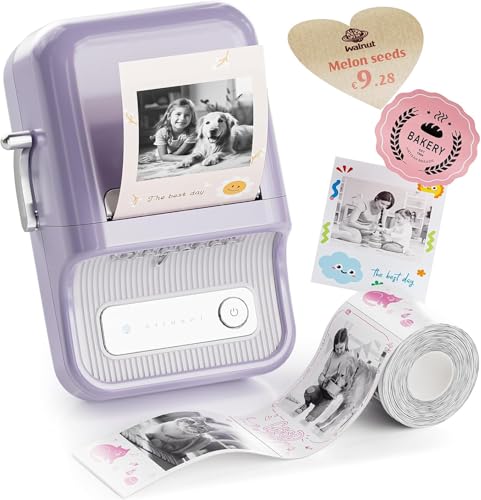
NIIMBOT B21 Pro Sticker Printer 300DPI (Violet)

Brother P-Touch PTH110BP Label Maker Bundle (White)
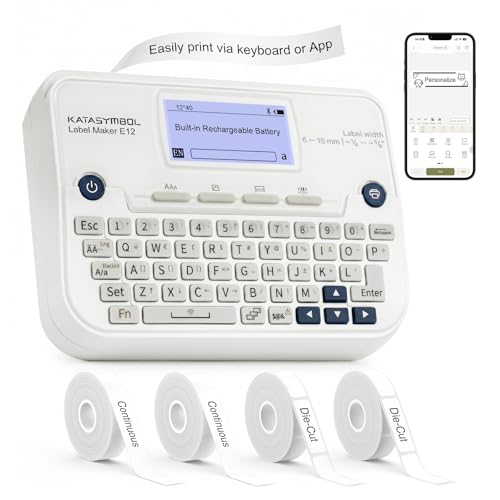
SUPVAN E12 Keyboard and Bluetooth Label Maker

NIIMBOT B21 Pro 300 DPI Label Maker (Green)
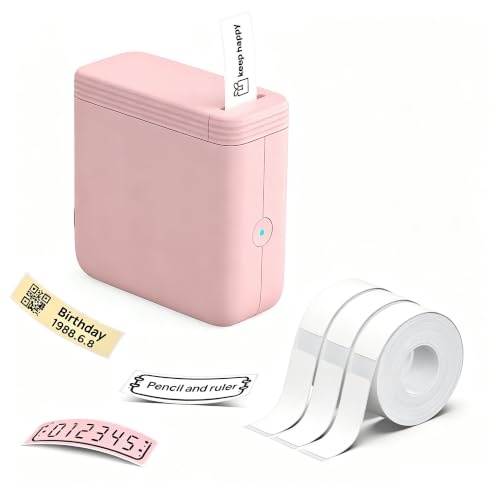
FLEXYVA P24 Mini Label Maker with 3 Tapes (Pink)

NIIMBOT B1 Pro 300 DPI Label Maker

SUPVAN E11 Keyboard and Bluetooth Label Maker
The Details Behind The Selections
The SUPVAN E10 leans fully on your phone for design work, which keeps the hardware itself small enough to disappear in a kitchen drawer. For households sorting spice jars, daycare bins, or cable runs behind a TV, that phone-first workflow actually fits: you snap a photo of a shelf, build the layout on screen, then print.
Three starter tapes ship in the box, so you can label real objects the day the package arrives. Compared with the keyboard-driven picks later in this list, you trade tactile typing for a more flexible app canvas, which matters if your labels need icons or varied fonts.
What Works In Its Favor
- No ink or toner cartridges to swap, which cuts down on consumable clutter
- App requires no fees or registration, lowering the friction for first-time users
- Rechargeable battery designed to last roughly a month per charge under typical home use
- Three bundled tapes cover common widths, useful for pantry jars and storage boxes right away
Honest Caveats
- Phone-only design means a dead battery or older device can pause a labeling session
- Tape rolls run out faster than you expect once you start labeling cables and switches
Right Fit For
Households and small home offices that want a low-commitment first label machine for jars, folders, and electronics cables.
Where Another Pick Suits Better
Office staff who prefer physical buttons should look at the Brother P-Touch PTH110BP, which prints straight from its built-in keyboard.
The B21 Pro steps up to a 300 DPI thermal print head, and that resolution jump is what sets it apart from older 203 DPI labelers. Fine text, small icons, and even short QR codes come out legible instead of fuzzy, which matters once you start labeling retail samples or inventory bins.
It still pairs over Bluetooth and runs from an app, but the added dot density gives the prints a noticeably cleaner edge. Side by side with the SUPVAN E10 above, this one trades a touch of price for sharper output.
A Few Strong Suits
- 300 DPI thermal head renders small fonts and barcodes with crisp edges
- Supports color and clear label rolls for different finishes, depending on your stock
- Compact body slips into a tote bag for pop-up labeling at markets or events
- Inkless thermal printing removes one ongoing expense from the running cost
Points To Keep In Mind
- Higher resolution labels take slightly longer to feed through the cutter
- Color rolls cost more than standard white tapes, so plan your tape budget
Key Specs
Whose Shelf It Belongs On
Small-business owners and craft sellers who need sharper output than entry-level labelers can deliver.
Swap It Out When
You mainly produce colorful scrapbook stickers and want the photo-style focus of the NIIMBOT B21 Pro violet edition.
This violet B21 Pro shares the same 300 DPI thermal engine as the beige model but is pitched squarely at craft rooms. The companion app leans into photo-style labels and decorative frames, so stickers for journals, planners, and gift tags get the same treatment as plain text tags.
It is the same printer underneath, so the honest read is that color choice and app library matter more than hardware differences here. Compared with the SUPVAN E10 at the top of this list, this one costs more but unlocks richer sticker designs.
Noteworthy Benefits
- Photo-style label rolls turn tiny prints into scrapbook-ready stickers
- App includes templates tuned for planners, cards, and gift tags
- 300 DPI keeps even thin script lettering legible on small label sizes
- Bluetooth setup means no driver installs on phones or tablets
Soft Spots
- Specialty photo tapes cost more per roll than standard labels
- Compact body has no keyboard, so every label needs the app open
Best Suited To
Journalers, scrapbookers, and parents making personalized gift labels at home.
Consider Something Else When
You mostly print utilitarian tags and would rather not pay the photo-tape premium; the SUPVAN E10 is a simpler route.
The Brother PTH110BP is the keyboard-first holdout in this lineup, and that is its quiet strength. A built-in QWERTY layout, a small LCD, and a dedicated print button mean you can label a file folder without unlocking a phone, which is genuinely faster for office workers on the move.
Four tapes ship in the box, so you get a working assortment out of the gate. Set against the app-only picks earlier in this list, this unit trades smartphone flexibility for tactile reliability.
Useful Strengths
- Physical keyboard lets you draft and print without a paired phone
- Four bundled label tapes cover common office and classroom widths
- Compact shell fits a desk drawer when not in active use
- Brother’s tape ecosystem is widely stocked, easing restocking
Trade-Offs To Consider
- Print resolution sits below the 300 DPI thermal models here
- Limited font and frame library compared with app-driven units
Quick Facts
Right Fit For
Office staff, teachers, and small-store clerks who want a reliable keyboard-driven labeler with no app dependency.
Look Elsewhere When
Your labels need fine graphics or QR codes, where the NIIMBOT B21 Pro’s 300 DPI output looks sharper.
The SUPVAN E12 splits the difference between the keyboard-first Brother and the app-only E10 earlier in the list. A built-in keyboard handles the quick jobs, while Bluetooth unlocks the app when you want icons, varied fonts, or batch designs.
Four tapes arrive in the box, which trims the early shopping list to almost nothing. For someone labeling office files one minute and pantry jars the next, that dual mode prevents the constant reach for a phone.
Why It Works Well
- Backlit LCD stays readable in a dim supply closet
- Bluetooth path opens up richer templates for batch labels
- Four bundled cassettes cover most home-office and pantry widths
- Rechargeable battery cuts down on disposable cells over time
A Few Limitations
- Body is larger than the pocket-friendly FLEXYVA P24 covered later
- Best experience assumes you will invest an hour learning the app
Feature Snapshot
Who Should Grab It
Home-office workers balancing file labels, kitchen jars, and school-supply bins who want both keyboard speed and app flexibility.
Skip It When
Your labeling happens away from a flat surface, since the SUPVAN E11 offers a lighter shell with the same hybrid setup.
This green B21 Pro is essentially the beige model from earlier in the list, just wearing a different shell. The reason it earns its own slot is two-color tape support: red-and-black rolls can highlight warning labels, sample dates, or allergy notes in a way plain monochrome labels cannot.
For kitchen pantries and home-lab storage where a splash of color helps, the option matters more than the housing. Compared with the entry-level SUPVAN E10, this unit gives you that extra visual layer when you want it.
Well-Handled Touches
- Two-color tape support draws attention to dates and warnings
- 300 DPI output keeps small print readable on narrow rolls
- Same proven Bluetooth app workflow as the rest of the B21 family
- Inkless thermal engine keeps consumable costs predictable
Points To Note
- Two-color tape rolls cost more than single-color cassettes
- Color accuracy leans on the app template, so layouts need a careful eye
Who Will Love This
Kitchen organizers and home-brew hobbyists who want eye-catching labels on jars, bottles, and sample containers.
Another Choice May Suit
Plain-text office work is handled faster by the keyboard-driven Brother P-Touch PTH110BP covered above.
The FLEXYVA P24 is the lightest machine in this roundup at roughly 113 grams, and that small footprint is its whole reason to exist. Slipping into a coat pocket or a tote, it lets college students and renters label shared-kitchen shelves without dragging a desktop printer along.
Three tapes arrive in the box at a 14 by 40 millimeter size, which suits jars and small bins but may feel narrow on cable runs. Compared with the SUPVAN E10 above, you trade some app richness for genuine portability.
Positive Takeaways
- Pocketable 113-gram body travels easily between rooms or apartments
- Compact thermal printing skips the ink-replacement routine entirely
- Three starter tapes keep early costs low for tight budgets
- App pairing takes seconds, useful for renters with minimal setup time
Where It May Fall Short
- Starter tape width feels narrow for wider cable or shelf labels
- Smaller body means a smaller battery and shorter active runtimes
Best Suited To
Renters, college students, and anyone labeling a small kitchen or shared space without dedicating desk room to a printer.
Not Your Match When
Your labels need crisp QR codes or fine print, since the NIIMBOT B1 Pro offers a sharper 300 DPI output.
The NIIMBOT B1 Pro joins the 300 DPI club and is built for the small-but-vital jobs: asset tags, cable IDs, and QR-coded bins. Compared with the older B1 and B21 models without the Pro label, this one keeps narrow QR patterns and serial-number strings looking crisp.
One starter label ships in the box, so plan to buy additional rolls before a serious run. For inventory-leaning home offices, the tradeoff of paying more upfront for cleaner output usually pays back in fewer reprints.
What Helps Most
- 300 DPI print head handles tiny QR codes and serial numbers cleanly
- Compact form factor suits a packing-station desk or workbench corner
- Inkless thermal printing keeps running costs tied to tape, not cartridges
- App-based design lets you save templates for repeat asset tags
Honest Caveats
- Only one starter label ships in the box, so budget for more rolls
- Higher resolution uses slightly more battery per print job
At A Glance
Right Fit For
Home-office users managing inventory, electronics, or storage bins where scannable codes matter as much as readable text.
Look Elsewhere When
You mostly label in bulk without scanning, since the SUPVAN E12’s keyboard-and-app hybrid may finish faster for plain text runs.
The SUPVAN E11 rounds out the list as a starter-friendly hybrid. A built-in keyboard handles quick file or jar labels, while the Bluetooth path opens the app when you want richer templates. Four tapes ship in the box, giving a real head start on common household projects.
A 1200 mAh battery is rated for roughly a month of typical use per charge, which fits the once-a-week organizer rather than a daily warehouse tagger. The honest read is that this is the entry point for the SUPVAN hybrid lineup.
Notable Upsides
- Keyboard plus app pairing covers quick tags and detailed designs
- Four bundled tapes cover pantry, file, and cable widths from day one
- 1200 mAh battery holds charge well between sporadic sessions
- Rechargeable design trims the cost of disposable cells over time
Practical Considerations
- Print resolution sits below the 300 DPI thermal picks in this roundup
- Bundled tape variety may leave gaps if you need specialty widths later
Perfect Match For
First-time label machine shoppers and casual home organizers who want keyboard convenience without overspending.
A Better Fit Elsewhere
Small-business owners needing sharper prints should consider the NIIMBOT B21 Pro 300 DPI model earlier in this article.
What Matters Most Before Choosing Auto Label Machines
Print Resolution And Detail Work
Thermal labelers typically run at 200 DPI (dots per inch, meaning how many tiny ink dots fit into one inch of label) for everyday text, while 300 DPI models handle finer fonts, small icons, and QR codes more cleanly. If your labels stay simple, the lower resolution saves money; if they include scannable codes, the upgrade usually pays back in fewer misreads.
Input Style: Keyboard, App, Or Both
Keyboard-driven machines like the Brother PTH110BP let you draft a tag without unlocking a phone, which speeds up quick office runs. App-only models unlock richer templates and batch design, while hybrid units like the SUPVAN E11 and E12 cover both worlds at the cost of extra bulk.
Power, Portability, And Tape Supply
Rechargeable batteries in most modern units last a month or more under typical home use, but heavy daily sessions wear that down. Tapes are the ongoing expense, so check both the bundled count and the brand’s catalog before committing, since replacement rolls vary in price and width options.
Picking Across The Lineup
Common Shopping Slip Ups
A frequent misstep is buying a 200 DPI machine and expecting sharp QR output later; if you anticipate scanning codes, choose a 300 DPI thermal printer from the start. Another trap is assuming all tapes are interchangeable, since Brother cassettes and NIIMBOT or SUPVAN rolls use different cassettes, and the wrong fit simply will not load.
Where The Extra Money Goes
Higher-tier picks in this category add 300 DPI print heads, dual input modes, or specialty tape support, including two-color and photo-style rolls. For most households, those upgrades are worthwhile only when the labels themselves carry detail worth preserving, so match the spend to the workload rather than chasing features you will not use.
Frequently Asked Questions
Do auto label machines need ink or toner?
No. Most modern thermal labelers in this category use heat to darken special tape, so you never buy cartridges, only replacement rolls. The tradeoff is that tapes are brand-specific and add up over time.
Can I print labels from my phone?
Yes. The app-driven and hybrid models here pair over Bluetooth and let you design on iOS or Android. Pure keyboard models like the Brother PTH110BP work without a phone but offer fewer design options.
What resolution do I need for QR codes?
For scannable QR codes, 300 DPI thermal printers like the NIIMBOT B21 Pro or B1 Pro deliver noticeably cleaner edges than 200 DPI models. If QR codes are rare, a 200 DPI unit still handles plain text labels well.
How wide are the printed labels?
Most bundled tapes in this roundup are designed for narrow applications such as jars, folders, and cables. Wider tapes exist in the same ecosystems, so check each brand’s catalog before restocking.
Are label machines good for small businesses?
Yes, especially the higher-resolution and hybrid models covered above. For repeated runs of asset tags, sample labels, or retail tags, 300 DPI output and template-saving apps save real time across a workday.
Closing Remarks
The right auto label machine comes down to how often you label, what goes on the tag, and whether your phone is always nearby. Keyboard-first models suit quick office sessions, app-driven units unlock creative designs, and hybrid picks handle both. Pick the resolution and tape ecosystem that match your workload, and the rest tends to fall into place.