Construction math breaks a standard pocket calculator in about ten minutes. Converting feet and inches to fractions, calculating rafter lengths, and figuring board counts on the fly calls for tools designed for the trade. The picks below cover dedicated construction calculators, scientific workhorses, printing desktop machines, and a few helpful adjacent tools, so you can match the right device to the kind of work you actually do.
The Essentials At A Glance

ROATEE Construction Calculator with Writing Tablet

Texas Instruments TI-108 Solar Calculator Teacher’s Kit (Set of 10)

ROATEE Construction Calculator Engineer Calculator

Calculated Industries 4065 Construction Master Pro Calculator

Sharp EL-1801V Ink Printing Calculator (12-Digit, Off-White)

ROATEE 12-in-1 Multi Tool Construction Pen (Yellow)

Casio fx-115ES Plus 2nd Ed Advanced Scientific Calculator

Sharp 12-Digit Two-Color Print Calculator (EL2196BL, Black)
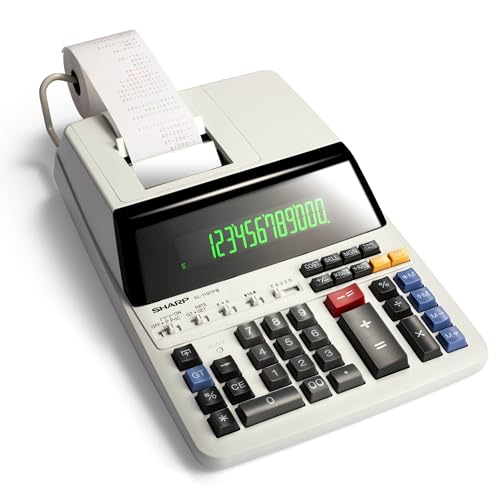
Sharp EL-1197PIII Heavy Duty Color Printing Calculator

Casio FX-300ESPLSB Scientific Calculator (Pink)
The Picks, Examined More Closely
ROATEE’s writing-tablet model combines a dedicated construction calculator with a flip-page notepad on top, so you can jot measurements without pulling out a separate clipboard. The flip pad is handy when a foreman calls out dimensions and you need to write while the calculator is still in your hand.
For crews working in dusty or wet environments, the integrated pad means fewer loose papers to lose. It’s a thoughtful pairing that the plain ROATEE engineer calculator (covered later) does not offer.
Where It Excels
- Flip-page writing tablet built into the unit, removing the need for a separate notepad
- Dedicated construction functions for area, volume, rafter, and material counts
- Compact form factor slips into a tool belt or vest pocket without a bulky holster
- Reduces paper waste on jobs where measurements change rapidly
Points To Keep In Mind
- The flip-page pad adds thickness compared with a standard slim calculator
- Writing surface can wear over months of daily pocket carry, depending on conditions
Key Product Details
Who It Suits Best
Field estimators and framers who want a single pocket tool for both math and quick notes on a busy site.
Consider Something Else When
You rarely jot measurements and would rather save pocket space with the slimmer ROATEE engineer calculator covered below.
The TI-108 is the no-frills desktop calculator that has stocked school desks and training classrooms for years. Solar-powered, with an eight-digit display, it covers basic arithmetic plus the percent and square-root keys that come up constantly in introductory construction math classes.
This kit arrives as a set of ten, aimed squarely at instructors buying in bulk for a program. It is not a trade-specific device, but as a starter calculator for apprentice classes it does the job without ceremony.
Positive Takeaways
- Solar power means no batteries to swap during a long lab
- Pack of ten keeps a full classroom supplied at a low per-unit cost
- Large, well-spaced keys reduce entry errors for new learners
- Familiar TI layout shortens the learning curve for apprentices
Trade Offs
- Only eight-digit precision, with no feet-inch-fraction math built in
- Designed for desktop use, not pocket-friendly for active jobsites
The Right Fit
Trade-school instructors running introductory estimating, blueprint, or framing classes who need a reliable fleet of student calculators.
A Better Fit Elsewhere
Working contractors should skip this and step up to the Calculated Industries 4065 Construction Master Pro, which handles the dimensional math apprentices eventually need.
Without the flip-pad on top, this ROATEE model leans fully into the math side of construction work. The function library runs through area and volume, brick and block counts, drywall sheets, board and flooring quantities, plus circle, arc, and rafter geometry.
Compare that to the writing-tablet ROATEE reviewed earlier, and the trade-off is clear: this one drops the notepad to keep the calculator slimmer and the function set more visible. For estimators who already carry a clipboard or tablet, that swap makes sense.
Positive Points
- Wide range of construction-specific keys for layout, rafter, and material work
- Slimmer profile than the writing-pad sibling for easier pocket carry
- Covers roofing, stair, foundation, and stud-spacing calculations
- Suitable for both field crews and office-based estimators
Honest Caveats
- Lacks an integrated writing surface for jotting measurements on the fly
- Function density on the keypad can overwhelm first-time users until they memorize key clusters
- Display details vary by unit, so checking button labels before heavy use is worthwhile
Best Suited To
Contractors and estimators who already use a separate notebook or tablet and want a function-dense dedicated construction calculator.
Look Elsewhere When
You want an all-in-one tool with a built-in notepad, in which case the ROATEE writing-tablet model is the better match.
The Construction Master Pro has been the unofficial training tool for carpenters, framers, and remodelers for decades. It shines at feet-inch-fraction math, which is the daily currency of stick-built construction in North America.
Where the ROATEE models cover a similar function list, the Construction Master Pro leans on a long industry track record and a layout that veteran crews already know by feel. That familiarity shortens training time across a whole crew.
Practical Pluses
- Industry-standard feet-inch-fraction handling reduces entry errors on dimensional math
- Used in apprenticeship and union training programs, easing the learning curve
- Wide function set for rafters, stairs, materials, and cost calculations
- Familiar layout for crews who already use earlier Construction Master models
Factors To Consider
- Costs more than most pocket construction calculators at this level
- Key labels are dense, which can feel intimidating on day one
Feature Snapshot
Made For
Working contractors, remodelers, and estimators who rely on accurate dimensional conversions every day on the jobsite or in the office.
Swap It Out When
You are an apprentice still learning the basics, where the lower-cost ROATEE engineer calculator or a Casio scientific model is a friendlier starting point.
The Sharp EL-1801V is a desk-bound printing calculator rather than a field tool. The two-color ink ribbon prints positive numbers in black and negatives in red, which makes long estimate sheets easier to audit at a glance.
Twelve digits of capacity handle the big totals that come up on commercial estimates, while AC power keeps the unit running through an entire billing cycle. Compared with the Construction Master Pro, this is firmly an office machine, not a belt-pocket device.
Everyday Perks
- Twelve-digit LCD handles large commercial totals without rounding headaches
- Two-color print ribbon speeds up visual auditing of estimate tapes
- AC-powered, so there are no batteries to replace during deadline week
- Well-spaced keys reduce fatigue during long estimating sessions
Worth Noting
- Ink ribbon replacement is an ongoing maintenance item for heavy users
- Not portable, so it cannot replace a dedicated jobsite calculator
Who Should Grab It
Office-based estimators and accounting staff who need a paper-tape record of every calculation they run.
Where Another Pick Suits Better
Crew members who spend more time on roofs and slabs than at a desk will get more value from the Calculated Industries 4065 Construction Master Pro.
Strictly speaking, this is a multi-tool pen rather than a true calculator, but it earns a place on a construction shortlist for the quick checks that come up between formal estimates. It bundles a stylus, ruler, bubble level, flat and Phillips drivers, an LED flashlight, a magnet, and a fidget toy into a pen-shaped body.
For a foreman running between meetings, it is a “good enough” companion to a separate calculator. Compared with the dedicated ROATEE units above, this one trades depth for breadth.
A Strong Showing
- Twelve functions in a single pocket tool, reducing what you carry
- Ruler and bubble level cover the most common on-site checks
- Stylus tip works with phones and tablets for digital takeoffs
- Compact pen form clips into a shirt pocket or notebook
Softer Spots
- Not a substitute for a real construction calculator on serious math
- Small drivers are fine for quick fixes, not for daily fastener work
Whose Shelf It Belongs On
Site supervisors and estimators who want a compact backup tool for quick measurements and minor fixes between full calculations.
Reach For A Different Pick When
Your workload involves dimensional math every hour, where the ROATEE writing-tablet calculator will earn its keep far faster.
The Casio fx-115ES Plus 2nd Edition is a scientific calculator, not a trade-specific device, but its versatility earns it a spot for apprentices balancing classwork with field training. The Natural Textbook Display shows formulas as they appear on paper, easing the transition from algebra to applied construction math.
Where the Construction Master Pro specializes in feet-inch-fraction conversions, the Casio broadens the toolkit with statistics, trigonometry, and calculus functions that matter in engineering coursework.
Everyday Wins
- Natural Textbook Display mirrors how formulas appear in textbooks
- Covers trigonometry, statistics, algebra, and calculus for engineering coursework
- Sixteen-digit, four-line LCD keeps multi-step problems readable
- Solar plus battery power for backup in low-light conditions
Small Caveats
- Requires manual conversion for feet-inch-fraction problems that the Construction Master Pro handles natively
- More menu-diving than a trade calculator on basic jobsite tasks
Technical Highlights
Perfect Match For
Engineering students and apprentices who need one calculator that handles both classroom coursework and the math that bleeds into field practice.
Another Choice May Suit
Crews focused purely on residential framing will be better served by the Calculated Industries 4065 Construction Master Pro.
The EL2196BL is a heavier-duty sibling to the EL-1801V reviewed above. A weighted base keeps the unit planted during fast data entry, and the bright two-color print rolls out tape at a pace that keeps up with busy estimating sessions.
Where the lighter EL-1801V covers most office work, this model is the better pick for teams that punch numbers all day and want a machine that feels stable under fast fingers.
What Makes Sense
- Weighted base reduces wobble during rapid keying
- Two-color print keeps positives and negatives easy to scan on tape
- Twelve-digit display handles large commercial totals
- Bright, high-contrast LCD improves readability in shared office spaces
Where It May Fall Short
- Larger footprint than compact desktop calculators, so plan desk space
- Ink and paper rolls are an ongoing consumable cost
Right Fit For
Busy estimating desks and accounting teams that need a stable, fast printing calculator for daily volume.
Skip It When
You mainly work solo in a small home office, where the lighter Sharp EL-1801V covers the same core functions with less desk space taken.
The EL-1197PIII is the long-running workhorse of the Sharp printing-calculator family. It adds a built-in clock and calendar, which suits offices that timestamp printed estimates for recordkeeping or client billing.
Compared with the EL2196BL, this older-design model trades a sleeker display for a heavier chassis that has proven itself over many office cycles. Owners commonly report it keeps running through years of daily use with little more than ribbon swaps.
The Case For It
- Heavy-duty build suited to multi-year daily office use
- Two-color print with crisp black and red output for clean tapes
- Built-in clock and calendar add timestamps to printed records
- Familiar key layout reduces training time for new hires
Things To Weigh
- Larger footprint than newer Sharp desktop models
- Display style is functional rather than modern, which may matter in design-conscious offices
Quick Technical Notes
Who Will Love This
Long-tenured offices and accounting teams that want a dependable printing calculator with a timestamp feature for audit trails.
Not Your Match When
You want a slimmer, modern-looking desktop unit, where the Sharp EL-1801V or EL2196BL fits better on the desk.
The pink Casio FX-300ESPLSB rounds out the list as a friendly entry point for students stepping into construction math. The Natural Textbook Display renders fractions and formulas in textbook form, which helps newcomers build intuition before they graduate to a dedicated trade calculator.
Versus the more advanced Casio fx-115ES Plus covered above, this model strips down to the essentials students use most in middle school, high school, and early college coursework.
Benefits That Matter
- Natural Textbook Display reads formulas as they appear in printed math
- Approachable key layout for students new to scientific calculators
- Slim, lightweight body fits easily in a backpack or binder
- Solid choice for general math, pre-algebra, algebra, and trigonometry classes
Potential Drawbacks
- Does not include the deeper engineering functions of the fx-115ES Plus line
- No feet-inch-fraction or construction-specific keys for trade use
Feature Rundown
Built With In Mind
Students just starting to learn scientific calculators and the math that leads into construction estimating.
Where A Sibling Pick Shines
Apprentices who already handle geometry, trigonometry, and statistics should consider the Casio fx-115ES Plus 2nd Edition instead.
What To Weigh Before Choosing Your Next Construction Calculator
A dedicated construction calculator is worth it once dimensional math, material counts, and rafter layouts become part of your week. The right choice depends on where you actually work, how often you calculate, and how much paper trail you need to keep.
Field vs. Office Use
If most of your day happens on ladders, in attics, or on slabs, a pocket-sized dedicated calculator is the better fit. The ROATEE writing-tablet model and the Calculated Industries 4065 Construction Master Pro are both built to live in a tool belt. Office estimators and accountants, on the other hand, benefit more from a desk-bound printing calculator like the Sharp EL-1801V or EL2196BL, where the paper trail matters as much as the math.
Function Set and Display
Look for the specific functions your work demands: feet-inch-fraction handling, rafter angles, stair dimensions, or board and drywall counts. A display that mirrors textbook-style formulas, like the Natural Textbook Display on the Casio scientific models, helps learners bridge the gap between classroom and jobsite. For crews that read measurements aloud on rooftops, larger keys reduce entry errors.
Power, Durability, and Maintenance
Solar power keeps calculators running in well-lit shops, while AC-powered printing calculators are reliable for long office days. Belt-carried models need cases or holsters to survive drops, and printing calculators need ribbon and paper roll replacements. Plan for those ongoing costs before you commit.
Key Considerations Across These Picks
Pitfalls Shoppers Hit
A common mistake is buying a basic scientific calculator and expecting it to handle feet-inch-fraction conversions cleanly. Another is choosing a feature-dense dedicated calculator without learning the key layout first, which leads to errors on day one. Before settling, think about whether your work happens in the field, the office, or both, since the best match differs in each environment.
Where The Extra Money Goes
Higher-tier models like the Construction Master Pro and Sharp EL2196BL earn their cost through deeper function libraries, heavier build quality, and longer service lives. The premium shows up in fewer miscalculations on dimensional math, more stable printing, and units that survive years of daily carry. For full-time contractors and estimators, that reliability typically pays for itself in saved time and avoided rework.
Frequently Asked Questions
What is a construction calculator?
A construction calculator is a specialized calculator with built-in functions for feet-inch-fraction math, rafter geometry, area and volume, and material counts that standard scientific calculators handle only through manual conversion.
Do I still need a scientific calculator for construction work?
Many apprentices and engineering students use a scientific calculator alongside a dedicated construction device. A scientific model covers trig, statistics, and calculus for coursework, while the trade calculator handles dimensional math on the jobsite.
How long do construction calculators typically last?
With reasonable care and a case for pocket carry, dedicated construction calculators from major brands commonly last through years of daily use, though belt-carried models in tough environments may need replacement sooner.
Are printing calculators useful for construction offices?
Yes, printing calculators provide a paper tape record of estimates and totals, which helps with client billing, audits, and internal reviews, especially on large commercial projects with multiple line items.
What is the difference between a construction calculator and a scientific one?
A construction calculator focuses on dimensional and material math, while a scientific calculator handles broader math functions like trigonometry, calculus, and statistics for engineering and classroom work.
Wrap Up
The right calculator depends on where the work happens and how detailed the math needs to be. Field crews get the most from a dedicated construction calculator, office teams benefit from a printing desktop model, and apprentices often do best pairing a trade calculator with a versatile scientific one. Match the tool to the job, and the math stops getting in the way.