Picking the right commercial inkjet printer changes how smoothly your shop runs, whether you’re pressing custom tees, marking production batches, or printing pro-grade photo prints. The category splits into three camps: DTF (Direct-to-Film) transfer printers built for apparel decorators, handheld coders for industrial marking, and wide-format photo printers for studios. This list covers all three so you can match a machine to your actual workflow, not just chase the loudest spec sheet.
The Shortlist At A Glance

MZK A3 Pro F1080 DTF Printer (XP600 Gen2)

MZK 14″ A3 Plus F1080 DTF Printer + Shaker + Purifier

MZK A3+ XP600 Gen2 F1080 Upgraded DTF Printer

MZK A3 Plus I1600 Dual Head DTF Printer
Industrial A3 i3200 DTF Printer with Shaker, Laptop, Purifier

DSV A3 Plus F1080 DTF Printer with Oven and Computer

MZK A3 Pro F1080 DTF Printer with Shaker and Purifier
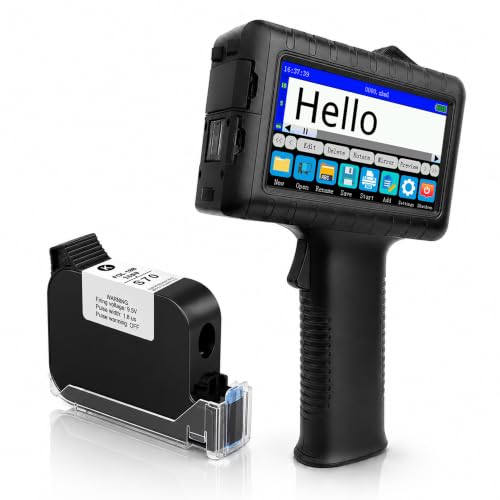
Handheld Inkjet Printer for Batch Codes and Dates

Canon imagePROGRAF PRO-1000 Photographic Inkjet Printer
The Picks, Examined More Closely
The MZK A3 Pro F1080 slots in as a confident middle-ground pick for anyone stepping into direct-to-film printing without going full industrial. It handles 13-inch-plus DTF film and prints an A3 sheet noticeably faster than older L1800-based units, which matters once you start filling real orders rather than running test swatches. The XP600 Gen2 printhead is the kind of detail that quietly separates hobby machines from workhorses.
What sets this one apart from the entry-level DTF crowd is its attention to keeping the printhead healthy. A scheduled anti-clog cleaning cycle and dual ink-level alerts mean you can leave the printer alone on a weekend and come back without the usual “oh no, the white ink settled” panic. A 5-inch LED touchscreen rounds out a control layout that feels modern for the category. For most small studios printing tees, totes, and hoodies, this lands at a sensible balance of speed, footprint, and price.
The Helpful Details
- Scheduled anti-clog cleaning reduces manual printhead babysitting.
- Dual ink-level alerts catch low white or CMYK before a job goes sideways.
- 5-inch LED touchscreen simplifies job setup versus button-based panels.
- Built-in film cutter trims finished transfers to usable size.
- XP600 Gen2 printhead runs roughly 2x the speed of legacy L1800 designs.
Things To Consider
- No included shaker or purifier, so finishing gear adds to the total cost.
- DTF workflow still requires a heat press, sold separately.
- White ink circulation needs daily attention during heavy use weeks.
Quick Facts
Who It Suits Best
Small apparel shops and Etsy sellers printing 20 to 80 transfers per day who want anti-clog automation without stepping into industrial pricing.
Look Elsewhere When
You need a dual-head setup for higher daily volume, in which case the MZK A3 Plus I1600 Dual Head DTF Printer is a faster sibling worth considering.
Bundling the printer with a powder shaker and air purifier, this MZK A3 Plus kit answers the most common first-week complaint from new DTF owners: “I bought a printer and now I need ten other things.” The 14-inch A3 Plus film width gives a touch more real estate than the standard A3, which is enough for oversized chest prints on youth XL tees and tote bags. Speed lands roughly 2x faster than the legacy L1800 reference design.
The one-click printhead moisturizing routine and continuous white-ink circulation both target the same problem: keeping the white channel from settling into chalky blockage during the gaps between print runs. A smart control panel ties those routines together so you’re not poking through menus. For new shop owners who would rather learn one cohesive system than mix-and-match parts, the bundle approach pays for itself in saved setup time.
Real Benefits
- Includes shaker and purifier, removing two extra purchases.
- One-click printhead moisturizing simplifies white-channel care.
- 14-inch film path accommodates oversized transfers.
Worth Noting
- Bundled accessories are matched to this printer, not field-upgradable.
- Bigger footprint than a printer-only DTF unit, so plan bench space.
- Still requires a separate heat press for final curing.
Made For
First-time DTF shop owners who want a single shipment that covers printing, powdering, and air handling from day one.
Skip It When
You already own a shaker or purifier, because the MZK A3 Pro F1080 DTF Printer (XP600 Gen2) gives the same core engine without duplicate accessories.
The upgraded A3+ keeps the same F1080 / XP600 Gen2 core that defines this generation of MZK machines but shifts attention to user ergonomics. The 5-inch rotatable touchscreen means you can angle the panel toward you whether the printer sits on a tall rack, a low workbench, or the floor. Owners commonly report that small touch of adjustability saves a sore neck during long shift batches.
Underneath, the auto-maintenance cycle runs through a built-in anti-clog filter, and dual ink-level alerts warn before a color runs dry mid-job. The throughput is on par with the original A3 Pro at roughly 2x older L1800 speeds, so you’re not paying for ergonomic upgrades with productivity. For solo operators running a single printer out of a converted garage or spare bedroom, this feels like the friendliest machine in the lineup.
Points In Its Favor
- Rotatable screen adjusts for different workstation heights.
- Anti-clog ink filter adds a second layer of nozzle protection.
- Dual ink-level indicators reduce mid-run interruptions.
- Built-in film cutter trims output to size without a separate tool.
Trade Offs
- Single-head design caps throughput below dual-head models.
- No bundled shaker means finishing gear is on you to source.
Right Fit For
Hobbyist DTF studios and side-hustle apparel decorators printing under 50 transfers a day who want a comfortable control interface.
Consider Something Else When
Your throughput needs exceed what a single XP600 Gen2 head can push, in which case the MZK A3 Plus I1600 Dual Head DTF Printer doubles the production line.
The jump from a single XP600 head to dual I1600 printheads is the kind of upgrade that turns a weekend hobby into a paying print operation. This MZK A3 Plus pushes roughly 3x the speed of older L1800 units and prints an A3 sheet in around 2.5 minutes, so back-to-back orders stop feeling like a slog. A high-precision steel frame keeps the dual-head carriage aligned under continuous use, which is what you want when the machine runs for hours.
The 7-inch LED multi-function display gives you more room to monitor job progress than the smaller panels on entry-level models. Owners commonly report that the bigger screen makes troubleshooting ink flow or printhead status easier during long shifts. Auto-maintenance cleaning plus anti-clog ink design round out a build that assumes daily commercial use. For shops running 100-plus transfers per day, the dual I1600 setup is where single-head machines start to creak.
A Favorable Mix
- Dual I1600 heads roughly triple throughput versus L1800 references.
- Steel frame stabilizes long print runs.
- 7-inch multi-function display simplifies status monitoring.
- Anti-clog cleaning cycle keeps the dual heads clear during idle hours.
Room For Improvement
- Larger and heavier than single-head options, so plan floor space.
- Higher ink consumption means refill cycles come faster.
- No included shaker or purifier, so finishing gear is separate.
Quick Facts
Who Should Grab It
Established apparel shops printing 100 to 300 transfers per day who need dual-head speed without stepping into full industrial pricing.
A Better Fit Elsewhere
You run a full-time print farm that pushes 500+ transfers a day, in which case the Industrial A3 i3200 DTF Printer with Shaker, Laptop, Purifier is a heavier-duty alternative.
This is the machine you buy when “hobby” stopped being the right word twelve months ago. The Epson i3200 industrial printhead delivers the kind of throughput that makes print-farm economics work, hitting roughly 5x the speed of legacy DTF models and printing an A3 design in around 2.5 minutes. Owners commonly report that the i3200 platform handles 12-hour shifts without the drop quality drifting, which matters when every order pays the same rate.
The bundle includes the powder shaker, air purifier, and a laptop for RIP software, so the only major accessory you need is the heat press. Resolution lands at 720 x 3660 DPI, which keeps fine line work and small text legible on dark garments. A 5-inch smart screen handles on-device control. For full-time print operations, the i3200 head is the dividing line between DTF-as-a-side-project and DTF-as-a-business.
Positive Takeaways
- Epson i3200 industrial head sustains quality over long shifts.
- Bundled shaker, purifier, and laptop remove separate sourcing.
- 720 x 3660 DPI keeps small text sharp on dark transfers.
- Auto-cleaning and anti-clog filter protect the i3200 channels.
Points To Keep In Mind
- Industrial footprint demands dedicated floor and ventilation space.
- i3200 ink costs run higher than XP600 setups at the same volume.
- Heat press still sold separately for full finishing.
Feature Snapshot
Built With In Mind
Full-time DTF print farms running multi-hour production days that need industrial duty cycles and bundled finishing equipment.
Swap It Out When
Your daily volume is closer to hobby scale, because the MZK A3 Pro F1080 DTF Printer (XP600 Gen2) handles small batches at a much lower entry cost.
The DSV A3 Plus tackles the same problem the MZK bundle does, but adds a curing oven to the package so the powder actually fuses onto the film before you ever touch a heat press. For first-time DTF buyers, that single inclusion removes one of the most confusing steps in the workflow: knowing when the powder coat is properly melted. A 5-inch multi-function touch screen and 24/7 auto-maintenance keep the white-ink channels circulating.
Speed lands at roughly 2x older L1800 references, and the included computer means RIP software is preconfigured out of the box. Owners commonly report that arriving at a full kit (oven included) saves a week of sourcing parts. The trade-off is that an oven adds bulk, so you’ll want a wider bench than the printer-only footprint suggests. For new shops that want everything aligned from the start, this is a low-fuss path in.
Everyday Wins
- Included curing oven removes a confusing workflow step.
- Pre-configured computer with RIP software cuts setup time.
- 24/7 auto-maintenance runs white circulation continuously.
Honest Caveats
- Oven and computer raise the overall footprint versus printer-only kits.
- F1080 head caps throughput below dual-head DTF models.
Perfect Match For
First-time DTF buyers who want a turnkey kit that handles printing, powder curing, and software out of one shipment.
Not Your Match When
You already own a curing oven or prefer to mix components yourself, because the MZK A3 Pro F1080 DTF Printer (XP600 Gen2) sells the print engine separately.
The MZK A3 Pro with Shaker and Purifier lands as a sensible middle path for DIY apparel businesses that print tees from a home workshop or garage. The printhead anti-clog design and 24/7 auto-maintenance cycle keep the white ink moving even when the machine sits idle between weekend orders. Continuous white circulation is the kind of feature you stop noticing until you remember how often older DTF units clogged in the same shop conditions.
Speed runs roughly 2x the L1800 baseline, which is plenty for a small-batch t-shirt operation printing 30 to 60 garments on a busy Saturday. The included shaker handles the powder application step, and the purifier keeps the fine powder out of your breathing zone during those batches. For solo operators and family-run print shops, this kit hits the practical middle of MZK’s lineup.
Where It Excels
- Bundled shaker and purifier cover two workflow extras in one box.
- 24/7 auto-maintenance runs quietly in the background.
- Anti-clog printhead design tolerates intermittent use patterns.
Some Limits To Know
- Single-head output limits daily transfer volume.
- No included curing oven, so the powder melt step needs a separate solution.
Whose Shelf It Belongs On
Small-batch t-shirt businesses and home-based apparel decorators running weekend production runs of 30 to 60 transfers.
Reach For A Different Pick When
Your shop runs daily production, because the MZK A3 Plus I1600 Dual Head DTF Printer offers the dual-head speed that weekly workflows demand.
This handheld INPTNOV printer sits in a totally different lane than the DTF machines on this list. Instead of pressing transfers onto apparel, it marks expiration dates, batch codes, barcodes, and QR codes directly onto plastic, metal, glass, wood, and cardboard. For small production lines, warehouse packing stations, and craft food makers, that mobility solves a problem a desktop printer simply can’t.
The 42ml fast-dry ink cartridge is leak-proof and self-locking, which matters when you’re tilting the unit at odd angles to print on curved jars or angled boxes. A 4.3-inch HD capacitive touchscreen handles template editing on the device itself, so you don’t always need a laptop tethered. Owners commonly report that the long battery life covers a full warehouse shift without recharging. For mobile production marking, it’s the only true handheld option on this list.
Features That Help
- Prints on plastic, metal, glass, wood, and cardboard.
- 42ml fast-dry ink reduces smearing on glossy surfaces.
- 4.3-inch touchscreen supports on-device template editing.
- Self-locking ink cartridge prevents leaks during angled printing.
Potential Drawbacks
- Marking-only design, not suitable for graphics or photo output.
- Small print area limits use to codes, dates, and short text.
Best Suited To
Small-batch food makers, warehouse packers, and craft producers who need mobile coding on packaging of mixed materials.
Another Choice May Suit
Your work centers on photographic or graphic output, because the Canon imagePROGRAF PRO-1000 is the right tool for image-quality large-format printing.
The Canon imagePROGRAF PRO-1000 closes the list by stepping away from DTF and handheld coding entirely. This is a 17-inch wide-format photographic printer built for studios that print gallery work, fine art reproductions, and exhibition prints. The FINE print head uses a tubular ink delivery system (a sealed channel that feeds each nozzle steadily) which reduces clogging risk and keeps color consistency stable across long print runs.
Canon’s Air Feeding System uses vacuum suction through openings on the platen (the flat printing surface) to hold each sheet flat during printing, which prevents skew on heavyweight art papers. For photographers who switch between matte cotton and glossy photo stock, that flatness matters more than raw speed. At a 17-inch maximum print width, the PRO-1000 covers most gallery-standard sizes without forcing you up to 24-inch wide-format pricing.
Strengths Worth Knowing
- 17-inch width covers most gallery and exhibition print sizes.
- FINE print head with tubular ink delivery reduces clogging.
- Air Feeding System keeps heavyweight art paper flat during printing.
- Designed for sustained color accuracy across multiple print runs.
Where It May Fall Short
- Not designed for fabric or transfer work, only flat media.
- Ink tank replacements are a recurring cost worth budgeting for.
Feature Snapshot
Who Will Love This
Pro photographers, fine art studios, and exhibition printers who need gallery-grade output on cotton and photo papers.
Where A Sibling Pick Shines
Your work involves decorating apparel or fabric rather than photography, because the MZK A3 Pro F1080 DTF Printer (XP600 Gen2) is purpose-built for that workflow.
Picking The Right Commercial Inkjet Printer For Your Work
Choosing a commercial inkjet printer starts with honest answers about what you’re actually printing. DTF transfer machines excel at apparel decoration but don’t help photographers. Handheld coders mark packaging but won’t produce a single gallery print. Wide-format photo printers handle cotton paper beautifully but can’t press a tee. Matching the machine to your dominant workflow matters more than chasing the highest spec on a single product page.
Within the DTF category, printhead technology sets the performance ceiling. The XP600 Gen2 platform is the workhorse of the mid-tier, balancing speed and cost for most small shops. Dual I1600 head configurations roughly triple throughput for established apparel operations printing 100-plus transfers a day. Industrial i3200 printheads sustain quality over 12-hour shifts for full-time print farms. Each step up adds cost in ink consumption and machine footprint, so the question is whether your daily volume justifies the jump.
Maintenance considerations matter more in this category than in standard office printing. White ink circulation, anti-clog cycles, and powder management are daily concerns that can sideline a machine if neglected. Buyers commonly report that automated cleaning routines and continuous circulation systems pay for themselves in reduced manual babysitting. A 5-inch touchscreen or larger also helps when you need to troubleshoot ink flow or printhead status during long shifts.
Key Considerations Across These Picks
Common Shopping Slip Ups
The most frequent mistake in this category is buying a printer only and forgetting the finishing gear. DTF workflow requires powder application, curing, and a separate heat press, none of which come with a bare printer. Bundled kits like the MZK 14-inch A3 Plus and the DSV oven-included package save weeks of sourcing. Another common trap is underestimating white ink maintenance; machines without continuous circulation clog faster during idle weeks.
What The Higher Tier Buys
Stepping from a single XP600 Gen2 head to dual I1600 or industrial i3200 printheads roughly doubles or quintuples throughput. The higher tier also buys heavier steel frames that resist alignment drift under heat cycles, larger touchscreens for monitoring long jobs, and bundled accessories that remove separate purchases. The case for spending up is strongest when daily volume already strains a single-head machine, since the productivity gain compounds weekly.
Frequently Asked Questions
What Is DTF Printing?
DTF (Direct-to-Film) is a transfer process where designs print onto a special film, get coated with adhesive powder, and then heat-press onto garments. It works on cotton, polyester, and blends, and produces vibrant prints on dark fabrics without the weeding required by older vinyl methods.
How Fast Do Commercial DTF Printers Print?
Speed varies widely by printhead. XP600 Gen2-based machines like the MZK A3 Pro F1080 print an A3 sheet in roughly 4 minutes, while dual I1600 setups cut that to around 2.5 minutes. Industrial i3200 models hold similar A3 speeds but sustain quality over much longer shifts.
Do I Need A Heat Press With A DTF Printer?
Yes. The printer lays ink on film, but a heat press transfers that film onto the garment. No commercial DTF printer includes a press, so plan for one as a separate purchase regardless of which model you choose.
Can I Print Photos With A DTF Printer?
DTF printers are optimized for garment transfers, not photographic prints. For gallery-grade photo output on cotton or photo paper, a wide-format photographic printer like the Canon imagePROGRAF PRO-1000 is the correct tool.
How Do I Prevent White Ink Clogging?
Continuous white-ink circulation and scheduled anti-clog cleaning cycles are the two main defenses. Machines with built-in circulation systems, like the MZK A3 Pro and DSV A3 Plus, handle idle periods better than basic DTF units that need daily manual agitation.
Closing Remarks
The best commercial inkjet printer is the one that matches your actual daily volume and material, not the one with the loudest spec sheet. Start by choosing your workflow lane: apparel transfers, mobile coding, or photographic output. Then match printhead tier to volume, and look for bundled accessories that save setup time. The right machine fades into the background and lets you focus on the work itself.