Your Mac deserves a printer that respects its desk space. Finding one that plays nicely with macOS without taking over your home office takes a little more digging than scrolling the first listing. This roundup covers ten compact printers that have been chosen for their Mac compatibility, manageable footprint, and the kind of day-to-day practicality that actually matters when you print shipping labels, ID photos, or a stack of receipts.
View Latest PriceAn Overview Of The Picks

Brother HLL2405W Printer and TN830XL High Yield Toner
Phomemo G100 Pro AirPrint Portable Printer with Case

Canon Selphy CP1300 Wireless Compact Photo Printer

Canon 2234C001 SELPHY CP1300 Wireless Photo Printer

KNAON Bluetooth 4×6 Shipping Label Printer

KNAON Shipping Thermal 4×6 Label Printer (Black)

Phomemo M832D Touchscreen Portable Thermal Printer

Canon Selphy CP1500 Wireless Photo Printer Bundle
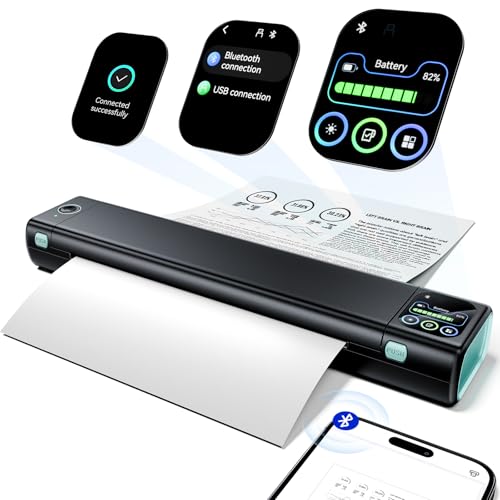
Phomemo M08D Portable Letter-Size Thermal Printer
KNAON Wi-Fi Thermal 4×6 Label Printer with AirPrint
More On The Choices That Made The List
The Brother HLL2405W anchors this list as the most traditional document printer in the group, which makes it a natural starting point for anyone whose printing life still revolves around invoices, contracts, and multi-page reports. As a monochrome laser (a printer that uses a dry toner powder fused to paper with heat, rather than liquid ink), it skips the slow warm-up common to inkjet models and gets to a usable page in seconds.
Paired with the TN830XL high yield toner cartridge, you’re set up for sustained printing without constantly swapping consumables. For a freelance writer or accountant running a Mac-based home office, that steady, no-drama output matters more than flashy features.
Useful Highlights
- Single-sided print speeds reaching up to 30 pages per minute, which keeps a stack of pages moving.
- Toner rated for roughly 3,000 pages of output, reducing the frequency of cartridge swaps.
- Monochrome laser output delivers crisp text that holds up well for professional documents.
- Compact body fits on a small desk shelf or printer stand.
- Refurbished configuration paired with a toner bundle offers a lower entry cost.
Worth Noting
- Single-sided printing only, so double-sided jobs require manual page flipping.
- Monochrome output means no photo or color graphics capability for creative work.
- Refurbished units can vary in cosmetic condition between individual shipments.
Key Specs
Who It Suits Best
Freelancers, remote workers, and small business owners who print text-heavy documents daily and want a Mac-friendly laser printer that stays out of the way.
Where Another Pick Suits Better
Color photo printing or shipping label output points you toward the Canon Selphy CP1300 Wireless Compact Photo Printer or the KNAON Wi-Fi Thermal 4×6 Label Printer with AirPrint instead.
Where the Brother HLL2405W stays bolted to your desk, the Phomemo G100 Pro is built to ride in your bag. This thermal printer (one that uses heated print heads to activate special paper, meaning no ink or toner is ever required) uses AirPrint natively, so your iPhone or Mac finds it on the network without a separate app dance on iOS and macOS.
The included carrying case hints at its intended crowd: road-warrior consultants, traveling nurses, or anyone who needs to hand a client a signed contract on the spot. For one-off forms and reference documents, the G100 Pro replaces a stack of pre-printed pages with on-demand output.
Why It Works Well
- Native AirPrint support means iPhone and Mac users skip driver installs for everyday printing.
- Thermal printing eliminates ink and toner costs over the life of the device.
- Carrying case included for grab-and-go mobility.
- Compact footprint slips into a laptop bag side pocket.
- Wireless printing keeps the workspace cable-free.
Trade Offs
- Thermal-only output, so no traditional color photos or graphics-rich documents.
- Windows users need a dedicated driver installation before first use.
- Specialty thermal paper required, which adds an ongoing consumable cost.
Right Fit For
Mobile professionals and frequent travelers who need to print receipts, forms, or reference documents from a MacBook or iPhone without tethering to a full-sized printer.
Skip It When
Photo printing or full document reproduction is the goal, in which case the Canon Selphy CP1300 Wireless Compact Photo Printer or the Brother HLL2405W Printer and TN830XL High Yield Toner are better fits.
The Canon Selphy CP1300 steps away from text documents and into the photo lab category. Using dye-sublimation technology (a process that heats dye onto special paper in layered passes for smooth, continuous-tone prints), it produces photos with a depth and finish that standard inkjet printers struggle to match in this size class.
For Mac users, AirPrint and Mopria compatibility (Mopria is a cross-platform wireless printing standard common on Android devices) make it equally friendly to iPhone and Android households. The optional battery pack further extends its reach to outdoor events, weddings, or anywhere a wall outlet is out of sight.
The Upside
- AirPrint support streamlines Mac and iOS printing without extra software.
- Dye-sublimation output produces lab-quality photos resistant to smudging.
- Optional battery pack enables printing at outdoor events and parties.
- Print directly from USB drives or camera memory cards without a computer.
- Sleek portable design makes storage and transport manageable.
Honest Caveats
- Print speeds are slower than inkjet document printers, so high-volume jobs take time.
- Special Canon paper and ink cartridge sets are required, which adds ownership costs.
- Limited to photo sizes rather than standard letter documents.
Feature Snapshot
Best Suited To
Event photographers, scrapbookers, and memory keepers who want a Mac-friendly photo printer that delivers keepsake prints on demand.
Look Elsewhere When
Daily document printing or shipping label volume is the priority, in which case the Brother HLL2405W Printer and TN830XL High Yield Toner or the KNAON Wi-Fi Thermal 4×6 Label Printer with AirPrint serve better.
Another variant of the same CP1300 hardware, this listing leans into the editing and customization side of photo printing. While it shares the dye-sublimation engine of the previous pick, the focus here is on creative touches like borders, effects, and built-in portrait optimization.
Parents printing school project photos or hobbyists producing scrapbook layouts benefit most from those editing features. The multiple print sizes, ranging from 2.1 x 2.1″ labels through 4 x 6″ postcards, give Mac-using families flexibility for crafts, gifts, and albums.
The Practical Payoff
- Built-in editing tools for red-eye correction, skin smoothing, and portrait optimization.
- Multiple print sizes accommodate labels, cards, and standard photo prints.
- Borders and effects allow custom layouts without external software.
- Wireless connectivity keeps cables off the kitchen counter.
Small Caveats
- Specialty Canon paper and ink sets add ongoing ownership costs.
- Print speed is slower than document-focused inkjet models.
- Compact printer body still requires dedicated shelf space for paper storage.
Whose Shelf It Belongs On
Parents, hobbyists, and family photo archivists who want a Mac-compatible printer with built-in editing features and varied print sizes.
Consider Something Else When
High-volume shipping labels are the priority, in which case the KNAON Bluetooth 4×6 Shipping Label Printer is a more practical choice.
The KNAON Bluetooth Shipping Label Printer is purpose-built for online sellers who ship from a home office. The 4×6 thermal format matches the standard label size used by USPS, UPS, and most e-commerce platforms, so there’s no trimming or resizing required.
Bluetooth connectivity means you can print labels from an iPhone in the same room as the printer, without dragging a MacBook over. For Etsy and Shopify sellers handling a dozen orders a day, that speed and simplicity translate directly into faster fulfillment.
Positive Points
- Standard 4×6 output matches common shipping label sizes without modification.
- Bluetooth support enables wireless printing from mobile devices.
- Compatible with Etsy, Shopify, and major carrier platforms.
- Thermal printing removes the ongoing cost of ink or toner cartridges.
Points To Note
- Mac users need to download the FlashLabel Pro app for desktop printing.
- Limited to label printing, not a general-purpose document printer.
- Thermal labels have a specific look that not every seller prefers for branding.
The Right Fit
Small business owners and home-based e-commerce sellers who print shipping labels regularly and want a Mac-compatible dedicated label printer.
Not Your Match When
You need AirPrint-native label printing without a dedicated app, in which case the KNAON Wi-Fi Thermal 4×6 Label Printer with AirPrint is the stronger option.
This KNAON model shares the 4×6 thermal format with the previous entry but emphasizes a slightly different workflow. The black housing keeps it visually discreet on a packing bench, and the ink-free thermal engine means there are no cartridges to swap mid-shift.
For warehouse operators and home-based fulfillment stations, the appeal is straightforward: fewer consumables, fewer interruptions. The unit supports Mac with M-series processors through a dedicated app connection, making it a current-friendly option for newer MacBooks.
Notable Upsides
- Ink-free thermal printing cuts recurring consumable costs.
- Compatible with current Mac M-series processors via dedicated app.
- Compact size fits on a packing bench or shelf.
- Black housing blends into a workshop or warehouse environment.
A Few Limitations
- Mobile printing requires the FlashLabel Pro app download.
- Limited to label output rather than general document printing.
- Bluetooth pairing adds a step compared to Wi-Fi-only options.
Made For
Warehouse staff, fulfillment teams, and packing station operators who want a low-maintenance label printer that pairs with newer MacBooks.
Swap It Out When
You prefer AirPrint convenience over app-based setup, in which case the KNAON Wi-Fi Thermal 4×6 Label Printer with AirPrint is the natural alternative.
The Phomemo M832D leans into a touchscreen interface that lowers the barrier for first-time printer owners. Rather than chasing drivers through menu trees, you tap through battery status, connection mode, and paper placement on a built-in digital display.
For students and casual users, that kind of feedback prevents the head-scratching that comes with most portable printers. You can see at a glance whether the paper loaded correctly, which cuts down on the wasted sheets that often accompany thermal printers.
What Stands Out
- Built-in touchscreen simplifies setup and status monitoring.
- Paper placement detection reduces wasted prints from misalignment.
- Compact body fits a dorm desk or small apartment workspace.
- Inkless thermal operation removes cartridge replacement.
Less-Strong Areas
- Thermal output limits color and graphic fidelity compared to inkjet.
- Specialty paper is required, which adds an ongoing consumable expense.
- Screen adds a small power draw that affects battery run time.
Perfect Match For
Students, casual hobbyists, and first-time printer owners who value a guided touchscreen setup over deep configuration menus.
A Better Fit Elsewhere
Full US Letter document printing is the goal, in which case the Phomemo M08D Portable Letter-Size Thermal Printer is a stronger match for mobile document needs.
The Canon Selphy CP1500 bundle pairs the printer with a KP-108IN ink and paper set, so the box arrives ready to produce 108 4×6 prints right out of the gate. For someone new to dye-sublimation printing, that means skipping the scramble for matching consumables.
The included six-slot memory card holder rounds out the package for photographers who shoot on dedicated memory cards. At roughly 7 x 5 x 2 inches, the printer body is the kind of footprint that slips into a camera bag or bookshelf without protest.
A Few Highlights
- Included ink and paper set covers the first 108 prints out of the box.
- Multiple paper sizes including small adhesive stickers for creative projects.
- Compact body measures roughly 7 x 5 x 2 inches for easy storage.
- Wireless printing from Mac, iPhone, and compatible devices.
- Memory card holder included for direct camera-to-printer workflows.
Trade-Offs To Consider
- Print speed per image is slower than inkjet photo printers.
- Bundled consumables will eventually need replenishment with Canon-branded supplies.
- Bundles can sometimes include older ink formulations, depending on stock.
Who Should Grab It
First-time photo printer owners who want a complete starter kit with ink, paper, and storage accessories in a single purchase.
Reach For A Different Pick When
You already own Selphy-series supplies and only need the printer body, in which case the Canon Selphy CP1300 Wireless Compact Photo Printer is a simpler option.
Most portable thermal printers stick to narrow receipt or label widths, but the Phomemo M08D steps up to full 8.5″ x 11″ US Letter paper. That’s a meaningful shift for mobile contractors, field inspectors, or anyone printing contracts and forms away from a traditional office.
The upgraded digital display builds on the M08F design, acting as a status hub for battery life, connection mode, and print progress. For Mac users running newer hardware, the touchscreen helps cut through the typical portable-printer confusion that comes with thermal paper alignment.
Useful Strengths
- Supports full US Letter paper for traditional document sizes.
- Touchscreen display centralizes status and settings controls.
- Thermal operation removes ink and toner replacement.
- Portable form factor suits mobile contractors and field workers.
Potential Sticking Points
- Thermal output limits the printer to monochrome or limited-color work.
- Specialty thermal paper is required, which is pricier than standard copy paper.
- Touchscreen adds a small learning curve for users new to thermal printers.
Spec Overview
Built With In Mind
Mobile contractors, field inspectors, and traveling professionals who need to print standard-size documents on the road from a Mac.
Another Choice May Suit
Photo printing or shipping label output is your primary need, in which case the Canon Selphy CP1300 Wireless Compact Photo Printer or the KNAON Wi-Fi Thermal 4×6 Label Printer with AirPrint fit better.
The KNAON Wi-Fi Thermal 4×6 Label Printer closes out the list with the most Mac-friendly workflow of the label-focused picks. Native AirPrint support means your Mac or iPhone finds the printer on the network without a dedicated app or driver install, which streamlines the daily shipping routine.
The included label holder is a small but practical touch for sellers who batch-print dozens of labels at a time. For Shopify operators and small e-commerce brands, that combination of AirPrint simplicity and thermal reliability removes one more friction point from order fulfillment.
Everyday Wins
- Native AirPrint support simplifies Mac and iOS printing without extra software.
- 4×6 format suits standard shipping label requirements.
- Wi-Fi connectivity removes cable clutter on the packing bench.
- Thermal operation eliminates ink and toner replacement costs.
- Included label holder supports batch printing workflows.
Where It May Fall Short
- Limited to label printing, not a general-purpose document printer.
- Wi-Fi setup still requires initial network configuration.
- Thermal-only output means no color labels for branded packaging.
Who Will Love This
Online store owners and small e-commerce brands who print shipping labels daily from a Mac or iPhone and prefer AirPrint simplicity over app-based setup.
Where A Sibling Pick Shines
You need broader document printing in addition to labels, in which case the Brother HLL2405W Printer and TN830XL High Yield Toner handles the document side.
What To Weigh Before Picking Your Compact Printer
Mac Compatibility First
macOS has historically played well with most major printer brands, but not every wireless standard lines up neatly. AirPrint remains the smoothest path for iPhone, iPad, and Mac users, with no driver installs and minimal setup friction. Printers that support AirPrint let you tap “Print” from nearly any Mac app and get a job without detouring through system preferences. For Mac households where multiple devices share a printer, that uniformity saves real time.
Footprint And Placement
A compact printer earns the “compact” label by fitting where full-size printers cannot. Measure your intended shelf, drawer, or desk corner before choosing, and account for paper feed clearance. Thermal portable printers often weigh under two pounds, while compact photo printers run closer to five. The trade-off usually shows up in paper capacity and consumable bulk rather than overall dimensions.
Print Volume And Use Case
Daily document printing points toward a laser or high-yield inkjet with serious monthly duty cycles. Occasional photo prints suggest a dye-sublimation photo unit. Shipping label volume calls for a dedicated thermal label printer. Trying to make one device do all three jobs usually means accepting compromise in every direction, so the more honest path is matching the printer to the dominant task.
Consumable Costs Over Time
The upfront price of a thermal printer looks low, but specialty paper can add up. Similarly, photo printers need branded ink and paper sets. Laser printers offer lower per-page costs but require toner swaps. Looking past the listing and into consumable availability matters more for long-term ownership than the initial purchase.
Key Considerations Across These Picks
Pitfalls Shoppers Hit
A common mistake is choosing a thermal portable printer for traditional document work, only to discover the print quality and paper limitations don’t match the use case. Another trap is assuming every “wireless” printer supports AirPrint; many rely on proprietary apps instead. For Mac users specifically, confirming AirPrint or driver-level macOS support before checkout saves hours of troubleshooting later. Storage is another overlooked factor, since compact printers still need room for paper trays and consumable stockpiles.
What The Higher Tier Buys
Stepping up to a premium-tier compact printer usually means faster print speeds, larger paper capacity, and broader wireless support. Higher-priced photo printers, like the Canon Selphy CP1500 bundle, include starter consumables that add practical value beyond the printer itself. For daily users, the upgrade often pays off through reduced maintenance and longer consumable cycles rather than headline features.
Frequently Asked Questions
Do compact printers work well with macOS?
Most modern compact printers support macOS through AirPrint, Mopria, or vendor drivers. AirPrint offers the smoothest experience for Mac, iPhone, and iPad users since no extra software is needed.
Are thermal printers a good choice for Mac users?
Thermal printers work well for receipts, labels, and reference documents, and many connect to Mac over Wi-Fi or Bluetooth. They’re not a substitute for high-quality color photo or graphics printing.
What is the best compact printer for shipping labels?
Dedicated 4×6 thermal label printers from KNAON and Phomemo are widely used by small business owners for Etsy, Shopify, and USPS label output. AirPrint-native models simplify the Mac workflow further.
Can a compact photo printer match lab quality?
Dye-sublimation photo printers like the Canon Selphy series produce lab-like prints with continuous tone and smudge resistance. For casual photo albums and event prints, the quality is generally considered excellent.
How important is duplex printing in a compact printer?
Duplex printing (automatic two-sided printing) is rare in the compact category, especially among portable thermal models. For double-sided documents, plan on manual page flipping or consider a larger multifunction printer.
Closing Thoughts
The right compact printer for your Mac depends on what you actually print day to day. Photo lovers should gravitate toward a Canon Selphy, label-heavy sellers toward a KNAON thermal unit, and document-heavy home offices toward a Brother laser. Match the printer to the dominant task, and the rest tends to fall into place.