A construction calculator is one of those small tools that quietly earns its keep the first time it saves you from miscalculating a stair stringer or a footing volume. If you frame, estimate, or remodel even occasionally, the right handheld device turns feet-inch-fraction math, rafter cuts, and material counts into fast, repeatable work. The ten options below cover a realistic spread: full-featured contractor workhorses, simpler DIY-friendly models, one with a built-in writing surface, and a few specialty picks for estimating and quick site math.
How The Shortlist Stacks Up

ROATEE Construction Calculator with Writing Tablet

Calculated Industries Construction Master Pro Bundle

Calculated Industries 4080 Construction Master Pro Trig

Calculated Industries 4080 Trig and 4065 Pro Bundle
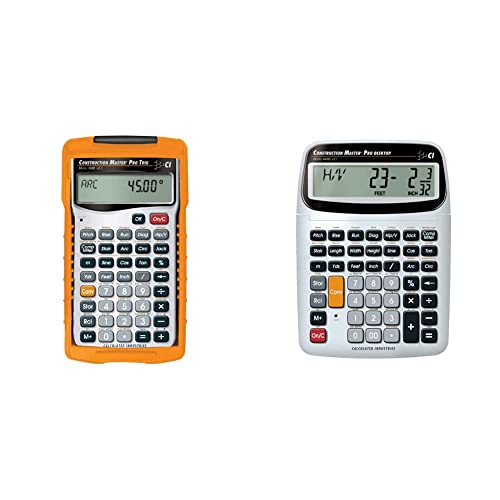
Calculated Industries 4080 Trig and Pro-Desktop Bundle

Calculated Industries 4020 Measure Master Pro

ROATEE Construction Engineer Calculator

Calculated Industries 4065 Construction Master Pro

ROATEE 12-in-1 Multi Tool Pen

Calculated Industries 4019 Material Estimator
What Each Pick Brings To The Table
This ROATEE model stands out the moment you pick it up: a flip-page writing surface sits on top of the keypad, which is a small detail that changes how you use a calculator on a dusty site. You can scribble a quick dimension, flip back to it, and enter numbers without reaching for a notepad.
Under the pad, the calculator covers the usual construction territory, mixed-dimension entries, area and volume, brick and block counts, concrete, studs, roofing, rafter math, and stair layouts. For site supervisors and framers who already lose pens and scraps of paper, the tablet cuts one moving part out of the routine.
Bright Spots
- Built-in writing tablet removes the need for separate notepads on the deck
- Wide function set covering rafters, studs, drywall, concrete, and stairs
- Thick, rugged shell designed to take drops and rough handling
- Reusable tablet surface keeps paper waste out of the truck
- Familiar key layout that mirrors common contractor calculators
Things To Consider
- Tablet adds thickness, so pocket carry is bulkier than a slim calculator
- Writing surface can scuff over time and may need replacement sooner than the calculator itself
Who It Suits Best
Field supervisors and working framers who scribble dimensions all day and want them tied to the calculator instead of a clipboard.
Look Elsewhere When
You mostly work at a desk and want desktop ergonomics; the Calculated Industries Construction Master Pro Bundle is the more comfortable pairing for that.
This bundle pairs the Construction Master Pro-Desktop with a guided tutorial guide, so you get the calculator and a structured way to learn its deeper menus. For apprentices, students, or anyone self-teaching construction math, that pairing matters more than another set of hardware buttons.
The guide walks through site prep, framing, finish work, and advanced functions, with practice problems that show how to get the most out of the device. The calculator itself carries the brand’s long-running footprint in feet-inch-fraction math, dimensional conversions, right-angle solutions, stairs, arcs, and material-waste prevention.
Notable Upsides
- Desktop calculator with strong dimensional and trig function set
- Tutorial guide organized by phase of construction work
- Practice problems let you build real fluency, not just familiarity
- Strong fit for school programs and apprenticeship training
Worth Noting
- Bundled guide takes time to work through, so the value shows up only if you actually use it
- Desktop form factor means it’s a desk tool, not a pocket tool for active job walks
Made For
Students, apprentices, and self-taught remodelers who want both a calculator and a structured way to learn construction math.
Consider Something Else When
You already know the calculator’s menus and want a tougher handheld for the field; the Calculated Industries 4080 Construction Master Pro Trig is a leaner daily-carry option.
The 4080 has been a fixture on jobsites for years, and for good reason: it handles the math that older scientific calculators stumble on. Feet-inch-fraction entry, decimal feet, yards, and metric conversion all share the same keypad, and full trig covers sine, cosine, tangent, and their inverses when you need to lay out angles.
Compared to the ROATEE pick above, this one skips the writing tablet and leans into pure math. Owners commonly report that the rugged body and clear labeling hold up after years of belt-clip use, which is the kind of reputation a calculator earns by surviving real sites.
Good Reasons To Consider
- Full trig functions for rafter, slope, and angle layout
- Converts between feet-inch-fractions, decimal feet, yards, and metric without re-entry
- Weight-per-volume and degree-minute-second conversions built in
- Long-standing rugged design that survives daily jobsite carry
Trade Offs
- No dedicated writing surface, so notes stay separate from the device
- Display and key labeling are functional rather than modern, which can feel dated in the hand
Right Fit For
Framers, engineers, and estimators who want a single trusted handheld for both dimensional math and trig layout work.
A Better Fit Elsewhere
You do most of your estimating at a desk; the desktop-shaped Calculated Industries Construction Master Pro Bundle is easier on the eyes and wrists for long sessions.
This bundle ships two handhelds: the trig-capable 4080 and the classic 4065. That makes sense when you split work between the field and a bench, or when a two-person crew wants to share the load without handing one calculator back and forth.
The 4080 covers trig and conversions, while the 4065 handles the dimensional work, right angles, rafters, drywall, studs, blocks, concrete footings, and crown molding miters. Having both means the trig buttons stay dedicated to layout while the 4065 handles layout and material counts without menu-diving.
The Case For It
- Two role-specific calculators for layout and dimensional work
- Trig model covers rafter and angle layouts with sine, cosine, and tangent
- Material-waste functions span roofing, drywall, studs, blocks, concrete, and lumber
- Compound miter functions help when working on crown molding or millwork
Honest Caveats
- Carrying and storing two devices takes more belt space than a single unit
- Buying both costs more upfront than picking one specialized model
- Some functions overlap, so casual users may not need the full pair
Who Will Love This
Two-person crews, contractors with both a shop and a truck, and serious remodelers who want a backup on hand.
Reach For A Different Pick When
You’re a one-person operation and just want one strong daily calculator; the Calculated Industries 4080 Construction Master Pro Trig handles most needs alone.
If you estimate at a desk and walk jobs with a handheld, this pairing covers both halves of the day. The desktop unit handles long estimating sessions without cramping your fingers, while the 4080 stays clipped to your belt for rafter checks and quick conversions.
The desktop calculator keeps the same dimensional and trig math as the handheld, so muscle memory carries over. You’ll find roofing, drywall, studs, blocks, concrete footings, and compound miter functions on the desktop, and the same feet-inch-fraction logic on the handheld. That continuity matters when you’re switching environments.
Everyday Perks
- Desktop calculator for long estimating sessions
- Handheld 4080 for active site work
- Shared function logic means less relearning between devices
- Strong fit for contractors who split time between office and site
Room For Improvement
- Takes up both desk and belt space, so plan for a home for each unit
- Two devices means two sets of batteries to watch
Whose Shelf It Belongs On
Contractors and remodelers who estimate at a desk in the morning and walk jobs in the afternoon.
Not Your Match When
You mostly work on the go and don’t need a desktop unit; the twin-pack 4080 and 4065 bundle keeps everything portable instead.
The 4020 Measure Master Pro focuses on the everyday math of measuring and converting, with a strong push toward metric and imperial interchange. If you source materials from suppliers using different units, the conversion button saves more time than any other feature.
You enter dimensions the way you say them, then push one button to flip to your preferred units. Waste allowances factor into linear, area, and volume calculations, which makes quick material checks at the lumber yard faster than reworking the math on a phone.
Strengths Worth Knowing
- One-button conversion between U.S. and metric units
- Handles linear, area, and volume math in both unit systems
- Waste allowances fold into material counts for realistic ordering
- Useful when working with imported plans or international suppliers
Things To Consider
- Lacks the trig and rafter-layout depth of the 4080 or 4065
- Better for estimating than for in-the-field angle layout
Best Suited To
Estimators, remodelers, and DIYers who toggle between metric and imperial and need clean conversions on the fly.
Skip It When
Your work is heavy on rafters and angles; the Calculated Industries 4080 Construction Master Pro Trig is the better tool for that workload.
ROATEE’s engineer-focused calculator leans into volume of features, covering area, volume, brick and block, concrete, board, flooring, wall studs, drywall sheet count, circle and arc properties, compound miters, polygon tiling, roofing, foundation correction, right angles, rafters, and stair layouts. That’s a long list, and the keypad reflects it.
Where the 4080 earns trust through focus, this one earns attention through breadth. For someone who bounces between framing, drywall, and finish work without picking up a separate tool, the wider function list means fewer trips back to a phone.
What It Does Well
- Broad library covering framing, drywall, flooring, and finish tasks
- Circle, arc, and polygon functions reduce geometry hand-calc time
- Roofing and foundation correction built into the same unit
- Stair layout functions support a common jobsite calculation
Points To Keep In Mind
- Many functions live behind menus, so learning curve is steeper than simpler models
- Button labeling can feel crowded with so many roles assigned per key
Right Fit For
Multi-trade handymen and remodelers who jump between framing, drywall, and finish work without carrying a second calculator.
Another Choice May Suit
You mostly need fast rafter layout and clean trig; the leaner Calculated Industries 4080 Construction Master Pro Trig is easier to learn.
The 4065 is the model many carpenters cut their teeth on, and an entire generation of framers still reach for it out of habit. It covers the dimensional math, right-angle solutions, rafters, drywall, studs, blocks, concrete footings, and board-feet lumber estimating that show up on most residential jobs.
Compared to the trig-capable 4080 above, this one trims the trig functions and focuses on layout and material math. For pure dimensional work without the angle layouts, the trimmed key map is faster to read at a glance.
Benefits That Matter
- Time-tested layout functions for rafters, square-ups, and rake-walls
- Material waste functions for roofing, drywall, studs, blocks, and concrete
- Compound miter functions help with crown molding and millwork
- Simplified key map speeds up dimensional math compared to trig-heavy models
Factors To Consider
- No full trig functions, so steep-pitch rafter math still needs a separate solution
- Long-running design means the look feels utilitarian rather than modern
Perfect Match For
Carpenters, remodelers, and framers who learned on this calculator and want the same trusted layout engine in their pocket.
Where Another Pick Suits Better
Your work leans into complex roof geometry; the Calculated Industries 4080 Construction Master Pro Trig handles that without a separate trig calculator.
This isn’t a construction calculator in the strict sense, but it earns a place on this list because it handles the small checks that happen between real calculations: writing, ruling, leveling, opening paint cans, and grabbing a quick measurement. The pen format slips into a shirt pocket or clipboard without adding weight.
For site supervisors who already carry a phone-based calculator app, this pen covers the physical tasks that pair with that workflow. The LED flashlight is a nice add for dark corners, and the stylus tip works on phones and tablets.
What Pays Off
- Twelve functions packed into a pen-shaped body
- Slim profile fits in a clipboard or shirt pocket
- Useful add to a phone-based estimating workflow
- LED light handles quick look-ins in dark spaces
Practical Considerations
- Not a substitute for a real construction calculator with feet-inch-fraction math
- Small screwdriver bits are handy but not a replacement for a full bit set
- Battery-dependent flashlight will dim if you forget spares
Built With In Mind
Site supervisors and estimators who already calculate on a phone and want a pocket tool for the supporting tasks.
Swap It Out When
You need real dimensional math on the calculator itself; the Calculated Industries 4065 Construction Master Pro is the dedicated tool for that job.
The 4019 narrows in on what most DIYers and small-job contractors care about first: how much material will this take, and what will it cost. You enter dimensions in feet, inches, fractions, yards, or meters, then convert to your preferred units for clean counts.
Stored values for tile size, grout gap, and other repeatable inputs speed up repeat estimates for similar rooms. For homeowners planning a remodel, the workflow turns a stack of dimensions into a workable material list without spreadsheet gymnastics.
A Favorable Mix
- Enter dimensions in feet-inch-fractions, yards, or meters
- Instant unit conversion to your preferred building format
- Stored values for common inputs like tile size and grout gap
- Estimating focus suits DIY remodel budgets and small jobs
Details To Watch
- Less emphasis on rafter and angle layout compared to the 4080 or 4065
- Cost-tracking workflow shines on smaller projects more than on full builds
Who Should Grab It
DIY remodelers and small-project estimators who want a clean material list and rough cost figure without leaving the calculator.
A Better Fit Elsewhere
Your work centers on framing and roof geometry; the Calculated Industries 4080 Construction Master Pro Trig handles that kind of layout more directly.
Picking The Right Construction Calculator For Your Work
A construction calculator earns its place by handling the math your phone struggles with: feet-inch-fractions, decimal feet, yards, metric, rafter angles, and material counts that account for waste. The right choice depends on where you spend most of your workday and which trade you call home.
Functions That Matter Most
Dimensional entry is the heart of any construction calculator. The best models let you type dimensions the way you say them out loud, like “seven feet three and a quarter inches,” then convert on the fly. Trig functions add real value when you work with rafters, slopes, or compound miters, because they replace the mental gymnastics of right-angle math with direct solutions. Material-waste functions matter if you order lumber, drywall, or concrete and need realistic counts that account for cuts and breakage.
Trade-Specific Considerations
Framers and carpenters usually want rafter, stair, and right-angle functions. Estimators benefit from stored values for repeat materials like tile and grout, plus clean unit conversion for plans from different sources. Remodelers bouncing between trades tend to prefer wider function libraries over deep specialty menus. For hybrid office-and-field work, having a desktop calculator for estimating plus a handheld for site checks keeps both halves of the day productive.
Key Considerations Across These Picks
Common Shopping Slip Ups
A frequent mistake is buying on feature count alone. A calculator with hundreds of functions sounds appealing, but if those functions sit behind menus you never open, the device just adds confusion. Match the function set to the trade, not to the spec sheet. Another slip is overlooking durability; a calculator that needs a case to survive a truck cab isn’t saving time over a more rugged model. Plan for how the device will be carried and stored before deciding.
Where The Extra Money Goes
Higher-tier models usually pay for dedicated buttons instead of menu-driven functions, longer battery life, and tougher shells that survive drops. The upgrade is worth it for full-time tradespeople who lean on the device daily, since every second saved at the keypad adds up across a year. For occasional DIY projects, a simpler model covers the same math without the steeper cost, and that trade-off is honest rather than limiting.
Frequently Asked Questions
What Is A Construction Calculator?
A construction calculator is a specialized handheld calculator designed for building math, including feet-inch-fractions, dimensional conversions, rafter angles, and material counts. The best construction calculators replace the mental work of unit conversion and right-angle geometry with direct solutions.
How Is It Different From A Scientific Calculator?
Scientific calculators handle advanced math like trig and logs but stumble on construction-specific formats like feet-inch-fractions and board feet. Construction calculators fold in dimensional entry, waste allowances, and trade-specific functions that scientific models lack.
Do I Need Trig Functions?
Trig functions matter if you work with rafters, slopes, or compound miters, because they replace manual right-angle math with direct solutions. For pure dimensional work and material counts, you can skip trig and save money on a simpler model.
What Is A Feet-Inch-Fraction Entry?
Feet-inch-fraction entry lets you type dimensions the way you say them, like “seven feet three and one quarter inches,” rather than converting to decimals first. That single feature saves real time on jobs where plans are written in mixed units.
Can One Calculator Cover Multiple Trades?
Yes, wider-function models cover framing, drywall, flooring, and finish work in one device. The trade-off is more menu navigation, since each function shares a button with several others. Specialists may prefer leaner key maps with more dedicated buttons per function.
The Takeaway
The right construction calculator depends less on feature lists and more on the trade you practice and where you carry the device. Field-heavy work favors rugged handhelds like the 4080 or 4065, while estimating-heavy work benefits from a desktop unit or a metric-friendly model. A writing tablet helps if you scribble dimensions all day, and a material-estimating focus suits DIYers planning budgets. Match the device to your real workday and the math that actually shows up on your plans.