Working from the couch doesn’t have to mean slouching. Whether you’re gaming from the sectional, catching up on spreadsheets in the living room, or running a remote session with your laptop balanced on a cushion, the right monitor stand turns the sofa into a real workstation. The picks below cover everything from simple laptop risers to full swivel TV mounts, so you can lift the screen, save your neck, and reclaim your floor space.
A Fast Comparison Of The Options

VIVO Black Adjustable Curved Monitor Riser Stand-V001N

Simple Houseware Metal Desk Monitor Stand Riser

HUANUO Single Monitor Arm 39 inch Tall Pole

Hemudu Universal TV Stand Monitor with Swivel Mount

BONTEC Dual Monitor Stand Riser, Adjustable, White
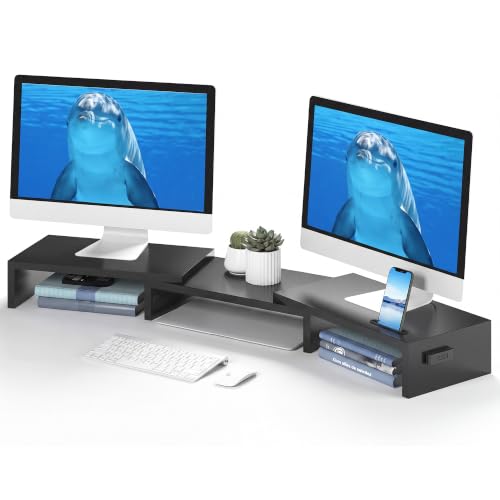
BONTEC Dual Monitor Stand Riser, Adjustable, Black

BONTEC Wooden 2-Tier Monitor Stand Riser

Simple Houseware Dual Monitor Stand Riser, Rustic Brown

Simple Houseware Monitor Stand Riser with Adjustable Tray

NB SmooVex Monitor Mount Model-A5, 32 inch
The Strengths Of Each Pick
Pulling double duty as a laptop rest and a monitor platform is where this VIVO riser earns its keep. The curved top holds screens up to 16 inches, which covers most everyday laptops and a wide range of standalone monitors without forcing you to swap accessories between work and play.
The tilting mechanism is the quiet star of the design. Lifting a screen to eye level from a low coffee table takes pressure off your neck, and tilting the platform turns a laptop into a more natural typing surface when you’re working from the couch. The metal base keeps weight down while still feeling planted.
What Works In Its Favor
- Dual-purpose platform swaps between laptop and monitor without separate hardware.
- Adjustable tilt lifts the screen to eye level for better couch posture.
- Curved top cradles 16 inch displays comfortably.
- Solid metal frame keeps the unit stable on carpet or hard floors.
- Light enough to move between rooms when your workspace shifts.
Things To Consider
- Ventilation on the top plate can trap dust over time and benefits from occasional wiping.
- Heavier ultrawide monitors may push past the supported footprint, so check dimensions before committing.
Who It Suits Best
Anyone bouncing between a laptop and a mid-size monitor on a coffee table or low desk will get the most out of its dual setup.
A Better Fit Elsewhere
For larger dual-screen layouts, the BONTEC Dual Monitor Stand Riser (White) gives you more width and articulation.
Hidden storage tends to be the difference between a tidy coffee table and a mess of remotes and notebooks. This Simple Houseware riser builds that storage right in, with a sliding letter-size drawer tucked under the platform where pens, sticky notes, and chargers can disappear from view.
The all-metal frame is the practical anchor. It shrugs off the weight of a printer or a heavier monitor without bowing, and the black finish blends into most living-room setups without screaming “office gear.” Compared to the VIVO riser above, this one trades adjustability for a sturdier fixed platform.
A Few Highlights
- Built-in sliding drawer hides the small clutter that piles up around a screen.
- All-metal frame supports heavier monitors and even compact printers.
- Lifts displays to a comfortable viewing height to ease neck strain.
- Neutral black coating fits in with most living-room or office furniture.
Honest Caveats
- Fixed height means you can’t tilt or angle the platform like the VIVO option.
- The drawer is best for flat items, so chunky accessories may not fit cleanly.
Made For
Home-office workers who want a single riser that doubles as a quiet storage unit.
Consider Something Else When
People needing tilt adjustment should look at the VIVO Black Adjustable Curved Monitor Riser instead.
Tall pole arms earn their place the moment your display needs to clear a deep desk or sit above eye level for a sit-stand routine. HUANUO’s 39 inch center pole is built for exactly that scenario, letting you swing the screen up high or drop it low without losing stability.
The compatibility list is generous, covering 13 to 32 inch screens and even ultrawide panels up to 38 inches, all on a clamp or grommet mount. If your work leans toward a standing desk or a tall chair setup that puts the screen well above standard riser height, this is the kind of arm that solves the geometry problem the basic stands above can’t.
A Strong Showing
- 39 inch pole reaches heights most risers can’t match.
- Supports standard 13 to 32 inch screens plus 38 inch ultrawides.
- Clamp or grommet mounting covers most desk styles.
- Articulating arm frees up desk surface area for couch-side work.
- Sturdy enough for sit-stand transitions through the day.
Points To Note
- Desk thickness limits the clamp fit, so measure before ordering.
- Installation takes more time than a simple riser shelf.
- Single-arm only, so dual-screen setups need a second mount.
Best Suited To
Tall sit-stand desks and rooms where the screen needs to clear a deep surface or rise well above eye level.
Look Elsewhere When
Couch-only laptop users will find the NB SmooVex Monitor Mount Model-A5 easier to fit in tighter spaces.
Freestanding floor mounts make sense when wall drilling isn’t an option. This Hemudu unit turns any 19 to 43 inch screen into a swivel centerpiece, useful for a bedroom corner where you’d rather angle the display toward the bed than stare at it head-on.
The combination of height adjustment and a wide swivel range means the same screen can face the couch for movie night and rotate toward a workout mat in the morning. That’s a versatility the desk-bound risers like the Simple Houseware Metal Stand can’t match.
Bright Spots
- Wide swivel range pivots the screen across the room.
- Height adjustment covers both seated and standing viewing angles.
- Tilt function reduces glare from windows.
- Fits 19 to 43 inch TVs and monitors across common VESA patterns.
- No wall mounting required, so rentals stay drill-free.
Less Ideal Details
- The base takes up floor space, so smaller rooms may feel crowded.
- VESA compatibility must be checked against the screen’s mount pattern.
Right Fit For
Renters and anyone who wants a swiveling screen without committing to wall hardware.
Skip It When
Your workspace is desk-based, in which case the HUANUO Single Monitor Arm offers more precise articulation.
Dual-monitor risers live or die by their adjustability, and this BONTEC model stretches from about 31.5 to 42.5 inches wide. That range covers everything from a compact side-by-side laptop pair to a wider arrangement of full-size monitors without forcing you into a fixed-size platform.
The swivel shelves are the practical twist. Each side panel rotates, so you can angle screens inward for focused work, fan them out for a wider gaming view, or pivot them into a corner-friendly L-shape. It turns a flat wall setup into something that adapts to the room.
Useful Highlights
- Adjustable length fits narrow and wide dual-screen layouts.
- Swivel shelves support angled, straight, or corner arrangements.
- White finish brightens lighter desks and small rooms.
- Raises both screens to a comfortable viewing height at once.
Some Limits To Know
- White finish shows dust and smudges faster than darker options.
- Two-piece assembly takes more setup time than a single-shelf riser.
Who Should Grab It
Anyone running a dual-monitor setup who wants the screens to angle in toward the viewer.
Reach For A Different Pick When
Single-display users will be better served by the BONTEC Wooden 2-Tier Monitor Stand Riser with its open shelf.
The black version of the BONTEC dual riser brings the same adjustable spine and swivel shelves, just wrapped in a finish that disappears into gaming rooms or darker desks. If your setup leans matte black with RGB trim, this is the cleaner visual match over the white edition.
Functionally identical to its white sibling, it covers the same 31.5 to 42.5 inch range and supports angled, straight, or corner layouts. The shared engineering means owners get the same ergonomic lift without changing how the stand behaves day to day.
Good Reasons To Consider
- Matte black finish blends into gaming or dark-themed setups.
- Same wide adjustability range as the white version.
- Swivel shelves let you angle displays toward the viewer.
- Supports laptop-plus-monitor or dual-monitor combinations.
- Sturdy platform handles standard-sized displays comfortably.
Practical Considerations
- Black finish can still collect dust along edges and benefits from occasional wiping.
- Heavy displays on the outer shelves may need occasional re-leveling.
Whose Shelf It Belongs On
Gaming rooms and dark desks where visual continuity matters more than bright contrast.
Swap It Out When
You prefer wood-grain warmth, in which case the BONTEC Wooden 2-Tier Monitor Stand Riser fits better.
Two-tier risers trade swivel shelves for layered storage, and this BONTEC model uses that layout to combine screen height with an open lower shelf. The result feels less like office furniture and more like a small console table, which suits living rooms better than most metal risers.
The wood finish carries warmth into a setup, and the lower tier holds keyboards, notebooks, or a small printer without crowding the desk. Compared to the dual-arm BONTEC models above, this one prioritizes a single primary display and storage over screen-to-screen adjustability.
Where It Helps
- Two-tier layout lifts the screen while keeping accessories close.
- Wood finish softens the look of a tech-heavy corner.
- Open lower shelf stores keyboards or paperwork without drawers to clean.
- Comfortable viewing height for long working sessions.
A Few Limitations
- Single-shelf top doesn’t support dual-monitor setups without spacing concerns.
- Wood finish can show water rings, so coasters under drinks are wise.
Perfect Match For
Single-screen home offices where warmth and layered storage matter more than multi-display flexibility.
Where Another Pick Suits Better
Dual-monitor desks will be better served by the BONTEC Dual Monitor Stand Riser in either color.
Rustic brown finishes earn their keep in rooms with warm wood tones, and this Simple Houseware riser layers that warmth with practical storage. A built-in phone and tablet holder, a removable divider tray, and side caddies mean small accessories have a home instead of the desk surface.
The dual-monitor platform handles two side-by-side displays and lifts them to a more natural viewing height, easing the neck strain that comes from laptop-and-monitor stacks. Where the Simple Houseware Metal Stand focuses on a single screen and a drawer, this one stretches across two displays with extra organizational pieces.
What Pays Off
- Phone and tablet holder keeps secondary screens in view.
- Removable dividers create up to nine small compartments.
- Side caddies store office tools within arm’s reach.
- Dual-monitor support without a complex mounting system.
- Rustic brown finish pairs well with wood furniture.
Trade-Offs
- More compartments mean more pieces to keep dust-free.
- Finish may not match darker or cooler-toned desks.
Who Will Love This
People with rustic-styled desks who want their dual-screen setup and accessories all in one organized footprint.
Not Your Match When
Minimalist black setups will look more cohesive with the BONTEC Dual Monitor Stand Riser in Black.
A customizable drawer tray is the small detail that makes a riser feel built for real clutter, and this Simple Houseware unit includes one. The compartments can be rearranged to fit pens, sticky notes, or small cables, so the space underneath the screen becomes useful instead of empty.
Lifting a single monitor to eye level is its main job, and the platform handles that without overcomplicating the room. If your work setup runs one screen with a busy desk around it, this riser delivers the same ergonomic lift as the other Simple Houseware option but with a flexible tray.
The Practical Payoff
- Customizable drawer tray sorts small office supplies neatly.
- Lifts a single monitor to a more natural viewing height.
- Open space below the platform stores keyboards and notebooks.
- Compact footprint works in smaller living-room corners.
- Black finish blends into most tech-heavy setups.
Potential Sticking Points
- Tray compartments shift if the riser is moved often.
- Single-screen only, so dual-monitor setups need a wider option.
Built With In Mind
Anyone with one main display and a desk full of small items that need a tidy home.
Another Choice May Suit
Two-screen users will prefer the BONTEC Dual Monitor Stand Riser, Adjustable, Black.
Mechanical spring arms sidestep one common complaint about gas-strut mounts, and the NB SmooVex leans into that upgrade. By swapping a pressurized gas cylinder for a precision spring system, the arm aims for smoother travel and longer-term stability without the slow sag that some owners report.
The mount supports most flat and curved displays up to 32 inches on standard VESA 75x75mm and 100x100mm patterns, which covers the bulk of mainstream monitors. For anyone who has dealt with a drooping screen mid-day, the mechanical spring approach is a meaningful shift in how the arm behaves over time.
Noteworthy Benefits
- Mechanical spring reduces long-term sag compared to gas-strut arms.
- Smoother daily movement keeps the screen easy to reposition.
- Supports flat and curved monitors up to 32 inches.
- Standard VESA 75 and 100 patterns fit most displays.
- Slimmer profile keeps the desk area uncluttered.
Factors To Consider
- Mechanical spring tension may need a brief adjustment period after install.
- Single-arm design means dual displays call for a second mount.
The Right Fit
Single-screen users who want smooth, sag-resistant arm movement over the long haul.
A Better Fit Elsewhere
Taller sit-stand desks may get more reach from the HUANUO Single Monitor Arm with its 39 inch pole.
What Matters Most Before Choosing Couch Monitor Stands
Screen Size and VESA Compatibility
The first thing to match is the screen size range. A 16 inch laptop riser handles everyday work, while a 32 to 43 inch floor mount opens up TV-style viewing. For arm-style mounts, VESA (Video Electronics Standards Association) refers to the four-hole pattern on the back of your screen, and 75x75mm or 100x100mm covers most monitors on the market today.
Mounting Style and Desk Thickness
Clamp and grommet mounts both grip a desk, but the clamp needs the right thickness range to bite down safely. Freestanding floor stands skip the desk entirely, which is friendlier for renters who can’t drill. Simple risers only need a flat surface, so they slot into coffee-table setups with zero installation.
Adjustment Range and Ergonomics
Lift height, tilt, swivel, and length adjustments all shape how comfortable the screen feels through a long session. Taller poles like the HUANUO arm clear deep desks and sit-stand routines, while dual-screen risers like the BONTEC models let you angle each display inward for a focused view.
Key Considerations Across These Picks
Common Shopping Slip Ups
The easiest mistake is buying a riser based on footprint alone, without checking weight capacity or screen size limits. A platform that holds a 24 inch monitor may not feel stable with a heavier 32 inch display, and ultrawide screens need extra width. The other trap is overlooking VESA compatibility on arm mounts, since a mismatched pattern means the screen simply won’t bolt on.
Where The Extra Money Goes
Higher-tier options usually spend the budget on smoother articulation, longer pole reach, or integrated storage. Mechanical spring arms like the NB SmooVex trade up to avoid long-term sag, while wooden dual risers add warmth and compartments you won’t find on a basic metal shelf. The upgrade pays off when you actually use the extra range day to day.
Frequently Asked Questions
What height should a couch monitor stand be?
A comfortable eye-level height usually sits roughly at your seated eye line, which means the top of the screen should land near where your gaze naturally falls when you’re sitting upright on the couch.
Can I use a monitor stand riser with a laptop?
Yes, and several picks here double as laptop and monitor platforms. The VIVO riser tilts for typing comfort, while wood risers like the BONTEC 2-Tier shelf hold both a screen and a notebook on the lower tier.
Do monitor arms damage desks?
Clamp and grommet mounts grip the desk edge without drilling, but very thick or curved edges can limit how well the clamp seats. Checking your desk thickness against the mount’s range prevents wobble.
What is VESA compatibility?
VESA is the standard mounting hole pattern on the back of a screen, measured in millimeters like 75×75 or 100×100. Matching the mount to that pattern is what lets the screen bolt on safely.
Are floor TV stands stable enough for daily use?
Freestanding floor stands with a wide base tend to stay planted for routine viewing and light adjustments. Heavier screens benefit from a stand with a broad footprint to prevent tip risk.
Final Verdict
The right couch monitor stand depends on whether you’re working from a laptop, running a dual-screen setup, or treating the sofa like a casual media room. Risers handle everyday laptop-plus-monitor swaps, dual-arm platforms serve side-by-side displays, and freestanding floor mounts bring TV-style flexibility. Pick the format that matches your screen and your room, and the rest tends to fall into place.