Picture this: you’re in a meeting, on a train, or sketching an idea in a café, and your notebook is still sitting in a drawer three offices ago. That’s exactly the gap a good digital note pad fills. The right one captures handwriting that feels natural, syncs across devices, and disappears into your bag without weighing it down.
This lineup covers everything from stripped-down paper tablets to full-fat creative workhorses. Students, designers, and professionals on the move should all find a fit below. Each pick reflects a real ownership scenario: carry weight, app friction, stylus feel, and how the device fits into an actual day.
A Closer Look At The Lineup
Samsung Galaxy Tab S6 Lite 10.4″, 64GB WiFi Tablet with S Pen (Oxford Gray)
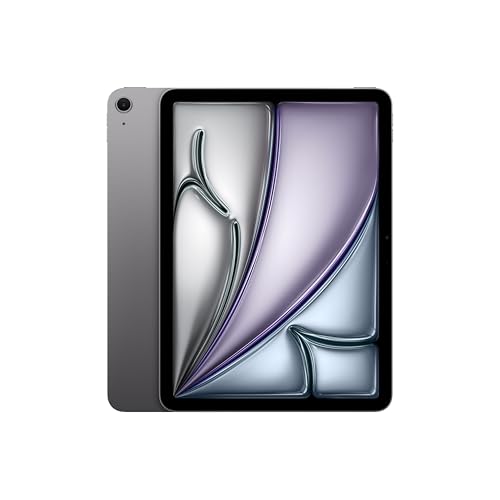
Apple iPad Air 11-inch (M4) 1TB Wi-Fi 7 (Space Gray)

Samsung Galaxy Tab S6 Lite 10.4″ 128GB WiFi Tablet with S Pen (Gray)

Apple iPad Pro 11-inch (M5) 1TB Nano-Texture Glass (Space Black)

UGEE 14.25″ 2.4K Standalone Drawing Pad with U-Pencil

reMarkable Paper Pro with Marker Plus

reMarkable Paper Pro with Marker Plus and Basalt Book Folio

reMarkable Paper Pro with Marker Plus and Black Leather Folio
Why These Options Stand Out
The Galaxy Tab S6 Lite punches above its weight in the everyday note pad category, pairing a slim 10.4-inch frame with a bundled S Pen that snaps to the tablet magnetically. You won’t be hunting for a stylus before class or a flight, and the lightweight metal build slips into most backpacks without crowding them out.
For students scribbling through lectures or commuters drafting to-do lists, the One UI 2 experience on Android keeps the workflow familiar. The 64GB of storage handles months of lecture notes, though anyone archiving video or large PDFs should consider the 128GB sibling covered later in this list.
Noteworthy Benefits
- Pen ships in the box, removing a common extra purchase for first-time tablet buyers.
- The slim profile weighs less than a paperback novel, so it disappears into shoulder bags.
- Samsung Notes and similar apps support handwriting-to-text, which speeds up searchable archives.
- Dual speakers handle podcast playback during study sessions without needing headphones.
- The 10.4-inch canvas gives enough room for split-screen note-taking plus a reference PDF.
Things To Consider
- 64GB fills up faster than most people expect once offline lectures and textbooks join the mix.
- The international model may ship without a U.S. adapter in some orders, worth confirming before checkout.
Built With In Mind
University students and knowledge workers who lean on handwriting but still want full Android app freedom will get the most from this pick.
A Better Fit Elsewhere
Writers craving a distraction-free writing slab should reach for the reMarkable Paper Pro with Marker Plus further down the list.
The iPad Air with the M4 chip turns a tablet into something closer to a full workstation, all while keeping the 11-inch frame travel-friendly. The Liquid Retina display handles long reading sessions without fatigue, and the Apple N1 chip brings Wi-Fi 7 to the table for fast syncs between note apps and cloud drives.
Where this Air earns its premium status is in the polish of the handwriting ecosystem. GoodNotes and Notability feel instant under the M4, and the 1TB of storage is overkill for notes alone, but a lifesaver for anyone juggling raw photo edits or sketch libraries next to their writing.
The Upside
- The M4 chip chews through multitasking, leaving plenty of headroom for future iPadOS updates.
- Apple’s handwriting recognition in Notes remains best-in-class for converting scrawl to searchable text.
- 1TB of storage lets you keep years of PDFs and notebooks locally without juggling cloud plans.
Worth Noting
- The Apple Pencil is sold separately, which adds real cost for a complete note-taking setup.
- All-day battery life holds for reading and notes, but dips faster under heavy sketch or video workloads.
Feature Snapshot
Right Fit For
Power users who want one device for note-taking, sketching, and video calls will feel right at home here.
Look Elsewhere When
Anyone wanting distraction-free writing should consider the reMarkable Paper Pro with Marker Plus instead.
Think of the 128GB Galaxy Tab S6 Lite as the practical sibling to the 64GB model reviewed above. The slim metal frame and bundled S Pen carry over, but the doubled storage opens up room for offline textbooks, recorded lectures, and a year of meeting notes without a microSD card.
For commuters and home-office workers juggling multiple notebooks, the extra breathing room tends to matter more than raw speed. Android’s flexibility means swapping between Samsung Notes, OneNote, or third-party PDF editors is straightforward, and the 10.4-inch screen stays sharp for long reading sessions.
Everyday Wins
- 128GB comfortably holds textbooks and lecture recordings alongside written notes.
- The S Pen attaches magnetically, so it stays put in transit between home and the office.
- Slim metal body feels sturdier in hand than the plastic frames common in this bracket.
- Dual speakers carry voice notes and video calls without forcing you to reach for earbuds.
Trade Offs
- Performance sits in the mid-range, so heavy creative apps run but aren’t snappy.
- The display refresh rate stays at 60Hz, a small step behind the smoother scrolling on premium models.
Who It Suits Best
Anyone keeping more than a year of mixed media notes on a single device will appreciate the storage bump.
Skip It When
Power users chasing flagship speed should look at the Apple iPad Pro 11-inch (M5) covered next.
The iPad Pro with the M5 chip and Ultra Retina XDR display pushes into laptop-class territory without giving up the tablet form factor. The Nano-Texture Glass option cuts glare in bright studios and sunlit cafés, which matters more than spec sheets suggest for anyone working outdoors.
Compared to the iPad Air reviewed earlier, the Pro adds a LiDAR scanner and Face ID, plus the kind of performance margin that matters for layered Procreate files or LumaFusion edits. For pure note-taking it’s overkill, but for creators who sketch and shoot alongside writing, the headroom is the point.
What Pays Off
- The M5 chip handles intensive creative apps alongside notes without breaking a sweat.
- Nano-Texture Glass reduces reflections during outdoor writing or sketching sessions.
- LiDAR scanner opens AR workflows that simpler tablets can’t touch.
- 1TB storage swallows years of high-resolution project files next to your notebook library.
Room For Improvement
- The Pro carries a meaningful price premium that hard to justify for note-only use cases.
- The Apple Pencil and Magic Keyboard still ship separately, pushing total cost higher.
Quick Facts
Made For
Creative professionals who want a single device for writing, drawing, video, and AR tasks.
Another Choice May Suit
Writers who never touch Procreate or video apps will find the iPad Air 11-inch (M4) covers their needs at lower cost.
The UGEE Drawing Pad breaks the assumption that a creative slate needs a tethered PC. The 14.25-inch 2.4K canvas runs Android natively, paired with 8GB of RAM and 256GB of storage, so illustrators can carry their studio in a backpack. The bundled U-Pencil skips the usual upcharge, and the paper-like NanoMatte display reduces glare under studio lights.
The 10,000mAh battery pushes toward multi-day sessions, which helps during plein air sketching trips or marathon client revisions. Where it differs from the reMarkable options later in this list is the focus: this one wants to be a sketchbook first, distraction-free notebook not so much.
Notable Gains
- Standalone operation means no laptop tethering, which opens up couch, café, and outdoor sketching.
- The NanoMatte surface mimics paper friction, easing the transition for traditional artists.
- The 27W fast charging cuts downtime between long sessions.
Points To Keep In Mind
- The 14.25-inch footprint is generous for art but less comfortable as a one-handed note pad.
- App ecosystem is more limited than iPadOS, so pro users may miss familiar creative apps.
Key Attributes
Best Suited To
Illustrators and comic artists who prioritize canvas size and pen feel over app breadth.
Reach For A Different Pick When
Writers looking for a quieter, more focused experience will prefer the reMarkable Paper Pro with Marker Plus.
The reMarkable Paper Pro takes a different bet than the tablets reviewed so far: it strips out apps, browsers, and notifications in favor of a focused writing experience. The 11.8-inch color Canvas display is a step up from earlier reMarkable generations, and the Marker Plus in the box means writing feels closer to a real pen on paper than most LCD alternatives can match.
For long-form writers, academics, and anyone prone to tab-flicking procrastination, that focus is the entire selling point. Notes sync to the reMarkable cloud and shuttle to your laptop or phone, so the tablet stays lean while your archives stay accessible.
A Few Highlights
- No social apps or browser means genuine focus during deep work sessions.
- Paper-like friction on the screen reduces finger fatigue over long writing stretches.
- Color display finally brings highlights and tags to a category stuck on grayscale for years.
- Adjustable reading light helps in dim lecture halls or late-night writing.
Honest Caveats
- The tablet requires a reMarkable subscription for full cloud sync and connect features.
- It handles note-taking and reading, not the creative apps you find on iPadOS or Android tablets.
Who Will Love This
Writers, researchers, and academics who want their tablet to disappear into the work rather than compete with it.
Swap It Out When
Anyone needing app flexibility for sketching or video calls should step back to the Apple iPad Air 11-inch (M4).
The bundle version of the reMarkable Paper Pro pairs the tablet and Marker Plus with a Basalt Book Folio, which adds drop protection and a cover that props the device up for reading. If you commute with your tablet sliding loose in a tote, the folio solves the most common wear-and-tear concern.
The folio also folds back cleanly when you’re writing, so it doesn’t get in the way of the stylus. For anyone whose digital note pad lives in a backpack alongside keys and chargers, this is the more travel-ready version of the same focused writing experience covered just above.
Real-World Strengths
- Folio protects the screen from scratches during commutes and air travel.
- The folding cover doubles as a stand for hands-free reading sessions.
- Same paper-like writing feel as the standalone tablet, no compromises there.
Small Caveats
- Adds bulk compared to the bare tablet, which matters if you already use a slim laptop sleeve.
- Folio color is limited to Basalt, so style-conscious shoppers may prefer the leather variant next.
Perfect Match For
Commuters and travelers who want a single bundled setup with protection out of the box.
Not Your Match When
Buyers already owning a third-party sleeve should save money by choosing the standalone reMarkable Paper Pro with Marker Plus.
The Black Leather Book Folio version dresses the same reMarkable Paper Pro in a more grown-up cover, aimed at professionals who care about the look on a boardroom table. The leather wraps the same protective function as the Basalt folio above, with a softer hand-feel and a finish that ages visibly with use.
For client-facing meetings, leather tends to read as intentional rather than utilitarian. The trade-off, of course, is that leather costs more and shows wear sooner than the textile alternative, so the honest read depends on whether you treat your tablet as a tool or a long-term carry piece.
Features That Help
- Leather cover elevates the tablet’s look for client meetings and presentations.
- Folio folds into a stand for hands-free reading and review sessions.
- Same focus-first software experience as the other reMarkable options in this list.
Areas To Watch
- Leather shows scratches and patina faster than the Basalt textile alternative.
- Costs more than the bare tablet, so it’s a style-and-protection upgrade rather than a functional one.
Whose Shelf It Belongs On
Style-focused professionals and frequent presenters who want their note pad to match a leather briefcase or planner.
Where A Sibling Pick Shines
Frequent travelers who prefer durable, wipeable materials should pick the Basalt folio bundle covered just above.
What Matters Most Before Choosing Digital Note Pads
Pen Feel and Latency
Stylus comfort sets the tone for daily use. Look for pens with low latency, meaning the ink appears under the tip with no visible delay, and tips that offer a touch of friction rather than skating on glass. The S Pen and Marker Plus in this list both ship with that paper-like resistance, while Apple Pencil owners may prefer matte screen protectors for similar grip.
App Ecosystem vs Focused Software
Tablets like the iPad Air and iPad Pro run full app stores, so you can swap between GoodNotes, Notability, OneNote, and countless sketch apps. The reMarkable Paper Pro trims that flexibility in favor of distraction-free writing, which helps if your main struggle is staying off Twitter during a meeting. Match the device to your attention style rather than the spec sheet.
Storage and File Workflows
Note pads with 64GB fill up faster than you’d think once textbooks and recorded lectures pile in. For most users, 128GB is a comfortable baseline, and 1TB makes sense only for creators managing large media files. Cloud sync plans are worth comparing against the on-device storage, since they change how often you clean up old notebooks.
Battery and Carry Weight
All-day battery life on tablets typically means ten to twelve hours of mixed use, which holds up for a normal workday plus a commute. The reMarkable Paper Pro tends to stretch further because it runs lighter software. Weight matters more than people expect; anything over roughly a pound and a half starts to feel in a shoulder bag by mid-afternoon.
Smart Shifts For Digital Note Pad Shoppers
Mistakes Worth Dodging
A common slip is buying the cheapest tablet and expecting pen precision to match a dedicated paper tablet, only to find that the stylus lags or the tip feels slick. Another trap is paying for storage you’ll never use, or skipping the cloud subscription on a reMarkable and losing access to cross-device sync later. Test the pen-on-screen feel whenever possible, since it shapes the daily experience more than the processor does.
When Paying More Pays Off
The jump to premium picks like the iPad Pro with M5 or the UGEE Drawing Pad buys longer software support, faster chips, and displays calibrated for color-critical work. For anyone keeping a tablet past three years, that headroom matters more than the sticker price difference. If your notes double as creative work, the upgrade earns its keep; for plain note-taking, the mid-tier options hold up just as well.
Frequently Asked Questions
Are digital note pads better than paper notebooks?
Digital note pads win on searchability, sync across devices, and the ability to carry a full library in one slim device. Paper still offers zero charging and zero learning curve, so the honest answer depends on how much you value search, backup, and cross-device access over tactile familiarity.
Do I need a stylus that ships with the tablet?
Bundled pens like the S Pen and Marker Plus save a real upcharge, and they’re tuned to their own screens. Third-party styluses exist, but palm rejection and pressure sensitivity often take a small step down, so starting with the included pen is usually the most reliable path.
Can I use a digital note pad for sketching and drawing?
Yes, though results vary. The UGEE Drawing Pad and the iPad Pro with M5 lean into art workflows with color-accurate screens and pressure-sensitive pens. The reMarkable line is serviceable for sketches but isn’t built for layered illustration work.
How important is cloud sync?
Cloud sync matters the moment you want to read a notebook on your phone or laptop without manually transferring files. For academics and professionals, it’s close to essential, which is why reMarkable’s subscription model is worth weighing into the total cost.
What’s the average lifespan of these devices?
Most modern tablets stay useful for around five years of typical note-taking before software updates slow down or battery capacity dips. Higher-tier models tend to age better, partly because their processors handle new app versions comfortably for longer.
Final Verdict
The right digital note pad comes down to how you actually work, not which has the longest spec list. Students and commuters get the most mileage from the Galaxy Tab S6 Lite lineup, while focused writers should look hard at the reMarkable Paper Pro family. Creators juggling sketching, video, and notes will find their stride with the iPad Air (M4), the iPad Pro (M5), or the UGEE Drawing Pad, depending on canvas size and ecosystem preference. Pick the device that matches your attention style, and you’ll reach for it daily.