A wall-mounted family calendar used to mean a paper square stuck to the fridge. Today, touchscreen planners sync with Google, iCloud, and Outlook in minutes, then sit on your kitchen wall showing the whole week at a glance. The right panel turns chaotic mornings into a five-second glance and makes chore charts disappear into something the kids actually look at. The wrong screen, though, ends up ignored after two weeks.
You probably need a digital wall calendar touch screen if multiple people in your household run on different schedules, your paper planner keeps dying, or your family has ever missed a recital because nobody checked the fridge. The picks below cover a wide range, from a 10-inch countertop helper to a 27-inch statement panel. Sizes, ecosystems, and mounting options vary, so match the screen to the room first, not the brand.
A Side-By-Side Look
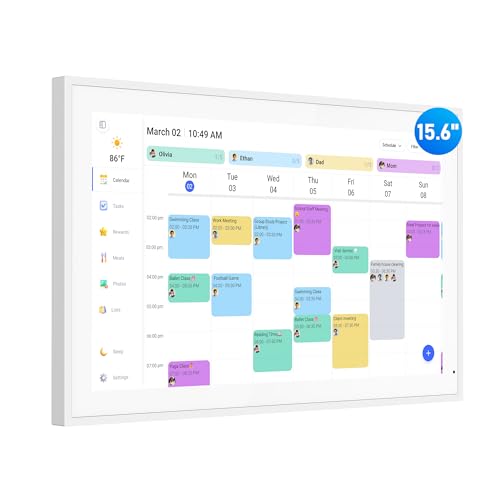
flyEVfish 15.6″ Wall Planner & Chore Chart Touchscreen

LQN 10.1″ Digital Calendar Touch Screen

ApoloSign 15.6″ Smart Wall Planner with Stand (Teak)

ApoloSign 21.5″ Smart Wall Planner (Teak)
AOC 15.6″ Smart Electronic Wall Planner

flyEVfish 27″ Wall Calendar & Chore Chart Touchscreen

ApoloSign 27″ Smart Wall Planner (Teak)

Frameo 10.1″ WiFi Digital Picture Frame (Gold)

flyEVfish 21.5″ Smart Family Organizer Touchscreen
What Each Pick Brings To The Table
The flyEVfish 15.6-inch touchscreen lives in that sweet spot where wall panels either click with a household or quietly become expensive coasters. It is sized to read from across the kitchen, but small enough to mount without drilling into a stud. Wi-Fi setup and multi-account sync mean a spouse and two teens can each drop in their own calendars and chores without fighting for control.
For most families, the panel becomes the household reference point: morning routines glance at it, weekend plans get entered from the couch, and the chore list stops being a thing parents nag about. Compared to the smaller LQN panel that follows, this one earns its wall space by being readable from the next room.
Where It Excels
- 15.6-inch HD touchscreen reads clearly from six to eight feet away, which is the realistic viewing distance in most kitchens.
- Wall and desk mounting are both supported, so renters and homeowners get the same value.
- Wi-Fi sync across multiple accounts keeps school, work, and family calendars on one panel without subscription fees.
- Color-coded events and tasks give kids an instant visual cue, helping younger children learn the day at a glance.
- Setup is genuinely plug-and-sync, which keeps first-day friction low in busy households.
Things To Consider
- The touchscreen needs a power outlet nearby, and a long cable run across open wall space can look untidy without some planning.
- Stand and mount hardware can vary between batches, so check what is in the box before you assume a clean install.
Who It Suits Best
A family with mixed schedules, school-age kids, and one shared wall that everyone walks past in the morning benefits most from this everyday pick.
Consider Something Else When
If counter space matters more than wall real estate, the LQN 10.1-inch panel may be a tighter fit for your routine.
The LQN 10.1-inch panel is the smallest screen in this roundup, and that is exactly its job. It slides onto a kitchen counter, a coffee table, or a small shelf where the flyEVfish 15.6-inch wall planner would feel oversized. Multi-account sync keeps the same household-sharing story alive, just in a portable form factor.
It works particularly well as a meal-planning assistant or a small-format hub in an apartment where wall mounting is not realistic. The trade-off is obvious: from across the room, the 10-inch panel asks you to lean in. For most cooks and desk-bound households, that is fine, since they are already standing nearby.
What Earns Its Place
- 10-inch footprint fits kitchens, dorms, and shared desks that cannot host a full-size wall panel.
- Multi-account sync means a roommate setup still benefits from a shared family view.
- The portable form factor makes it a strong pick for renters who cannot drill into walls.
Worth Noting
- From across a large room, a 10-inch display can strain eyes during a quick glance.
- Smaller screens mean more scrolling through week views, which slightly slows morning check-ins.
- Stand and cable management are not always included, so plan for a tidy corner placement.
Made For
Small households, renters, and apartment dwellers who want a countertop planner without committing to wall drilling benefit most from this compact choice.
Where Another Pick Suits Better
For a household that wants a real wall centerpiece, the flyEVfish 15.6-inch wall planner gives you a much larger reading surface.
ApoloSign enters with a 15.6-inch screen in a teak frame and a built-in stand, which sets it apart from pure wall-mount competitors. The dual-mode design lets you switch between a focused Calendar view and a full Android interface. For shoppers who like to tinker, that second mode opens the door to widgets, third-party apps, and meal-planning tools that other panels do not surface.
Compared to the flyEVfish 15.6-inch model, the ApoloSign trades a bit of simplicity for flexibility. Some households will appreciate the app layer. Others may find the extra menus add a small learning curve on day one.
Noteworthy Benefits
- Dual Calendar and Android mode offers both simplicity and customization in one device.
- Teak frame finish blends into warmer interiors more naturally than all-black panels.
- Stand included in the box removes the need for a separate mounting kit.
- App and widget support extends beyond calendar chores into meal planning and reminders.
Trade Offs
- The Android mode adds menus that non-technical household members may ignore after the novelty wears off.
- App-heavy use can lead to heavier Wi-Fi reliance, which may matter on slower networks.
Best Suited To
Tech-forward families who want a calendar that can also run their preferred planning tools benefit most from this app-friendly pick.
Swap It Out When
For a simpler experience that prioritizes calendar-only use, the AOC 15.6-inch wall planner offers a more focused interface.
The ApoloSign 21.5-inch panel sits between the 15.6-inch entry and the 27-inch statement screens. It delivers noticeably more viewing area without dominating the wall, which matters in open-plan kitchens where 27 inches starts to feel like a TV. The wall mount is included, so install day stays simple.
For households that want bigger text for aging eyes or more visible chore rows for younger kids, the step up from 15.6 to 21.5 inches is the most useful jump in this category. The teak frame carries the same warm finish as its smaller sibling.
Why It Works Well
- 21.5-inch panel reads from across an open-plan kitchen without straining.
- Wall mount included in the box, removing a common install friction point.
- Dual Calendar and Android mode delivers the same flexibility as the 15.6-inch ApoloSign.
- Teak frame finish keeps the panel visually integrated with cabinetry and wood floors.
Points To Note
- A larger panel needs a clear wall section; small entryways or narrow kitchens may not have the real estate.
- Power cable routing matters more at this size, since a long visible cord becomes more noticeable.
Who Will Love This
Households with open layouts, larger walls, or family members who prefer larger text benefit most from this mid-size panel.
A Better Fit Elsewhere
For a smaller, more portable footprint, the LQN 10.1-inch panel may suit tighter spaces better.
The AOC 15.6-inch panel keeps things deliberately focused: a calendar, a chore chart, and the syncing hooks that matter. Google, iCloud, and Outlook all sync onto the same screen, and the no-subscription angle keeps ongoing costs out of the picture. For families with school-age kids, the reward-style chore system adds a small motivational layer.
It earns its place by being the most pick-up-and-use option in this lineup. Where the ApoloSign 15.6-inch model leans into Android apps, AOC keeps the interface simpler, which many households prefer in a shared device.
Well-Handled Touches
- Google, iCloud, and Outlook sync onto one screen without subscription fees.
- Reward-style chore chart gives younger kids a reason to check the panel independently.
- 15.6-inch size is the most universally readable format for mixed households.
- Multi-account updates appear instantly across the panel, so edits from a phone show up the same second.
Minor Gripes
- The interface favors calendar chores over app experimentation, which limits flexibility for power users.
- Wall mounting hardware may not suit every wall type, so plan for anchors if you have plaster or brick.
Perfect Match For
Families with school-age children who want a focused planner without extra menus benefit most from this well-rounded pick.
Reach For A Different Pick When
For a deeper app layer and dual Android mode, the ApoloSign 15.6-inch wall planner is the more flexible sibling.
The flyEVfish 27-inch panel is the largest screen in the roundup, and it commits to the idea that a family planner should be impossible to miss. From across a long kitchen or an open-plan great room, the whole week sits there in one frame. Portrait and landscape mounting both work, so the panel can become either a vertical week strip or a wide dashboard.
You trade wall real estate for legibility. For a busy household with a lot of overlapping schedules, that exchange is usually worth it. You may find, however, that smaller rooms feel crowded with a panel this size.
Real Benefits
- 27-inch viewing area turns the calendar into a real room centerpiece, readable from anywhere.
- Portrait and landscape mounting lets you tailor the layout to your wall shape.
- Multi-platform sync (Google, Outlook, iCloud, and more) keeps the whole household on one screen.
Honest Caveats
- A 27-inch panel needs a substantial clear wall, which limits where it can realistically live.
- Cable management is more visible at this size; tucking the power cord into the wall becomes more important.
- The size can feel oversized in galley kitchens and smaller dining nooks.
Built With In Mind
Larger households with significant wall space and high cross-room visibility benefit most from this statement panel.
Not Your Match When
For tighter layouts, the flyEVfish 21.5-inch wall planner offers a more proportionate footprint.
The ApoloSign 27-inch panel pairs the largest screen in this roundup with the brand’s dual Calendar and Android mode. That combination turns the wall planner into something closer to a smart display, capable of running apps and widgets alongside the family calendar. Wall mount is included, which removes a common install step.
Compared to the flyEVfish 27-inch model, this one leans toward flexibility over simplicity. Households that want a panel to grow with their habits may appreciate the extra capability. Households that just want a clean calendar may prefer the flyEVfish focus.
Bright Spots
- 27-inch screen with full Android mode offers genuine smart-display capability.
- Wall mount included in the box keeps setup straightforward for first-time installers.
- Teak frame finish gives the large panel a warmer look than all-black alternatives.
- Apps and widgets extend the panel’s usefulness beyond chores into broader planning routines.
Points To Keep In Mind
- The Android mode adds menus that some household members may avoid, which can dilute the shared-screen feel.
- App-heavy use increases reliance on a stable Wi-Fi connection throughout the day.
The Right Fit
Tech-forward households that want a planner to evolve into a broader smart display benefit most from this feature-rich pick.
Skip It When
For a simpler, calendar-first experience at 27 inches, the flyEVfish 27-inch wall planner is the cleaner choice.
The Frameo 10.1-inch panel is the most unusual pick on this list. It is not a dedicated calendar, but a Wi-Fi picture frame with a touchscreen, 32GB of storage, and auto-rotate mounting. For households that want a shared panel that handles both family photos and lightweight planning tasks, it earns its spot in this roundup.
The HD IPS touch screen reads at 1280×800, which is plenty sharp for photos and basic reminders. Sharing through the Frameo app means relatives can push images to the panel from anywhere, which broadens its usefulness beyond the home.
Useful Highlights
- 10.1-inch HD IPS touchscreen renders photos and reminders crisply at typical viewing distances.
- 32GB of internal storage holds a meaningful library of family photos without constant cloud syncing.
- Auto-rotate and wall-mount support let the frame switch between portrait and landscape orientation.
- Frameo app sharing means family members can push photos to the panel from any location.
Small Caveats
- It is not a dedicated calendar, so households needing full chore chart and sync features should pair it with a planning app or stick with one of the calendar-first panels above.
- The gold finish may not suit every interior palette, depending on wall color and frame styling.
Whose Shelf It Belongs On
Households that want a shared photo display with light planning capability benefit most from this photo companion pick.
Where Another Pick Suits Better
For full calendar and chore chart functionality, the flyEVfish 15.6-inch wall planner is a more focused scheduling option.
The flyEVfish 21.5-inch panel closes the roundup with the most flexible mounting story. Wall mount and desk mount both work in portrait or landscape, which means the same panel can move from a hallway wall to a kitchen counter without a different bracket. For households that are still deciding where the planner will live, that flexibility matters.
It shares the same multi-platform sync as the other flyEVfish panels, so the software experience stays consistent if you ever upgrade to a 27-inch sibling later. Compared to the ApoloSign 21.5-inch model, this one stays focused on calendar chores without the Android mode.
Strengths Worth Knowing
- Portrait and landscape support, plus wall and desk mounting, give this panel the most placement flexibility in the lineup.
- 21.5-inch size balances readability with a smaller footprint than 27-inch alternatives.
- Multi-platform sync (Google, Outlook, iCloud, and more) keeps family schedules aligned.
A Few Limitations
- Lacks the Android mode of the ApoloSign 21.5-inch sibling, so it is less flexible for households wanting app-based planning.
- Stand and mount accessories may need to be sourced separately depending on the install plan.
Right Fit For
Households that have not yet committed to a final mounting location benefit most from this flexible favorite.
Consider Something Else When
For a similar screen size with deeper app support, the ApoloSign 21.5-inch wall planner is the more expandable option.
Picking The Right Screen Size and Mounting Style
Start with the room, not the brand. A 27-inch panel anchors an open-plan kitchen but swallows a hallway. A 10-inch panel disappears on a wall but earns its spot on a counter. Match screen size to viewing distance: 15.6 inches covers most standard kitchens, while 21.5 inches and up work best in great rooms where the panel sits across from the cook.
Mounting style decides more than people expect. Wall-mounted panels free up counter space and stay visible, but they need a nearby outlet and a clean cable run. Desk-mounted or stand-equipped models work for renters who cannot drill, and they can move with you. Portrait orientation suits weekly schedules, while landscape works for daily dashboards and chore lists.
What To Check Before You Sync
Calendar sync sounds simple until your household runs on three different platforms. Most panels here support Google, iCloud, and Outlook, which covers the majority of families. A few also sync with Cozi and Yahoo, which matters if anyone in your home uses a less common service.
Multi-account handling is the next thing to test. The best panels let each family member link their own calendar without overriding anyone else. Color-coded events and chore charts give the panel a visual rhythm that helps kids learn the week at a glance.
Finally, consider the app layer. Dual-mode panels like the ApoloSign models run Android alongside the calendar, which adds flexibility but also more menus. A focused panel like the AOC 15.6-inch model keeps things simpler for households that just want a planner, not a smart display.
Key Considerations Across These Picks
Common Shopping Slip Ups
Buying by screen size alone is the most frequent mistake. A 27-inch panel can feel enormous in a galley kitchen, while a 10-inch panel may be unreadable from across a great room. Always measure the wall or counter space before choosing.
Forgetting about power and cable routing is the second trap. Touchscreen calendars need constant power, and a visible cord across a clean wall breaks the whole effect. Plan an outlet location before mounting.
What The Higher Tier Buys
Stepping up from a 15.6-inch to a 21.5-inch or 27-inch panel buys viewing area, not new software features. The larger screens read better across long rooms and let more events sit on one frame. The premium also tends to include dual-mode Android support, which adds app flexibility for households that want a planner to grow into a smart display.
Frequently Asked Questions
Do Digital Wall Calendar Touch Screens Require A Subscription?
Most panels in this roundup operate without a subscription fee, which keeps ongoing costs low. Always check the product page for the latest terms before purchasing, since software models can change.
Can Multiple Family Members Sync Their Own Calendars?
Yes, most panels support multi-account sync so each person links their own Google, iCloud, or Outlook calendar. Color-coded events help everyone see who has what at a glance.
What Size Screen Works Best For A Standard Kitchen?
A 15.6-inch panel covers most kitchens comfortably, readable from six to eight feet away. Larger 21.5-inch or 27-inch panels suit open-plan layouts and great rooms.
Are These Panels Hard To Mount?
Most come with mounting hardware included, and the install is similar to hanging a picture frame. You will need a nearby power outlet and a clean cable path to keep things tidy.
Can These Panels Run Other Apps Besides The Calendar?
The ApoloSign dual-mode panels switch into a full Android interface for running other apps and widgets. The flyEVfish and AOC models stay focused on calendar and chore functionality.
Closing Thoughts
The right digital wall calendar touch screen turns a chaotic household into a glance-and-go morning. Match the panel to your room, then to your family’s sync habits, and the rest tends to fall into place. Whichever screen you choose, a wall planner that the whole household actually checks beats a feature list no one opens.