Working from home, homeschooling, or sketching out weekend plans all hit the same wall: a flat screen only takes you so far. The right whiteboard turns a corner of the kitchen, a study nook, or a kids’ room into a thinking space you can wipe clean and start over on. The picks below cover everything from large-format interactive screens to small desktop pads, so you can match the tool to the room and the way your household actually works.
How The Shortlist Stacks Up

Shiarffe X5 Smart Board 75 Inch 4K Interactive Whiteboard

TSJ OFFICE Mini Easel Desktop Double Sided Whiteboard

TSJ OFFICE Desktop Glass Whiteboard Keyboard Stand Pad

Ryitss Magnetic Portable Foldable Whiteboard 16″x12″
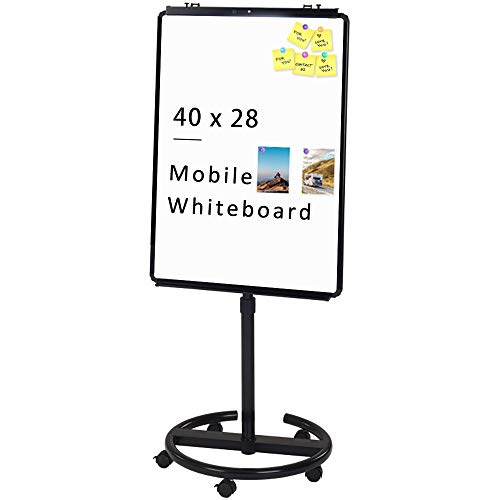
VIZ-PRO ECO Magnetic Mobile Whiteboard/Flipchart Easel

VIZ-PRO Whiteboard Easel 36 x 24 Inches Portable Tripod

Shiarffe R9 65″ Smart Board, 16GB+256GB

Shiarffe X5 Smart Board 65 Inch 4K Interactive Whiteboard

SCRIBBLEDO Small Dry Erase Board 11×14 Double Sided

VIZ-PRO Double-Sided Mobile Whiteboard on Wheels 48×36″
A Breakdown Of The Leading Choices
A 75-inch interactive panel is the kind of surface that wants a full wall and a dedicated workspace, not a corner of a kitchen counter. The Shiarffe X5 lands firmly in that category, built around a 4K industrial-grade touchscreen and a reinforced chassis. For households treating one room as a hybrid office or a tutoring hub, this becomes the centerpiece rather than an accessory.
The board is marketed for daily classroom use, which reads as a durability statement rather than a niche claim. Reinforced construction and a Google EDLA certification (a Google standard that ensures direct, native access to Google Play and core Google services without extra setup) suggest the hardware is tuned for constant tapping, dragging, and stylus work. Anyone running a small business, a coaching practice, or a busy homeschool will recognize the appeal.
Useful Touches
- 75-inch 4K panel gives a generous canvas for diagramming, lesson slides, and group work.
- Industrial-grade touchscreen rated for repeated daily interaction.
- Reinforced chassis and Google EDLA certification point toward long-term reliability in a busy room.
- Protection plans covering drops, spills, and breakdowns reduce worry in a shared home environment.
- Functions as both a meeting tool and a wall-mounted display, replacing a TV in a study space.
Things To Consider
- Mounting and power requirements mean this isn’t a weekend swap-in, especially in older homes with limited outlet placement.
- The 75-inch footprint demands clear wall space, which most smaller rooms simply don’t have.
Key Specs
Who Should Grab It
Families or remote professionals converting one room into a full-time work or tutoring hub with the wall space to anchor a large panel.
Look Elsewhere When
The TSJ OFFICE Mini Easel Desktop Double Sided Whiteboard fits better in a smaller setup, especially if a countertop notepad is closer to the daily need than a wall-mounted display.
Where the Shiarffe X5 wants a wall, this mini easel wants the edge of a desk. The TSJ OFFICE 12″ x 16″ board stands on an aluminum bracket that folds flat and locks at multiple angles, which keeps it steady during writing sessions without anchoring it permanently to a room. In a household where a whiteboard is pulled out for a five-minute brainstorm and tucked away again, that portability matters more than screen size.
The double-sided writing surface quietly doubles the usable area without expanding the footprint. Compared to a flat desktop pad, the easel angles the board toward you, reducing wrist strain during longer note sessions or quick demos over a video call.
Points In Its Favor
- Compact 12″ x 16″ size fits any desk, kitchen counter, or dining table.
- Adjustable aluminum easel locks at multiple angles for seated or standing use.
- Double-sided surface means more writing area without a larger footprint.
- Light enough to move between rooms during the day, depending on your routine.
Points To Keep In Mind
- The magnetic capability is a nice bonus, but marker residue can ghost over time on budget dry-erase surfaces, so routine cleaning matters.
- Folding easel joints can loosen with heavy daily repositioning, which is worth watching if it moves often.
Right Fit For
Remote workers and home learners who want a small, repositionable surface for to-dos, sketches, and short study sessions.
Consider Something Else When
The TSJ OFFICE Desktop Glass Whiteboard Keyboard Stand Pad is the better fit for keyboard-adjacent note-taking in a tight workstation.
This glass-surface pad is built for a specific kind of desk: one where the keyboard already lives. The sloped profile rests between a keyboard and a monitor, so it doubles as a writing surface and a wrist-friendly typing platform. That dual purpose saves real estate in a small home office where a separate whiteboard would crowd the workspace.
The glass finish is a step up from typical melamine boards, wiping clean without the streaking that cheap surfaces tend to develop. The integrated drawer tucks markers and erasers out of sight, which helps a small desk look calm rather than cluttered.
A Few Highlights
- Tempered glass surface wipes clean with minimal streaking.
- Sloped angle supports both writing and keyboard use without swapping accessories.
- Integrated drawer keeps markers and erasers contained at the desk.
- Grey finish blends with most monitor and laptop setups, so it doesn’t visually shout.
Trade Offs
- Glass adds weight, so this is more of a stationary pad than a carry-it-around option.
- The writing area is sized for short notes and quick sketches, not full lesson plans or large diagrams.
Made For
Anyone working at a tight desk who wants a slim, integrated place to capture quick thoughts without losing typing space.
Skip It When
The Ryitss Magnetic Portable Foldable Whiteboard suits you better if you’d rather move the surface around or prop it on a lap.
At roughly 2.5 pounds with a fold-flat stand, the Ryitss board is the kind of pick that disappears into a closet and reappears when needed. Dorm rooms, small apartments, and shared kitchens benefit from a surface that doesn’t claim permanent territory. The 16″ x 12″ writing area gives enough room for a study outline or a weekly meal plan without dominating a tabletop.
The magnetic surface adds quiet utility: notes, cards, and small reference sheets stay put during a session. Compared to the TSJ OFFICE mini easel earlier, this one is lighter and folds flatter, which makes it the better board for moving between rooms or tucking into a bag.
Standout Benefits
- Folding stand keeps the board compact for storage and transport.
- Magnetic surface holds notes, index cards, and small references in place.
- 16″ x 12″ size balances writing area with portability.
- Light enough for kids to reposition on their own during homework.
Honest Caveats
- Smaller writing area means long diagrams or full lesson plans won’t fit comfortably on one side.
- Magnetic strength is enough for paper and cards but won’t hold heavier objects.
Best Suited To
Students, renters, and small-space dwellers who want a board they can fold away when the table needs to do double duty.
Reach For A Different Pick When
The SCRIBBLEDO Small Dry Erase Board 11×14 Double Sided Whiteboard is a smarter call for younger kids who flip between math and spelling practice.
Where the Ryitss and TSJ OFFICE picks live on tabletops, the VIZ-PRO ECO is a rolling easel. The frame sits on casters that move it between the living room, the home office, or a homework corner without needing to be lifted. Height adjustment from about 60 to 76 inches lets adults stand and kids sit without compromising the angle, which is a quiet but real win for shared households.
The dual-purpose surface combines a magnetic dry-erase panel with a flipchart clamp, so presentations and brainstorms can happen on the same board. Compared to the static desktop options earlier, this is the first pick in the list that genuinely follows the user around the home.
Why It Works Well
- Mobility via casters means the board moves with the conversation, not the other way around.
- Adjustable height supports both seated and standing use across family members.
- Magnetic surface adds flexibility for charts, photos, or pinned notes.
- Flipchart compatibility lets you swap in paper for take-away notes when needed.
Softer Spots
- Wheels that lock matter on hard floors; carpeted rooms may need a small rug stop to prevent drift.
- Larger footprint compared to desktop pads, so storage planning is worth doing before it arrives.
Feature Snapshot
Whose Shelf It Belongs On
Multi-room families and home-schooling parents who want one board that serves the dining table, the office, and the playroom over the course of a week.
Swap It Out When
The VIZ-PRO Double-Sided Magnetic Mobile Whiteboard on Wheels is the better fit if double-sided writing space matters more than flipchart use.
The tripod easel form factor keeps this VIZ-PRO light and quick to deploy. It folds up for storage behind a door or in a closet, and it sets up in seconds when a presentation, a tutoring session, or a quick family meeting pops up. The 36″ x 24″ writing surface lands between a desktop pad and a full rolling easel, so it covers most household scenarios without filling a wall.
The non-magnetic surface is a real consideration: it means no pinned handouts, but it also means lower cost and easier wiping. Compared to the ECO magnetic easel reviewed just before this one, this pick trades accessories and mobility for a simpler, lighter footprint.
Notable Upsides
- Tripod design sets up and breaks down in moments, ideal for occasional use.
- 36″ x 24″ writing surface balances size with easy storage.
- Included pen tray and movable hook add small but useful touches.
- Lower complexity means fewer parts to misplace or repair over time.
Where It May Fall Short
- Non-magnetic surface means paper handouts need the included hook rather than direct pinning.
- Tripod legs can wobble slightly on uneven floors, especially during energetic writing sessions.
Perfect Match For
Tutors, coaches, and parents running short, focused sessions who want a board that pulls out, gets used, and goes back in the closet.
A Better Fit Elsewhere
The VIZ-PRO ECO Magnetic Mobile Whiteboard/Flipchart Easel is the better choice if you want casters and magnetic accessories for daily repositioning.
The R9 sits one notch below the 75-inch X5 reviewed earlier but steps up in internal storage and onboard memory. With 16GB of RAM and 256GB of storage, this panel is closer to a thin client computer than a traditional display, which matters once you start running collaboration apps, recording lessons, or keeping multiple files cached locally. The Google EDLA certification gives direct access to Google services without side-loading.
For households treating a hybrid work setup as a long-term arrangement rather than a temporary fix, the extra horsepower shows up in smoother app switching and faster file handling. Compared to the X5, this is the pick for people who plan to install and use heavy creative or productivity software on the board itself.
What Pays Off
- 16GB RAM keeps multitasking smooth during screen-shared meetings and lesson planning.
- 256GB of storage covers local caching of presentation files and recordings.
- Google EDLA certification provides native Google app support without workarounds.
- 4K panel keeps slides, charts, and video calls crisp from across a room.
Things To Weigh
- Wall-mount planning is still required, including power routing and safe bracket placement.
- More onboard storage is useful only if you actually store and run apps directly on the panel.
Feature Card
Who Will Love This
Remote professionals and tutors who run their workflow directly from the panel and want a responsive, app-rich surface rather than a simple display.
Not Your Match When
The Shiarffe X5 Smart Board 65 Inch 4K Interactive Whiteboard is a more focused choice if you want classroom-grade durability over maximum internal storage.
The 65-inch version of the X5 trades screen real estate for easier room placement. A 65-inch panel fits on more walls in real homes, which is often the difference between installing it and wishing you had. The X5 carries the same industrial-grade touchscreen and reinforced chassis as the 75-inch model reviewed earlier, both marketed for daily K-12 classroom use.
For a family that wants a serious interactive surface without committing to the largest size, this is the more room-friendly entry point into the X5 line. The Google EDLA certification brings the same direct Google app access as the 75-inch panel.
A Few Strong Suits
- 65-inch panel balances canvas size with more flexible wall placement.
- Reinforced chassis rated for constant daily use in busy environments.
- 4K resolution keeps text and diagrams readable from across a room.
- Google EDLA certified for direct Google services access.
A Few Limitations
- Still a wall-mounted install, so outlet location and bracket choice matter for placement.
- Less writing area than the 75-inch X5 if you frequently sketch across the full surface.
The Right Fit
Families and home-schooling parents who want classroom-rated durability in a panel that fits standard residential walls without custom mounting.
Where Another Pick Suits Better
The Shiarffe R9 65″ Smart Board suits you better if app storage and onboard memory matter more than reinforced chassis durability.
The SCRIBBLEDO board is small on purpose. At 11″ x 14″, it fits a child’s lap or a kitchen-table homework corner without overwhelming either. The double-sided surface keeps math practice on one side and spelling on the other, which is a quiet productivity boost for short study bursts.
Compared to the Ryitss foldable board reviewed earlier, this one skips the stand entirely. That makes it lighter, simpler, and easier for kids to handle, but it also means it needs a flat surface to lean against. In a busy household, that tradeoff usually lands in favor of simplicity.
Practical Advantages
- Compact 11″ x 14″ size fits a child’s lap or a small table.
- Double-sided surface supports multiple subjects without erasing mid-session.
- Light enough for kids to carry between rooms and set up on their own.
- Simple design means fewer parts that can break or get lost.
Small Caveats
- No built-in stand, so it leans against a surface or gets held during use.
- Smaller writing area is less useful for diagrams that span more than a quick sketch.
Made For
Parents running quick homework sessions with kids who need a manageable, easy-to-handle practice surface.
Another Choice May Suit
The Ryitss Magnetic Portable Foldable Whiteboard is the smarter call if you want a built-in stand and magnetic attachment for the same age range.
This VIZ-PRO board closes the list with the largest surface area and the simplest interaction model. The 48″ x 36″ double-sided panel gives you one side for active work and another waiting in reserve, which matters during long planning sessions when you don’t want to erase the previous hour. Locking casters keep the board planted once it’s positioned.
Compared to the VIZ-PRO ECO easel reviewed earlier, this pick is heavier and more stationary in feel, but the horizontal pivot handle and rotating frame mean you can flip the board without dragging it across the floor. For an open-plan living area or a multi-use family room, that combination of size and stability tends to earn its keep.
Useful Strengths
- Double-sided design provides continuous writing space without mid-session erasing.
- Locking casters keep the board stable once positioned.
- Pivot handle makes flipping the board easier than dragging it sideways.
- Magnetic surface accepts pinned notes, charts, and small visual aids.
Possible Compromises
- Larger frame means planning the storage spot ahead of arrival, especially in tighter hallways.
- Casters can mark softer floors over time, so felt pads or careful rolling on hardwood are worth considering.
Quick Facts
Built With In Mind
Open-plan homes and busy family rooms that benefit from one large, mobile board serving multiple uses across the day.
Skip It When
The VIZ-PRO ECO Magnetic Mobile Whiteboard/Flipchart Easel is a smarter pick if you want a smaller rolling easel with height adjustment.
Choosing A Whiteboard That Actually Fits Your Home
Start with the room, not the feature list. Wall-mounted interactive panels reward a dedicated office or study with built-in power and mounting points. Rolling easels want open floor space and a path between rooms. Desktop pads and mini easels thrive on the edge of an existing desk, where they share territory with keyboards and monitors.
For households running a mix of work, school, and creative projects, dual-sided surfaces quietly earn their keep. A double-sided board means one panel can stay filled while the other is actively used, which cuts down on mid-session erasing. Magnetic capability adds small but real utility for holding handouts, calendars, and reference notes without needing tape or pins.
Cleaning habits matter more than spec sheets in this category. Dry-erase surfaces develop ghosting (faint leftover marks that linger after erasing) when low-quality markers are used or when erasers are skipped in favor of random cloths. A consistent routine with proper markers and a soft eraser keeps any board looking fresh for years.
Picking The Right Format For Your Space
Common Buying Slip Ups
Measuring wall space before falling for a screen size saves a lot of regret. Most interactive panels look smaller in product photos than they do on a real wall, and an oversized panel can dominate a room meant for multiple activities.
Skipping the mounting plan is the next frequent miss. Panels need a power outlet, a wall type that holds the included bracket, and often a clear cable path. Sorting those details before the box arrives turns installation into a one-hour project instead of a weekend one.
Why Top Tier Costs More
Interactive panels cost more than rolling easels for specific reasons: industrial-grade touchscreens, reinforced chassis, onboard computing hardware, and certifications like EDLA that allow direct access to app stores. That hardware is what allows daily tapping, drawing, and app use without performance drop-off.
For a household that runs the board as a primary work surface, that durability shows up in long-term reliability. For lighter, occasional use, a mid-tier panel or a quality rolling easel often delivers the same everyday value at a lower cost.
Frequently Asked Questions
What size whiteboard works for a typical home office?
A 65-inch panel fits most residential walls without overwhelming the room. Smaller rolling easels at 36″ x 24″ work well when the office doubles as a guest room or shared space.
Are interactive smart boards worth it for home use?
Smart boards earn their keep in homes with regular video calls, lesson planning, or creative work that benefits from a large touch surface. For light, occasional note-taking, a traditional dry-erase board usually does the job.
How do I keep a dry-erase board from ghosting?
Use quality dry-erase markers and clean the surface with a soft eraser or microfiber cloth weekly. Avoid abrasive cleaners, which damage the coating and accelerate ghosting over time.
Can kids use these boards safely?
Smaller desktop pads and rolling easels are designed for casual handling and pose no special concerns. Wall-mounted panels need secure mounting and tidy cable management, especially in homes with younger children.
Do I need a magnetic surface?
Magnetic capability helps when you pin handouts, photos, or reference cards to the board. It is a useful feature for shared family spaces, but not essential for a single-user home office.
Wrap Up
The right whiteboard is the one that fits the room you already have, not the room you wish you had. Small desktop pads, mid-size easels, and large interactive panels each solve a different kind of household problem, and matching the format to the daily routine matters more than chasing the biggest spec sheet. Pick the surface that supports how your home actually works, and the rest tends to fall into place.