Paper notebooks still work, but a growing share of note-takers, parents, and professionals keep reaching for a writing tablet instead. The category splits in two: simple LCD scratch pads that replace sticky notes and grocery lists, and full E-Ink paper tablets built for serious writing, sketching, and document review. Picking the right one means matching size, feel, and feature set to the way you actually write.
A Quick View Of The Lineup
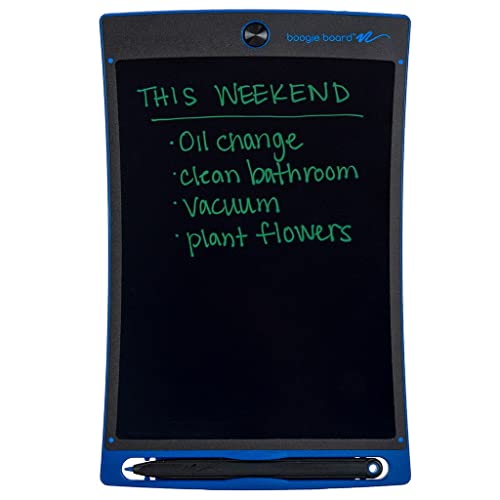
Boogie Board Jot Reusable Writing Tablet 8.5″ LCD Stylus Magnets Kickstand
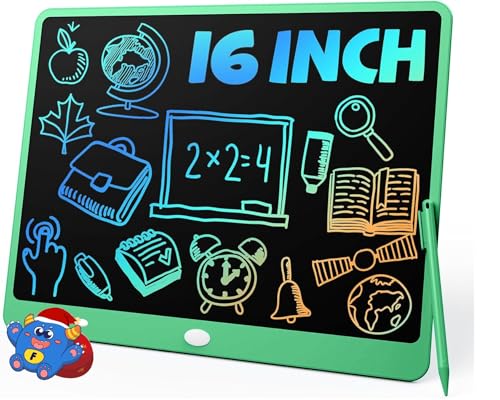
TEKFUN 16″ LCD Writing Tablet for Kids Learning (Green)

TEKFUN 15 Inch LCD Writing Tablet for Girls Ages 3-12 (Pink)

TEKFUN 15″ LCD Writing Tablet for Kids (Blue)

TEKFUN 12″ LCD Writing Tablet for Kids Ages 3-8 (Purple)

TEKFUN 16″ LCD Writing Tablet for Kids (Yellow)

reMarkable Paper Pro with Marker Plus

reMarkable Paper Pro with Marker Plus and Basalt Book Folio

reMarkable Paper Pro with Marker Plus and Black Leather Folio

Boogie Board Basics Reusable Writing Pad with Stylus
Inside Each Recommended Option
The Boogie Board Jot lives in that sweet spot between a fridge notepad and a full tablet, which is exactly why it earns the top slot. The 8.5-inch pressure-sensitive LCD (a screen that reads how hard you press, much like a smartphone drawing app) responds to the included stylus, and yes, your fingernail works in a pinch. Compared to the simpler Basics model covered later, this Jot adds magnets on the back and a built-in kickstand, two small touches that change how often you actually reach for it.
For office workers scribbling a quick phone message, or parents drawing with kids at the kitchen table, the Jot feels right at home. It runs on a coin-cell battery that owners commonly replace only every couple of months, so battery anxiety isn’t really part of the deal.
A Few Strong Suits
- Pressure-sensitive LCD gives lines that look like pencil shading instead of flat ink
- Magnetic back lets you stick it to a fridge, filing cabinet, or any steel surface for hands-free note-taking
- Kickstand props the board up during desk work, so you can write without holding it
- One-button erase keeps the workflow fast, no menus, no apps, no charging routine
- Lightweight plastic shell holds up to backpack abuse and the occasional drop
Worth Noting
- The 8.5-inch canvas runs small for full-page sketches or long lists
- No save function, so anything important disappears the moment you press erase
- Stylus can wander off in a drawer if you don’t clip it to the board
Key Specs
Best Suited To
Office workers, teachers, and parents who want a grab-and-go scratch pad for lists, reminders, and quick diagrams without charging a device.
Look Elsewhere When
Creatives who need a larger canvas for detailed sketches should consider the TEKFUN 16″ LCD Writing Tablet for Kids (Green) instead, since its wider screen handles bigger drawings more comfortably.
The TEKFUN 16-inch LCD Writing Tablet leans hard into the “bigger is better for homework” philosophy. A 16-inch LCD dwarfs the Boogie Board Jot from the previous review, giving a child room to write out spelling words, solve multi-step math problems, or sketch an entire comic page before the inevitable erase. The green shell gives it a calm, classroom-friendly look that doesn’t scream toy aisle.
Homeschool families and parents who want a screen-free alternative to apps during focus time will appreciate the calm, low-stim format. It also shines in waiting rooms and restaurants, since the screen swallows time the way an old-fashioned Etch A Sketch used to.
Strong Points
- Generous 16-inch canvas fits full-page writing and bigger drawings without cramping
- Screen-free format means no app downloads, no logins, and no battery to charge
- Lightweight plastic shell travels well between kitchen table, car, and grandma’s house
- Works for spelling practice, homework scratch work, and creative doodling alike
Things To Consider
- Large footprint means it needs a bigger backpack pocket than the Boogie Board Jot
- Pressure sensitivity is limited, so younger kids may not notice the difference in line weight
Right Fit For
Homeschooling families and parents building a screen-free homework routine for school-age kids who already write in full sentences.
Skip It When
Toddlers under three get more use out of the TEKFUN 12″ LCD Writing Tablet for Kids Ages 3-8 (Purple), since the smaller size matches shorter attention spans and smaller hands.
This pink 15-inch TEKFUN tablet looks like a gift the moment it comes out of the box, which matters more than people admit when wrapping for a child. The 15-inch canvas sits between the compact 12-inch model and the roomy 16-inch green board above, giving a nice middle ground for kids who want space but not a board that overwhelms their desk.
It works well as a quiet-time tool during long car rides, after-school downtime, or rainy weekends. Parents commonly report that kids gravitate toward it because it feels more like a sketchbook than a screen, and the lack of audio makes restaurant use genuinely painless.
Features That Help
- Bright pink finish reads as a personal gift rather than a generic school supply
- 15-inch screen holds a full alphabet practice sheet or a multi-step math problem
- Instant erase button resets the canvas between activities without adult help
Honest Caveats
- Color choice limits appeal for siblings sharing the device
- No memory function, so completed work disappears unless you snap a photo
Made For
Gift-givers shopping for a child between ages three and twelve who enjoys drawing and wants something that feels like her own.
Reach For A Different Pick When
Families with multiple kids sharing a board should consider the gender-neutral TEKFUN 15″ LCD Writing Tablet for Kids (Blue), which fits mixed households more comfortably.
The blue 15-inch TEKFUN tablet drops the gift-bag styling in favor of a calmer, gender-neutral look that works in a shared family or classroom. Functionally, it shares most of its bones with the pink model reviewed above, but the deep blue shell ages better as kids outgrow themed colors.
Long-haul families and anyone tired of handing over a phone on flights will find this board genuinely useful. The screen swallows time the way a coloring book used to, without the blue-light eye fatigue that comes with tablets. Owners commonly report that the included stylus lives in a slot on the body, which means fewer lost pens on road trips.
What Stands Out
- Blue colorway fits boys, girls, and shared classroom settings without feeling gendered
- 15-inch canvas fits easily on airplane tray tables and restaurant high chairs
- Built-in stylus storage keeps the pen from disappearing in a backpack
Trade Offs
- Thin plastic shell can pick up scuffs if tossed into a backpack without a sleeve
- No backlight, so it disappears in dim cars at night
Who Will Love This
Parents of mixed-gender siblings and frequent travelers who want a single reusable board that survives car seats, planes, and restaurant booths.
Not Your Match When
Gift-givers shopping for a child who loves bright, themed colors should look at the TEKFUN 15 Inch LCD Writing Tablet for Girls Ages 3-12 (Pink), which leans into personality over practicality.
The 12-inch TEKFUN is the smallest LCD canvas on this list, and that is its main selling point. Smaller hands can actually reach across the screen without leaning, which matters for the three-to-eight crowd. Compared to the 15-inch and 16-inch TEKFUN boards covered earlier, this one feels less like a classroom tool and more like a personal sketchpad.
It is a natural fit for stroller snacks, restaurant waits, and quick bedtime doodles. Parents commonly report that kids outgrow the size around age eight or nine, at which point stepping up to the 15-inch blue model makes sense.
The Good Stuff
- Compact 12-inch size matches the reach of younger kids and shorter arms
- Lightweight build fits inside a diaper bag or small backpack
- Purple finish reads playful without leaning into cartoon branding
A Few Limitations
- Limited screen real estate for older children practicing full sentences
- No included stylus tether, so the pen can vanish in couch cushions
Perfect Match For
Parents of preschoolers and early elementary kids who want a low-cost introduction to digital drawing without handing over a smartphone.
Swap It Out When
Older kids ready for longer writing sessions should move up to the TEKFUN 15″ LCD Writing Tablet for Kids (Blue), which gives the screen space to grow with them.
The yellow 16-inch TEKFUN is the largest LCD screen in this roundup, and it doubles down on the “give a kid a real canvas” idea. Two siblings can sketch side by side without elbow-bumping, and group activities like classroom voting boards or family to-do lists finally fit comfortably on a single screen.
It works best on a flat surface, since the size makes handheld use awkward for younger kids. You may find it doubles nicely as a shared family message center stuck to a fridge or cabinet if you add a magnet strip on the back, though magnets are not built in.
Everyday Wins
- Largest LCD canvas here handles two kids drawing side by side
- Bright yellow finish makes the board easy to spot in a toy bin
- Same screen-free workflow as smaller TEKFUN boards, so no learning curve
Points To Note
- Big size makes it less practical for stroller bags and small backpacks
- Younger kids may need help holding the board steady while writing
Whose Shelf It Belongs On
Active households with multiple kids, or anyone who wants a single big board for shared lists, group doodling, and kitchen-table planning.
A Better Fit Elsewhere
Solo users and younger kids get more mileage from the TEKFUN 12″ LCD Writing Tablet for Kids Ages 3-8 (Purple), which trades canvas size for easier handling.
The reMarkable Paper Pro is the leap into a different category entirely. The 11.8-inch Canvas Color display is an E-Ink panel (electronic ink that looks like printed paper and only uses power when the image changes) with color support, an adjustable reading light, and a textured surface designed to feel close to paper under the Marker Plus stylus. None of the LCD boards above come close to that paper-like experience.
Writers, attorneys, designers, and engineers tend to gravitate here because notes save as searchable files, sync to cloud storage, and convert handwriting to text. The catch is a much higher price than LCD scratch pads and a learning curve for the software.
The Case For It
- 11.8-inch color E-Ink display reads like printed paper and stays gentle on the eyes
- Marker Plus stylus writes with real friction, which long writing sessions benefit from
- Notes save as files, sync across devices, and convert handwriting to typed text
- Adjustable reading light supports late-night work in low-light settings
Things To Weigh
- Premium price puts it well out of reach for casual note-takers
- Software ecosystem takes an afternoon to learn compared to LCD boards
- Battery life stretches long but still needs regular charging, unlike coin-cell LCD pads
Quick Facts
Who Should Grab It
Writers, attorneys, and designers who take hundreds of notes a week and want searchable, syncing files rather than disposable scribbles.
Consider Something Else When
Anyone wanting a screen-free scratch pad for the fridge should consider the Boogie Board Basics Reusable Writing Pad, which delivers the same quick-erase simplicity at a much smaller commitment.
Functionally identical to the standard Paper Pro reviewed above, this bundle adds the Basalt Book Folio, a fitted cover that protects the screen and props the device at a comfortable typing angle. For commuters and frequent flyers, the folio turns the tablet into something you can toss into a laptop bag without babying it.
The Basalt color reads as a calm, slate-gray professional tone. If you write mostly at a desk, the standard Paper Pro without a folio will suit you just as well, but anyone carrying the device daily appreciates the extra protection.
What Helps Most
- Includes the Basalt Book Folio, which adds screen protection and a built-in stand
- Same 11.8-inch color E-Ink canvas as the standard Paper Pro
- Folio folds flat against the device, keeping the bag profile slim
Practical Considerations
- Costs more upfront than the Paper Pro alone
- Folio adds a small amount of weight compared to a bare tablet
Built With In Mind
Mobile professionals and consultants who carry a tablet between client meetings and want a polished, protected setup out of the box.
A Better Fit Elsewhere
Strictly desk-bound users save money buying the reMarkable Paper Pro with Marker Plus on its own and adding a cover later if they need one.
The Black Leather Book Folio takes the same Paper Pro covered above and dresses it in a leather cover that ages with use. The folio magnetically attaches to the tablet, props it up for typing, and feels more like a notebook than a gadget when carried.
Compared to the Basalt Book Folio bundle, this option trades the slate fabric feel for a more traditional leather look that pairs nicely with a briefcase. Owners commonly report that the leather softens up nicely after a few weeks of daily carry.
What Works In Its Favor
- Leather folio adds a polished, briefcase-friendly look for professional settings
- Magnetic attachment makes the cover easy to remove for a lighter carry
- Same color E-Ink writing experience as every other Paper Pro in this lineup
Some Limits To Know
- Leather costs more than the Basalt fabric version
- Adds modest thickness compared to the bare tablet
Right Fit For
Executives and lawyers who want a writing tool that looks at home next to a leather planner and a fountain pen.
Not Your Match When
Budget-focused shoppers should pick the reMarkable Paper Pro with Marker Plus without a folio and use a generic sleeve if they want protection.
The Boogie Board Basics is the original no-frills LCD scratch pad that started the category. Compared to the Jot reviewed earlier, the Basics skips the magnets, kickstand, and pressure sensitivity, leaving a flat plastic slab that writes and erases with one button. The trade-off is a simpler, lighter device that lives happily on a fridge or in a desk drawer.
It is the right pick for someone who wants an inexpensive, screen-free replacement for sticky notes and notepads. Owners commonly keep one in the kitchen for grocery lists and another by the phone for quick messages.
A Favorable Mix
- Simple one-button design needs zero learning curve for any age
- Lightweight build makes it easy to carry, mount, or stash in a drawer
- Coin-cell battery lasts months between changes, keeping ownership hassle low
- Works with any non-scratching stylus, so replacements are easy to find
Potential Drawbacks
- No pressure sensitivity, so lines all look the same weight
- No magnets or kickstand, unlike the Boogie Board Jot
- No way to save notes, which limits it to disposable scribbles
Perfect Match For
Anyone who wants the cheapest, simplest way to ditch paper for lists, messages, and quick sketches around the home.
Consider Something Else When
Office workers who want pressure-sensitive lines and a kickstand should step up to the Boogie Board Jot Reusable Writing Tablet, which adds those touches for a modest jump in price.
Picking The Right Writing Tablet For Your Routine
A writing tablet should fit how you actually work, not the other way around. The right screen size, feel, and feature set depends on whether you scribble quick lists, take meeting notes, or sketch detailed layouts.
Screen Size And Daily Carry
LCD scratch pads come in sizes ranging from 8.5 inches to 16 inches, and the right choice hinges on where the board will live. A small 8.5-inch model slips into a laptop bag or kitchen drawer without a fuss, while 15-inch and 16-inch boards earn their space on a desk or shared table. E-Ink tablets like the reMarkable Paper Pro sit in the middle with an 11.8-inch canvas that handles full-page notes but still travels well in a briefcase.
Feel, Stylus, And Writing Style
Pressure sensitivity (the ability of the screen to read how hard you press and change line thickness accordingly) makes a real difference for anyone who sketches. LCD boards tend to read pressure lightly, giving you thicker lines when you press harder, while E-Ink tablets like the Paper Pro add subtle texture under the stylus for a more pen-like feel. The included stylus matters too: built-in storage slots help prevent the classic lost-pen problem in backpacks and kitchen drawers.
Saving Notes Versus Disposable Scribbles
The biggest divide in the category is whether notes survive the erase button. LCD boards wipe clean with one press, which is great for lists and rough work but terrible for anything you want to keep. E-Ink tablets save files, sync to cloud storage, and even convert handwriting to text, which justifies the higher price for serious note-takers. Parents shopping for kids usually want the disposable simplicity, while writers and professionals lean toward the saving features.
Battery And Long-Term Ownership
LCD boards run on coin-cell batteries that can last months between swaps, which makes them nearly maintenance-free. E-Ink tablets charge over USB and typically last days between charges, depending on screen brightness and reading-light use. Either way, both styles avoid the daily charging ritual that comes with a traditional tablet, which is part of why people pick them in the first place.
Common Shopping Slip Ups In This Category
A few recurring mistakes trip up first-time shoppers, and most of them come down to expectations rather than product flaws.
Pitfalls Shoppers Hit
Many shoppers assume any writing tablet will save their notes, then feel frustrated when an LCD board erases everything at the press of a button. Others pick an LCD board expecting it to feel like a high-end E-Ink device and end up disappointed by the lack of texture and pressure response. A third common slip is buying a 16-inch board for a five-year-old, then watching it gather dust because the size overwhelms small fingers.
Where The Extra Money Goes
The jump from a basic LCD pad to an E-Ink paper tablet like the reMarkable Paper Pro brings real engineering costs: a color E-Ink panel with adjustable front light, a textured writing surface, on-device storage, cloud sync, and a rechargeable battery. Folios and Marker Plus styluses add leather or fabric covers and refined eraser-tipped pens, which explains the bundle pricing differences you see between the three Paper Pro options. For most casual users, an LCD board covers daily needs at a small fraction of the price, while the upgrade makes sense only when you genuinely need saved, searchable files.
Frequently Asked Questions
What Is The Difference Between LCD And E-Ink Writing Tablets?
LCD writing tablets use a pressure-sensitive liquid-crystal screen that requires a small battery to hold the image, while E-Ink tablets use electronic ink that holds an image with almost no power at all. LCD boards are cheaper and erase instantly with a button, but they offer no save function. E-Ink tablets cost more, store notes as files, and read closer to real paper.
Are Writing Tablets Good For Kids?
Yes, especially for younger children who want a screen-free alternative to apps for drawing and writing practice. LCD boards in the 12-inch to 16-inch range hold up well to rough handling, give kids a tactile drawing surface, and cut down on paper waste. E-Ink tablets are usually overkill for kids unless they need to save schoolwork.
Do Writing Tablets Need Charging?
Most LCD boards run on a coin-cell battery that lasts months between swaps, so charging is rarely part of the routine. E-Ink tablets charge over USB like a regular tablet and last days between charges depending on screen and reading-light use. Either way, daily charging is not part of the deal.
Can You Save Notes On A Basic LCD Writing Tablet?
No, basic LCD boards erase everything with a single button press and offer no way to store or share notes. If saving matters, look at an E-Ink tablet like the reMarkable Paper Pro, which stores notes locally and syncs them to cloud services. A workaround for LCD boards is to snap a photo with a phone before erasing.
How Long Do Writing Tablets Last?
LCD scratch pads typically last for years with occasional battery swaps and basic care, since the hardware is simple and rugged. E-Ink tablets last just as long with software updates and normal charging habits. Owners commonly replace either style only when the screen gets physically damaged or when the internal battery wears out after several years of regular use.
Wrap Up
The right writing tablet depends entirely on what you need it to do. LCD boards cover quick notes, kid-friendly doodling, and screen-free lists at low cost, while E-Ink tablets step in when saved files, syncing, and a paper-like feel matter more than price. Match the size, feel, and feature set to your daily routine, and the rest tends to fall into place.