Whether you have a shoebox of family photos from the 1970s, a stack of receipts cluttering your desk drawer, or a small business workflow that demands reliable document digitization, the right scanner turns paper piles into searchable, organized files. Modern document photo scanners range from compact desktop units to overhead book scanners, and choosing between them comes down to whether you handle loose photos, bound books, or high-volume paperwork. This roundup focuses on nine solid options that suit home archivists, students, freelancers, and small offices alike.
A Closer Look At The Lineup
PickWhy We Picked ItBest ForAction

Editor’s Choice
Epson FastFoto FF-680W Wireless Photo & Document Scanner Bundle
Photo-first batch scanning
Family photo archivists

Book Scanning Standout
CZUR ET24 Pro Professional Book Scanner, 24MP
Bound book page capture
Researcher digitization projects
Heavy Duty Pick
Xerox DocuMate 6460 Duplex Document Scanner
High-volume office workflows
Small business batch scanning

Premium Pick
CZUR ET MAX Professional Book & Document Scanner, 38MP
High-resolution book imaging
Archivists and libraries
Accessory Pick
Wanty Black Antistatic Dust-Proof Nylon Cover for Epson FF-680W
Scanner protection in storage
FF-680W owners

Feature Rich
ScanSnap iX1600 Wireless or USB Document Scanner
Touchscreen and wireless scanning
Hybrid home offices

Simple Standout
ScanSnap iX1400 One-Touch Document & Photo Scanner
One-button simplicity
First-time scanner users

Dependable Option
Epson FastFoto FF-680W Duplex Photo and Document Scanner
Proven photo batch design
Photo-heavy family projects

Travel Ready
CZUR Aura Pro Portable Book Scanner, A3
Portable A3 book capture
Mobile researchers and students
This bundle pairs the FastFoto FF-680W with a Workforce ES-580W document scanner, giving you a photo-specialist and a paperwork workhorse on the same desk. If you have stacks of prints from the pre-digital era alongside a steady flow of receipts and contracts, the pairing handles both without swapping gear.
The FF-680W is built around photo batch capture, processing loose prints as quickly as about one per second at 300 dpi (dots per inch, a measure of scan sharpness). It handles everything from Polaroid squares to 8″x10″ portraits, with a duplex document feeder for paperwork. Wireless setup keeps the workstation clean, and the companion mobile app lets you add voice notes to family photos for future generations.
Good Reasons To Consider
- ✓Batch-scans up to 36 photos in a single load, saving hours on album conversions.
- ✓Duplex automatic document feeder handles double-sided paperwork without flipping pages by hand.
- ✓Wireless connectivity avoids tethering the unit to one computer, useful in shared spaces.
- ✓Software can enhance faded prints, restoring contrast and color on old family photos.
- ✓Bundle includes the Workforce ES-580W for dedicated document throughput.
Things To Consider
- •The bundle footprint takes meaningful desk space when both units run side by side.
- •Photo restoration depends on the software; very damaged prints may still need manual touch-ups.
Feature Snapshot
| | Feature | Specification | Why It Matters |
|---|
| Photo Scan Speed | Approx. 1 photo per second at 300 dpi | Speeds through shoebox-sized photo collections in hours, not weekends. |
| Batch Capacity | Up to 36 photos per load | Reduces babysitting the scanner for hours on end. |
| Photo Size Support | Polaroid through 8″x10″ prints | Covers nearly every common print format from the last century. |
| Connectivity | Wireless and USB | Fits into most home or office setups without rewiring. |
Who Will Love This
Family archivists with mixed paper and photo collections who want one station to digitize decades of memories.
A Better Fit Elsewhere
Researchers digitizing bound books should consider the CZUR ET24 Pro, which uses an overhead camera designed for curved pages.
Check on Amazon
The ET24 Pro takes a different approach from the Epson above. Rather than feeding loose pages through rollers, it sits overhead and photographs what you place beneath it. That makes it well suited to anyone working with bound books, journals, magazines, or fragile originals that should not be pulled apart.
A 24-megapixel camera paired with CZUR’s curve-flattening software handles the natural bow of a book’s spine, producing flat, readable pages without forcing the binding open. For students, genealogists, or anyone digitizing a personal library, the workflow feels closer to a copy stand than a traditional scanner.
What Earns Its Place
- ✓Overhead capture preserves book bindings rather than forcing pages flat through rollers.
- ✓Curve-flattening software turns curved spreads into clean, readable scans.
- ✓24MP resolution captures fine text and small illustrations clearly.
- ✓Faster than photographing books page by page with a phone.
Honest Caveats
- •Highly glossy paper can create reflections; matte pages scan far more cleanly.
- •Requires a stable surface and decent ambient lighting for consistent results.
- •Not designed for high-volume loose-paper scanning.
Made For
Researchers and students digitizing bound books, journals, or fragile archival materials page by page.
Consider Something Else When
Offices running high-volume loose-document workflows will get more throughput from the Xerox DocuMate 6460.
View Latest Price
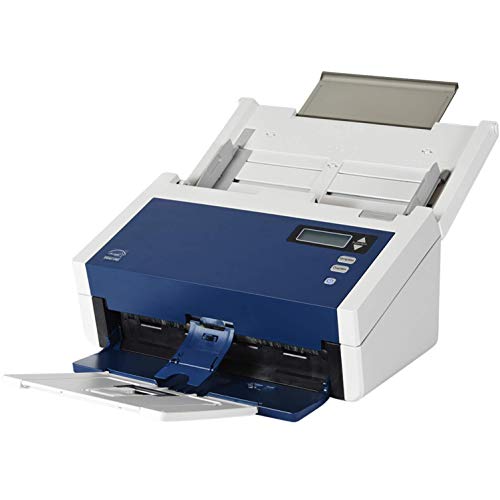
The DocuMate 6460 sits firmly in office-scanner territory, with duplex speeds of up to 70 pages per minute or 140 images per minute in duplex mode. Compared to the photo-focused Epson bundle above, this is the unit to reach for when paperwork volume is the bottleneck, not photo preservation.
It handles checks, plastic ID cards, photos, and standard documents through its high-capacity automatic document feeder. Nine programmable presets let you map common jobs to a single button, and scans save directly to your preset destinations. For small offices processing daily paperwork flows, the throughput and reliability pay for themselves quickly.
The Upside
- ✓Duplex scanning at 70 ppm handles stacks of mixed documents in minutes.
- ✓High-capacity feeder reduces reload interruptions during big jobs.
- ✓Nine presets let you trigger recurring workflows with one touch.
- ✓Handles checks and rigid plastic IDs alongside standard pages.
Points To Note
- •Bulk and weight make it less suited to a casual home desk.
- •Photo quality is solid but not specialized for archival print restoration.
- •Duplex speed advantage flattens out for very small daily batches.
Technical Highlights
| | Feature | Specification | Why It Matters |
|---|
| Scan Speed | Up to 70 ppm / 140 ipm duplex | Clears multi-page jobs quickly without babysitting the feeder. |
| Duplex | Automatic two-sided scanning | Captures both sides of a page in one pass. |
| Media Support | Documents, checks, photos, plastic IDs | Covers everyday office media types in a single device. |
Best Suited To
Small business operators and office admins running daily paperwork through a single dedicated station.
Swap It Out When
Home archivists focused on photo restoration should consider the Epson FastFoto FF-680W bundle instead.
Check Latest Price
The ET MAX steps up from the ET24 Pro with a 38-megapixel CMOS sensor (a light-sensitive chip that converts the image into digital data) and a resolution of 7168 by 5376 pixels. Where the ET24 Pro handles most research needs well, the ET MAX targets users who need higher resolution for detailed illustrations, small text, or archival-grade output.
It uses the same overhead book-scanning approach, with patented curve-flattening that removes the bow from bound pages. Built-in OCR (optical character recognition, which converts scanned text into editable and searchable files) makes scanned pages searchable rather than just image-based. For libraries, serious archivists, or anyone producing publication-quality scans, the extra resolution justifies the higher tier.
Where It Helps
- ✓38MP sensor captures fine detail in illustrations, maps, and small text.
- ✓Curve-flattening software produces clean spreads from bound books.
- ✓OCR converts scanned pages into searchable, editable files.
- ✓Handles documents, books, and bound materials without unbinding.
Practical Considerations
- •Higher-tier price makes it overkill for casual home use.
- •Glossy pages still produce reflections; matte originals scan best.
- •Larger file sizes require meaningful local storage or cloud backup planning.
Feature Card
| | Feature | Specification | Why It Matters |
|---|
| Sensor | 38MP CMOS | Captures finer detail than lower-megapixel overhead units. |
| Resolution | 7168 x 5376 pixels, 410 dpi | Supports archival-quality output for printed reproduction. |
| OCR | Built-in searchable text conversion | Makes scanned libraries usable for keyword search. |
| Book Handling | Patented curve-flattening | Keeps bindings intact while producing flat spreads. |
Whose Shelf It Belongs On
Serious archivists, libraries, and researchers producing high-resolution digital copies of bound materials.
Look Elsewhere When
Casual home users may find the CZUR ET24 Pro covers their book-scanning needs at a lower tier.
View on Amazon
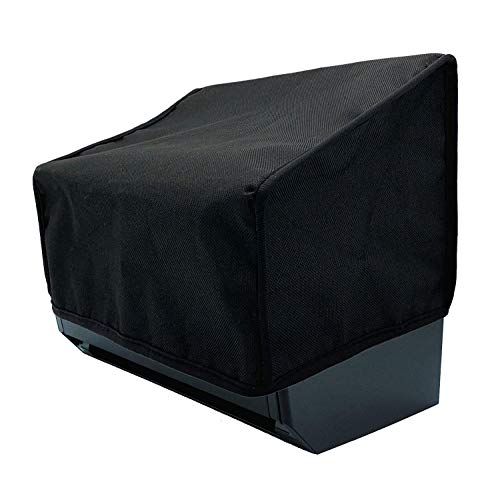
This nylon cover is built specifically for the Epson FastFoto FF-680W scanner covered earlier. If you have invested in that scanner and want to keep it safe between photo-archiving sessions, this kind of cover protects against the dust, spills, and static that accumulate on a desk unit over time.
The antistatic and water-resistant properties suit a garage, attic, or basement workspace where seasonal projects happen. Nylon construction holds up to repeated handling, and the tailored fit means you can leave the scanner in place and just drape the cover over it.
What It Does Well
- ✓Tailored fit for the Epson FF-680W means no awkward bunching.
- ✓Antistatic finish reduces dust attraction during idle periods.
- ✓Water-resistant nylon handles minor spills without soaking through.
- ✓Lightweight, folds flat for storage when not in use.
Small Caveats
- •Only useful if you already own the Epson FF-680W it is sized for.
Right Fit For
Owners of the Epson FastFoto FF-680W who store the unit on a desk between projects and want basic protection.
Not Your Match When
Owners of any other scanner on this list should skip it; the tailored fit will not transfer to a different model.
Check on Amazon
The ScanSnap iX1600 is built for hybrid home offices where paperwork and photos both pass through the same station. Where the Xerox above prioritizes raw throughput, the iX1600 prioritizes flexibility, with a large color touchscreen, dual Wi-Fi and USB connectivity, and ScanSnap Home software that organizes scans automatically.
Duplex speeds are rated at around 40 pages per minute, a step below the heavy-duty Xerox but well above casual home scanners. The touchscreen makes profile switching painless, and wireless support removes the cable clutter that builds up in a busy workspace.
Strengths Worth Knowing
- ✓Touchscreen lets you pick profiles and destinations without a computer.
- ✓Dual Wi-Fi and USB connectivity fits into most home or shared-office setups.
- ✓ScanSnap Home software handles file naming and organization automatically.
- ✓Duplex scanning captures both sides in one pass.
Where It May Fall Short
- •Not designed for specialized photo restoration; the Epson bundle handles that better.
- •Touchscreen adds cost that casual users with single-profile workflows may not need.
Who Should Grab It
Hybrid home office users juggling paperwork, receipts, and occasional photos who value wireless and a touchscreen.
Where A Sibling Pick Shines
Users wanting the simplest possible one-button workflow should consider the ScanSnap iX1400 covered below.
View Latest Price
The iX1400 strips the ScanSnap formula down to its core: one button starts the scan, cleans up the image, and delivers it to your destination. If the iX1600 above feels like overkill for your workflow, this sibling model does the same essential job with fewer frills and a friendlier learning curve.
The Quick Menu interface pops up after each scan, letting you drag the file into your favorite app without navigating nested menus. For first-time scanner owners or anyone tired of fiddling with complex settings, that simplicity is the whole point.
What Pays Off
- ✓One-button operation removes the configuration friction that stops many people from scanning regularly.
- ✓Quick Menu interface speeds up drag-and-drop into common apps.
- ✓Auto document feeder handles multipage jobs without constant reloading.
- ✓Same ScanSnap software reliability as higher-tier models.
Trade Offs
- •No touchscreen or wireless; USB connection only.
- •Lacks the profile-switching convenience of the iX1600.
Perfect Match For
First-time scanner owners and anyone who wants reliable document capture without learning a complex interface.
Skip It When
Users needing wireless sharing across multiple devices should consider the ScanSnap iX1600 covered above.
Check Latest Price
This is the standalone FF-680W without the Workforce bundle, the same photo-first design as item 1 minus the second unit. If your workflow is photo-heavy with occasional paperwork rather than balanced between both, buying the FF-680W alone avoids paying for hardware you will rarely use.
The core capability stays the same: batch scanning up to 36 photos at about one per second at 300 dpi, with software that restores faded prints and tags faces for easier browsing. It is a proven workhorse for family photo projects and a sensible pick for one-off archive sessions.
Useful Highlights
- ✓Photo batch speed and capacity match the bundle version exactly.
- ✓Restoration software revives faded prints without third-party tools.
- ✓Handles photos, postcards, and panoramas alongside standard documents.
- ✓Mobile companion app adds voice notes for family history projects.
Factors To Consider
- •No companion document scanner; high-volume paperwork days run slower than the bundle.
- •Companion software updates may require occasional attention to stay current.
Key Product Details
| | Feature | Specification | Why It Matters |
|---|
| Photo Scan Speed | Approx. 1 photo per second at 300 dpi | Makes big family archive projects feasible in a weekend. |
| Batch Capacity | Up to 36 photos per load | Reduces operator time during long digitization sessions. |
| Photo Format Support | Polaroid through 8″x10″, postcards, panoramas | Covers nearly every print format commonly found at home. |
Built With In Mind
Households focused mainly on photo archiving with occasional document scans rather than daily paperwork flows.
Reach For A Different Pick When
Users who need both photo and document throughput at volume should consider the Epson bundle covered earlier.
View on Amazon
The Aura Pro rounds out the CZUR family as the portable cousin of the ET24 Pro and ET MAX covered above. Where those are designed for fixed desk setups, the Aura Pro folds down and travels, letting you set up a scanning station in a library, archive, or client site rather than hauling books to your office.
It uses three laser lines for accurate curve-flattening, capturing the flat page from a curved binding without distorting the text. A3-size support handles larger archival materials, periodicals, and oversize documents. For mobile researchers and students moving between collections, the portability outweighs the smaller footprint of competitors.
Practical Advantages
- ✓Portable design sets up at archives, libraries, or client sites.
- ✓Triple-laser curve-flattening keeps bound pages flat and readable.
- ✓A3 support handles oversize periodicals and archival materials.
- ✓AI-assisted processing reduces manual cleanup time.
Possible Compromises
- •Lower resolution than the ET24 Pro or ET MAX for fine detail work.
- •Portability means a smaller scanning area per session than desktop models.
Who It Suits Best
Mobile researchers, students, and archivists who digitize across multiple locations rather than one fixed desk.
Where Another Pick Suits Better
Stationary archival projects needing the highest resolution should consider the CZUR ET MAX covered earlier.
Check on Amazon
What Matters Most Before Choosing Document Photo Scanners
Match the Scanner to Your Source Material
Loose prints, bound books, and office paperwork each demand different hardware. Sheet-fed scanners like the Epson FastFoto FF-680W and ScanSnap iX1600 shine on loose pages, while overhead models like the CZUR ET24 Pro and Aura Pro handle bound books without damaging spines. If you work with mixed formats, expect to either compromise on one or run two specialized units.
Resolution vs. Speed Trade-Off
Higher megapixels capture finer detail but produce larger files and slower throughput. For archival-grade reproductions or small text, the CZUR ET MAX at 38MP earns its premium over the 24MP ET24 Pro. For everyday documents and standard photos, the 300 dpi range of sheet-fed scanners hits the sweet spot between clarity and file size.
Connectivity and Software Fit
Wireless support and bundled software shape day-to-day usability more than raw specs. The ScanSnap iX1600 pairs a touchscreen with Wi-Fi for flexible setups, while the iX1400 sticks to USB and a single button for simpler needs. Consider how the scanner fits into your existing computer and app workflow before chasing the most feature-rich option.
Throughput and Duty Cycle
A home user scanning a few pages a week will not stress any of these units, but an office processing hundreds of pages daily benefits from the Xerox DocuMate 6460’s 70 ppm duplex speed. Match the unit to your realistic weekly volume rather than peak one-time projects.
Key Considerations Across These Picks
Pitfalls Shoppers Hit
A common mistake is buying a photo-focused scanner expecting strong document throughput, or picking an office workhorse and being disappointed with photo quality. Match the scanner to your dominant media type. Another trap is overlooking OCR; if you need searchable text rather than image-only files, confirm the software includes OCR before buying.
Where The Extra Money Goes
Premium overhead scanners like the CZUR ET MAX justify their higher tier through 38MP resolution, OCR, and archival-grade curve-flattening. The upgrade pays off for libraries, genealogists, and researchers producing long-term digital archives. For casual users scanning the occasional photo album, the ET24 Pro covers the same core workflow at a more accessible tier.
Frequently Asked Questions
QWhat resolution do I really need for photo scanning?
For standard prints shared on screens and social media, 300 dpi captures more detail than the eye can resolve at typical viewing distances. For archival projects, large prints, or cropping into photos later, a scanner rated at 600 dpi or higher preserves finer detail. The Epson FF-680W covers standard archival needs at 300 dpi, while the CZUR ET MAX at higher pixel counts handles demanding reproduction work.
QCan one scanner handle both photos and documents?
Yes, but with trade-offs. Sheet-fed scanners like the Epson FF-680W and ScanSnap iX1600 process both, with photo restoration features on the Epson and document-focused software on the ScanSnap. The bundle version pairs two specialized units for users who want the strongest performance in each category.
QDo overhead book scanners damage bindings?
No, overhead scanners capture pages without pressing the book flat against glass. The CZUR models use laser lines and software to flatten the natural curve of an open book in the resulting image, leaving the physical binding untouched. This is their main advantage over flatbed scanners for bound materials.
QIs wireless connectivity worth the extra cost?
For shared workspaces or hybrid offices where multiple people use the same scanner, wireless removes cable swaps and makes profile switching smoother. For a single-user desk setup, USB delivers the same scan quality at a lower tier, as seen in the ScanSnap iX1400.
QHow important is OCR for everyday scanning?
OCR converts scanned images into searchable and editable text, which matters if you need to find specific content later or edit documents digitally. For tax records, contracts, and notes, OCR turns a folder of image files into a searchable library. For pure photo archiving, OCR adds little value, so a photo-focused scanner without it may suit your needs.
Bottom Line
Pick the scanner that matches your most common source material: the Epson FF-680W for photo archives, the CZUR ET series for bound books, the Xerox DocuMate for office volume, or the ScanSnap iX models for flexible daily paperwork. A unit that fits your dominant use case will pay back the investment faster than a feature-heavy compromise that handles everything poorly.