Receipts pile up faster than you’d think, and the right scanner turns that mess into searchable, organized files before the stress sets in. Whether you’re a freelancer tracking expenses or running a small office that processes invoices daily, a dedicated document receipt scanner saves hours of typing and filing. The picks below cover wireless convenience, heavy-duty throughput, and compact options that fit a cramped desk, so you can match the tool to the workload instead of the other way around.
A Quick View Of The Lineup

Epson WorkForce ES-590W Wireless Desktop Color Duplex Document Scanner

Epson WorkForce ES-400 II High-Speed Color Duplex Desktop Document Scanner

Epson WorkForce ES-500W II Wireless Color Duplex Desktop Document Scanner

ScanSnap iX1600 Wireless or USB High-Speed Document Scanner, Black

Doxie Pro Duplex Document and Receipt Scanner
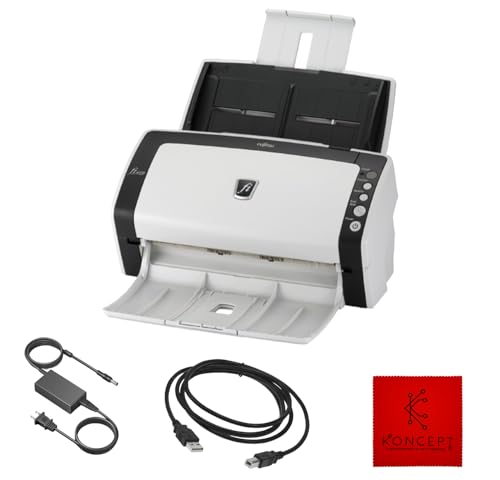
FI-6130Z Fujitsu Duplex Sheet-Fed Document Scanner (Renewed)

ScanSnap iX1600 Receipt Edition Color Duplex Invoice Scanner

ScanSnap iX1400 One-Touch Color Document and Receipt Scanner

FI-7160 Fujitsu Duplex Document Scanner 60 PPM (Renewed)
The Picks, Examined More Closely
The ES-590W sits at the top of the lineup because it tackles the two things that slow people down: feeding paper and figuring out where the scan goes next. Its 100-page auto document feeder (ADF) is generous for a desktop unit, so a stack of receipts, contracts, and mixed-size sheets can ride through without babysitting.
A 4.3-inch color touchscreen handles profile selection on the device itself, which keeps the workflow moving when a laptop isn’t open. Compared to the ES-400 II that follows, this model adds wireless connectivity and AI-driven file naming through Epson ScanSmart, so scanned documents become searchable PDFs without extra clicking.
Advantages To Know
- 100-page ADF means fewer refill trips during a long scanning session
- Wireless and USB dual connectivity fits flexible desk setups
- 4.3-inch touchscreen simplifies job selection without opening software
- Duplex scanning (both sides in one pass) saves time on two-sided documents
- AI-powered searchable output reduces manual filing after scanning
Things To Consider
- Cloud features rely on a stable network connection, which can be a weak spot in older offices
- The 45 ppm speed is best at 300 dpi; higher resolutions slow the feeder noticeably
Key Specs
Whose Shelf It Belongs On
Hybrid workers and small office managers who handle a steady mix of receipts, contracts, and multipage reports will find the speed and automation land where they need them.
Where Another Pick Suits Better
Shoppers running an older Windows-only shop on a tighter budget may get more value from the FI-6130Z, since that renewed unit delivers solid duplex scanning without the touchscreen price tag.
The ES-400 II drops the touchscreen and wireless radio, and that tradeoff pays off when budget matters more than bells and whistles. It still pulls both sides of a page in one pass, which is the main reason anyone buys a desktop document scanner in the first place.
It plugs in over USB and works through Epson ScanSmart on a connected computer, so setup is straightforward for anyone comfortable with a basic software install. Compared to the ES-590W above, this model runs at a slower rated speed, but the core duplex engine and feeder design are familiar territory for home offices processing under a few hundred pages a day.
Real-World Strengths
- USB-only design means a single cable and no network headaches
- Two-sided capture handles standard receipt and document stacks in one sweep
Points To Note
- No wireless connectivity limits placement to wherever a USB cable reaches
- 50-sheet ADF means more refills on long batches than the ES-590W
- Speed drops on color or higher-resolution scans, so archival jobs take longer
Who It Suits Best
Home users and small business owners who scan a few hundred pages weekly and prefer a wired, predictable setup will appreciate the no-nonsense approach.
Consider Something Else When
Anyone needing wireless placement for a shared office floor should look at the ES-500W II instead, since it adds Wi-Fi while keeping the same feeder design.
The ES-500W II lands in the middle of Epson’s lineup and earns its place by bridging the gap between the budget ES-400 II and the touchscreen ES-590W. Wireless connectivity is the main upgrade, letting the scanner sit anywhere on a network rather than tethered to one computer.
It pushes through 35 ppm and 70 ipm (images per minute) in duplex mode, which is more than enough for a small team processing daily invoices, intake forms, and receipts. Owners commonly report that ScanSmart software keeps the workflow simple on both Mac and PC, and the 50-page ADF handles mixed batch sizes without constant attention.
Features That Help
- Wi-Fi connectivity supports multiple users across an office network
- Duplex scan engine captures both sides per pass, halving handling time
- ScanSmart software includes OCR (optical character recognition) for searchable PDFs
- Compact desktop footprint fits beside a monitor or on a shallow shelf
Trade Offs
- 50-sheet ADF is smaller than the ES-590W’s 100-page tray
- Wireless setup can take a few tries on networks with stricter security settings
Feature Snapshot
Made For
Small businesses and home office teams that need shared access from a few computers without stepping up to a full enterprise model.
Look Elsewhere When
Freelancers or bookkeepers who primarily scan receipts may prefer the ScanSnap iX1600 Receipt Edition for its QuickBooks-specific output.
ScanSnap built its reputation on software that doesn’t fight you, and the iX1600 is the flagship expression of that philosophy. The 4.3-inch touchscreen is the centerpiece: profiles for tax docs, receipts, business cards, and photo scans are all one tap away, which sounds small until you stop fiddling with menus.
It supports both Wi-Fi and USB, so you can park it on a credenza in a shared office or run it from a single laptop. ScanSnap Home ties everything together with a clean desktop app, and the duplex engine at 40 ppm puts it comfortably ahead of the Epson ES-500W II in pure speed.
Where It Delivers
- 40 ppm duplex scanning handles large jobs without bottlenecking
- Touchscreen profiles make one-touch workflows actually work
- ScanSnap Home software keeps scanned files organized by document type
- Wireless and USB both supported, so the scanner fits multiple setups
Minor Gripes
- Premium positioning puts it well above the Epson mid-range models in cost
- Software updates occasionally change interface elements, so muscle memory resets now and then
Best Suited To
Professionals who value software polish, speed, and a touchscreen interface more than saving on the hardware itself.
Not Your Match When
Shoppers wanting simple USB-only scanning on a tighter budget should consider the ES-400 II, which covers the duplex basics without the premium markup.
Doxie takes a different approach with a collapsible feeder that flattens down when you’re not scanning, which is genuinely useful in a small apartment or shared desk. The footprint shrinks to about the size of a laptop, so it tucks into a drawer between sessions.
It still does duplex (two-sided) scanning, automatic cropping, contrast boost, and OCR for searchable output, so functionality isn’t sacrificed for portability. Compared to the bulkier Epson ES-400 II, Doxie’s appeal is form factor more than raw speed, but the software handles receipts, business cards, and photos with equal ease.
The Case For It
- Collapsible design stores flat, ideal for tight workspaces
- Direct feed slot accepts thick or delicate paper that an ADF might struggle with
- OCR and automatic cropping built into the bundled software
Points To Keep In Mind
- Feeder capacity is modest, so large jobs require more refills
- Plastic shell feels lighter than the metal-bodied Fujitsu units
Right Fit For
Remote workers, students, and travelers who need a capable scanner that doesn’t dominate the desk when it’s not in use.
Swap It Out When
High-volume offices running hundreds of pages a day should reach for the FI-7160 instead, since that renewed Fujitsu is built for sustained daily workloads.
The FI-6130Z is a workhorse from Fujitsu’s enterprise line, sold here as a renewed unit to bring the cost down. The metal frame, robust roller system, and proven duplex engine are the kinds of details that show up in offices running thousands of scans a day.
The catch is compatibility: this model supports Windows XP through Windows 10, but not Windows 11, which limits the audience. Anyone on a supported OS gets a scanner that punches well above its refreshed price point.
What Makes Sense
- Refurbished enterprise build costs less than a new mid-range model
- Duplex sheet-fed design handles mixed document types in a single pass
- USB connectivity keeps the wiring simple
Practical Considerations
- Not compatible with Windows 11, so verify your OS before purchase
- Renewed units may show cosmetic wear, which is worth expecting at this price
- Lacks modern wireless features of newer Epson and ScanSnap models
Who Should Grab It
Small offices and home studios still running Windows 10 who want enterprise-grade scanning hardware without paying new-unit prices.
A Better Fit Elsewhere
Anyone on a current-generation OS or who needs wireless connectivity should consider the Epson ES-500W II, which offers similar duplex scanning with broader system support.
The Receipt Edition takes the standard iX1600 hardware and layers on QuickBooks Online integration, which matters if that’s the system where your books live. Receipts and invoices are captured, parsed, and pushed to QuickBooks without manual data entry per transaction.
Bookkeepers and freelancers tracking expenses will appreciate the workflow, since the bottleneck in expense management is usually the typing, not the scanning. Compared to the regular iX1600, this version trades some of the general-purpose flexibility for tighter bookkeeping output.
A Few Strong Suits
- Direct QuickBooks Online export cuts manual data entry from each receipt
- Same 40 ppm duplex engine as the standard iX1600
- Touchscreen profiles simplify receipt and invoice workflows
Soft Spots
- Specialty focus means the value drops if QuickBooks isn’t your bookkeeping tool
Perfect Match For
Independent bookkeepers, freelancers, and small business owners managing expenses through QuickBooks Online who want the parsing to happen automatically.
Reach For A Different Pick When
Anyone who doesn’t use QuickBooks will get more general-purpose value from the standard ScanSnap iX1600 without the receipt-specific feature tax.
The iX1400 strips the touchscreen and wireless connectivity from the iX1600 and lands on a single-button design philosophy. Press the button, scan, save, done. For anyone who found the previous ScanSnap software layers too much, this is the cleanest entry point.
It connects over USB only, which keeps the setup simple and avoids the network troubleshooting that occasionally shows up with wireless scanners. The Quick Menu pops up on the connected computer, so you still get drag-and-drop routing to apps, but the scanner itself stays minimal.
What It Does Well
- One-button operation removes the learning curve for first-time users
- USB-only setup means plug it in and start scanning in minutes
- ScanSnap Quick Menu routes scans to email, folders, or apps from the desktop
Honest Caveats
- No wireless connectivity limits placement to one computer’s reach
- Lacks the touchscreen profile selection that makes the iX1600 faster for shared use
Who Will Love This
Beginners and casual home users who want a reliable scanner without managing network profiles or touchscreen menus.
Skip It When
Shared offices needing multi-user wireless access will find the ScanSnap iX1600 a more flexible fit for the additional cost.
The FI-7160 sits at the top of the throughput chart with a 60 ppm duplex engine and an 80-sheet ADF, which is the kind of capacity you want when scanning isn’t an occasional task but a daily one. Fujitsu built this series for back-office environments that run through contracts, medical forms, or financial records in serious volume.
The rated daily duty cycle of 4,000 scans is a clue to its design intent: this is a scanner meant to be in motion, not sitting idle. Compared to the Doxie Pro earlier in the list, the FI-7160 trades the collapsible form factor for sustained heavy use.
Points In Its Favor
- 60 ppm duplex speed cuts through high-volume daily batches
- 80-sheet ADF reduces refill frequency on long jobs
- 600 dpi optical resolution handles detailed document capture
- USB 3.0 supports faster data transfer than older USB 2.0 scanners
Possible Compromises
- Renewed status means cosmetic wear is possible; check the seller’s notes
- Larger footprint requires more desk or shelf space than compact units
Technical Reference
Built With In Mind
Busy offices, accounting departments, and anyone processing thousands of pages per week who needs hardware that holds up under daily pressure.
Another Choice May Suit
Home-based freelancers with light weekly scanning volume would find the Epson ES-400 II easier to fit on a small desk without sacrificing the duplex basics.
What To Weigh Before Choosing A Document Receipt Scanner
Speed And Daily Volume
The right speed depends on how much paper moves through your week. Home users processing a few dozen receipts a day will find 25 to 35 ppm comfortable, while small offices with hundreds of daily pages should look at 45 ppm and above. The FI-7160 at 60 ppm sits in another category entirely, suited to environments where the scanner rarely stops.
A higher pages-per-minute rating assumes a standard 300 dpi setting; cranking to 600 dpi for archival quality slows the feeder noticeably on every model. Match the rated speed to your typical batch size, not your worst-case day.
Feeder Capacity And Document Variety
ADF capacity ranges from 50 sheets on mid-range units to 100 on the ES-590W and 80 on the FI-7160. Larger trays mean fewer pauses, but they also add bulk. For mixed documents, the ADF needs to handle varied paper weights and sizes without jamming.
If you regularly scan thick cards, embossed receipts, or odd-sized forms, look for a model with a direct feed slot or adjustable guides. Doxie Pro leans into this with its direct feed for delicate or thick paper.
Connectivity And Software
Wireless scanners free up placement but introduce network setup quirks. USB-only models are simpler but tether the scanner to one computer. Touchscreen interfaces, like the ones on the ES-590W and ScanSnap iX1600, speed up job selection for shared use.
Software is the layer most people underestimate. OCR turns scans into searchable text, automatic cropping trims edges, and naming rules keep files organized without manual effort. Check whether the bundled software supports your operating system before committing, since some renewed units like the FI-6130Z cap at Windows 10.
Key Considerations Across These Picks
Common Shopping Slip Ups
One frequent misstep is chasing the highest ppm rating without checking feeder capacity or daily duty cycle. A fast scanner with a tiny ADF becomes the bottleneck on real jobs. Another is overlooking operating system compatibility, especially with renewed units that target legacy Windows versions.
Software support matters as much as hardware specs. Bundled OCR and filing tools save hours each week, but only if the apps run on your current OS. Verify the supported version before buying.
Where The Extra Money Goes
Paying more typically buys three things: a larger touchscreen, faster duplex speeds, and tighter software integration. The ScanSnap iX1600 line is a good example, where the premium lands in the polished interface and QuickBooks-friendly output rather than the scan engine itself.
For offices running thousands of pages weekly, the upgrade to a 60 ppm unit like the FI-7160 pays off in time saved across a year. For home users scanning under a few hundred pages, the premium tier is usually more capability than needed.
Frequently Asked Questions
What Is A Document Receipt Scanner?
A document receipt scanner is a sheet-fed device that digitizes paper receipts, invoices, business cards, and standard documents into searchable digital files. Most modern models support duplex scanning, which means both sides of a page are captured in a single pass.
Do I Need Duplex Scanning For Receipts?
Duplex is useful for two-sided documents like contracts and statements, but most receipts are single-sided. The bigger benefit of duplex is speed on mixed batches where some pages happen to be two-sided, saving the hassle of re-feeding pages manually.
How Important Is OCR (Optical Character Recognition)?
OCR converts scanned images into searchable and editable text, which is essential if you want to find a specific receipt or invoice later by typing a name or amount. Without OCR, scans are just pictures, and you can’t search their content.
Can These Scanners Send Files Directly To Cloud Storage?
Many modern scanners, including the Epson ES-590W and ScanSnap iX1600, support cloud destinations through their companion software. The exact integrations depend on the model, so check the software’s supported services before purchase.
What Is A Renewed Scanner, And Is It Worth Buying?
A renewed scanner is a pre-owned unit that has been inspected, cleaned, and tested for resale. Renewed units like the Fujitsu FI-6130Z and FI-7160 can offer enterprise-grade hardware at a lower cost, though cosmetic wear and limited OS support are worth expecting.
Bottom Line
The best scanner matches your real workload, not the highest spec sheet. For most home offices and small businesses, the Epson ES-590W or ScanSnap iX1600 delivers the right balance of speed, software, and daily usability. Heavy-volume offices should look at the FI-7160, while casual users on a budget will find the ES-400 II or Doxie Pro more than enough for weekly receipt runs.