Two screens can transform how you work, but only when they’re positioned properly. Neck strain from screens sitting too low, cluttered desks from chunky factory bases, and tangled cables are the everyday frustrations most dual-monitor setups never quite escape. The right stand lifts your displays to a comfortable eye line, frees up workspace underneath, and keeps everything tidy, whether you’re working from home, gaming after hours, or managing a busy studio. This list pulls together ten solid options across risers, gas-spring arms, and triple/quad mounts, so you can find the configuration that actually fits your desk and your screens.
An Overview Of The Picks

HUANUO Monitor Riser with Vented Steel Shelf, 2 Pack

Hemudu 2 Pack Computer Monitor Riser

monTEK Triple Monitor Stand for 17-32″ Screens
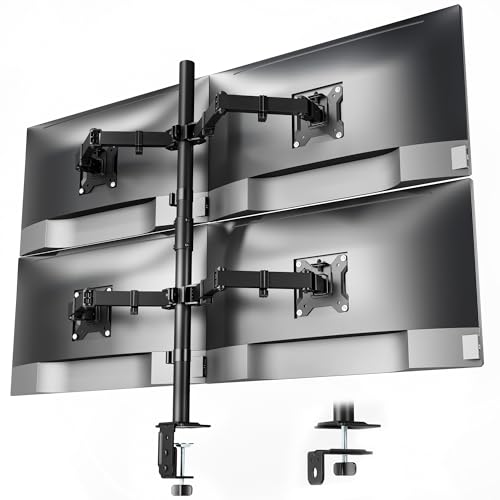
monTEK Quad Monitor Stand for Four 17-32″ Screens

Fenge Dual Monitor Stand with Drawers, 42.5″, Oak

HUANUO FlowLift Pro Monitor Arm for 13-32″ Screens

ELG Dual Monitor Stand, Gas Spring, 17-35″ Screens

monTEK Heavy-Duty Dual Monitor Stand for 17-32″

HUANUO FlowLift Dual Monitor Stand, 13-32″ Screens

HUANUO Triple Monitor Mount for 17-32″ Screens
A Deeper Look At The Lineup
Two-pack risers are a smart move when you want matching stands on either side of a desk, or you’re outfitting a home office and a study at the same time. HUANUO’s offering uses a powder-coated steel shelf with perforated holes across the surface, which is more interesting than it sounds. Those holes let warm air escape from a laptop or a hot-running printer sitting underneath, rather than trapping it the way a solid wood shelf would.
The footprint runs roughly 14.6 by 9.3 inches with a 3.94-inch lift, enough to bring most monitors up to a comfortable viewing height without forcing you to crane your neck. VESA compatibility isn’t part of the design here, so you’re relying on the factory base to sit flat on the shelf. In a typical home office where you’re moving between email, a browser, and the occasional video call, that simple approach is often all you need.
What Helps Most
- Perforated steel shelf pulls heat away from laptops and printers
- Two-pack pricing makes dual setups more affordable
- 3.94-inch lift hits a natural eye line for most seated setups
- Powder-coated finish resists scuffs during daily use
- Slides a keyboard or notebook underneath when not in use
Things To Consider
- No VESA compatibility, so heavier or oddly shaped monitor bases may not sit securely
- Fixed height means adjusting viewing angle requires stacking books or swapping stands
- Owners commonly report the shelf edges can flex slightly under very heavy equipment
Who It Suits Best
Budget-focused home office workers who run one or two standard monitors and want simple cooling underneath.
Skip It When
You need a fully adjustable arm setup, in which case the HUANUO FlowLift Pro Monitor Arm offers a step up.
The Hemudu riser trades the fixed-shelf approach of the HUANUO pick above for something more adjustable. Stainless steel legs telescope so you can fine-tune the height, and the top surface tilts forward up to 15 degrees. That tilt option matters more than it sounds: it’s useful when you’re sitting low or sharing a desk between people of different heights, and it helps reduce glare from overhead lights bouncing off glossy LCD panels.
The shelf sits high enough that you can slide a closed laptop or a notebook underneath, turning wasted air space into storage. Compared to the more passive HUANUO riser, this one feels more like a small workstation than a passive platform. For a shared home office or a college dorm where multiple people use the same desk throughout the day, the adjustability pays off.
A Few Strong Suits
- Telescoping legs adapt to different chair heights and user profiles
- 15-degree forward tilt helps reduce glare on glossy displays
- Two-pack bundle suits couples or shared workstations
- Stainless steel legs resist wobble over years of adjustment
Worth Noting
- Tilt adjustment requires loosening hardware, not a quick one-handed change
- Surface area is smaller than the Fenge dual riser, limiting side-by-side monitor placement
Best Suited To
Shared desks where multiple users need different viewing angles throughout the day.
Look Elsewhere When
You want both a height lift and storage drawers, a gap the Fenge Dual Monitor Stand fills nicely.
Stepping away from risers, the monTEK triple mount floats three screens on gas-spring arms clamped to the back of your desk. VESA (Video Electronics Standards Association) mounting holes are the standardized screw patterns on the back of monitors, either 75x75mm or 100x100mm here, which covers the vast majority of displays from 17 to 32 inches. Each arm handles up to 22 lbs, so most flat panels under 32 inches clear the bar comfortably.
This is the configuration most traders, video editors, and software engineers gravitate toward: one primary screen straight ahead, two flanking displays angled inward. Unlike the passive risers above, the arms articulate, so you can pull a screen closer for detailed work or push it back when you need extra desk space for sketching or writing. Built-in cable routing keeps the wire mess manageable, though you’ll still want to plan your cable runs before mounting.
Features That Help
- Three independent arms let you angle each screen independently
- 22-lb per-arm capacity covers most 27-inch and 32-inch monitors
- Integrated cable organizers keep wires routed along the arms
- Frees up the entire desk footprint beneath the screens
Points To Note
- Requires a wood desk with a back edge for the clamp to grip
- Triple-monitor cable runs take planning to keep tidy
- Heavier curved displays may push the upper weight limit depending on arm position
The Right Fit
Traders, editors, and engineers running three flat panels between 17 and 32 inches with VESA mounting holes.
Reach For A Different Pick When
Four screens are the goal, where the monTEK Quad Monitor Stand becomes the obvious upgrade.
Four screens on a single mount sounds excessive until you sit down and try it. The monTEK quad stand adds a fourth arm to the triple configuration above, holding four 17-to-32-inch displays at 22 lbs each. The same VESA 75x75mm and 100x100mm compatibility applies, so most modern flat panels drop right onto the plates.
This is the build for serious multi-taskers: someone monitoring chat, code, documentation, and a dashboard at the same time, or a creator reviewing footage on three panels while a fourth handles timeline tools. Desk space underneath is completely reclaimed. The honest read is that four-arm setups feel dramatic on day one, then quietly become the new normal within a week.
What Stands Out
- Four-arm configuration supports command-center style workflows
- Matches the same per-arm weight rating as the triple mount
- Single clamp base frees up more desk real estate than separate stands
- Cable organizers route cleanly across all four arms
Honest Caveats
- Requires a deep desk to position four screens without the outer pair hanging off the edge
- More arms mean more pivot points to fine-tune during setup
- Heavier overall installation may warrant a second person for mounting
Made For
Power users running simultaneous workflows across four displays, from finance to content production.
Swap It Out When
Three screens are plenty, where the lighter monTEK Triple Monitor Stand is easier to live with.
The Fenge stand takes a different route entirely. Instead of clamping arms to your desk, it’s a 42.5-inch wide wooden shelf in an oak finish that sits on top of your existing desk surface. Two tiers give you a lower shelf for a keyboard or paperwork, while the upper surface holds two monitors side by side, sized for displays up to 32 inches each.
What sets this pick apart from the steel risers earlier in the list is the integrated drawer. A slide-out drawer roughly 10.9 inches deep swallows pens, chargers, sticky notes, and the small desk clutter that usually migrates across your workspace. It’s the closest thing in this list to a small desk organizer disguised as a monitor stand. For tidy desks with a defined aesthetic, this is the one that blends in.
Useful Touches
- Built-in drawer consolidates desk clutter in one spot
- 42.5-inch width holds two 32-inch monitors side by side
- Oak finish suits warmer home office aesthetics
- Lower shelf doubles as a printer or keyboard perch
- MDF construction keeps the unit relatively lightweight to reposition
Room For Improvement
- MDF finish can scuff if dragged across rough desk surfaces
- No height or tilt adjustment once placed on the desk
- Fixed footprint demands adequate desk depth to sit comfortably
Feature Card
Who Will Love This
Home office workers with a defined desk aesthetic who want built-in storage alongside their monitor lift.
A Better Fit Elsewhere
You need adjustable height, where the ELG Dual Monitor Stand gives full motion flexibility.
The FlowLift Pro is HUANUO’s single-arm flagship, built around what the brand calls a MechaSpring mechanism. That refers to the internal spring-and-pivot hardware that lets the arm move smoothly through height, tilt, swivel, and rotation without drifting after you let go. Screens from 13 to 32 inches fit, with weight limits between 4.4 and 19.8 lbs for flat panels.
Tool-free VESA mounting is a nice touch if you’ve ever fumbled with a tiny Allen wrench behind a monitor. A C-clamp or grommet base secures the arm to desks between 0.59 and 3.54 inches thick, though the brand specifically recommends wood surfaces. For a single-monitor workstation where ergonomics matter, this is one of the more refined picks you’ll find without jumping to a much higher tier.
Everyday Advantages
- MechaSpring movement holds position without drift
- Tool-free VESA plate speeds up mounting and swaps
- Wide compatibility from 13-inch portable screens to 32-inch panels
- Frees up significant desk space beneath the floating screen
Factors To Consider
- Curved screens have a tighter weight range, up to 15.4 lbs
- Wood desk recommendation excludes glass and metal surfaces
- Single arm configuration means no built-in second-screen partner
Feature Card
Perfect Match For
Single-screen users who want premium adjustability without committing to a multi-arm setup.
Another Choice May Suit
You need two screens on articulating arms, where the ELG Dual Monitor Stand is purpose-built for that.
Where the HUANUO FlowLift Pro above is a single-arm setup, the ELG doubles down with two independent gas-spring arms. Each arm carries a screen between 17 and 35 inches, up to 19.8 lbs. That 35-inch ceiling is unusual in this category and opens the door to larger ultrawide panels. The arms extend up to 21.4 inches and adjust vertically to about 16.1 inches, which gives genuine reach across a deep desk.
Construction mixes aluminum alloy with heavy-duty carbon steel, and 360-degree rotation means you can swing a screen from landscape to portrait without unbolting anything. That’s a quiet superpower for coders reviewing long log files or writers editing manuscripts side by side. Compared to the heavier monTEK dual pick later in the list, this one trades a bit of weight capacity for finer motion control.
Key Advantages
- Independent gas-spring arms adjust each screen separately
- 35-inch screen ceiling suits larger ultrawide displays
- 360-degree rotation supports portrait-mode workflows
- Aluminum and carbon steel construction feels solid
Possible Compromises
- 19.8-lb per-arm limit is lower than monTEK’s 22-lb dual mount
- C-clamp base requires a sturdy desk edge to feel secure
Right Fit For
Professionals with two larger displays who want smooth gas-spring movement and portrait-mode flexibility.
Consider A Sibling Pick
Heavier monitors tip the balance toward the monTEK Heavy-Duty Dual Monitor Stand.
The Heavy-Duty Dual is monTEK’s answer to anyone whose monitors weigh more than average. Reinforced steel joints, thickened VESA plates, and anti-slip base pads make up the bones of this stand. Each arm handles up to 22 lbs of flat-panel display between 17 and 32 inches, which puts it slightly above the ELG dual in raw capacity.
Tilt, swivel, and rotation adjustments are standard. The heavier build shows up where it counts: when you’re pushing a screen back to its full extension, this stand resists the wobble that lighter arms sometimes develop. If you regularly type hard, share your desk with someone, or have monitors with chunky stands, the reinforced joints earn their keep.
What Makes Sense
- 22-lb per-arm capacity covers heavier 27 and 32-inch panels
- Reinforced steel joints reduce wobble at full extension
- Thickened VESA plates grip monitors more securely
- Anti-slip base pads protect desk finishes from clamp pressure
Details To Watch
- Heavier overall weight makes initial mounting a two-person job
- No gas-spring assist means manual positioning throughout the day
Feature Card
Built With In Mind
Heavy-monitor users who want solid support over buttery gas-spring motion.
Where A Sibling Pick Shines
Smoother motion matters more than capacity, in which case the ELG Dual Monitor Stand delivers the gas-spring feel.
The FlowLift Dual is HUANUO’s long-running answer for gamers and streamers who run two screens, often a primary gaming display and a chat or streaming panel off to the side. Full-motion articulation means tilt, swivel, and rotation across both arms, with each arm supporting 4.4 to 19.8 lbs. The 13-inch lower limit covers portable monitors that streamers sometimes use for chat overlays.
Compared to the monTEK dual pick above, this one offers slightly less weight capacity but compensates with broader screen size compatibility. The C-clamp and grommet base work on most wood desks, and the VESA 75 and 100mm mounting holes match standard displays. For a desk where two screens need to swing around freely without locking into a single position, the dual full-motion setup is the right kind of flexibility.
Noteworthy Benefits
- Full-motion articulation on both arms for varied screen angles
- 13-inch lower limit covers portable streaming monitors
- C-clamp and grommet base options fit varied desk layouts
- Compatible with most wood desks within the recommended thickness range
Soft Spots
- 19.8-lb per-arm ceiling excludes heavier 32-inch curved panels
- Full-motion arms need periodic tension adjustment over time
Whose Shelf It Belongs On
Gamers and streamers pairing a main display with a secondary panel for chat, console, or broadcast tools.
Consider Something Else When
Three screens are the goal, where the HUANUO Triple Monitor Mount is purpose-built for that.
Rounding out the list, HUANUO’s triple mount handles three screens from 17 to 32 inches, with each arm rated between 4.4 and 17.6 lbs. VESA 75x75mm or 100x100mm compatibility is standard, and the clamp and grommet kit is included in the box. The lower per-arm weight rating compared to the monTEK triple earlier reflects the lighter gas-spring mechanism HUANUO uses here.
Swivel, tilt, and rotation are all available across the three arms, so a gaming or streaming build with one main display and two side panels lines up cleanly. For most triple-screen gaming setups with standard 24 to 27-inch panels, the weight limit is rarely an issue. Where the monTEK triple appeals to heavier productivity monitors, this HUANUO triple leans toward gaming displays that prioritize fast motion over heavy-duty load rating.
Strong Points
- Triple-arm configuration supports gaming and streaming multi-screen layouts
- Swivel, tilt, and rotation across all three arms
- Clamp and grommet mounting kit included out of the box
- Compatible with standard 24 to 27-inch gaming panels
Less Ideal Details
- 17.6-lb per-arm ceiling is the lowest of the triple mounts in this list
- Three arms mean more cables to plan for and route
Best Fit For
Triple-screen gaming builds where motion and angle flexibility matter more than raw weight capacity.
Where Another Pick Suits Better
Heavier productivity monitors are involved, where the monTEK Triple Monitor Stand supports more weight per arm.
What Matters Most Before Choosing Double Monitor Stands For Desk
Riser Versus Mount Arm
Risers are passive shelves that simply lift your monitor a few inches off the desk. They cost less, install in seconds, and leave the monitor’s factory base untouched. Mount arms clamp to the back of your desk and use VESA plates to float your screen, freeing up the space beneath it and letting you adjust height, tilt, swivel, and rotation. Arm mounts suit anyone who spends long hours in front of a screen or wants to angle displays for specific tasks.
Screen Size, Weight, And VESA Fit
Every arm mount on this list specifies a screen size range and a weight range per arm. Check both before buying: a 27-inch monitor at 15 lbs fits comfortably within most arms here, while a 32-inch curved display can push some limits. VESA compatibility refers to the four-screw mounting pattern on the back of your monitor, usually 75x75mm or 100x100mm. If your monitor lacks VESA holes entirely, an arm mount won’t work and a riser is the realistic path.
Desk Type And Clamp Compatibility
Most clamp-based mounts require a wood desk with a back edge between roughly 0.6 and 3.5 inches thick. Glass, metal, and curved-edge desks often rule out a standard C-clamp. If your desk falls outside the typical range, look for grommet-mount options, which use a hole drilled through the desk surface for a more secure attachment.
Key Considerations Across These Picks
Pitfalls Shoppers Hit
The most common mistake is choosing a mount without checking your monitor’s actual weight and VESA pattern. A 35-inch panel can fall outside the size range of smaller mounts, and curved displays often have stricter weight limits than flat panels. Another trap is buying a clamp-style arm for a glass desk and discovering too late that the clamp won’t grip. Measure your desk thickness and confirm your monitor’s VESA layout before anything else.
Where The Extra Money Goes
Higher-tier models in this category typically add gas-spring assistance, broader VESA compatibility, and reinforced joints that resist wobble. You also pay for integrated cable management and sturdier base clamps. The upgrade tends to pay off for anyone adjusting screens multiple times a day, working long hours, or running heavier monitors. For a single fixed-position setup used a few hours at a time, a budget riser or simpler arm covers the basics without the premium price tag.
Frequently Asked Questions
What VESA Pattern Do I Need?
Most monitors use either a 75x75mm or 100x100mm VESA mounting pattern, which refers to the distance between the four screw holes on the back. Check your monitor’s spec sheet or measure the holes manually to confirm before buying a mount arm.
Can I Use These Stands On A Glass Desk?
Clamp-style arms generally need a wood desk with a defined back edge. Glass desks usually rule out standard C-clamps unless you use a grommet mount through a drilled hole. Risers and shelf-style stands work on any flat surface.
How Much Weight Can A Dual Monitor Arm Hold?
Per-arm weight limits in this list range from 17.6 lbs to 22 lbs. Always check your specific monitor’s weight and stay under the rated limit, especially at full arm extension where leverage increases.
Do These Mounts Work With Curved Monitors?
Most do, though curved screens often have a tighter weight range than flat panels of the same size. A few models here specify different limits for curved displays, so verify the curved-screen rating if that applies.
Is Installation Difficult?
Risers and shelf-style stands require no installation beyond placing them on your desk. Arm mounts need a clamp or grommet attachment plus monitor mounting, usually taking 15 to 30 minutes with basic tools.
Closing Thoughts
The right double monitor setup depends less on specs and more on how you actually use your desk. A simple riser handles a quiet home office beautifully, while a triple arm mount makes sense for traders, creators, and gamers who need multiple angles throughout the day. Measure your monitors, check your desk, and pick the configuration that fits the way you work. Your neck and your keyboard tray will both thank you.