You don’t need a tethered scanner anymore to keep checkout lines humming and warehouses moving. Modern wireless models read 1D and 2D codes from phone screens, printed labels, and damaged packaging alike, sending data straight to laptops, tablets, or POS terminals over Bluetooth. The right pick depends on where you’ll work: a busy retail counter, a dusty warehouse aisle, or a mobile cart at a trade show.
The Choices Worth Comparing

NETUM 2D QR Industrial Bluetooth Barcode Scanner

Tera 9700 Handsfree Omnidirectional Scanner

NETUM Upgraded QR Industrial Bluetooth Scanner

Tera D5100 Wireless 2D Barcode Scanner
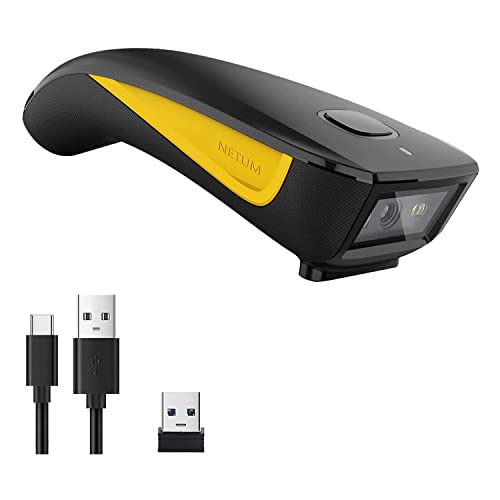
NETUM Mini Bluetooth Barcode Scanner
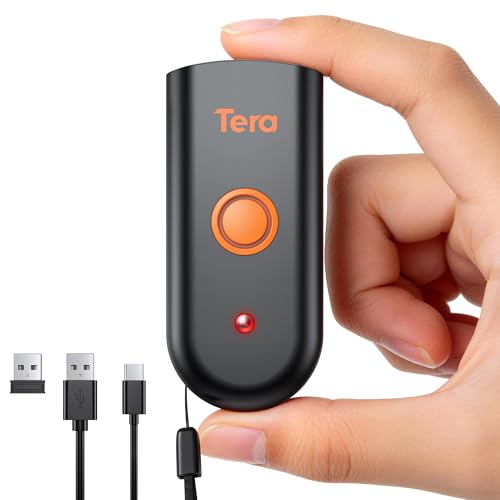
Tera 1200 Pocket Wireless 2D Scanner

NETUM Q900 Android Mobile Computer

Tera HW0009 Pro Wireless Scanner with Screen

Tera HW0002 Wireless 2D Scanner with Stand

Inateck Nano 260D Wireless 2D Scanner
More Details On Our Top Picks
Designed for shops where drops and dust are daily realities, this NETUM model arrives ready for rough treatment. The IP67 rating means full dust-tight sealing plus temporary water immersion protection, and the silicone overmold absorbs shocks from drops onto concrete. Bluetooth pairs with phones, tablets, and POS terminals, while the included charging dock keeps the unit topped off between shifts.
Compared to desk-bound models like the Tera 9700 that follow, this one trades countertop convenience for true portability. Workers moving between racks or loading docks benefit most, since you can read codes off cartons, pallets, and phone screens without breaking stride. The wider industrial housing does add weight, so extended all-day carry may tire smaller hands.
Strong Points
- IP67 sealing keeps the scan engine working through dust storms and splashes that would retire lesser models.
- Dedicated charging dock means you return the unit to a known spot and grab it again fully powered.
- Reads both 1D barcodes and 2D QR codes from screens, paper, and slightly worn labels.
- Wireless Bluetooth connection frees you to walk 30+ feet from the host device without dropped scans.
Things To Consider
- Heavier than pocket scanners, so fatigue sets in during marathon shifts without a holster.
- Industrial silicone sleeve collects dust in gritty environments and needs occasional wipe-down.
- Initial Bluetooth pairing across multiple host devices may require a quick manual scan of setup codes.
Key Specs
Whose Shelf It Belongs On
Warehouse leads, auto parts retailers, and construction supply counters where codes arrive on beat-up cartons and rainy pallets.
Look Elsewhere When
You run a single checkout lane and prefer the Tera 9700 hands-free desktop form factor for speed over portability.
This desktop scanner sits on the counter and reads codes from any angle, which means cashiers stop juggling the device and bulky items. The omnidirectional window captures barcodes as they pass through the scan field, cutting a half-second off every transaction. Plug-and-play USB works with Windows, macOS, and Linux without driver hunting.
Where the NETUM industrial model earlier handles warehouse abuse, the Tera 9700 stays put and speeds up fixed checkout lanes. It suits bookstores, pharmacies, and small grocery shops where volume matters more than reach. The wired USB design means no batteries to swap, but also no flexibility to roam.
Useful Strengths
- Omnidirectional reading eliminates aiming, so untrained cashiers get up to speed fast.
- USB-powered design means no charging cycles and zero dead-battery downtime mid-shift.
- Compact footprint fits crowded counters next to receipt printers and card readers.
- Reads damaged or wrinkled labels that frustrate single-line laser scanners.
Worth Noting
- Tethered cable limits placement to within USB-cable reach of the host computer.
- Counter-only design means you can’t grab it for inventory in the back room.
- Glossy scanning window shows fingerprints and needs daily wiping in busy lanes.
Made For
High-volume retail lanes where cashiers scan hundreds of items per hour and need a stationary workhorse.
Consider Something Else When
Your team walks aisles or receives pallets; the NETUM Upgraded model gives you cordless reach instead.
The upgraded sibling to the first NETUM model brings a refreshed scan engine that picks up codes faster and from greater distances. The IP67-rated housing and silicone armor carry over, so the durability story stays solid for outdoor job sites, lumber yards, and cold storage rooms. Bluetooth connectivity pairs with phones and tablets without fuss.
Relative to the desk-bound Tera 9700 above, this unit trades fixed-lane speed for genuine mobility across a loading dock. The upgraded optics help when codes sit on awkward angles, like curved bottles or high-up shelf labels. You may find the larger grip less comfortable than the D5100 Tera reviewed next.
Advantages To Know
- Refined scan engine reads codes from a wider range of distances and angles.
- Same IP67 sealing as the original NETUM, so weather and dust stay outside.
- Charging dock included, removing cable fumbling from your daily routine.
- Bluetooth pairing supports modern HID profiles for instant keyboard emulation.
Points To Note
- Upgraded internals push the cost above basic scanner tiers.
- Larger grip diameter may strain smaller hands during full-day scanning marathons.
- Dock takes up dedicated counter space in already-cramped back rooms.
Right Fit For
Industrial teams that need both rugged build and faster read speeds in a single handheld unit.
Swap It Out When
You prefer a slimmer grip and want the battery indicator lights of the Tera D5100 instead.
The D5100’s standout feature is the visible battery level indicator, a small touch that prevents the dreaded mid-scan blackout. The 2200mAh cell runs longer than typical handheld units, while the curved, thickened handle targets North American hand sizes for a more comfortable grip. Wireless 2D scanning covers QR codes, Data Matrix, and traditional barcodes alike.
Compared to the rugged NETUM models earlier, the D5100 trades IP-rated sealing for lighter weight and better ergonomics. That trade-off works in clean offices, boutique stockrooms, and indoor event check-in desks. Outdoors on a rainy loading dock, you’ll want the NETUM instead.
Everyday Advantages
- Battery indicator lights remove guesswork about when to recharge mid-shift.
- Curved handle reduces wrist fatigue during long scanning sessions.
- Reads 1D and 2D codes from paper labels and backlit phone screens.
- Wireless range keeps you moving freely around the workspace without dropped data.
A Few Limitations
- No IP rating, so splashes and dusty stockrooms shorten its lifespan.
- Orange finish stands out and gets dirty faster than dark housings in grimy settings.
- Charging cradle sold separately on some listings, raising total ownership cost.
Feature Snapshot
Who It Suits Best
Indoor retail stockrooms, libraries, and event organizers who scan steadily and value battery visibility.
Reach For A Different Pick When
Your work takes you onto wet docks or construction sites where the NETUM industrial scanners handle abuse better.
Three connection modes give this pocket scanner unusual flexibility for the price: Bluetooth HID and SPP for direct pairing, plus 2.4GHz wireless through a USB dongle for older laptops without Bluetooth. You can also plug in via USB for tethered use when batteries run low. The compact body slips into an apron pocket or laptop bag.
Where the Tera 9700 above anchors a counter, this NETUM Mini travels with you on the floor. Retail merchandisers doing price checks and small-business owners doing weekend inventory find the form factor practical. The smaller housing means a shorter read range than the full-size industrial units earlier.
Why It Works Well
- Three connection modes mean it works with phones, tablets, and older PCs alike.
- USB dongle included for instant plug-and-play without Bluetooth pairing steps.
- Compact size fits in a smock pocket for hands-free carry between tasks.
- Reads both printed barcodes and QR codes displayed on customer phones.
Honest Caveats
- Smaller scan window struggles with wide labels compared to industrial models.
- Plastic shell feels light, and rough drops may crack the housing over time.
- Battery life shorter than the Tera D5100 when scanning constantly all day.
Who Should Grab It
Mobile inventory runners, trade-show exhibitors, and small shops that need flexible connection options on a budget.
A Better Fit Elsewhere
Stationary scanning at a high-volume register; the Tera 9700 outperforms it there with omnidirectional speed.
Small enough to carry everywhere yet rated IP66 against dust and water jets, the Tera 1200 balances portability with everyday durability. The silicone port plug keeps moisture away from the USB charging port when you’re caught in the rain. Bluetooth and 2.4GHz wireless modes let you pair with phones, laptops, or tablets without juggling cables.
Standing in contrast to the counter-bound Tera 9700, this pocket unit hands you the scanner and says, “take it with you.” Pop-up market vendors and field-service techs love the grab-and-go size. For all-day warehouse hauling, the bulkier NETUM industrial models earlier still feel sturdier in the hand.
Notable Upsides
- IP66 sealing protects against rain and dusty loading areas during outdoor work.
- Pocket-sized chassis weighs little, so it disappears in a bag until needed.
- Silicone port cover prevents corrosion on the charging contacts over time.
- Reads 1D and 2D codes from curved packaging and digital wallets alike.
Trade Offs
- Smaller battery means more frequent charging than the Tera D5100.
- Compact trigger may tire fingers during heavy full-day use.
- No bundled stand, so you set it down wherever you find space.
Perfect Match For
Field technicians, pop-up retailers, and delivery drivers scanning on the move through varied environments.
Skip It When
You want built-in scan verification on a screen; the Inateck Nano 260D reviewed later shows data right on the unit.
The Q900 crosses the line from scanner into full mobile computer territory, running Android 14 on an octa-core processor with a 5.99-inch touchscreen. You install the same apps you’d run on a phone, while the built-in HS7 scan engine handles 1D and 2D codes. 4GB of RAM and 64GB of storage support field-service apps and inventory databases without constant cloud round-trips.
Relative to the simpler Tera D5100 reviewed earlier, this device replaces a scanner-plus-laptop pairing with one handheld unit. Route drivers, large-warehouse pickers, and parcel couriers benefit most from the consolidated form. The larger body and added weight mean it sits between a phone and a rugged tablet in feel.
Noteworthy Benefits
- All-in-one design removes the need to tether a scanner to a separate laptop or phone.
- Android 14 opens up the full app ecosystem for custom inventory workflows.
- 5.99-inch HD touchscreen lets you verify scans, edit records, and confirm orders on the spot.
- Expandable storage handles large SKU databases without forcing cloud dependence.
Points To Keep In Mind
- Higher cost than basic scanner-only models, so overkill for simple checkout work.
- Larger footprint won’t fit small pockets or belt holsters designed for slim scanners.
- Full Android OS may require IT setup for app permissions and remote management.
Quick Facts
Best Suited To
Logistics teams, field-service crews, and warehouse pickers who need a computer and scanner in one device.
Not Your Match When
You just need to scan at a fixed counter; the Tera 9700 handles that job with less complexity and lower cost.
A built-in display and physical keypad transform how you interact with this scanner, since you no longer scan setup barcodes from a printed manual. You change language, volume, and connection mode directly on the unit, and review stored scans without returning to your computer. The cradle charges the unit while keeping the keypad within arm’s reach.
Setting this apart from the screen-free Tera D5100 covered earlier, the HW0009 supports users who frequently switch connection types or audit collected data on the fly. Multi-location retailers and inventory auditors appreciate the self-service setup. The added screen adds cost, weight, and a glass surface to protect.
Practical Advantages
- On-device menu removes the need to print and scan configuration barcodes.
- Stored scan counter helps auditors verify totals without exporting to a computer first.
- Cradle design functions as both charger and stable desk stand.
- Triple-mode connection covers Bluetooth, 2.4GHz, and wired USB scenarios.
Possible Compromises
- Glass screen adds a breakable surface compared to button-only competitors.
- Heavier than the Tera D5100, so it drags on a belt clip during long shifts.
- Price climbs above basic wireless models due to the display and keypad hardware.
Built With In Mind
Multi-location inventory teams and IT-managed deployments where one device moves between several host setups.
Another Choice May Suit
Single-location retail where the Tera HW0002 with stand accomplishes the same scanning tasks at lower cost.
The bundled stand transforms the HW0002 from a handheld into a hybrid countertop scanner. Set it down and pass items past the window for hands-free reads; pick it up and walk to a back shelf for spot checks. The battery indicator keeps power levels visible without booting a phone or laptop.
Stacked against the Tera 9700 above, the HW0002 trades pure omnidirectional speed for the freedom to grab and walk. Counter staff at boutiques and pharmacies find the dual-mode flexibility helpful during slow shifts. Heavy-throughput lanes still favor the dedicated desktop form factor.
The Helpful Details
- Included stand enables hands-free scanning when staying put at the counter.
- Battery indicator light prevents surprise shutdowns during peak hours.
- 2D image engine reads phone screens, loyalty QR codes, and damaged labels.
- Wireless pairing works with most POS tablets and laptops out of the box.
Worth Bearing In Mind
- Switching between handheld and stand modes interrupts workflow more than a fixed desktop unit.
- No IP rating, so café counters with steam and crumbs need careful placement.
- Stand takes up additional room behind the register next to printer and card reader.
Who Will Love This
Front-counter teams who split time between scanning at the register and walking the floor for stock checks.
Where A Sibling Pick Shines
You need a dedicated desktop lane with maximum throughput; the Tera 9700 sits and scans without lifting.
The 1.4-inch TFT screen on the Nano 260D shows battery, connection mode, and the actual scanned barcode data right on the unit, ending the guesswork that plagues beeper-only scanners. The 2600mAh battery outlasts smaller pocket units, and a 300K-pixel CMOS sensor reads codes from low-contrast surfaces and curved bottles. Triple-mode wireless covers Bluetooth, 2.4GHz, and wired use.
Compared to the Tera HW0009 reviewed earlier, this Inateck trades the keypad for a simpler display focused purely on scan verification. Quality-control crews and high-volume pickers benefit most from the instant on-screen confirmation. The trade-off shows up in limited menu options compared to the Tera’s full configuration keypad.
Useful Highlights
- Built-in TFT screen displays actual barcode content for instant verification.
- 2600mAh battery supports multi-shift use without daily recharging.
- High-resolution sensor reads faded or low-contrast labels that defeat basic scanners.
- Three connection modes work with phones, laptops, and POS systems alike.
Some Limits To Know
- Display shows data only, with no menu navigation like the Tera HW0009 keypad.
- Glass screen adds a vulnerable surface to a portable working tool.
- Pricing sits above screen-less competitors in the same weight class.
Feature Card
Who Should Grab It
Quality-control inspectors and high-volume warehouse pickers who need scan verification without checking a screen.
A Different Pick Fits Better When
You frequently reconfigure the scanner for different hosts; the Tera HW0009 keypad makes those changes easier.
What Matters Most Before Choosing Handheld Bluetooth Barcode Scanners
Match The Scanner To Your Environment
Think about where scanning actually happens, not where you wish it happened. A clean boutique stockroom rewards lightweight ergonomic designs like the Tera D5100, while a dusty lumber yard punishes anything below IP54. Water resistance ratings follow an IP code where the first digit rates dust protection and the second rates water, so IP65 means dust-tight plus jet-resistant spray. A warehouse with concrete floors and forklift traffic demands IP67 sealing and drop-rated silicone overmolds like the NETUM industrial models.
Decide Between Fixed And Mobile Workflows
Counter-heavy retailers benefit from omnidirectional desktop readers that capture codes without aiming, freeing cashiers to bag items faster. Mobile crews doing inventory walks or route deliveries need wireless reach that lets them roam 30+ feet from the host tablet. Hybrid operations want both: a scanner-plus-stand combo that switches from handheld to hands-free without changing hardware.
Check Connection Compatibility Before Buying
Bluetooth pairing sounds universal until you meet an older POS terminal that needs a 2.4GHz USB dongle instead. HID mode sends scanned data as keyboard input and works nearly everywhere, while SPP mode emulates a serial port for older systems. Verify your host device supports the scanner’s preferred profile, and keep a backup wired USB option for emergency use.
Weigh Battery Life Against Charging Habits
A 2200mAh or 2600mAh cell handles full shifts, but only if you remember to dock it overnight. Battery indicator lights remove the guessing game for crews who skip planned charging windows. For multi-shift operations, hot-swappable batteries or dual-unit rotation eliminates downtime, while single-shift users can prioritize lighter weight over battery capacity.
Key Considerations Across These Picks
Pitfalls Shoppers Hit
Assuming any scanner reads phone screens leads to frustration, since older laser models only handle printed 1D codes. Modern 2D imagers like the ones here read both paper and screen, but only if the scanner specifically advertises 2D support. Another common slip is ignoring the IP rating altogether; a scanner that works fine in an office can die from a single coffee spill on a warehouse counter.
Where The Extra Money Goes
Higher-tier models like the NETUM Q900 or Inateck Nano 260D bundle features that pay off in volume settings: faster scan engines, integrated displays, and rugged housings. The upgrade is worth it when your team scans hundreds of codes daily and downtime from a failed scan costs real money. For occasional scanning, a basic 2D wireless model covers the same barcodes at a fraction of the cost.
Frequently Asked Questions
What is the difference between 1D and 2D barcode scanners?
A 1D scanner reads traditional linear barcodes like UPC labels, while a 2D scanner also reads QR codes, Data Matrix, and codes displayed on phone screens. Most modern 2D imagers cover both formats, so they future-proof your setup against QR-based loyalty programs and mobile tickets.
How far can Bluetooth barcode scanners transmit data?
Most wireless barcode scanners transmit reliably up to about 30 feet indoors, though walls and interference from other wireless devices reduce that range. Open warehouse floors often see longer effective range than crowded retail back rooms full of Wi-Fi access points and metal shelving.
Do I need a special app to use a Bluetooth barcode scanner?
Most scanners pair as a Bluetooth keyboard (HID mode) and work with any app that accepts typed input, including spreadsheets, inventory software, and POS systems. No special app is required for basic use, though vendor-supplied apps unlock advanced features like scan history and configuration management.
Can barcode scanners read damaged or wrinkled labels?
Modern 2D imagers use software algorithms to reconstruct damaged codes, so wrinkled, faded, or partially obscured labels often still scan. Severe damage with missing sections may still defeat the scanner, and reflective surfaces like phone screens sometimes need a slight angle adjustment to capture the code reliably.
How long do scanner batteries typically last?
Wireless scanner batteries typically last 8 to 12 hours of continuous scanning on a full charge, depending on scan volume and screen usage. Larger batteries like the 2600mAh cell in the Inateck Nano 260D extend that range, while compact pocket models with smaller cells may need midday top-ups in busy operations.
Final Verdict
The right handheld Bluetooth barcode scanner comes down to honest answers about where you’ll use it and how much you’ll scan. Match the ruggedness to your environment, the form factor to your workflow, and the connection type to your host devices. Any of the ten picks here handles daily scanning competently; the differences come down to comfort, durability, and feedback features that suit specific jobs.