Running a small production line, an Etsy shop, or a food packaging station means you can’t always wait for a desktop printer to spit out batch codes. Handheld inkjet printers let you mark dates, logos, and QR codes directly on the surface in front of you, whether that’s a glass jar, a corrugated box, or a piece of fabric. The category has grown crowded fast, with overlapping model numbers and similar-looking 0.5-inch printheads that all promise quick-drying ink and all-surface compatibility.
The nine models below represent the most useful variations worth weighing right now. Some focus on marathon battery life, others on touchscreen template editing, and a couple lean into industrial line-coding with optical sensors. Your job is to match the right tool to the surface you’ll mark most often.
How The Shortlist Stacks Up

TESEN New Upgrade Handheld Inkjet Printer 1/2 Inch Printhead (Green)

BESHENG Inkjet Coding Machine 5 Inch Touch Screen with 42ml Ink

BENTSAI BT-HH6205B Handheld Inkjet Printer 16H Endurance 0.5 Inch
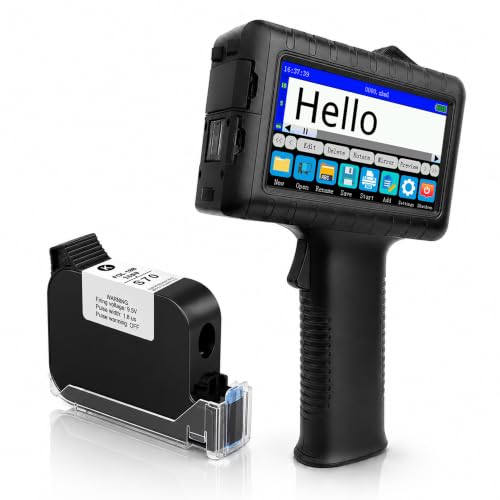
INPTNOV Portable Batch Code & Expiration Date Printer 42ml Fast-Dry Ink

KAKAONE Handheld Inkjet Printer 0.5 Inch Nozzle Portable Coder

BENTSAI BT-HH6105B2 Handheld Inkjet Printer 1/2 Inch (Black)

Ikaïka Handheld Inkjet Printer 12.7mm Portable Logo & Packaging Printer

v4ink BENTSAI Handheld Inkjet Printer BT-HH6105B2 (Black)

YEV Handheld Inkjet Printer VP127 with Photoelectric Sensor (Green)
A Deeper Look At The Lineup
The TESEN handheld printer sits at the simpler end of this list, and that’s not a complaint. You get a 12.7mm printhead aimed at small batch shops, craft sellers, and home-based packaging stations. The green body is light enough to walk around a workbench with one hand, and the printhead is sized for one- or two-line text on cartons, jars, or pouches.
Versus the touchscreen-driven BESHENG covered further down, this one relies more on direct trigger controls, which keeps the learning curve manageable. Expect to spend time dialing in vertical spacing and drop position by hand. The quick-dry ink claim matters most when you’re marking glossy or non-porous surfaces where smearing ruins a label.
Everyday Perks
- The 0.5-inch printhead fits neatly on jar lids, box flaps, and small product tags without overhang.
- Quick-dry ink means you can stack printed cartons almost immediately without transfer smudges.
- Portable, trigger-style design works well for short coding sessions at a packing table.
- Surface coverage spans wood, glass, plastic, cardboard, and metal, which covers most small-shop packaging.
Worth Noting
- Owners commonly report that very smooth or curved surfaces need a steady hand for clean character edges.
- Cartridges will need to be matched to the right surface type to avoid slow drying or fading.
Feature Snapshot
Whose Bench It Belongs On
Garage workshops and Etsy-level sellers who mark dates and batch numbers on small product runs will get the most out of this printer.
Reach For A Different Pick When
You need on-screen template editing and faster turnaround between batches, the BENTSAI BT-HH6205B further down offers 16-hour runtime.
BESHENG positions this inkjet coder for production-floor operators who want a proper touchscreen for editing. The 5-inch panel is bigger than the 4.3-inch displays on most rivals, which matters when you’re tweaking QR codes or stitching together a multi-line batch template with your thumb. A 42ml quick-drying ink cartridge ships in the box, so you can mark your first batch without sourcing a separate consumable.
Compared to the trigger-style TESEN covered above, BESHENG leans closer to a desktop workflow you happen to hold. The ink handles both porous and non-porous surfaces, which means glass, foil pouches, ceramics, and PE bags all stay on the menu. It’s a comfortable middle ground between hobbyist coding and full industrial integration.
Real Benefits
- The larger 5-inch touchscreen reduces squinting when adjusting multi-line templates or logo placement.
- The included 42ml quick-dry ink cartridge keeps first-batch setup fast and removes one sourcing step.
- Prints on porous and non-porous surfaces, from cardboard to glass and foil bags.
- Supports a broad set of content types, including date, time, barcode, QR code, batch number, and picture.
Trade Offs
- A larger screen and onboard storage push the unit’s weight higher than minimalist pistol-grip models.
- Surface prep still matters: oily or dusty substrates will need a wipe-down before ink sets cleanly.
Best Suited To
Small-batch packagers who routinely swap QR templates and want a real editing canvas without plugging into a computer.
A Better Fit Elsewhere
Operators running all-day assembly-line coding should look at the YEV VP127 later in this guide for its photoelectric alignment sensor.
The BT-HH6205B is BENTSAI’s answer to the most common complaint about handheld coding: dying mid-shift. The redesigned power management aims for over 16 hours of continuous operation, which covers a full production day without a recharge. You still get the same 0.5-inch printhead used across the category, but the runtime is the differentiator.
Stacked next to the BESHENG unit above, this BENTSAI trades a bigger touchscreen for a longer battery and a more rugged handheld chassis. It handles plastic, cardboard, wood, metal, and fabric, so apparel and packaging workflows both stay in play. The trade-off is that you’ll spend more time on the trigger-style interface than editing on a tablet-sized screen.
The Good Stuff
- Sixteen-hour continuous operation covers a full shift without a recharge cycle.
- The 0.5-inch printhead prints batch numbers, dates, logos, and QR codes across multiple substrates.
- Works on fabric, which matters for apparel sellers marking inside-collar tags.
- Recharge cycles are reduced compared to earlier BENTSAI models, according to manufacturer claims.
Room For Improvement
- Editing happens through the printer’s own interface rather than a phone app, which slows complex logo uploads.
- Long runtime claims assume moderate use, so heavy multi-line production may still drain the cell before a full shift.
Quick Facts
Who It Suits Best
Production operators running long shifts who can’t afford mid-day recharges.
Consider Something Else When
You primarily code on assembly lines with conveyor movement, the YEV VP127 covered later pairs a similar runtime with a photoelectric sensor for alignment.
INPTNOV’s offering balances features that are often scattered across the category. You get a 4.3-inch HD capacitive touchscreen, around 16 hours of operation, and a self-locking ink cartridge that resists leaks when the printer sits in a toolbox overnight. Twenty-eight language interfaces make this a sensible choice for shops that share equipment across shifts or borders.
Where the TESEN above strips back to a trigger-style design, INPTNOV pushes toward template editing on the device itself. JPG, PNG, and BMP files can be loaded for direct logo printing, which is rare at this tier. Coverage spans plastic, metal, glass, wood, and cardboard, so food, beverage, and hardware packaging all fit the workflow.
What It Does Well
- The leak-proof self-locking ink cartridge reduces mess during storage and travel between job sites.
- On-device template editing removes the need to tether to a phone or laptop.
- 28 language interfaces suit multilingual teams and shared equipment.
- Up to 16 hours of operation covers typical full-day shifts without recharging.
Points To Note
- The 4.3-inch screen is smaller than the BESHENG unit above, so dense QR layouts still feel cramped.
- Fast-dry ink performs best at room temperature, and very cold warehouses can slow the drying curve.
Key Attributes
Made For
Multi-material small shops that want one printer for jars, cartons, and metal parts without juggling separate firmware.
Skip It When
Your top priority is barcode versatility and you prefer a dedicated industrial feel, the BENTSAI BT-HH6105B2 covers six barcode formats.
The KAKAONE handheld coder leans hard into “no phone, no app, no computer.” Editing, parameter tweaks, and printing all happen through a 4.3-inch HD touch screen mounted directly on the device, and the manufacturer notes built-in storage plus 28 interface languages. For solo creators and small studios, that means less gear to wrangle.
Compared to the BENTSAI BT-HH6205B above, this model is positioned as the lower-fuss alternative. The 0.5-inch printhead still hits QR codes, barcodes, dates, and logos on metal, plastic, wood, glass, fabric, and paper. The ergonomic story is the selling point here: no tethered workflow, just pick it up and code.
The Value In It
- On-device touchscreen removes the need for a phone app or computer connection.
- Built-in storage saves commonly used templates so startup time stays short.
- 28 language interfaces cover multilingual production environments.
- The 0.5-inch nozzle prints across six common material categories without swapping hardware.
Honest Caveats
- Surface variety is broad on paper, but heavily textured fabrics may need a slower pass for clean edges.
- Onboard storage capacity is limited, so very large graphic libraries may need rotation.
The Right Fit
Solo maker studios and home-based packaging operations that prefer single-device workflows.
Look Elsewhere When
You’re coding on a moving assembly line and need automatic alignment, the YEV VP127 further down integrates a photoelectric sensor for that scenario.
The BT-HH6105B2 is the more industrial-styled BENTSAI on this list. You get a 1/2-inch (12.7mm) print height at 600 DPI resolution, six barcode types, and the same broad surface compatibility as its siblings. The black chassis leans into a warehouse or production-floor aesthetic rather than a craft-studio one.
Versus the BENTSAI BT-HH6205B covered earlier, this older-generation model focuses less on marathon battery claims and more on barcode versatility and print resolution. Porous, semi-porous, and non-porous surfaces are all listed, so carton, wood, fabric, plastic, and metal all stay valid. It’s a sensible tool when barcode reliability matters more than long runtime.
The Upside
- 600 DPI resolution keeps text and small graphics legible on packaging.
- Six barcode types support varied warehouse and logistics workflows.
- The 1/2-inch print height allows slightly larger logos or two-line date stamps.
- Works across porous, semi-porous, and non-porous substrates without changing cartridges.
Small Caveats
- Listed runtime is shorter than the newer BT-HH6205B, so heavy shifts may need mid-day charging.
- Industrial styling adds bulk compared to minimalist pistol-grip designs.
Who Should Grab It
Logistics teams and warehouse operators who prioritize barcode accuracy and resolution over long battery endurance.
Swap It Out When
Long, uninterrupted shifts are the priority, the BENTSAI BT-HH6205B covered above targets 16-hour operation.
Ikaïka’s ZG127A targets small business owners who want to print logos and packaging marks without juggling a stylus. The upgraded touchscreen is designed for finger-based editing, which matters when you’re sketching layout changes between batches. The 12.7mm print height matches the rest of this category, so it slots into existing templates without rework.
Compared to the KAKAONE above, this Ikaïka model is positioned for apparel and craft sellers in particular, with clothes and fabric called out alongside wood, plastic, and metal. The pitch is direct: skip the computer, edit on the device, mark the product, repeat.
Useful Highlights
- The finger-friendly touchscreen removes the stylus dependency some handheld coders require.
- Logo and packaging use cases are explicitly supported, which fits apparel and craft sellers.
- The 12.7mm print height matches the category standard for batch text and basic QR codes.
- Compact form factor suits mobile carts and small packing stations.
A Few Limitations
- Resolution and barcode format details are not emphasized, so logistics-grade work may need a different tool.
- Fabric marking needs test runs to dial in speed and avoid ink bleed on textured weaves.
Perfect Match For
Craft and apparel brands printing inside-collar tags, swing tags, and small fabric patches.
Where A Sibling Pick Shines
Multi-material warehouse coding is a better match for the INPTNOV covered earlier, which lists five substrate categories and on-device template editing.
The v4ink-branded BT-HH6105B2 is the same BENTSAI hardware sold under a different label, which matters because the multi-line capability is the standout spec. You can print one to five lines per pass, with a 0.5-inch (12.7mm) print height and a maximum single-print length of roughly 15.98 inches (406mm) at 600 DPI resolution. For longer expiry-date stacks or multi-language packaging, that headroom is welcome.
Stacked next to the BENTSAI BT-HH6205B earlier in this guide, this older-generation model focuses less on marathon battery claims and more on layout flexibility. Image uploads in JPEG, PNG, and BMP formats are supported, so logo marking works without conversion steps. It’s a strong label-heavy choice when print length matters more than uptime.
A Few Highlights
- Up to five lines of printing per pass supports longer expiry-date stacks and multi-language labels.
- 600 DPI resolution keeps text and small graphics legible at packaging scale.
- JPEG, PNG, and BMP uploads remove the need to convert logos before printing.
- The maximum single-print length of 406mm covers long carton panels in one sweep.
Practical Considerations
- Older-generation battery claims are more modest than the BT-HH6205B’s 16-hour target.
- Longer single prints need steady hand motion, so first-time operators may need practice runs.
Technical Highlights
Built With In Mind
Label-heavy producers printing long expiry-date stacks or multi-language packaging on cartons.
Not Your Match When
Long battery life outweighs print length, the BENTSAI BT-HH6205B above targets 16-hour runtime instead.
The YEV VP127 leans into a different problem: marking items moving along a production line. A built-in photoelectric sensor handles alignment, so the printer knows where each product edge sits before firing the printhead. That cuts down on skewed dates and crooked QR codes when you’re hand-guiding items past the sensor at speed.
Compared to the touchscreen-heavy BESHENG unit covered earlier, the VP127 trades a larger editing canvas for line-coding intelligence. Continuous operation past 16 hours keeps the unit on shift parity with the BENTSAI BT-HH6205B above. It’s the right tool for assembly-line workflows where misalignment ruins scan rates.
A Favorable Mix
- The photoelectric sensor improves alignment on assembly-line production runs.
- Continuous operation beyond 16 hours matches a full shift’s workload.
- Industrial positioning suits warehouses and factory-floor environments.
- Optical alignment reduces operator fatigue during repetitive coding cycles.
Factors To Consider
- Sensor-based workflows need consistent product positioning, so loose or rolling items can confuse alignment.
- Industrial setup may take longer than a basic handheld coder on first use.
Quick Technical Notes
Right Fit For
Production-line operators marking products on conveyors or guided tracks where alignment accuracy matters.
Consider Something Else When
You’re coding stationary packaging on a tabletop, the INPTNOV above covers on-device template editing without a sensor overhead.
Picking The Right Handheld Inkjet Printer For Your Workflow
The first decision is the surface you’ll mark most often. Carton, glass, plastic, metal, and fabric all show up across this category, but ink chemistry varies by cartridge, and slow-drying ink on glossy surfaces leads to smudges. Pick a printer that explicitly lists your dominant substrate rather than assuming universal compatibility.
Battery life matters more than spec sheets suggest. A 4-hour cell looks fine on paper until you’re three hours into a packaging run with a half-charged unit. Printers claiming 16-hour runtime, like the BENTSAI BT-HH6205B and the YEV VP127, earn their keep on production-floor workflows. Smaller studios coding for an hour a day can accept shorter cells.
Touchscreen size changes the editing experience. A 5-inch panel, like the BESHENG unit’s, gives you room to adjust multi-line templates without squinting, while a 4.3-inch screen is fine for date stamps and short codes. If you regularly upload logos or edit QR layouts, prioritize the larger panel.
Match The Tool To The Environment
Garage workshops and craft sellers usually want a low-fuss printer with a small learning curve. Industrial lines and warehouse operations lean toward barcode versatility, higher resolution, and sensor-assisted alignment. Apparel sellers need fabric compatibility and stable performance across weave textures.
Key Considerations Across These Picks
Pitfalls Shoppers Hit
A common slip is buying a printer with a small screen and expecting desktop-level template editing. Another is assuming all 42ml cartridges use the same ink formula, when surface compatibility actually varies by cartridge chemistry. Buyers sometimes overlook the difference between trigger-grip models and touchscreen-driven ones, then struggle with editing workflows that don’t match their habits.
Where The Extra Money Goes
Higher-tier models typically add longer battery life, bigger touchscreens, more barcode formats, and on-device template editors. The upgrade is worth it for shops running multi-line packaging or large image libraries. Smaller operations printing a handful of boxes a day rarely need the extra overhead, and a basic 0.5-inch printer with quick-dry ink is enough.
Frequently Asked Questions
How Long Does A Handheld Inkjet Printer Battery Typically Last?
Most handheld coders in this category run between 4 and 16 hours per charge, depending on usage patterns and print density. Models like the BENTSAI BT-HH6205B and the YEV VP127 specifically target 16-hour continuous operation for full shifts.
What Surfaces Can These Printers Handle?
Coverage spans plastic, wood, cardboard, metal, glass, fabric, and ceramics across the category. Surface compatibility depends on the ink cartridge, so verify the cartridge matches your dominant substrate before printing a full batch.
Can You Print QR Codes And Barcodes On These Units?
Yes, QR codes, DM codes, and several barcode formats are supported across this category. The BENTSAI BT-HH6105B2 lists six barcode types, while other models support a smaller subset focused on QR and standard linear codes.
Do You Need A Computer Or Phone To Operate Them?
Most modern handheld coders, including the KAKAONE and the Ikaïka ZG127A, work standalone through onboard touchscreens. A few models still rely on companion apps or trigger-based controls without a screen.
How Fast Does The Ink Dry On Non-Porous Surfaces?
Quick-drying ink is standard across the category, which means glass, metal, and plastic typically accept marks without immediate smearing. Cold environments slow drying, so warming the substrate or extending handling time helps in chilly warehouses.
Closing Remarks
The right handheld inkjet printer comes down to the surfaces you mark, the volume you push, and how much editing you do between batches. Match the tool to the substrate first, then weigh battery life and screen size. With those three filters, one of the nine above will fit your workflow without overreach.