Labeling a spice rack at midnight, marking cartons in a small workshop, batch-coding jars for a side hustle. Handheld printers turn those everyday chores into quick, satisfying tasks without dragging out a desktop machine. The category splits into two clear families: compact thermal label makers for home and office organization, and portable inkjet guns that mark directly onto packaging, fabric, metal, and wood. This roundup covers both, so you spend less time sorting through listings and more time getting things labeled.
The Leading Options At A Glance

Genuine Case for Nelko PM220 Label Maker, Black
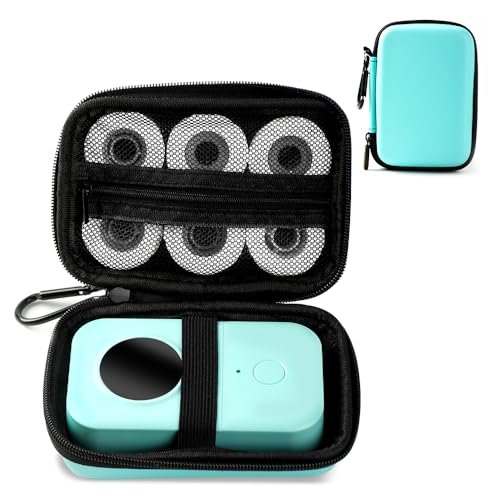
Phomemo D30 Label Maker Machine with Case and Tape
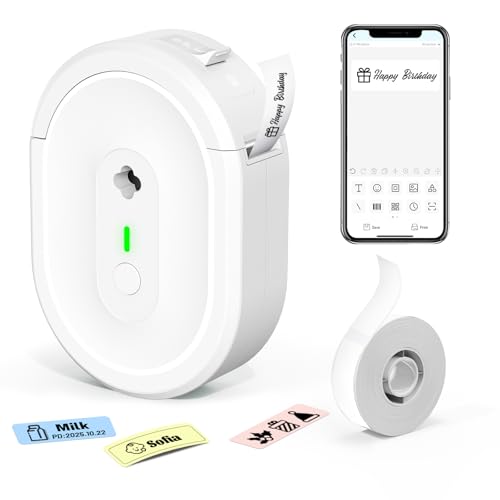
Bluetooth Label Maker Machine N12 Mini Thermal Printer

BENTSAI B35 Handheld Inkjet Printer 1 Inch Printhead

Handheld Inkjet Printer Gun MS-Z10 with Quick-Drying Ink

Compact Mini Handheld Inkjet Printer M11Pro for All Surfaces

High Adhesion Fast-Drying Black Ink Cartridge 42ml

BENTSAI BT-HH6105B2 Handheld Inkjet Printer 1/2 Inch
The Picks, Examined More Closely
A neat solution for anyone who already owns a Nelko PM220 and wants it to survive life on the go. This case wraps the unit with a fitted shell that includes a mesh pocket for tape rolls, cables, and small accessories, plus a detachable hand strap that makes the whole package easier to carry between rooms or out to a garage workshop.
For owners who treat their label maker like a tool rather than a desk ornament, the protective shell earns its place. The exterior dimensions around 7.67 x 4.72 x 3.34 inches suggest a snug fit, which keeps everything from rattling loose in a bag. Anyone traveling between classrooms, client sites, or job trailers will appreciate not fishing around for a stray USB cable at the bottom of a backpack.
Well-Handled Touches
- Detachable hand strap keeps the label maker close during mobile jobs
- Mesh pocket organizes tape rolls and cables so nothing goes missing
- Form-fitted shell reduces scuffing on the printer body over time
- Compact footprint slips into a tote or drawer without crowding other tools
Things To Consider
- Case only, so the label maker itself must be sourced separately
- Snug dimensions mean bulky third-party tape refills may not fit the mesh
Who It Suits Best
Current Nelko PM220 owners who carry their label maker between locations and want organized protection for the printer and its accessories.
Look Elsewhere When
You need a printer included, in which case the Phomemo D30 Label Maker Machine ships with its own case and a starter tape roll out of the box.
The Phomemo D30 trades the chunky, retro keyboard of older label makers for a Bluetooth connection to a phone app. The result feels closer to a small craft tool, pairing with iOS or Android to pull from a deep library of templates, frames, icons, and barcode designs. A thermal print head, where heat rather than ink creates the image, runs the show, so there are no cartridges to swap.
Anyone organizing a craft room, classroom, or kitchen pantry gets a creative shortcut without wrestling a QWERTY keyboard. The included green case and one starter roll mean you can begin labeling the moment the box opens. Compared with the bare-bones Genuine Case for the Nelko PM220, this is a complete starter bundle rather than an accessory.
A Favorable Mix
- App-based design tools open access to over 1,000 symbols, 60+ frames, and varied fonts
- Compact size slips into a craft bag alongside scissors and washi tape
- Thermal printing eliminates ink or toner cartridge swaps entirely
- Bundled case and starter tape let you print labels the same day you unbox it
Worth Noting
- Relies on a paired smartphone, so the phone must stay charged during longer label sessions
- Print clarity and DPI read clearly only on compatible thermal tapes, which can limit material choices
Key Specs
Right Fit For
Newcomers to label printing who want a phone-driven creative workflow for crafts, gifts, and home organization.
Consider Something Else When
You print mostly in the field without a phone handy, where the Bluetooth Label Maker Machine N12 Mini Thermal Printer offers a similarly pocket-sized Bluetooth alternative with its own app-driven approach.
The N12 Mini leans hard into the “pocket printer” idea, with a footprint and weight closer to a thick marker than a desktop label maker. Thermal technology keeps it ink-free, and a Bluetooth link to the NADA Print app on iOS or Android handles the design side. White plastic trim keeps it visually unobtrusive on a desk or shelf.
Anyone who labels in short bursts throughout the day benefits from a printer that disappears into a bag between uses. Unlike the Phomemo D30, which ships with a case and starter tape, the N12 arrives as the unit itself, so first-time shoppers should plan to grab a tape roll alongside it. For renters, teachers, and small-business inventory tagging, the small size is the headline feature.
What Makes Sense
- Compact build slips into a coat pocket or purse for grab-and-go labeling
- Thermal printing means no ink or toner to replace over time
- Bluetooth app pairing with iOS and Android broadens device compatibility
Trade Offs
- Smaller print area may struggle with long shipping labels or wide product tags
- Tape refills are sold separately, adding to the upfront cost for new shoppers
Made For
Frequent travelers and apartment dwellers who want a barely-there label printer for organizing jars, cables, and cosmetics on the move.
Swap It Out When
You want a complete starter bundle with case and tape included, in which case the Phomemo D30 ships ready to print out of the box.
The B35 steps away from label tape entirely and prints directly onto surfaces, the same way a desktop industrial coder would. The 1-inch printhead delivers a tall marking zone that can handle up to ten lines of text, batch codes, dates, QR codes, and barcodes in a single pass. Variable data support means content can be pulled from a CSV or text file, so a small business can run hundreds of unique prints without retyping.
Compared with the thermal label makers earlier in this list, this is the moment the conversation shifts from home organization to real production marking. Anyone coding cartons in a shipping room, marking inventory on metal shelving, or branding craft packaging benefits from the larger print area. The B35 is heavier and bulkier than a phone-driven label maker, but it earns that weight by printing directly onto the object itself.
The Case For It
- 1-inch print height accommodates tall text blocks and stacked data fields
- Variable data import from CSV and text files speeds up batch runs
- Multi-line support up to ten rows handles complex QR or barcode labels
- Direct-to-surface printing removes the cost of label rolls for many tasks
Points To Keep In Mind
- Inkjet cartridges must be replaced periodically, adding a recurring consumable cost
- Larger print area makes the body bulkier than pocket label makers
- Optimal print quality depends on compatible surfaces, which may require test prints on unusual materials
Key Specs
Who Will Love This
Small-batch makers and warehouse teams who mark cartons, pallets, or product surfaces directly and need a tall, multi-line print area.
Where A Sibling Pick Shines
You mostly need barcode precision on flat packaging and want six dedicated barcode types, where the BENTSAI BT-HH6105B2 offers narrower 1/2-inch prints with specialized barcode support.
The MS-Z10 is built around a pistol grip, a deliberate choice that makes long marking sessions far less tiring than holding a slim wand. The 42ml quick-drying black ink cartridge keeps prints sharp on contact and shortens the wait before boxes can be stacked or wrapped. A print height range from roughly 0.08 to 0.5 inches supports up to five lines of text in a single pass.
For warehouse teams, agricultural packers, and anyone running production through a long afternoon, the ergonomic grip is the headline feature. It sits between the larger BENTSAI B35 and the more travel-friendly Minssine M11Pro later in this list. Anyone who has finished a shift of coding with hand cramps will appreciate the difference a trigger-style handle makes.
What Pays Off
- Pistol-grip design reduces wrist fatigue during extended marking sessions
- Quick-drying ink supports water-resistant results on common packaging materials
- Print height range covers most date, batch, and barcode marking tasks
Honest Caveats
- Ink is not permanent, so prints may need sealing for outdoor exposure
- Gun-style body adds bulk, making it less convenient for casual home labeling
Key Specs
Best Suited To
Production-line workers and warehouse staff who mark dozens of items an hour and want a comfortable grip for long shifts.
Skip It When
You mostly code in tight spaces or on a small workbench, where the Minssine M11Pro Mini Coding Machine offers a more compact body for cramped areas.
The M11Pro Mini shrinks the handheld inkjet concept down to roughly 4.3 x 1.97 x 3 inches and around 0.6 pounds with the cartridge loaded. That footprint is small enough to slip into a jacket pocket or a small tool pouch, which opens up coding work in places a pistol-grip printer would feel clumsy. The 0.5-inch nozzle and fast-drying black cartridge handle text, dates, barcodes, logos, QR codes, and batch numbers on a wide range of surfaces.
This is the model for coders who move around a lot. Pop-up markets, farm stands, custom wood shops, and small-batch candle makers tend to do their marking wherever the product sits, not at a fixed station. Compared with the bulkier MS-Z10 from the same brand family, the M11Pro trades the long-shift grip for genuine grab-and-go portability.
Advantages To Know
- Lightweight build at about 0.6 pounds eases transport between job sites
- Compact body reaches into tight spaces where larger printers struggle
- Versatile content support covers dates, barcodes, logos, and QR codes
- Fast-drying cartridge shortens wait time before items move to the next stage
A Few Limitations
- Smaller nozzle limits print height compared with the BENTSAI B35
- Lightweight body may need a steady hand for consistent print alignment on uneven surfaces
Perfect Match For
Mobile crafters, farmers’ market vendors, and small shop owners who need to mark products in the space where they actually make them.
Another Choice May Suit
You want a tall 1-inch print area and CSV-driven batch runs, where the BENTSAI B35 covers larger markings and heavier production cycles.
This 42ml black solvent ink cartridge is built for handheld inkjet printers with a 0.5-inch (12.7mm) printhead, the same width used by the MS-Z10 and M11Pro from the same brand. High-adhesion, fast-drying ink keeps prints sharp on contact and helps them hold up on packaging that gets handled soon after marking. The solvent formula targets industrial-grade use, where standard dye inks would smear under friction or moisture.
Owners of compatible printers will appreciate the practical convenience of a matching refill, rather than chasing third-party alternatives. The cartridge capacity translates into roughly 10,000 characters per fill, which suits a small business running daily batch coding. This pick makes more sense as a stocking-up accessory than as a first purchase.
Notable Gains
- High-adhesion formula keeps prints legible on slick and porous surfaces
- Fast-drying performance reduces smudging on freshly printed items
- 42ml capacity supports long batch runs between swaps
Where It May Fall Short
- Designed only for 0.5-inch printheads, so it will not fit wider printers like the BENTSAI B35
Built With In Mind
Existing owners of Minssine 0.5-inch handheld inkjet printers who want a steady supply of matched, fast-drying ink on hand.
Reach For A Different Pick When
You do not yet own a compatible handheld inkjet printer, in which case the Minssine M11Pro Mini Coding Machine is the more natural starting point.
The BT-HH6105B2 focuses on barcode-rich environments where every scan needs to read cleanly. Six barcode types sit alongside QR codes, DM codes, logos, and small-character text at 600 DPI resolution, printed at up to 1/2 inch (12.7mm) tall. The printhead handles porous, semi-porous, and non-porous materials, which covers everything from corrugated cartons to finished wood and bare metal.
Compared with the taller BENTSAI B35 reviewed earlier, this model trades raw height for sharper, narrower coding suited to standard shipping and inventory labels. For small businesses running real production cycles on cartons, fabric, plastic, and metal, the surface versatility and barcode variety are the draw. It reads less like a gadget and more like a scaled-down industrial coder.
What Works In Its Favor
- Six barcode types alongside QR and DM codes cover most retail and logistics needs
- 600 DPI resolution keeps small text and codes legible at a glance
- Multi-surface compatibility extends to wood, fabric, plastic, and metal
Small Caveats
- Half-inch print height is narrower than the BENTSAI B35, which limits tall markings
- Cartridge replacement adds ongoing cost that thermal label makers avoid
- Optimal performance on non-porous surfaces may require a brief test pass before full runs
Key Specs
Who Should Grab It
Small business owners running inventory, shipping, or product coding on multiple surface types who prioritize scan-ready barcode quality.
A Better Fit Elsewhere
You want taller prints and CSV-driven batch runs, where the BENTSAI B35 with its 1-inch printhead serves larger multi-line markings.
Picking The Right Format For The Job
Thermal Label Maker Or Inkjet Handheld Printer
Thermal label makers, like the Phomemo D30 and Bluetooth Label Maker Machine N12, use heat to print onto special tape, so there is no ink to replace and no mess to clean. They excel at organizing jars, cables, file folders, and craft supplies at a desk. Inkjet handhelds, like the BENTSAI models and Minssine units reviewed above, spray ink directly onto surfaces, which means they can mark cartons, wood, plastic, and metal without a label. Choosing between them comes down to whether the job needs a sticky label or a permanent mark on the object itself.
Connectivity And Workflow
App-connected printers (the Phomemo D30 and N12 Mini) rely on a paired phone and a design app, which opens up rich templates and barcode tools but ties you to your phone during use. Standalone inkjet guns (the MS-Z10, M11Pro, B35, and BT-HH6105B2) operate independently, which matters in warehouses, farm fields, and production lines where phones get dirty or wet. The standalone route also skips app updates that occasionally change the workflow mid-project.
Print Height And Resolution
Print height ranges from roughly 0.08 inches on the MS-Z10 up to a full inch on the BENTSAI B35. Smaller heights work fine for expiration dates, batch numbers, and short barcodes, while taller prints are needed for shipping labels, large codes, or stacked data fields. Resolution matters most for barcode-heavy tasks, and 600 DPI on the BT-HH6105B2 keeps scans reliable on retail packaging.
Portability And Surface Range
Pocket-shaped printers like the N12 Mini and M11Pro slip into a bag and code on the move, while pistol-grip models like the MS-Z10 trade pocket size for comfort during long shifts. Surface compatibility is the deciding factor for inkjet handhelds: the BT-HH6105B2 handles porous, semi-porous, and non-porous materials, which makes it a flexible choice for mixed production environments.
Key Considerations Across These Picks
Common Shopping Slip Ups
Buying a thermal label maker when you actually need to print directly onto boxes is a frequent mismatch, and so is grabbing an inkjet handheld without confirming your surfaces sit within its compatible material list. Another easy miss is forgetting consumable costs: thermal printers avoid ink but need rolls, while inkjet printers need cartridge refills like the High Adhesion Fast-Drying Black Ink Cartridge 42ml. Bundles like the Phomemo D30, which ship with a case and starter tape, sidestep these gaps for newcomers.
What The Higher Tier Buys
Stepping up from a pocket thermal to an industrial handheld adds serious capability. Wider printheads (1 inch on the BENTSAI B35 versus 0.5 inches on the M11Pro) handle taller markings and stacked data. Barcode-rich environments gain from dedicated code types and 600 DPI resolution on models like the BT-HH6105B2. Ergonomic pistol grips, variable data imports, and multi-surface support all show up first at the higher tier, and they pay off when production volume or surface variety outgrows a simpler pocket unit.
Frequently Asked Questions
What Is The Difference Between A Handheld Label Maker And A Handheld Inkjet Printer?
A handheld label maker prints onto adhesive tape using thermal heat, so you peel and stick the result. A handheld inkjet printer sprays ink directly onto the surface of an object, leaving a permanent mark on the item itself without any label.
Can Handheld Printers Mark On Wood, Metal, And Fabric?
Handheld inkjet printers with multi-surface compatibility can print on porous, semi-porous, and non-porous materials. The BENTSAI BT-HH6105B2 is a strong example, handling carton, wood, fabric, plastic, and metal in a single device.
Do These Printers Need Ink Or Toner?
Thermal label makers like the Phomemo D30 and N12 Mini use heat, so they need no ink or toner and only require compatible tape rolls. Handheld inkjet printers, including the BENTSAI B35 and Minssine units, use replaceable ink cartridges such as the 42ml High Adhesion Fast-Drying Black Solvent Cartridge.
Are Phone Apps Required To Use These Printers?
Bluetooth label makers like the Phomemo D30 and N12 Mini rely on a phone app for design and editing. Handheld inkjet printers typically operate independently through onboard controls, so they work without a paired phone in the field.
How Long Does An Ink Cartridge Last In A Handheld Inkjet Printer?
A 42ml cartridge in this category can print roughly 10,000 characters, depending on font size, line count, and surface type. Heavy daily production runs will drain a cartridge faster than occasional batch coding at a market stall.
The Takeaway
Handheld printers split cleanly into two camps: phone-driven thermal label makers for organizing life at home, and standalone inkjet guns for marking products in the field. The right pick depends on whether you need a sticky label or a permanent mark on the object itself. Match the format to your most common task, and the rest of the decision tends to follow.