A sticky-note rotation on the fridge, a paper planner that gets lost in the junk drawer, three different phone calendars nobody else in the house checks. Sound familiar? Home digital calendars tackle that exact chaos, pulling school pickups, work meetings, soccer practice, and that dentist appointment your partner keeps forgetting into one shared, glanceable spot. The right pick depends on whether you live in a busy family kitchen, want a dementia-friendly clock for an older relative, or need a wall-mounted display that doubles as a rotating photo frame. This list covers nine solid options across those use cases so you can match the format to your actual household rhythm.
The Shortlist At A Glance
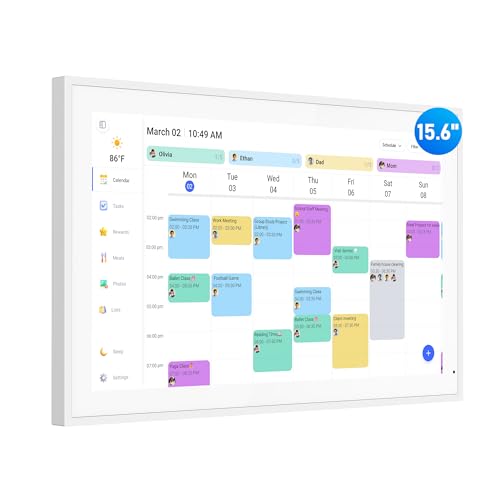
flyEVfish 15.6″ Digital Wall Planner & Chore Chart

LQN 10.1″ Digital Calendar Touch Screen

flyEVfish 27″ Digital Wall Calendar & Chore Chart
SSYA Dementia Clock with Day and Date (Black)

Mesqool 10.1″ Dementia Clock for Seniors

PiPivision 21.5″ WiFi Digital Picture Frame
AOC 15.6″ Digital Calendar Wall Touch Screen

Mitoart 7″ Digital Calendar Clock for Seniors

flyEVfish 21.5″ Digital Calendar & Chore Chart
The Details Behind The Selections
For most households juggling two working parents and a couple of kids, the flyEVfish 15.6″ lands in a sweet spot: big enough to read across a kitchen, small enough not to dominate the wall. It functions as a shared family planner plus a built-in chore chart, with a touchscreen that lets anyone add a task or check the next appointment without hunting for a phone.
It runs as a true family command center rather than a single-user device. Color-coded events and per-person task lists make the morning rush less of a guessing game, and you can read the schedule at a glance from the next room. The screen is HD and the interface stays readable across the room, which matters when you’re half a kitchen away holding a coffee mug.
The Practical Payoff
- Doubles as a chore chart, so the same screen handles homework reminders and Saturday cleanup.
- Color coding cuts through visual noise when four family members stack events on a single Tuesday.
- 15.6″ diagonal gives strong readability from a few feet away without eating the whole wall.
- Touch-first design means kids can tap their own tasks once they’re tall enough to reach.
Worth Noting
- Wi-Fi setup requires a 2.4 GHz network in most cases, which can be a friction point on dual-band routers.
- Wall mounting typically needs a power outlet behind or very near the chosen spot, so plan placement before drilling.
Who It Suits Best
Busy families with school-age kids who want a single shared wall planner that handles both schedules and chores without a subscription layer.
Where Another Pick Suits Better
Households that want a calendar plus a rotating family photo slideshow should look at the PiPivision 21.5″ WiFi Digital Picture Frame instead.
Where the flyEVfish 15.6″ wants wall space, the LQN 10.1″ wants a countertop. It’s compact enough to live on a kitchen island, a bedside shelf, or a coffee table, and it bridges two jobs at once: a smart family calendar and a digital photo frame. That dual role is the real reason it earns a spot on this list.
For smaller homes, dorms, or apartments where a 27-inch wall display would feel like overkill, this one earns its place. It pulls double duty as a meal-planning assistant in the kitchen and a family-schedule hub in the living room, and the touchscreen keeps interactions quick. Where it lands short is on raw screen real estate: across a room, the text is harder to read than on a 15-inch or larger panel.
A Few Highlights
- 10.1″ size fits tight countertops, shelves, and coffee tables that won’t fit a wall display.
- Photo frame mode means the screen earns its keep even when nobody’s checking the calendar.
- Multi-account sync across household members covers the typical “whose phone has the appointment” fight.
Points To Note
- Smaller panel means lower readability from across a room compared to the 15.6″ and 21.5″ picks.
- Like all touchscreen smart displays, fingerprint smudges on the bezel tend to show up quickly in kitchens.
Made For
Apartments, dorm rooms, and small kitchens where wall space is limited but a glanceable daily schedule still matters.
Consider Something Else When
Open-plan homes with a long sightline to the calendar will get more from the AOC 15.6″ Digital Calendar Wall Touch Screen.
The 27-inch flyEVfish is the opposite end of the spectrum from the LQN 10.1″. It’s a wall-anchored centerpiece for open-plan homes, large kitchens, and busy families where one person always seems to be ten feet away from the calendar. If you’ve ever squinted at a phone-sized screen from across a long countertop, the value here is obvious.
The large touchscreen makes month and week views feel less like a zoomed-in phone screen and more like a real planner you happen to interact with. It mounts in portrait or landscape, which means it can slot into a tall narrow wall section or stretch across a wide one. Expect the same shared family-chore workflow as the 15.6″ flyEVfish, just at a scale that holds up in bigger rooms.
Notable Upsides
- 27″ screen stays readable from across large kitchens and great rooms.
- Dual orientation mounting adapts to tall walls or wide central spaces.
- Multi-day and month views feel less cramped than on smaller panels.
Trade Offs
- Requires a substantial clear wall section and a reachable power outlet.
- Heavier than 15-inch panels, so mounting hardware needs to be rated for the weight.
- Overkill for studio apartments or single-occupant homes.
Key Advantages
Best Suited To
Large households in open-plan homes that want a single wall centerpiece everyone can read from a distance.
Skip It When
Smaller spaces and renters who can’t commit to a heavy wall mount will find the flyEVfish 15.6″ Digital Wall Planner a better match.
Home digital calendars aren’t only about syncing family schedules. For households caring for an older relative with dementia, a clearly readable clock that spells out the day, date, and time can be just as essential. The SSYA Dementia Clock lands in that category, with an extra-large display tuned for low-vision use.
It leans into customization rather than touch interactivity. You get 13 custom reminder alarms for medication windows and recurring routines, plus multiple display styles and font colors to match the room’s lighting and the user’s visual comfort. Compared to the touchscreen chore-chart models from flyEVfish, this is a calmer, single-purpose device built for a specific caregiving need.
Advantages To Know
- 13 programmable alarms cover a full daily medication and routine schedule.
- High-contrast display stays readable in dim bedrooms and bright living rooms.
- Four interface styles and six font colors let you tune the look to the user’s vision and decor.
Honest Caveats
- No touchscreen or shared family-calendar sync, so it’s not a substitute for a wall planner.
Whose Shelf It Belongs On
Caregivers supporting a senior with memory loss who needs a single-purpose, glanceable clock for time, day, and reminders.
A Better Fit Elsewhere
If the priority is an audible time announcement for someone with very low vision, the Mitoart 7″ Digital Calendar Clock for Seniors is the more targeted option.
The Mesqool 10.1″ sits right between a bedroom clock and a small information display. The unit measures roughly 10″ wide by 6.3″ tall by 1″ deep, so it fits a nightstand without crowding it, and the 10.1″ screen gives enough surface to show day, date, and time without making the user lean in.
What makes it interesting in the senior-clock category is the focus on time-period awareness. The display shows 13 time blocks from Midnight through Night, so a user can quickly orient themselves to “morning,” “afternoon,” or “evening” without working it out from a clock face. Compared to the SSYA Dementia Clock, this one trades some alarm depth for clearer time-of-day context, which can be more useful for certain stages of memory support.
The Upside
- 10.1″ high-contrast display is large for a nightstand-friendly unit.
- 13 time-of-day periods help users orient without reading an analog clock.
- Compact depth keeps it stable on shallow shelves and bedside tables.
A Few Limitations
- Plug-in only, so outlet placement near the bedside or wall matters.
- Smaller than full family-planner displays, so it isn’t designed for room-wide viewing.
Right Fit For
Seniors who need a bedroom-friendly time-and-day reference and caregivers who want a low-fuss, plug-in clock without app complexity.
Look Elsewhere When
Households that want a touchscreen shared family planner should return to the flyEVfish 15.6″ Digital Wall Planner.
Strictly speaking, the PiPivision 21.5″ is a WiFi digital picture frame, not a dedicated calendar device. It earns its spot on this list anyway, because it doubles as a large-format family display for living rooms where you want both rotating photos and shared information on one wall. The Full HD 1920 by 1080 IPS touchscreen gives photos a sharper, more accurate look than typical 720p frames.
For households that want one wall panel to do several jobs, this one is worth a look. The IPS panel keeps colors consistent from off-angle seats, so photos don’t go dim for the person sitting at the far end of the couch. The catch is that it isn’t a full touchscreen chore-chart system, so the family-planning layer is more limited than on the flyEVfish or AOC models.
Useful Strengths
- 21.5″ Full HD IPS panel handles photos and video clips with consistent color from off-angle seats.
- Wall-mountable form factor fits the same central spots as a family calendar.
- Touchscreen controls make photo browsing and app adjustments quicker than remote-only frames.
Potential Drawbacks
- Calendar functionality is secondary to the photo frame role, so scheduling depth is more limited.
- Wi-Fi-only setup means a stable home network is essentially required for full functionality.
Feature Snapshot
Who Should Grab It
Households that want a living-room wall display for family photos first, with a light scheduling layer added on top.
Another Choice May Suit
For dedicated shared scheduling with chore tracking, the flyEVfish 21.5″ Digital Calendar & Chore Chart is the more focused option.
AOC’s 15.6″ wall planner is the pick for households where different people live in different calendar apps. The headline feature is multi-platform sync: Google, iCloud, and Outlook calendars can all feed into the same display at the same time, which solves the “my events are on iCloud, my partner is on Google” problem that hits mixed-OS homes.
Beyond the sync layer, it pulls the same chore-tracking and family-organizer duties as the flyEVfish 15.6″. Where it edges ahead is software polish and the breadth of calendar sources it accepts. The catch is that more sync points can also mean more initial setup time to authorize each account, especially for households with three or four active calendars to bring in.
Everyday Perks
- Google, iCloud, and Outlook sync in parallel covers the typical mixed-OS household.
- 15.6″ touchscreen lands in the same family-friendly footprint as the flyEVfish 15.6″.
- Star-style reward framing for chores can help engage younger kids in daily routines.
Possible Compromises
- Bringing in multiple calendar accounts adds a longer initial setup pass.
- Wi-Fi reliability matters more here than on simpler single-source displays.
Built With In Mind
Tech-comfortable households running a mix of iCloud, Google, and Outlook who want one display to consolidate them all.
Reach For A Different Pick When
Single-OS homes that just need a clean shared wall planner will be just as happy with the flyEVfish 15.6″ Digital Wall Planner.
The Mitoart 7″ is the smallest panel on this list, and that is exactly the point. It’s built for the bedside table of a senior who has difficulty reading even mid-size text, and it leans into two features the other clocks here don’t: an audio voice announcement for the time, and a multi-language option covering nine languages.
That voice readout matters when a senior’s vision is poor enough that even a high-contrast display is hard to follow. A press of the button on the back or the included remote triggers a spoken time announcement, which means the user can check the time without leaning toward the screen. Multiple alarm sets and auto-DST handling round out the senior-friendly feature set, and the compact 7-inch footprint fits on nearly any nightstand.
Where It Excels
- Spoken time announcement supports users with low vision who struggle to read any screen.
- Nine-language voice support covers a wider range of households than most senior clocks.
- Multiple alarm sets and auto-DST handling reduce manual clock adjustments over the year.
Where It May Fall Short
- 7″ panel is too small to function as a shared family wall planner.
- Voice feature adds a small audio footprint that may not suit quiet bedrooms.
Feature Card
Perfect Match For
Seniors with very low vision who need an audio-confirmed time readout at their bedside, and caregivers who want minimal setup.
Not Your Match When
If the priority is a large wall display for shared family scheduling, the AOC 15.6″ Digital Calendar Wall Touch Screen is the better direction.
The 21.5″ flyEVfish sits right between the 15.6″ and 27″ versions, and for most households that’s the comfortable middle. It’s large enough to read from across a hallway or large kitchen, but not so large that it dominates a smaller wall. The dual-mount option (wall or desk, portrait or landscape) is the real flexibility play here.
Desk mounting matters more than people expect. A lot of homes have a kitchen counter, console table, or entryway shelf that’s a more natural spot for a glanceable schedule than a wall above the fridge. Being able to place it there without committing to a wall anchor is a quiet advantage over the larger flyEVfish 27″, which is essentially wall-only.
Strong Points
- 21.5″ size hits the readability-versus-footprint middle ground.
- Dual mounting (wall or desk) adapts to renters and homeowners alike.
- Portrait or landscape orientation fits narrow hallways and wide central walls.
- Shares the same family-planner and chore-chart workflow as the other flyEVfish sizes.
Small Caveats
- Desk placement still needs a reachable outlet nearby.
- Not as room-filling as the 27″ version for very large open-plan spaces.
At A Glance
Who Will Love This
Mid-size households that want a flexible, room-readable family planner without committing to a large wall mount.
Where A Sibling Pick Shines
Open-plan homes with a long sightline to the calendar will get more impact from the flyEVfish 27″ Digital Wall Calendar.
Picking A Home Digital Calendar That Actually Fits
Buying a digital calendar usually comes down to three honest questions. Where will it actually live in your home, who needs to read it from how far away, and what existing calendar apps your household already uses. Answer those and the right pick gets much easier.
Screen size ties directly to sightline. A 7″ or 10″ panel works on a nightstand or a kitchen counter where the viewer is within arm’s reach. A 15″ panel works for typical kitchen walls, and 21″ or 27″ panels earn their keep in open-plan spaces where someone is always ten feet away. Mounting flexibility matters more for renters: wall-only units force a permanent decision, while desk-mountable units can follow you to a new place.
For senior care, a touchscreen wall planner is rarely the right tool. A dedicated clock with large fonts, high contrast, optional voice readout, and custom medication alarms will serve the user far better than a feature-rich family display that expects touch interaction.
Where The Display Will Live
Plan the outlet before you choose the size. Every wall-mounted touchscreen needs power within reach of the supplied cord, and the larger 21″ and 27″ panels are heavy enough to need a stud or solid anchor. For renters, the desk-mountable flyEVfish 21.5″ is the lowest-commitment option in this list.
Which Calendar Apps Your Household Runs
Mixed-OS homes with iPhones and Android phones in the same kitchen get more from a panel that accepts Google, iCloud, and Outlook feeds at the same time, like the AOC 15.6″. Single-platform homes will be just as happy with a tighter, simpler sync layer.
How Readable It Needs To Be From Afar
For senior care, prioritize high contrast, large fonts, and an audio readout over a multi-app feature list. For busy families, prioritize touchscreen responsiveness and quick tap-to-add task workflows, since those get used dozens of times a day.
Senior-Specific Features Worth Knowing
A dementia clock is a different product category from a family wall planner. Key features to look for include custom reminder alarms for medication windows, time-of-day labels (morning, afternoon, evening) to reduce orientation confusion, and a high-contrast display that holds up in both dim bedrooms and bright living rooms.
Key Considerations Across These Picks
Pitfalls Shoppers Hit
The most common mistake is buying a wall planner sized for a kitchen that ends up in a great room, or vice versa. A 15″ panel that reads perfectly from five feet away can become unreadable from twelve. Measure your sightline before you fall for a screen size. The second common slip is assuming every “smart” display syncs with every calendar app. The flyEVfish and AOC panels each handle major calendar services, but a picture frame like the PiPivision 21.5″ treats scheduling as a secondary feature, so its calendar layer is thinner.
Where The Extra Money Goes
Bigger screens cost more, but the jump from 15″ to 21″ or 27″ also adds weight, mounting requirements, and outlet constraints. The extra spend on a larger flyEVfish mostly buys you a wider reading angle and a more centerpiece-like presence on the wall. On the senior side, the Mitoart 7″ costs a little more than some basic clocks because of the voice announcement and multi-language support, which can be the deciding factor for a low-vision user. If those specific features don’t matter for the person using it, a simpler clock does the same job for less.
Frequently Asked Questions
How Do Home Digital Calendars Sync With Phones?
Most wall-mounted planners connect over Wi-Fi and pull events from calendar services like Google, iCloud, and Outlook. Once linked, changes made on a phone show up on the wall display within a few seconds.
Do These Calendars Need A Subscription?
Several wall planners in this category run on a one-time purchase with no subscription, including the flyEVfish and AOC models. Always confirm on the current product page, since pricing and policies can change.
Can A Digital Calendar Help Someone With Dementia?
Yes, but the right product is a senior clock with large fonts, high contrast, and reminder alarms, not a touchscreen family planner. The SSYA, Mesqool, and Mitoart clocks in this list are tuned for that audience.
What Size Screen Works For A Typical Kitchen?
For most kitchens, 15″ is the comfortable sweet spot: readable from the cooking area without overwhelming the wall. Larger 21″ and 27″ panels earn their keep in open-plan layouts with a longer sightline.
Can The Display Be Mounted Without Drilling?
Only some models support desk or shelf placement. The flyEVfish 21.5″ and the LQN 10.1″ both offer non-wall-friendly placement, while the larger 27″ panel is essentially wall-only.
Closing Remarks
The right home digital calendar comes down to matching the device to the room and the user. A large open-plan family kitchen with mixed-OS phones points toward the AOC 15.6″ or the flyEVfish 21.5″. A small apartment or a senior’s bedside points toward the LQN 10.1″ or one of the dedicated dementia clocks. Measure the sightline, check the calendar app on every phone in the house, and pick the panel that fits both.