Remote work has settled into a daily rhythm for most households, and the cheap laptop camera above your screen now shows its limits fast. Glare from a window, fuzzy edges in low light, and tinny built-in mics drag down meetings that used to run smoothly in person. A dedicated webcam changes that picture in a few minutes of setup, and the right one matches your room, your lighting, and the platforms you actually use.
You don’t need to overthink it. Match the webcam to your main use case: daily video calls, frequent streaming, content creation, or occasional check-ins. Resolution matters most for clarity, while autofocus and field of view (the width of the scene the lens captures) decide how natural the frame feels. Microphone quality, privacy shutter design, and mounting flexibility round out the differences. Below are ten solid options that cover most work-from-home setups, sorted by what each one does best.
Your Options, Compared

Shcngqio 1080P HD Webcam with Privacy Cover

TRAUSI 1080P FHD Webcam with Privacy Cover

Logitech Brio 100 Full HD Webcam (White)

Logitech C270 HD Webcam (Gray/Black)

EMEET C960 4K Webcam with PDAF Autofocus

EMEET NOVA 4K Webcam with Dual Mics

Lenovo 310 FHD Webcam (Black)
Lenovo 310 FHD Webcam (White)

EMEET C960 1080P Webcam with Dual Mics

Lenovo QHD Webcam with AI Noise Cancellation
The Picks, Examined More Closely
This Shcngqio webcam takes the friction out of upgrading from a built-in laptop camera. It clips to most monitors, connects over USB, and starts working without driver installs, which suits anyone who hops between Zoom, Teams, and Skype on different machines. The wide-angle frame captures more of the room than a stock camera, handy when you shift around during long calls or share props with a teammate.
It runs at a smooth 30 fps (frames per second) at 1080p and includes a physical privacy cover you slide over the lens when you’re off-camera. The microphone is built in, so you won’t need to swap hardware just to be heard clearly. Most people working from a spare bedroom or kitchen table will find the setup painless, especially if you’ve been making do with a grainy laptop lens for the past few years.
What Pays Off
- 1080p resolution at 30 fps keeps facial detail crisp on most monitors
- Wide-angle lens fits two people at a small desk without awkward cropping
- Built-in noise-cancelling microphone cuts household hum during calls
- Physical privacy cover slides closed in one motion, no software toggling
- USB plug-and-play works across Windows, macOS, and common conferencing apps
Points To Keep In Mind
- Low-light rooms still show grain, since the small sensor has limits after sunset
- Plastic clip mount can feel loose on thinner monitor bezels over time
Feature Snapshot
Who It Suits Best
Remote workers taking daily video calls who want a noticeable upgrade over their laptop camera without a steep learning curve.
A Better Fit Elsewhere
The Logitech Brio 100 is a smoother pick if you care about brand-name driver support and long-term reliability more than wide-angle framing.
Auto light correction is the headline feature on the TRAUSI 1080P webcam, and in real kitchens and windowless offices that single function does most of the heavy lifting. The camera reads your scene and adjusts brightness and color on the fly, so backlighting from a hallway or overhead lamp stops washing you out mid-sentence. That makes it a forgiving pick for anyone who can’t control their room’s lighting setup.
Compared to the Shcngqio above, this model shares the same 1080p at 30 fps baseline but leans harder into low-light handling. The wide-angle lens still pulls in a broad scene, and the noise-cancelling mic helps if you’re joining calls from a shared space. You also get a built-in privacy cover and plug-and-play USB, which keeps setup time to a minute or two.
The Upside
- Automatic light correction rescues dim or backlit rooms during calls
- Noise-cancelling microphone keeps voices intelligible in busy homes
- Wide-angle lens captures more background without distortion
- Plug-and-play USB cuts setup to a single cable connection
Soft Spots
- Color accuracy can shift when light correction ramps up brightness
- Wide field of view may need adjustment in very small rooms
- Mount clip design varies across monitor thicknesses
Made For
Remote workers in mixed or unpredictable lighting who want a webcam that handles dim rooms without manual tweaking.
Swap It Out When
The EMEET C960 4K is worth stepping up to if you need true 4K resolution for content creation rather than everyday video calls.
The Logitech Brio 100 sticks to a clean, dependable formula. You get 1080p resolution, automatic lighting balance, and a built-in microphone that picks up voices without much fuss. The white finish also gives it a slightly cleaner look on light-colored desks, which matters more than you’d think if your background is part of a video call composition. The RightLight feature increases brightness by up to 50% compared to older Logitech generations, reducing harsh shadows in evening calls.
Logitech’s tuning tends to land somewhere more natural than the budget picks earlier in this list, so skin tones look less processed. The slip-style privacy cover is a small but useful touch, sliding shut when you want the camera fully off. Drivers are mature, support is broad, and you can swap it between work and personal machines with little hassle. It’s a strong default choice for anyone who doesn’t want to weigh every spec.
Where It Excels
- RightLight auto-balances shadows and brightness in mixed lighting
- 1080p resolution holds detail across most monitors
- Built-in microphone delivers clear voice pickup for daily meetings
- Slip privacy cover offers full closure without adhesive stickers
- USB-A connection drops into almost any laptop or dock
Worth Noting
- Standard fixed field of view is tighter than wide-angle picks
- White finish can pick up dust over time on open desks
Quick Facts
Right Fit For
Professionals who want a trustworthy brand-name webcam that just works, especially in mixed office lighting.
Look Elsewhere When
The Lenovo QHD Webcam is the smarter upgrade if you want 2K resolution and AI-powered noise cancellation for client-facing calls.
The Logitech C270 has been around long enough that calling it a classic isn’t far off. It captures 720p HD video at a standard 1280×720 resolution, which sounds modest against the 1080p picks above, but for short daily check-ins that detail level holds up fine on most laptop screens. Photos interpolate (a process where the camera digitally enlarges a lower-resolution image) up to 3MP, which is enough for quick profile shots and casual uploads.
It’s compact and gray-and-black, which keeps it visually quiet on a crowded monitor. The built-in microphone and USB 2.0 plug-and-play setup mean you can move it between machines without driver headaches. You won’t find a privacy shutter here, so a small adhesive cover or a piece of tape is a common workaround among owners. The C270 makes the most sense when price matters more than resolution, or as a backup unit for travel.
The Good Stuff
- Compact shell fits on small monitor bezels and travel kits
- USB 2.0 plug-and-play avoids driver install delays
- Built-in microphone handles basic call audio
- Logitech driver ecosystem is mature and broadly supported
Honest Caveats
- 720p resolution is noticeably softer than 1080p picks
- No built-in privacy shutter
- Older design lacks modern lighting correction features
Who Should Grab It
Light video callers, students, or anyone setting up a second workstation on a tight budget.
Reach For A Different Pick When
The Lenovo 310 FHD Webcam is the cleaner step up if you want 1080p clarity and a proper external privacy shutter.
True 4K resolution without upscaling tricks is the pitch on the EMEET C960, and the PDAF autofocus (phase-detection autofocus, the same fast-focus tech used in smartphones) does a lot to justify stepping beyond the 1080p picks in this list. PDAF locks on quickly when you hold something up to the lens, lean in, or move around during a presentation. If you’ve ever watched a colleague’s webcam hunt for focus mid-meeting, you’ll appreciate how snappy this one feels.
The 73° field of view is on the narrower side, which keeps the frame focused on you rather than your bookshelf. That makes it a strong pick for client-facing calls, recorded training sessions, and any scenario where your face is the focal point. Dual omnidirectional microphones (mics that pick up sound evenly from all directions) round out the audio, and the 4K CMOS sensor (a type of image sensor known for low noise in good light) keeps colors natural in well-lit rooms. Compared to the TRAUSI earlier, this is a clear jump in image fidelity when light cooperates.
A Strong Showing
- True 4K resolution delivers noticeably sharper detail than 1080p picks
- PDAF autofocus stays locked on moving subjects during demos
- Dual omnidirectional microphones capture voices from across a desk
- 73° FOV frames you without pulling in distracting background clutter
Trade-Offs
- 4K video requires a USB port and bandwidth that older laptops may lack
- Narrower FOV is less forgiving for two-person calls
- Premium features push the price tier higher
Best Suited To
Presenters, trainers, and content creators who need sharp detail and reliable autofocus during recorded sessions.
Where Another Pick Suits Better
The EMEET C960 1080P is the more practical choice for households that mostly run group calls rather than solo presentations.
The EMEET NOVA sits in the same 4K tier as the C960 above but with slightly different trade-offs worth noting. You get a 4K CMOS sensor running at 30 fps, which keeps motion smooth in calls and recordings. PDAF autofocus is back, so focus stays locked whether you’re leaning in to read a document or holding a product up to the camera. That makes it a versatile tool for hybrid workers who alternate between meetings and recorded walk-throughs.
Dual omnidirectional microphones handle voice pickup from across a small meeting table or home office desk. Where it differs from the C960 is the broader framing: the NOVA pulls in a slightly wider scene, which works better if your calls include a second person or a whiteboard behind you. It also pairs well with conferencing software that supports 4K input, although you’ll want to check your laptop’s USB bandwidth before committing. For most home office setups, you’ll find the image quality speaks for itself in good light.
Notable Gains
- 4K resolution at 30 fps produces detailed, smooth video
- PDAF autofocus handles fast movements during live demos
- Dual omnidirectional mics balance voice from across the desk
- CMOS sensor keeps color and contrast accurate in well-lit rooms
Some Limits To Know
- Low-light performance drops compared to bright office lighting
- Bandwidth-hungry on machines without USB 3.0 ports
Whose Shelf It Belongs On
Hybrid professionals running both daily meetings and recorded sessions who want consistent 4K clarity.
Not Your Match When
The TRAUSI 1080P is the smarter call if your workspace has unpredictable lighting and you don’t need true 4K resolution.
The Lenovo 310 FHD leans into practicality. Two integrated microphones give you a fuller pickup pattern than single-mic webcams in this price range, which helps if you move around your desk or share a quick comment from across the room. The 1.8-meter cable also gives you slack to route around monitor arms, docks, and cluttered setups without buying an extension.
It runs at 1080p resolution and 30 fps, which matches the everyday standard for video calls. The external privacy shutter is a thoughtful addition you can swivel closed when you’re done, no tape required. Setup is plug-and-play over USB, and the black finish keeps it visually quiet on darker monitors. Compared to the Logitech Brio 100 earlier, the Lenovo trades some image polish for the dual-mic and longer-cable combo.
Real Benefits
- Two integrated microphones capture voices from multiple angles
- 1.8-meter cable reaches across desks and behind monitors
- 1080p at 30 fps holds up on standard video calls
- External privacy shutter protects the lens when not in use
- Plug-and-play USB works without extra software installs
Factors To Consider
- Auto light correction is less aggressive than the TRAUSI above
- Dual mics pick up more ambient noise in shared spaces
Built With In Mind
Standard home office setups where you want flexible cable reach and dual-mic pickup without premium pricing.
A Better Fit Elsewhere
The Logitech Brio 100 is the safer choice if driver maturity and tighter Logitech tuning matter more than cable length.
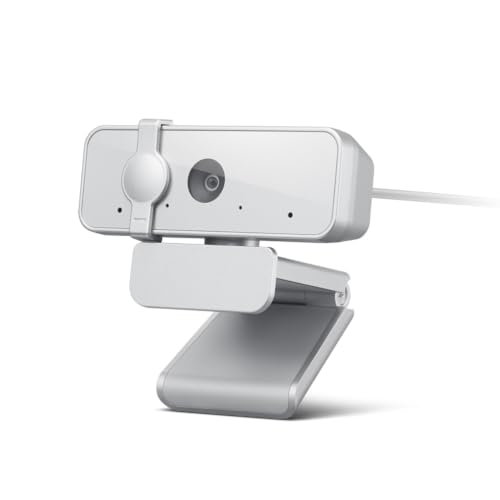
The white version of the Lenovo 310 FHD delivers the same internal setup as its black sibling, but the lighter finish changes how it reads on camera. White furniture, light-colored desks, and bright Scandinavian-style setups tend to blend better with a white webcam than a chunky black unit. That visual harmony matters for anyone streaming or recording where the camera becomes part of the on-screen composition.
The dual integrated microphones, 1.8-meter cable, and external privacy shutter all carry over from the black model reviewed above. You also get the same 1080p at 30 fps capture and USB plug-and-play simplicity. If you already chose the black version for darker gear, this is the natural match for minimalist or bright-room workstations. Functionally, the choice between the two comes down to aesthetic preference rather than performance.
A Few Strong Suits
- White finish blends with light-colored and minimalist desks
- Two integrated microphones give flexible voice pickup
- 1.8-meter cable handles longer routing runs
- External shutter protects the lens without adhesive covers
Points To Note
- White shell can show smudges and dust more visibly
- Same audio pickup means shared spaces may still capture background noise
Perfect Match For
Remote workers with bright, modern setups who want a webcam that matches a lighter desk aesthetic.
Skip It When
The black Lenovo 310 FHD is the cleaner choice for darker monitors or gaming-style desks.
The 90° field of view is the standout number on the EMEET C960 1080P. That wider frame fits two people side-by-side, a whiteboard behind you, or a small product demo without anyone getting cropped at the edges. For group calls from a home office or kitchen table, that extra coverage saves you from squeezing toward the monitor.
It captures 1080p video through a 5-layer anti-glare lens (a multi-coated optical element that reduces reflections and stray glare), which helps in rooms with mixed light sources. Two built-in microphones round out the audio, and the removable privacy cover is a small but appreciated touch. Compared to the 73° EMEET C960 4K reviewed earlier, this 1080P model trades resolution for a broader frame and easier compatibility with older laptops. It’s a thoughtful middle ground for shared workspaces.
What It Does Well
- 90° wide FOV captures two people without cropping
- 5-layer anti-glare lens reduces reflections from windows
- Two built-in microphones handle group conversation pickup
- Removable privacy cover protects the lens when off-camera
Practical Considerations
- Wide framing may show more background clutter than you’d like
- Fixed focus means close-up product shots can blur
Key Specs
Who Will Love This
Households and small teams running group video calls from a shared desk or kitchen table.
Consider Something Else When
The EMEET C960 4K is the better pick if you need sharper detail and PDAF autofocus for solo presentations.
The Lenovo QHD Webcam steps things up with 2K resolution, which sits in a useful middle ground between standard 1080p and full 4K. AI noise cancellation and enhanced image quality pull double duty: cleaner voice pickup when a coffee shop or shared kitchen is in the background, and smarter color and contrast adjustments without manual tweaking. The 2X digital zoom adds framing flexibility when you need to crop in for a tighter shot.
It’s also Teams certified, which matters if your workplace standardizes on Microsoft Teams and you want guaranteed compatibility with the platform’s calling features. The physical privacy shutter gives you that same peace of mind as the picks earlier in this list, and the directional microphone focuses on voice from in front of the camera. Compared to the Logitech Brio 100, this is a meaningful upgrade for image fidelity and audio processing, especially in noisier rooms.
The Case For It
- 2K resolution delivers sharper detail than 1080p standards
- AI noise cancellation reduces background hum and chatter
- 2X digital zoom enables flexible framing during calls
- Teams certification ensures smooth Microsoft Teams integration
- Physical privacy shutter blocks the lens when off-camera
- Directional microphone prioritizes voice over room noise
Things To Weigh
- 2K video requires more bandwidth than 1080p on older laptops
- Premium pricing reflects the upgraded sensor and AI features
At A Glance
The Right Fit
Professionals and frequent video callers who want a polished image, cleaner audio, and Teams-certified reliability.
Where A Sibling Pick Shines
The EMEET NOVA 4K is worth considering if you’d rather step to true 4K resolution over AI-enhanced 2K.
Matching The Right Webcam To Your Work Setup
Resolution is the first spec most people check, and for good reason. 1080p at 30 fps remains the practical baseline for daily video calls on standard monitors, while 2K and 4K make a noticeable difference when you record, stream, or sit close to a large external display. Anything below 720p starts to look soft on modern screens, so the Logitech C270 represents the floor most remote workers should consider.
Microphone quality deserves equal attention in shared or noisy homes. Dual-mic designs like the Lenovo 310 FHD or the EMEET C960 1080P capture voices from wider angles, while AI noise cancellation on the Lenovo QHD Webcam actively filters background hum. Run a quick test recording in your actual workspace before deciding, since specs only tell half the story.
Field of view, privacy features, and mounting round out the practical differences between models. A wider 90° frame suits group calls and whiteboards, while a tighter 73° view keeps solo presentations focused. Built-in physical shutters are increasingly common and worth seeking out over adhesive covers. Finally, plug-and-play USB compatibility matters for anyone who swaps between a work laptop, a personal desktop, and a docking station throughout the week.
Key Considerations Across These Picks
Mistakes Worth Dodging
Choosing a webcam based on megapixel count alone leads to soft, oversaturated video that looks worse than a clean 1080p feed. Resolution numbers don’t tell you how the sensor handles low light, which is where most home office setups actually fall short. Skipping a privacy shutter is another common oversight, since software-based covers can fail or get accidentally toggled off. Also worth avoiding: assuming every USB webcam works the same on older laptops, since 4K streaming demands more bandwidth than older USB 2.0 ports can comfortably deliver.
When Paying More Pays Off
Higher-tier webcams earn their keep through smarter image processing, better microphones, and longer firmware support. AI noise cancellation on the Lenovo QHD Webcam actively cleans up voices in real time, which is hard to replicate with a cheap clip-on mic. PDAF autofocus on the EMEET C960 4K and NOVA also keeps you sharp during demos and live presentations. For most daily callers, mid-tier picks cover the essentials, but the upgrade path matters if your work depends on consistent, polished video.
Frequently Asked Questions
What resolution do I actually need for video calls?
1080p at 30 fps is the practical baseline for most video calls and looks clean on standard laptop and monitor screens. 2K and 4K add sharpness but require a faster USB port and more bandwidth.
Do built-in microphones replace a separate headset?
For casual calls, dual-mic webcams like the EMEET C960 1080P or Lenovo 310 handle voice pickup well. For long calls or noisy homes, a dedicated headset or USB microphone still wins on clarity and comfort.
How important is a privacy shutter?
It is a small feature with real value. A physical shutter lets you block the lens mechanically without trusting software toggles, and it removes any doubt about whether the camera is actually off.
Will any of these webcams work with macOS and Windows?
All ten picks listed use standard USB plug-and-play connections and work across major operating systems and conferencing platforms, though some companion software may be platform-specific.
How does field of view affect my video calls?
A wider FOV (90° or more) fits two people or a whiteboard into the frame, while a narrower FOV (around 70°–75°) keeps the focus on a single presenter. Pick based on whether you usually appear solo or with a co-worker.
Closing Remarks
The right webcam depends less on flashy specs and more on the room you actually work in. Match the resolution to your monitor size, prioritize microphone quality if your home is busy, and don’t overlook field of view or a physical shutter. Any of the picks above will outperform a built-in laptop camera. From there, it’s just a matter of choosing the feature set that fits your daily rhythm and letting it fade into the background while you focus on the work.