Anyone with a shoebox of fading 4×6 prints knows the quiet dread of watching color shift and paper soften year after year. Home photo scanners promise to stop that clock, but the category is genuinely messy, with sheet-feed speeds, flatbed optics, and document hybrids all colliding in one listing page. This guide sorts ten real options into clear profiles, from quick batch jobs on shoebox albums to archival film work. Pick the one that matches your stack of photos, not the one with the most ambitious spec sheet.
The Leading Options At A Glance
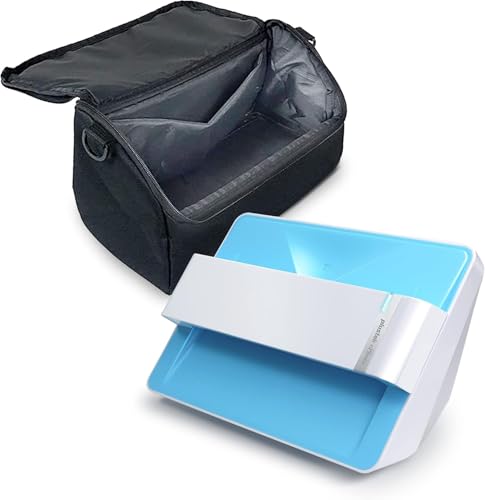
Plustek Photo Scanner Z300 + Carrying Bag

Wanty Nylon Dust Cover for Epson Perfection V700/V750/V800/V850

CaSZLUTION Dust Cover for Epson FastFoto FF-680W

Plustek ePhoto Z300 Photo Scanner

Epson FastFoto FF-680W and Workforce ES-580W Scanner Bundle

ScanSnap iX1600 Wireless Document Scanner

ScanSnap iX1400 One-Touch Document and Photo Scanner

Canon LiDE 400 Flatbed Scanner

Epson FastFoto FF-680W Duplex Photo and Document Scanner

Epson Perfection V850 Pro Photo Scanner
The Picks, Examined More Closely
The Plustek Z300 handles the most common digitization chore in the home, a stack of mixed prints in a shoebox, without forcing you to babysit every page. It feeds 3×5, 4×6, 5×7, and 8×10 prints plus letter and A4 documents through a sheet-fed path, which is dramatically faster than lifting a flatbed lid for each image. The bundled carrying case is a small but welcome touch if you want to move the unit between a desk and a closet.
For a casual family archive, the workflow feels surprisingly relaxed. You can knock down an afternoon’s worth of prints without much fuss, and the speed is where this Plustek pulls ahead of slower flatbed alternatives on this list.
The Good Stuff
- Sheet-fed design runs through dozens of prints in one session, a real time-saver compared with flatbed models like the Canon LiDE 400.
- Supports common print sizes from wallet up to 8×10, plus standard letter and A4 paper.
- Includes a carrying case for portable storage between rooms or locations.
- Auto crop and deskew tidy up slightly skewed or crooked prints in software.
- Cross-platform compatibility covers both Mac and PC households.
Things To Consider
- Resolution tops out at 600 dpi, which is plenty for prints but limits archival film work.
- Photo-only workflow means fragile originals need gentle handling before feeding.
Feature Snapshot
Who It Suits Best
Families sitting on a backlog of 4×6 prints who want a set-and-scan workflow without flatbed fatigue.
Consider Something Else When
Hobbyists digitizing 35mm negatives and slides should step up to the Epson Perfection V850 Pro for far higher optical resolution.
The Wanty cover is not a scanner, and that is precisely the point. It is a fitted dust shield for owners of pro-grade Epson Perfection flatbeds, the kind of gear that lives on a desk for years and slowly accumulates pet hair, coffee steam, and airborne grit. The 600D nylon fabric is the heavy-duty grade of dust cover material, and a wipe-down with a damp cloth is enough to keep it looking new.
Compared with the Plustek Z300, which is all about throughput, this accessory is about preservation between sessions. For photographers and archivists who just spent serious money on a flatbed, keeping the glass clean between scans is half the battle.
A Few Strong Suits
- Tailored to Epson Perfection V700, V750, V800, and V850 flatbeds.
- 600D nylon resists dust, splashes, and everyday kitchen or office mishaps.
- Folds flat for easy storage when the scanner is in active use.
- Helps protect a significant investment in pro-grade scanning hardware.
Worth Noting
- Limited to a narrow list of compatible Epson Perfection models.
- Does not guard against drops, spills, or impact damage, only airborne debris and minor splashes.
Made For
Owners of Epson Perfection V700 through V850 flatbeds who want to extend the life of their scanner between sessions.
Skip It When
Anyone using a sheet-feed scanner like the ScanSnap iX1600 needs a different cover, since that form factor is built around the CaSZLUTION cover in this list.
Sheet-feed photo scanners are wonderful until a dusty room turns the rollers into a maintenance chore. The CaSZLUTION cover slips over the Epson FastFoto FF-680W (and a handful of similarly sized units) to keep that dust off when the scanner sits idle. The fit is approximate rather than custom-tailored, so it works across multiple models in the same size class.
Think of it as a low-effort insurance policy for a scanner that handles paper constantly. If your FF-680W lives on a craft table or near a window, this cover pays for itself the first time you skip a roller cleaning.
Everyday Perks
- Designed around the Epson FastFoto FF-680W form factor.
- Compatible with several Fujitsu ScanSnap and Epson document scanners of similar size.
- Lightweight and easy to slip on and off between scanning sessions.
- Helps reduce how often you need to clean the feed rollers.
Honest Caveats
- Approximate sizing means a slightly loose fit on some compatible models.
- Covers dust, not humidity, so storage environment still matters in damp basements.
Right Fit For
Owners of Epson FastFoto FF-680W and similarly sized sheet-feed scanners who want to keep feed paths clean between batches.
A Better Fit Elsewhere
Flatbed owners with an Epson Perfection V850 Pro should grab the Wanty cover instead, since that pattern is matched to flatbed dimensions.
The Plustek ePhoto Z300 is the lighter, simpler cousin of the bundled Z300 covered earlier in this list, and it shares the same core DNA. A CCD sensor (a charge-coupled device, the kind of image sensor long favored for accurate color capture) reads each print, and software handles the cropping and straightening automatically. For most family albums, that is exactly the right amount of intervention.
Where it really earns its keep is in the unpredictability of real photo piles: slightly crooked, sometimes sticky, often different sizes. It processes a 4×6 print in around two seconds and an 8×10 in roughly five, so a kitchen-table project moves at a comfortable pace.
Noteworthy Benefits
- CCD sensor captures color and detail faithful to the original print.
- Auto crop and deskew fix common alignment issues without manual editing.
- Handles 3×5 through 8×10 prints plus letter and A4 paper.
- Supports both Mac and PC out of the box.
Points To Keep In Mind
- No carrying case included, unlike the Plustek Z300 bundle.
- 600 dpi ceiling again rules out true archival film scanning.
Quick Facts
Who Will Love This
Home users with mixed print sizes who want automatic cleanup without fiddling with settings each time.
Reach For A Different Pick When
Anyone scanning large stacks of documents alongside photos should consider the Epson FastFoto FF-680W for its higher throughput.
This pairing solves a problem most households discover too late: a photo scanner and a document scanner are rarely the same machine. The FastFoto FF-680W specializes in rapid photo batches with smartphone-friendly tools for annotation and slideshows, while the ES-580W duplex desktop handles the steady stream of paperwork that arrives every week. Together, they cover both halves of a typical home archive.
The bundle makes sense for anyone facing a serious backlog. Instead of choosing between optimizing for photos or optimizing for receipts, you get two units built for each job.
Features That Help
- Dedicated photo scanner plus a separate duplex document scanner in one purchase.
- FF-680W handles polaroids, panoramas, postcards, and prints up to 8×10.
- Workforce ES-580W scans double-sided pages in a single pass, saving time on paperwork.
- Companion mobile app supports voice and text overlays for storytelling.
Trade Offs
- Two scanners take up more desk space than a single hybrid unit.
- Two separate workflows to learn instead of one unified app.
Perfect Match For
Households balancing a photo archive with active paperwork, taxes, and school documents in equal measure.
Look Elsewhere When
Anyone with limited desk space should pick the single-purpose Plustek ePhoto Z300 and add a basic document feeder later.
The ScanSnap iX1600 leans hard into flexibility. It connects over Wi-Fi or USB, runs duplex scanning at 40 pages per minute (both sides captured in one pass), and tops everything off with a color touchscreen that lets each family member create a personal profile. For a household where several people scan different things on different schedules, that profile system removes a lot of friction.
It is a document-first scanner with photo capability rather than a dedicated photo unit like the Plustek Z300. The trade-off is that you get polished software, fast duplexing, and wireless placement, but you give up some of the photo-specific batch tuning of the FastFoto line.
Where It Excels
- Wi-Fi and USB connectivity for flexible desk placement.
- 40 ppm duplex scanning tackles thick paperwork quickly.
- Large color touchscreen supports multiple user profiles per household.
- ScanSnap Home 2.0 software organizes output into searchable archives.
Where It May Fall Short
- Photo-specific tools are less rich than Epson FastFoto’s annotation app.
- Larger footprint than compact flatbeds like the Canon LiDE 400.
Best Suited To
Shared family spaces where multiple people need quick, profile-based scanning for both documents and occasional photos.
Swap It Out When
Dedicated photo archivists with thousands of prints will find the Epson FastFoto FF-680W a faster path through the pile.
Where the iX1600 adds a touchscreen and wireless profiles, the iX1400 strips the experience down to a single button. Press it, scan, organize, done. For households intimidated by configurable scanners, that simplicity is genuinely valuable.
The Quick Menu pops up after each scan so you can drag and drop straight into a folder, email, or cloud service. The auto document feeder (ADF, a top-mounted tray that pulls pages through automatically) handles mixed paper sizes, including photos, with minimal intervention.
Strengths Worth Knowing
- One-touch scanning removes configuration anxiety for casual users.
- Quick Menu drag-and-drop workflow is fast for ad hoc jobs.
- Auto document feeder handles documents, receipts, and photo prints.
- Compatible with both Mac and PC.
A Few Limitations
- No wireless option; USB connection only.
- Lacks the touchscreen and user profiles of its sibling iX1600.
Who Should Grab It
First-time scanner shoppers and casual users who want the path of least resistance for occasional digitization.
Where Another Pick Suits Better
Multi-user households benefit more from the ScanSnap iX1600 with its profile system and Wi-Fi connectivity.
The Canon LiDE 400 takes the opposite approach from the sheet-feed giants in this list. It is a slim flatbed (LED Indirect Exposure, a low-power scanning method that uses LEDs instead of a traditional lamp) that stands upright when you need it and tucks away when you do not. The USB-C connection pulls power and data through a single cable, so there is no bulky power brick hogging an outlet.
For small apartments and home offices where desk space is at a premium, that vertical footprint is the whole pitch. Speed lands at roughly eight seconds per A4 page, which is brisk for a flatbed and comfortable for occasional archiving.
The Case For It
- Vertical kickstand design saves significant desk space.
- USB-C 3.0 connection carries both data and power in one cable.
- Five EZ buttons offer one-touch scan, copy, email, and PDF creation.
- Produces multi-page PDFs without a connected computer.
Some Limits To Know
- Single-page workflow is slower than sheet-feed options for bulk jobs.
- Best for occasional scanning; heavy daily use will feel tedious.
Built With In Mind
Apartment dwellers and home-office workers with limited desk space who mostly need occasional scans of documents and single prints.
Not Your Match When
Anyone staring down a shoebox of hundreds of prints should pick a sheet-feed unit like the Plustek Photo Scanner Z300 instead.
The standalone Epson FastFoto FF-680W is the speed-focused heart of the bundle covered earlier, and it earns its own spot for shoppers who already own a separate document scanner. Throughput runs around one photo per second at 300 dpi, and the auto document feeder accepts batches up to 36 prints at a time. For a multi-thousand-print archive, that throughput is the difference between finishing in a weekend and never starting at all.
It also handles odd formats like panoramas and postcards, which expands its usefulness beyond standard 4×6 and 5×7 prints. Duplex scanning (capturing both sides of a page in a single pass) lets it double as a competent document scanner for mixed-archive households.
Positive Takeaways
- One photo per second at 300 dpi for fast batch processing.
- Accepts up to 36 photos per batch in the auto feeder.
- Handles polaroids, panoramas, postcards, and prints up to 8×10.
- Duplex capability covers document scanning alongside photo work.
- Companion app supports voice, text, and slideshow creation.
Possible Compromises
- Higher price tier than entry-level sheet-feed scanners.
- Software learning curve is steeper than the one-button ScanSnap iX1400.
Feature Rundown
The Right Fit
Archivists tackling thousands of prints who care more about throughput than absolute flatbed resolution.
Another Choice May Suit
Anyone working with film negatives or slides instead of paper prints should reach for the Epson Perfection V850 Pro.
The Epson Perfection V850 Pro is the deep-archive choice in this lineup. It is a flatbed scanner (the kind where you lift a lid and place originals on a glass plate) that resolves 6400 dpi, with dual-lens optics (two separate lenses optimized for different resolution ranges) and a 4.0 Dmax rating (a measure of the scanner’s dynamic range, meaning how well it captures both deep shadows and bright highlights in a single scan). For film holders, slides, and archival negatives, that resolution range is the reason this unit exists.
It is slower and far more deliberate than any sheet-feed model on this list. Each scan requires placement, software tweaking, and patience. For most families, that effort is overkill, but for hobbyists, photographers, and family historians, the V850 is the right tool for the job.
Good Reasons To Consider
- 6400 dpi optical resolution captures fine grain in film and slides.
- Dual-lens system optimizes for both reflective prints and transmissive film.
- 4.0 Dmax tonal range preserves shadow and highlight detail.
- Includes film holders for 35mm slides, medium format, and other formats.
Worth Bearing In Mind
- Single-item workflow makes bulk photo scanning impractical.
- Higher price tier than most consumer-oriented scanners.
- Requires more software tuning than auto-crop sheet-feed models.
At A Glance
Whose Shelf It Belongs On
Photographers, archivists, and family historians working with slides, negatives, and irreplaceable film originals.
Where A Sibling Pick Shines
For paper-print archives in the thousands, the Epson FastFoto FF-680W delivers far faster results.
Matching a Scanner to Your Stack
Before any feature comparison, define the pile you are staring at. A few hundred 4×6 prints ask for a completely different tool than a shoebox of negatives, and that single decision shapes the rest of the buying process.
For paper-print projects, match sheet size to your largest common print. The Plustek units handle everything from 3×5 wallets up to 8×10 sheets, while sheet-feed scanners like the Epson FastFoto and ScanSnap iX-series run more efficiently when most of your prints fall within a single size range. Mixed-size batches are fine, but expect slightly more frequent re-loading.
Resolution matters more for film than paper. For prints at typical viewing sizes, 300 to 600 dpi is generous; for slides and negatives that you may want to print large or crop into, 6400 dpi (the V850 Pro’s territory) opens up options that lower-resolution units simply cannot reach.
Duplex capability (scanning both sides of a page in one pass) is a quiet superpower. If your archive mixes photos with two-sided documents such as letters, recipes, or certificates, a duplex sheet-feed model like the FastFoto FF-680W or ScanSnap iX1600 saves more time than any other single feature.
Finally, weigh software honestly. The auto crop and deskew tools in the Plustek ePhoto Z300 and the annotation features in the FastFoto app represent meaningful differences in how much fiddling you will do after each scan.
Key Considerations Across These Picks
Mistakes Worth Dodging
The most common pitfall is buying a flatbed for a bulk print project. A flatbed forces you to lift the lid for every image, which feels fine for ten photos and turns into a chore at five hundred. For paper-print archives, a sheet-feed scanner like the Plustek Z300 or Epson FastFoto FF-680W will save hours.
Another trap is assuming high dpi alone equals better scans. Resolution is just one variable; sensor quality, color depth, and software processing matter as much for everyday prints. A 600 dpi scan from a CCD-equipped Plustek can outperform a poorly tuned 1200 dpi capture from a cheaper sensor.
Finally, do not skip protective accessories. A fitted dust cover like the Wanty or CaSZLUTION option extends the life of any flatbed or sheet-feed scanner, especially in homes with pets, craft supplies, or open windows.
What the Higher Tier Buys
Premium models like the Epson Perfection V850 Pro exist for a reason. The 6400 dpi resolution, dual-lens optics, and 4.0 Dmax tonal range deliver film scans that consumer units cannot approach, with enough detail to make large prints from small negatives. If your archive includes slides or medium format, that premium is the difference between a usable scan and a true reproduction.
The upgrade is not always justified. For paper-print projects, the practical gains from stepping up to a premium flatbed are modest, while the workflow slowdown is significant. Spend the difference on storage and backup instead, and keep your workflow fast.