Spending hours hunched over a laptop leaves its mark on your neck and shoulders, and a flat desk only makes things worse. The right laptop stand lifts the screen closer to eye level, opens up airflow under the chassis, and turns a cramped notebook into something that actually feels like a workstation. The nine picks below cover the spread most shoppers care about: budget aluminum risers, sit-stand converters, vertical docks, full docking stations with built-in hubs, and a wide wooden platform for heavier gear.
The Choices Worth Comparing

Nulaxy Full Aluminum Laptop Stand

SOUNDANCE Aluminum Ergonomic Desk Riser

tounee Telescopic Sit-Stand Laptop Stand
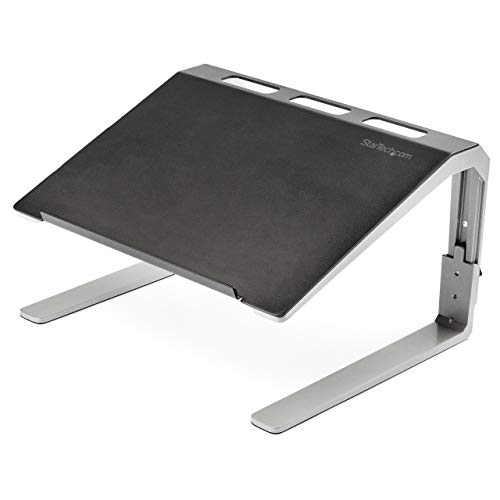
StarTech Adjustable Laptop Riser (Tilted)

BoYata Adjustable Multi-Angle Laptop Riser

OMOTON Dual Vertical Laptop Stand

Umaniy 8-in-1 USB-C Hub Laptop Stand
Umaniy M91 9-in-1 Dual HDMI Hub Stand

loukin Wood Monitor and Laptop Riser
The Strengths Of Each Pick
The Nulaxy sits in the sweet spot where most shoppers land: a flat aluminum slab on a wide base, designed to hold essentially any mainstream notebook from 10 to 16 inches. It raises the screen roughly seven inches off the desk, which is enough to put a 13-inch laptop close to eye level for someone around five-foot-eight without stacking it on books.
Compared to the SOUNDANCE riser below, the Nulaxy carries a higher published weight limit and feels more planted under a heavier 15-inch workhorse. The open-back frame lets hot air escape from the bottom of the chassis, so a long video call or a heavy compile won’t turn the keyboard into a hand warmer.
Bright Spots
- Ten- to 16-inch compatibility covers MacBook Air, Pro, Dell XPS, ThinkPad, and most Chromebooks in one frame.
- Published support up to 22 lbs handles gaming notebooks and mobile workstations without flex.
- The fully open back improves passive cooling during long editing or rendering sessions.
- Flat folded profile makes it easy to slide into a laptop bag between meetings.
Honest Caveats
- No height or tilt adjustment, so the angle is whatever the fixed geometry gives you.
- Aluminum can show fingerprint smudges; a microfiber wipe tends to be the easiest way to keep it presentable.
Feature Snapshot
Made For
Anyone with a 10- to 16-inch laptop who wants a stable, no-fuss riser that fits right into a home or office setup.
Reach For A Different Pick When
The tounee Telescopic Stand suits you better when you want to switch between sitting and standing throughout the day.
The SOUNDANCE riser keeps things simple: a single bent-aluminum piece that lifts the screen about six inches and stays put thanks to silicone pads. There’s nothing to assemble, nothing to tighten, and nothing to configure when you switch from a 13-inch MacBook to a 15-inch workhorse.
Where the Nulaxy above feels like a small platform with an open back, this one folds into a single slab you can toss in a bag. For remote workers who split time between a kitchen counter, a coworking space, and a hotel desk, that portability often matters more than extra height.
The Case For It
- 5mm thickened aluminum gives the deck a stiff feel under typing pressure.
- Silicone contact pads keep the laptop from drifting when you lean in to type.
- Folds flat for stashing in a backpack or rolling laptop sleeve.
Trade-Offs To Consider
- Listed capacity tops out around 8.8 lbs, so heavy 16-inch mobile workstations may be a stretch.
- Single fixed angle means shorter users may need to pair it with an external keyboard for true ergonomic alignment.
Right Fit For
Students and remote workers who bounce between desks and want a light, dependable aluminum riser.
Skip It When
You regularly dock at a fixed desk, in which case the StarTech Adjustable Laptop Stand offers more platform space and a higher published capacity.
The tounee trades the flat-riser simplicity of the Nulaxy and SOUNDANCE for a telescoping post and a 360-degree swivel base. The whole point is movement: you can raise the screen to standing height, rotate the laptop to show a colleague something on the screen, and sit back down without leaving the chair.
For anyone already working at a sit-stand desk, the tounee replaces the awkward stack of books you’ve been using to bring a laptop up to monitor height. The trade-off is footprint: the round base takes a bit more desk real estate than a flat riser, and the moving parts need a wipe-down every few weeks to keep the swivel smooth.
Advantages To Know
- True sit-to-stand range lets you change posture through the day instead of locking into one position.
- 360-degree swivel makes it easy to share the screen with someone sitting beside you.
- 10–17 inch compatibility handles most consumer notebooks plus the larger 16- and 17-inch models.
- Telescoping post is portable enough to move between home and a hot desk.
Soft Spots
- Takes more desk depth than a flat riser, which can crowd smaller workstations.
- Moving parts collect dust; a quick wipe around the swivel joint every few weeks keeps action smooth.
Quick Facts
Who It Suits Best
Hybrid workers and anyone at a sit-stand desk who wants their laptop to move with them through the day.
Look Elsewhere When
Your setup is a small fixed desk, where the loukin wood riser takes up less depth and adds storage underneath.
StarTech leans into the office-IT side of the category with a 2.5mm steel platform on aluminum legs and a built-in tilt. The deck measures roughly 14 by 10 inches, which means a 17-inch workstation actually fits without overhanging the edges, and a 12.7mm lip along the bottom keeps the laptop from sliding off when the deck is angled.
Unlike the SOUNDANCE and Nulaxy flat risers, this one is built to stay parked on a desk. You can leave it loaded with a heavy machine all day, and the open underside gives you room to slide a keyboard, a notebook, or a charging brick out of sight. In a shared office, that storage nook often matters as much as the lift itself.
Notable Gains
- Steel platform on aluminum legs supports 17-inch laptops without flex.
- Tilted deck positions the screen at a more natural angle for long reading sessions.
- Open underside doubles as storage for a keyboard or paperwork.
- Heavy-duty build stands up to daily use in a busy shared workspace.
Small Caveats
- Heavier than aluminum flat risers, so it’s not the pick for bag-based commuters.
- Limited color options for setups where the riser has to match a particular aesthetic.
Best Suited To
Office managers and power users running 15- to 17-inch laptops who want a fixed, durable riser that doubles as under-desk storage.
A Better Fit Elsewhere
Casual home users wanting a lighter, more decorative option should consider the loukin wood riser instead.
The BoYata is the most posture-flexible of the risers so far. The Z-shaped alloy frame folds in two places, which lets you set the deck higher or lower and angle it toward you. That range is genuinely useful for short and tall users sharing the same desk, or for switching between typing and movie-watching on a long flight.
Four silicone pads along the bottom grip slick desktops, and the same pads on the deck keep a tablet from sliding when you set the riser low and flat. Compared to the SOUNDANCE single-angle slab, this one demands a minute of fiddling to find your angle, but pays you back with options the fixed riser simply can’t offer.
Strong Points
- Two pivot points give you height and angle adjustment in one package.
- Alloy steel build keeps the frame stiff when fully extended.
- Doubles as a tablet stand for sketching or watching video at a low angle.
- Folds flat enough to slide into a laptop sleeve alongside the notebook.
Points To Note
- Two hinge points mean two things that can loosen over time; a quick re-tightening every few months is wise.
- Fully extended, the front feet can lift slightly off the desk on very smooth glass surfaces.
Perfect Match For
Anyone sharing a workspace with a partner, or alternating between a laptop and a tablet through the day.
Swap It Out When
You’d rather lock in a single ergonomic height and never adjust it again, in which case the Nulaxy Full Aluminum Laptop Stand is the more set-and-forget option.
OMOTON steps away from the riser pattern entirely and goes vertical. Two slotted cradles hold closed laptops upright on the desk, freeing up the surface that would otherwise be lost to two open notebooks. For anyone with a work MacBook and a personal Windows machine, the space difference is dramatic: two closed laptops occupy roughly the footprint of one open one.
The slots are sized for notebooks between about 14mm and 42mm thick, which covers most ultrabooks and gaming machines without crushing the chassis. Silicone lining inside the cradles keeps the aluminum edges from picking up scratches over time.
Where It Delivers
- Vertical cradle design recovers desk space usually lost to two open laptops.
- Adjustable width fits a wide range of laptop thicknesses without forcing you to measure twice.
- Silicone slot lining protects the finish on premium aluminum notebooks.
- Aluminum body matches Apple aesthetics in a silver home office.
Worth Bearing In Mind
- This is a docking cradle, not a screen riser, so it doesn’t help with monitor height on its own.
- Dual cradles means it’s only worth buying if you genuinely have two laptops to park.
Who Will Love This
Anyone running a work-and-personal laptop pair who wants both machines off the desk but within reach.
Consider Something Else When
You only have one laptop and want better ergonomics, in which case the SOUNDANCE riser does the height job at a lower cost.
Umaniy merges two accessories that usually live separately: a foldable laptop riser and a USB-C hub with HDMI output, USB-A and USB-C 3.0 ports, plus SD and TF card slots. One cable to the laptop, and you’ve lifted the screen, added an external display, and connected a mouse and an external SSD at the same time.
It’s noticeably more complex than the SOUNDANCE flat riser, and the hinge plus the cable management underneath take a minute to set up cleanly. For a single-cable desk, though, the reduction in clutter is hard to beat. In a home office with a permanently parked laptop, this is closer to a tiny docking station than a simple stand.
Everyday Wins
- 4K HDMI output turns a laptop into a single-cable desk setup with an external monitor.
- SD and TF card slots are useful for anyone moving photos off a camera or drone.
- Foldable design means it still packs flat for occasional travel use.
Less Ideal Details
- More ports mean more cables, so a quick tidy every couple of weeks keeps the desk from looking tangled.
- Hub electronics add some heat, so airflow around the riser matters more than with a plain aluminum stand.
Built With In Mind
Remote professionals who want a single-cable desk and don’t want a separate dock and stand competing for space.
Another Choice May Suit
The Umaniy M91 9-in-1 fits better if dual 4K HDMI outputs are part of your daily workflow.
The M91 takes the Umaniy hub-stand concept and pushes it toward creators and analysts. Dual HDMI outputs at 4K and 60Hz let you run two external monitors off a single USB-C cable, while additional USB 3.0 ports handle external drives and peripherals. For an editor working from a MacBook, this can replace a full Thunderbolt dock at a fraction of the desk footprint.
The riser portion stays in the background, which is the point. You get the screen lift of a Nulaxy or SOUNDANCE, plus a hub, in one piece of metal. The honest read is that this is a hub first and a stand second, so anyone who doesn’t need the dual 4K is paying for capability they won’t use.
Where It Excels
- Dual 4K HDMI at 60Hz drives two external monitors from a single USB-C connection.
- Multiple USB 3.0 ports keep drives, mice, and dongles connected without a separate hub.
- USB-C PD passthrough keeps the laptop charged while everything else runs through the stand.
Things To Consider
- Overkill for shoppers who only need a basic screen lift, so the feature set has to actually get used.
- Hub electronics add weight; expect a noticeably heavier unit than a plain aluminum riser.
Feature Rundown
Whose Shelf It Belongs On
Creators, analysts, and developers who run dual external monitors and want everything routed through one tidy cable.
Not Your Match When
You only need to lift a single laptop, in which case the Nulaxy Full Aluminum Laptop Stand delivers the same height job for less money.
The loukin shifts away from the aluminum-and-steel category default and uses a wide MDF platform finished in wood grain. At 22.4 by 8.2 inches, the deck is wide enough for a monitor and a laptop to sit side by side, plus a tablet, a speaker, or a small plant, depending on how you like to fill a desk.
It does double duty as a printer stand, a projector platform, or a shelf for a full external display. The lift is more modest than the tounee’s sit-stand range, but the storage underneath tends to be the bigger selling point in a small home office where every inch of vertical space matters.
Strengths Worth Knowing
- Wide deck fits a monitor and a laptop, a printer, or a projector on the same surface.
- Waterproof finish wipes clean with a damp cloth, which helps with coffee spills.
- Open space underneath turns the riser into a small storage shelf.
- Wood grain plays nicely in a room where aluminum risers feel out of place.
A Few Limitations
- MDF is heavier than aluminum and not the friendliest material to move between rooms.
- Fixed height means you’ll still want an external keyboard for proper ergonomic alignment at standing height.
Right Fit For
Home office users in smaller apartments who want a wide platform that doubles as a storage shelf.
Where Another Pick Suits Better
Heavy 17-inch workstations are better served by the StarTech Adjustable Laptop Riser, which has a steel platform and a higher published capacity.
Picking The Right Laptop Stand for Your Setup
The category splits into a few clear patterns once you start looking. Flat aluminum risers such as the Nulaxy and SOUNDANCE are the everyday default, low in cost, light in the bag, and stable enough for most notebooks. Adjustable and sit-stand options like the tounee give you posture flexibility through the day, which matters if your back complains after long sessions. Hub-integrated stands such as the Umaniy 8-in-1 and M91 collapse cable clutter into a single USB-C connection, while a wide wooden platform like the loukin brings storage and a softer aesthetic to a home office.
Match the stand to the laptop you actually own. A 13-inch ultrabook doesn’t need a 17-inch steel deck, and a heavy 16-inch workstation will overpower a thin aluminum riser. The published weight capacity, the listed size range, and the materials together tell you most of what you need to know before checking the listing.
Decide whether ergonomics or desk organization is the real priority. Screen-lift stands are about posture, while dual vertical docks and wide riser shelves are about reclaiming surface area. The hub-integrated stands mix both jobs into one piece, which is convenient but only worth the added complexity if you’ll use the ports.
Key Considerations Across These Picks
Wrong Turns To Avoid
The most common mistake is choosing a riser on looks alone and ignoring the listed weight capacity. A 17-inch mobile workstation can weigh well over six pounds, and a thin aluminum slab without enough material behind the deck can flex under that load. Match the capacity to your machine, not the other way around.
A second pitfall is buying a hub-integrated stand when a simple riser would do. The extra ports, cables, and PD passthrough add complexity that has to be managed, and any electronic accessory adds another thing that can occasionally need troubleshooting.
When Paying More Pays Off
Higher-tier models earn their cost through materials and adjustability. A 2.5mm steel platform with aluminum legs costs more than a thin aluminum riser, but it stays rigid under a heavy machine and outlasts lighter frames in a shared office. Sit-stand and hub-integrated stands also climb in price because they add real engineering: telescoping posts, dual HDMI controllers, and USB-C PD circuitry all add to the bill.
The upgrade is worth it when you’ll genuinely use the extra capability every day. For a remote worker spending eight hours at a fixed desk, the posture and cable reduction pay back the cost. For a casual user who only opens the laptop on the couch, the cheaper riser is the smarter buy.
Frequently Asked Questions
How much weight can a typical laptop stand handle? Most aluminum risers in this roundup are rated between 8 and 22 lbs, with steel platforms sitting at the higher end. Always check the listed capacity for the specific model against your laptop’s actual weight before buying.
Do laptop stands actually help with posture? Raising the screen closer to eye level reduces the downward neck angle that flat-desk laptop use encourages, which can ease shoulder and upper-back strain over time. For full ergonomic alignment, pair the stand with an external keyboard and mouse so your arms stay at a comfortable height.
Will a laptop stand overheat my machine? Open-back aluminum risers such as the Nulaxy actually help with cooling by allowing air to circulate beneath the chassis. Closed-bottom or fully enclosed designs can trap heat, so check the design if your laptop runs warm under load.
Are foldable laptop stands stable enough for daily use? A well-built alloy or steel folding stand with silicone contact pads is stable enough for everyday typing and video calls. Look for hinge construction, pad placement, and a non-slip base, especially if you tend to lean on the laptop while typing.
Can a laptop stand double as a monitor riser? Wide platforms like the loukin wood riser are large enough to hold an external monitor and a laptop side by side, while narrower risers are really only suitable for a single laptop. For dual monitor setups, the M91 hub-stand or a dedicated monitor riser is the better match.
The Takeaway
The right laptop stand depends on the laptop you carry, the desk you sit at, and how much your back complains at the end of the day. Aluminum risers cover the everyday case, sit-stand stands add posture flexibility, hub-integrated stands cut cable clutter, and wide wooden platforms bring storage back into a small room. Pick the job that actually matters in your setup, and the choice tends to make itself.