Whether you’re rescuing decades of family photos from a shoebox or prepping oversized prints for a client, the right large format photo scanner turns hours of fiddling into an afternoon of progress. These picks span dedicated photo feeders, flatbed alternatives, and wide format plotters that handle everything from wallet prints to 36-inch poster prints. Each one earns its spot for a specific reason: speed, color depth, page-size range, or software smarts.
The Leading Options At A Glance
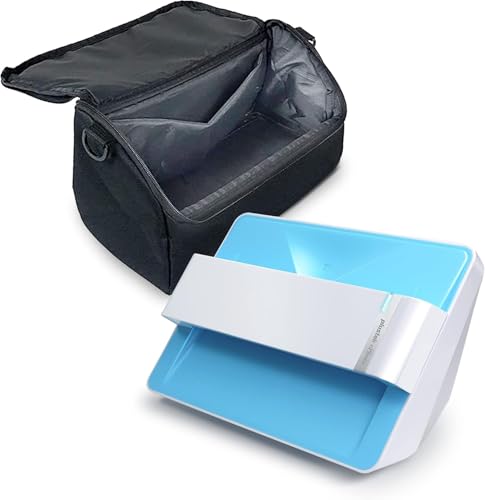
Plustek Photo Scanner Z300 + Carrying Bag

HP DesignJet T650 24-inch Plotter Printer (5HB08T)

Plustek ePhoto Z300 CCD Photo Scanner

CZUR Shine Ultra Smart Portable Document Scanner

CZUR Shine Ultra Pro 24MP Document Scanner

ScanSnap iX1400 One-Touch Document Scanner

CZUR Lens800 Pro Portable 8MP A4 Document Scanner

HP DesignJet T210 24-Inch Plotter (8AG32T)
HP DesignJet T650 36-inch Plotter (5HB10T)

CZUR Aura Pro Portable Book Scanner
Why These Options Stand Out
The Plustek Z300 handles the kind of job that usually eats a weekend: a shoebox of mixed prints ranging from wallet-sized keepsakes to 8×10 portraits. Optical resolution (the level of detail the lens actually captures) tops out at 600 dpi, with a 300 dpi quick mode that pushes a 4×6 photo through in about two seconds. That’s the speed you want when you’re staring down a thousand prints and a long afternoon.
Compared to the flatbed scanner most people grew up with, the Z300’s sheet-feed design skips the lid-lift ritual entirely. You drop one photo in, wait for the chirp, drop the next. For casual archivists who care more about preserving memories than chasing gallery-grade color depth, that tradeoff makes sense.
Where It Helps
- Feed-through design beats a flatbed for batch jobs
- Handles 3×5, 4×6, 5×7, 8×10 prints plus letter and A4 paper
- About two seconds per 4×6, five seconds per 8×10 at 300 dpi
- Includes a carrying bag for off-site scanning sessions
- Auto crop and deskew (straightening crooked scans) reduce post-edit work
Things To Consider
- 300 dpi scans look fine on screens but won’t satisfy archival reprints at poster size
- Feeder rollers need occasional cleaning to handle sticky or curled prints without jamming
Who It Suits Best
Family historians and casual archivists who want to convert hundreds of prints to digital without spending all weekend at a flatbed.
Consider Something Else When
Pro photographers chasing maximum tonal range should look at the Plustek ePhoto Z300 in spot three, which uses a CCD sensor (a charge-coupled device that captures richer color data) for better color fidelity.
HP built the T650 for the kind of work that lives or dies on a clean line. Architects, engineers, and GIS (Geographic Information Systems) teams rely on 24-inch plotter output for technical drawings, renderings, and detailed maps. Where the Plustek photo feeders above capture old memories, the T650 prints new ones at scale, and it ships with HP Click software that walks non-designers through poster creation in minutes.
The included two-year onsite warranty covers accidental damage plus breakdowns, which matters for a machine that pulls long shifts. The T210 in spot eight offers a softer entry into wide format, but the T650’s crisper line quality and faster throughput earn the step up for anyone running prints daily.
Key Advantages
- Prints up to 24-inch wide technical drawings and posters
- Two-year onsite warranty covers drops, spills, and breakdowns
- HP Click software lowers the learning curve for new users
- 24/7 support reduces downtime when print jobs are queued
Worth Noting
- Ink costs add up on heavy CAD (computer-aided design) or poster runs; budget for replacement cartridges
- Footprint is substantial; smaller studios may need to rearrange furniture to fit the unit
Feature Snapshot
Made For
Architects, engineers, and design studios that need reliable wide format output backed by a real warranty.
A Better Fit Elsewhere
Casual users who only print the occasional poster should consider the HP DesignJet T210 instead, which carries a lighter footprint and a friendlier setup.
The original ePhoto Z300 is the Plustek that put photo-feed scanning on the map. It uses a CCD sensor rather than a CIS (Contact Image Sensor) contact strip, and that detail matters: CCDs typically pull more accurate color and tonal data, which is exactly what you want when scanning prints with subtle skin tones or faded pastels. The two-second 4×6 scan speed still applies, so you’re not trading time for quality.
Compared to its sibling in spot one, this model ships without the carrying bag but adds the CCD advantage for color-critical hobbyists. Mac and PC compatibility keeps it friendly for mixed households. Auto crop and deskew software cleans up crooked batches before they hit your hard drive.
What Makes Sense
- CCD sensor delivers richer color depth than typical CIS scanners
- Two-second scan speed per 4×6 keeps large projects moving
- Supports prints from 3×5 through 8×10 plus letter and A4 documents
- Auto crop and deskew trim editing time after each batch
Trade Offs
- No carrying bag in the standard bundle, unlike the Z300 bundle in spot one
- Software suite focuses on photo capture; advanced retouching still needs a separate editor
Right Fit For
Hobbyist photographers and scrapbookers who care about accurate tonal reproduction on family prints.
Skip It When
Anyone scanning glossy magazine pages or bound books will prefer the CZUR overhead scanners further down the list, which flatten curved pages more gracefully.
The CZUR Shine Ultra flips the photo scanning category on its side, literally. Instead of feeding paper through a slot, you mount the scanner above your desk and capture documents from above. That means you can scan pages from a bound book, a magazine, or a stapled report without tearing anything apart. The trade-off shows up in lighting: overhead units depend on consistent ambient light, which can shift color between batches.
Scan speed lands near one second per page, and it handles anything up to A3 size (11.69 by 16.53 inches). The dual-mode functionality turns the unit into a USB document camera for remote teaching, which makes it a natural fit for tutors and homeschool parents. Setup works on Windows and macOS, though mobile devices are off the table.
The Helpful Details
- Overhead design captures bound books and stapled reports without disassembly
- About one second per page scan speed keeps classroom sessions moving
- Doubles as a USB document camera for live teaching
- Accepts documents up to A3 size for oversized worksheets and charts
Honest Caveats
- Glossy magazine pages can pick up reflections from overhead lighting
- No iOS or Android support; laptop required for operation
- Curved book pages in the center of thick volumes may need manual flattening in software
Best Suited To
Tutors, homeschool families, and remote workers who need a portable scanner that handles both loose pages and bound material.
Look Elsewhere When
Anyone scanning large batches of loose prints should consider the Plustek Z300 in spot one, which is built for feeder efficiency.
The Shine Ultra Pro is the Shine Ultra’s resolution-hungry sibling. A 24-megapixel auto-focus camera pushes resolution up to 5696 by 4272 pixels, which translates to noticeably sharper scans when you’re digitizing delicate artwork, magazine spreads, or product photography. Effective DPI lands at 440 for A4 sheets and 320 for A3, which is plenty for most print and web projects.
Pixel transformation technology flattens the curved surface of an open book, which makes this a sensible choice for designers who scan reference books all day. The Ultra in spot four handles the same workload at lower resolution, so the Pro earns its premium mainly through detail capture and the better auto-focus.
Bright Spots
- 24MP sensor captures fine detail in artwork and magazine spreads
- Auto-focus keeps pages sharp without manual tweaking
- Curve-flattening tech handles open-book scans cleanly
- Doubles as a USB document camera for client presentations
Points To Note
- Glossy photo paper and glossy magazine covers are not recommended for best results
- Requires a stable overhead mount or desk setup for consistent framing
Who Should Grab It
Designers, researchers, and content creators who need high-resolution scans of reference material without scanning individual pages.
Reach For A Different Pick When
Anyone digitizing primarily glossy photo prints should look at the Plustek ePhoto Z300 in spot three, which feeds them through a CCD sensor without glare issues.
The ScanSnap iX1400 is what happens when a scanner tries to disappear into your routine. One button press scans, cleans up, and organizes the document, then drops it into the app of your choice. The auto document feeder handles receipts, photos, and pages without supervision, which makes it a quiet workhorse in a home office that processes a steady trickle of paperwork.
Compared to the Plustek feeders in spots one and three, the iX1400 leans toward office tasks like receipts and statements rather than high-volume print archiving. Color handling is solid, and the Quick Menu integration keeps the workflow smooth across Mac and PC setups.
Well-Handled Touches
- One-button operation removes setup friction for non-technical users
- Auto document feeder handles mixed batches of receipts and pages
- Quick Menu drops scans straight into your preferred apps
- Cross-platform support covers both Mac and PC households
A Few Limitations
- Not optimized for large photo prints; the feed path suits standard document sizes
- Bundled software assumes routine office workflow rather than archival photo management
Perfect Match For
Home office users who want one scanner that handles receipts, statements, and the occasional photo without a learning curve.
Not Your Match When
Archivists working through shoeboxes of vintage prints will get better results from the Plustek Z300 bundle in spot one.
The Lens800 Pro keeps things simple. An 8-megapixel camera paired with 270 DPI output delivers 3264 by 2448 captures, which lands in the sweet spot for everyday document archiving and study notes. The included OCR (Optical Character Recognition) software converts scans into editable Word, Excel, searchable PDF, and editable PDF files across more than 180 languages, though Thai, Hebrew, and Arabic are not currently supported.
This is the most travel-friendly CZUR in the roundup, and the multilingual OCR makes it a natural fit for language learners and students working through foreign-language textbooks. Resolution sits below the Shine Ultra Pro in spot five, so it isn’t the pick for fine-art reproduction.
Reasons It Performs
- OCR software recognizes over 180 languages for editable output
- Compact form factor travels well between home, school, and office
- Multi-targeting software scans multiple items in one frame
- Fast scan speed keeps note digitization efficient
Things To Weigh
- A4 ceiling excludes legal-size and larger documents
- OCR misses Thai, Hebrew, and Arabic text per the current software version
Feature Rundown
Built With In Mind
Students and language learners who need editable scans of foreign-language materials and textbooks.
Swap It Out When
Anyone needing A3 support should step up to the CZUR Shine Ultra in spot four, which handles larger pages.
The DesignJet T210 lowers the entry point into 24-inch wide format printing. HP Click software walks first-time users through CAD drawings and poster layouts without demanding deep design knowledge, which makes the T210 a natural fit for small studios, classroom labs, and branch offices that occasionally need oversize output. The two-year HP Care Pack adds onsite support that covers accidental damage and breakdowns.
Compared to the T650 in spot two, the T210 is the lighter, simpler option for shops that don’t print at full CAD volume. The output quality still handles line drawings and maps well, and the included software bundle covers most small-team workflows.
Benefits That Matter
- 24-inch wide format covers CAD, posters, and map prints
- HP Click software eases the learning curve for new users
- Two-year onsite warranty covers drops, spills, and mechanical issues
- Compact footprint among 24-inch plotters for tight studio spaces
Some Limits To Know
- Print speed falls behind the T650 on large batch runs
- Ink consumption climbs quickly with daily poster production
Whose Shelf It Belongs On
Small studios, classrooms, and satellite offices that need occasional wide format output without a dedicated print operator.
Where A Sibling Pick Shines
High-volume architectural firms should consider the T650 in spot two, which delivers faster throughput and tighter line accuracy.
The T650 in 36-inch form is the wide format printer you reach for when standard architectural sheets aren’t wide enough. GIS teams printing detailed maps, urban planners laying out city blocks, and architects producing expansive renderings benefit from the extra real estate. The same two-year onsite warranty from the 24-inch version in spot two carries over, which covers accidental damage plus mechanical breakdowns.
Footprint is the obvious compromise. You’ll need dedicated floor space and a stable table or stand, especially compared to the 24-inch T210. For shops already running wide format, the upgrade from 24 to 36 inches is usually a workflow unlock rather than a luxury.
Positive Takeaways
- 36-inch print width handles oversized maps and architectural renders
- Sharp line quality for technical drawings and detailed maps
- Two-year onsite warranty covers accidental damage and breakdowns
- HP Click simplifies poster creation for non-designers
Things That May Matter
- Large footprint demands dedicated floor space in the office
- Ink costs scale with print size; budget accordingly for full-bleed posters
Who Will Love This
Architecture firms, GIS teams, and mapping professionals who routinely produce oversize technical prints.
Another Choice May Suit
Smaller operations that only occasionally exceed 24 inches should consider the 24-inch HP DesignJet T210 instead, which costs less to own and operate.
The Aura Pro is the scanner that takes book preservation seriously. Three laser lines project onto each page to capture the precise curvature of an open book, and the bundled AI software flattens that curve into a clean, even scan. For archivists, rare book collectors, and academic researchers handling fragile volumes, that level of geometry correction matters more than raw pixel count.
A3 size support covers oversized folios, and the AI-assisted workflow trims manual editing time on busy pages. Compared to the Shine Ultra in spot four, the Aura Pro dedicates its hardware to book geometry rather than general document scanning, so it earns its place in libraries and research offices more than in home workspaces.
The Good Stuff
- Three-laser projection flattens curved book pages accurately
- AI software trims cleanup time on complex page layouts
- A3 coverage handles oversized folios and bound reports
- Fast scan speed keeps digitization projects on schedule
Where It Is Less Suited
- Specialized hardware commands a premium over general document scanners
- Glossy coated pages still need careful ambient lighting to avoid reflections
Key Specs
The Right Fit
Archivists, rare book collectors, and academic researchers who need page-faithful scans of bound volumes.
Where Another Pick Suits Better
Casual users digitizing loose prints and documents will find the CZUR Shine Ultra in spot four more practical for everyday work.
What To Weigh Before Choosing A Large Format Photo Scanner
The “large format” label covers more ground than people expect. Some picks here are photo feeders that handle prints up to 8×10, while others are wide format plotters that print up to 36 inches. Defining your actual workflow before shopping saves you from overpaying for capacity you won’t use, or underbuying and hitting a ceiling in six months.
Sensor Type And Color Depth
CCDs generally capture more accurate color and tonal range than CIS sensors, which matters when scanning faded prints or delicate artwork. The Plustek ePhoto Z300 leans on a CCD for that reason, while most overhead CZUR units use camera-based capture that prioritizes speed and flexibility. Glossy originals challenge both sensor types, so plan for matte or semi-matte surfaces whenever the source material allows.
Speed Versus Resolution Trade-offs
Higher DPI scans (dots per inch, a measure of detail density) produce larger files and slower throughput. Most home archivists find 300 DPI perfectly adequate for screen viewing and standard reprint sizes. Professional photographers and archivists targeting gallery prints usually want 600 DPI or higher. A two-second 4×6 scan at 300 DPI turns into a much longer job at 600 DPI, so the time budget matters.
Size Coverage And Format Fit
A scanner that handles 4×6 prints won’t help with a 24-inch architectural drawing, and a plotter won’t digitize your photo album. Match the unit to the actual output you need. Print feeders like the Plustek Z300 cover photo albums, while overhead CZUR units handle books and bound reports, and HP DesignJet plotters address wide format poster and CAD output.
Key Considerations Across These Picks
Wrong Turns To Avoid
The most common slip-up is buying a wide format printer when the real need is a faster photo feeder. Plotters solve print output problems, not archive digitizing problems. Another trap is ignoring the operating system requirement, since some CZUR models don’t support mobile devices. Glossy original handling trips up a lot of first-time shoppers too, because overhead scanners can struggle with reflections on coated paper.
When Paying More Pays Off
Higher-tier models earn their premium through three upgrades that matter in daily use. Better sensors deliver richer color on photo prints. Larger optical formats cover oversized originals without tiling scans. Robust software packages save hours of editing time on real-world projects. For anyone running scans weekly rather than yearly, those upgrades typically pay back within the first few months of use.
Frequently Asked Questions
What Counts As A Large Format Photo Scanner?
Large format generally means a scanner or printer that handles oversized originals or output beyond standard letter and A4 paper. In this roundup that includes photo feeders for 8×10 prints, overhead scanners for A3 pages, and 24 to 36-inch plotters for technical drawings and posters.
How Many DPI Do You Really Need For Photo Archiving?
For screen viewing and standard reprint sizes, 300 DPI is plenty. Archival reprints at poster size benefit from 600 DPI. Anything beyond 600 DPI mainly serves specialized reproduction work.
Can Overhead Scanners Handle Glossy Photo Prints?
Overhead scanners can struggle with glossy originals because ambient lighting creates reflections. A flat-feed scanner with a CCD sensor usually delivers cleaner results on glossy photo paper.
Do Wide Format Plotters Work As Scanners?
The HP DesignJet models in this roundup are printers, not scanners. For digitizing large originals, you’ll need a flatbed or overhead scanner with appropriate size coverage.
How Important Is OCR In A Photo Scanner?
OCR matters most when you’re digitizing text-heavy documents like books, notes, and records. For pure photo archiving, OCR is a bonus rather than a core requirement, though multilingual OCR helps if you scan foreign-language material.
The Takeaway
The right scanner depends entirely on what you’re trying to preserve or produce. Family photo archives lean toward the Plustek feeders in spots one and three, while bound material and books call for the CZUR overhead models in spots four, five, seven, and ten. Wide format print output belongs to the HP DesignJet plotters in spots two, eight, and nine. Match the unit to your dominant workflow, and you’ll spend less time fighting the hardware and more time enjoying the results.