Sitting shouldn’t feel like a punishment. Yet for anyone managing lower back pain or sciatica, an ordinary office chair can turn an eight-hour workday into a slow-motion ache that runs from the lumbar spine down through the hips.
The right seating setup distributes weight away from the tailbone, keeps the spine in a neutral curve, and lets you shift positions without losing support. The picks below cover mesh task chairs, big-and-tall frames, and a contoured cushion that travels from desk to car to couch, so you can match the solution to your specific pain pattern.
A Side-By-Side Look
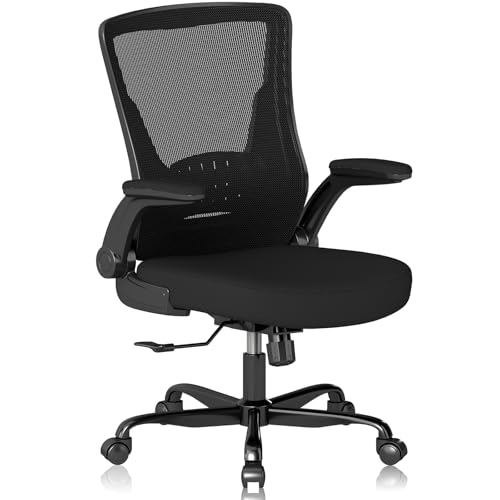
Vomena Ergonomic Mesh Desk Chair with Flip-Up Armrests

GLEEWARM Extra Large Seat Cushion for Sciatica & Tailbone Pain

CASASIO Ergonomic Home Office Chair with 4-Way Lumbar

BLISNEST Big and Tall Executive Chair with Air-Lumbar Support

SIHOO B300 Pro Ergonomic Office Chair with 4D Lumbar

Solviva Mesh Office Chair with Headrest and 3D Arms

Humergo Ergonomic Office Chair with Footrest
The Picks, Examined More Closely
Vomena’s mesh desk chair leans into the basics of ergonomic seating without overcomplicating the package. The breathable mesh back keeps air moving across the spine on warm afternoons, while a dense foam cushion handles the load through long video calls. Flip-up armrests swing out of the way, so the chair slides neatly under a standard desk when the workday ends.
The five-point support layout targets the shoulders, back, hips, and hands at once, which matters when sciatica pain shifts the way you sit. You’ll find yourself adjusting less and focusing more, which is the whole point of a task chair meant for daily use.
The Value In It
- Five-zone support layout that addresses shoulders, lumbar, hips, and arms in one frame
- Mesh backrest allows steady airflow, reducing sweat buildup during back-to-back meetings
- Flip-up armrests free up desk space, helpful in compact home offices
- Dense foam padding holds its resilience through a typical workday without flattening quickly
Things To Consider
- The lumbar curve is built into the frame rather than separately adjustable, so taller users may need to add a small pillow for precise support
- Mesh seats feel firmer than padded leather-style chairs during the first week of ownership
Key Product Details
Who It Suits Best
Remote workers and students who sit six to eight hours a day and want an all-mesh setup that stays cool.
A Better Fit Elsewhere
Shoppers over 250 pounds or anyone needing a deeply adjustable lumbar should look at the SIHOO B300 Pro for more refined tuning.
When your existing chair is fine but the tailbone isn’t, a contoured cushion can change the math fast. GLEEWARM’s oversized seat pad uses a W+M+U shape that follows the curve of the thighs and leaves a relief channel where the coccyx meets the seat, taking direct pressure off the most painful spot.
The 24 vent holes punched through the foam create airflow channels that beat typical gel pads on hot days, so your hips stay dry through long drives or marathon work sessions. You can move it from the office chair to the driver’s seat to a wheelchair without losing the ergonomic benefit.
What Helps Most
- W+M+U contoured shape spreads load across the thighs, easing tailbone and lower back stress
- 24 strategically placed vents pull heat away from the seat, useful during summer commutes
- Generous footprint fits wider chairs and car seats without sliding around
- Portable between desk, vehicle, and home, so one cushion covers multiple pain scenarios
Honest Caveats
- Adds two to three inches of height, which can leave shorter users dangling their feet without a footrest
- The foam density favors pressure relief over plush softness, so first impressions may feel firm
Feature Snapshot
Built With In Mind
Anyone recovering from tailbone injury, managing chronic sciatica, or stuck sitting on hard surfaces for hours at a time.
Skip It When
You’d rather replace your existing chair entirely with an ergonomic frame, in which case the Vomena mesh chair handles posture without an extra accessory.
CASASIO’s home office chair goes wider and stronger than the typical mesh task chair, with a 330-pound weight rating that opens the door for bigger frames. The four-way adjustable lumbar moves up, down, forward, and back, so you can dial in support for the exact spot that flares up after lunch.
A virgin foam seat distributes weight evenly, which matters when hip pain makes a too-soft cushion feel like sitting on a hammock. Flip-up armrests slide out of the way when you need to roll close to the desk for focused keyboard work.
Where It Excels
- Four-way lumbar lets you shift the support pad to match your spine’s natural curve
- 330-pound capacity covers a wider range of body types than most task chairs
- Virgin foam seat prevents the sagging that cheaper cushions develop after a year
- Flip-up arms free up elbow room for typing, sketching, or gaming
Points To Keep In Mind
- The wider seat can feel oversized in compact rooms under 80 square feet
- Lumbar adjustment takes a few sessions of trial and error to land in the right spot
Feature Rundown
Made For
Taller and heavier users who need a sturdy frame with a lumbar pad that actually moves with them.
Look Elsewhere When
You want an inflatable lumbar for fine-tuned firmness, in which case the BLISNEST air-lumbar chair offers more adjustment precision.
BLISNEST takes the lumbar support concept and puts an air bladder inside it, controlled by a small squeeze bulb. Inflating or deflating the pad on the fly means you can adjust firmness in seconds without leaving the chair, a real advantage during flare-ups.
The wide cushion seat gives larger users room to shift positions without falling off the edge, while breathable mesh keeps the back cool through long shifts. Flip-up armrests handle the same desk-clearance job as the other picks, so the chair fits shared workspaces and standing-desk setups alike.
The Case For It
- Air-lumbar pad fills the lower back’s natural curve with adjustable firmness
- Squeeze-bulb inflation adjusts support in seconds during flare-ups
- Wide seat accommodates shifting postures without losing edge support
- Mesh backrest resists heat buildup across full workdays
Trade-Offs To Consider
- The air bladder requires occasional re-inflation as the seal settles, a minor ownership task
- The executive silhouette runs deeper than standard task chairs, so measure your doorway before delivery
Best Suited To
Shoppers with variable lower back pain who want to dial lumbar firmness up or down depending on the day’s symptoms.
Not Your Match When
You want a fully spring-loaded lumbar that moves with posture shifts, where the SIHOO B300 Pro handles that automatically.
The B300 Pro leans into refined lumbar engineering rather than a single foam pad. A spring-assisted 4D lumbar system adjusts in height, depth, and angle, then flexes forward as you lean in, so the support follows your posture instead of disappearing the moment you shift.
That tracking matters for people with sciatica who can’t sit still in one position for hours. Lean forward for a focused writing sprint, sit upright through meetings, or recline to recharge, and the lumbar stays in contact the whole time. Compared to the Vomena chair earlier in this list, the B300 Pro treats the lumbar as a moving part rather than a fixed curve.
Everyday Advantages
- 4D lumbar adjusts vertically and forward to match spine curvature at any sitting angle
- Spring-loaded tracking keeps support in contact as you shift from upright to reclined
- Multi-dimensional armrests accommodate keyboards, laptops, and reading positions
- Sturdy frame supports extended daily use without wobble or squeak
Practical Considerations
- The adjustment learning curve runs longer than basic chairs, so first-time ergonomic users may need a week of fine-tuning
- Mesh seat breathes well but feels firmer than padded alternatives during initial use
Specs At A Glance
Right Fit For
Knowledge workers and gamers who shift between focused and reclined postures and want the lumbar to keep up automatically.
Consider Something Else When
You’re primarily adding pressure relief to an existing chair, where the GLEEWARM cushion delivers targeted tailbone relief without replacing your seat.
Solviva’s mesh chair covers the basics plus a couple of extras: an adjustable headrest for upper-spine breaks and 3D armrests that pivot in three directions. The wide seat adds room for users who shift their hips during long calls, and the breathable mesh back handles summer heat without sticking.
For full-shift desk workers managing lower back pain, the headrest earns its keep during the 2 p.m. slump when neck tension stacks up on top of lumbar fatigue. Compared to the Vomena chair earlier, this one trades simplicity for added upper-body support.
A Favorable Mix
- Adjustable headrest gives the upper spine a break during long screen sessions
- 3D armrests pivot to support wrists, elbows, and shoulders across typing and reading positions
- Wide padded seat suits users who cross their legs or shift laterally through the day
- Mesh backrest keeps airflow steady so sweat doesn’t compound back pain
Small Caveats
- Headrest adds bulk to the upper frame, so the chair may not fit under low-clearance desks
- Wide seat footprint can crowd smaller rooms under 70 square feet
Who Should Grab It
Full-time remote employees and students who spend eight or more hours a day at the desk and want upper-body support alongside lumbar care.
Reach For A Different Pick When
You want recline breaks with a built-in footrest, where the Humergo chair handles mid-day rest stretches.
Humergo’s reclining chair adds a feature most task chairs skip: a pull-out footrest that turns the seat into a recovery pod between meetings. The backrest reclines from 90 to 145 degrees, so you can move from upright typing to a stretched-out reset without leaving the chair.
The lumbar pad slides 2 centimeters forward or backward to tune depth against your lower back, and the headrest rotates 45 degrees to cradle the neck during reclined breaks. For sciatica flare days when standing is uncomfortable, lying back with the legs elevated can take pressure off the nerve and give the lower back a real rest.
What Stands Out
- Retractable footrest elevates the legs to relieve pressure on the lower spine during flare-ups
- 90 to 145-degree recline range handles focused work and full rest in one frame
- Depth-adjustable lumbar pad matches the natural curve of the lower back
- 45-degree rotating headrest supports the neck during reclined stretches
Points To Note
- Footrest adds weight to the base, so the chair is harder to move between rooms than lighter frames
- Recline mechanism takes a couple of weeks to master, especially the lock tension
Whose Setup It Belongs In
Home offices where mid-day recline breaks are realistic and where sciatica pain makes leg elevation valuable between work sprints.
Swap It Out When
You sit in a strict upright posture for most of the day and don’t need the footrest, in which case the CASASIO chair keeps things simpler.
What To Weigh Before Choosing Office Chairs For Lower Back Pain And Sciatica
Lumbar Support That Actually Adjusts
A lumbar support system is the pad or curve that fills the inward arch of your lower spine, and it’s the single most important feature for back pain. Fixed curves work for some users, but adjustable lumbar pads win for most people because spine geometry varies widely. Look for height adjustment at minimum, with depth or 4D movement if your pain shifts throughout the day. Mesh chairs tend to offer less lumbar control than padded or air-lumbar frames, so factor that in if your symptoms are severe.
Seat Depth, Width, and Cushion Density
The seat pan (the flat part you sit on) needs to fit your thighs without cutting off circulation behind the knees. Wider seats suit users who shift laterally, while deeper seats support taller frames. Foam density matters more than thickness, and denser foam prevents the bottoming-out feeling that compounds hip pain after a few hours. Mesh seats breathe better but feel firmer, while padded seats feel softer but trap heat.
Armrest Function and Foot Support
Armrests take pressure off the shoulders and neck, but they need to adjust to your desk height or they push the shoulders up. Flip-up and 3D arms win for shared or multi-use desks. Foot support matters too, whether that means a footrest on the floor, a built-in retractable footrest, or simply ensuring your feet sit flat when the seat height is dialed in. Dangling feet create a chain reaction that tightens the lower back.
Mobility, Recline, and Match to Your Workday
Recline range and tilt tension affect how often you shift positions, and shifting is critical for spinal health during long sitting. A 90 to 120-degree recline is enough for most users, while 145-degree ranges serve people who use recline breaks as part of their recovery routine. Mobility matters too, since rolling to a filing cabinet or standing desk transition several times a day is easier on smooth dual-wheel casters.
Smart Considerations Before You Buy
Where Shoppers Go Wrong
A common mistake is choosing a chair based on looks rather than adjustability. Pretty leather executive chairs often have fixed lumbar curves that don’t match the average spine, leaving the lower back unsupported. Another trap is ignoring seat depth: too shallow and the thighs hang off the front, too deep and the cushion pushes into the back of the knees. Measure your leg length from hip to knee and compare it to the seat pan depth before buying.
What The Higher Tier Buys
Premium ergonomic chairs invest in dynamic lumbar systems, multi-directional armrests, and recline mechanisms that move with your body. That movement is what justifies the higher cost, since a static lumbar pad can’t follow your posture through the day. For users with daily sciatica pain, the upgrade often pays off in fewer flare-ups and less stiffness, but casual users sitting two hours a day rarely need that level of refinement.
Frequently Asked Questions
Do ergonomic chairs actually help with sciatica?
Yes, when they include adjustable lumbar support that fills the lower back’s natural curve. The right chair reduces pressure on the sciatic nerve by keeping the spine in a neutral position, though a chair alone won’t fix structural issues.
How long should I sit in an ergonomic chair before feeling relief?
Most users notice a difference within the first week, but full adjustment takes two to four weeks as the lumbar pads conform and you learn the right settings for your body.
Are mesh chairs better than padded chairs for back pain?
Mesh chairs win on airflow and consistent support, while padded chairs win on initial softness. For chronic pain, denser foam or mesh usually outperforms plush padding, since plush surfaces compress unevenly over time.
Can a seat cushion replace a new ergonomic chair?
A contoured cushion like the GLEEWARM helps when the existing chair is structurally sound but the seat pan is too firm or flat. It won’t fix a chair with no lumbar curve or poor adjustability.
How often should I replace my office chair if I have back pain?
Most ergonomic chairs last five to eight years with daily use, but the lumbar foam and mesh tend to fatigue first. Replace the chair when the lumbar pad stops holding shape or the seat foam bottoms out under your weight.
Wrap Up
Lower back pain and sciatica respond best to chairs that keep your spine neutral, your hips supported, and your posture changeable. Match the chair to your body’s shape and your workday’s rhythm, since the best lumbar system in the world won’t help if the seat depth or armrest height is wrong. Start with the feature that matters most to your symptoms, then build outward from there.