A solid home or small-office copier pays for itself the first month you stop running to the print shop. The picks below cover three compact Brother multifunction laser machines plus two steel printer stands that turn any desk corner into a proper workstation, so you can match the gear to your volume, space, and clutter tolerance.
The Lineup, Simplified

LVSTEEL Small Printer Stand with Storage

Brother HL-L2395DW Monochrome Laser Printer
LVSTEEL Large Printer Stand with Lock

Brother DCP-L2550DW Monochrome Multifunction

Brother HL-L2480DW Wireless Monochrome Multifunction
More Details On Our Top Picks
A printer stand earns its keep by clearing desk clutter and giving your machine a stable base. This LVSTEEL mobile cart uses thickened cold-rolled steel with a powder-coated finish that holds up to daily scuffs, and the four 360° swivel casters let you slide the whole setup out of the way when you need the floor space back.
Lock the front wheels and it stops exactly where you left it. The open-shelf layout keeps paper and toner within arm’s reach, and the lower deck clears most compact laser printers without crowding the output tray. For renters and small studios, mobility matters as much as storage, and this design gets both.
Useful Strengths
- Cold-rolled steel frame handles the daily weight of a loaded paper tray without bowing.
- Powder-coated surface wipes clean with a dry cloth, no special cleaners needed.
- Locking front casters keep the cart planted during long print runs.
- Open shelves keep spare reams and toner visible so you never dig at print time.
Trade Offs
- No enclosed cabinet, so supplies sit in plain sight and collect desk dust.
- Compact footprint means heavier multifunction printers may overhang the top deck.
Right Fit For
Remote workers in tight apartments who move their gear between rooms and need a printer station that rolls rather than bolts down.
Skip It When
You run a multi-device setup with a full-size copier, where the LVSTEEL Large Printer Stand with Lock offers the enclosed cabinet and adjustable shelving you actually need.
The HL-L2395DW sits in a sweet spot for anyone printing a few hundred pages a month without wanting a desktop-hogging tank. Brother pairs the flatbed scan glass (a fixed plate where you lay documents for copying or scanning) with a 2.7-inch color touchscreen that handles cloud print jobs without a computer in the loop.
NFC “tap to connect” makes it painless for guests to print from a phone, and automatic duplexing (double-sided printing without manually flipping pages) handles the kind of handouts and reports that normally eat through a ream. The 250-sheet tray means fewer fill-up interruptions on busy weeks.
Reasons It Performs
- Up to 36 ppm output keeps up with deadline bursts without lag.
- Wireless plus NFC pairing covers laptops, tablets, and phones in one workflow.
- Flatbed scan glass copies bound pages and odd-size documents the sheet feeder cannot.
Honest Caveats
- Monochrome only, so any color job gets routed to a different machine.
- No automatic document feeder, so multi-page copy jobs become hands-on.
- Toner replacement cost adds up faster than inkjet for low-volume users.
Quick Facts
Who Will Love This
Solo professionals and grad students who print mostly text, scan the occasional contract, and need a machine that fits on a bookshelf.
Look Elsewhere When
You copy or scan multi-page stacks weekly, where the Brother DCP-L2550DW adds a 50-sheet automatic document feeder that handles the whole pile in one pass.
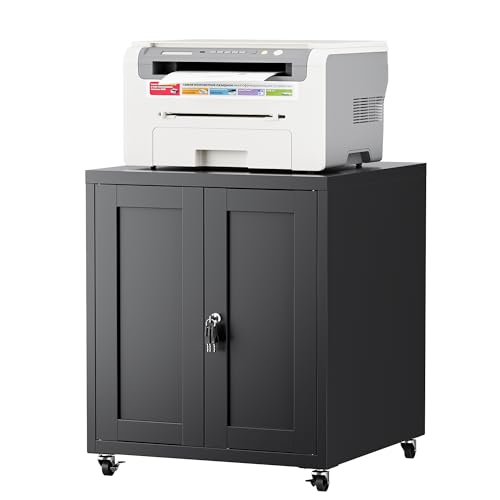
Step up from a mobile cart and you land in cabinet territory, where the machine, paper, and supplies all hide behind a door. This LVSTEEL stand uses the same cold-rolled steel base as the smaller sibling but adds a lockable cabinet with rubber-magnet doors, so the closet stays quiet when you grab a ream at midnight.
Adjustable shelves let you reconfigure the interior for a full-size copier, a fax machine, or stacked reams of letter and legal paper. It doubles as a side table or extra printer perch, which matters in shared offices where every surface earns its square footage.
A Few Highlights
- Cabinet lock keeps toner, paper, and confidential printouts out of sight.
- Rubber-magnet doors close softly, no slam during late-night work sessions.
- Adjustable interior shelves fit bulk paper packs alongside the printer itself.
- Powder-coated steel resists the scuff marks that come with rolling chairs.
Worth Bearing In Mind
- Heavier than the open-shelf mobile cart, harder to reposition alone.
- Larger footprint demands a real wall or corner to anchor against.
Best Suited To
Home-office owners running a full multifunction copier plus a second device who want one locked home for the whole setup.
Reach For A Different Pick When
You live in a studio and move monthly, since the LVSTEEL Small Printer Stand rolls and survives moves far better than this cabinet.
The DCP-L2550DW earns its spot for the people who copy and scan in stacks rather than singles. The 50-sheet automatic document feeder (a top-mounted tray that pulls pages through the scanner one after another) takes a contract or tax bundle and runs it through without you standing over the machine.
Print speeds reach up to 36 ppm with automatic duplex built in, so a 20-page double-sided report finishes before the kettle boils. Wireless setup covers phones and laptops, and the build replaces the older L2540DW with smoother paper handling that owners commonly say fixes the wrinkled-edge issues that plagued earlier models.
Good Reasons To Consider
- 50-sheet ADF frees you from feeding pages one at a time during bulk scans.
- Up to 36 ppm output matches the pace of a busy shared office.
- Monochrome toner runs cheaper per page than inkjet for high text volume.
- Wireless and mobile app support cover laptops, tablets, and phones.
Points To Note
- No color output means marketing materials and charts go to a different machine.
- Larger body than the HL-L2395DW, so plan desk space before checkout.
Feature Snapshot
Made For
Small business owners, accountants, and admins who copy and scan stacks of paperwork every week and need the machine to keep up.
A Better Fit Elsewhere
Casual users who print a few pages a week will find the Brother HL-L2480DW a smaller and quieter fit for a corner desk.
The HL-L2480DW aims for the hybrid-work crowd who want printing, copying, and scanning in one slim box. It stacks all three functions into a compact footprint, which matters when your “office” doubles as the dining table between Zoom calls.
Automatic duplex keeps paper bills down, and the mobile app walks you through setup without a driver disc in sight. The included Refresh Subscription trial gives a window to test toner delivery before committing to the program, a small perk for anyone tired of emergency runs to the office supply store.
Notable Upsides
- 3-in-1 design (print, copy, scan) keeps the desk clear of separate devices.
- Wireless and mobile setup cut the cable clutter that older printers leave behind.
- Compact footprint fits credenzas and rolling carts without dominating them.
Things To Consider
- Monochrome laser only, so charts and photos need a second machine.
- Lower page yields than the larger DCP-L2550DW for heavy daily use.
Perfect Match For
Hybrid workers splitting time between home and a co-working space who need one machine that handles all three core jobs without a dedicated office room.
Not Your Match When
You run a small business with daily stacks of paperwork, where the Brother DCP-L2550DW and its 50-sheet document feeder handle the load more comfortably.
What To Weigh Before Choosing An Office Copier
Print volume decides the machine, and space decides everything else. A solo freelancer printing fifty pages a week needs a different setup than a two-person shop running invoicing and shipping labels all day.
Match The Machine To Your Monthly Page Count
Under 200 pages a month, a compact monochrome like the HL-L2395DW or HL-L2480DW covers everything without burning through expensive toner. Between 200 and 1,000 pages, the DCP-L2550DW earns its keep with faster output and an automatic document feeder (ADF) that handles multi-page scans without supervision. Above 1,000 pages, you are shopping for office-tier gear rather than the home picks in this roundup.
Think About The Physical Setup Before You Buy
A printer on the floor collects it fast, and a printer on a wobbly side table vibrates itself into an early grave. Measure the depth of your desk, the height clearance for the output tray, and the room for the paper tray to extend during refills. If the machine lives in a shared room, the LVSTEEL cabinet stand keeps noise and clutter contained.
Connectivity Matters More Than It Used To
Wireless printing, mobile apps, and cloud scan-to-email workflows now ship standard on most home-office lasers. Confirm the printer supports your phone’s operating system and your router’s band (a wireless frequency your router uses, typically 2.4 GHz for range or 5 GHz for speed) before checkout, since older drivers can choke on newer mesh networks. NFC pairing on the HL-L2395DW stays handy for guests without your Wi-Fi password.
Toner Cost And Replacement Cycles
A low machine price gets eaten alive by toner replacement cycles. Monochrome laser printers cost more upfront than inkjet but print far cheaper per page, so the math flips once you cross a few hundred pages a month. Look at the cartridge yield (the page count one cartridge prints before running out) and the high-yield option before you commit, since the difference in running cost can be significant over a year of regular use.
Key Considerations Across These Picks
Common Shopping Slip Ups
Buying a printer by sticker rather than by running cost catches most first-time shoppers. A cheaper machine with a small starter cartridge that runs out in 200 pages ends up costing more than the midrange option with high-yield toner. Measure your typical monthly volume first, then compare the cartridge yield on the listing.
When Paying More Pays Off
Higher-tier models in this category buy you an automatic document feeder, automatic duplexing, and faster print engines. For anyone copying and scanning stacks weekly, those features save real time and paper. Casual users who mostly print single-sided text pages skip the upgrade without losing much.