A good office laser printer keeps receipts printing, contracts landing in clients’ hands, and labels shipping without drama. A bad one wastes mornings wrestling with paper jams and Wi-Fi drops. Small business owners running invoices, multi-page reports, and occasional color handouts need a printer that pulls its weight every shift. The picks below separate the genuinely useful workhorses from the budget pretenders, with honest notes on where each one flexes and where it holds back.
A Snapshot Of The Selections

Brother HLL2395DW Monochrome Laser Printer

Brother HL-L2390DW Monochrome Laser Printer
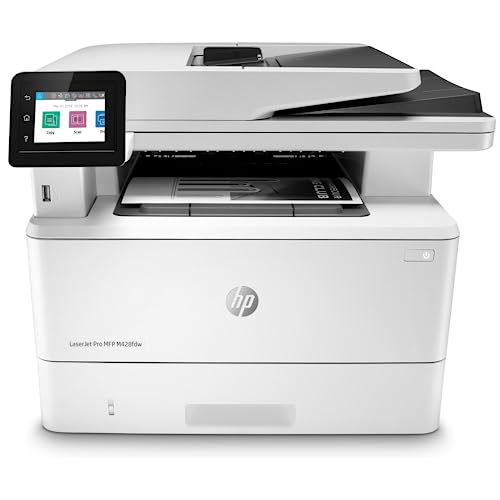
HP LaserJet Pro MFP M428fdw Monochrome Printer

Brother HL-L6200DWT Monochrome Laser Printer
Brother MFCL2710DW All-in-One Laser Printer

Epson EcoTank ET-2980 All-in-One Supertank Printer

Brother DCPL2550DW Multifunction Laser Printer

Brother MFCL2750DW All-in-One Laser Printer
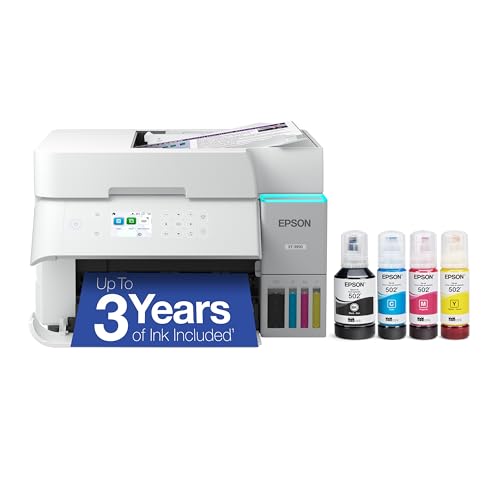
Epson EcoTank ET-3950 All-in-One Supertank Printer
Why These Options Stand Out
The Brother HLL2395DW is the kind of printer that disappears into the workflow once it’s set up, which is exactly what a small office needs from a daily driver. It prints, copies, and scans from a flatbed glass, with wireless and NFC (near-field communication, which lets you tap a phone to connect) support for the team members who prefer working from their phone. The 2.7-inch color touchscreen is small but sharp, and it serves as a control panel for cloud workflows that real offices actually use.
Compared to the HL-L2390DW reviewed next, this model adds the touchscreen and NFC, which matter more than they sound for shops that route scans to cloud storage. For a two-to-five-person office printing invoices, contracts, and shipping labels daily, the 250-sheet tray cuts down on refill trips noticeably.
The Practical Payoff
- Automatic duplex (two-sided) printing trims paper use on multi-page reports without extra steps.
- Flatbed scan glass handles passports, receipts, and odd-size documents the sheet feeder can’t.
- Wireless plus NFC means newer staff don’t need driver installs to start printing.
- The touchscreen shortcuts can save recurring scan-to-email workflows to a single tap.
Things To Consider
- Monochrome only, so any color handouts mean a second machine or a trip to the copy shop.
- No automatic document feeder (ADF) for unattended multi-page scanning, which slows bigger copy jobs.
Who It Suits Best
A two-to-five-person office that prints mostly text, scans the occasional contract, and wants wireless without an IT person on standby.
Skip It When
The Brother HL-L2390DW is a smarter match for a solo operator who doesn’t need the touchscreen or NFC.
The HL-L2390DW strips the touchscreen and NFC out of its sibling above but keeps the same flatbed scanner and wireless core, which makes it a strong lean-budget pick. It’s a true multitasker that prints, copies, and scans without piling on features you wouldn’t use anyway. For a freelancer, consultant, or one-person shop, the savings make sense.
The flatbed glass stays, so odd-size scans and book pages still work without the document feeder. Where it falls behind the HLL2395DW is on the control panel, which is a small LCD rather than the color touchscreen. Setups that route scans to cloud destinations become a few extra button presses.
What Makes Sense
- Same core engine and flatbed scanner as the pricier HLL2395DW at a friendlier price tier.
- Wireless networking keeps a single desk setup tidy without ethernet runs.
- Automatic duplex helps control paper costs on longer jobs.
- Compact enough for a credenza or shared desk corner.
Trade Offs
- No touchscreen means slightly more menu-diving for scan-to destinations.
- No ADF, so unattended multi-page scanning requires manual page changes.
Made For
A freelancer or solo operator who needs reliable text printing, occasional copying, and the rare flatbed scan without overspending.
Consider Something Else When
The Brother HLL2395DW makes more sense for a small office that needs the touchscreen and cloud shortcuts.
The HP LaserJet Pro M428fdw is built for the office that’s outgrown entry-level machines and now cares about security, workflow automation, and uptime. It prints, scans, copies, and faxes, with built-in ethernet for the offices that keep their printer off Wi-Fi on purpose. The customizable control panel lets you map recurring tasks to a single button press.
HP’s WOLF PRO SECURITY is built into the firmware and operating layer, which matters for any business handling client data. Compared to the Brother HLL2395DW, this machine is heavier, more capable, and aimed at slightly larger teams. Depending on your print volume, it can replace a stack of single-purpose machines with one workhorse.
A Strong Showing
- All-in-one design combines print, scan, copy, and fax in one footprint.
- Two-sided printing and scanning handle longer jobs without manual flips.
- Ethernet plus wireless covers both wired security setups and mobile convenience.
- Customizable control panel shortcuts shave time off repetitive workflows.
- Built-in firmware-level security protects sensitive client documents.
Points To Note
- Larger footprint demands a dedicated printer station, not a shared desk corner.
- Toner costs run higher than entry-level models, so total ownership matters here.
Best Suited To
A growing team of five to fifteen people that needs automated workflows, secure handling, and reliable fax capability in a single machine.
Look Elsewhere When
The Brother HL-L6200DWT suits print-heavy operations that need raw speed and dual paper trays.
The Brother HL-L6200DWT is a workhorse aimed squarely at businesses that print more in a week than most home offices print in a year. The dual paper trays handle letterhead and plain paper in separate stacks, so the team isn’t swapping trays mid-job. Wireless networking and mobile printing round out a printer that wants to sit at the center of a busy office.
Compared to the compact Brother HLL2395DW, this unit trades desk-friendliness for output volume. For print-heavy environments like legal, accounting, or logistics, the higher-capacity toner and dual trays pay off fast. For a small team, it may feel oversized, and that’s worth weighing before you commit.
The Value In It
- Dual paper trays keep letterhead, plain paper, and forms ready without swapping.
- High-yield toner support lowers per-page cost over the printer’s life.
- Wireless and mobile printing keep the office flexible about where staff work.
- Automatic duplex trims paper waste on multi-page reports.
Honest Caveats
- Print-only design means no scan or copy, so pair it with another device.
- Large footprint needs a dedicated printer stand or table.
Right Fit For
Print-heavy operations such as law offices, accounting firms, and warehouses that run thousands of pages monthly.
Reach For A Different Pick When
The HP LaserJet Pro M428fdw is the better choice for teams that also need scanning, copying, and fax in one box.
The Brother MFCL2710DW packs print, scan, and copy functions into a frame that fits where many all-in-ones can’t. It’s a comfortable middle step for a small office that needs more than a basic laser but doesn’t have room for a floor-standing machine. Wireless networking handles the modern multi-device office without ethernet runs.
Set against the Brother HLL2395DW, this model offers a slightly more compact chassis while still covering the essentials. The trade-off is a smaller control surface and slightly slower duty cycle, which are real but rarely noticeable at small volumes. Depending on your office layout, that compactness can be the deciding factor.
What Works In Its Favor
- Compact footprint fits on small desks or credenzas without crowding.
- All-in-one design covers printing, scanning, and copying in a single device.
- Wireless networking supports modern office setups without cabling.
- Automatic duplex helps control paper consumption on longer jobs.
Room For Improvement
- Smaller duty cycle than larger workhorses, so heavy print weeks can stretch it.
- No touchscreen means more button presses for advanced scan workflows.
Who Should Grab It
A one-to-three-person office that needs scan and print together, and would rather give up the touchscreen for a smaller footprint.
A Better Fit Elsewhere
The Brother DCPL2550DW is a smarter pick for an office that wants more substantial paper handling capacity.
The Epson EcoTank ET-2980 takes a different angle from the laser crowd: refillable ink tanks instead of cartridges, with color output included. For a home office that prints a mix of documents, color handouts, and the occasional photo, the running cost math is genuinely compelling. Wireless connectivity keeps the desk setup tidy.
Unlike the monochrome lasers above, this is an inkjet (a printer that sprays liquid ink) with refillable tanks, so color is in play. The trade-off is print speed, which trails the laser machines on long runs. Depending on how much you print weekly, the slower pace may or may not register as a real-world concern.
Well-Handled Touches
- Refillable ink tanks cut long-term running costs dramatically versus cartridges.
- Color printing handles marketing materials and charts without a second device.
- Wireless setup keeps cable clutter off the desk.
- All-in-one design combines print, scan, and copy in one machine.
Small Caveats
- Slower print speeds compared to laser machines on large jobs.
- Ink tank printers need periodic use to keep the printhead (the component that sprays ink) healthy, which can be an issue in very low-volume offices.
Perfect Match For
A home-based or hybrid office that prints light color volume and wants lower ongoing ink costs.
Swap It Out When
The Brother DCPL2550DW makes more sense for offices that primarily print black-and-white documents at higher speeds.
The Brother DCPL2550DW is the kind of machine that has earned its reputation through years of consistent service in small offices. It prints, copies, and scans, with a 50-sheet automatic document feeder for unattended multi-page jobs. Wireless networking handles the modern office layout without cabling complications.
Set against the MFCL2710DW, this model adds an ADF for hands-off scanning and copying. Compared to the HP M428fdw, it’s lighter on advanced security and workflow features but considerably easier on the wallet. For a small business that needs reliable basics, that balance is exactly the point.
The Helpful Details
- 50-sheet ADF handles multi-page copying and scanning without babysitting.
- All-in-one design covers printing, copying, and scanning in one footprint.
- Wireless networking simplifies placement in shared office spaces.
- Automatic duplex supports two-sided printing without manual flips.
Points To Keep In Mind
- No fax capability, which some businesses still rely on for legacy clients.
- No touchscreen, so scan-to-cloud workflows take more button presses.
Whose Shelf It Belongs On
A standard small office that needs a reliable all-in-one for everyday print, copy, and scan tasks without premium features.
Another Choice May Suit
The Brother MFCL2750DW is the upgrade path for teams that need fax plus a touchscreen control panel.
The Brother MFCL2750DW is the fuller-featured sibling of the DCPL2550DW, adding fax and a touchscreen interface for offices that want more from one machine. Single-pass duplex scanning and copying cuts time on multi-page jobs in half compared to manual flip models. Wireless networking plus the touchscreen makes daily operation approachable for non-technical staff.
Where the DCPL2550DW stops at print, copy, and scan, this model layers in fax and faster duplex scanning. Compared to the HP M428fdw, it lacks enterprise-grade security features but covers the broader small-office feature set. Depending on your team size, that gap matters more or less.
The Good Stuff
- Single-pass duplex scanning speeds up multi-page copy and scan jobs.
- Touchscreen interface streamlines scan-to-cloud and other workflow shortcuts.
- Fax capability remains useful for offices dealing with legacy vendors or clients.
- Wireless networking supports flexible placement in shared workspaces.
- All-in-one design consolidates print, scan, copy, and fax in one device.
Less Ideal Details
- Larger footprint than the DCPL2550DW, so plan desk space accordingly.
- Toner refresh costs run higher than entry-tier options, so total ownership matters.
Built With In Mind
A small office that needs fax, faster duplex scanning, and a touchscreen for staff who prefer visual workflow shortcuts.
Not Your Match When
The HP LaserJet Pro M428fdw suits IT-conscious operations that need enterprise-grade security and automated workflows.
The Epson EcoTank ET-3950 is the larger sibling of the ET-2980, designed for households and small offices that print a healthy mix of color documents and photos. Refillable ink tanks keep the long-term cost picture favorable, and wireless connectivity simplifies the home-office setup. For hybrid users splitting work and family printing through one machine, it covers both reasonably well.
Unlike the monochrome laser machines on this list, this one trades raw speed for color output and low ink costs. Compared to the ET-2980, the larger paper capacity and stronger duty cycle suit higher-volume weekly use. For most home offices running a few hundred pages a month, that step up is a useful one.
Features That Help
- Refillable ink tanks slash long-term cost versus cartridge-based inkjets.
- Color output handles marketing collateral, school projects, and photos.
- Larger paper capacity than the ET-2980, reducing refill trips.
- All-in-one design handles print, scan, and copy in one machine.
Trade-Offs To Consider
- Slower than the laser options on this list, so big print jobs take longer.
- Ink tank printers benefit from regular use, which can be awkward in very low-volume setups.
Who Will Love This
A hybrid home and small office setup that prints color regularly and wants lower ongoing ink costs over cartridge machines.
Where Another Pick Suits Better
The Brother HLL2395DW is the right call for offices that print mostly monochrome and want faster laser output.
What Matters Most Before Choosing Office Laser Printers For Small Business
Monthly print volume drives most decisions. Below roughly 500 pages a month, a compact desktop laser keeps costs low. Between 500 and 3,000, an all-in-one with scan and copy earns its place by replacing separate machines. Above 3,000, a workhorse with high-yield toner and dual trays saves money fast on per-page cost.
Monochrome versus color is the next fork. Most offices print 90% black-and-white documents, so a monochrome laser covers the workload at lower toner cost. Color belongs in the setup only if marketing materials, client presentations, or charts in color are a regular ask. Ink tank color printers fill that gap economically when volumes stay modest.
Connectivity shapes daily use more than people expect. Wi-Fi covers most modern offices without ethernet cabling. Ethernet matters for offices that keep the printer off Wi-Fi on purpose for security or stability. NFC and tap-to-print shortcuts add convenience for mobile-first teams but rarely justify a price jump on their own.
Duty cycle and paper handling protect uptime. A printer rated for higher monthly duty cycles lasts longer under heavy use. Automatic duplex saves paper on multi-page reports. An ADF speeds up multi-page scan and copy jobs. None of these matter for a one-person office, but they become daily time-savers for any team of three or more.
Key Considerations Across These Picks
Where Shoppers Go Wrong
Chasing the cheapest sticker often backfires when toner replacement costs more than the printer did over its life. For offices printing a few hundred pages monthly, a compact laser like the Brother HLL2395DW makes more long-term sense than a budget inkjet with pricier consumables. The honest math is per-page cost over a year, not just the upfront number.
Ignoring connectivity is another quiet trap. A printer without wireless forces every new hire through driver installation, which costs the office an afternoon over a year. Most modern offices should treat wireless and mobile printing as table stakes rather than premium features.
When Paying More Pays Off
Higher-tier models like the HP LaserJet Pro M428fdw and Brother MFCL2750DW earn their higher price through faster duplex scanning, larger touchscreens, and longer duty cycles. For a team of five or more printing daily, those features save hours monthly and reduce paper jams under load. The upgrade is worth it once your office stops being able to wait for the printer to catch up.