A reliable desktop turns a cramped corner into a real workspace. The right pick handles video calls, spreadsheets, and a few browser tabs without grinding to a halt, and fits the way you actually work, whether that’s a tucked-away nook or a multi-monitor command center. This list covers full-size towers, compact mini PCs, and a rolling stand that solves a problem most buyers forget about: where to put the box.
The Picks In Brief

HP OmniDesk Desktop AMD Ryzen 5 16GB DDR5 1.5TB Storage

Skytech Gaming PC Azure 3 Ultra 7 RTX 5060 32GB
Intel NUC 14 Essential Mini PC N97 8GB 256GB

Intel NUC 13 Pro NUC13ANHi5 Barebone Kit i5-1340P

EUREKA ERGONOMIC Height Adjustable PC Stand with Wheels
Acer Aspire TC-895-UA91 Desktop i3 8GB 512GB SSD

HP OmniDesk Desktop AMD Ryzen 5 64GB DDR5 3TB Storage

HP OmniDesk Desktop AMD Ryzen 5 32GB DDR5 3TB Storage

Lenovo ThinkCentre Tiny M70q Gen 6 16GB DDR5 512GB

Intel NUC 13 Pro NUC13ANHi5 Mini PC i5 16GB 512GB
The Strengths Of Each Pick
Home offices running Teams, Outlook, a couple of spreadsheets, and a browser with too many tabs are exactly what this HP OmniDesk was built for. The AMD Ryzen 5 8500G pairs six cores with integrated Radeon 740M graphics, which is enough headroom for four screens without leaning on a dedicated GPU.
Sixteen gigabytes of DDR5 RAM keeps multitasking smooth, while the dual-drive setup (a 512GB SSD for the OS and a 1TB HDD for archives) gives you speed where it counts and bulk storage where you need it. Quad-monitor support and Wi-Fi 6 round out a configuration that feels right at home on a busy desk.
Real Benefits
- Quad-monitor support means a real trading-style or spreadsheet-heavy layout is possible without buying a graphics card.
- DDR5 memory at 16GB handles dozens of browser tabs alongside Office apps without the slow-down you get from older DDR4 systems.
- Split storage keeps Windows fast on the SSD while giving you a generous HDD bay for project files and backups.
- Wireless keyboard and mouse in the box means no extra shopping just to get started.
Things To Consider
- Integrated Radeon graphics handle everyday work fine but struggle with serious video editing or 3D rendering.
- The mid-tower footprint needs a real spot under or beside your desk, unlike the mini PCs further down this list.
Made For
Remote workers running multiple monitors who want a balanced tower without paying for a discrete GPU.
Consider Something Else When
Designers and video editors should look at the Skytech Gaming PC Azure 3, which brings dedicated RTX graphics to heavier creative workloads.
The Skytech Azure 3 is overkill for someone who only opens email, and that’s the point. Home offices doing video editing, CAD, or large dataset analysis get an Intel Core Ultra 7 alongside an NVIDIA RTX 5060 GPU and 32GB of DDR5, which is a serious step up from the integrated graphics on most picks here.
The 360mm AIO liquid cooler (a closed-loop water cooler that handles heat better than typical air fans) keeps thermals in check during long compiles or renders, and the 1TB NVMe SSD means project files load fast. Compared to the HP OmniDesk above, this trades a quieter office footprint for genuine creative horsepower.
Where It Delivers
- RTX 5060 graphics cut render times dramatically compared to integrated Radeon options.
- 32GB of DDR5 RAM lets you keep dozens of browser tabs, a Premiere timeline, and Slack running without swapping.
- AIO liquid cooling handles sustained workloads quietly enough for a shared office space.
Trade Offs
- The full tower demands real desk space, and the gaming-oriented styling may clash with a minimalist setup.
- Far more power than a typical office worker needs, so it only makes sense if your apps actually use the GPU.
- Liquid cooling loops are durable but require more care down the road than a simple air cooler.
Who It Suits Best
Freelance creators, hybrid engineers, and anyone whose workday involves GPU-accelerated software.
A Better Fit Elsewhere
Plug-and-play remote workers who just need Teams and a browser should pick the Acer Aspire TC-895-UA91 instead, saving cash and space.
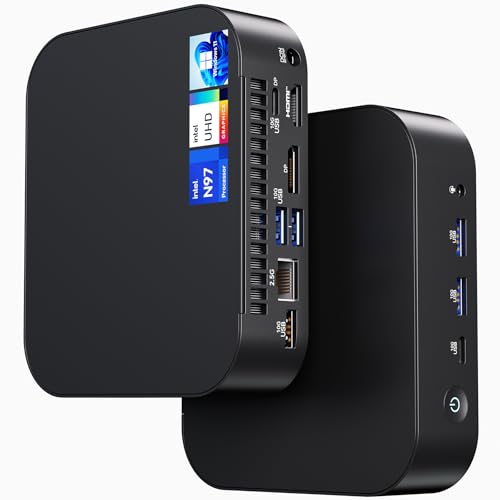
When the desk is a converted kitchen table, the last thing you want is a tower taking up floor space. The Intel NUC 14 Essential shrinks an entire PC into a box small enough to mount behind a monitor (via standard VESA brackets, the square hole pattern on the back of most displays), and the Intel N97 processor with 8GB of RAM runs Windows 11 Pro without complaint for everyday office tasks.
Wi-Fi 6E and Bluetooth 5.3 mean modern wireless speeds, and the included Pro version of Windows is genuinely useful for businesses that need BitLocker encryption and remote management. Compared to the larger HP OmniDesk earlier, this trades expandability for a footprint that disappears.
What Helps Most
- Tiny form factor fits behind a monitor or on a small shelf, reclaiming your entire desk surface.
- Windows 11 Pro brings business-grade security tools that home versions skip.
- Completely silent cooling under normal office loads, depending on your workload.
Points To Note
- 256GB of storage fills up fast with project files; expect to add external or cloud storage.
- 8GB of RAM is the floor for modern multitasking; heavy Excel models will feel tight.
- No dedicated graphics, so creative apps are off the table.
Best Suited To
Small-office teams that need a quiet, space-saving terminal for email, browsers, and POS or signage duty.
Not Your Match When
Anyone juggling large creative files should look at the Skytech Gaming PC Azure 3 instead.
The NUC 13 Pro barebone kit is a shell with a 13th-gen Core i5-1340P inside, but no RAM, no storage, and no operating system. That sounds like a downside, yet for IT departments and hobbyists building specific configurations, it’s the whole appeal. You choose the memory speed, the SSD size, and the OS yourself.
Twelve cores of hybrid performance architecture (Intel’s split between high-power and efficiency cores) handle office work easily, and 8K/4K UHD output means serious monitor setups. Against the NUC 14 above, this is faster but demands more setup time.
Features That Help
- Customizable memory and storage let you match the build exactly to your workload.
- 13th-gen i5 hybrid cores deliver strong single-thread and multi-thread performance for the size.
- Gigabit Ethernet and Wi-Fi 6 cover wired and wireless network needs in one box.
A Few Limitations
- No RAM, SSD, or OS included, so the real cost climbs once you add the essentials.
- Setup time and a basic comfort with PC hardware are required.
Who Should Grab It
IT buyers outfitting an office or hobbyists who want full control over every component.
Skip It When
Most home-office shoppers will be happier with the pre-built NUC 13 Pro NUC13ANHi5 later in this list.
Nobody talks about where the tower actually lives, yet it matters: a PC on carpet sucks in dust, and a tower on the floor gets kicked. The EUREKA ERGONOMIC stand solves both problems with a steel frame on wheels and six height settings between roughly 23 and 33 inches.
It fits full-size ATX cases and printers, and the rolling casters let you pull the tower out for cleaning or cable swaps. Compared to the PCs in this roundup, this isn’t a computer at all; it’s the accessory that makes owning one easier.
The Helpful Details
- Six height positions mean you can tuck the tower low or raise it to desk level for quick port access.
- Locking wheels keep the stand put once positioned.
- Steel frame supports heavier full-size ATX cases without flex.
Worth Noting
- Owners commonly report that assembly takes patience and a second pair of hands.
- This is a stand only; you still need a separate PC to put on it.
The Right Fit
Anyone with a full-size tower who wants better airflow and easier access than a floor corner.
Another Choice May Suit
Owners of mini PCs like the Intel NUC 14 Essential don’t need this; the small form factor fits anywhere.
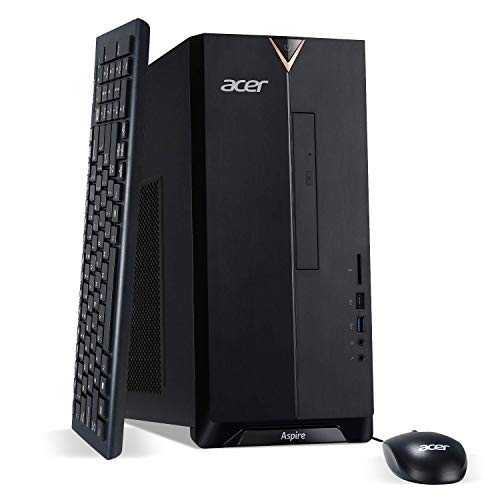
The Acer Aspire TC-895-UA91 is a 10th-generation i3 desktop that doesn’t try to be anything fancier than a dependable office box. Four cores, 8GB of DDR4, and a 512GB NVMe SSD handle email, web apps, and a video call without drama, which is exactly what most home offices need.
There’s even a built-in DVD writer, increasingly rare in 2026, and a front USB-C port for newer accessories. Compared to the HP OmniDesk at the top of this list, you sacrifice modern DDR5 memory and quad-monitor support, but you save serious cash for a starter setup.
Key Advantages
- 8GB DDR4 and a 512GB NVMe SSD deliver snappy everyday performance for office apps.
- Front USB-C and Wi-Fi 6 cover modern connectivity without dongles.
- Compact mid-tower design fits under most desks without dominating the floor.
Honest Caveats
- 10th-gen i3 is aging, and heavy multitasking will feel tight sooner than newer picks.
- Integrated UHD 630 graphics limit creative work.
- Only modest upgradability down the road.
Who Will Love This
Students, first-time remote workers, and anyone setting up a second household PC on a tight budget.
Reach For A Different Pick When
Power users should choose the HP OmniDesk with 64GB DDR5 later in this list.
This is the HP OmniDesk turned up to eleven: the same Ryzen 5 8500G and Radeon 740M as the entry version, but with 64GB of DDR5 RAM and a 3TB split between a 2TB SSD and a 1TB HDD. For home offices running virtual machines, large Photoshop files, or dozens of browser tabs across four monitors, that memory ceiling removes a real bottleneck.
The 2TB SSD alone stores an entire project library at SSD speeds, while the HDD handles cold archives. Against the standard OmniDesk earlier, this costs more for headroom you may never need, yet for the right user, it’s the right tool.
Positive Points
- 64GB DDR5 supports heavy multitasking, including running multiple virtual machines at once.
- 2TB SSD provides generous fast storage for active projects.
- Quad-monitor support with the same Ryzen platform as the base model.
Small Caveats
- Costs more than most home offices require, so it’s only smart for confirmed power users.
- Still uses integrated graphics; a discrete GPU would unlock serious creative work.
Perfect Match For
Engineers, analysts, and creators who push their machines hard every day.
Look Elsewhere When
Anyone whose workload fits in 16GB should save money and grab the Everyday Favorite HP OmniDesk from pick one.
The middle child of the OmniDesk family hits a practical sweet spot: 32GB of DDR5 is enough for almost any office workflow, and the 3TB storage split matches what the 64GB version offers. Home offices expecting to grow into heavier workloads get real breathing room without paying for memory they won’t use.
The Ryzen 5 8500G, Radeon 740M graphics, and quad-monitor support carry over from the rest of the OmniDesk line, so you’re not trading capability for capacity. Think of this as the Everyday Favorite with a longer runway.
Practical Pluses
- 32GB DDR5 strikes a real-world balance for most power users.
- 3TB split storage matches the top-tier OmniDesk, so capacity isn’t a downgrade.
- Wireless peripherals in the box keep setup simple.
Things To Weigh
- Still integrated graphics, so GPU-heavy apps remain out of reach.
- Some shoppers may find 32GB more than they need and could step down.
Built With In Mind
Growing home offices that want headroom without going to the top of the stack.
Where A Sibling Pick Shines
Light-use households will save with the 16GB Everyday Favorite HP OmniDesk from pick one.
Lenovo’s ThinkCentre Tiny line is the gold standard for compact business desktops, and the M70q Gen 6 continues that reputation. An Intel Core Ultra processor, 16GB of DDR5, and a 512GB NVMe drive cover professional office work in a chassis small enough to mount behind any monitor.
Windows 11 Pro, DisplayPort plus HDMI, and wired peripherals in the box make this a true turnkey setup for remote pros. Against the Intel NUC 14 earlier, the M70q leans further into business features and manageability.
Everyday Wins
- Tiny form factor disappears behind a monitor, freeing the desk completely.
- Windows 11 Pro with full business security and management features.
- Wired keyboard and mouse included for offices that prefer reliability over wireless.
Where It May Fall Short
- 512GB storage fills up quickly on long-term file hoarders.
- Less gaming and creative headroom than full-size picks.
Whose Shelf It Belongs On
Remote professionals and small businesses that want compact, secure, ready-to-go hardware.
Swap It Out When
Hobbyists who want to choose their own memory and storage will prefer the NUC 13 Pro barebone kit.
The NUC 13 Pro in its fully configured form is everything the barebone kit above is not: ready to plug in and use. You get a 13th-gen Core i5-1340P, 16GB of RAM, a 512GB SSD, and Windows 11 Pro already installed. That’s a complete office PC in a footprint smaller than a hardcover book.
It pairs neatly with any monitor, keyboard, and mouse you already own, which makes it a strong pick for refreshing an aging home-office setup without replacing peripherals. Compared to the Lenovo M70q above, you trade a bit of business polish for slightly faster CPU performance in similar dimensions.
Advantages To Know
- Pre-installed RAM, SSD, and OS mean true out-of-the-box use.
- 12-core i5 handles heavier office multitasking than the N97 in the smaller NUC 14.
- Compact size frees desk space and reduces cable clutter.
Some Limits To Know
- 512GB storage is comfortable but not generous.
- Integrated graphics limit creative workloads.
Right Fit For
Small offices and home workers who want a fast, compact, fully configured mini PC.
Where Another Pick Suits Better
Anyone needing more RAM headroom should choose the 32GB OmniDesk from pick eight.
Choosing The Right Pc For Your Work Style
Form Factor Comes First
Before specs, decide how the PC will live on your desk. A full-size tower like the HP OmniDesk line gives you room to grow, more ports, and easier upgrades, but it eats floor space. A mini PC like the NUC 14 or ThinkCentre M70q disappears behind your monitor and stays quiet, though storage and GPU power are more limited. Measure the spot you actually have, not the spot you wish you had.
Match The Specs To The Workload
RAM (random access memory, the short-term workspace your apps use) is the single most useful spec to check. 8GB handles email and a browser, 16GB covers most remote-work realities, and 32GB or more future-proofs you for heavier apps. SSD storage (a solid-state drive, far faster than older spinning hard drives) matters more than total capacity; a 256GB SSD will feel snappier than a 1TB HDD. A modern CPU like AMD’s Ryzen 5 8500G or Intel’s Core i5-1340P is plenty for office work; you only need a dedicated GPU if you edit video or run 3D software.
Connectivity And Extras
Wi-Fi 6 or 6E gives you headroom on busy home networks. Front-facing USB-C ports are increasingly useful for newer laptops and tablets. Windows 11 Pro adds BitLocker encryption and remote management if you handle sensitive work, while the included keyboard and mouse on most OmniDesk models save a separate trip to the store.
When To Spend More
Stepping up usually buys more RAM, more storage, or a discrete GPU. If your workday never pushes beyond Office and a browser, the extra spend is hard to justify. If you juggle large files, virtual machines, or creative software, the headroom pays for itself in saved time and fewer bottlenecks.
Key Considerations Across These Picks
Pitfalls Shoppers Hit
A common mistake is buying more RAM than the CPU can use, or paying for a discrete GPU when integrated graphics already cover the workload. Another trap is underestimating storage: 256GB fills up fast with downloads and project files. Measure your real needs before chasing the biggest number on the spec sheet.
Why Top Tier Costs More
Higher configurations like the 64GB OmniDesk add memory and storage that most users never touch. The premium pays for headroom and quieter long-term performance under heavy loads, and only makes sense if your apps actually demand it. For everyday office work, the mid-tier or budget picks give you nearly all the experience at a fraction of the cost.
Frequently Asked Questions
How Much Ram Do I Really Need For A Home Office Pc?
For most remote workers, 16GB of RAM handles daily multitasking comfortably. Run heavy Excel models, video calls, and dozens of browser tabs all day, and 32GB removes the slowdown. Anything beyond 32GB only matters for specialized workflows like video editing or running virtual machines.
Is A Mini Pc Powerful Enough For Home Office Work?
Modern mini PCs with Intel Core i5 or Ryzen 5 processors handle email, browsers, Office apps, and video calls without issue. The trade-off shows up in storage capacity and GPU power, so creative workloads still favor a full-size tower.
Do I Need A Dedicated Graphics Card?
Office work, browsing, and streaming run fine on integrated graphics. A discrete GPU matters once you edit video, work in 3D, or play games during breaks, which is where picks like the Skytech Azure 3 come in.
What Is The Difference Between SSD And HDD Storage?
An SSD (solid-state drive) uses flash memory and loads apps and files much faster. An HDD (hard disk drive) is older spinning storage that holds more data for less money but feels slow. Most modern PCs pair a smaller SSD for the operating system with a larger HDD for archives, which is exactly the split used in the OmniDesk line.
Should I Choose Windows 11 Home Or Pro?
Windows 11 Home covers personal use well, including Office apps, browsers, and casual gaming. Windows 11 Pro adds BitLocker device encryption, Remote Desktop, and group policy management, which matters for businesses handling sensitive data or managing multiple machines.
Bottom Line
The best PC is the one that matches your workload, your desk, and your tolerance for noise and clutter. Tower shoppers get balanced everyday value from the HP OmniDesk lineup, mini-PC shoppers get near-silent performance from the NUC and ThinkCentre options, and creative pros get the GPU muscle of the Skytech Azure 3. Pick the form factor that fits your space, then size the specs to your actual day.