A printer scanner earns its keep the day a receipt fades, a school form arrives at 9 p.m., or a freelance contract needs signing and emailing in the same breath. The right machine handles everyday documents without drama, and the wrong one burns through ink while you wait. This list covers nine options built for different rhythms, from quick photo prints at the kitchen table to high-volume home offices that never sleep.
The Leading Options At A Glance

Canon SELPHY CP1300 Wireless Photo Printer
Epson EcoTank ET-2720 All-in-One Supertank Printer (White)
Epson WorkForce 30 Color Inkjet Printer (C11CA19201)
Epson EcoTank ET-2720 All-in-One Supertank Printer (Black)

HP OfficeJet 200 Wireless Mobile Printer (CZ993A)

Epson EcoTank ET-2980 Wireless All-in-One Supertank Printer (Black)

Canon Pixma TS6320 Wireless All-in-One Photo Printer (Black)
Epson EcoTank ET-3950 Wireless All-in-One Supertank Printer

Epson EcoTank Pro ET-5800 Wireless All-in-One Supertank Printer (White)
Inside Each Recommended Option
The Canon SELPHY CP1300 sits in a different lane than every other machine on this list. It is a dedicated photo printer, not a general document device, and that focus shows the moment you drop in paper. Where the inkjet picks ahead of it chase spreadsheets and homework, this one chases glossy prints and craft projects.
Photo hobbyists and scrapbookers tend to appreciate the small footprint, which fits neatly on a craft table or shelf next to a die cutter. It supports several common print sizes, so you can move between wallet-sized keepsakes and full postcard prints without swapping hardware.
Why It Works Well
- Built-in editing tools cover portrait optimization, red eye correction, and skin smoothing before printing.
- Multiple print sizes from 2.1 x 2.1 inch labels through 4 x 6 inch postcards cover most photo projects.
- Wireless connectivity means a phone or laptop can send images without cable juggling.
- Borders, effects, and dimension options give crafters room to customize each print.
Worth Noting
- This is a photo specialist, so plain documents are not its strength.
- Ink and paper kits are consumables, so ongoing ownership cost adds up over time.
Who It Suits Best
Crafters, scrapbookers, and photo hobbyists who print images more often than documents.
Consider Something Else When
You mostly print text-heavy schoolwork or office forms, in which case the Epson EcoTank ET-2720 is a better daily fit.
The white Epson EcoTank ET-2720 trades the cartridge model most people grew up with for refillable ink tanks. You pour bottles into marked reservoirs, the printer tracks levels, and the dreaded empty cartridge panic mostly fades into the background.
Light home printers running a few pages a day will likely see the value fastest, since each bottle set is rated for a large page count. The scanning and copying functions sit on top, giving you a three-in-one without paying for features you will not use.
Useful Highlights
- Refillable ink tanks cut the per-page cost well below cartridge models.
- All-in-one design adds scanning and copying in the same footprint.
- Wireless setup keeps cables off the desk.
- Compact white housing fits in a kitchen nook or small office corner.
Honest Caveats
- Print speed is modest compared to higher-end EcoTank siblings.
- Photo prints look fine for casual use but not gallery-grade.
Key Advantages
Made For
Light home users printing a handful of pages and the occasional scan each week.
Skip It When
You run a shared family printer with daily school projects, where the Epson EcoTank ET-2980 handles volume more comfortably.
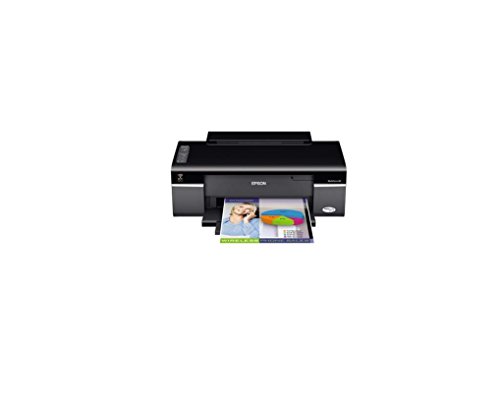
The Epson WorkForce 30 is the simplest entry on this list, a printer and nothing else. No flatbed scanner, no copy function, no fax board. That focus keeps the price approachable and the footprint small, which suits a dorm desk or a secondary workstation.
Text-heavy jobs are where this machine earns its place. Compared with the all-in-one EcoTank picks, it prints documents quickly and reaches a higher optimized resolution, so small type and charts stay legible.
Bright Spots
- High optimized resolution keeps text and charts sharp at small sizes.
- Print speed favors black-and-white documents over color photos.
- Lower upfront cost than multi-function siblings.
Trade Offs
- No scanner or copier built in.
- Ink cartridges cost more per page than tank systems like the EcoTank line.
- Older design, so modern wireless features may be limited depending on setup.
Right Fit For
Users who only need to print and already have a separate scanner or phone-based scanning app.
A Better Fit Elsewhere
Anyone needing scan and copy in one machine should reach for the Epson EcoTank ET-2720 instead.
The black Epson EcoTank ET-2720 is the same hardware as its white sibling reviewed earlier, dressed in a darker finish. The black housing blends into home office furniture, especially darker desks and bookshelves, so the printer fades into the room rather than standing out.
Students and remote workers tend to settle into this one quickly. It scans, prints, and copies on the same refillable ink system, so monthly running costs stay predictable even during mid-term crunch weeks.
Everyday Wins
- Same economical ink tank system as the white ET-2720.
- Compact black design suits most home offices.
- Wireless and mobile printing cover phone and laptop workflows.
Points To Note
- Identical print speed to the white model, so it is not faster under load.
- Photo quality remains casual rather than professional.
The Key Facts
Best Suited To
Students, remote workers, and small households that want a low-fuss daily printer.
Reach For A Different Pick When
You want photo-grade prints, since the Canon Pixma TS6320 is tuned for richer color work.
The HP OfficeJet 200 sits at the middle of this list and breaks the desktop mold entirely. Battery-powered and compact, it travels in a laptop bag and prints from a hotel room, a client site, or the back of a car.
Field workers, traveling consultants, and anyone who signs contracts on the road tend to rely on this kind of hardware. A small control panel and quiet operation help it fit into shared spaces without drawing attention.
The Upside
- Battery included for true cord-free operation in transit.
- Wireless printing from phones and laptops without a router.
- Borderless prints up to common letter sizes for clean client documents.
Factors To Consider
- No scanner or copier, so it pairs with a phone scanning app.
- Ink cartridges cost more per page than tank systems like the EcoTank line.
- Print speed drops on battery power to preserve charge.
Who Should Grab It
Travelers, field technicians, and consultants who print documents away from a desk.
Where A Sibling Pick Shines
For a home-based setup with scanning needs, the Epson EcoTank ET-2720 is the better anchored choice.
The Epson EcoTank ET-2980 picks up where the ET-2720 leaves off, with quicker output and a sturdier chassis for shared use. Print speed gains show up clearly when multiple household members queue up jobs back to back.
Busy families with school projects, permission slips, and the occasional color craft tend to feel the difference. Heat-free PrecisionCore technology keeps the unit cooler during long runs, which helps longevity in a high-traffic corner.
What Works In Its Favor
- Faster print speeds than earlier EcoTank models in this list.
- Heat-free technology supports longer print runs without warm-up delays.
- Tank system keeps per-page cost low for high-volume households.
- All-in-one scanning and copying in one device.
Possible Compromises
- Larger footprint than the compact ET-2720.
- Photo output is solid but not a substitute for a dedicated photo printer.
Feature Card
Whose Shelf It Belongs On
Families and shared home offices that need reliable daily output from one machine.
Swap It Out When
You need heavy-duty office volume, since the Epson EcoTank Pro ET-5800 handles that workload more comfortably.
The Canon Pixma TS6320 splits the difference between document duty and photo work. A small OLED screen and LED status bar sit on top, giving you printer feedback from across the room without walking over to check.
Creators who balance text documents with image-heavy projects tend to appreciate the five-ink system. Photos look richer than a standard four-color setup, while text stays sharp for school reports and invoices.
What Makes Sense
- Five individual ink tanks reduce waste since you only replace the color that runs out.
- OLED display and LED status bar keep updates visible from a distance.
- Auto-expanding output tray starts printing without manual setup.
A Few Limitations
- Higher ink cost per page than EcoTank siblings.
- Smaller paper capacity than dedicated office machines.
Perfect Match For
Photo hobbyists, students, and home creators who print both documents and images regularly.
Look Elsewhere When
Your main goal is cutting ink cost on text-heavy printing, where the Epson EcoTank ET-2720 wins on refill economics.
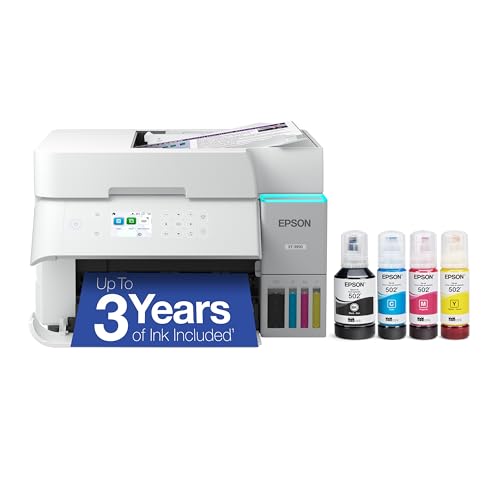
The Epson EcoTank ET-3950 steps up from the ET-2980 with more paper capacity and steadier output under load. Mid-size home offices with two or three regular users tend to find a sweet spot here, since the tanks hold enough ink to skip frequent refills.
The chassis stays reasonably compact for the volume it handles, so it works in a corner of a living room rather than demanding a dedicated office closet.
What Stands Out
- Larger paper tray capacity than smaller EcoTank models.
- Tank system keeps running costs low for steady printing habits.
- Heat-free printhead supports longer daily output sessions.
- Wireless and mobile device support for mixed-device homes.
Softer Spots
- Photo quality is good but trails a dedicated photo printer like the SELPHY CP1300.
- Larger footprint than entry-level tank printers.
Feature Snapshot
Built With In Mind
Mid-size home offices and small studios that print and scan several times a day.
Not Your Match When
You only print a few pages a week, since the lighter ET-2720 covers that workload more efficiently.
The Epson EcoTank Pro ET-5800 anchors the top of this list as a true office-class machine. It bundles print, scan, copy, and fax in one chassis, with Ethernet alongside wireless for stable networked setups.
Small businesses and prosumer home offices lean on hardware like this when daily volume outgrows a casual home unit. Compared with the smaller EcoTank models earlier in the list, this one is built to absorb hundreds of pages per week without slowing down.
Strengths Worth Knowing
- Four-function design adds fax to the standard print, scan, copy trio.
- Ethernet port supports stable wired office networks.
- PrecisionCore Heat-Free technology delivers print-shop-quality output at high volume.
- Low-cost replacement ink bottles keep per-page cost near the bottom of the range.
Some Limits To Know
- Larger footprint needs a dedicated desk or shelf space.
- Higher upfront cost than entry-level tank printers.
Feature Rundown
Who Will Love This
Small business owners, prosumer home offices, and consultants who print and scan daily in volume.
Another Choice May Suit
Casual home users should consider the Epson EcoTank ET-2720 to avoid paying for office-class capacity they will not use.
What To Weigh Before Choosing A Printer Scanner
Ink System And Long-Term Cost
Cartridges seem cheaper at the register, but the cost per page climbs fast once you start printing weekly. Tank systems like the EcoTank line pour bottles into reservoirs, and each set covers thousands of pages, which works out cheaper for households that print regularly. Cartridges still make sense for users who print a handful of pages a month and rarely touch the machine.
Print Speed And Daily Volume
Speed ratings get quoted in pages per minute, and the gap between an entry-level unit and an office-class unit is real. A small home printer handles ten pages a day without breaking a sweat, but a household with multiple students printing reports, plus a remote worker running invoices, will notice a slow machine fast. Match the speed to your busiest realistic day, not your quietest.
Scanner Quality And Daily Use
Scanners often get overlooked until the moment a fading receipt needs digitizing. Look at the optical resolution, which is the actual hardware detail the scanner captures, not the interpolated numbers. If you archive family photos or work with documents that need text recognition, higher resolution saves a lot of cleanup later. Flatbed designs handle books and passports, while sheet-fed designs excel at stacks of paper.
Size, Noise, And Connectivity
Measure the spot where the printer will live before falling in love with a model. Some all-in-ones are compact enough for a bookshelf, while office-class machines like the ET-5800 need a real desk. Wireless printing keeps cables down, and mobile apps let everyone in the house send jobs without crowding the device.
Key Considerations Across These Picks
Common Shopping Slip Ups
Chasing the lowest upfront price often backfires once ink costs land. Many shoppers also overlook the difference between optimized resolution and actual print quality, which only shows up on photo paper. Consider the full first-year cost, including replacement ink or toner, before committing. Finally, confirm the printer supports your devices, especially if your household mixes Windows laptops, Macs, and phones on different platforms.
What The Higher Tier Buys
Spending more on a model like the EcoTank Pro ET-5800 buys faster print engines, larger paper trays, and sturdier components rated for daily heavy use. Tank capacity jumps significantly, so refills happen less often even under load. The upgrade pays off when your printer handles work rather than hobbies, since downtime and slow queues cost real time. For a household that prints only a few pages a week, the extra capacity rarely justifies the price jump.
Frequently Asked Questions
Do printer scanners handle both photos and documents?
Most modern all-in-ones print both, though dedicated photo printers like the Canon SELPHY CP1300 focus on color depth. Document-first machines such as the Epson EcoTank line keep text sharp and accept photo paper when needed, while photo-first models trade speed and document versatility for richer color output.
How often will I need to refill ink?
Refillable tank printers can run for months or longer between top-ups for moderate home use. Cartridge models need replacement far more often, sometimes weekly in busy households. Your real refill frequency depends on how many pages you print and how much color coverage those pages carry.
Is wireless printing reliable for everyday use?
Current wireless standards are stable enough for most households, especially with a recent router and up-to-date device software. Wired Ethernet, available on office models like the ET-5800, remains the most reliable option for large file transfers or shared office networks.
Can a printer scanner replace a separate scanner?
For most home tasks, yes. Flatbed scanners on all-in-ones digitize documents, photos, and book pages at usable quality. Dedicated scanners still win for high-volume archival work or professional photo reproduction, but the gap has narrowed sharply in recent years.
What is the difference between inkjet and tank printers?
Inkjet printers use small cartridges that get replaced once empty. Tank printers, like the Epson EcoTank models here, use refillable reservoirs that you top up with ink bottles. Tank systems typically cost more upfront but save money per page over the life of the machine, especially for regular printing.
Closing Thoughts
The right printer scanner matches your real printing rhythm, not the busiest day you can imagine. Light home users find their footing with the compact EcoTank models, families lean toward the ET-2980 or ET-3950, and small offices settle into the Pro ET-5800. Pick the machine that fits how you actually print, and the daily experience stays smooth.